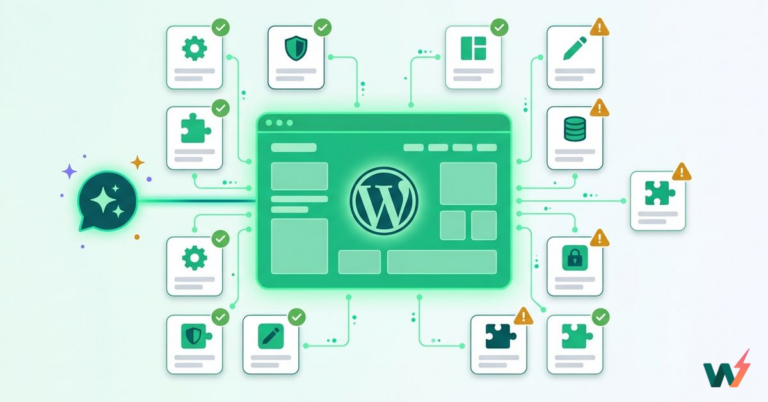
The best WordPress hosting with MCP is the host whose MCP reaches both your hosting account and the content inside your WordPress site. InstaWP checked 11 hosts on 6 October 2026, and they split cleanly. Most hosts that ship an MCP server, such as Hostinger, Cloudways, Pressable and Rocket.net, let an AI agent manage servers, sites and domains. WordPress.com lets it edit content. InstaWP does both: an account-level MCP for the hosting and a site-level MCP built into every WordPress site.
MCP, the Model Context Protocol, is how AI clients such as Claude, ChatGPT and Cursor call tools on another system (the MCP introduction explains the model). If you are new to agents, InstaWP’s guide to building a WordPress AI agent covers the basics. When a host ships an MCP server, your agent can do hosting work in a chat instead of in a dashboard. This list ranks 11 well-known managed WordPress hosting providers by what their MCP can actually do, based on each host’s own documentation, the MCP packages they publish, and live requests to their MCP endpoints.
- “MCP support” means two different things. An account-level MCP manages hosting (sites, domains, backups). A site-level MCP manages what is inside WordPress (posts, pages, plugins).
- Eight of the 11 hosts ship an official MCP server. Kinsta, SiteGround and Bluehost do not, as of 6 October 2026.
- InstaWP has both levels built in, with read-only modes, permission scopes and the riskiest tools switched off until you turn them on.
- Tool counts vary from 2 to 408. GoDaddy’s MCP checks domain availability; Hostinger’s official package ships 408 tools, 38 of them for WordPress installs, none for writing posts.
- Only some hosts label their tools. Hostinger marks 171 tools read-only; Rocket.net’s 205 tools carry no read-only labels.
WordPress hosting with MCP at a glance
The short version. Every figure was checked on 6 October 2026.
What does “WordPress hosting with MCP” actually mean?
It means the host gives your AI client an MCP server to connect to. What that server can touch decides whether it is useful for your work, and there are two levels:
- Account level. The agent manages your hosting: creates and clones sites, changes PHP versions, connects domains, takes backups, reads logs. It works outside WordPress, on the host’s API.
- Site level. The agent works inside one WordPress site: writes posts and pages, edits menus and media, installs plugins. It needs to reach WordPress itself, usually through the WordPress REST API or the Abilities API.
Most hosts in this list ship one level. That matters because the work people usually want from an agent, such as “rewrite the homepage” or “fix the alt text on every image”, is site-level work, and an account-level MCP cannot do it. The guide to WordPress MCP explains the protocol itself, and how to connect AI agents to WordPress using MCP walks through a first connection.
How did InstaWP compare 11 WordPress hosts?
InstaWP did not take the hosts’ marketing pages at face value. Between 29 September and 6 October 2026 it:
- Read each host’s own MCP documentation and announcement, and recorded the date it was published.
- Downloaded the official MCP packages where a host publishes one, and counted the tools in them. Hostinger’s package was counted tool by tool, including which tools are labelled read-only or destructive.
- Sent live MCP requests to each official endpoint without credentials, to see what a client meets first: a login requirement, an OAuth challenge or an open tool list. Rocket.net and GoDaddy return their full tool list without logging in, so those were counted directly.
- Used InstaWP’s own MCP first-hand on live sites, at both the account and the site level, the same InstaMCP server InstaWP documents publicly.
Which WordPress host has the best MCP? The comparison table
All 11 hosts, numbered as they appear below. Read the “Edits WordPress content” column first: it is the one that decides whether the agent can do the work most people want from it.
The coverage matrix below shows the same thing by area: which parts of hosting and WordPress each official MCP can reach, according to the host’s own documentation or package.
The 11 best WordPress hosts with MCP
Each entry starts with a spec sheet, then answers the same questions: what the host’s MCP does, how you connect it, whether it can change your WordPress content, how it keeps an agent in check, what it costs, where it falls short, and who it suits.
1. InstaWP: account-level and site-level MCP, built in
What does InstaWP’s MCP do?
InstaWP is the only host in this list where both levels are part of the platform. The account MCP manages your hosting: it lists and creates sites, changes PHP and WordPress versions, takes and lists backups, and reads billing, teams and diagnostics.
The site MCP, InstaMCP, works inside one WordPress site with 43 typed tools: it writes and edits posts and pages, validates blocks before saving, manages media, meta, menus and taxonomies, installs plugins and themes, and reads error logs.
The two connect. The account MCP can switch on a site’s MCP and, with its “act inside sites” capability turned on, reach into each site’s tools. So an agency with 40 client sites adds one connection to Claude, not 40. The difference is explained in Account MCP vs Site MCP, and InstaWP’s guide to managing multiple WordPress sites shows the dashboard side of the same work.
How do you connect InstaWP’s MCP?
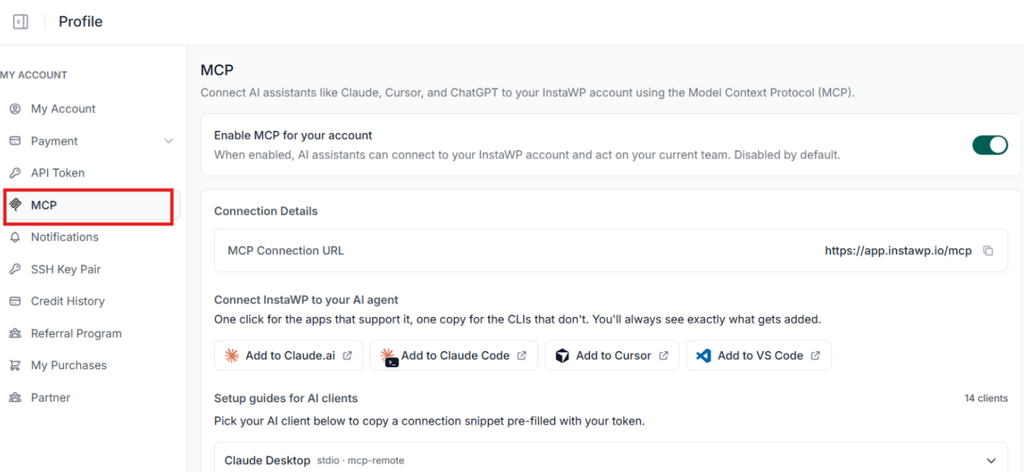
- Account MCP: open the MCP tab in your InstaWP account, switch on Enable MCP for your account, then use the one-click button for Claude.ai, Claude Code, Cursor or VS Code, or copy the connection for another client.
- Authenticate and choose read-only or read-write access. This is where the agent’s access level is decided.
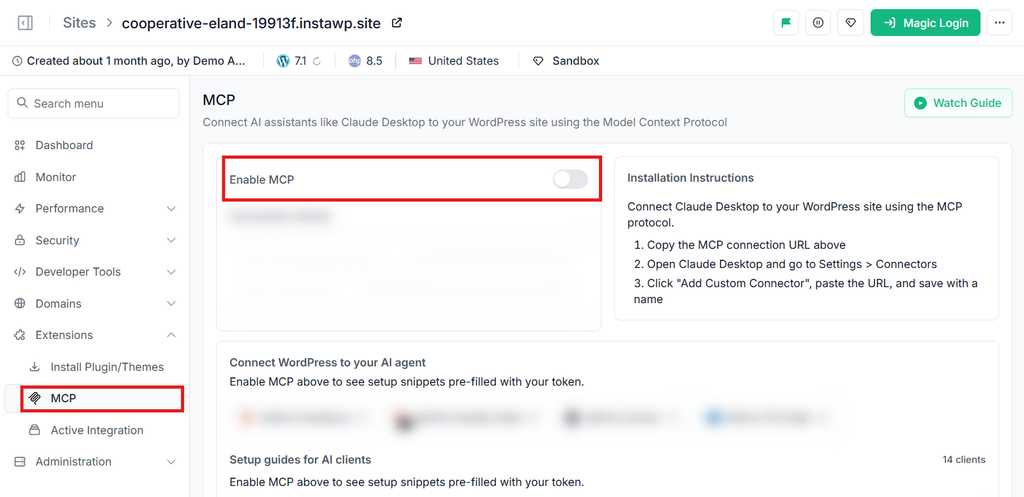
- Site MCP: open a site, choose MCP, switch on Enable MCP and paste the site’s connection URL into your AI client. The docs cover connecting AI assistants to a site.
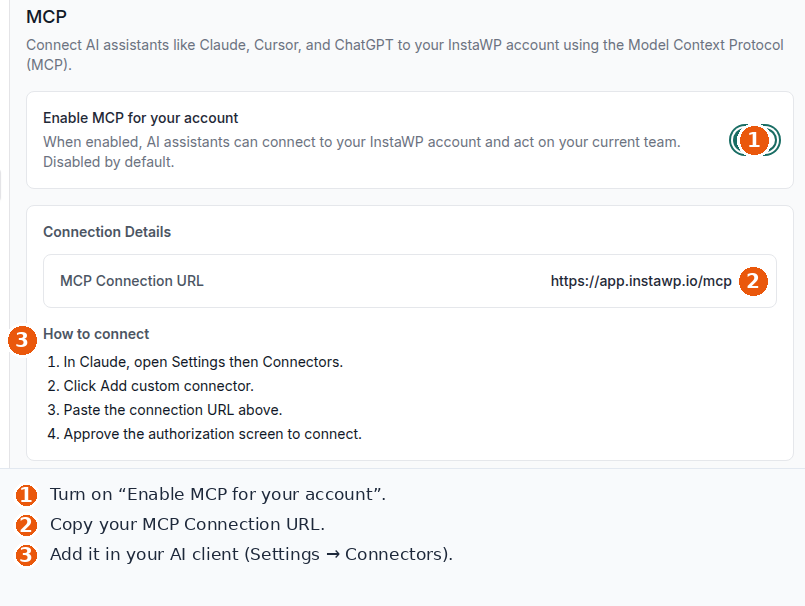
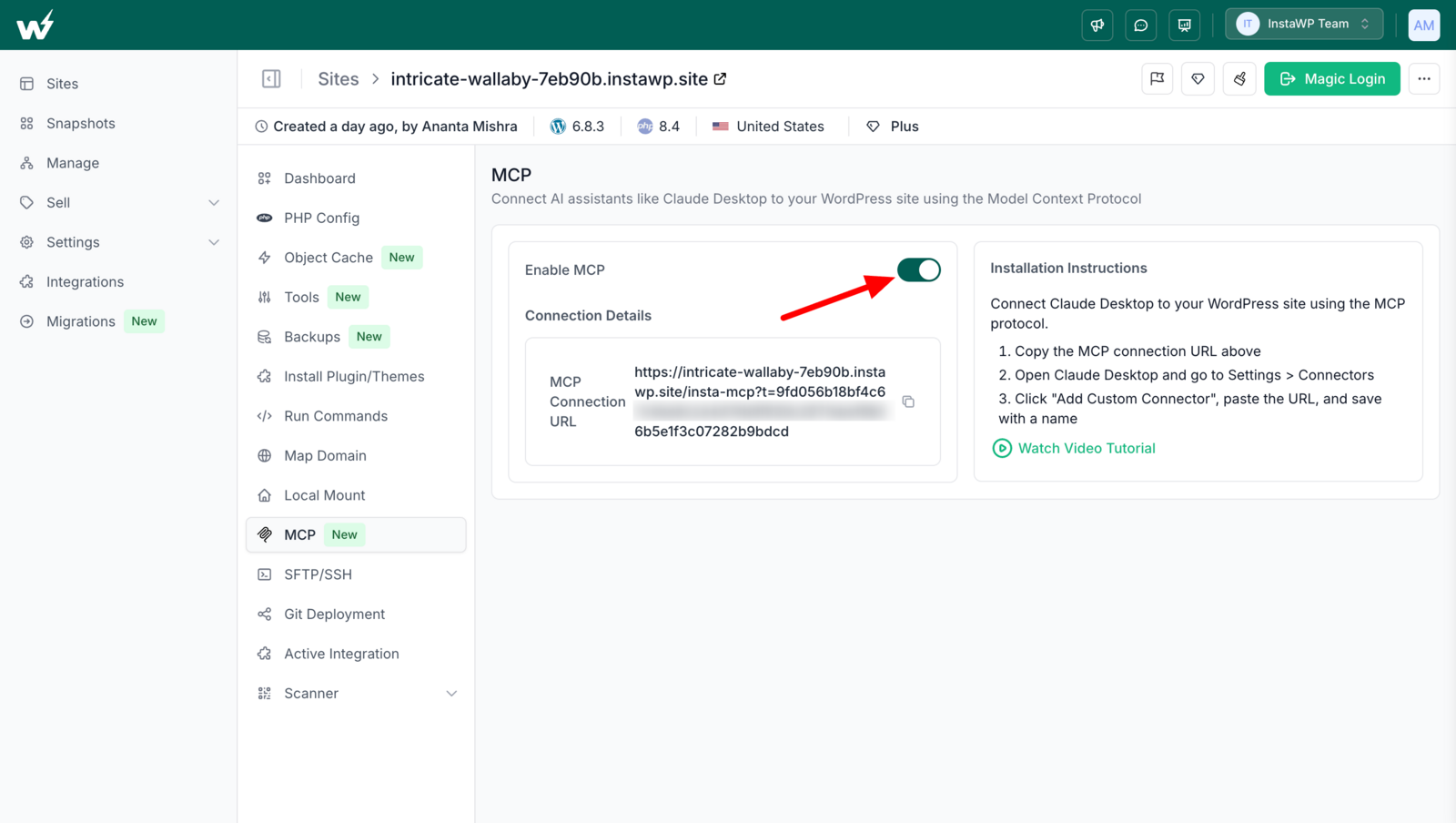
Can InstaWP’s MCP edit your WordPress content?
Yes, through the site MCP, and within the permissions of the WordPress role of the user the token belongs to. It can also run plugin and core updates, as shown in updating WordPress with an MCP server.
WordPress roles map to four scopes: administrators get read, write, delete and admin; editors read, write and delete; authors read and write; contributors and subscribers read only. A subscriber’s token was refused a write in InstaWP’s own test. The MCP authorization specification is built on OAuth 2.1, which is what the account MCP uses.
How does InstaWP keep an AI agent in check?
With two gates at each level. At the account level, MCP is off until you enable it, Read-only mode stops every change, each capability has its own switch, and the sensitive group (credentials and secrets, shell and WP-CLI, acting inside sites) stays off until you turn it on. At the site level, MCP is off per site, tokens carry role-based scopes, and PHP execution, database queries and site file access stay off until an administrator enables them. PHP and file writes are syntax-checked before they are saved, and a guard reverts boot-critical files an agent breaks. The site activity log records what changed.
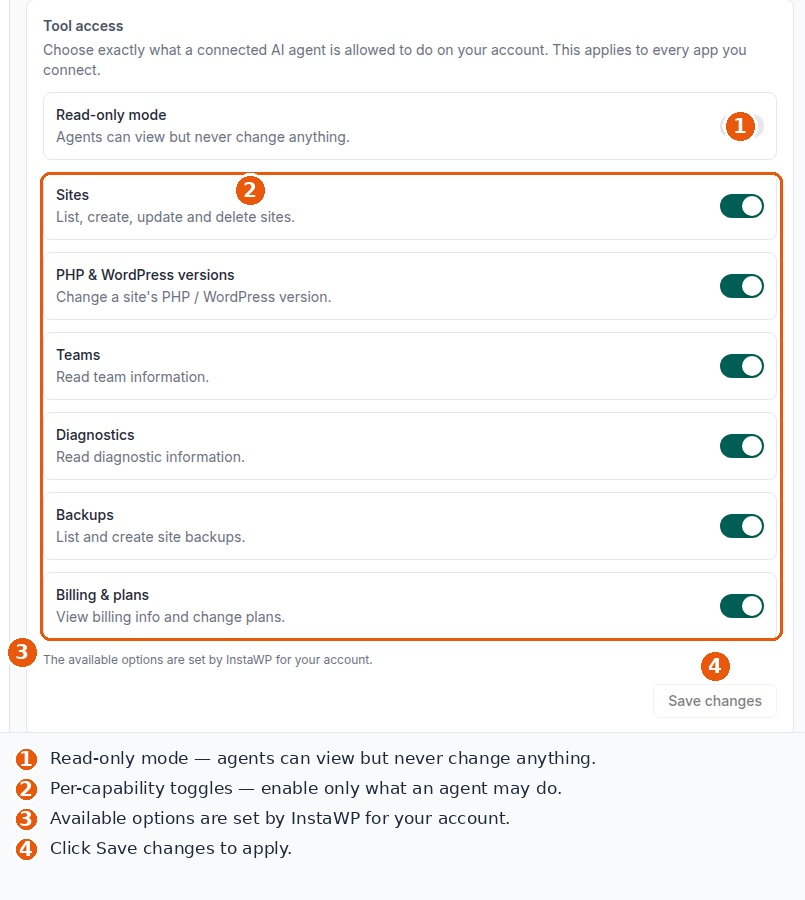
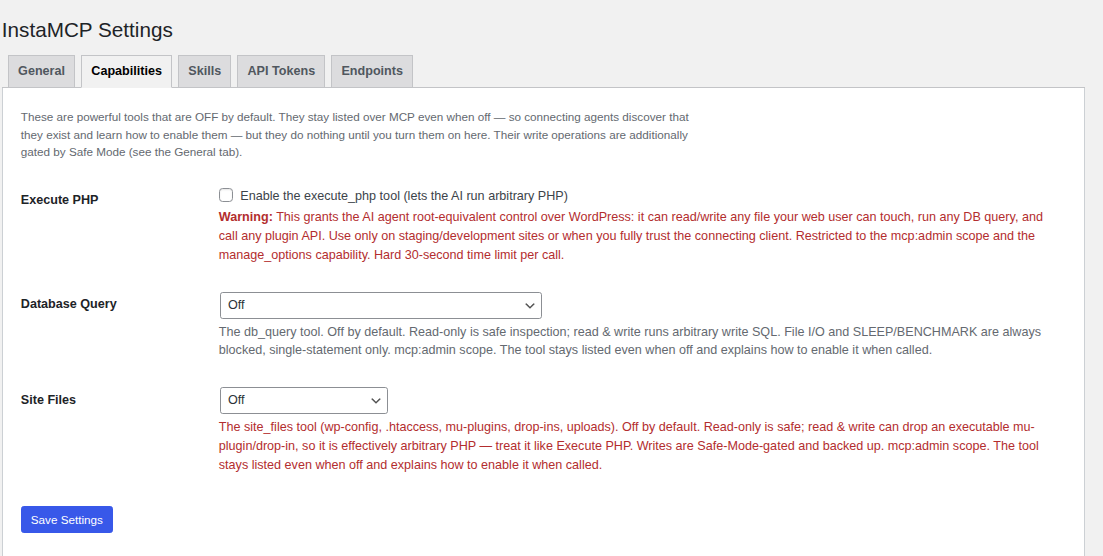
How much does InstaWP cost?
Both MCP levels are included, alongside staging, snapshots, SSH and WP-CLI on every site, and the InstaCLI for scripted work. Managed production sites start at $5 a month per site and sandboxes at $2, billed daily with no annual contract, and new accounts get $25 in free credits. See InstaWP pricing, managed WordPress hosting, pay-as-you-go WordPress hosting and managed WordPress hosting plans for agencies.
What are InstaWP’s limits?
Its account MCP does not cover domains in its capability list, there is no per-change undo token or rate limit yet, and the site MCP’s token travels in the connection URL. On InstaWP, snapshots and backups are the undo, and the account MCP can take a backup before the agent starts. If something goes wrong, you can restore a site from a backup.
Who should use InstaWP?
Use it for: agencies and developers who want an agent to work across many client sites and inside each one, from one connection, with read-only modes for agents that only need to look. The InstaWP AI features page lists the rest of the platform’s AI tooling.
Skip it if: you are committed to another host and only need hosting automation there. Full detail in the InstaWP account MCP and InstaMCP guides, and in the docs for connecting an AI assistant to your account.
2. WordPress.com: content editing over MCP, with approvals
What does the WordPress.com MCP do?
WordPress.com’s MCP server started with read access in January 2026: searching posts, reading post details and comments, and reading site settings, statistics and users. On 20 March 2026 it added 19 write operations across six content types, so an agent can draft and publish posts, build and update pages, approve and reply to comments, restructure categories and tags, and fix media alt text, captions and titles.
How do you connect the WordPress.com MCP?
Turn on the write operations you want at wordpress.com/me/mcp, then add the WordPress.com MCP server as a custom connector in Claude, ChatGPT, Cursor or OpenClaw and approve it through OAuth 2.1. The token refreshes on its own. Anthropic’s guide to custom connectors in Claude and OpenAI’s docs on MCP connectors cover the client side. For self-hosted sites, see how to connect Claude with WordPress and how to connect ChatGPT to WordPress.
Can the WordPress.com MCP edit your WordPress content?
Yes, and this is its strength. It is the most complete content-editing MCP among the other hosts, limited to the content types above. It does not install plugins or themes, run code or manage hosting.
How does WordPress.com keep an AI agent in check?
Every change needs your approval, new posts are saved as drafts, deletions can be reversed for 30 days where possible, every change appears in the activity log, WordPress permissions apply, and you switch on only the operations you want.
What does the WordPress.com MCP cost?
It is included on all paid WordPress.com plans.
What are the limits of the WordPress.com MCP?
It only works for sites hosted on WordPress.com, and it covers content rather than site management: no plugins, themes, code, backups or staging.
Who should use the WordPress.com MCP?
Use it for: bloggers and teams whose sites already live on WordPress.com and who want an agent drafting and tidying content with approvals.
Skip it if: you need plugin, theme or hosting work, or your sites are self-hosted.
Source: WordPress.com, 20 March 2026, the WordPress.com MCP developer docs and 22 January 2026.
3. Hostinger: the largest hosting MCP, 408 tools
What does the Hostinger MCP do?
It turns Hostinger’s API into MCP tools. InstaWP downloaded version 2.8.0 on 6 October 2026 and counted 408 tools, which can also run as 11 smaller servers so an agent only loads what it needs:
How do you connect the Hostinger MCP?
Add mcp.hostinger.com as a remote server in Claude Code, Claude or Cursor and sign in through OAuth in the browser, or run the package locally with an API token. The package also ships seven agent skills, including auditing hosting, connecting a domain, migrating a site and maintaining WordPress.
Can the Hostinger MCP edit your WordPress content?
Not through the MCP server. Its 38 WordPress tools work at the installation level: install WordPress, update core, install, activate and update plugins and themes, purge LiteSpeed cache, toggle Memcached and maintenance mode, and create auto-login links. None writes posts or pages.
Content work goes through Hostinger Agent (Kodee), an AI assistant inside the WordPress dashboard on Hostinger’s managed WordPress hosting. Hostinger describes it as MCP-based, able to edit posts, pages, users and WooCommerce products, and in its early stages. It is an assistant you chat with in Hostinger’s interface, not a server your own AI client connects to.
How does Hostinger keep an AI agent in check?
Tool labels are the main control: 171 of the 408 tools are marked read-only and 128 destructive, which lets well-behaved AI clients ask before destructive calls. These hints are defined in the MCP tools specification. Access is whatever the OAuth sign-in or API token allows.
What does the Hostinger MCP cost?
The MCP server is free and open source; you need a Hostinger account and pay for the hosting itself.
What are the limits of the Hostinger MCP?
No content tools for your own AI client, and website backups are not in the package (its backup tools are for VPS). The tool set is large, so agents work best loading one of the smaller servers.
Who should use the Hostinger MCP?
Use it for: Hostinger customers automating hosting operations across websites, domains and VPS from an AI client.
Skip it if: you want your own agent to write and edit site content. InstaWP compares the options in Hostinger alternatives for WordPress and Hostinger vs GoDaddy for WordPress.
Source: Hostinger API MCP Server, the package source on GitHub, and Hostinger’s guide to WordPress MCP integration.
4. Pressable: hosting management for agencies
What does the Pressable MCP do?
Pressable MCP connects Claude, ChatGPT or Gemini to a Pressable hosting account. Pressable lists:
- Site creation and environment configuration
- Site lifecycle actions: clone, enable, disable, convert and delete
- PHP version management and WordPress updates
- Domain management
- Collaborator management at account and site level, including bulk actions
- PHP error logs and web server access logs
- Plugin management and WordPress user management
- One-time login URLs, FTP accounts and activity logs
How do you connect the Pressable MCP?
From MyPressable, open Tools and choose Pressable MCP, which gives the configuration for supported clients.
Can the Pressable MCP edit your WordPress content?
No. Its capability list covers hosting and site administration, not posts or pages. Separately, Pressable began pre-installing the WordPress MCP Adapter on sites as a read-only developer preview in February 2026, according to the Pressable changelog. InstaWP covers running MCP on live sites in how to use MCP for WordPress in production.
How does Pressable keep an AI agent in check?
Pressable’s announcement does not describe tool-level controls, so access follows the account the agent connects with.
What does the Pressable MCP cost?
Pressable did not publish a separate price for it.
What are the limits of the Pressable MCP?
No content editing and no backup tools in its published capability list.
Who should use the Pressable MCP?
Use it for: agencies on Pressable that want to run site setup, updates and access management from an AI client.
Skip it if: the agent’s job is content.
Source: Pressable, 31 March 2026.
5. Rocket.net: the whole platform API as 205 tools
What does the Rocket.net MCP do?
Rocket.net says its MCP covers its whole API, and the tool list agrees. InstaWP listed it on 6 October 2026 without logging in and counted 205 tools, named after API routes: 93 that read, 69 that create, 22 that delete, 16 that patch and 5 that replace. They cover sites, domains, SSL certificates, backups and restores, staging, plugins, themes, files, cache, users, billing and account settings.
# what the tool list returned
server  rocket-mcp
tools   205   (get 93, post 69, delete 22, patch 16, put 5)
labels  readOnly 0, destructive 43
auth    Bearer token on every call
How do you connect the Rocket.net MCP?
Add the MCP server to Claude Desktop, Cursor, VS Code or Windsurf and send a Rocket.net token with each call. Rocket.net also describes agentic provisioning, where an agent signs you up, provisions a managed WordPress install and points a domain at it.
Can the Rocket.net MCP edit your WordPress content?
Indirectly. Two tools run WP-CLI commands on a site, so an agent that knows the WP-CLI command set can create or edit posts that way, and file tools can change site files. There are no dedicated post or page tools. InstaWP sites expose the same WP-CLI over SSH and through InstaWP’s CLI tooling.
How does Rocket.net keep an AI agent in check?
Rocket.net says each MCP token can be limited to chosen tools, chosen sites and a time window, and that every action is logged in its activity feed. In the tool list, 43 tools carry a destructive hint and none carries a read-only hint, so AI clients cannot tell safe reads from writes by label alone.
What does the Rocket.net MCP cost?
Rocket.net did not publish a separate price for it.
What are the limits of the Rocket.net MCP?
The tools mirror API routes rather than tasks, so agents need clear instructions, and content work depends on WP-CLI.
Who should use the Rocket.net MCP?
Use it for: developers who want full API control of a Rocket.net account from an AI client, with scoped tokens.
Skip it if: you want task-shaped content tools.
Source: Rocket.net AI hosting for WordPress, the Rocket.net API reference and InstaWP’s tool-list request, 6 October 2026.
6. Cloudways: server and application management
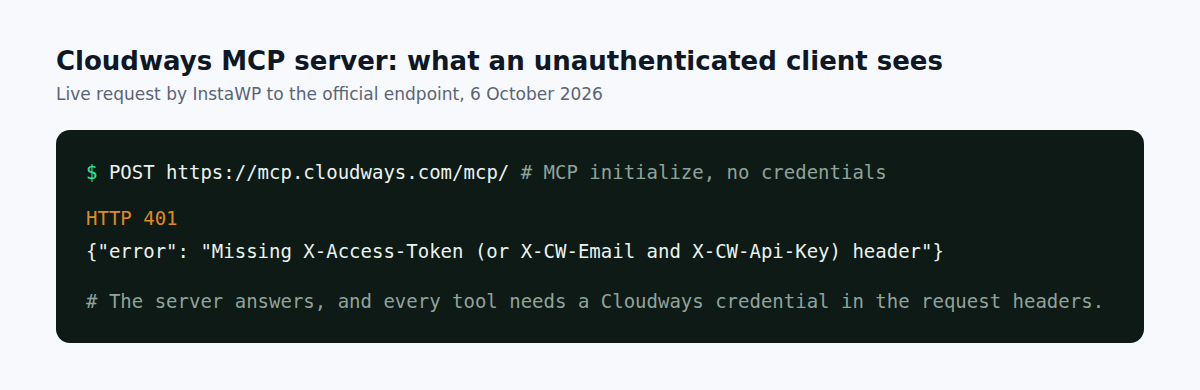
What does the Cloudways MCP do?
It lets an AI client manage Cloudways infrastructure: servers and applications, monitoring graphs for CPU, memory, disk and network, bandwidth and disk use per application, WordPress vulnerability lists with CVSS scores and fresh vulnerability scans, and status checks on long-running operations such as server creation, application backups, scaling and restarts.
How do you connect the Cloudways MCP?
Add mcp.cloudways.com/mcp/ to Claude Desktop, Cursor, VS Code, ChatGPT or Gemini CLI and send your credentials as request headers. Without them the server answers HTTP 401 and names the headers it needs.
Can the Cloudways MCP edit your WordPress content?
No. It works at the server and application level.
How does Cloudways keep an AI agent in check?
Access is whatever the API credential allows. Cloudways’ documentation does not describe read-only modes or tool labels.
What does the Cloudways MCP cost?
Cloudways did not publish a separate price for it.
What are the limits of the Cloudways MCP?
No content or plugin tools, and the credential travels in request headers your client has to manage. Cloudways’ support pages block automated browsers, which is why this entry shows the endpoint response rather than a screenshot.
Who should use the Cloudways MCP?
Use it for: Cloudways customers who want monitoring, scans and server operations from an AI client.
Skip it if: you want an agent working inside WordPress. InstaWP compares the field in Cloudways alternatives.
Source: Cloudways’ MCP server tools reference and InstaWP’s request to mcp.cloudways.com, 6 October 2026.
7. WP Engine: read-only search over your content
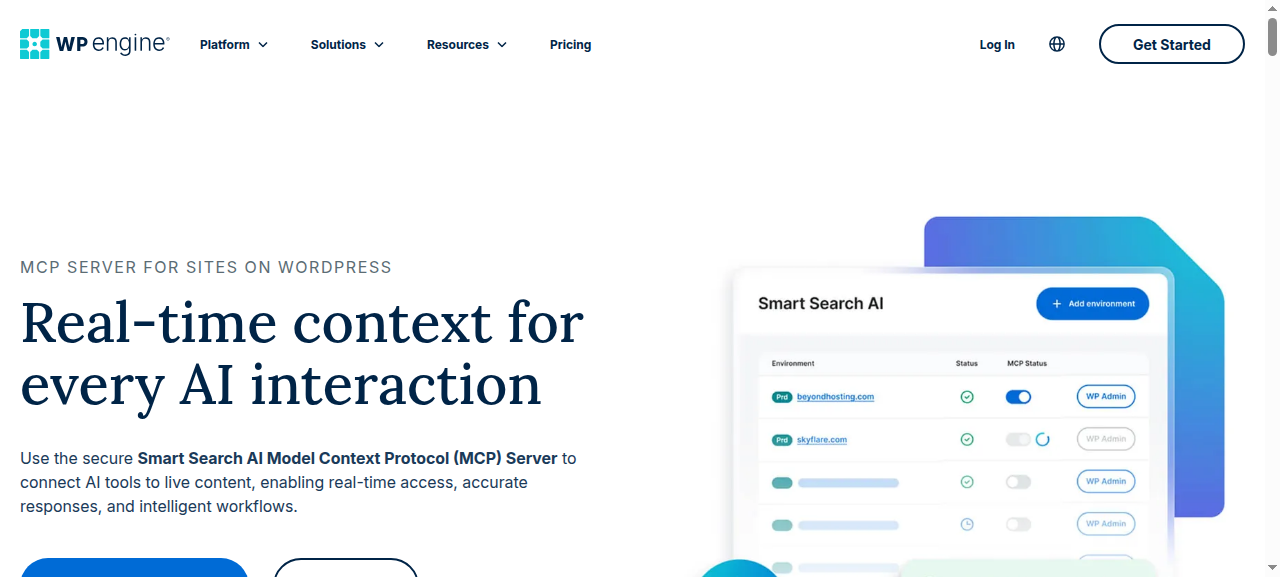
What does the WP Engine MCP do?
It lets AI tools search and fetch your published content through WP Engine’s managed vector database, so a chatbot or assistant answers from your site’s current content. You switch MCP on per environment in the AI Toolkit settings and get a server URL.
How do you connect the WP Engine MCP?
Copy the generated server URL into ChatGPT, Claude, Cursor or VS Code with Copilot.
Can the WP Engine MCP edit your WordPress content?
No. It reads approved, published content. It does not create or change anything.
How does WP Engine keep an AI agent in check?
By being read-only, with rate limiting on the server.
What does the WP Engine MCP cost?
It comes with Smart Search AI in WP Engine’s AI Toolkit, priced through WP Engine’s sales team.
What are the limits of the WP Engine MCP?
It is a retrieval tool, not a management tool: no hosting operations and no content changes.
Who should use the WP Engine MCP?
Use it for: WP Engine customers building chatbots or assistants that answer from site content.
Skip it if: you want an agent to manage or edit anything. For making any WordPress site readable by AI, see how to make a WordPress site AI-agent ready, and for the wider field, WP Engine alternatives.
Source: WP Engine MCP server.
8. GoDaddy: domain search, nothing else
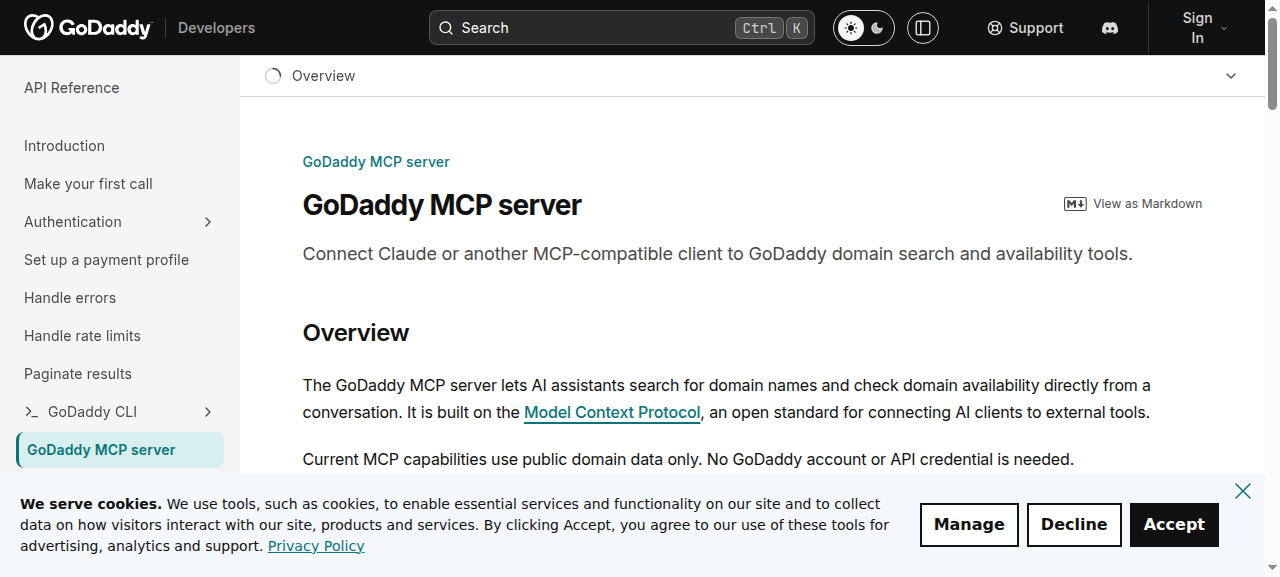
What does the GoDaddy MCP do?
It suggests domain names from keywords or a business description and checks whether domains are available to register. InstaWP connected to it on 6 October 2026 without an account and listed exactly two tools, both marked read-only.
server  godaddy-domains-mcp 1.29.1
domains_suggest             readOnly
domains_check_availability  readOnly
How do you connect the GoDaddy MCP?
Add GoDaddy’s remote MCP endpoint to Claude, ChatGPT or Cursor. There is nothing to sign in to.
Can the GoDaddy MCP edit your WordPress content?
No. It has no hosting, DNS or WordPress tools.
How does GoDaddy keep an AI agent in check?
It cannot change anything, so there is nothing to guard.
What does the GoDaddy MCP cost?
Nothing.
What are the limits of the GoDaddy MCP?
It does not touch GoDaddy hosting at all, so searching “GoDaddy MCP” for WordPress management will not find what you want there.
Who should use the GoDaddy MCP?
Use it for: brainstorming and checking domain names in a chat.
Skip it if: you need any hosting or WordPress work. See GoDaddy alternatives for WordPress agencies.
Source: GoDaddy developer docs, GoDaddy’s announcement and InstaWP’s tool-list request, 6 October 2026.
9. Kinsta: no official MCP, build your own
Does Kinsta have an MCP server?
Not an official one, as of 6 October 2026. Kinsta published a tutorial on 20 May 2026 showing how to build your own MCP server on the Kinsta API, with tools to list sites, clear cache, clone environments and check plugin and theme updates. A community package, kinsta-mcp, wraps much more of the API: 101 tools listed in the README of version 1.1.0, covering analytics, backups, CDN and edge cache, domains, DNS, environments and sites.
Can it edit your WordPress content?
No. The Kinsta API manages hosting, not post content.
Who should use it?
Use it for: developers on Kinsta comfortable running and securing their own MCP server.
Skip it if: you want a supported, built-in option. See Kinsta alternatives for managed WordPress hosting.
Source: Kinsta, 20 May 2026, the Kinsta API docs and the kinsta-mcp repository, 6 October 2026.
10. SiteGround: an AI agent in the dashboard, no MCP
Does SiteGround have an MCP server?
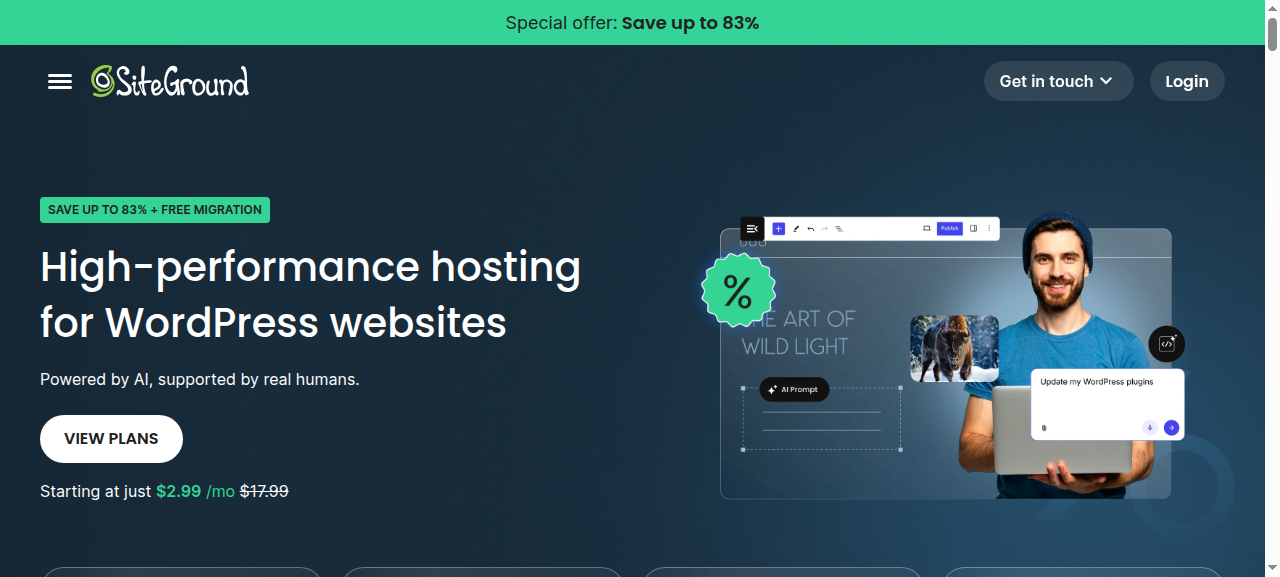
No, as of 6 October 2026. SiteGround’s hosting pages describe a free built-in AI agent that connects to your site and manages it through a chat, across several sites and in bulk, plus an AI Studio workspace for chatting with ChatGPT, Claude and Gemini. That agent lives in SiteGround’s interface; there is no MCP endpoint for your own Claude, ChatGPT or Cursor to connect to.
How do you use your own AI client on SiteGround?
Install a WordPress MCP plugin on the site, such as the official MCP Adapter, which the WordPress AI team ships as one of its AI Building Blocks. InstaWP tested 21 of them in its roundup of the best WordPress MCP plugins, and the WordPress MCP servers comparison covers servers you run outside WordPress.
Who should use it?
Use it for: SiteGround customers happy to work inside SiteGround’s own AI agent.
Skip it if: you want to bring your own AI client. See SiteGround alternatives for agencies.
Source: SiteGround WordPress hosting and SiteGround AI Studio, 6 October 2026.
11. Bluehost: no MCP yet
Does Bluehost have an MCP server?
InstaWP found no Bluehost MCP server, documentation or announcement as of 6 October 2026. Bluehost’s site blocks automated browsers, so this is based on searches of its public pages and announcements rather than a screenshot.
How do you use your own AI client on Bluehost?
Install a WordPress MCP plugin such as the official MCP Adapter, connect it with an application password for a low-privilege user, and test it on a staging copy first.
Who should use it?
Use it for: sites staying on Bluehost that can run their own MCP plugin.
Skip it if: you want MCP built into the host. See Bluehost alternatives for agencies.
Source: InstaWP search of Bluehost’s public pages and announcements, 6 October 2026.
What do the tool counts tell you?
Less than they seem. A large tool count usually means a host turned its whole API into tools, which is useful for hosting automation and says nothing about whether an agent can work inside WordPress. These are the counts InstaWP measured itself on 6 October 2026:
Labels matter as much as counts. Hostinger marks 171 of its tools read-only and 128 destructive, and GoDaddy marks both of its tools read-only, so an AI client can treat reads and writes differently. Rocket.net’s 205 tools carry no read-only labels. InstaMCP does not label its tools either; it relies on role-based scopes and on keeping its three riskiest tools switched off instead.
Which WordPress host with MCP should you choose?
Start from what you want the agent to do. The decision guide below covers the common cases.
When should you rely on a host’s MCP, and when not?
How do you connect an AI agent to your hosting safely?
Start read-only, narrow the access, and keep a way back. The MCP security best practices call this scope minimisation. These are the steps InstaWP recommends on any host:
- Connect read-only first. Choose read-only access when you authenticate if the host offers it, as InstaWP’s account MCP does, and only switch to read-write when a job needs it.
- Narrow what the connection can do. Turn off capabilities the agent does not need, such as billing, credentials or shell access, or use a token limited to specific tools and sites. On InstaWP, manage API tokens from the account settings.
- Practise on a copy. Run the agent against a staging site or a sandbox clone before it touches a production site. On InstaWP you can clone a site or create a staging environment in a few clicks.
- Take a backup or snapshot before writes. Ask the agent to take one first. On InstaWP the account MCP can do it, and backups cover the whole site.
- Check results yourself. Open the site or dashboard and confirm the change, rather than trusting the agent’s summary. WordPress security for agencies covers the wider checklist.
- Review and revoke. Check the host’s activity log where it has one, and revoke tokens you no longer need. For CI pipelines and scheduled agents, InstaWP documents using the CLI with AI agents.
Why InstaWP builds MCP into both levels
Because most real agent work crosses the line between hosting and WordPress. “Clone the client’s site, update the plugins on the clone, rewrite the homepage, and back it up first” is one request to a person, and it touches the account, the site and the content. A host with only account-level MCP can do half of it; a site-only MCP can do the other half.
InstaWP’s account MCP and site MCP are designed to work together: one connection reaches every site in the team, each site has its own 43 typed tools with role-based scopes, and both levels start switched off with their riskiest capabilities behind a second switch. If your sites are elsewhere, you can migrate them to InstaWP (the automated import copies a live site across) or start from a free WordPress sandbox. Agencies comparing hosts on more than MCP can read InstaWP’s roundups of the best WordPress hosting for agencies and WordPress hosting with staging, and the migration features page explains moving sites in.
Eight of the 11 hosts ship an official MCP server, but they do different jobs. Hostinger, Rocket.net, Pressable and Cloudways automate hosting. WordPress.com edits content on its own platform. WP Engine searches content for chatbots, and GoDaddy checks domains. InstaWP is the one host in this comparison with both an account-level MCP and a site-level MCP built in, with read-only modes, role-based scopes and the riskiest tools switched off by default, which makes it the best fit for agencies that want one agent working across their hosting and inside every client site.
Related guides on WordPress MCP and AI agents
More from InstaWP on running AI agents against WordPress, each based on hands-on testing:
- Best WordPress MCP plugins, 21 tested: every WordPress.org MCP plugin with 50+ installs, on one live site.
- Best WordPress MCP servers compared: open-source servers you run outside WordPress.
- WordPress MCP Adapter review: the official plugin from the WordPress AI team, tested.
- Elementor MCP tested: four silent failures when agents build Elementor pages, and the fix.
- Novamira review: a developer-focused MCP plugin, compared with InstaMCP.
- InstaWP account MCP: one connection for every site in an account.
- WordPress 7 AI features: what core WordPress now does with AI.
- Claude Code skills for web development: agent skills that hold up on client work.
- Best AI coding tools for WordPress developers: the editors and agents that pair with MCP.
WordPress hosting with MCP: frequently asked questions
Which WordPress host has the best MCP?
For most agencies, InstaWP, because it has both an account-level MCP for the hosting and a site-level MCP inside every WordPress site, with read-only modes and role-based scopes. WordPress.com is strongest for content on its own platform, and Hostinger and Rocket.net have the largest hosting tool sets.
Does Hostinger have an MCP server?
Yes. Hostinger publishes an official API MCP server, available as a remote server with OAuth sign-in or as a package you run with an API token. Version 2.8.0 has 408 tools covering hosting, VPS, domains, DNS, email, ecommerce and billing, including 38 for WordPress installs. It has no tools for writing posts or pages.
Does GoDaddy have an MCP server?
Yes, but only for domains. GoDaddy’s MCP server has two read-only tools, domain suggestions and availability checks, and needs no account. It does not manage GoDaddy hosting or WordPress sites.
Does Cloudways have an MCP server?
Yes. Cloudways has an official MCP server for managing servers and applications, monitoring, vulnerability scans and long-running operations. It authenticates with an access token or with your email and API key in request headers.
Does Kinsta have an MCP server?
Not an official one as of October 2026. Kinsta publishes a tutorial for building your own MCP server on the Kinsta API, and a community package wraps the API with 101 tools.
What is the difference between account-level and site-level MCP?
An account-level MCP manages the hosting, such as sites, PHP versions, domains, backups and billing. A site-level MCP works inside one WordPress site, such as posts, pages, media, plugins and themes. Most hosts ship only one level.
Can a hosting MCP edit my WordPress posts?
Only some can. InstaWP’s site MCP and WordPress.com’s MCP can edit content directly, Rocket.net can do it indirectly through WP-CLI, and WP Engine’s MCP only reads published content. Hostinger, Pressable, Cloudways and GoDaddy do not edit posts through their MCP servers.
Is it safe to give an AI agent access to my hosting account?
It can be, if you connect read-only first, turn off capabilities the agent does not need, practise on a staging copy and take a backup before any change. Prefer hosts whose MCP offers read-only modes, scoped tokens or labelled tools.