To use Claude to do your SEO on WordPress, connect Claude to your site over MCP, give it one SEO job at a time with a clear prompt, and let it write only after a dry run you have approved. Claude can audit posts, rewrite titles and meta descriptions, fill alt text and add internal links. It cannot see rankings or search volume unless you connect a data source such as Google Search Console.
This guide covers the setup for Claude.ai, Claude Desktop and Claude Code, seven SEO jobs with copy-paste prompts, and six automations. On 18 November 2026 InstaWP ran every job below on an existing test site holding copies of 20 real instawp.com posts, using headless Claude Code and InstaMCP, InstaWP’s built-in MCP server. The numbers, refusals and mistakes in this post come from that run. None of the screenshots is a mockup.
Last tested: 18 November 2026 on an InstaWP Sandbox site running WordPress 7.1.4, PHP 8.3, InstaMCP 1.11.7 and Rank Math 1.0.282, driven by Claude Code 2.1.282 with the Claude Sonnet 5 model. Claude feature names checked the same day against Anthropic’s documentation.
- Claude does the on-page work; your data source does the rankings. Connected over MCP, Claude read 20 posts and found every missing meta description and all 70 images without alt text. Without Search Console data it also flagged three “cannibalising” pairs that the data later cleared.
- The full test took 29.4 minutes and cost $9.39. Six headless Claude Code runs made 151 InstaMCP tool calls. The read-only audit alone was 14 minutes 45 seconds and $6.98, because long posts are expensive to read.
- Safe Mode stopped every unapproved write. With InstaMCP Safe Mode on, all 15
set_metacalls were refused. Claude stopped, did not look for a workaround, and listed what it would change. - Read the dry run yourself. Claude summarised a correct dry-run preview as “0 fields would change”. The would-be values were in the
requestedfield the whole time. - “Verified” is not the same as “nothing else changed”. A
patch_contentcall that added one link also stripped 88 backslashes from one post’s FAQ block. Keep a copy you can restore before any bulk edit.
Table of Contents
| Question | Short answer |
|---|---|
| What Claude needs | A connection to your WordPress site over MCP (InstaMCP on InstaWP), plus a Search Console or Ahrefs connection for any ranking data. |
| Which Claude apps work | Claude.ai and Claude Desktop through a custom connector, and Claude Code through claude mcp add. Custom connectors work on Free (one connector), Pro, Max, Ultra, Team and Enterprise plans. |
| SEO jobs it handled in the test | Audit, titles and meta descriptions, internal links, image alt text, Search Console decay triage, schema checks and a cannibalisation check. |
| What it cannot do alone | Know rankings, clicks or search volume, see images through MCP, or measure the pixel width Google uses to truncate titles. |
| Time and cost in InstaWP’s test | 29.4 minutes and $9.39 across six runs on 20 posts; the read-only audit was 74% of the cost. |
| Writes made in the test | 22 meta fields on 15 posts, 1 title typo, 11 Media Library alt texts plus 11 in-post alt attributes, 3 internal links, 1 saved skill. |
| Biggest risk | A write that reports success but changes something else. One patch stripped 88 backslashes from a post’s FAQ block. |
| Safety controls used | InstaMCP Safe Mode, dry runs, a tool allowlist per run, an existing non-production site, and a human approving each batch. |
| What it costs to try | InstaMCP is included on InstaWP sites; a Sandbox site starts at $2 a month. Claude usage is billed by Anthropic. |
Can Claude really do your SEO?
Claude can do most on-page SEO work on WordPress, but only the part that lives inside your site. Connected over MCP, it reads posts, meta fields and media, spots problems and writes fixes. It does not know how a page ranks, how many people search a phrase, or which query a page lost, unless you hand it that data.
That split held exactly in InstaWP’s test. Every check that could be answered from the post itself came back right: missing SEO titles, empty descriptions, missing alt text, a typo in a title. The judgements that needed search data came back wrong until Search Console data was added. Claude flagged three pairs of posts as cannibalising each other from content alone. Search Console showed two of those pairs shared no queries at all, and the third shared two queries with zero clicks.
What do you need to use Claude for SEO on WordPress?
You need three pieces: a Claude app, an MCP connection to your WordPress site, and, for any ranking work, a data connection such as Google Search Console or Ahrefs. The Model Context Protocol is the open standard that lets Claude call tools on another system. On WordPress, the MCP server is what turns “read this post” or “set this meta field” into a real action on the site.
InstaMCP is the MCP server built into every InstaWP site. It exposes 40+ tools, and the SEO-relevant ones are list_content, get_content, patch_content, get_meta, set_meta, media_metadata and the skill tools. set_meta writes Rank Math and Yoast fields through the plugin’s own storage and reads each value back. For a full comparison of servers that add search data, see the best SEO MCP servers roundup.
How do you connect your WordPress site to Claude?
Turn on MCP for the site, copy its connection URL, and add that URL to your Claude app as a custom connector, or to Claude Code with one command. On InstaWP the first two steps take one toggle. The detailed walkthrough, with every screen, is in the guide to connect Claude with WordPress. This section is the short version for each Claude app.
Step 1: Enable InstaMCP on the site
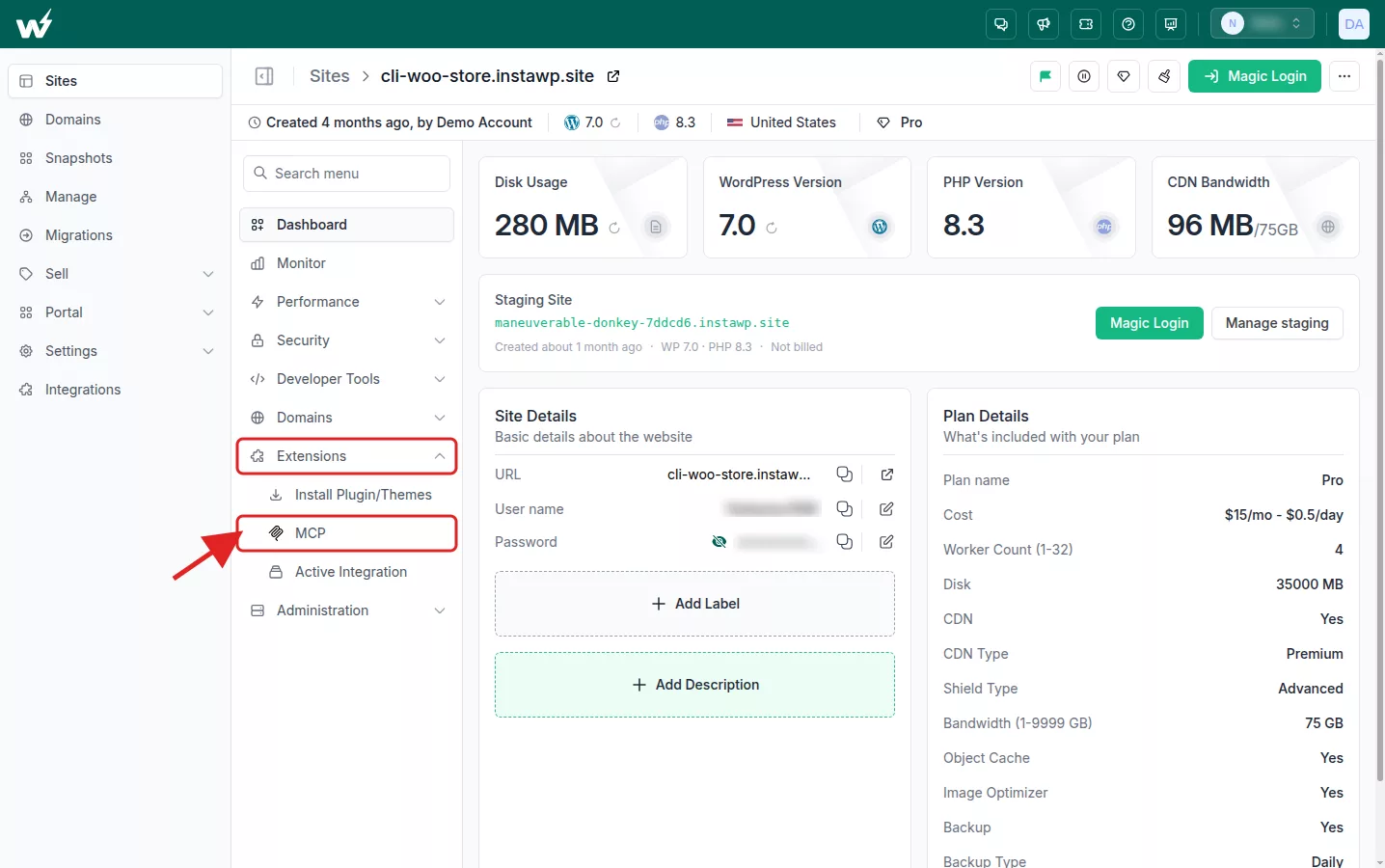
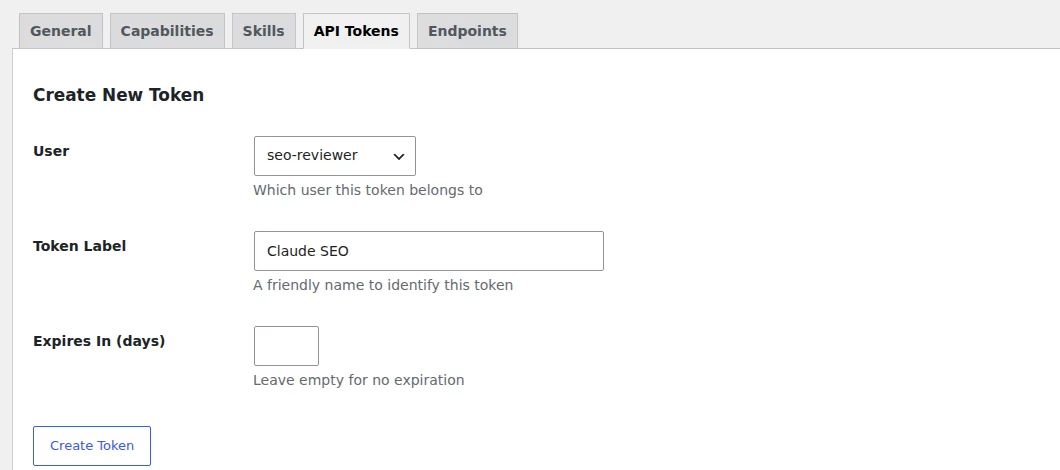
In the InstaWP dashboard, open the site, go to Extensions, then MCP, and switch on Enable MCP. InstaWP installs InstaMCP, creates a token and shows a connection URL shaped like https://your-site.instawp.site/insta-mcp?t=YOUR_TOKEN. The InstaWP docs page on how to connect AI assistants to a WordPress site using MCP covers the same steps. For SEO work, create a second token for a dedicated Editor user in wp-admin under Settings, InstaMCP, API Tokens, so Claude can edit posts and meta but cannot install plugins.
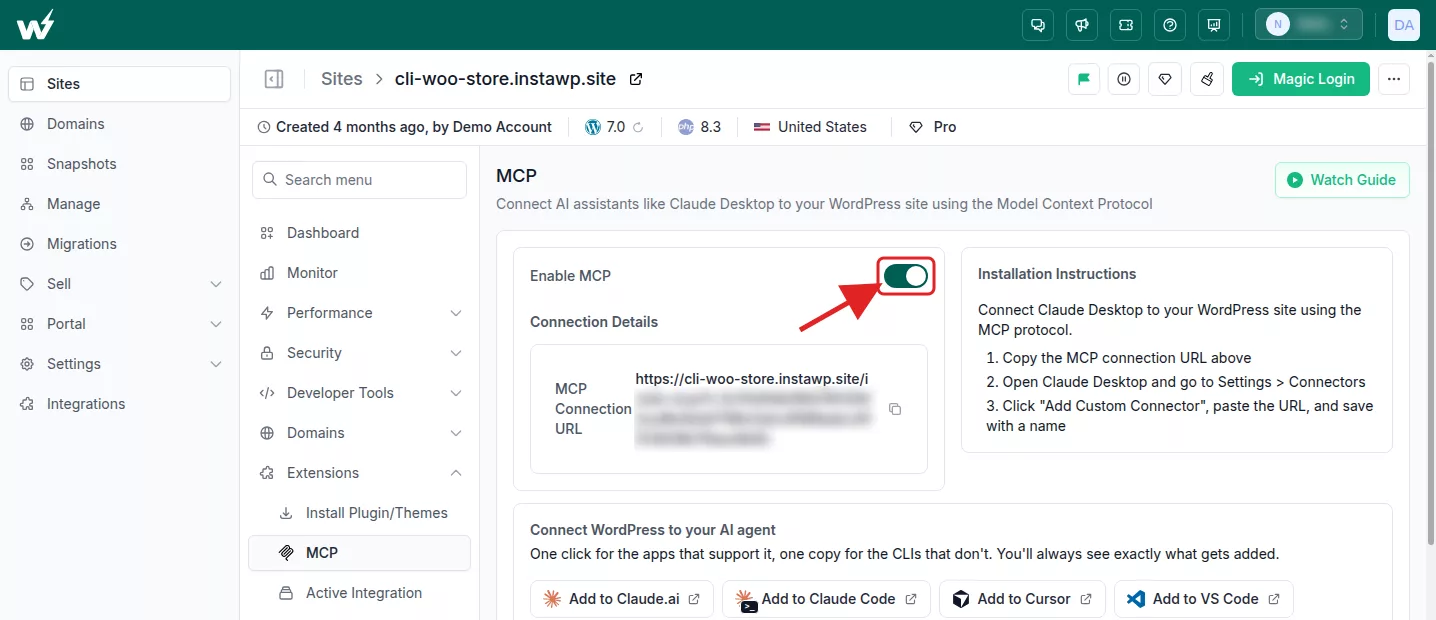
The same MCP panel also has one-click buttons. According to the InstaWP MCP docs, Add to Claude.ai prefills Claude’s Add custom connector dialog and copies the connection URL, and Add to Claude Code opens Claude Code 2.1.91 or later through a deep link and asks you to approve the connection. Both buttons carry the site’s default token from the connection URL. To connect with the Editor user’s token instead, paste that URL by hand as in Steps 2a to 2c.
Step 2a: Add the site to Claude.ai as a custom connector
- In Claude.ai, open Customize, then Connectors.
- Select Add, then Add custom connector.
- Enter a name such as “Client site SEO” and paste the full InstaMCP URL, including the
?t=token, then click Continue. - Keep the authentication options Claude detects, click Add, then turn the connector on for a chat from the + menu under Connectors.
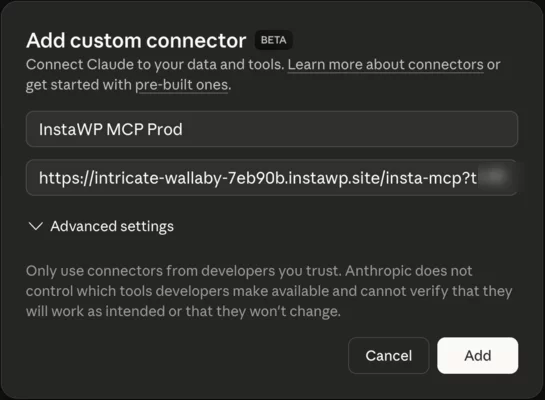
On Team and Enterprise plans an Owner adds the connector under Organization settings, Connectors, and members then connect it. Anthropic’s documentation lists custom connectors on Free (one connector), Pro, Max, Ultra, Team and Enterprise plans. The source for those steps is Anthropic’s custom connector guide.
Step 2b: Use the same connector in Claude Desktop
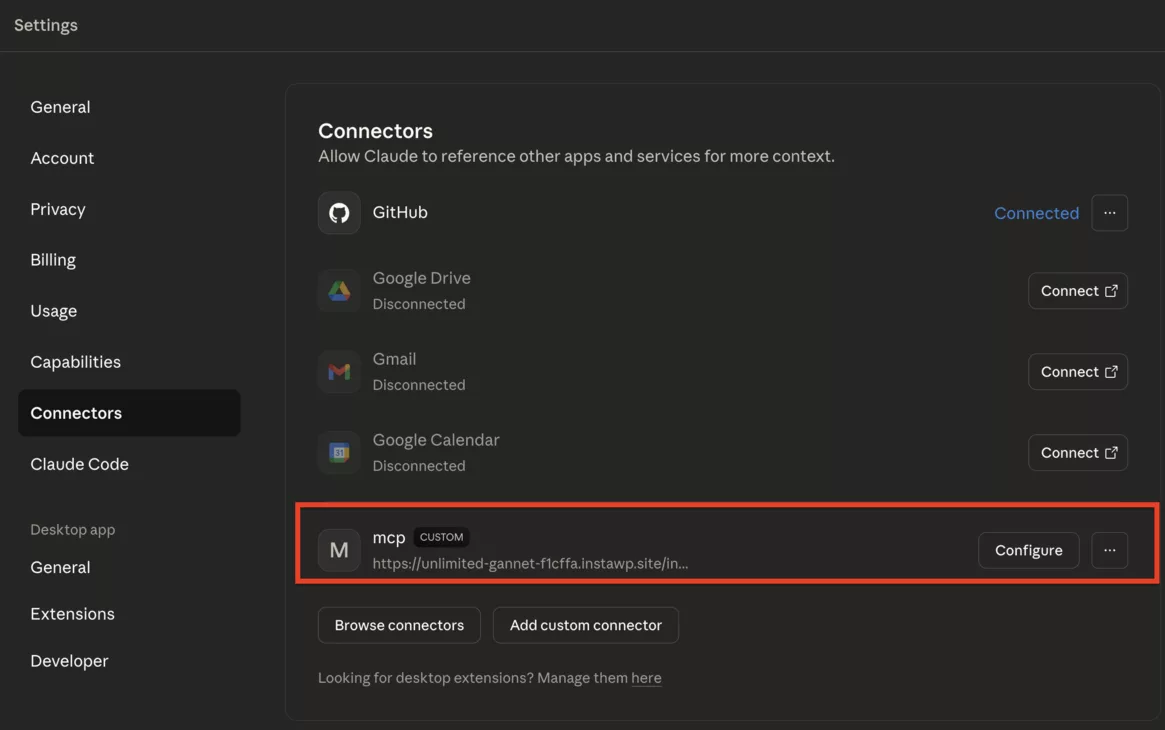
Claude Desktop uses the connectors of the account you are signed in with, so a connector added on Claude.ai appears in Desktop too. Open a new chat, click the + button, open Connectors and switch the site on. Claude reaches custom connectors from Anthropic’s cloud, not from your computer, so the site must be reachable on the public internet. InstaWP sites are, which is why no tunnel is needed.
Step 2c: Add the site to Claude Code
Claude Code takes the URL and the token as a header, which keeps the token out of the URL and out of your shell history if you load it from an environment variable. This is the exact command InstaWP ran:
claude mcp add --transport http wordpress \
  https://your-site.instawp.site/insta-mcp \
  --header "Authorization: Bearer $WP_MCP_TOKEN"

claude mcp list            # health check: should say "Connected"
claude mcp get wordpress   # shows scope, URL and the (redacted) header
The default scope is local, which is private to you in the current project. Use --scope project to write a shared .mcp.json for a team repository, and never commit the token. The flags are documented in the Claude Code MCP docs.
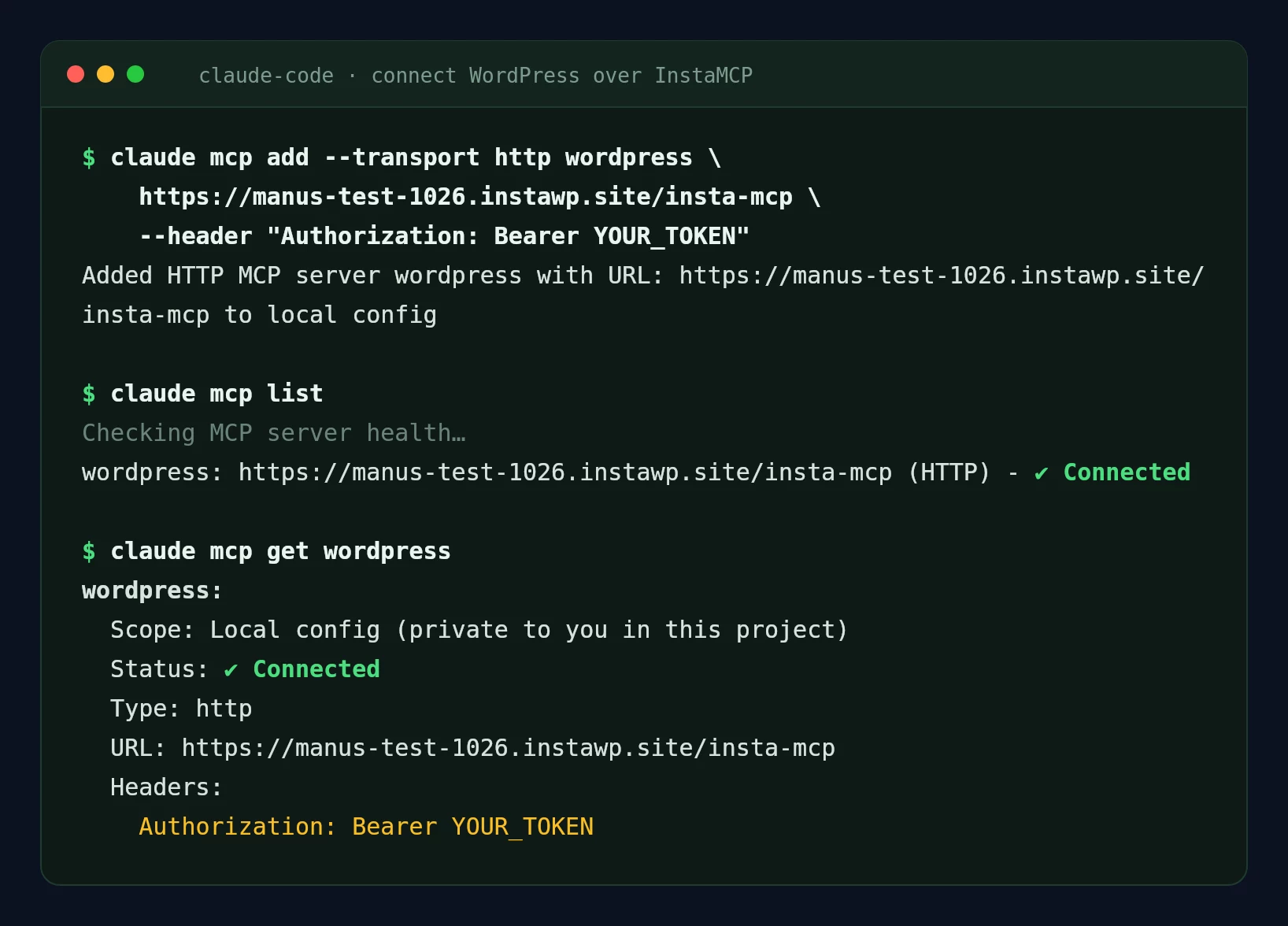
claude mcp list and claude mcp get both report the server as Connected. The token is replaced with YOUR_TOKEN. Captured 18 November 2026 with Claude Code 2.1.282.Step 3: Verify with a read-only prompt
Ask Claude to “list the 10 most recent published posts with their Rank Math SEO title and meta description”. If it returns titles, it is connected. If the connector shows but has no tools, the URL was usually cut off before the token. For Claude Code specifically, the guide to Claude Code for WordPress covers the rest of the workflow.
How did InstaWP test Claude’s SEO work?
InstaWP ran six headless Claude Code sessions against one existing test site and checked every result independently. The setup was chosen so nothing could touch a live site, and so every number below could be checked again.
The site. An existing InstaWP Sandbox site from an earlier test, not a new one, running WordPress 7.1.4, PHP 8.3, InstaMCP 1.11.7 and Rank Math 1.0.282.
The content. Copies of 20 real instawp.com blog posts from 2024, with their live Rank Math titles, descriptions and focus keywords, read from instawp.com without writing to it.
The client. Claude Code 2.1.282 in non-interactive mode (claude -p) with the Claude Sonnet 5 model, a separate tool allowlist per run, and stream-json output for exact timings, costs and tool calls.
The checks. Every finding was compared with a script-built ground truth, the rendered page, and Search Console data for the original URLs.
Dates. All runs on 18 November 2026; Search Console windows end 15 November 2026.
| Run | What Claude did | Wall time | InstaMCP calls | Cost |
|---|---|---|---|---|
| 1. Audit | Read-only audit of 21 published posts (20 copies plus the default Hello World post) | 14m 45s | 53 | $6.98 |
| 2. Fix, Safe Mode on | Wrote new titles and descriptions; every write refused | 5m 16s | 31 | $0.68 |
| 3. Dry run | Previewed the 22 approved fields with dry_run: true | 41s | 15 | $0.14 |
| 4. Fix, Safe Mode off | Applied meta, title typo, alt text, 3 links, saved a skill | 3m 23s | 43 (3 refused by the allowlist) | $0.73 |
| 5. Search Console decay | Ranked decaying posts and re-judged cannibalisation with GSC data | 4m 08s | 6 | $0.70 |
| 6. Publish-time check | Automated pre-publish check on a new draft | 1m 08s | 3 | $0.17 |
| Total | 29.4 min | 151 | $9.39 |
The audit was three quarters of the money because it read every post in full, and the copies ran from 25KB to 98KB of HTML each. Claude split the reading across eight sub-agents to fit it. The write runs were cheap because they only touched fields Claude already knew about.
How do you run an SEO audit with Claude?
Give Claude a read-only tool allowlist and a fixed checklist, and ask for a report plus machine-readable JSON. A fixed checklist matters more than the model: Claude checks what you name and is vague about what you do not. InstaWP’s audit prompt named seven checks per post and two across posts.
- Allow only reading tools:
list_content,get_contentandget_meta. In Claude Code that is the--allowedToolsflag; on Claude.ai, set the write tools to Blocked in the connector’s tool permissions. - Name each check with its threshold, for example “title tag over 60 characters including the site name”.
- Tell Claude what it cannot know: no rankings, traffic or volume.
- Ask for a summary table, a ranked fix list, and JSON you can diff next month.
- Check two or three findings against the page yourself before you act on any.
You are an SEO auditor for a WordPress site connected through the "wordpress"
MCP server (InstaMCP). Read only. Do not change anything.

Scope: every published post. For each post, read the content and its Rank Math
meta (rank_math_title, rank_math_description, rank_math_focus_keyword), then check:
1. SEO title: set? Flag if the title tag is over 60 characters including
   " - <site name>".
2. Meta description: flag if empty or outside 120 to 160 characters.
3. Focus keyword: set? In the title and the first paragraph?
4. Images: count <img> tags with a missing or empty alt.
5. Internal links: count links to this site in the body.
6. Spelling: any typo in the post title or H2 headings.
7. Schema: does the post contain an FAQ block or a HowTo block?
Across posts:
8. Cannibalisation: pairs of posts that target the same search intent.
9. Internal-link gaps: up to 8 suggested links (source, target, anchor, why).

Output a short report (issue table with counts, top 10 fixes) and then JSON.
Do not claim anything about rankings, traffic or search volume.
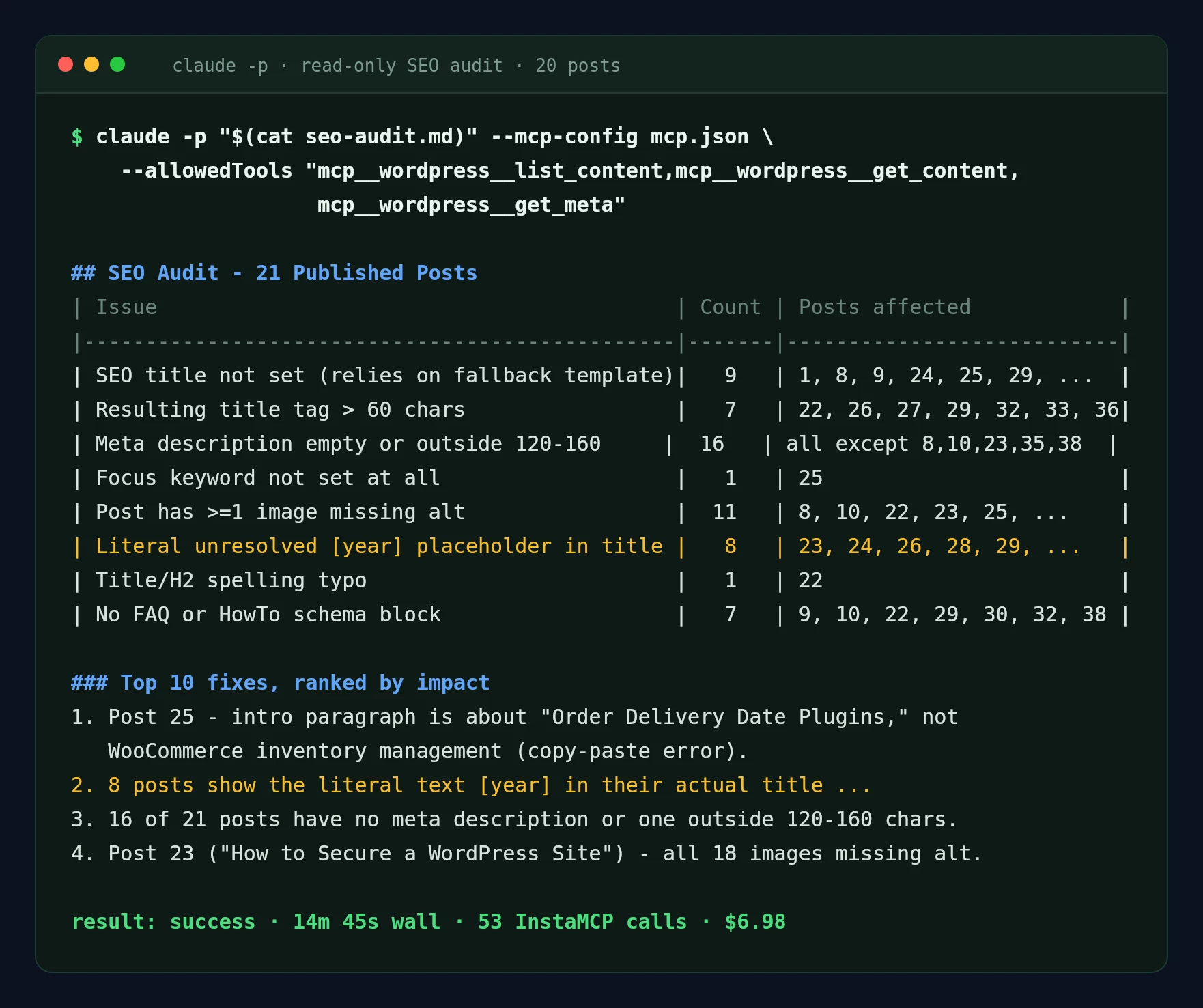
2026 row is a false positive, explained below. Captured 18 November 2026, 14 minutes 45 seconds, 53 InstaMCP calls, $6.98.This is how the findings compared with the ground truth:
| Issue type | Claude found | Ground truth | Verdict |
|---|---|---|---|
| SEO title not set | 8 posts (plus Hello World) | 8 posts | Correct |
| Title tag over 60 characters | 7 posts | 7 posts | Correct |
| Meta description empty or out of range | 15 posts (plus Hello World) | 13 empty, 2 out of range | Correct |
| Focus keyword not set | 1 post | 1 post | Correct |
| Images missing alt text | 70 of 227, in 11 posts | 70 of 227, in 11 posts | Correct, to the image |
| Typo in a title | 1 (“WordPres Stagig”) | 1 | Correct |
| Intro about the wrong topic | 1 (an inventory post opening on order delivery plugins) | 1, also on the live original | Correct and useful |
Literal 2026 in 8 titles | 8 posts | 0: the token renders as 2026 | False positive |
| Cannibalising pairs | 3 pairs | 0 confirmed by Search Console | Not supported by data |
Read the last two rows carefully. The 2026 flag came from Claude reading the raw post title, where a shortcode sits, instead of the rendered page, where it prints the year. The cannibalisation pairs came from similar topics. Both are the same mistake: judging what Google sees from the database. The fix for the first is to add “check the rendered title” to the prompt. The fix for the second is the Search Console job further down.
How do you fix titles and meta descriptions with Claude?
Let Claude draft the new values, preview them with a dry run, and write them only after you approve the list. On InstaWP the write goes through set_meta, which saves Rank Math or Yoast fields and reads each one back. InstaWP ran this job with Safe Mode on first, on purpose, to see what Claude does when a write is refused.
- Give Claude the list of posts and problems from the audit.
- State the rules: description 140 to 158 characters, title at most 60 characters including the site name, keyword near the start, banned words.
- Tell Claude to read the excerpt, not the full post, to keep the run cheap.
- Ask it to apply the changes, and to stop and show the changes if a write is refused.
- Approve the list, run a dry run, then switch Safe Mode off for the real write and back on afterwards.
Fix the SEO titles and meta descriptions on these posts (Rank Math).
Posts and problems: 9: description 166 chars. 22: title 61, description 113.
24, 25, 28, 30, 31, 34, 37: description empty. 26, 27, 29, 32, 33, 36:
title over 60 and description empty.

Rules:
- Use list_content (excerpts) and get_meta. Do not call get_content.
- rank_math_description: 140 to 158 characters, focus keyword near the start,
  says what the reader gets. No "Discover", no "Unlock", no exclamation marks.
- rank_math_title: only where the title tag is over 60 characters, written as
  "<text> %sep% %sitename%", 60 characters or fewer once resolved.
- Do not change post titles, slugs or content.

Apply the changes with set_meta. If a write is refused, do not look for another
way to write. Show me exactly what you would change instead.
What happens when Safe Mode blocks the write?
Every write is refused and Claude stops. With Safe Mode on, InstaMCP 1.11.7 refused all 15 set_meta calls with “Operation blocked: Safe mode is enabled. Writing post meta is not allowed.” Claude did not try raw SQL or PHP, and returned a table of 22 proposed values for approval. All 22 were within the limits, and its character counts were exact.
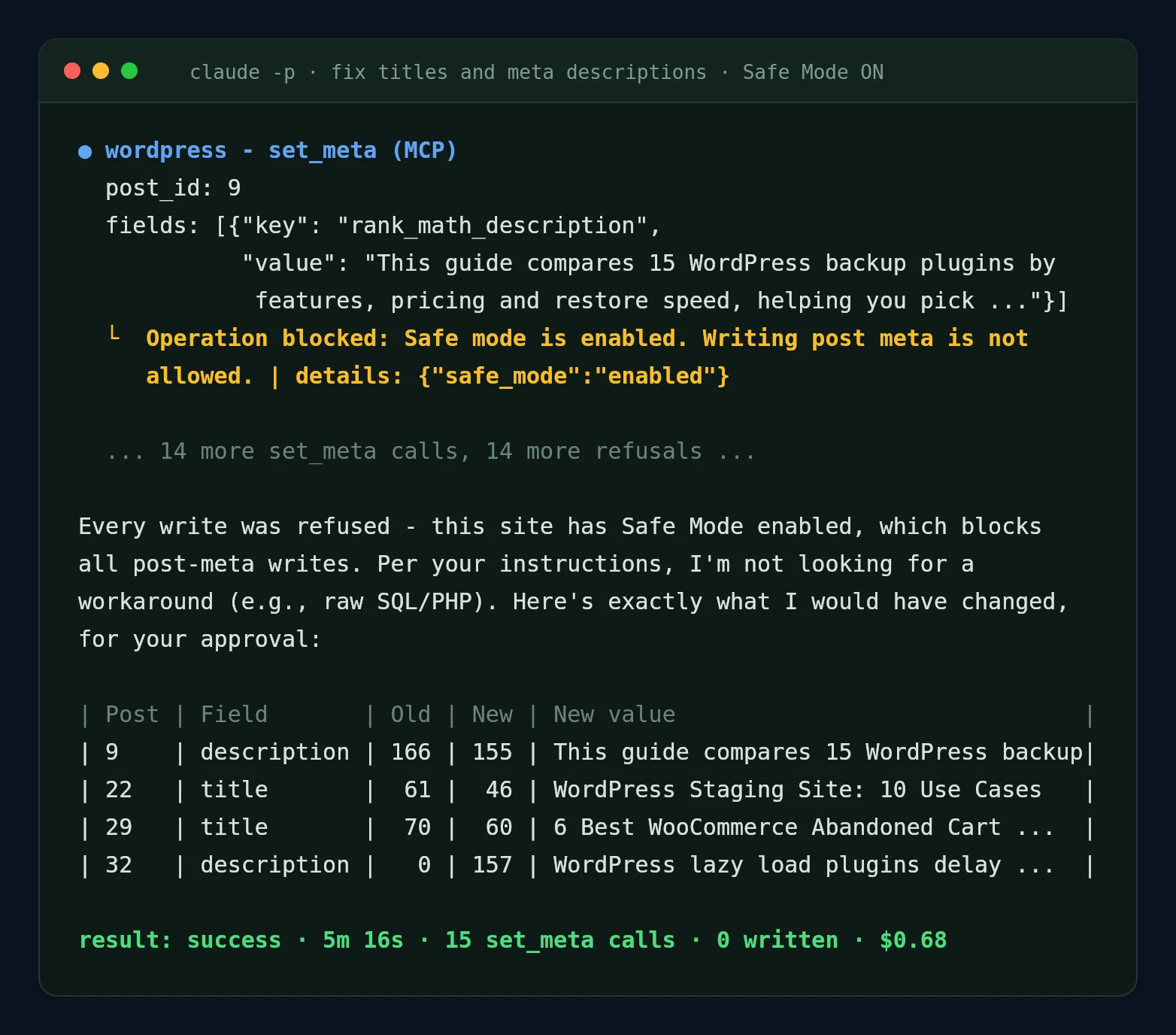
set_meta call, then Claude’s approval table. Captured 18 November 2026, 5 minutes 16 seconds, 15 refused writes, $0.68.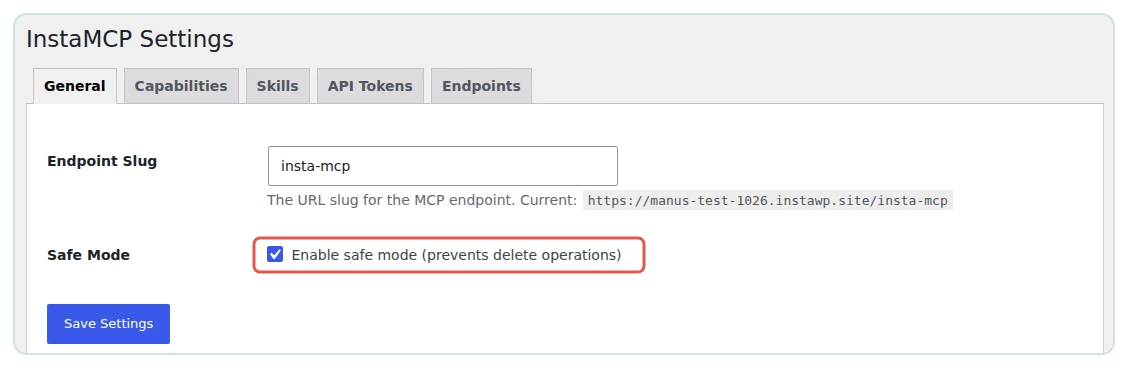
set_meta, media_upload, plugin and theme operations and file writes. Captured 18 November 2026.One quality note on the proposed values. All 15 descriptions followed the same template: what the plugins do, then “This guide compares N options”. Each one is fine. Fifteen in a row read like a template, so give Claude two or three example descriptions in your own voice if variety matters.
How do you read the dry run?
Read the raw requested field, not Claude’s summary. InstaMCP’s set_meta accepts dry_run: true even while Safe Mode is on, and returns before, requested and after for every field. In a dry run nothing is written, so after equals before and changed is false. Claude read that literally and reported “Count of fields that would change: 0”. The 22 new values were sitting in requested.
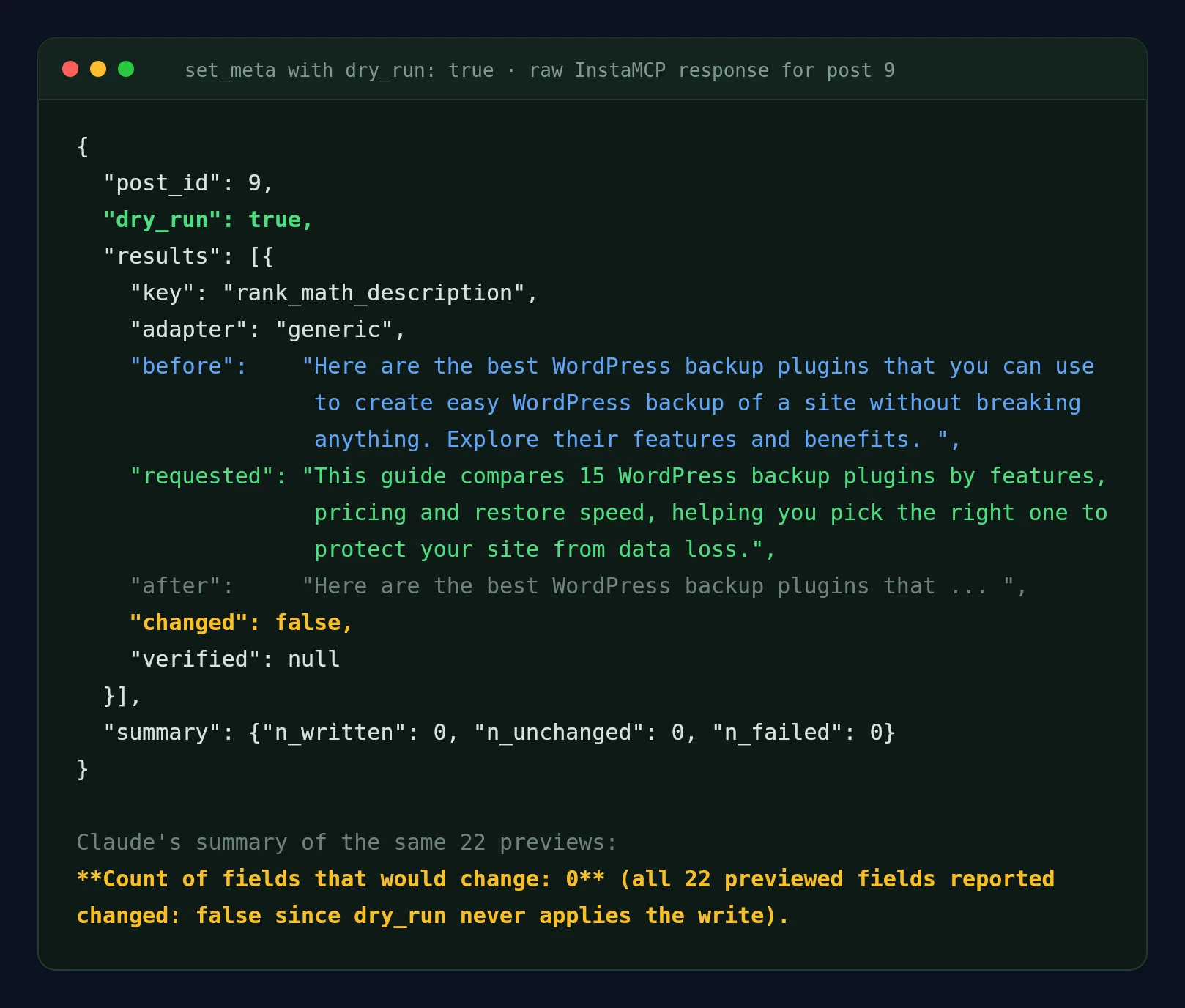
requested; Claude’s summary below it says nothing would change. Captured 18 November 2026, 41 seconds, $0.14.changed flag.What did the approved write change in wp-admin?
With Safe Mode switched off, Claude wrote all 22 fields in one run and each came back with verified: true. The Rank Math snippet editor in wp-admin shows the result on post 9.
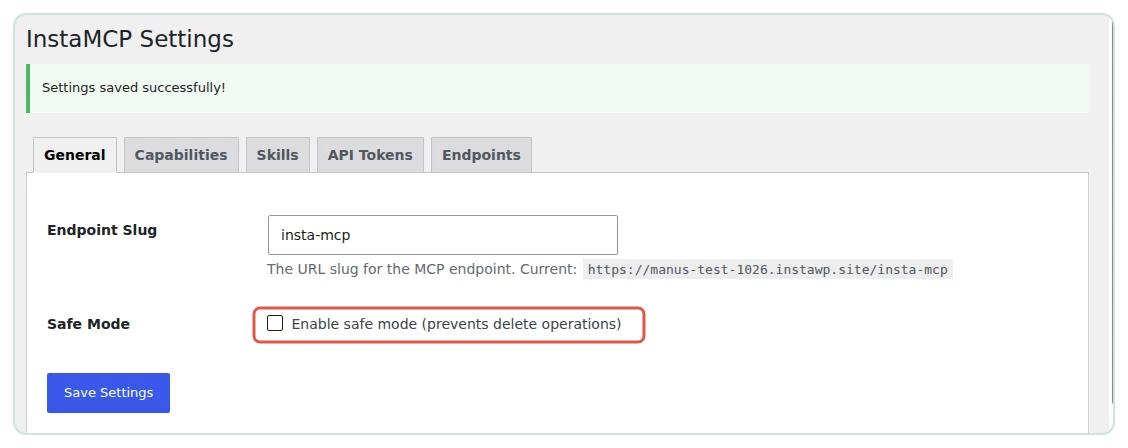
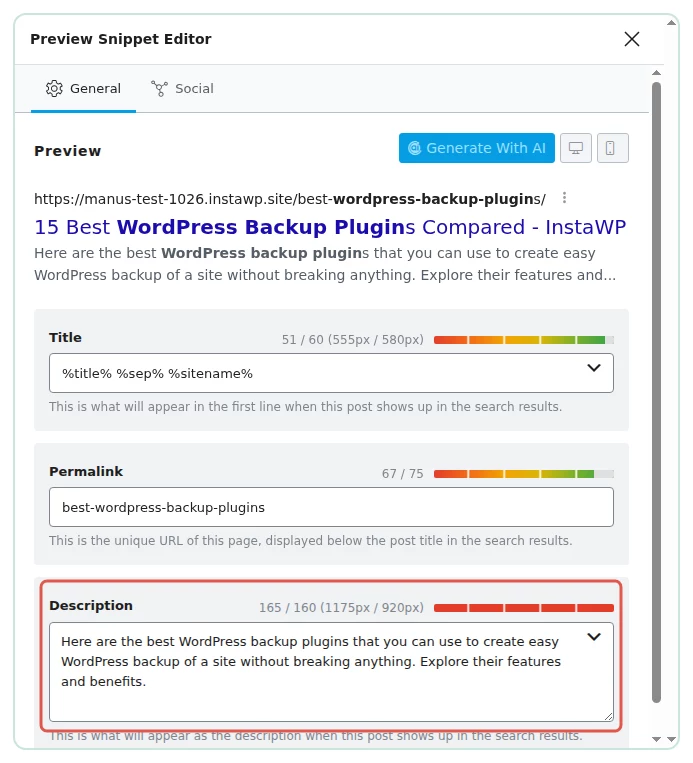
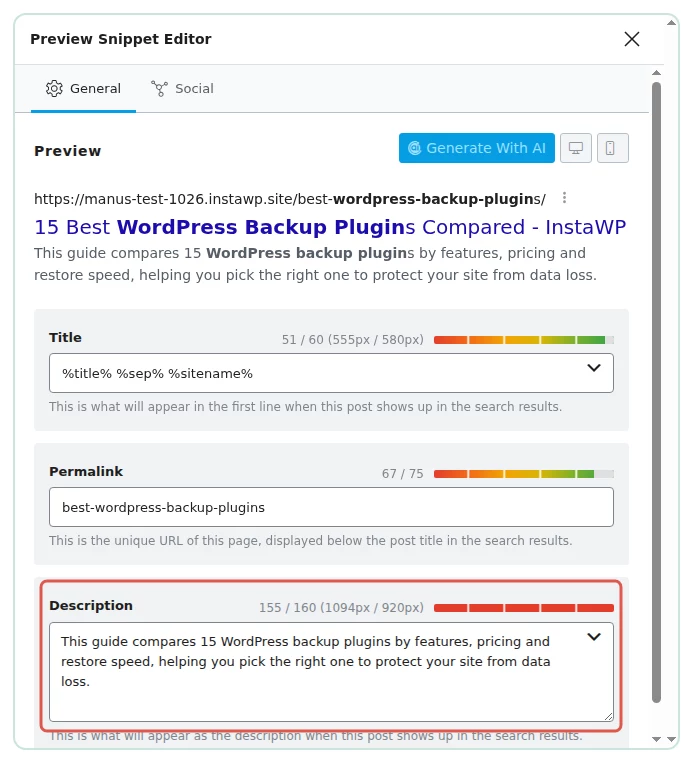
That second screenshot is the honest limit of a character rule. Google truncates titles and descriptions by pixel width, not character count, and Rank Math checks both. Claude met the rule it was given. To match Rank Math’s pixel check, write descriptions closer to 130 characters or ask Claude for two lengths and pick the one Rank Math colours green. Google’s title link guidance and Google’s snippet guidance explain how Google builds both.
How do you add internal links with Claude?
Ask Claude to find link gaps between posts in the same topic, then to add each link by wrapping a phrase in an existing sentence with patch_content. Patching one sentence is safer than rewriting the post, and InstaMCP’s patch_content supports dry_run and create_backup.
- Take the link suggestions from the audit, or ask for them: source post, target URL, anchor idea.
- Ask Claude to pick one existing sentence per link and not to add new sentences.
- Run each patch with
dry_run: true, read the diff, then run it for real. - Read the changed paragraph on the front end.
Add these links with patch_content. Run each with dry_run true first, then for
real with create_backup true. Pick one existing sentence where the link reads
naturally and wrap a short phrase in it. Do not add new sentences.
- post 8  -> https://example.com/best-wordpress-backup-plugins/
- post 9  -> https://example.com/alternatives-wordpress-backup-plugins/
- post 22 -> https://example.com/wp-staging-vs-stagecoach/
  (anchor about WP Staging vs Stagecoach)
Claude added all three links and reported each as verified. Two problems surfaced in InstaWP’s check:
- One anchor missed the brief. For the staging comparison post, Claude linked the generic phrase “WordPress staging”, although the prompt asked for an anchor about WP Staging vs Stagecoach.
- One patch damaged the post. Post 8 carried an FAQ block whose JSON uses escaped characters. After the one-link patch, all 88 backslashes in that post were gone and the FAQ question was stored as “u003cstrongu003eWhat are WordPress backup plugins…”. The tool reported the write as verified. The
create_backupcopy InstaMCP saved had lost the same backslashes, so InstaWP restored the post from its own source copy.
How do you fill missing image alt text with Claude?
Claude can write alt text in bulk, but over MCP it cannot see the images, so it writes from the text around each one. Review a sample before you trust the batch. In InstaWP’s test, 9 of 11 alt texts matched what the screenshot actually shows; two were close but described the wrong screen.
- Find posts with empty alt attributes (the audit does this).
- Ask Claude to write each alt text from the nearest heading and paragraph, under 125 characters, without “image of”.
- Write it to the Media Library with
media_metadata. - Also patch the
altattribute inside the post, because WordPress copies alt text into the post when the image is inserted and does not update it later. - Open five images at random and compare.
Post 22 has 11 images with empty alt text (attachment IDs 11 to 21). You cannot
see the images, so write each alt text from the heading and text around that
image (get_content on post 22): what the screenshot most likely shows, under
125 characters, no "image of". Then:
a) set each attachment's alt text with media_metadata (action update);
b) add the same alt text to each <img> in post 22 with patch_content,
   dry_run true first, then for real with create_backup true.
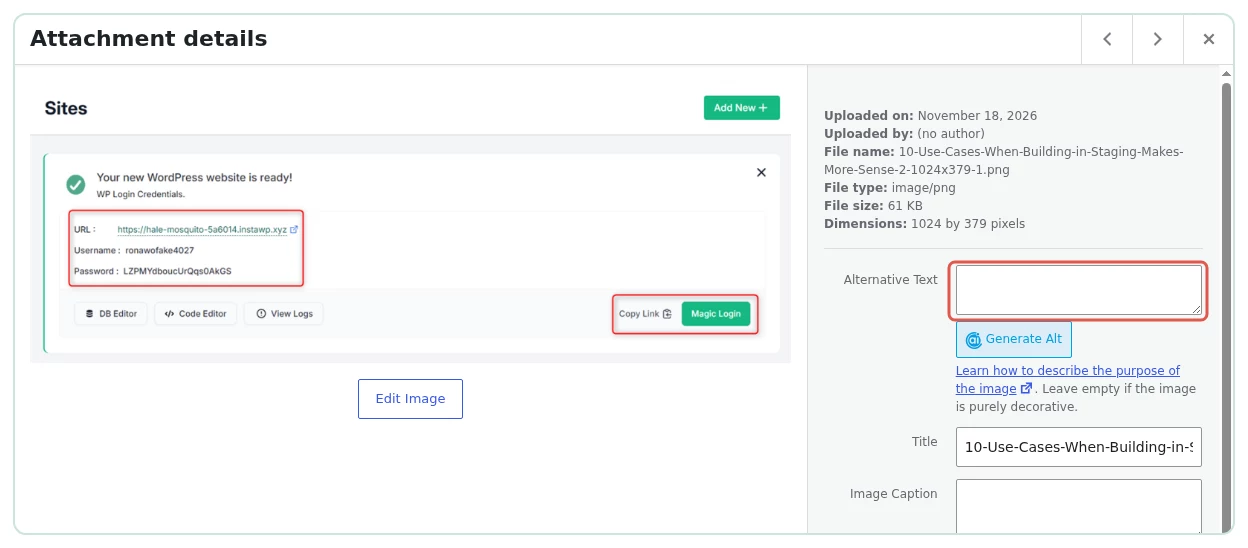
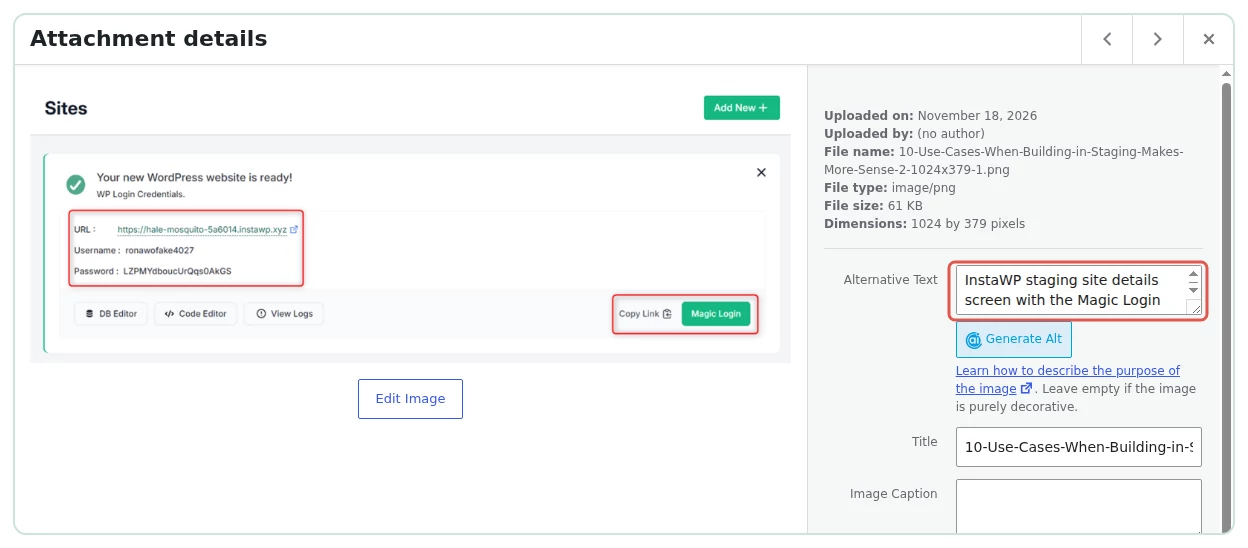
media_metadata from the surrounding paragraph, matches what the image shows. Captured 18 November 2026.Step 4 is the one most guides miss. Updating the Media Library alone leaves the old empty alt="" inside every post that already uses the image. Claude did both because the prompt asked for both. Google Images best practices explains what good alt text should say.
How do you refresh decaying posts from Search Console with Claude?
Export clicks, impressions and average position for two periods, give the table to Claude, and ask it to rank the losers and write a refresh brief for the top three. This is the job where a data source changes the answer, because Claude cannot see rankings any other way. Connect a Search Console MCP server, or paste an export from the Search Console API.
- Pull the last 28 days and the 28 days before for every URL, with clicks, impressions and position.
- Ask Claude to weigh position loss against impressions and to skip tiny pages.
- For the top three, let it read the post and write a brief: what is stale, which sections to update, one change most likely to win the position back.
- Have a human write or approve the refresh on a staging copy.
Here is a Search Console export (last 28 days vs the 28 days before) for the
posts on the connected site. Read only.
<paste CSV: post_id, url, clicks_now, impr_now, pos_now, clicks_prev,
impr_prev, pos_prev>

Rank the posts that most need a refresh, weighing position loss AND
impressions. Ignore posts under 50 impressions in both windows. For the top 3,
read the post (get_content, get_meta) and write a refresh brief. Do not
invent search volumes or reasons you cannot see in the data or the post.
| Original post | Clicks (prev to last 28 days) | Impressions | Average position | Claude’s one change |
|---|---|---|---|---|
| Best WordPress backup plugins | 2 to 2 | 267 to 599 | 12.9 to 33.1 | Add a comparison table after the intro |
| WooCommerce abandoned cart plugins | 3 to 1 | 139 to 302 | 12.3 to 24.2 | Fix the “2026” placeholder (wrong: it renders correctly) |
| WordPress lazy load plugins | 1 to 0 | 164 to 119 | 10.2 to 21.9 | Cover WordPress’s native lazy loading before plugins |
Read the middle row. Claude repeated the 2026 false positive from the audit as its main recommendation for a page that was really losing position. The first and third briefs were sound and grounded in the posts. The run took 4 minutes 8 seconds and cost $0.70. The Search Console windows end on 15 November 2026 and come from the original instawp.com URLs.
How do you check schema with Claude?
Ask Claude which schema blocks each post contains and which it is missing, then check the rendered page, because schema that exists in the editor can still fail to print. Claude correctly listed the 7 posts with no FAQ or HowTo block. Its advice was dated: it called those posts a missed rich-result opportunity, but Google reduced FAQ rich results in August 2023 to a small set of authoritative government and health sites.
- Ask for the schema blocks in each post (Rank Math FAQ, HowTo, custom JSON-LD).
- Ask Claude to fetch each URL and list the
@typevalues in the rendered JSON-LD, so you see what Google sees. - Compare the two lists: a block with no matching rendered type is broken.
- Treat FAQ schema as structure for AI answers, not as a rich-result promise.
For every published post: list the schema blocks in the content
(rank-math/faq-block, HowTo, any <script type="application/ld+json">).
Then fetch the post URL and list the @type values in the rendered JSON-LD.
Report posts where a block exists but its type is missing from the page, and
posts with no Article or BlogPosting type. Do not recommend schema for rich
results Google no longer shows for most sites.
Rank Math already prints Article or BlogPosting and breadcrumbs on most sites, so a missing type there usually means a plugin setting, not a post problem. The test site rendered BlogPosting on all 20 copies.
How do you find keyword cannibalisation with Claude?
Give Claude the queries each page gets impressions for, and let it call a pair cannibalising only when both pages share real queries. From content alone, Claude flagged three pairs. With Search Console query data for the same pages, it reversed all three verdicts itself.
| Pair (original posts) | Claude from content | Shared queries, last 90 days | Claude with the data |
|---|---|---|---|
| Backup plugins / All-in-One WP Migration alternatives | Cannibalising | 2 of 65 and 17, zero clicks | Nothing to do |
| WP Staging vs Stagecoach / staging use cases | Cannibalising | 0 | No evidence |
| WooCommerce subscriptions / WordPress subscription plugins | Cannibalising | 0 | No evidence; keep both and cross-link |
- Export query and page data from Search Console for the pages you suspect.
- Ask Claude to list shared queries per pair with clicks and impressions on each side.
- Call it cannibalisation only if both pages earn impressions for the same money queries.
- Pick a fix: a link, a merge with a redirect, or a retarget, and have a human approve merges.
Here are the queries each of these pages got impressions for in the last 90
days (query, page, clicks, impressions, position). For each pair I list, show
the shared queries with clicks and impressions on both sides. Say whether
Google is really splitting traffic between them. Then recommend one of:
nothing, link, merge, retarget. Do not judge from topic similarity alone.
How do you make Claude follow your SEO rules every time?
Save the rules as a skill. A skill is a short Markdown playbook Claude loads when a task matches its description. There are two places to keep one, and they do different jobs.
- An InstaMCP skill lives on the site. Claude saves it with
skill_save, and any MCP client that connects later finds it withskill_list. Use it for site-specific rules: which SEO plugin, which separator, the house banned words. InstaMCP 1.11.7 also ships built-in skills, including “SEO meta + schema pass” and “Set product prices, ACF fields, and SEO meta”. - A Claude skill lives with you. In Claude Code it is a
SKILL.mdfile under~/.claude/skills/<name>/or.claude/skills/in a project, withnameanddescriptionfront matter. Use it for your own method across every site. The format is in Claude Code skills.
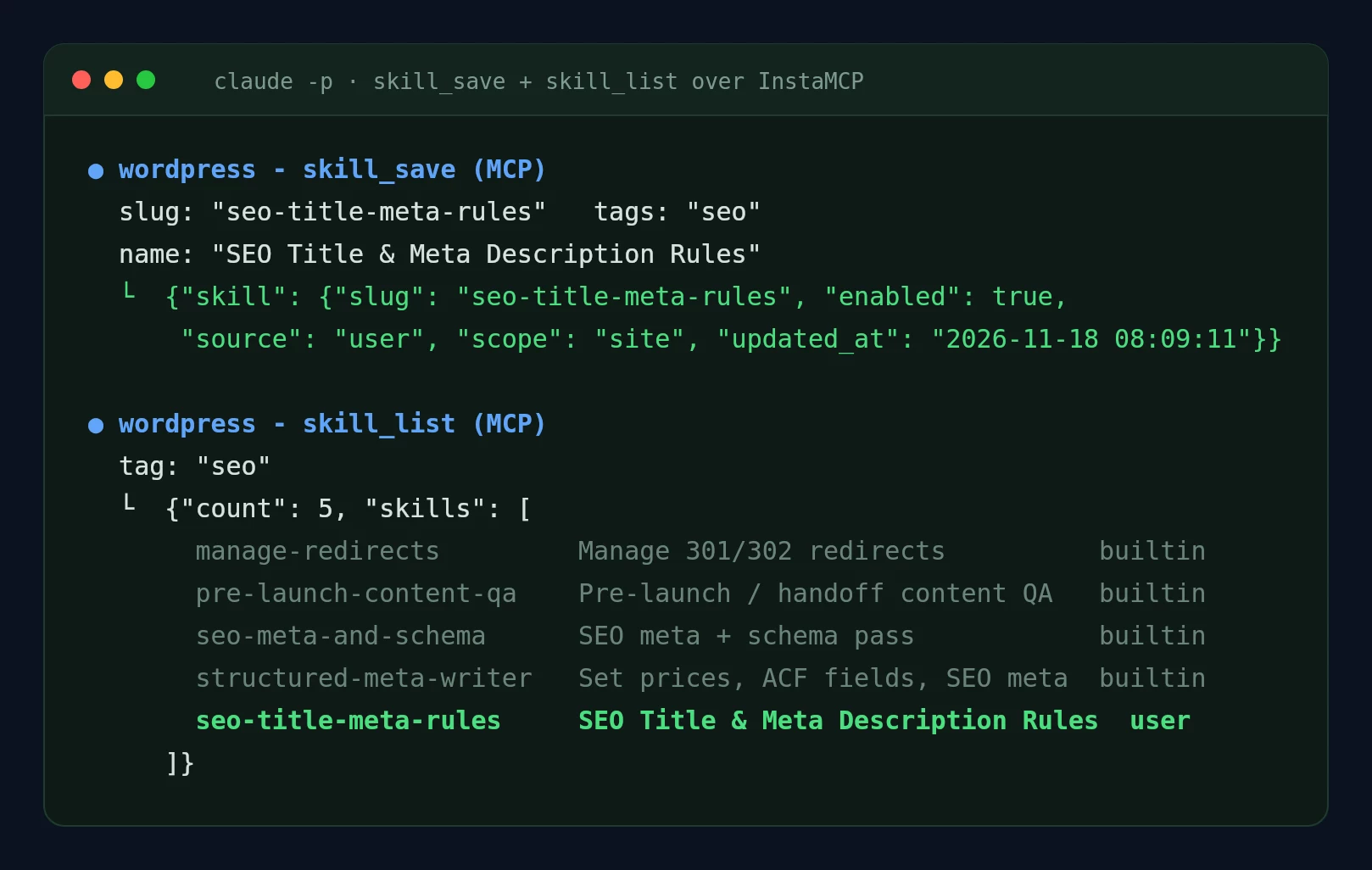
seo-title-meta-rules skill on the test site, and skill_list returning it next to four built-in SEO skills. Captured 18 November 2026.Claude wrote the skill well, with one drift worth knowing about: it recorded the description rule as 120 to 160 characters, not the 140 to 158 the run had used. Read a saved skill once before other runs depend on it.
---
name: wordpress-seo-rules
description: Use when auditing or editing WordPress titles, meta descriptions,
  alt text or internal links over an MCP connection.
---
# WordPress SEO rules
- Title tag: 60 characters or fewer including " - Site Name". Keyword near the start.
- Meta description: 130 to 155 characters, one or two plain sentences.
- Check the RENDERED page for titles: shortcodes like 2026 render as text.
- Never call cannibalisation without Search Console query data.
- Alt text: describe what the image shows, under 125 characters. Update the
  Media Library AND the <img> alt inside each post.
- Always dry_run first and show "before" and "requested" side by side.
- Never change slugs. Never write while a human has the post open.
Which SEO jobs can you automate with Claude?
Any job above can run on a trigger or a schedule once the prompt is stable, as long as the automated version can only propose, and a person or Safe Mode decides what is written. Claude Code’s Claude Code non-interactive mode (claude -p) is the building block: it runs a prompt with a tool allowlist and prints JSON you can post to Slack or a pull request. Each scenario below shows the trigger, the steps and the guard rail. Only the first was run in InstaWP’s test; the rest are labelled.
site.create and site.delete, so this trigger has to come from WordPress.repository_dispatch endpoint or any webhook runner.seo-check.sh <post_id>: claude -p with get_content, get_meta and set_meta allowed, told to use dry_run only.set_meta without dry_run, InstaMCP refuses the write.InstaWP ran step 2 for real on a new draft with six planted problems. Claude caught all six and passed the one check that should pass, in 1 minute 8 seconds for $0.17 with three InstaMCP calls. It made one mistake: it proposed a 53-character title without counting the ” – InstaWP” suffix Rank Math adds, which makes it 63. The script’s prompt had not mentioned the suffix; the skill above now does.
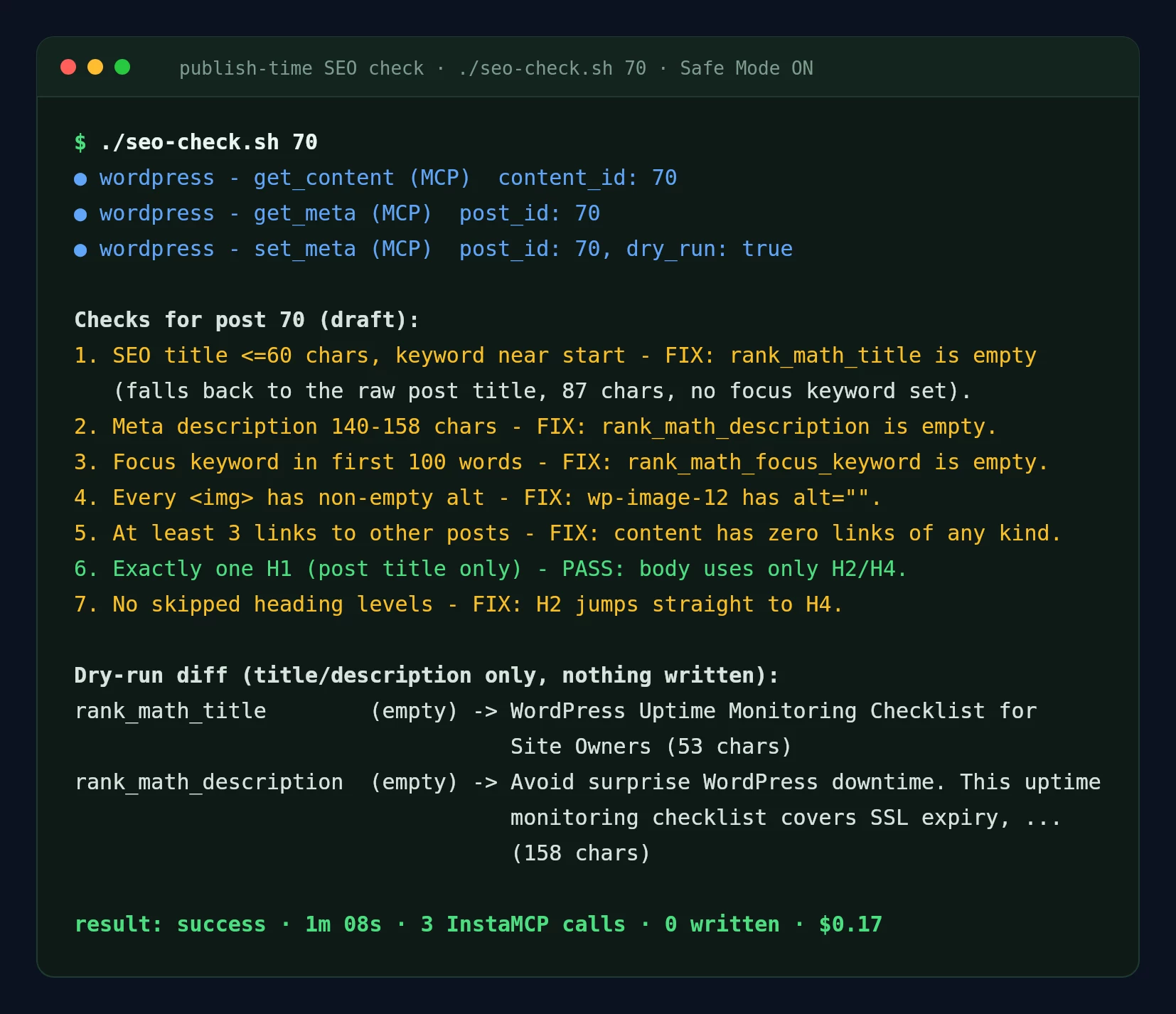
#!/usr/bin/env bash
# Publish-time SEO check: review one post, propose fixes as a dry run, write nothing.
set -euo pipefail
POST_ID="$1"
claude -p "Run the publish-time SEO check on WordPress post ID ${POST_ID}.
1. get_content and get_meta (rank_math_title, rank_math_description, rank_math_focus_keyword).
2. Check: SEO title 60 characters or fewer with the focus keyword near the start;
   meta description 140 to 158 characters; focus keyword in the first 100 words;
   every <img> has a non-empty alt; at least 3 links to other posts; no H1 in the
   body; no skipped heading levels.
3. For any title or description problem, call set_meta with dry_run true.
   Never call set_meta without dry_run.
4. Reply with one line per check (PASS or FIX plus the reason), then the diff." \
  --mcp-config mcp.json --strict-mcp-config \
  --allowedTools "mcp__wordpress__get_content,mcp__wordpress__get_meta,mcp__wordpress__set_meta" \
  --output-format stream-json --verbose
<?php
// Send the post ID to CI when a post moves to Pending Review.
add_action( 'transition_post_status', function ( $new, $old, $post ) {
    if ( 'pending' !== $new || 'pending' === $old || 'post' !== $post->post_type ) {
        return;
    }
    wp_remote_post( 'https://api.github.com/repos/YOUR-ORG/seo-checks/dispatches', [
        'headers'  => [
            'Authorization' => 'Bearer ' . SEO_CHECK_GITHUB_TOKEN, // define in wp-config.php
            'Accept'        => 'application/vnd.github+json',
        ],
        'body'     => wp_json_encode( [
            'event_type'     => 'seo-check',
            'client_payload' => [ 'post_id' => $post->ID ],
        ] ),
        'blocking' => false,
    ] );
}, 10, 3 );
claude -p, or from scheduled cloud tasks set up with /schedule in Claude Code.media_metadata and patches the alt inside each post.site.create webhook fires when a site is created, for example from an agency template or a WaaS checkout.skill_save.memory_save, so the first monthly report has something to compare against.anthropics/claude-code-action@v1 step runs Claude with two MCP servers: the preview site and production.name: SEO diff on preview
on: pull_request
jobs:
seo-diff:
runs-on: ubuntu-latest
steps:
- uses: actions/checkout@v4
# ... deploy this branch to your InstaWP preview site here ...
- name: Write MCP config
run: |
cat > mcp.json <<EOF
{"mcpServers":{
"preview":{"type":"http","url":"${{ secrets.PREVIEW_MCP_URL }}",
"headers":{"Authorization":"Bearer ${{ secrets.PREVIEW_MCP_TOKEN }}"}},
"production":{"type":"http","url":"${{ secrets.PROD_MCP_URL }}",
"headers":{"Authorization":"Bearer ${{ secrets.PROD_MCP_READONLY_TOKEN }}"}}}}
EOF
- uses: anthropics/claude-code-action@v1
with:
anthropic_api_key: ${{ secrets.ANTHROPIC_API_KEY }}
prompt: |
Compare the SEO title, meta description, canonical, H1/H2 order and
JSON-LD types of the 10 most recent posts on "preview" and "production".
Comment only the differences. Read only.
claude_args: >-
--mcp-config mcp.json
--allowedTools "mcp__preview__get_content,mcp__preview__get_meta,mcp__production__get_content,mcp__production__get_meta"
To spin preview sites up and down from the same workflow, use InstaCLI, InstaWP’s command-line tool; the guide to InstaCLI in CI/CD and AI agents covers tokens and non-interactive use, and the guide to deploy WordPress from GitHub with an AI agent shows the deploy half end to end.
What did Claude get wrong in InstaWP’s test?
Claude got the counting right and the judgement calls wrong whenever the answer depended on something it could not see. Nothing it got wrong was dangerous on its own, because every write sat behind Safe Mode, a dry run or a human. Each one would have shipped if those controls had not been there.
| What happened | Why | Fix |
|---|---|---|
Flagged a literal 2026 in 8 titles, and repeated it as a refresh reason | Read the raw post title, not the rendered page | Tell it to check the rendered title tag |
| Called 3 pairs cannibalising | Judged from topic similarity, with no query data | Give it Search Console query data per page |
| Reported a correct dry run as “0 fields would change” | Read changed: false literally | Ask for before and requested side by side |
| Reported a patch as verified while 88 backslashes vanished from one post | The tool checks the patched text, not the rest of the post | Compare backslash counts and keep a restore point |
| Used a generic “WordPress staging” anchor | Picked the closest existing phrase | Name the exact anchor text you want |
| 2 of 11 alt texts described the wrong screen | Cannot see images over MCP | Spot-check, or upload the image to a chat |
| Proposed a 63-character title as 53 | The prompt did not mention the site-name suffix | Put the suffix rule in the skill |
| Saved its skill with 120 to 160 instead of 140 to 158 | Drifted to a common rule of thumb | Read a saved skill before reusing it |
Two smaller slips are worth naming for completeness. In the decay table Claude described one post’s clicks as falling when they rose from 1 to 3, and it attached one post ID to the wrong URL. Neither changed the top three.
What should you never let Claude do unattended?
Never let Claude write to a live site without a dry run you have read and a way back. The rules InstaWP followed in this test, in the order they matter:
- Test on an existing staging or test site first. InstaWP ran every write on a non-production site and only read from instawp.com.
- Keep InstaMCP Safe Mode on by default. Switch it off for one approved run and back on immediately. In 1.11.7 it blocks
set_meta, media uploads, plugin and theme changes, file writes and deletes, but notpatch_content,update_contentormedia_metadata. - Give each run its own tool allowlist. Audits get read tools only; a fix run gets the two or three tools it needs.
- Use a scoped token. An Editor token can edit content but not install plugins; a Subscriber token is read-only.
- Keep a restore point outside the tool. A snapshot or backup, because a tool’s own backup can carry the same damage.
- Never automate deletions, redirects, slug changes or merges. These are the changes that cost traffic when they are wrong.
For the wider security picture, the guides on WordPress MCP security and running MCP on a production WordPress site go further. If the goal is visibility in AI answers rather than Google rankings, the companion guide on how to rank in ChatGPT and AI Overviews covers that side, and the steps to make a WordPress site AI-agent ready cover the site settings.
Connect Claude to your WordPress site over MCP: a custom connector in Claude.ai or Desktop, or claude mcp add in Claude Code. Run a read-only audit with a fixed checklist, approve the proposed titles, descriptions, links and alt text, preview them with a dry run, and write with Safe Mode off for that one run. Connect Search Console before you ask about decay or cannibalisation. Save your rules as a skill. Automate the checks, never the writes. In InstaWP’s test on 20 posts this took 29.4 minutes, cost $9.39, and caught every on-page issue, along with eight mistakes a human had to catch.
InstaWP is managed WordPress hosting with MCP built into every site, one-click staging, snapshots and backups, which is the setup this whole guide depends on. Compare managed hosting plans or read Rank Math vs Yoast if you are still choosing an SEO plugin.
How to use Claude for SEO: FAQs
How do I use Claude to do my SEO?
Connect Claude to your website over MCP, then give it one SEO job at a time: an audit, titles and meta descriptions, internal links or alt text. Let it propose changes, check them with a dry run, and approve the write yourself. Connect Google Search Console if you want it to work with rankings or traffic.
Can Claude see my Google rankings?
No, not on its own. Claude only knows rankings, clicks or search volume if you connect a data source such as a Google Search Console or Ahrefs MCP server, or paste an export. Without that, any ranking claim it makes is a guess.
What is a Claude SEO skill?
A Claude SEO skill is a saved set of SEO rules Claude loads when a task matches, such as title and description lengths, banned words and the dry-run step. In Claude Code it is a SKILL.md file in a skills folder. On an InstaWP site, Claude can also save it on the site with the InstaMCP skill_save tool.
Can Claude Code do SEO on WordPress?
Yes. Add the site with claude mcp add over HTTP, then run prompts interactively or headless with claude -p. In InstaWP’s test, headless Claude Code audited 20 posts in 14 minutes 45 seconds and applied 22 approved meta changes in 3 minutes 23 seconds.
How much does it cost to use Claude for SEO?
In InstaWP’s test the six runs cost $9.39 in Claude usage for 20 posts, and the read-only audit was $6.98 of that because it read every post in full. Short targeted runs were much cheaper: the publish-time check cost $0.17 per post.
Is it safe to let Claude edit my WordPress site?
It is safe if writes go through a dry run you approve, on a staging or test site first, with InstaMCP Safe Mode on by default and a restore point you control. In InstaWP’s test, one approved patch damaged a post while reporting success, so a backup outside the tool matters.
Can Claude write image alt text without seeing the image?
It can write it from the surrounding text, but it will sometimes describe the wrong thing. In InstaWP’s test, 9 of 11 alt texts written that way matched the actual image. Spot-check a sample, and update both the Media Library and the alt attribute inside each post.
Which Claude plans support connecting a WordPress site?
Custom connectors work on Claude’s Free plan (one custom connector), Pro, Max, Ultra, Team and Enterprise plans, according to Anthropic’s documentation on 18 November 2026. Claude Code connects through claude mcp add.