Many WordPress teams end up overpaying for idle server capacity or scrambling for extra resources when traffic spikes. Fixed-rate plans force you to estimate peak needs up front and pay for it every month, even on slow days.
The pay-as-you-go model is the answer: you align your bill with actual usage so you only pay for what you consume. With pay-as-you-go WordPress or pay-as-you-go hosting, also called pay-as-you-go cloud hosting, you can launch throwaway sandboxes for testing, scale instantly during busy periods, and spin sites down when you’re done.
This guide explains how usage-based billing works and shows you how InstaWP brings true flexibility and cost control to every stage of your WordPress workflow.
Table of Contents
What Is Pay-As-You-Go WordPress?
Pay-as-you-go WordPress is a usage-based hosting approach where you are billed only for the compute, storage, and bandwidth your sites actually consume. Charges accrue by the hour or by the day that a site is running, and you can monitor CPU utilization, disk I/O, and network transfer in real time.

Think of it like pay-as-you-go hosting for your car rental: you start the engine, you pay for the time, and you stop the engine when you’re done. This model removes minimum monthly fees or resource reservations and aligns your bill directly with the value you receive.
How It Differs From Fixed-Price or Recurring Plans
With traditional hosting, you commit to a fixed-rate plan, whether your site uses all its allocated CPU cores or none at all. You end up paying for idle capacity on slow days, and you may hit performance limits during traffic spikes.
In contrast, pay-as-you-go cloud hosting adjusts automatically. You can spin up a lightweight WordPress sandbox for development at a few cents per day, upgrade to higher resource tiers during peak events, then scale back down without penalty. There are no long-term contracts and no up-front overprovisioning.
Why It’s Gaining Traction Among Developers and Agencies
The pay-as-you-go model is quickly becoming popular because it delivers:
- Cost transparency: Real-time dashboards show exactly what you owe, eliminating surprise invoices.
- Agility: Launch and tear down isolated sandboxes for plugin and theme testing with minimal daily charges.
- Scalability: Handle sudden traffic surges, such as product launches or holiday sales, by bumping up resources on demand and then scaling down when traffic subsides.
- Client-friendly demos: Create production-like preview sites that convert seamlessly into live environments when the project is approved.
This combination of financial control and operational flexibility makes pay-as-you-go WordPress hosting an ideal fit for modern web teams.
What are The Key Components of Pay-As-You-Go WordPress
Pay-as-you-go WordPress is made up of different components, such as:
Pricing Tiers: From Free Sandbox to Full-Feature Plans
Most pay-as-you-go WordPress providers offer multiple tiers to match different needs:
- Free Sandbox: A limited-duration environment for quick tests and proofs of concept, typically expiring in 24–48 hours.
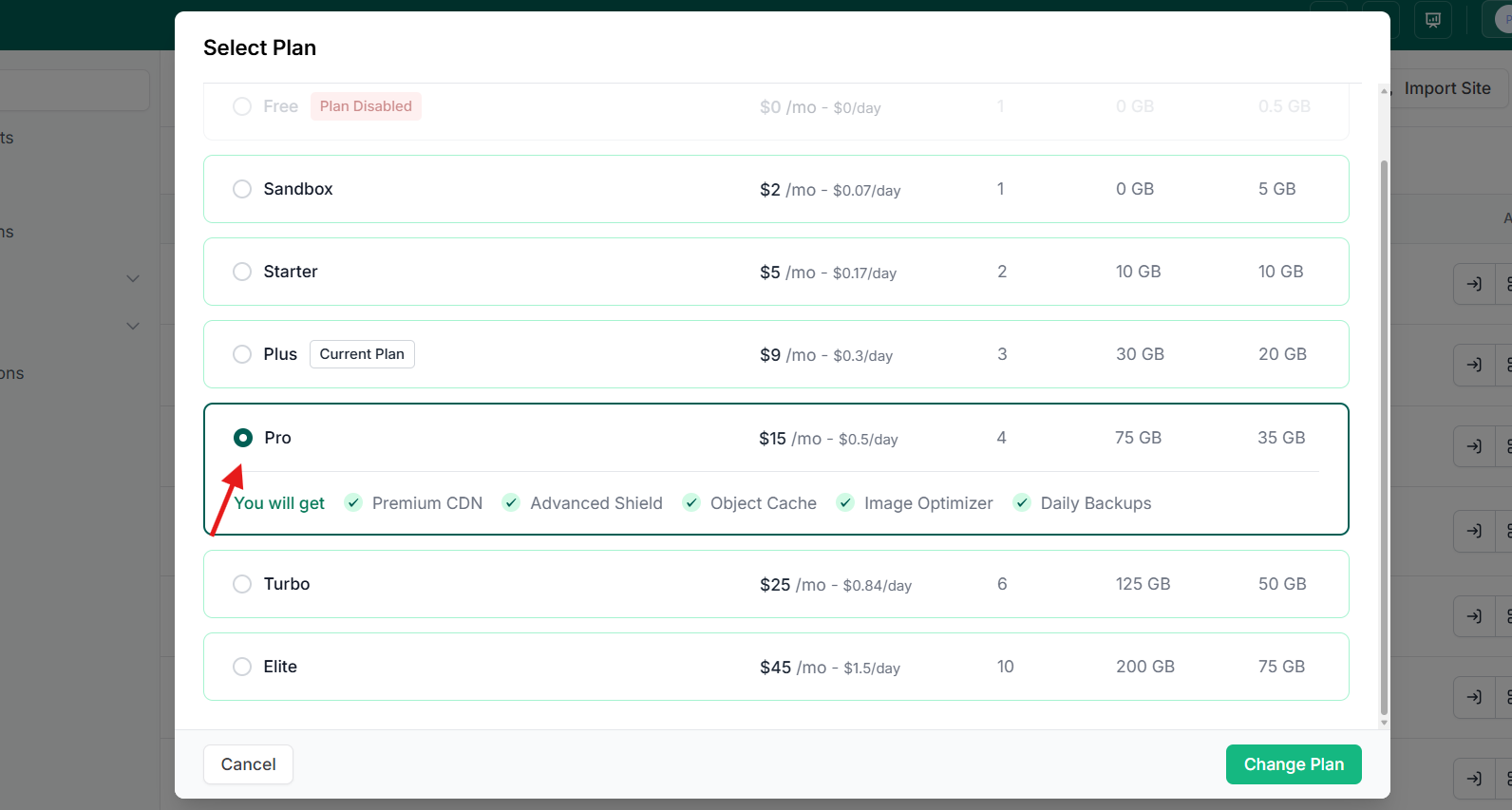
- Entry-Level Plan: Low-cost daily billing (for example $0.07/day) that includes core features like domain mapping, PHP configuration, and monthly backups.
- Full-Feature Plan: Higher-tier daily or monthly billing that unlocks advanced capabilities, multiple PHP workers, CDN bandwidth, daily backups, web application firewall, and built-in site-management tools.
These tiers let you start with zero commitment, move to a basic pay-as-you-go hosting setup when you need more stability, and upgrade to a robust pay-as-you-go cloud hosting solution for production workloads.
InstaWP’s managed cloud hosting exemplifies this approach. With flexible site plans from Starter to Pro, you always find the right fit, whether you’re a solo blogger or an agency managing dozens of client sites.
Usage Metrics: Compute, Storage, and Bandwidth
Usage-based billing tracks three main resource categories:
- Compute (CPU/Workers): The number of PHP workers or CPU cores allocated and the hours they run.
- Storage (Disk Space): The gigabytes of disk space used by files, databases, and backups, even temporary WordPress sandboxes.
- Bandwidth (CDN/Data Transfer): Outbound traffic served to site visitors, often cached through a global CDN network.
By measuring these exact metrics, the pay-as-you-go model can charge you proportionally, for example, $0.01 per GB of bandwidth or $0.05 per PHP-worker-hour, so you never pay for unused capacity.
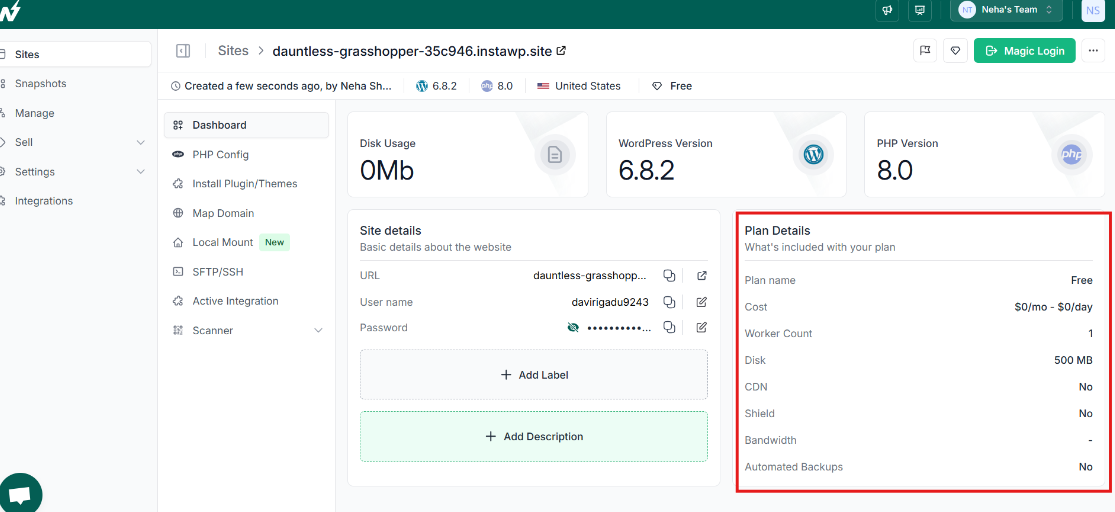
With InstaWP’s real-time usage dashboard, you see exactly how each resource contributes to your bill; no hidden fees, no surprises.
Real-Time Dashboards vs. Monthly Statements
A hallmark of modern pay-as-you-go WordPress platforms is transparent billing through:
- Real-Time Usage Dashboards: Interactive charts showing live CPU usage, storage consumption, and daily charges. You can filter by date ranges or resource types to spot cost spikes immediately.
- Monthly Statements: Automated summaries that roll up daily usage into a single final invoice, complete with line-item detail for each site and resource.
This dual approach ensures you have instantaneous insights to optimize spend and a clear, consolidated view when it’s time to review or share expenses with clients.
By combining on-the-fly visibility with clear monthly statements, InstaWP’s pay-as-you-go hosting ensures you can optimize performance and cost at the same time.
What Are the Benefits of Pay-As-You-Go WordPress
Choosing pay-as-you-go WordPress means:
Better Cost Predictability and Transparency
With traditional fixed-price plans, you commit to a monthly fee whether your site is busy or idle. The pay-as-you-go model is different. You receive a real-time breakdown of your pay-as-you-go WordPress resource usage, CPU hours, storage consumed, CDN traffic, and you only pay for what you use.
That means no more guessing how much capacity you need, no surprise overage fees, and a billing experience as clear as viewing your utility meter.
Instant Scalability on Demand
Web projects often experience unpredictable traffic spikes, for example, a product launch, marketing campaign, or holiday sale. Fixed plans force you to provision peak capacity in advance and pay for it all month long.
In contrast, pay-as-you-go hosting lets you upgrade resource tiers at any moment and downgrade as soon as demand drops. You can spin a site from a low-cost sandbox to a high-performance environment in seconds and then scale back down without penalty.
Perfect for Temporary and Iterative Workflows
Developers and agencies frequently need disposable environments to build, test, or demo features. A pay-as-you-go cloud hosting site can be created, used for a few hours or days, and then torn down with minimal cost, often just a few cents.
This makes it easy to maintain clean, isolated workspaces for plugin development, theme testing, client previews, or QA cycles without long-term commitments or wasted spend.
How InstaWP Brings Pay-As-You-Go WordPress to Life
Pay-as-you-go WordPress stands second to none when it comes to building and launching WordPress sites on your terms. InstaWP was built from the ground up to showcase exactly how the pay-as-you-go model is supposed to work for WordPress professionals.
Once you explore InstaWP’s site plans, you’ll see how it elevates flexibility to a whole new level.
Here’s how InstaWP turns the promise of pay-as-you-go WordPress hosting into a seamless reality:
A Unified Build-Host-Manage Workflow
Most pay-as-you-go WordPress hosting solutions force you to stitch together separate services, one for spinning up sandboxes, another for staging or production, and yet another for ongoing site management. InstaWP combines all three in a single dashboard. You can:
- Create a fresh WordPress site in under 10 seconds
- Apply snapshots or templates to reuse baseline code and content
- Manage backups, security scans, and performance reports—all without leaving the platform
Because everything lives under one roof, you avoid context-switching and can focus on coding, testing, and delivering value to clients.
Transparent, Predictable Billing with Real-Time Insights
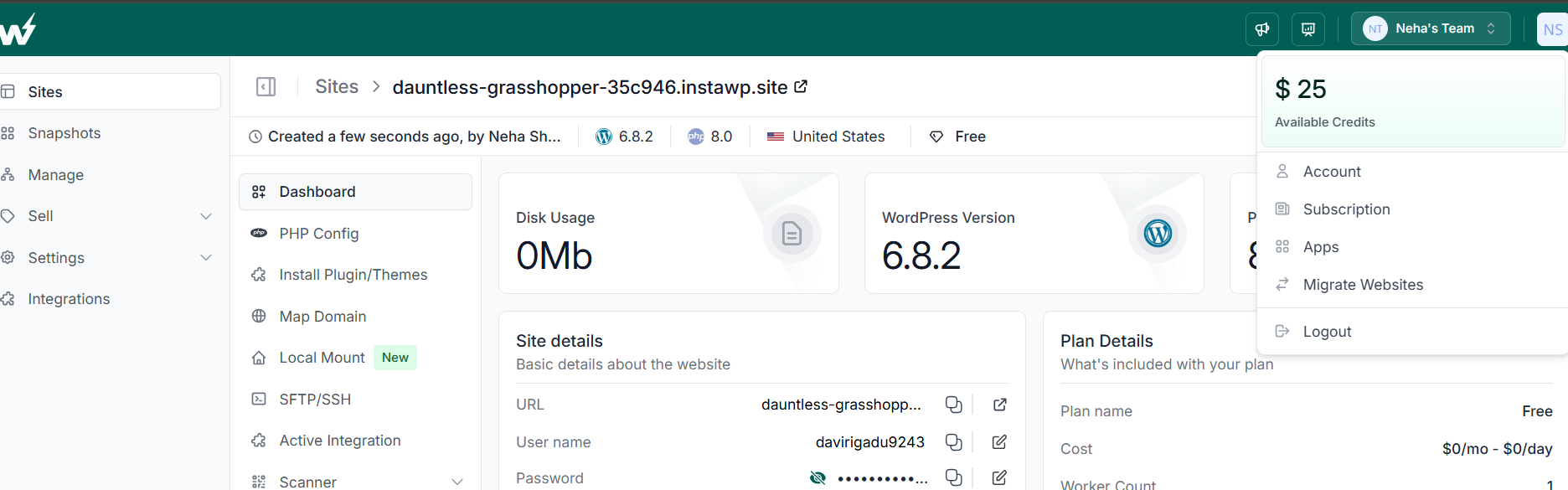
One of the biggest questions around pay-as-you-go cloud hosting is “How much will I actually pay?” InstaWP answers with crystal-clear visibility. From day one, you receive $25 in free credits to experiment risk-free. As you build and run sites, the Usage tab shows:
- Daily resource breakdowns for CPU hours, storage, and CDN traffic
- Real-time dollar amounts down to the cent, so you never guess your bill
- Credit balances and projected costs for the month
This level of transparency means you can plan budgets, provide accurate estimates to clients, and avoid any unpleasant surprises when invoices arrive.
Global Performance Paired with Local Control
For true pay-as-you-go WordPress development, performance matters at every stage. InstaWP’s network of data centers ensures fast site creation and low-latency page loads. Yet for code-first teams, local development workflows remain essential. InstaWP bridges that gap with Local Mount:
- Mount your remote site’s filesystem directly in your OS (via WebDAV or SFTP)
- Edit code in your favorite IDE as if it were running on localhost
- View logs, run CLI commands, and debug in real time
You get the best of both worlds: cloud speed and scale when you need it, with the familiar comfort of local-style development.
Feature-Rich Plans Aligned to Your Needs
In the pay-as-you-go model, one size rarely fits all. InstaWP offers flexible managed WordPress hosting tiers, each unlocked by actual usage:
- Sandbox at $0.07/day includes domain mapping, PHP config, and monthly backups
- Starter adds a global CDN, 10 GB disk, and weekly backups for a modest daily or monthly rate
- Plus unlocks multiple PHP workers, 30 GB CDN bandwidth, daily backups, and an integrated Web Application Firewall
Upgrading or downgrading between tiers takes one click, and each tier’s features map directly to the resources you consume. This ensures your pay-as-you-go hosting costs stay proportional to your project’s demands.
By choosing InstaWP, you harness the full promise of pay-as-you-go hosting for WordPress: you build faster, scale dynamically, and pay only for what you use; all within a single, developer-friendly platform.
How to Get Started with Pay-As-You-Go WordPress
Leaping to pay-as-you-go WordPress is straightforward. All you need is an active InstaWP site plan. Follow these detailed steps to register, configure your environment, and launch your first site under a pay-as-you-go hosting model.
- Go to instawp.com and click Get Started. You will be prompted to enter your email address and create a password.
- To enable pay-as-you-go cloud hosting, InstaWP requires a valid credit card. This verification step prevents abuse of the free tier and unlocks $25 in promotional credits. Enter your card details securely in the billing section.
- Check your inbox for InstaWP’s confirmation email. Click the verification link to confirm your address. Once verified, your account status will change from “Unverified” to “Active,” and you can begin creating sites immediately.
- Upon first login, navigate to the Account tab. You should see your starting balance of $25 in credits. These funds offset your early usage while you explore pay-as-you-go hosting without incurring charges to your card.
- Click Add Site, then select a region from the list of available data centers (e.g., Singapore, Frankfurt, or Virginia). Picking the nearest point of presence minimizes latency for both development and end-user access.
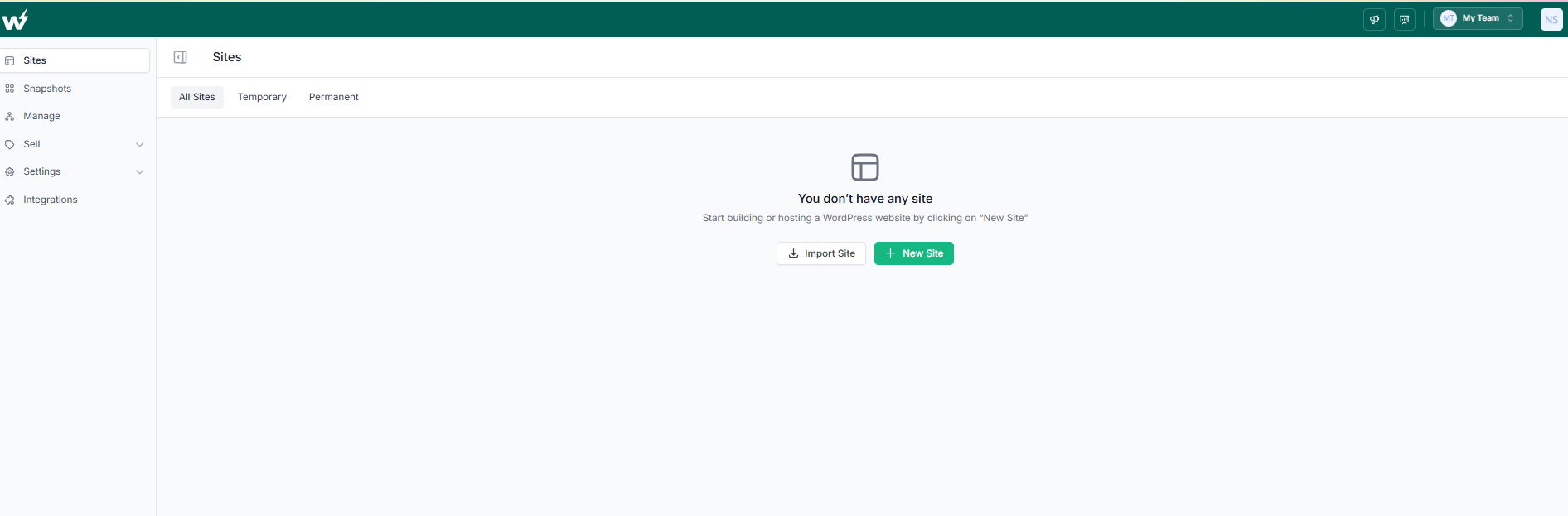
- Decide how you want to create a site on InstaWP. You have four options to choose from.
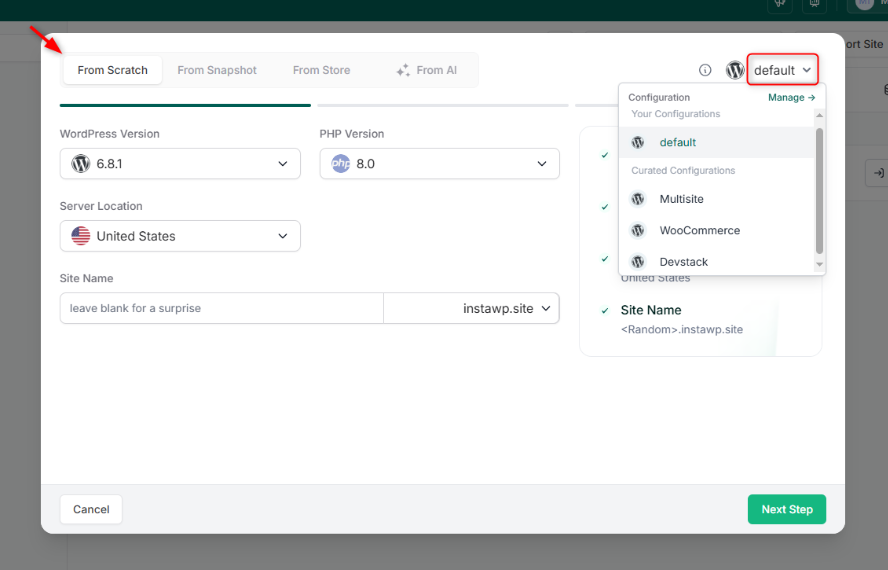
- Provide a memorable site name (e.g., “my-feature-test”) and other configurations. Click Next Step.
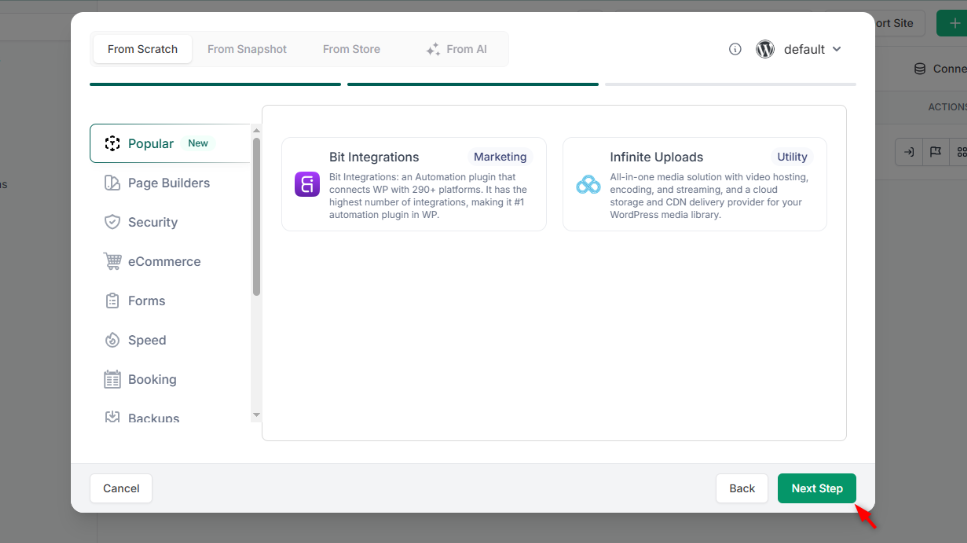
- Select the site plan. InstaWP offers tiered options under the pay-as-you-go model. Click ‘ Launch’ and InstaWP will provision your environment in under ten seconds. You’ll see a live URL, login credentials, and an overview of your current daily or monthly rate.
This will be a fully hosted WordPress site. You don’t have to purchase hosting separately. But you do have to map the domain.
You can also white label this website over a single toggle.
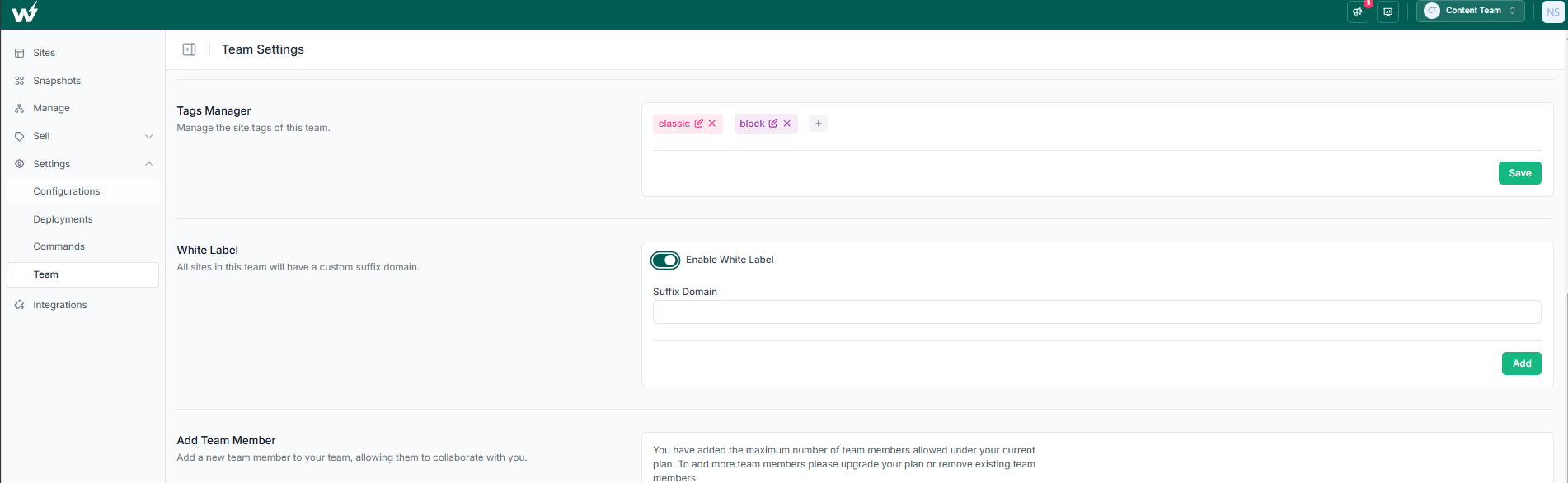
By completing these steps, you’ll have a fully functional WordPress instance running on a pay-as-you-go cloud hosting model. In the next section, we’ll explore how to configure domains, manage PHP settings, and monitor your resource usage to optimize costs and performance.
Advanced InstaWP Workflows to Enjoy
Once you have mastered the basics of pay-as-you-go WordPress hosting on InstaWP, these advanced workflows unlock even greater efficiency and power for development and operations.
Local Mount for True Code-First Development
Local Mount lets you mount your remote InstaWP site’s filesystem directly into your operating system; no SSH hacks required.
- Edit code locally in your IDE as if the site lived on your machine.
- View logs and run CLI commands in real time, without extra plugins.
- Maintain a pay-as-you-go hosting workflow—no local servers to configure or idle VM costs.
Automated Site Management
InstaWP’s built-in management tools streamline maintenance under a pay-as-you-go cloud hosting model:
- Schedule daily or on-demand tests that measure page load times, Time to First Byte, and resource usage.
- Receive alerts if metrics exceed predefined thresholds.
- Auto-scan core, themes, and plugins for known security issues.
- Generate WordPress maintenance PDF reports to share with stakeholders or include in client deliverables.
- Ping your production endpoints at configurable intervals.
- Instantly notify your team via email or webhooks when downtime occurs.
- Select multiple sites and perform bulk plugin updates, theme activations, or user role changes.
Conclusion & Next Steps
The pay-as-you-go model is reshaping how developers and agencies build, test, and deploy WordPress sites. By aligning costs with actual usage, you eliminate waste, avoid surprise invoices, and gain the agility to spin up environments on demand.
InstaWP’s unified platform delivers this flexibility with a robust feature set, from Local Mount code editing to automated security scans, while keeping billing transparent down to the cent.
Next Steps:
- Spin up your first free Sandbox at instawp.com and explore usage-based billing.
- Create a snapshot of your preferred configuration to save time on future projects.
- Upgrade to Starter or Plus when you need CDN, backups, or advanced site management.
Embrace pay-as-you-go WordPress today and experience full control over performance, security, and cost. Start building smarter with InstaWP.
FAQs
Q1. Is pay-as-you-go WordPress secure on InstaWP?
Yes. InstaWP’s pay-as-you-go hosting includes enterprise-grade security features even on entry tiers. The Plus plan adds Shield, a web application firewall that blocks DDoS, SQL injection, and common bot attacks. You also get vulnerability scans and activity logs to detect and remediate threats promptly.
Q2. Can I revert to a fixed monthly plan if needed?
Absolutely. While InstaWP excels at pay-as-you-go cloud hosting, you can switch to a flat-rate plan at any time by contacting support. Your sites and configurations stay intact, and billing transitions seamlessly.
Q3. How are snapshots and templates billed?
Snapshots incur a small daily charge based on storage usage when enabled; deleting a snapshot stops the fee immediately. Templates, a shareable version of snapshots, cost $1 each or $2/month to keep instant-snapshots live. These fees align with the pay-as-you-go model by matching storage needs to costs.
Q4. What happens if I spin up a site for just a few hours? Will I get a huge bill?
No. InstaWP bills pro rata. If you run a Sandbox site for only 6 hours at $0.07/day, you pay roughly $0.018. Your Usage dashboard shows these fractional amounts in real time, ensuring pay-as-you-go WordPress remains truly proportional to usage.
Q5. How do I handle traffic spikes without overpaying?
Upgrade your site from Sandbox to Starter or Plus during peak events, then downgrade immediately after. InstaWP’s automatic prorated billing charges only for the days you used higher resources. Upcoming auto-scaling features will automate this process based on real-time traffic thresholds.