Choosing among the best Cloudways alternatives in 2026 starts with how you build, host, and manage WordPress sites. The right fit depends on your total hosting costs, the server management you’re comfortable handling, and how easily you can add or remove client sites.
This guide compares seven alternatives, including InstaWP, across pricing, billing models, included features, and agency workflows. You’ll see the trade-offs between per-site hosting and server-based options, what to check beyond the starting price, and how to plan your migration.
- Cloudways bills per server, not per site. Flexible servers on DigitalOcean Premium cost $14 to $99 a month for 1 to 8 GB of RAM, with unlimited sites on each, and you decide when a server is full.
- Autonomous is now a per-website product. Growth is $99 a month for one website, Scale $199 and Plus $399, with disk, bandwidth and autoscaling billed on top.
- Pick InstaWP if your site count changes month to month. Each site is billed daily on its own plan, from $5 (Starter) to $45 (Elite), so a 10-day campaign site costs 10 days.
- Stay on Cloudways if you host Laravel, Magento or custom PHP, want AWS or Google Cloud underneath, or pack many small sites onto one server. At high density it is cheaper per site than InstaWP.
- xCloud, GridPane and RunCloud keep the server model but change who runs the server and how you pay for the panel.
- Migrating off Cloudways is a test-then-switch job: move one site, check it on a temporary URL, then point DNS. Migration onto InstaWP is free.
Table of Contents
What Are the Best Cloudways Alternatives in 2026?
The best Cloudways alternatives depend on why you are leaving. If the problem is paying for server capacity while your site count moves, choose a per-site host such as InstaWP. If you want premium managed hosting for one important site, choose Kinsta, WP Engine or Rocket.net. If you like the server model but want a different panel or price, choose xCloud, GridPane or RunCloud.
Pricing verified: 8 October 2026 for Cloudways, WP Engine, Rocket.net, xCloud, GridPane and RunCloud, on each vendor’s own pricing page. Kinsta was checked on 6 October 2026. InstaWP prices are from the InstaWP pricing page.
Who Are Cloudways’ Main Competitors?
Cloudways’ main competitors fall into two camps: managed WordPress hosts that run the server for you (InstaWP, Kinsta, WP Engine and Rocket.net) and server control panels that manage a server you rent from a cloud provider (xCloud, GridPane and RunCloud). Which camp you need comes down to one question: do you still want to size servers?
Grouped by how they charge, the Cloudways competitors in this guide look like this:
- Per-site, pay-as-you-go hosting bills each site by the day, with no server to size: InstaWP.
- Plan-based premium managed hosts sell a set number of sites or installs per plan: Kinsta, WP Engine and Rocket.net.
- Server-priced panels keep the Cloudways model of unlimited sites per server, at a different price: xCloud, GridPane and RunCloud.
If you also host Laravel or Magento, check the panels first. RunCloud manages PHP apps as well as WordPress, while InstaWP hosts WordPress only.
Why Do Agencies Look for a Cloudways Alternative?
Agencies usually leave Cloudways for one of three reasons: the bill tracks servers instead of clients, someone on the team has to size and watch those servers, or the fully managed Autonomous option costs far more per site. Cloudways itself is month to month with no contract, so “vendor lock-in” is rarely about a contract. It is about how much of your workflow depends on one provider’s servers.
Server-level pricing when your site count fluctuates
On Cloudways Flexible you pay for a server by the hour, then put as many sites on it as it can handle. That is efficient when the server is full and wasteful when it is half empty. A client who leaves does not lower your bill, and a client who arrives may push you to the next server size.
Capacity planning stays with you
Cloudways does not say how many sites fit on a server, because it depends on traffic, plugins and caching. Someone on your team decides when to resize, when to add a second server and which sites move. Cloudways sells extra help for that: its Advanced Support add-on costs $100 a month or 10% of the invoice, offered at $25 a month in a current promotion.
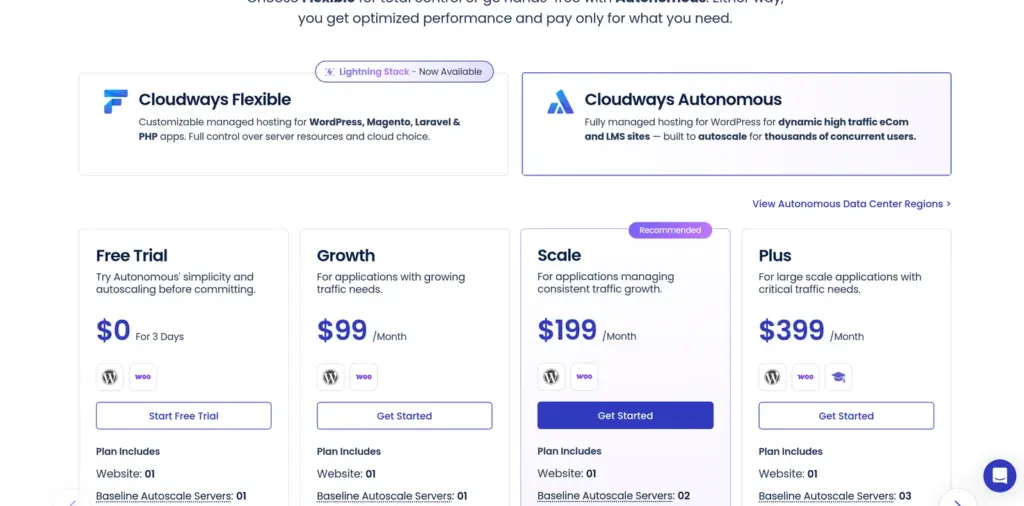
Autonomous now costs from $99 per website
Cloudways Autonomous is the hands-off option, built on Kubernetes with autoscaling, Cloudflare Enterprise and Object Cache Pro included. Each plan now covers one website: Growth is $99 a month, Scale $199 and Plus $399. Disk ($1 per GB), bandwidth ($0.04 per GB) and autoscaling beyond the baseline ($0.07 to $0.12 per server per hour) are billed on top. For an agency with ten modest client sites, that model does not fit.
What vendor lock-in looks like on managed hosting
Managed WordPress hosting lock-in is usually practical rather than contractual: staging, backups and workflows that only work inside one dashboard, and migrations that need the provider’s help. Before you switch, check four things on any host: whether you get SSH and SFTP, whether you can download full backups, whether there is an annual contract, and what moving away costs.
These vendor lock-in checks for managed hosting go deeper. On InstaWP, every plan includes SSH, SFTP, WP-CLI and Git, backups can be downloaded, there is no annual contract, and the pricing page lists a $2 charge for using InstaWP’s migration tool to move a site away. You can always move a site yourself over SSH.
Cloudways Pricing in 2026: How Much Does Cloudways Cost?
Cloudways pricing starts at $14 a month for a 1 GB DigitalOcean Premium server on Flexible, and at $99 a month for one website on Autonomous. Flexible is billed hourly and invoiced in arrears in the first week of each month. Prices exclude tax. Cloudways became part of DigitalOcean after its 2022 acquisition and now invoices as DigitalOcean LLC.
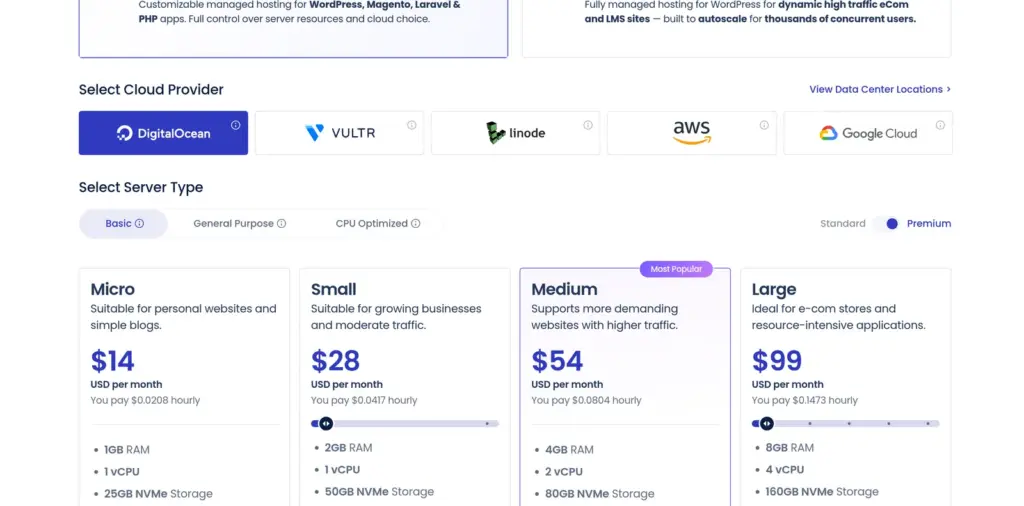
Pricing verified: 8 October 2026 on cloudways.com/en/pricing.php. The page was running a “30% off for 3 months” offer that day; the prices below are list prices.
Flexible servers also run on Vultr, Linode, AWS and Google Cloud at different prices, and DigitalOcean Standard servers (SSD rather than NVMe) start lower, at $11 a month. Its own add-ons change the real total:
Included at no charge on Flexible: free SSL, managed migration, staging and cloning, Redis, a WordPress vulnerability scanner, and Object Cache Pro on servers with 4 GB of RAM or more. There is a 3-day free trial with no credit card.
How Did We Compare These Cloudways Alternatives?
InstaWP compared each Cloudways alternative on the five things that decide whether a Cloudways customer is better off: what the billing unit is, what the cheapest useful plan costs, how adding or removing a site changes the bill, who looks after the server, and what you can do outside WordPress. Every price was taken from the vendor’s own pricing page on the date shown, at list price, billed monthly where a monthly price exists.
We did not run speed benchmarks across these hosts. Speed on a shared server depends on how many sites you put on it, so a single number would mislead. InstaWP’s own server benchmark is published separately and linked below. InstaWP is our product and is listed first; every other entry includes the job it does better than we do.
1. InstaWP: Best for Agencies Whose Site Count Changes
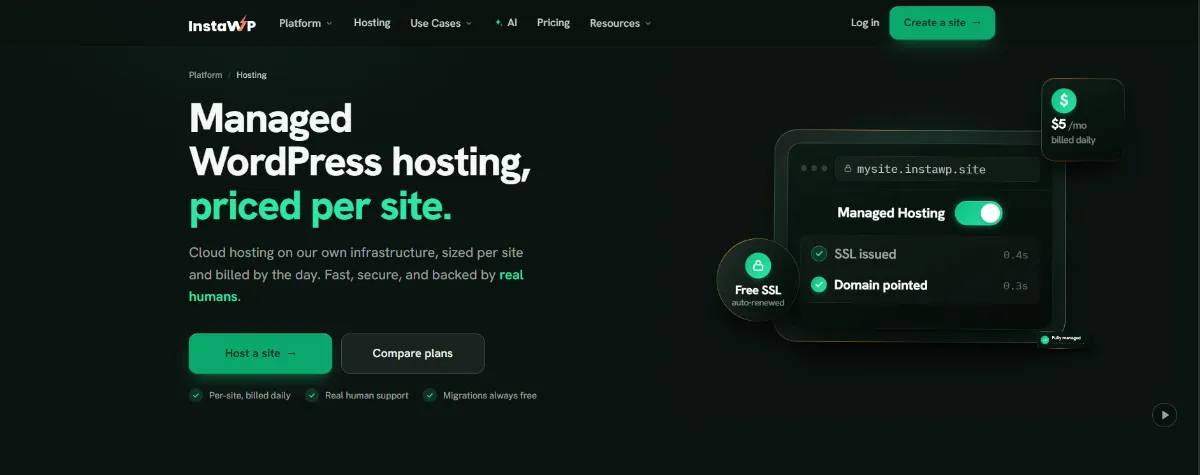
InstaWP is the best Cloudways alternative when your client list moves. It is managed WordPress hosting where each site runs on its own plan with reserved resources, its own Linux user and database, and its own line on a bill charged by the day. Sites are hosted on InstaWP’s own infrastructure in five regions: the US, UK, Germany, Singapore and Australia.
The billing unit is the main difference from Cloudways. A brochure site can sit on Starter while a busy store runs on Turbo, and each is charged at its own rate. Win a client and you add one site. Finish a project and you move the site to the $2 Sandbox tier or delete it, and the bill changes that day. There is no server to size.
Managed hosting features of InstaWP
Every production plan includes the InstaCDN edge network, the InstaShield firewall, free SSL, off-site backups and full developer access. Higher plans add resources and features:
- Firewall: InstaShield WAF, Basic on Starter and Advanced from Plus, with bot and DDoS protection from Plus.
- CDN: InstaCDN on every production plan, basic edge on Starter and premium from Plus.
- Object cache: a Redis-compatible object cache from Plus ($9).
- Staging: $2 sandboxes on every account, and built-in staging with push and pull from Pro.
- Developer access: SSH, SFTP, WP-CLI and Git on every plan, and PHP 7.4 to 8.5 per site. See WordPress developer tools.
- Support: human WordPress support on every plan.
Source: InstaWP pricing, checked 8 October 2026. Choosing the right InstaWP site plan matches each plan to a kind of site, and the WordPress hosting benchmark shows how InstaWP’s current servers scored (9.8 out of 10 in WP Benchmark, August 2026).
What InstaWP adds that Cloudways does not sell
Sandboxes that become production. A sandbox is a full WordPress site with SSH and WP-CLI for $2 a month. When it is ready, change its plan and it goes live on the same URL with the same data. The WordPress staging environment guide covers the full workflow.
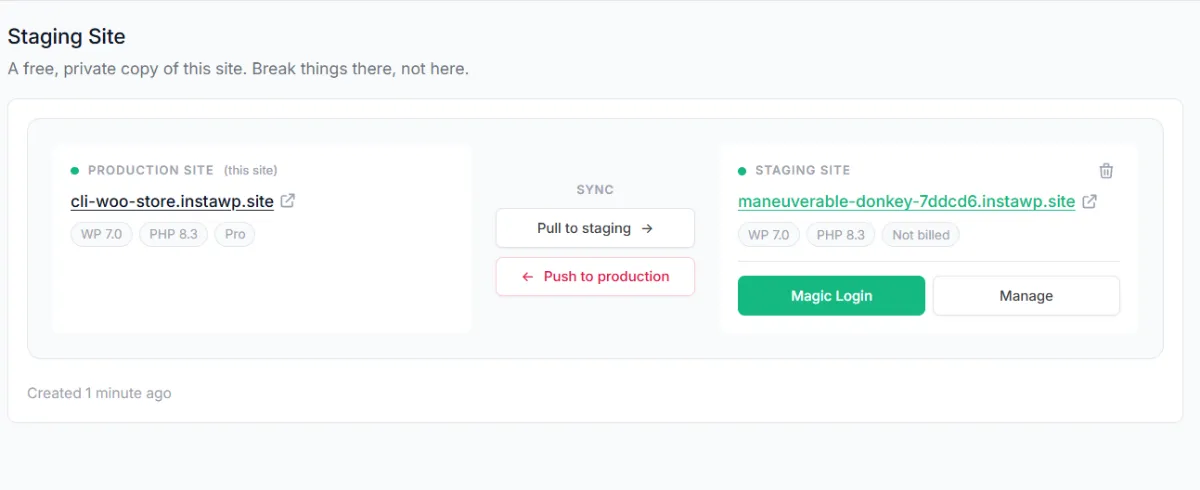
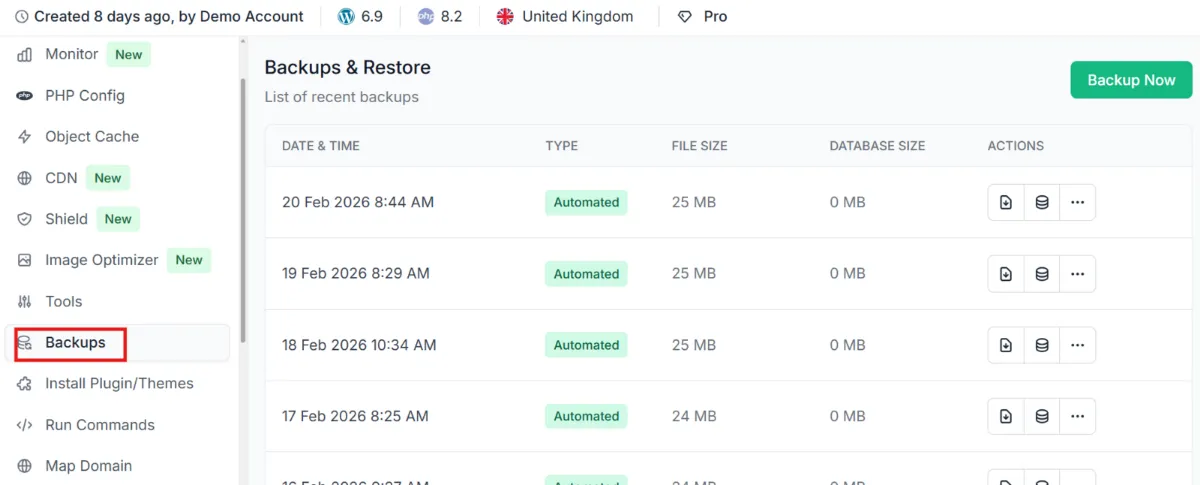
Backups you control. Off-site WordPress backups are stored in the site’s own region. Restore files, the database or both from the dashboard, take one on demand, or download it.
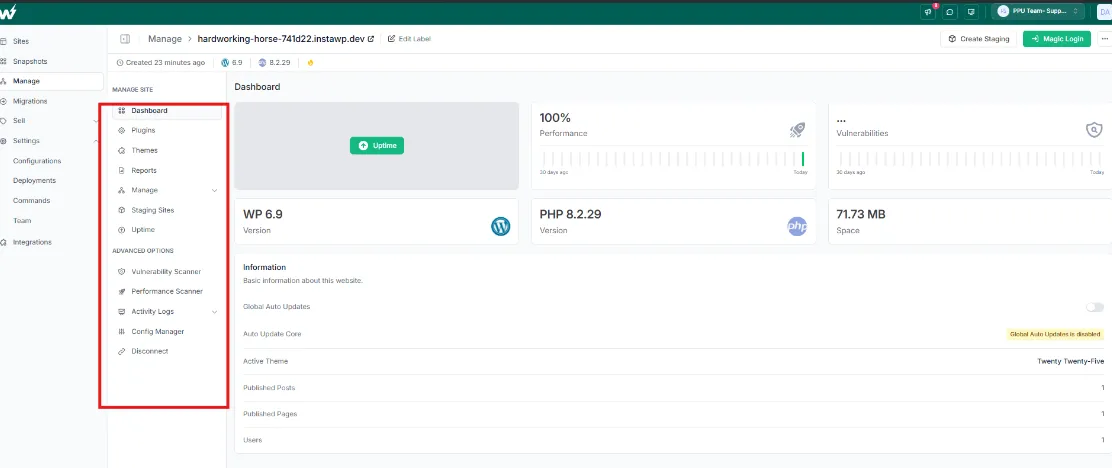
One dashboard for sites hosted anywhere. The free InstaWP Connect plugin brings a WordPress site on any host, Cloudways included, into the same dashboard. Advanced site management adds uptime monitoring, activity logs and update automation for $2 a month per site, free on Plus and above. See WordPress site management.
White-label resale. The Website as a Service platform gives you a branded storefront, checkout and client portal with your own plans and prices. There is no platform fee; native checkout takes 7% with Stripe fees included.
2. Kinsta: Best for One High-Traffic Site
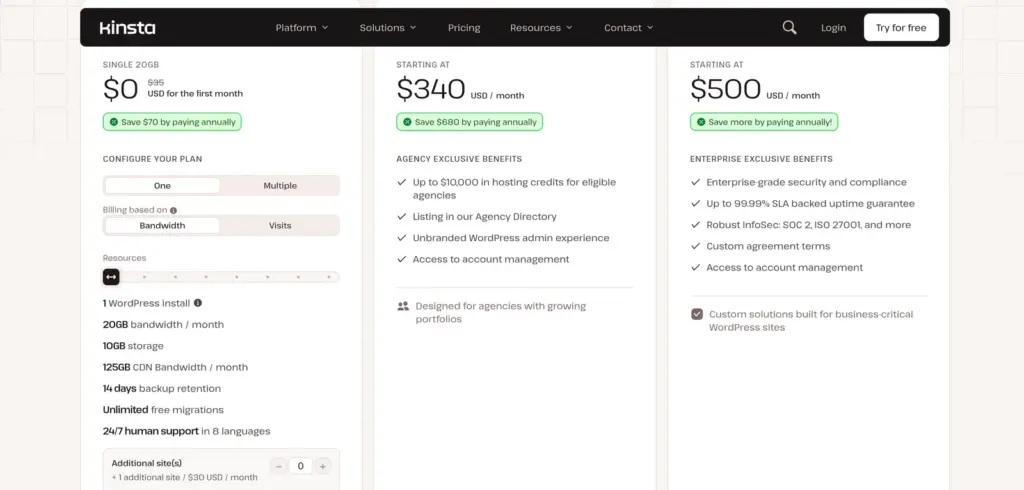
Kinsta is a premium managed WordPress host on Google Cloud. It starts at $35 a month billed monthly, or $30 a month billed annually, for one site, and every plan includes free staging, a built-in APM tool, Cloudflare Enterprise DDoS protection, free malware removal and 24/7 human support. Multi-site plans step up in fixed install counts, and Redis object cache is a $100 per site per month add-on.
The Kinsta alternatives for agencies guide works through the multi-site maths, and Kinsta’s pricing page has the current plans.
3. WP Engine: Best Big-Name Managed Platform for Agencies
WP Engine sells managed WordPress plans by site count. Its Essential plans cover 1, 3, 10 or 30 sites with visit allowances, start at $28 a month billed annually, and an extra site costs $20 a month. SSH, automatic SSL, daily backups and one-click staging are included on every plan, while the advanced DDoS and managed WAF is an optional add-on.
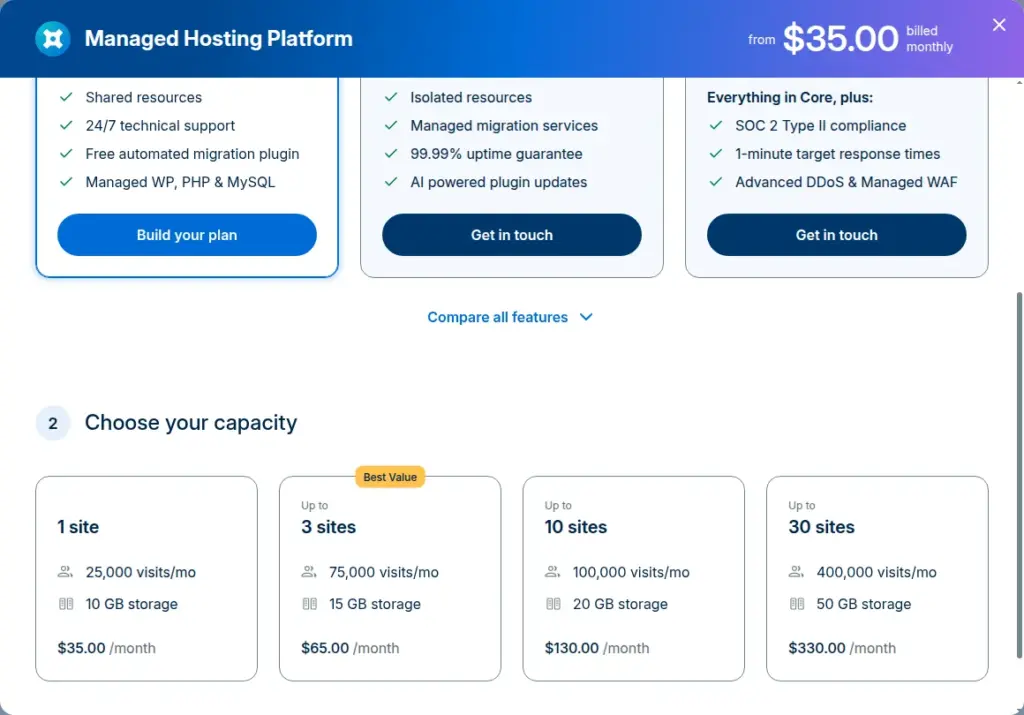
See WP Engine plans, and the Kinsta vs WP Engine comparison for the two premium options side by side.
4. Rocket.net: Best for Speed With a Built-In Edge Network
Rocket.net is a managed WordPress host whose plans each list an enterprise CDN and a WAF. Its Starter plan is $30 a month, or $25 a month billed annually, with $1 for the first month, free SSL, free migrations and a 30-day money-back guarantee. Pro, at $60 a month, covers multiple sites.
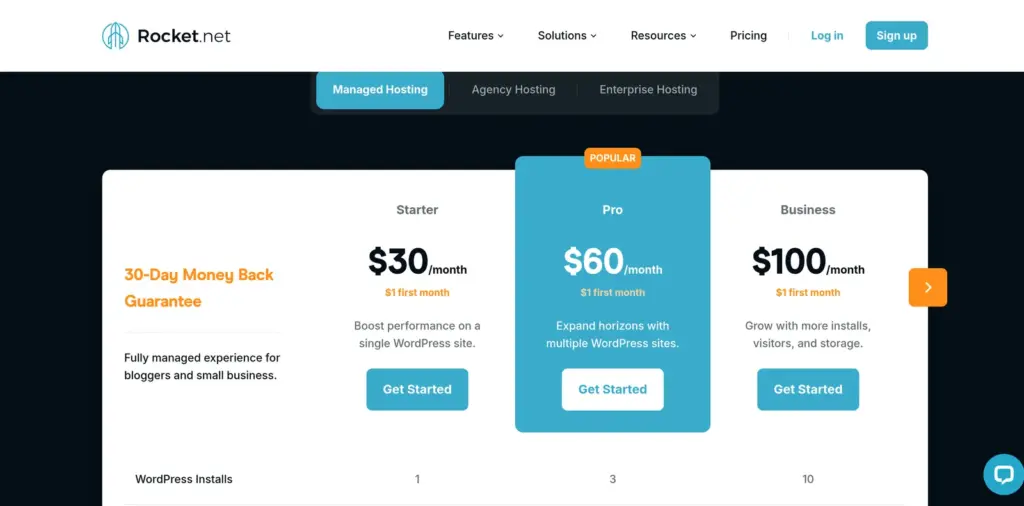
Prices are on Rocket.net pricing; Rocket.net alternatives covers where it falls short.
5. xCloud: Best for Cheap Servers With Unlimited Sites
xCloud keeps the Cloudways model of paying for a server and putting unlimited sites on it, at lower prices. Managed servers start at $5 a month, and its control panel is free for your first server (up to 10 sites) if you bring your own VPS, then $5 per server per month for 2 to 5 servers. It says it refunds the days you did not use.
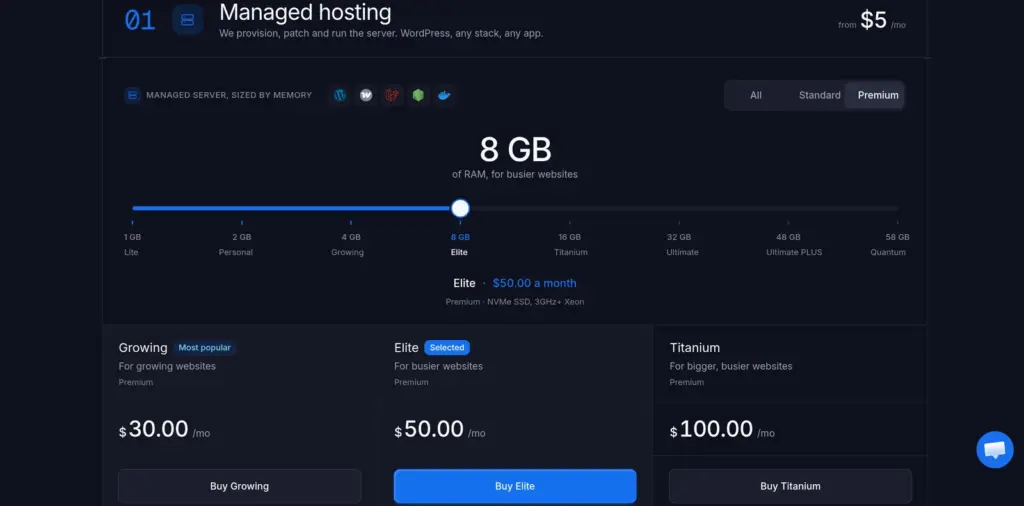
See xCloud pricing.
6. GridPane: Best for Agencies Running Their Own Servers
GridPane is a WordPress control panel for agencies that want to run their own cloud servers. Its Core plan is free and hosts up to 25 websites on your own Vultr server or a managed PeakFreq server, and fully managed PeakFreq servers start at $19 a month. You pay your cloud provider separately for a self-managed server.
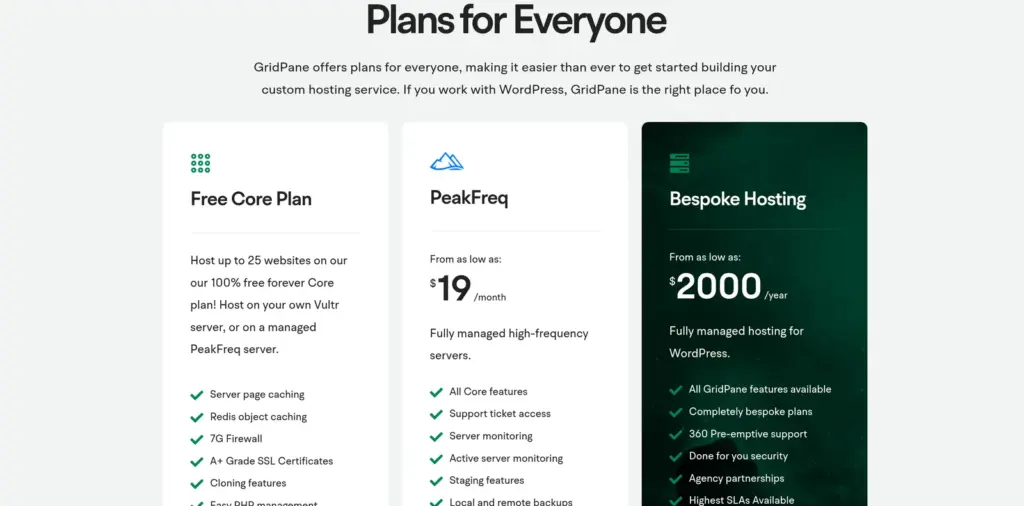
See GridPane pricing, or GridPane alternatives for agencies for the trade-offs.
7. RunCloud: Best Control Panel for Developers Who Want Root
RunCloud is a server control panel, not a host. You connect a server from any cloud provider and manage PHP apps, WordPress sites, NGINX caching, Redis and backups through its dashboard. Plans start at $9 a month for one server, $19 a month for up to 50 servers and $49 for up to 100, plus whatever your cloud provider charges.
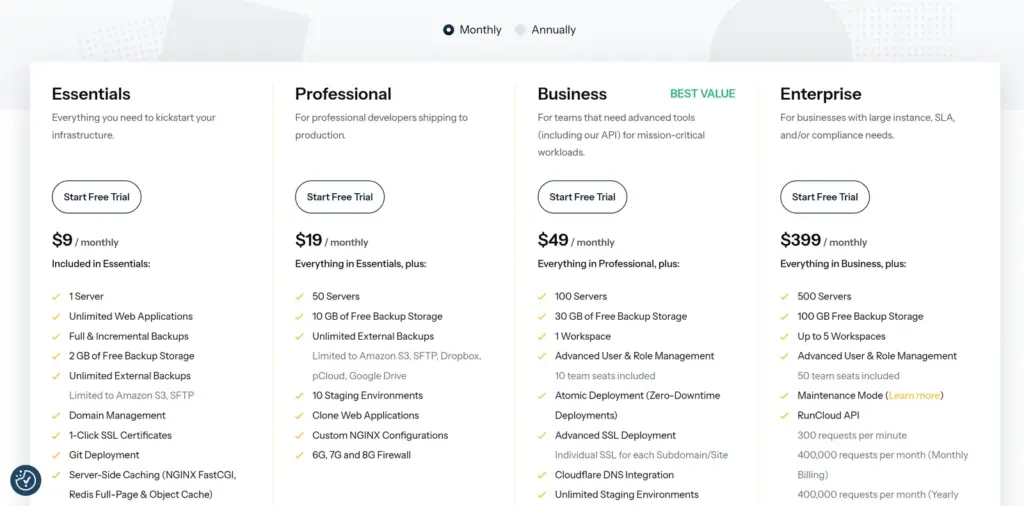
See RunCloud pricing.
Cloudways vs InstaWP: How Do They Compare?
Cloudways and InstaWP both bill monthly with no contract and both run WordPress on managed infrastructure. The difference is the unit: Cloudways sells servers you fill with sites, and InstaWP sells sites that each carry their own resources. Cloudways also runs other PHP applications and lets you choose the cloud underneath; InstaWP is WordPress only.
Cloudways details from its pricing page on 8 October 2026; Cloudways MCP facts from a test of its public endpoint on 6 October 2026. InstaWP details from the InstaWP pricing page.
Is Cloudways’ Pricing Flexible for Agencies With Fluctuating Site Counts?
Partly. Cloudways bills servers by the hour, so you can add or remove a server at any time and only pay for the hours it ran. But the bill follows server size, not the number of sites, so a changing client list means resizing or adding servers yourself. On InstaWP, the bill follows each site directly.
Take an agency that hosts six small client sites and launches three campaign sites that live for ten days.
How InstaWP totals the daily charges is explained in how InstaWP billing works, and the model behind it in pay-as-you-go WordPress hosting.
When Is Cloudways Still the Better Choice?
Cloudways is still the better choice in four situations:
- You host apps other than WordPress. Laravel, Magento and custom PHP run on Cloudways. InstaWP hosts WordPress only.
- You need a specific cloud. Cloudways runs on DigitalOcean, Vultr, Linode, AWS or Google Cloud, which matters if a client requires one of them or a region only they cover.
- You pack many small sites onto one server. At high density, one server costs less per site than any per-site plan, including InstaWP’s.
- You want a short no-card trial. Cloudways offers 3 days with no card. InstaWP needs a card to launch a site, and adding one unlocks $25 in credits.
Can You Keep Your Current Host and Still Use InstaWP?
Yes. You do not have to move every site to use InstaWP. The free InstaWP Connect plugin links a WordPress site on any host, including Cloudways, to the InstaWP dashboard, where you can manage it, run scanners and create staging copies alongside the sites InstaWP hosts. Many agencies start this way and move sites over one at a time.
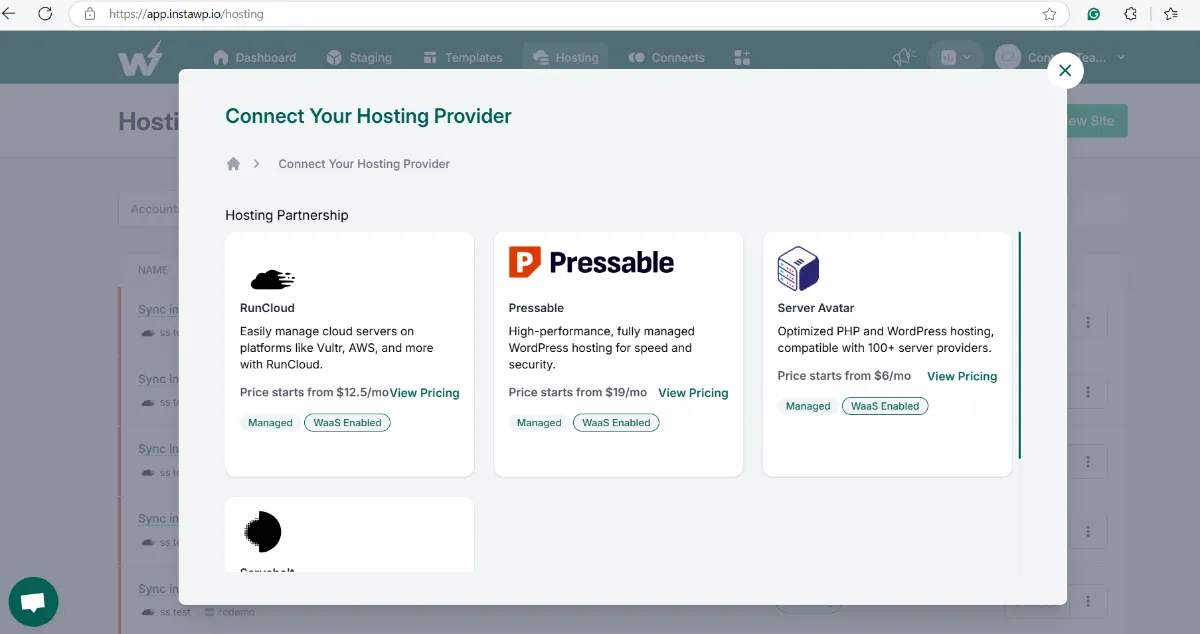
Server-panel tools such as RunCloud, ServerAvatar and Servebolt, and managed hosts such as Pressable, remain good options when a client must stay on their own infrastructure. For a structured way to compare them, read these factors for choosing a managed hosting provider and the agency WordPress hosting guide.
There is also an earlier roundup of Cloudways options for developers and a look at hosts without contract lock-in, including how InstaWP handles portability. Agencies weighing the wider picture can also read about InstaWP’s managed hosting for agencies.
How Do You Migrate From Cloudways to InstaWP?
Move one site first, test it on InstaWP’s temporary URL, and keep the Cloudways server running until DNS has switched. Migration onto InstaWP is free, and the original site stays live while it is copied.
The WordPress migration tool page covers each migration option, and how to migrate WordPress from one host to another walks through a manual move.
Conclusion: Which Cloudways Alternative Should You Choose?
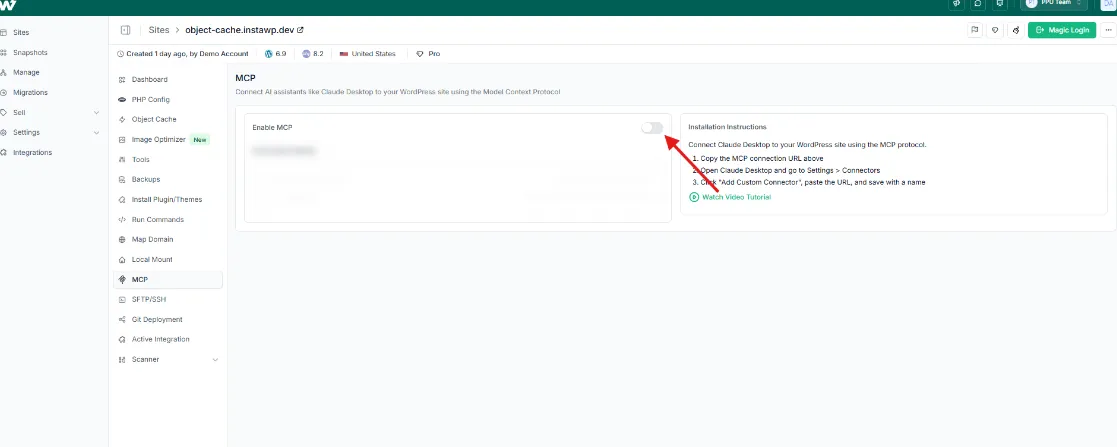
Cloudways is a good fit when you want to choose your cloud, run non-WordPress apps and fill servers with sites yourself. If your site count changes month to month, InstaWP is the stronger Cloudways alternative: each WordPress site is billed daily on its own plan from $5, with sandboxes, staging, site management and MCP on one platform. Kinsta, WP Engine and Rocket.net suit premium single sites, and xCloud, GridPane and RunCloud suit teams that want to keep running servers.
The quickest way to decide is to move one client site to InstaWP’s managed WordPress hosting and compare the bill and the workflow for a month.
Cloudways Alternatives: Frequently Asked Questions
What is the best Cloudways alternative?
For agencies whose site count changes, InstaWP is the best Cloudways alternative, because each site is billed daily on its own plan from $5 a month. Kinsta and WP Engine suit premium single sites, and xCloud, GridPane and RunCloud suit teams that want to keep running their own servers.
Who are Cloudways’ main competitors?
Cloudways’ main competitors are managed WordPress hosts such as Kinsta, WP Engine, Rocket.net and InstaWP, and server control panels such as xCloud, GridPane and RunCloud. The hosts manage everything for you; the panels manage a server you rent from a cloud provider.
How much does Cloudways cost per month?
On 8 October 2026, Cloudways Flexible started at $14 a month for a 1 GB DigitalOcean Premium server with unlimited sites, and Autonomous started at $99 a month for one website. Flexible is billed hourly and invoiced monthly in arrears; add-ons such as CDN and malware protection cost extra.
Is Cloudways’ pricing flexible for agencies with fluctuating site counts?
Partly. Servers are billed by the hour and sites per server are unlimited, but the bill follows server size, not site count, so you still resize or add servers as clients come and go. Per-site hosts such as InstaWP change the bill the day a site is added or removed.
Is Cloudways owned by DigitalOcean?
Yes. DigitalOcean acquired Cloudways in 2022, and Cloudways now invoices customers as part of DigitalOcean LLC. You can still choose Vultr, Linode, AWS or Google Cloud servers on Cloudways Flexible.
Is there a cheaper alternative to Cloudways?
For a single small WordPress site, yes: InstaWP Starter is $5 a month per site, against $14 a month for Cloudways’ 1 GB DigitalOcean Premium server. For many small sites packed onto one server, Cloudways or xCloud can be cheaper per site.
Does InstaWP have a free plan or trial?
No. Creating an InstaWP account is free, a card is required to launch a site, and adding one unlocks $25 in credits to put toward your sites. Every production plan has a 14-day money-back guarantee, and there is no annual contract.
Can I host my Cloudways sites on InstaWP?
Yes, if they are WordPress sites. InstaWP is a managed WordPress hosting provider with production plans from $5 a month per site, and migration onto InstaWP is free. Laravel, Magento and other PHP apps need to stay on Cloudways or another general PHP host.
How do I migrate from Cloudways to InstaWP?
Create a site on InstaWP, copy the Cloudways application over with the free migration tool, test it on the temporary URL, then point your domain and SSL is issued automatically. Keep the Cloudways server until traffic looks normal, then delete it to stop the hourly charge.
Is Kinsta better than Cloudways?
It depends on how many sites you run. Kinsta suits one important site: $35 a month (or $30 billed annually) buys premium support, free staging, an APM tool and Cloudflare Enterprise DDoS protection, with no server to manage. Cloudways suits many smaller sites, because a $14 Flexible server holds unlimited sites but leaves capacity planning to you.
Is RunCloud better than Cloudways?
RunCloud is better if you want root access and the lowest server bill: plans start at $9 a month for one server, plus whatever your cloud provider charges. Cloudways is better if you want the server managed for you, with staging, free SSL and managed migration in one bill.


