GitHub MCP is GitHub’s official, open-source MCP server: it lets an AI assistant read repositories, manage issues and pull requests, watch GitHub Actions runs and read security alerts through plain-language requests. GitHub hosts a remote version at api.githubcopilot.com/mcp/, or you can run it locally in Docker.
What it does not do is touch a running website. InstaWP read the GitHub MCP Server README for release v2.0.2 on 12 October 2026, counted every tool it documents, and then ran the hand-off from a GitHub release to a WordPress site on an InstaWP sandbox. This guide covers what GitHub MCP is, how to set it up in Claude Code, Cursor and Copilot, how to scope its token, and where the repository ends and the WordPress site begins. If you are new to the protocol itself, start with the WordPress MCP explainer.
Key takeaways
-
GitHub MCP is the official server, and it is free to use.
The
github/github-mcp-serverrepository is MIT licensed, and GitHub’s docs say the server is available to all GitHub users regardless of plan. Some tools still need the paid feature behind them. -
On 12 October 2026 the local server documented 92 distinct tools in 22 toolsets.
Only five toolsets load by default:
context,repos,issues,pull_requestsandusers. The remote server adds four more tools, includingcreate_pull_request_with_copilot. -
The setup command for Claude Code changed.
GitHub’s own guide now uses
claude mcp add-jsonfor Claude Code 2.1.1 and newer. The olderclaude mcp add --transport httpform is kept for 2.1.0 and earlier. -
None of the 96 tools touches a deployed website.
GitHub MCP can trigger a workflow and read its log. It cannot
install a plugin, run WP-CLI, read
debug.logor tell you whether a page still renders. - InstaWP’s MCP covers the site side and works alongside GitHub MCP. The Account MCP creates sites and backups. InstaMCP installs a GitHub release ZIP by URL and reads the site’s error logs. Neither talks to GitHub’s API.
Table of Contents
| Question | Answer (checked 12 October 2026) |
|---|---|
| What it is | GitHub’s official Model Context Protocol server, repository github/github-mcp-server |
| Licence and language | MIT licence, written in Go, repository created 4 March 2025 |
| Latest release | v2.0.2, published 8 October 2026 |
| Where it runs | Remote, hosted by GitHub at https://api.githubcopilot.com/mcp/, or local from the Docker image ghcr.io/github/github-mcp-server or a release binary |
| How it authenticates | OAuth or a personal access token (PAT). The local server can open a browser OAuth login on first use and keep the token in memory only |
| How many tools | 92 distinct tools in 22 toolsets on the local server, plus 4 remote-only tools |
| Default toolsets | context, repos, issues, pull_requests, users |
| Cost | Available to all GitHub users regardless of plan, per GitHub Docs. Tools inherit the access rules of the GitHub feature they call |
| Safety switches | --read-only, --toolsets / --tools allow-lists, and --lockdown-mode (a content filter, not an authorization boundary) |
| What it cannot do | Install plugins, run WP-CLI, read a site’s logs, create a staging site or check that a page renders |
What is GitHub MCP?
GitHub MCP is an MCP server that GitHub builds and maintains so AI tools can work with GitHub through natural language. You ask your assistant to “list the open issues labelled bug” or “open a pull request from this branch”, and the server turns that into GitHub API calls made with your credentials. The README describes five use cases: repository management, issue and pull request automation, CI/CD and workflow intelligence, code analysis, and team collaboration.
GitHub explained the reason for open-sourcing it in Why we open sourced our MCP server (GitHub Blog, 12 August 2025): a model is only as good as the context it is given, and a server that speaks MCP gives any compatible assistant live GitHub data instead of guesses.
MCP itself, the Model Context Protocol, is an open standard that lets an AI client call tools exposed by a server, which is the same mechanism a WordPress MCP server uses to let an agent work inside a WordPress site.
Does GitHub have an official MCP server?
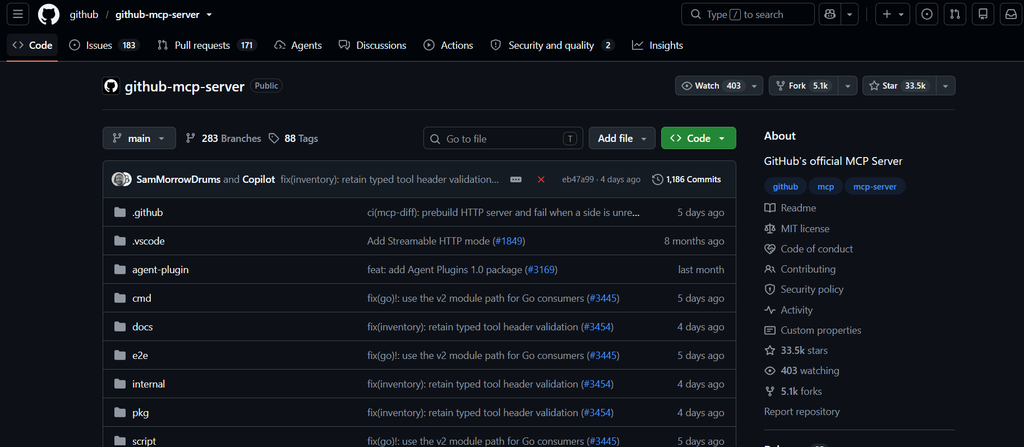
Yes. GitHub’s official MCP server lives at github/github-mcp-server. It is open source under the MIT licence and written in Go. According to the GitHub API on 12 October 2026, the repository was created on 4 March 2025, had 33,537 stars and 5,132 forks, and its latest release was v2.0.2, published on 8 October 2026.
Two older names still circulate in tutorials, and both are out of date. The npm package @modelcontextprotocol/server-github was the reference server before GitHub shipped its own, and GitHub’s Cursor install guide says it has been deprecated and non-functional since April 2025. The supported image is ghcr.io/github/github-mcp-server.
You will also find the server in the GitHub MCP Registry, GitHub’s catalogue of MCP servers. GitHub launched the registry as a single place to discover servers, each linked to its repository and installable into VS Code in one click. The registry lists GitHub’s own server next to servers from other vendors and the community.
What can GitHub MCP do? The toolsets and tools
GitHub MCP groups its tools into toolsets, and only five are switched on unless you ask for more: context, repos, issues, pull_requests and users. InstaWP counted the tools listed in the README on 12 October 2026: 92 distinct tools across 22 toolsets on the local server (93 entries, because get_label appears under both Issues and Labels). The table shows every toolset with its count and representative tools.
| Toolset | Tools | What it covers | Example tools (exact names) |
|---|---|---|---|
repos | 20 | Files, branches, commits, releases, tags, code search | get_file_contents, push_files, create_branch, get_latest_release, search_code, delete_file |
issues | 10 | Read, write, search and comment on issues | issue_read, issue_write, search_issues, add_issue_comment, sub_issue_write |
pull_requests | 10 | Open, review, update and merge pull requests | create_pull_request, merge_pull_request, pull_request_review_write, update_pull_request_branch, pull_request_read |
actions | 4 | Workflows, runs, jobs and logs | actions_list, actions_get, actions_run_trigger, get_job_logs |
code_security | 2 | Code scanning alerts | list_code_scanning_alerts, get_code_scanning_alert |
dependabot | 2 | Dependabot alerts | list_dependabot_alerts, get_dependabot_alert |
secret_protection | 2 | Secret scanning alerts | list_secret_scanning_alerts, get_secret_scanning_alert |
security_advisories | 4 | Global and repository security advisories | list_global_security_advisories, list_repository_security_advisories |
notifications | 6 | Read, dismiss and subscribe to notifications | list_notifications, dismiss_notification |
discussions | 5 | GitHub Discussions | list_discussions, get_discussion, discussion_comment_write |
context | 4 | Who you are and which teams you belong to | get_me, get_teams, get_team_members |
gists | 4 | Create, read and update gists | create_gist, get_gist, update_gist |
governance | 4 | Rulesets and custom properties | repository_ruleset_read, create_repository_ruleset |
labels | 3 | Repository labels | list_label, label_write |
projects | 3 | GitHub Projects | projects_list, projects_write |
stargazers | 3 | Starring repositories | star_repository, list_starred_repositories |
copilot | 2 | Hand work to Copilot | assign_copilot_to_issue, request_copilot_review |
copilot_issue_intents | 1 | Copilot assignment with rationale and confidence (opt-in) | assign_copilot_to_issue_with_intent |
code_quality | 1 | GitHub Code Quality findings | get_code_quality_finding |
git | 1 | Low-level Git API | get_repository_tree |
orgs | 1 | Organisation search | search_orgs |
users | 1 | User search | search_users |
Read the table from the top and the weight is obvious: 40 of the 92 tools sit in repos, issues and pull_requests. GitHub MCP is a repository and collaboration server first. Note also that repos includes delete_file and delete_repository, so the token you give it decides how much damage a confused agent can do (the token section below covers how to limit that).
The remote server adds three toolsets that the local one does not have: copilot gains create_pull_request_with_copilot, which hands a task to the Copilot coding agent and returns a pull request; copilot_spaces adds get_copilot_space and list_copilot_spaces; and github_support_docs_search answers questions from GitHub’s own support docs. That brings the total across both servers to 96 distinct tools.
Remote vs local GitHub MCP server: which should you use?
Use the remote server unless something stops you. The remote GitHub MCP Server is hosted by GitHub at https://api.githubcopilot.com/mcp/, needs no Docker, and is updated by GitHub. Run the local server when your MCP host cannot connect to a remote server, when you are on GitHub Enterprise Server, or when you want the command-line flags that pin exactly which tools exist.
| Remote server | Local server | |
|---|---|---|
| Where it runs | GitHub’s infrastructure, https://api.githubcopilot.com/mcp/ | Your machine: Docker image ghcr.io/github/github-mcp-server or a release binary |
| Authentication | OAuth where the host supports it, or a PAT in an Authorization: Bearer header | Browser OAuth login on first use (token kept in memory only), or GITHUB_PERSONAL_ACCESS_TOKEN, which takes precedence |
| Host requirement | A host with remote MCP support, such as VS Code 1.101+, Cursor or Windsurf | Any host that can launch a stdio server |
| GitHub Enterprise | Works for Enterprise Cloud with data residency (ghe.com) at copilot-api.<subdomain>.ghe.com/mcp | Required for GitHub Enterprise Server: set GITHUB_HOST or --gh-host |
| Extra tools | Adds the Copilot coding agent, Copilot Spaces and support-docs tools | Supports the --insiders flag for experimental tools |
Here is the remote server in VS Code with OAuth, straight from the README. VS Code opens a GitHub sign-in the first time the server starts, so there is no token in the file.
{
  "servers": {
    "github": {
      "type": "http",
      "url": "https://api.githubcopilot.com/mcp/"
    }
  }
}
And here is the local server in Docker with a token, limited to four toolsets, with every write tool removed and lockdown mode on. Each of those three settings is an environment variable, so the same image serves a cautious setup and a permissive one.
$ docker run -i --rm \
  -e GITHUB_PERSONAL_ACCESS_TOKEN=<your-token> \
  -e GITHUB_TOOLSETS="repos,issues,pull_requests,actions" \
  -e GITHUB_READ_ONLY=1 \
  -e GITHUB_LOCKDOWN_MODE=1 \
  ghcr.io/github/github-mcp-server
# same switches as flags on the binary:
# github-mcp-server --toolsets repos,issues --read-only --lockdown-mode
Three switches are worth knowing by name. --toolsets (or GITHUB_TOOLSETS) is an allow-list of toolsets, and --tools picks individual tools; GitHub notes that a shorter list also helps the model choose the right tool and keeps context small. --read-only (GITHUB_READ_ONLY=1) offers only read tools and wins even over a write tool you named explicitly. --lockdown-mode (GITHUB_LOCKDOWN_MODE=1) hides issue, pull request and comment content written by people without push access to a public repository.
Which AI tools support GitHub MCP?
GitHub MCP works in any MCP host that supports remote servers with a PAT, and GitHub publishes install guides for the common ones. As of 12 October 2026 the README links guides for VS Code with GitHub Copilot, GitHub Copilot in JetBrains, Visual Studio, Eclipse and Xcode, Copilot CLI, Claude Desktop and Claude Code, OpenAI Codex, Cursor, OpenCode, Windsurf, Zed and Rovo Dev CLI. The guides folder also holds guides for Antigravity, Cline, Gemini CLI and Roo Code.
One caveat from the README: each host has to register its own GitHub App or OAuth App to offer OAuth for the remote server, so support varies. A host that cannot do the OAuth handshake can still use the remote server with a PAT, or run the local server instead. If what you actually want is an assistant connected to a WordPress site, that is a different setup, covered in how to connect AI agents to WordPress using MCP.
How to add GitHub MCP to Claude Code
Run one command in your terminal (not inside a Claude Code session), restart Claude Code, then check the server is listed. GitHub’s Claude install guide uses the add-json form for Claude Code 2.1.1 and newer:
$ claude mcp add-json github '{"type":"http","url":"https://api.githubcopilot.com/mcp","headers":{"Authorization":"Bearer YOUR_GITHUB_PAT"}}'
$ claude mcp list
$ claude mcp get github
On Claude Code 2.1.0 or earlier, or if add-json returns Invalid input on Windows, use the older form: claude mcp add --transport http github https://api.githubcopilot.com/mcp -H "Authorization: Bearer YOUR_GITHUB_PAT". Add --scope user to make the server available in every project, or --scope project to share it through a .mcp.json file (in which case keep the token out of that file). For the local Docker server with OAuth instead of a token, the guide gives:
$ claude mcp add github -e GITHUB_OAUTH_CALLBACK_PORT=8085 -- \
  docker run -i --rm -p 127.0.0.1:8085:8085 -e GITHUB_OAUTH_CALLBACK_PORT ghcr.io/github/github-mcp-server
Claude Desktop is the exception. GitHub’s guide says the remote GitHub server cannot be added as a Claude Desktop custom connector today, because it needs OAuth through a registered app, so Claude Desktop users run the local Docker server. Connecting Claude to a WordPress site rather than to GitHub is covered separately in how to connect Claude with WordPress.
How to add GitHub MCP to Cursor
Add the remote server to ~/.cursor/mcp.json (all projects) or .cursor/mcp.json (one project), with a PAT. GitHub’s Cursor guide notes that Cursor needs v0.48.0 or later for Streamable HTTP and that the GitHub server currently requires a PAT in Cursor rather than OAuth.
{
  "mcpServers": {
    "github": {
      "url": "https://api.githubcopilot.com/mcp/",
      "headers": { "Authorization": "Bearer YOUR_GITHUB_PAT" }
    }
  }
}
Restart Cursor fully, look for the green dot next to “github” under Settings, Tools & Integrations, MCP Tools, and test with “List my GitHub repositories”. If the agent has too many tools to choose from, run the local server with a shorter GITHUB_TOOLSETS list.
What is MCP in GitHub Copilot?
In GitHub Copilot, MCP is how Copilot’s agents call tools outside the model, and GitHub MCP is the server that gives them your GitHub data. Where you set it up depends on which Copilot you use, and on a company plan an admin has to switch it on first.
.vscode/mcp.json or your user mcp.json.Use: switch Chat to Agent mode and pick the tools.GitHub MCP: add the remote server and sign in with OAuth, no token to paste.How do you get a GitHub token for MCP?
You may not need one. On github.com the remote server supports OAuth in hosts that implement it (VS Code is the clearest case), and the local Docker image ships with GitHub’s app credentials, so it opens a browser login on first use and keeps the token in memory only. Create a personal access token when your host needs a header, which today includes Cursor and the Claude Code commands above.
acme-site-mcp.repo, read:packages for the Docker image, and read:org only for team data..env file listed in .gitignore, and point your MCP config at the variable (GitHub notes Windsurf cannot).The README’s token security list is short and worth following literally: use separate tokens for different projects and environments, rotate them periodically, never commit them, and restrict the config files that hold them, for example with chmod 600 ~/.your-app/config.json. For agencies, “separate tokens” means one token per client repository, so revoking access for one client never breaks another. GitHub’s personal access token documentation covers fine-grained and classic tokens in full. The same habits apply on the WordPress side, where WordPress MCP security comes down to the user role and token the agent borrows.
What can’t GitHub MCP do for a WordPress site?
GitHub MCP stops at the repository. InstaWP went through all 96 tool names on 12 October 2026 and none of them installs a plugin on a site, runs WP-CLI, reads a site’s debug.log, creates a staging site, takes a backup or checks that a page still renders. A merged pull request is not a deployed site, and GitHub MCP has no view of the site at all.
The closest it gets is actions_run_trigger, which can start a GitHub Actions workflow, and get_job_logs, which reads what that workflow printed. If you have written a deploy job, an agent can start it and read its log. The log tells you the job exited zero. It does not tell you whether the client’s checkout page still loads, whether a plugin threw a fatal error on activation, or whether the cache served the old CSS.
| Job on a WordPress site | GitHub MCP | What can do it |
|---|---|---|
| Read the plugin’s code and the open bug report | Yes: get_file_contents, issue_read | GitHub MCP |
| Fix the code and open a pull request | Yes: create_branch, push_files, create_pull_request | GitHub MCP |
| Start a deploy workflow you wrote and read its log | Partly: actions_run_trigger, get_job_logs | GitHub MCP plus your own workflow |
| Create a staging copy of the client site | No | InstaWP Account MCP: create_site, staging in the dashboard |
| Back up the site before the change | No | InstaWP Account MCP: create_backup |
| Install or update the plugin on the site | No | InstaMCP: plugin_operations |
| Read PHP fatals and warnings after the change | No | InstaMCP: site_logs |
| Run a WP-CLI command | No | InstaWP Account MCP: run_command, where the shell capability is enabled |
The first three rows belong to GitHub MCP, and nothing on the WordPress side replaces it. The bottom five are where agency work gets judged, because clients look at the site and never at the commit: they notice when the contact form stops sending, not when a branch merges.
How do you close the loop on a WordPress site? GitHub MCP plus InstaWP MCP
You add a second MCP layer that works on the site, and you keep GitHub MCP for the repository. InstaWP, a managed WordPress hosting provider with MCP built into the platform, offers that site layer at two levels: the Account MCP for the hosting account and InstaMCP for the WordPress site itself. Neither one talks to GitHub’s API, so the honest setup is both servers connected to the same assistant, each doing the half it can see.
| Layer | What it reaches | Tools you would use |
|---|---|---|
| GitHub MCP | The repository: code, issues, pull requests, Actions, security alerts | get_latest_release, create_pull_request, merge_pull_request, get_job_logs |
| InstaWP Account MCP | The hosting account: sites, backups, PHP versions, plans, credentials, and (where enabled) a shell | create_site, create_backup, get_magic_login, get_ssh_sftp, update_php, change_plan, enable_site_mcp, run_command |
| InstaMCP (site MCP) | One WordPress site: plugins, themes, files, content, media, logs | plugin_operations, theme_operations, plugin_files, theme_files, site_logs, validate_blocks |
InstaWP Account MCP: the hosting account
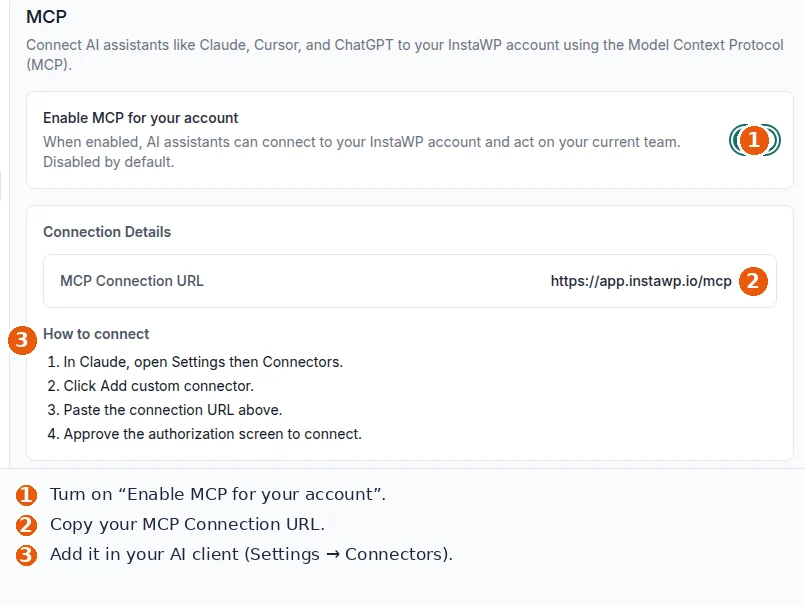
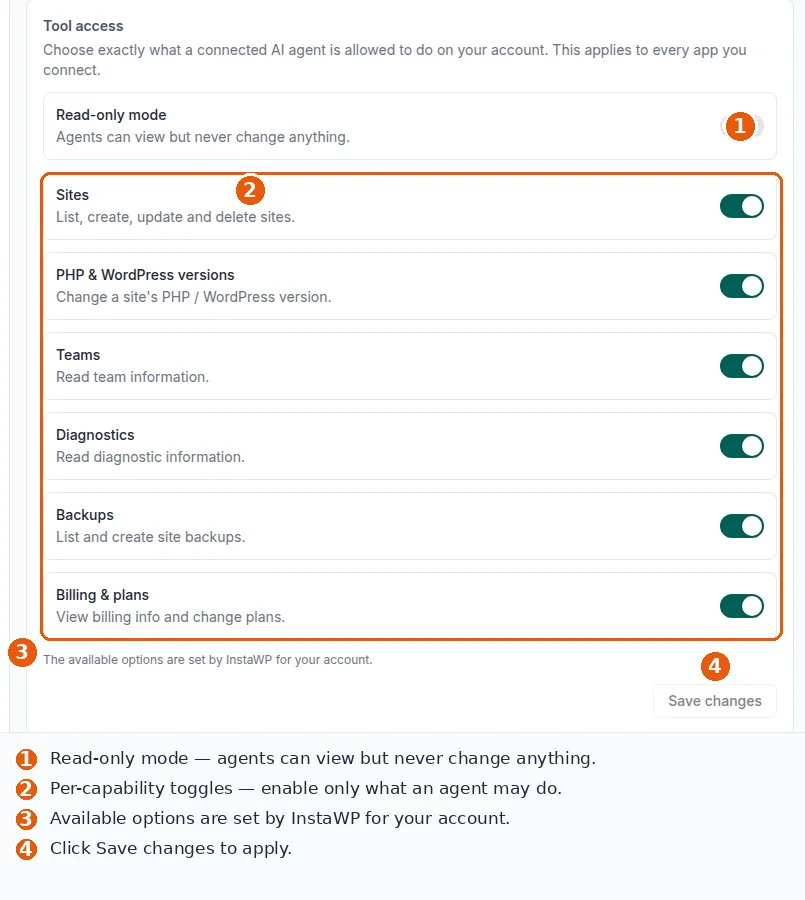
The InstaWP Account MCP connects an assistant to the whole InstaWP account over OAuth, scoped to the current team, with a read-only mode and per-capability toggles (Account MCP docs). Its sensitive capabilities, which include credentials and the “Shell & WP-CLI” capability behind run_command, are off by default and only offered to accounts enabled for them. run_command runs Linux and WP-CLI commands over SSH as the site user, not as root.
InstaMCP: the WordPress site
InstaMCP is the WordPress MCP server InstaWP installs on a site when you enable MCP on it (site MCP docs). It ships 43 typed tools, and three of them, execute_php, db_query and site_files, are off by default until an administrator switches them on.
plugin_operations and theme_operations install from wordpress.org, from a URL or from an uploaded ZIP, so a GitHub release asset is a valid source. plugin_files and theme_files back up a file before writing it, and site_logs tails the WordPress debug log and the PHP error log, filtered by severity. The difference between the two layers is laid out in Account MCP vs site MCP, and the full tool list is on the InstaMCP WordPress MCP server page.
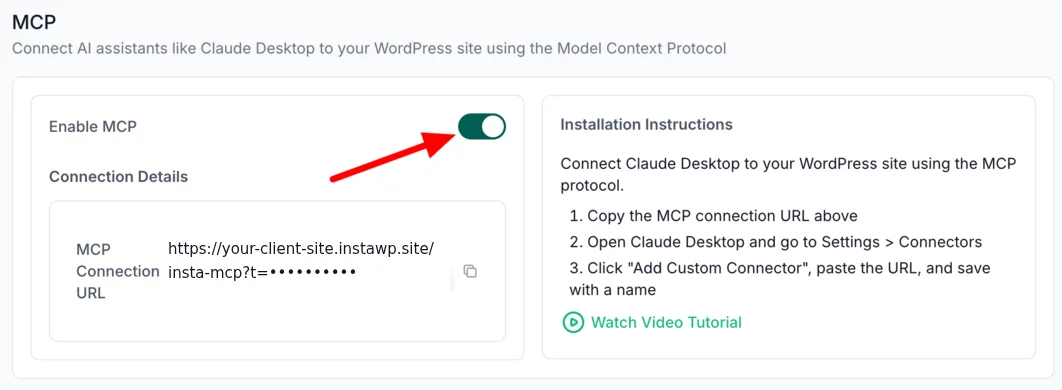
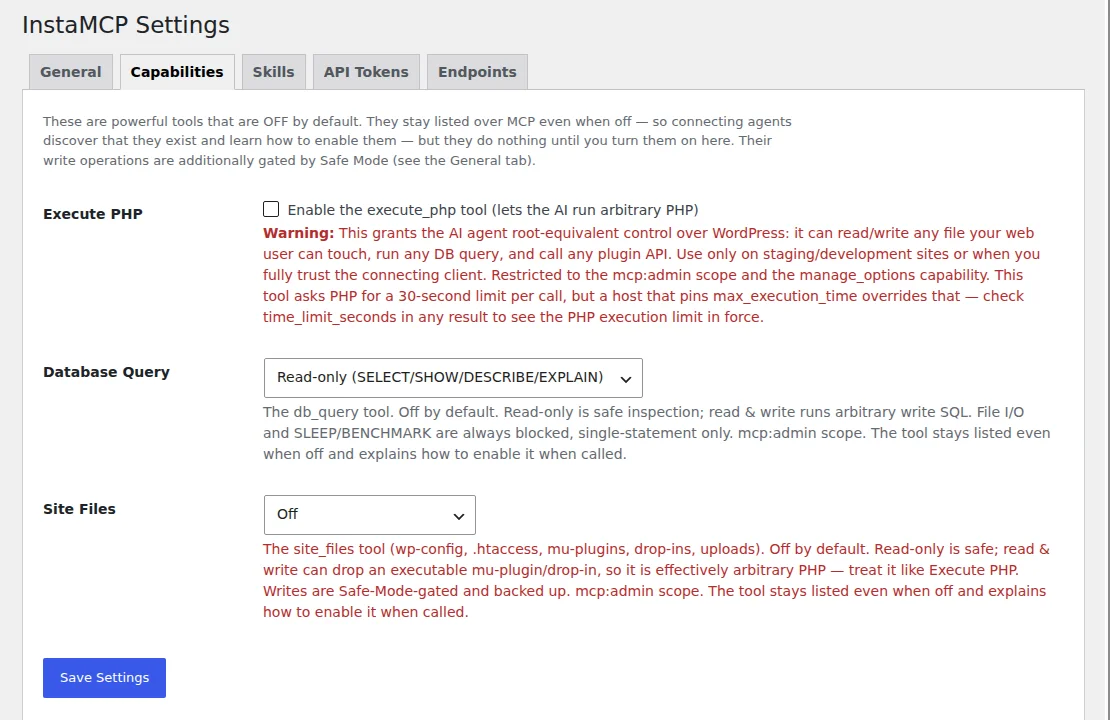
Deployments: Git code onto the site
Git deployment to the site is a separate InstaWP feature, Deployments, rather than an MCP tool. You connect a repository to a site or template, and a webhook on push, a manual Run Deployment or a GitHub Actions run pulls the code in; Actions can also create a fresh site for each pull request (Deployments overview, GitHub Actions integration).
The full setup is in how to deploy WordPress from GitHub.
Over MCP today an agent reaches it through run_command (for example a git pull in the right folder) or the InstaWP REST API; there is no typed deploy tool in either InstaWP MCP server.
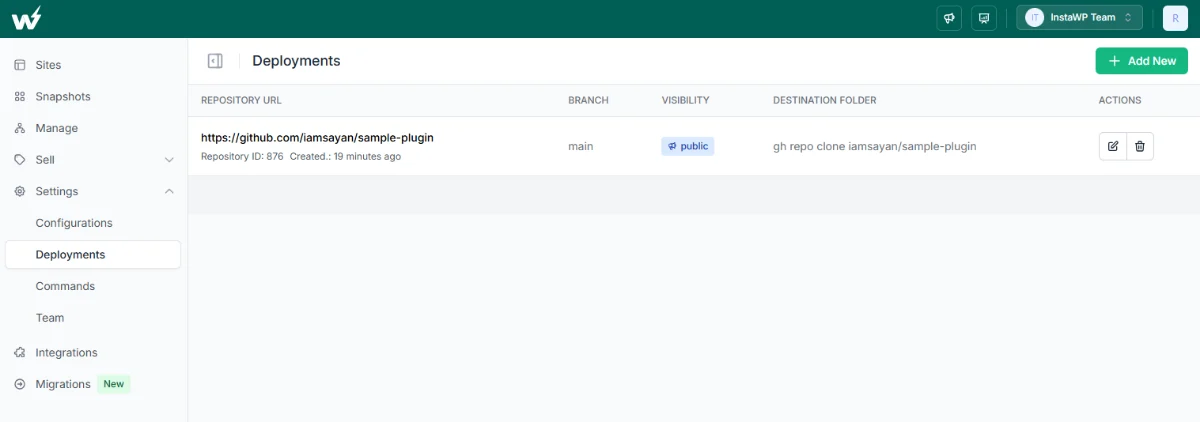
Worked example: ship a GitHub release to a client site
Here is the loop as an agent would run it, with a plugin your team maintains on GitHub and a client site on InstaWP.
Step 1: Read the release with GitHub MCP
get_latest_release returns the newest release with its tag and date. A release asset downloads from GitHub’s fixed pattern, github.com/<owner>/<repo>/releases/download/<tag>/<file>.
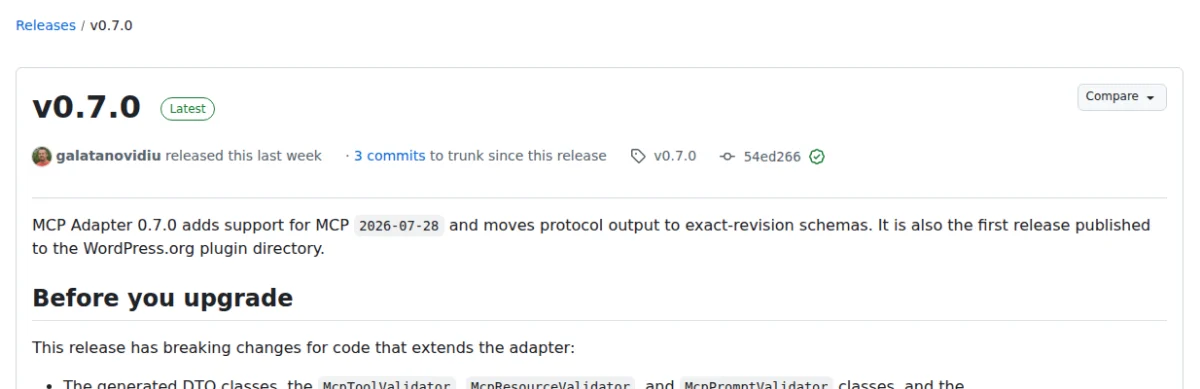
get_latest_release returns. WordPress/mcp-adapter v0.7.0, captured 12 October 2026.Step 2: Back up the site with the Account MCP
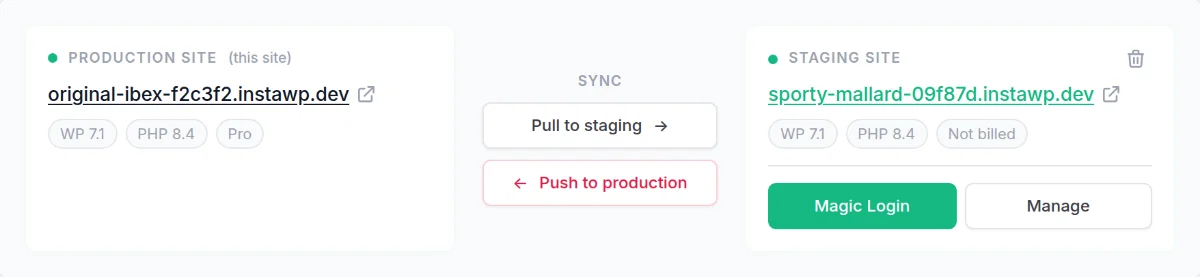
create_backup takes a backup before anything changes (backups docs). On a client site, run the next steps on a WordPress staging site first.
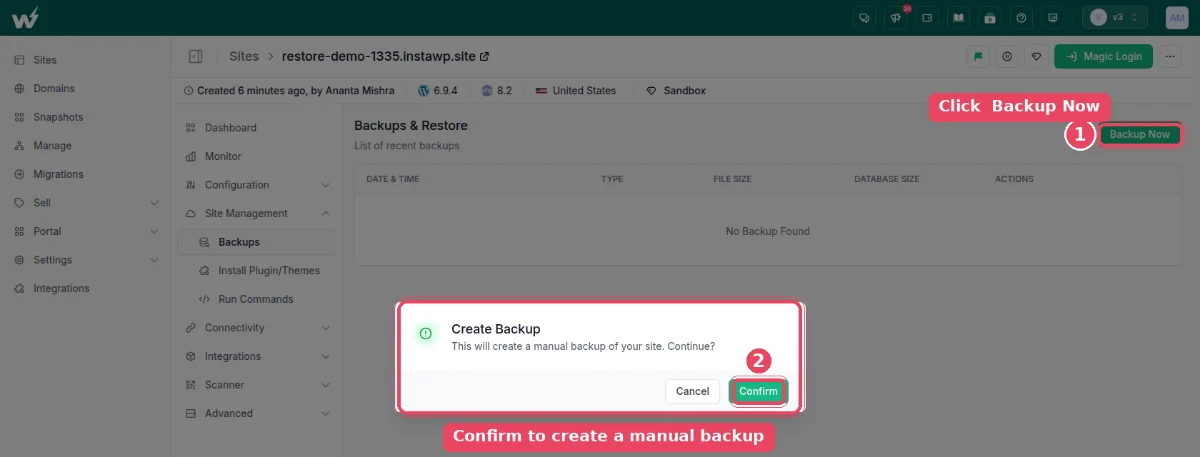
create_backup does this for the agent. Screenshot from the InstaWP docs.Step 3: Install the release with InstaMCP
plugin_operations with action: install, source: url and the asset URL as source_data, then activate it.
Step 4: Check the logs with InstaMCP
site_logs with level: fatal returns any fatal errors written since the install (where site error logs live).
Step 5: Fetch the page
The agent requests the pages the plugin affects and checks for an HTTP 200 and the content it expects, not just the status code.
Step 6: Promote or roll back
Push the staging site live, or let Deployments carry the tagged code to production. If step 4 or 5 failed, restore the backup (restore docs).

What happened when InstaWP ran the hand-off on a sandbox?
The verification steps caught a real failure. On 12 October 2026 InstaWP ran steps 1, 3, 4 and 5 against a sandbox site still on InstaMCP 1.10.3, an older release. The GitHub side worked first time: InstaWP read the latest release from the GitHub REST API, the same lookup step 1 asks GitHub MCP to make, and got WordPress MCP Adapter v0.7.0, published 2 October 2026, with one asset, mcp-adapter.zip, at 435,201 bytes.
// request
{ "action": "install", "plugin": "mcp-adapter", "source": "url",
  "source_data": "https://github.com/WordPress/mcp-adapter/releases/download/v0.7.0/mcp-adapter.zip",
  "activate_after_install": true }
// response
{ "error": "WordPress Error: Call to undefined function request_filesystem_credentials()" }
The install failed with a clear error, and the site kept working. site_logs with level: fatal returned 0 fatal lines, the plugin list was unchanged (Elementor 4.1.5 and InstaMCP, both active), and the homepage still answered HTTP 200 in 1.71 seconds. The error itself is a known, fixed bug: InstaMCP 1.11.3 (14 September 2026) changed plugin installs from a URL or ZIP to load wp-admin/includes/file.php first, because a front-end MCP request never loads it and WordPress’s upgrader needs it.
plugin_info first; if InstaMCP is older than 1.11.3, update it from the dashboard before running the install step. A pipeline that ends at GitHub has no way to see this error.InstaWP did not re-run the install on a 1.11.3 site for this article, so the success path above rests on the fixed code and the changelog, not on this sandbox. What the run does show is the shape of the loop: the repository half reported everything correctly, and only the site half could tell you the release had not landed.
The verdict
GitHub MCP is the right server for everything that lives in a repository, and it is free, official and well documented: start with the remote server, keep to the default toolsets, and give it a fine-grained token per project. For a WordPress team it covers half the job. The release still has to reach the site, and someone still has to confirm the site works afterwards. InstaWP’s Account MCP and InstaMCP are built for that second half, and connecting both servers to one assistant is what turns “the pull request merged” into “the client site is updated and still loads”.
If you are choosing a WordPress MCP server rather than a GitHub one, the best WordPress MCP servers compared covers the options in depth, and the WordPress MCP Adapter review covers the core adapter installed in the test above. For plugins that add MCP to a site you already run, see the best WordPress MCP plugins, and for hosts with MCP built in, the best WordPress hosting with MCP.
Related guides on MCP and WordPress
- How to rank in ChatGPT and AI Overviews: crawler access, quotable passages and an InstaMCP audit for a WordPress blog.
- WooCommerce MCP servers compared: 10 servers, 5 tested on a live store, including prices and orders.
- Best SEO MCP servers: Search Console and keyword data an agent can act on, tested on a live WordPress site.
- Is MCP WordPress integration safe: the controls that limit what an AI agent can do to a site, tested on a sandbox.
- Best WordPress hosting with MCP: 11 hosts compared on account-level and site-level MCP.
- Best WordPress MCP plugins: 21 plugins tested on one live site.
GitHub MCP: frequently asked questions
What is GitHub MCP server?
The GitHub MCP Server is GitHub’s official open-source server for the Model Context Protocol. It exposes GitHub as tools an AI assistant can call, such as reading files, opening issues, creating and merging pull requests, reading Actions logs and listing security alerts. GitHub hosts a remote version at api.githubcopilot.com/mcp/ and publishes a Docker image, ghcr.io/github/github-mcp-server, for running it locally.
How do I set up the GitHub MCP server?
Add the remote server URL, https://api.githubcopilot.com/mcp/, to your AI tool’s MCP configuration and sign in with OAuth or a personal access token. In VS Code that is an http entry in mcp.json; in Claude Code 2.1.1 and newer it is claude mcp add-json github with the URL and an Authorization header; in Cursor it is an entry in ~/.cursor/mcp.json. If your tool cannot use remote servers, run the Docker image locally instead.
How do I use the GitHub MCP server once it is connected?
Ask your assistant in plain language, for example “list open issues labelled bug in this repo” or “open a pull request from fix-login to main”. The assistant picks the matching GitHub MCP tool and asks for approval before running it, depending on your client’s settings. Keep the toolsets to what the task needs; GitHub notes that a smaller tool list helps the model choose the right tool.
What is the best MCP server for GitHub?
The official GitHub MCP Server, github/github-mcp-server, is the one to start with: it is maintained by GitHub, covers 96 tools across the remote and local servers as of 12 October 2026, and supports read-only and lockdown modes. Community GitHub servers predate it, and the older npm package @modelcontextprotocol/server-github has been deprecated since April 2025. The GitHub MCP Registry lists GitHub’s server alongside others.
Does GitHub Copilot support MCP?
Yes. Copilot Chat’s agent mode in VS Code and other supported IDEs can use MCP servers you add, and Copilot’s cloud agent has the GitHub MCP server and the Playwright MCP server configured automatically. Members of an organisation on Copilot Business or Copilot Enterprise need the “MCP servers in Copilot” policy enabled, which GitHub says is off by default.
Is GitHub MCP free?
Yes. The server is open source under the MIT licence, and GitHub Docs state that the GitHub MCP server is available to all GitHub users regardless of plan type. Individual tools inherit the requirements of the GitHub feature they use, so a tool that hands work to the Copilot coding agent still needs a paid Copilot licence.
Can GitHub MCP deploy to a WordPress site?
Not directly. GitHub MCP can trigger a GitHub Actions workflow with actions_run_trigger and read its output with get_job_logs, so it can start a deploy job you have written. It has no tool that installs plugins, runs WP-CLI, reads a site’s error logs or checks that a page renders. For that, connect a site-side MCP server such as InstaWP’s InstaMCP alongside it.
Does InstaWP MCP replace GitHub MCP?
No. InstaWP’s Account MCP and InstaMCP do not call GitHub’s API, so issues, pull requests, code search and Actions logs stay with GitHub MCP. InstaWP’s servers cover the site side: creating sites and backups, installing a plugin from a release URL, and reading the site’s PHP error logs. Most WordPress teams connect both to the same assistant.