- Novamira is a free, open-source WordPress MCP plugin that gives an AI agent such as Claude, ChatGPT or Cursor full PHP, WP-CLI, database and file access to a WordPress site.
- It is excellent for one developer on a staging site: free on any host, 20 supported AI tools, OAuth sign-in, a design linter and deep page-builder coverage in Pro.
- It is built for trust, not control. Every ability needs an administrator, there is no read-only mode, and its own system prompt tells the agent it has “unrestricted control over this WordPress installation”.
- Its guardrails are warnings you can click through. On our test site Novamira correctly flagged a production-looking domain, then enabled AI Abilities as soon as we clicked OK.
- The best Novamira alternative for agencies is InstaMCP, built into every InstaWP site. In our test a Subscriber-level token could read content but was refused the moment it tried to write.
Novamira is a free, open-source WordPress plugin that turns a WordPress site into an MCP server your AI agent can drive, with full PHP, database and file access. After installing Novamira 1.12.6 on a fresh WordPress site and testing it against InstaMCP, our verdict: Novamira is one of the most capable AI tools for a developer working on a staging site, and the wrong tool for client sites where different people and agents need different levels of access.
This Novamira review covers what the plugin is, how the Novamira MCP server works, how to install it, every feature we found in the admin, pricing, the security model in Novamira’s own words, and the best Novamira alternative for agencies. Every screenshot below comes from our own test site or from Novamira’s public documentation, captured on 29 September 2026.
Disclosure. InstaWP makes InstaMCP, a competing WordPress MCP server. We tested both on the same site and report the results where Novamira wins too, including design quality, price and host support.
What is Novamira?
Novamira is a WordPress plugin that connects AI agents to a WordPress site over the Model Context Protocol (MCP), the open standard AI clients use to call external tools. Once it is active, an agent can execute PHP with the whole WordPress environment loaded, run WP-CLI, query the database and read, write or delete files. Its plugin header describes it plainly: an “MCP server that gives AI agents full access to WordPress through PHP execution and filesystem operations. For development and staging environments only.” For how it compares with the other MCP plugins on the same test site, see the best WordPress MCP plugins.
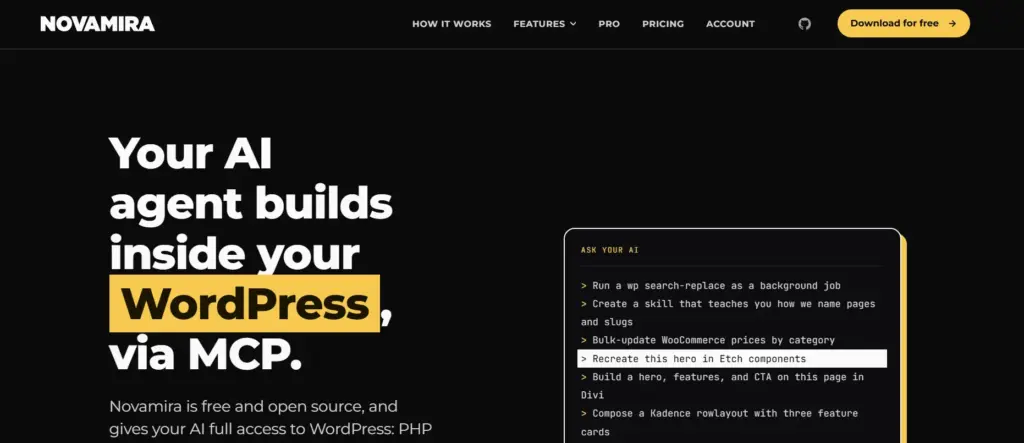
The Novamira WordPress plugin is built by Ovation S.r.l., an Italian company that sells it under its Dynamic.ooo brand, the team behind Dynamic Content for Elementor and Dynamic Toolbox for Bricks. The code is on GitHub under AGPL-3.0. The repository was created in February 2026 and had 720 stars and 49 open issues on 12 October 2026, with 1.12.8 the latest release. It needs WordPress 6.9 or later and PHP 8.0 or later. Novamira is not listed in the WordPress.org plugin directory: you download it from novamira.ai or from a GitHub release.
Around the core plugin, Novamira AI has grown into a small product family. We found all of these in the admin menu or on its site:
- Novamira Pro: memory between sessions plus end-to-end specialisations for 53 builders and plugins and 8 themes.
- Novamira Design: a per-site design system with a linter the agent must pass before shipping a page.
- Novamira Chat: an AI chat inside wp-admin that runs on your own AI provider API key.
- Novamira Visual: watch the agent work in a live editor. Labelled Experimental in the menu.
- Novamira HQ: a free desktop app in beta that gives your AI one connection to many sites.
- Novamira CLI: sets up terminal coding agents such as Claude Code and Codex to talk to a site.
How does the Novamira MCP server work?
Novamira registers its tools as abilities through the WordPress Abilities API added in WordPress 6.9, and exposes them to AI clients through an MCP endpoint on your site. Your AI client connects to that endpoint, authenticates as a WordPress administrator, and can then call any enabled ability. On our site the OAuth endpoint was /wp-json/mcp/novamira-oauth.
Authentication uses either OAuth, where your browser opens and you approve the connection, or a WordPress Application Password over HTTPS. Either way the agent acts as the admin user who connected it. Novamira also sends every agent a generated system prompt, which you can read on its Context screen. The first line on our site was: “Novamira gives you unrestricted control over this WordPress installation.”
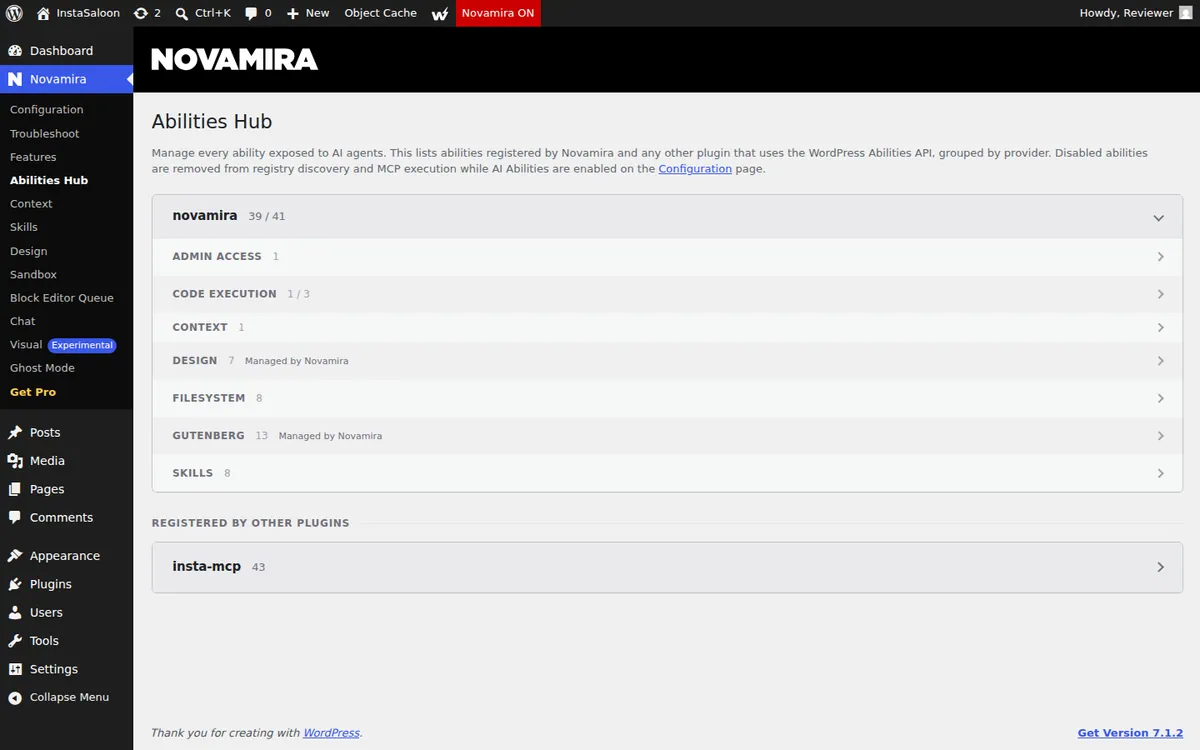
The Abilities Hub groups Novamira’s 41 abilities into seven families. Our count on 1.12.6:
Two of the three code-execution abilities showed as unavailable on our site because the server disables PHP process execution, which WP-CLI through Novamira needs. That is why the hub read 39 of 41. Plain PHP execution still worked.
How do you install Novamira on WordPress?
You install Novamira by uploading its ZIP, turning on AI Abilities, choosing your AI tool and connecting it. It took us about five minutes on a fresh site. These are the six steps of the Novamira 1.12.6 setup, with a screenshot from our test site at each one.
Step 1: Download the Novamira plugin
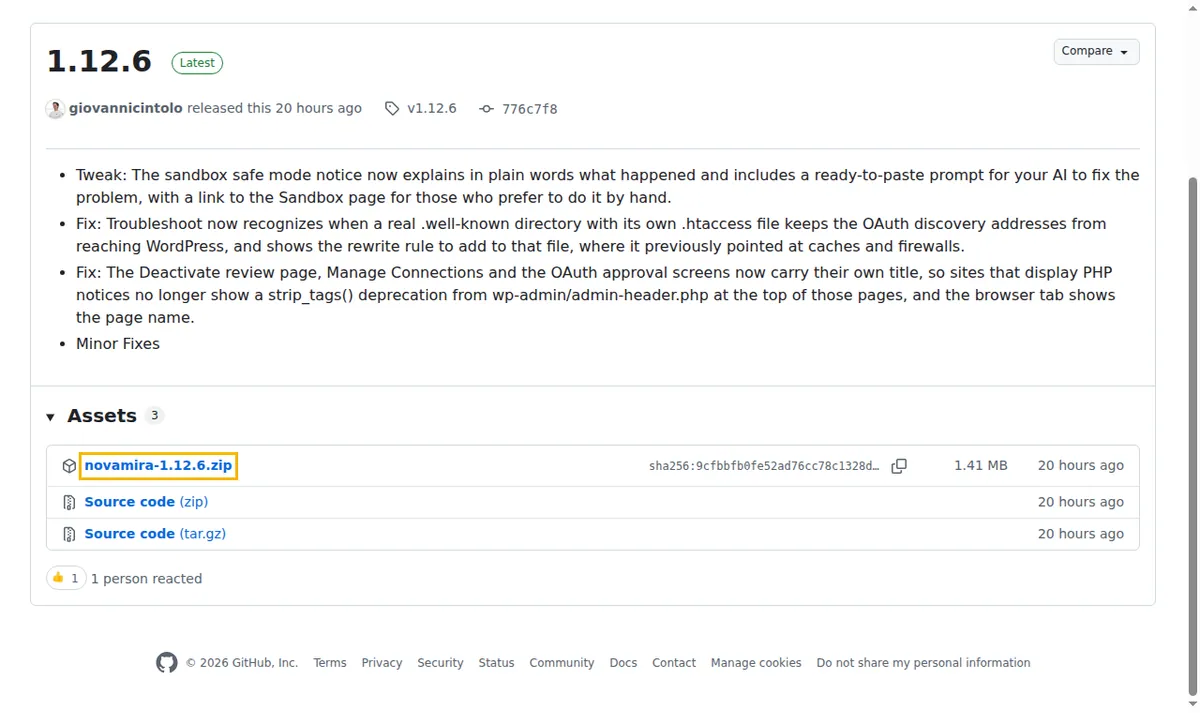
Download the latest ZIP from novamira.ai or from the Novamira GitHub releases page. Novamira is not in the WordPress.org plugin directory, so searching under Plugins, Add Plugin will not find it. We used version 1.12.6, a 1.41 MB file.
Step 2: Upload and activate it in WordPress
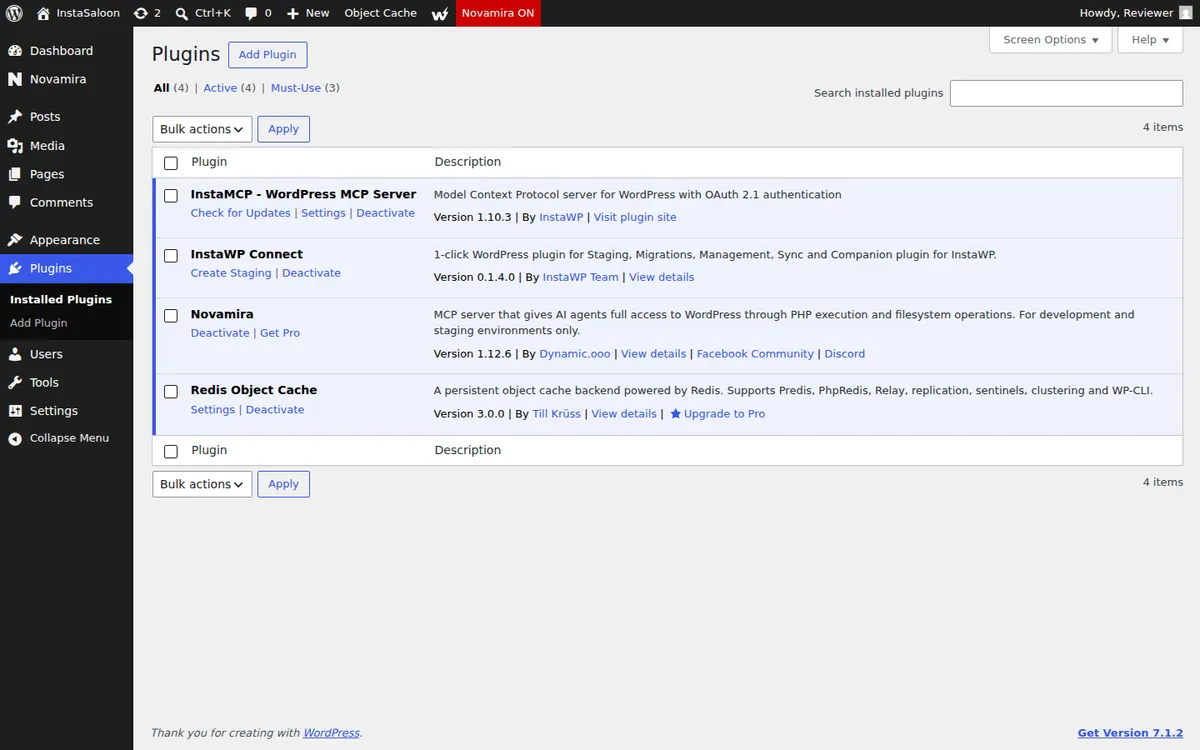
In wp-admin, go to Plugins, Add Plugin, Upload Plugin. Choose the ZIP, click Install Now, then click Activate. A Novamira item appears in the admin menu, and the Plugins screen describes it as an MCP server for development and staging environments only.
Step 3: Turn on AI Abilities
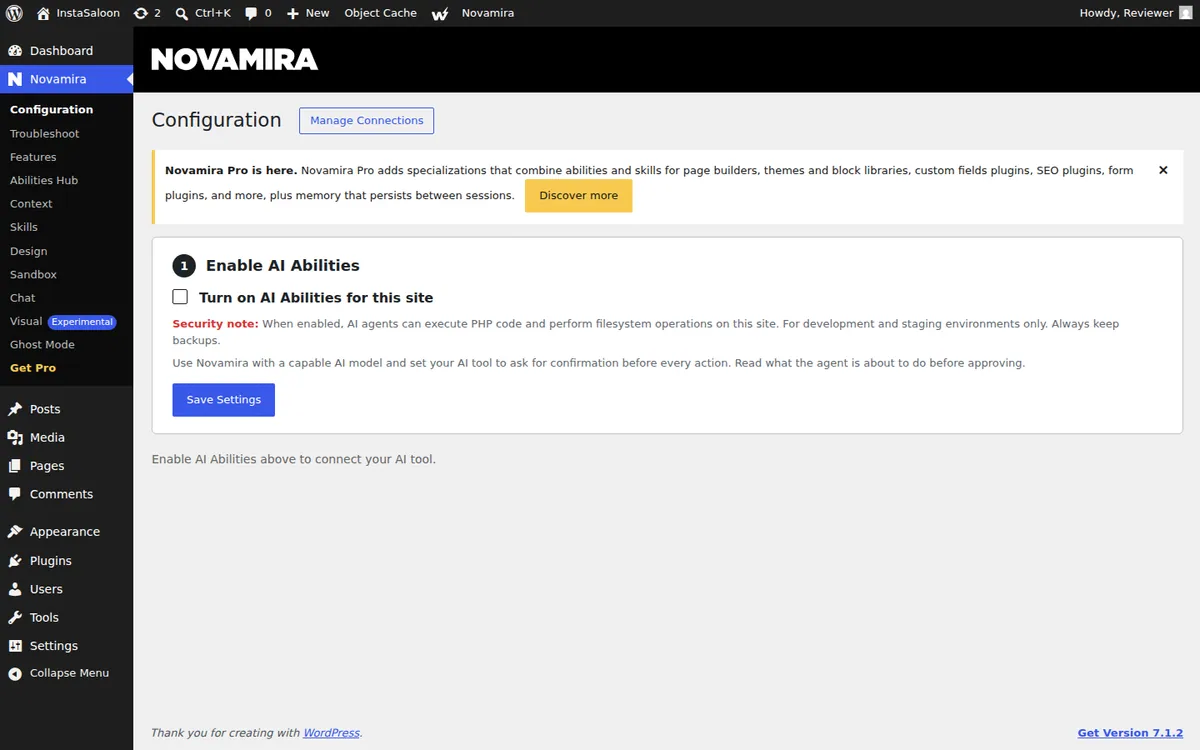
Open Novamira, Configuration. Tick Turn on AI Abilities for this site and click Save Settings. AI Abilities stay off until you do this, and Novamira asks you to confirm before it saves.
Step 4: Choose your AI tool
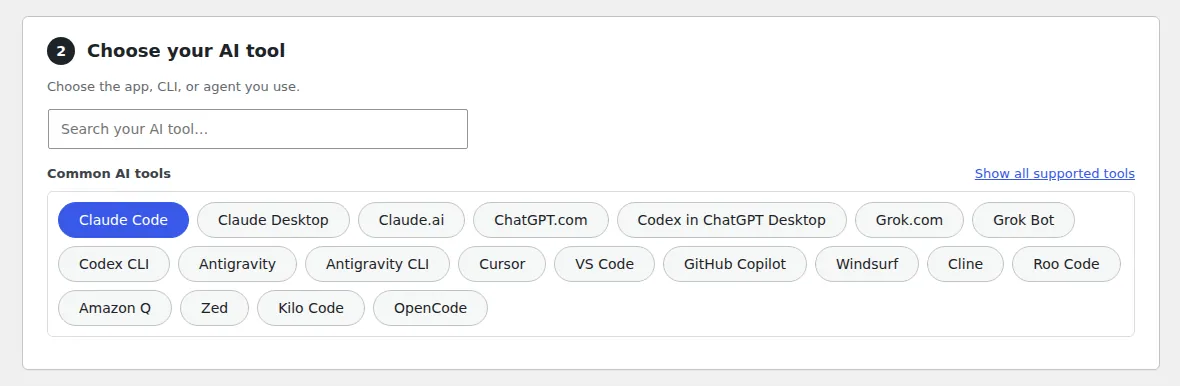
Under Choose your AI tool, click the app you use. Twenty are listed, including Claude Code, Claude Desktop, Claude.ai, ChatGPT, Codex, Cursor, VS Code, GitHub Copilot, Windsurf, Cline and Zed. If yours is not in the common list, use the search box or Show all supported tools.
Step 5: Choose how to connect
Pick one of three connection methods. Novamira CLI is the recommended option for coding agents that run in a terminal. OAuth signs you in through your browser, so there is no password to copy. Application password creates a WordPress application password that you paste into your AI tool’s settings.

Step 6: Connect your AI tool and test it
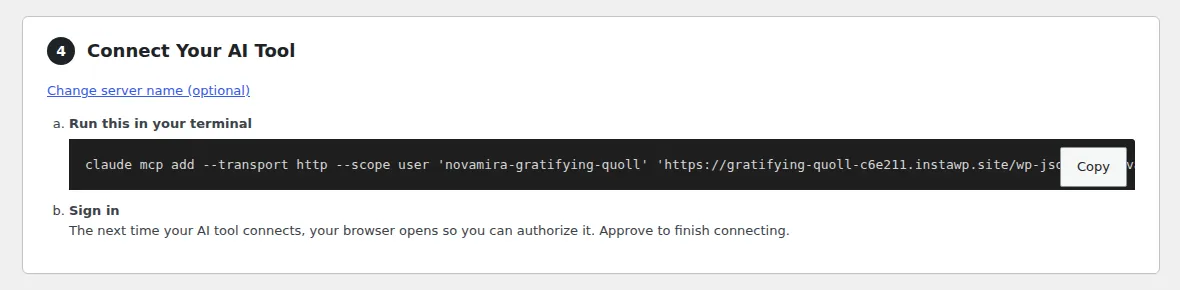
Novamira now shows the setup for the tool and method you picked. Follow it to add the site to your AI tool. With OAuth, your browser opens the first time the tool connects so you can approve it. Send one simple request to confirm it works. If the tool cannot connect, open Novamira, Troubleshoot to run connection diagnostics.
What are Novamira’s main features?
Novamira’s main features are raw code and file access, block editing, skills, a design system, an in-dashboard chat and a set of Pro specialisations.
Execute PHP and WP-CLI
The headline ability. The agent can run any PHP with $wpdb, every WordPress function and every loaded plugin available, and gets back the return value, output and any warnings. Where the host allows process execution, it can also run WP-CLI. This is what makes Novamira feel limitless for development work: if WordPress can do it, the agent can.
Filesystem abilities and the sandbox
Eight abilities read, write, edit, list and delete files inside the WordPress root. PHP files the agent writes go into wp-content/novamira-sandbox/ and are loaded on every request, which is how an agent adds a feature without editing your theme. Deleting the WordPress root, wp-admin or wp-includes is blocked. If a sandbox file causes a fatal error, crash recovery skips sandbox files on the next request.
Gutenberg editing and the Block Editor Queue
Thirteen Gutenberg abilities handle block content. For third-party blocks whose markup only their editor JavaScript knows, Novamira can hand the change to a real block editor to serialise. That route is accurate, but in our test it needed a person to keep a wp-admin tab open while it worked.
Skills and Context
Skills are Markdown playbooks the agent follows. Our install shipped four built-in skills (custom theme build, Gutenberg content editing, Novamira Design and a skill creator), and you can upload or write your own (Novamira Skills docs). The Context screen shows the system prompt Novamira generates and lets you add site-wide instructions for every connected agent.
Novamira Design
Novamira Design stores one design direction per site, created from a brief, and gives the agent a check-design ability that tests a page against your tokens and a floor of “anti-slop” rules such as em dashes, AI-purple colours, the Inter font and filler copy. It is the most distinctive feature in the plugin, and in our landing-page test it produced the better-looking page (Novamira Design).
Novamira Chat, Visual and HQ
Chat puts an assistant inside wp-admin. Its own warning says it “runs on your own AI provider API key. Every message and tool call is billed to that key”, and it recommends connecting over MCP for heavier work. Visual lets you watch the agent edit live and is marked Experimental. HQ is a desktop app that connects your AI to many sites at once, and it has a documented InstaWP integration.
Novamira Pro: memory, specialisations and Ghost Mode
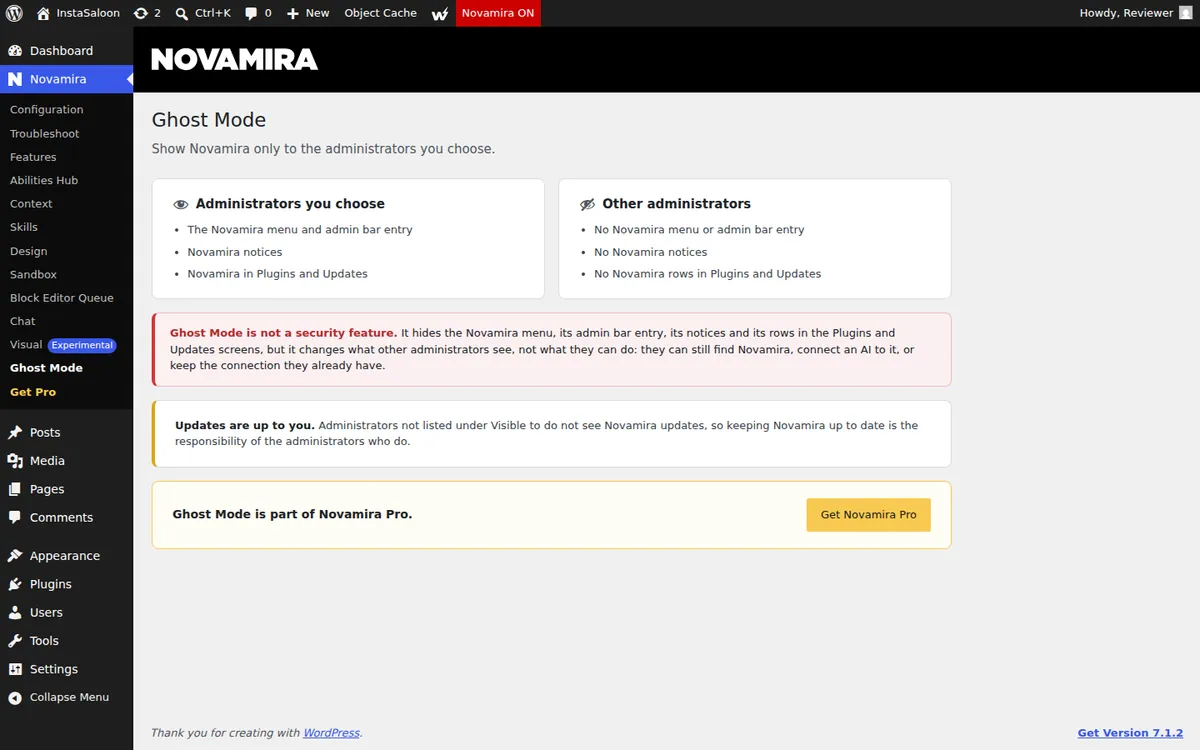
Pro adds memory between sessions, so the agent remembers your fonts, builder and conventions, and specialisations for 53 builders and plugins, including Elementor, Bricks, Divi 5, Oxygen 6, Breakdance, WPBakery, WooCommerce and ACF, plus 8 themes such as Astra, Kadence and GeneratePress (Novamira Pro). Pro also includes Ghost Mode, which hides Novamira from other administrators.
How much does Novamira cost?
The Novamira core plugin is free for unlimited sites. Novamira Pro starts at €49 a year for three sites. These are the prices on novamira.ai/pricing on 12 October 2026 (unchanged since we first checked on 29 September), with checkout on dynamic.ooo:
Novamira says Pro has no credits and no action quotas. Your AI usage is billed separately by your AI provider, and Novamira Chat always bills your own API key.
What does Novamira do well?
Novamira does developer power and transparency well. These are the strengths we confirmed first-hand:
- Nothing is out of reach. Raw PHP plus files plus the database means an agent can build a feature, debug a fatal or migrate data without waiting for someone to write a dedicated tool.
- Safe first steps. AI Abilities are off on activation, turning them on needs a confirmation, and Novamira detected our production-looking domain and warned us.
- Abilities are locked to the domain. Its docs say that if you clone or restore a site onto a different domain, AI Abilities do not carry over and must be re-enabled. That stops a staging clone from quietly opening an AI path into production.
- Broad client support. Twenty AI tools in the wizard, three connection methods and a Troubleshoot page that probes the site the way a client does.
- Honest documentation. Its security page has a table of what each layer “does not do”. Few vendors publish that, and it is why we can quote Novamira’s limits in its own words below.
- Design taste. Novamira Design is a real differentiator for anyone building marketing pages with AI.
What are Novamira’s limitations?
Novamira’s limitations come from one design choice: it trusts the person at the keyboard instead of enforcing limits in the plugin. Its security documentation is candid about this, and we quote it directly below.
There is no read-only mode
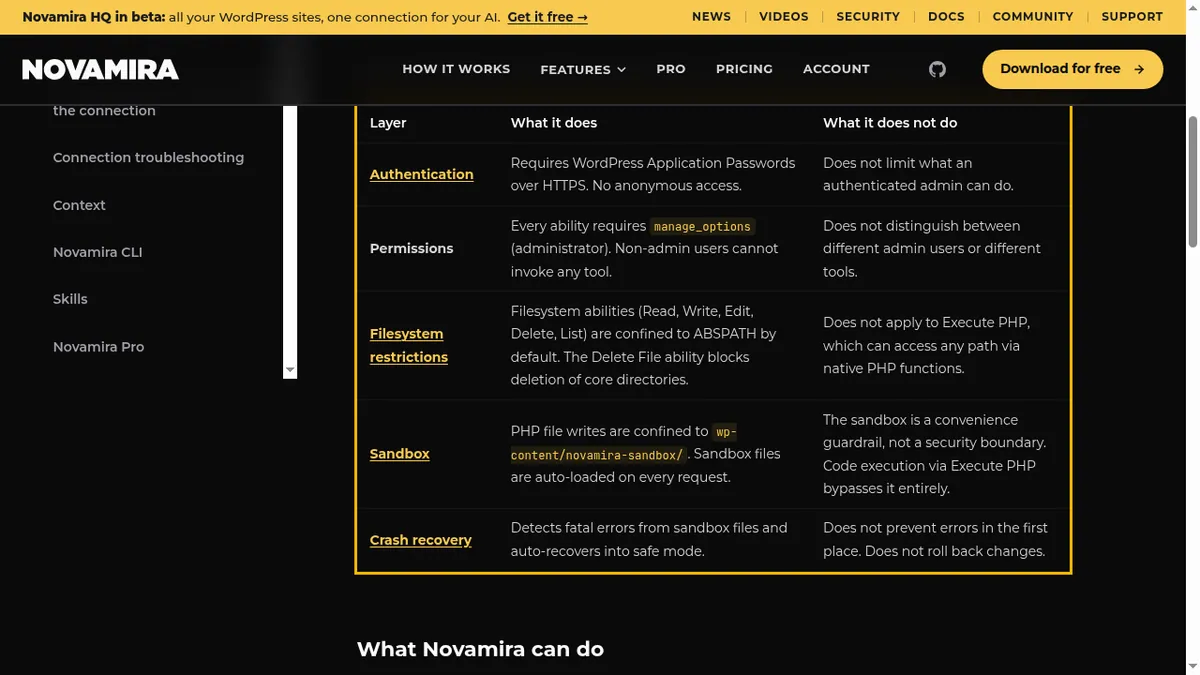
Novamira’s production FAQ says: “Novamira does not offer a read-only mode. AI abilities are either on (full read and write through the sandbox and execute-php) or off. There is no middle ground.” So an agent that only needs to audit a site, answer questions or build a report gets the same power as one rebuilding the theme (Can I use Novamira on a live site?).
Every ability requires an administrator
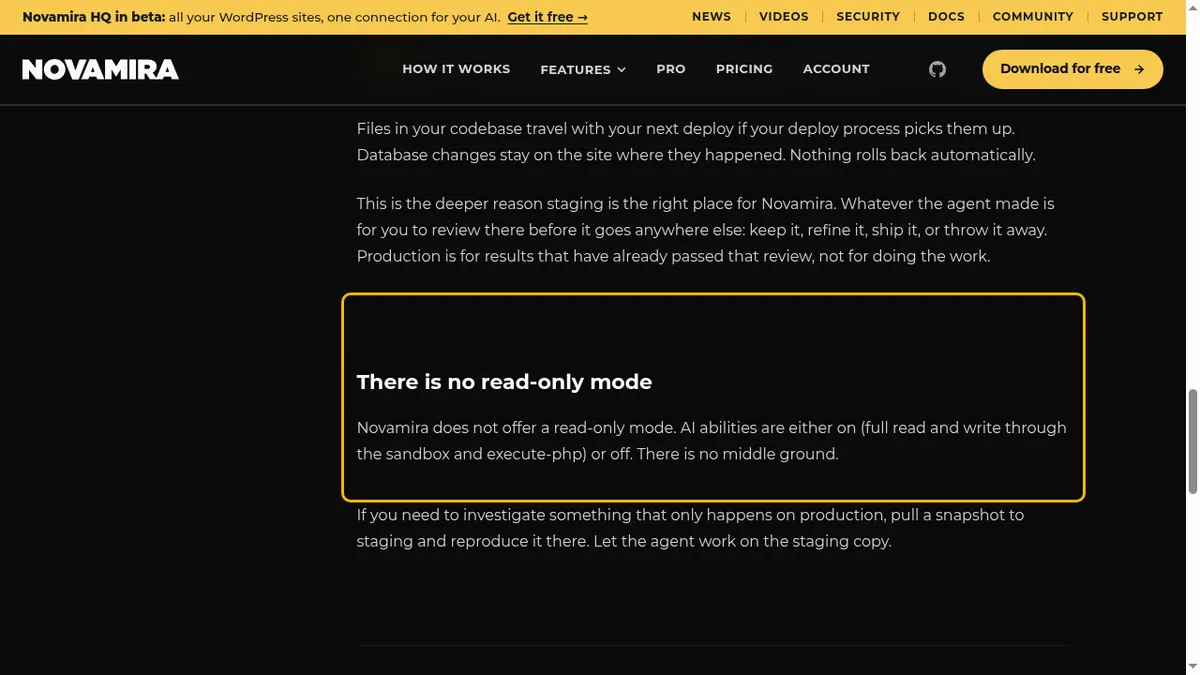
“Every ability requires manage_options (administrator). Non-admin users cannot invoke any tool,” and the permission layer “does not distinguish between different admin users or different tools.” The Abilities Hub can switch individual abilities off for the whole site, but it cannot give one agent less power than another. That runs against the principle of least privilege and against WordPress’s own roles and capabilities model, which exists to make exactly that distinction.
The agent is told it has unrestricted control
The system prompt Novamira hands every agent opens with “Novamira gives you unrestricted control over this WordPress installation.” That is accurate, and it sets the agent’s expectations accordingly. The next lines tell the agent not to modify the Novamira plugin or its own user, because that would cut its own connection.
Staging-only is a recommendation, not a guardrail
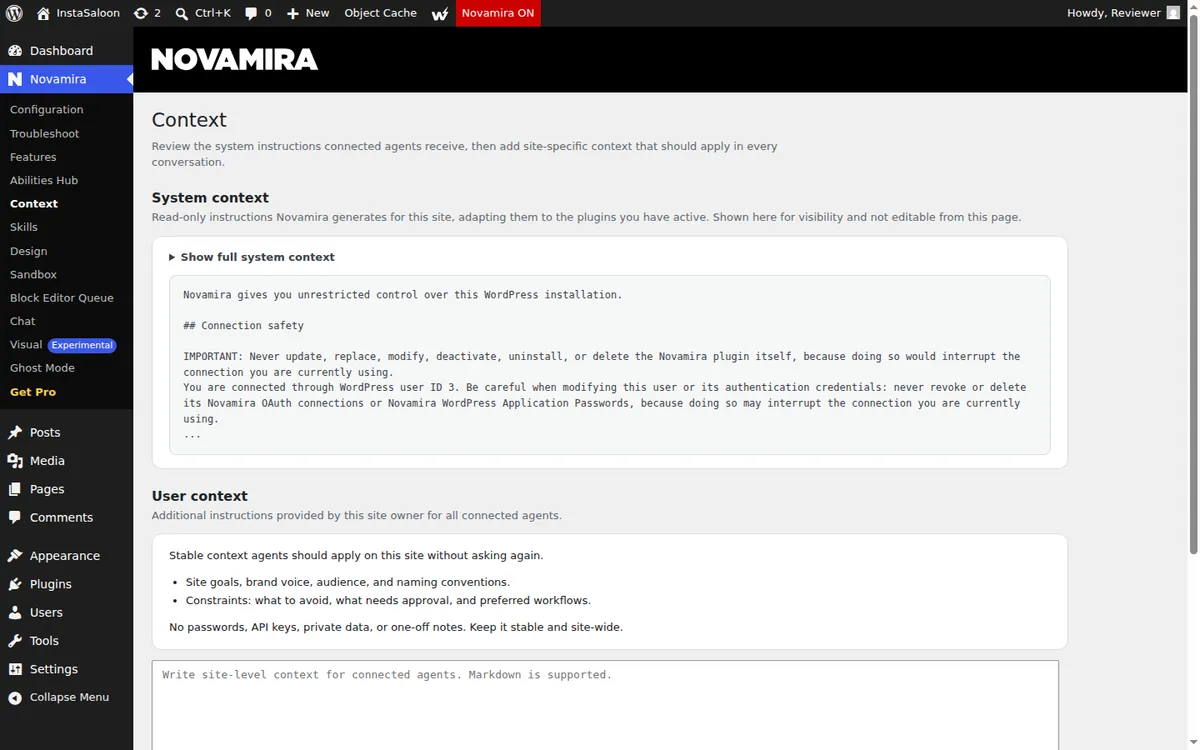
Novamira’s security page calls staging-only use “a professional recommendation, not a limitation enforced by the plugin.” Its production FAQ is blunter: with abilities on, “the only safety net against pointing at the wrong site is you, paying attention.” We saw this in practice: the production warning appeared, and one click dismissed it.
The sandbox is not a boundary, and nothing rolls back
Novamira’s docs say “the sandbox is a convenience guardrail, not a security boundary. Code execution via Execute PHP bypasses it entirely.” Crash recovery “does not prevent errors in the first place. Does not roll back changes.” And for database changes: “Nothing rolls back automatically.” If an agent edits your theme’s functions.php directly and breaks it, you restore it yourself.
Memory and builder expertise cost extra
Without Pro, each new conversation starts from scratch and the agent has to rediscover your theme, builder and conventions, which costs tokens and time (Novamira memory docs). The 53 builder specialisations and Ghost Mode are Pro too.
The most accurate block path needs a person
In our test on 1.12.5, a native Gutenberg page through Novamira’s editor-accurate path took four to five calls, and the finaliser told the agent to ask the user to open a wp-admin page “and keep it open while you work.” That is fine when you are at your desk, and it rules out agents that run on a schedule.
Most routine work goes through raw PHP
Novamira has no dedicated abilities for posts, terms, media or post meta, so the agent writes PHP for each. That is flexible, but details like WordPress’s backslash handling in update_post_meta become the agent’s problem. In our Elementor test, the caller had to pre-slash the page data or the layout would silently corrupt.
Connection problems are common
On 12 October 2026, roughly half of the open issues (24 of 49 by our count) on Novamira’s GitHub tracker were about connecting or signing in an AI client. The requirements page also lists Node.js 18 or later on your computer for the remote MCP proxy. Novamira ships fixes fast, so treat this as a snapshot rather than a verdict.
Is Novamira safe to use on a live WordPress site?
Not with AI Abilities on, and Novamira says so itself. Its guidance is to keep the plugin installed on production if AI-built sandbox features need its loader, but to keep AI Abilities off there and do the work on a staging copy. The plugin does not stop you enabling them on production; it warns you.
Before you connect an agent, make sure you have a staging copy to point it at, backups, and a way to move approved changes to live. If you do, Novamira is safe to use the way it is designed. If you manage client sites and do not, set that up first. On InstaWP you can create a staging site, clone a site before a risky change, keep automatic backups and push and pull between staging and live. Our guide to WordPress staging vs sandbox sites explains which one to use for AI work. For the wider question of whether WordPress MCP is safe on client sites, see our security guide.
Is there any Novamira alternative?
If your agentic WordPress needs are more evolved then you definitely need a powerful Novamira alternative. The best Novamira alternative for agencies and teams is InstaMCP, the WordPress MCP server built into every InstaWP site. It enforces the limits Novamira only recommends: access scoped to the WordPress user’s role, raw PHP, SQL and file access off by default, and automatic rollback of a broken boot file, with nothing to install.
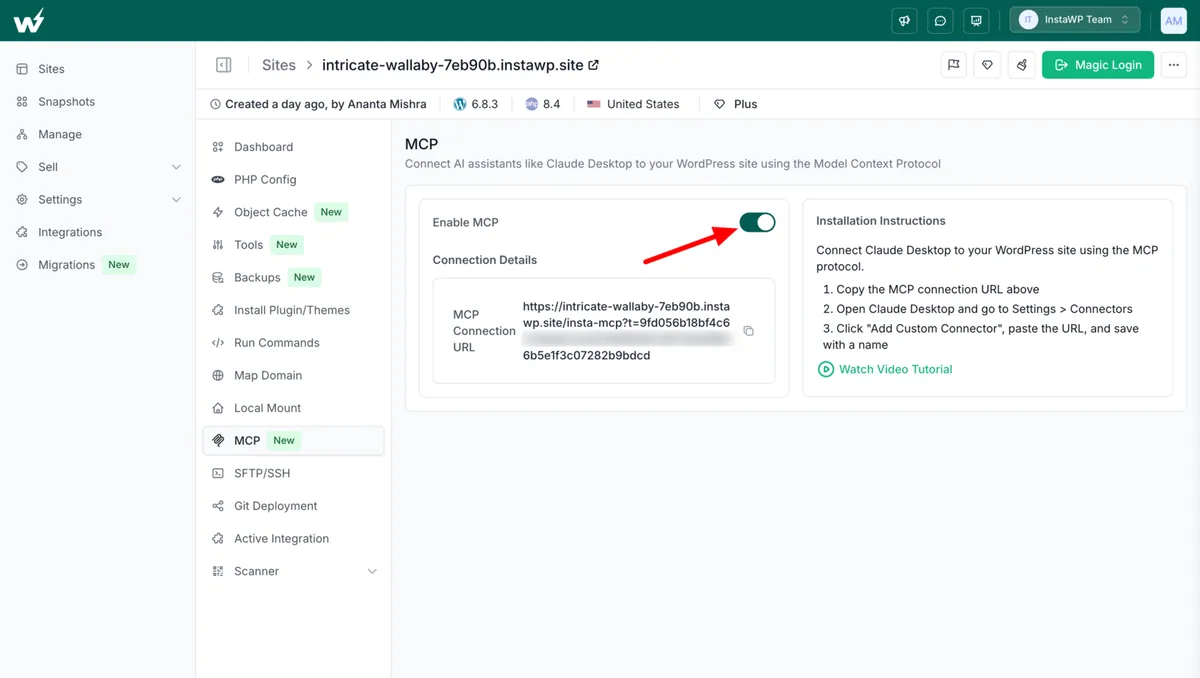
Turn on MCP with one toggle
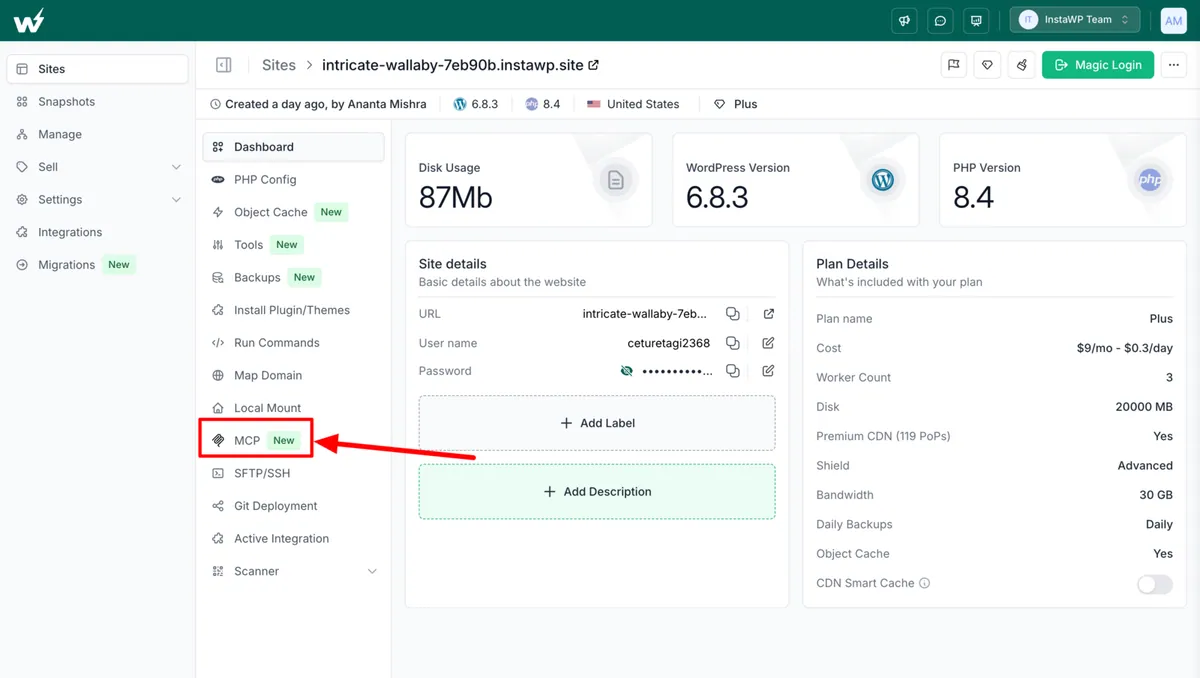
There is no plugin to find or upload to enable the MCP server with InstaMCP. Open a site in the InstaWP dashboard, choose MCP, and switch on Enable MCP. InstaWP installs InstaMCP and generates a secure connection URL. It works on every plan, including $2-a-month sandboxes, and on sites you host with InstaWP’s managed WordPress hosting.
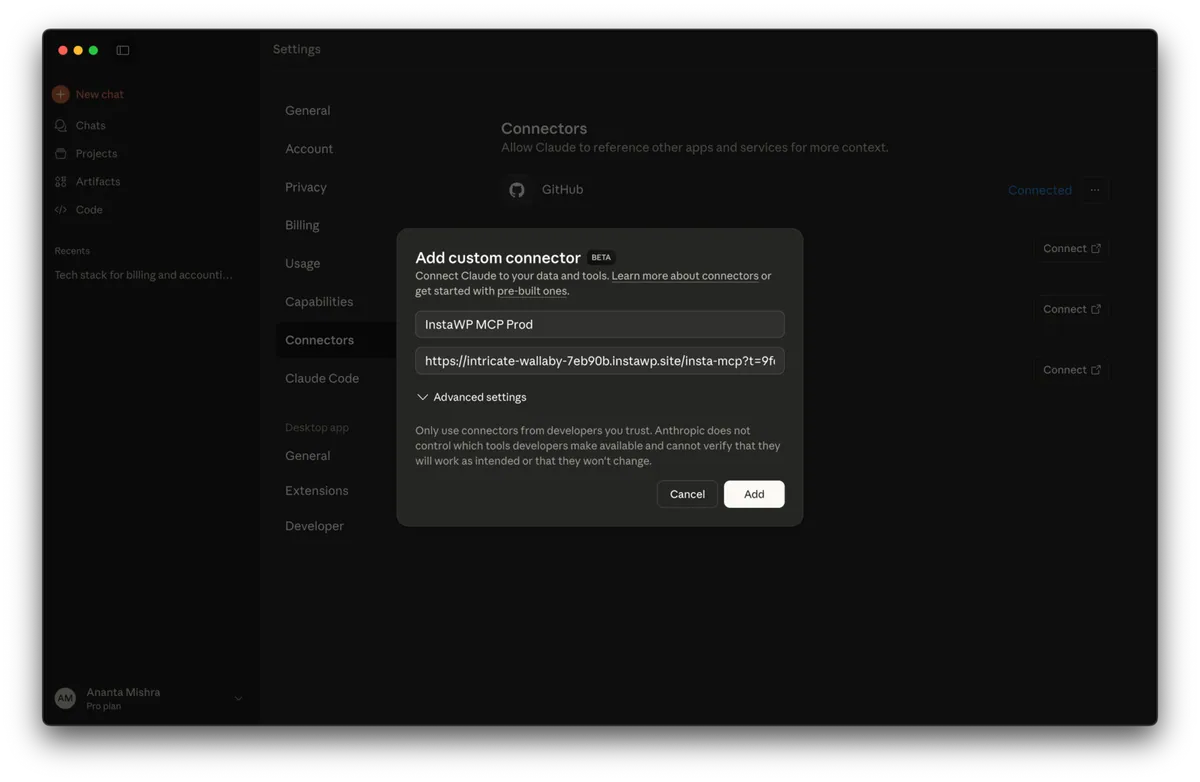
Connect Claude, ChatGPT or Cursor with one URL
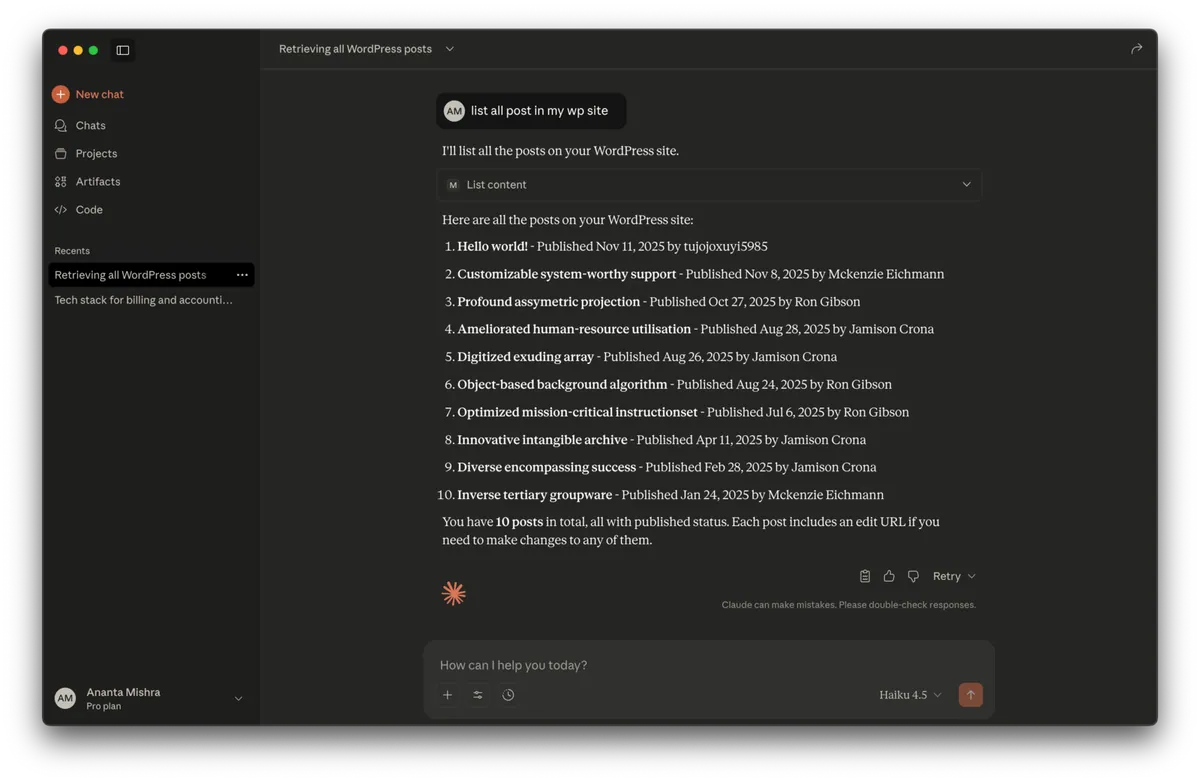
Paste the URL into your AI client as a custom connector. InstaMCP has setup guides for 14 AI clients, including Claude Desktop, Claude Code, Claude.ai, ChatGPT, Cursor, VS Code, Windsurf, GitHub Copilot, Cline, Gemini CLI and Codex (InstaMCP overview). The full walkthrough is in the docs on connecting AI assistants to your WordPress site using MCP, and our tutorial on connecting AI agents to WordPress using MCP explains the protocol side.
Give each agent only the access it needs
Access scoping is where InstaMCP and Novamira differ most. An InstaMCP token acts as a real WordPress user, and that user’s role decides the agent’s scopes. Every one of the 43 tools checks its required scope before it runs. We confirmed the mapping in InstaMCP’s source code:
Then we tested it. On our test site we created a Subscriber user called Client auditor, issued an InstaMCP token for that user with a 30-day expiry, and connected with it. Reading worked. Writing did not:
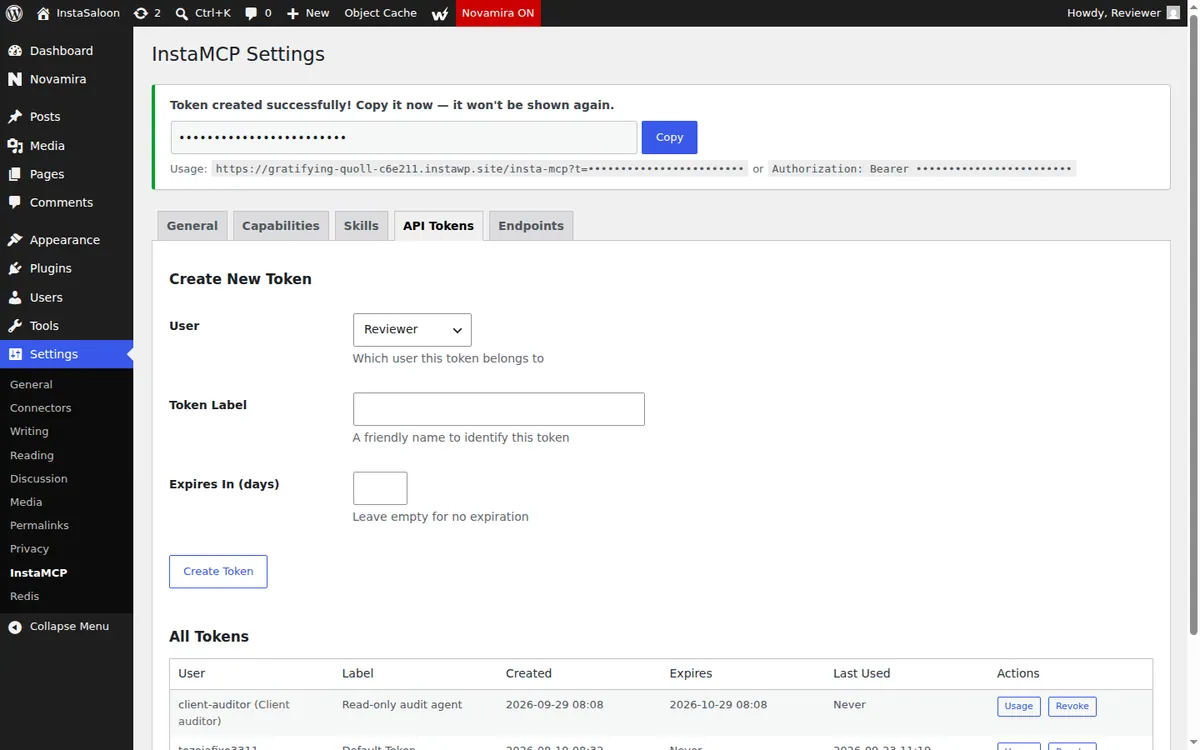
# Token user: "Client auditor" (Subscriber) => scopes: mcp:read
> list_content {"content_type":"post"}
OK: 1 item returned ("Hello world!")

> create_content {"content_type":"post","title":"Should not exist","status":"draft"}
Insufficient permissions: This tool requires the 'mcp:write' scope. You have: mcp:read
Novamira cannot do this at all: a Subscriber cannot use a single Novamira ability. For agencies that already give team members and contractors and clients different access in InstaWP, InstaMCP carries the same idea through to their AI agents.
Keep raw PHP, SQL and file access off until you need it
InstaMCP ships with its three most powerful tools switched off: execute_php, db_query and site_files. They still appear in the tool list, and calling one returns instructions for enabling it, so an agent is never confused about why a tool is missing. All three need the admin scope.
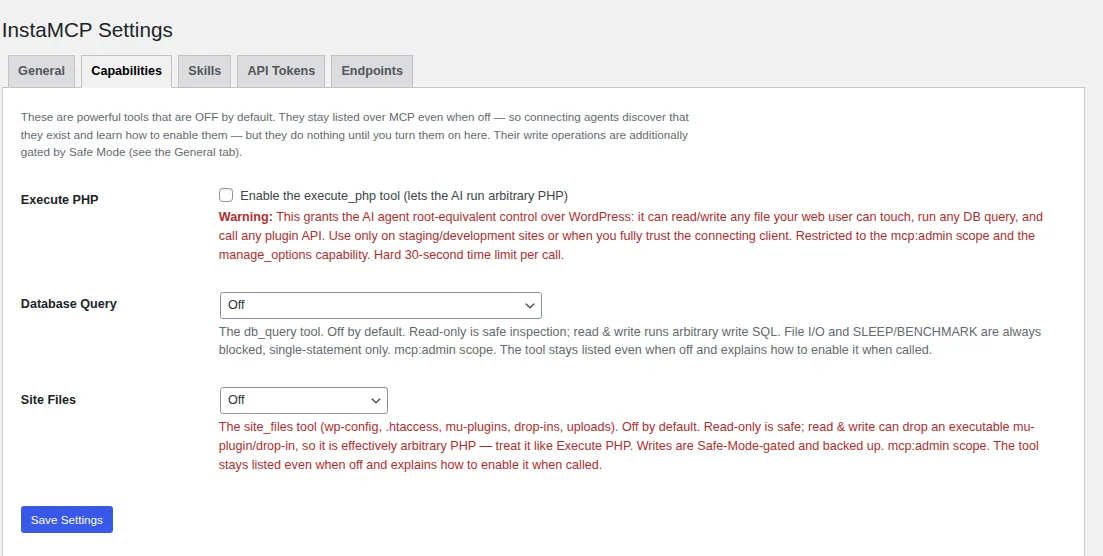
- Database Query has three modes: off, read-only (SELECT, SHOW, DESCRIBE, EXPLAIN) or read and write. File I/O and SLEEP or BENCHMARK are always blocked, and only single statements run.
- Site Files is limited to an allowlist (wp-config.php, .htaccess, mu-plugins, drop-ins and uploads) and can also be set to read-only.
- Safe Mode is a single switch in InstaMCP’s General settings. When it is on, InstaMCP refuses deletes, plugin and theme installs or changes, code file writes, post meta writes and media uploads, while normal content editing keeps working. It is off by default, so turn it on for client sites where agents should edit content and nothing else.
- Boot guard. When an admin enables
execute_php, InstaMCP snapshots boot-critical files such asfunctions.phpandwp-config.phpbefore each call. If the call leaves one with a PHP syntax error, InstaMCP rolls it back in the same request and reports it underboot_guard.
Our guide to using MCP for WordPress in production walks through when to turn each of these on, and InstaWP’s AI and MCP features page summarises the model.
A read-only mode for platform-level agents too
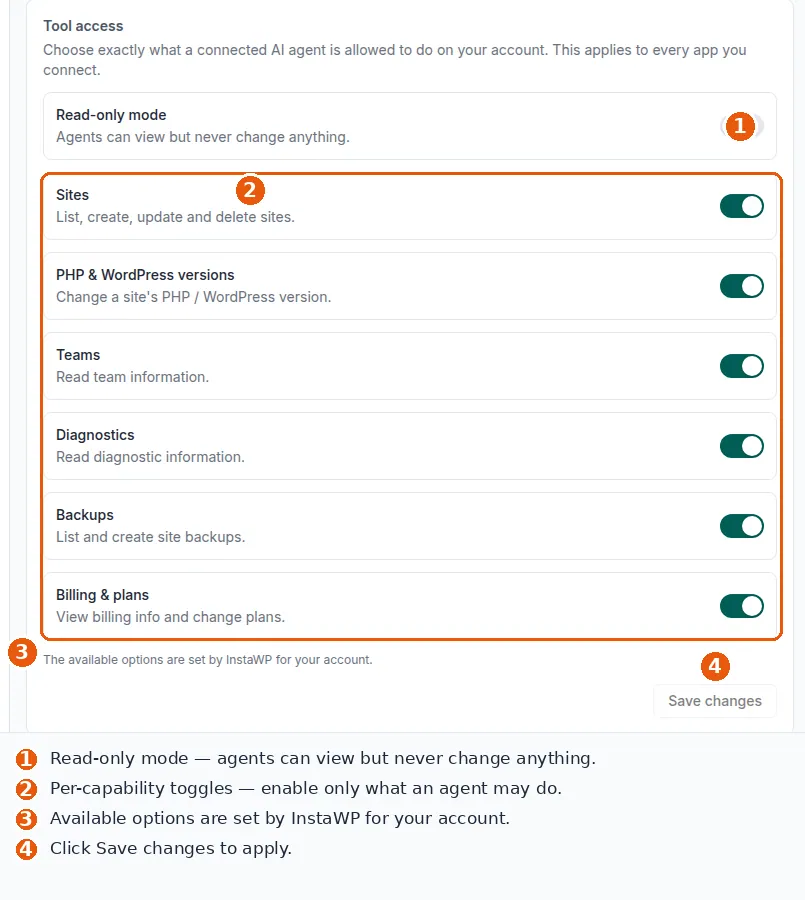
Besides per-site MCP, InstaWP has account-level MCP for agents that manage many sites: creating sites, changing PHP versions, taking backups. Its tool access panel has a Read-only mode and a switch for each capability, so you can let an agent look at every client site without letting it change any of them (account MCP docs).
Memory and skills included
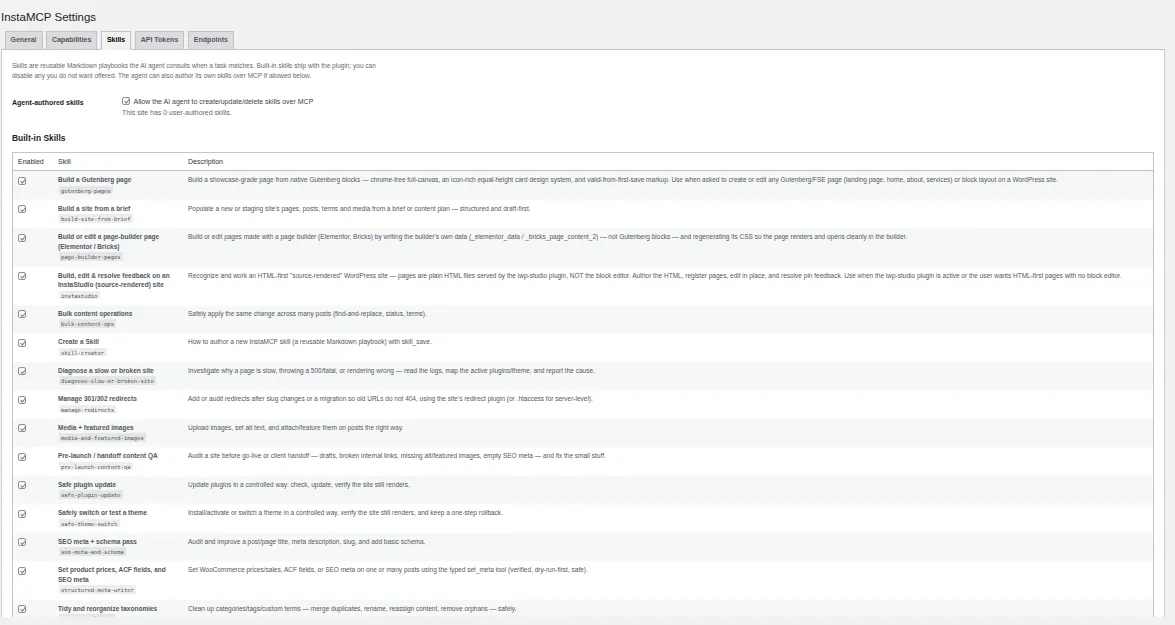
InstaMCP includes four memory tools on every site, so an agent can save your brand colours, builder and past decisions once and recall them next session, with no upgrade. It also ships 15 built-in skills, including playbooks for Gutenberg pages, Elementor and Bricks pages, safe plugin updates, SEO meta and pre-launch QA, and admins can add their own. Novamira’s free core has user skills too, so the difference here is memory.
Staging, backups and hosting in the same place
Novamira’s advice is to do AI work on a staging copy with backups. On InstaWP that is the starting point, not an extra step: staging environments next to production sites, WordPress hosting with staging included on higher plans, backups with one-click restore, and SSH, SFTP and WP-CLI on every tier. Agents that run from a terminal or pipeline can use the InstaCLI too, as covered in the docs on the CLI for CI/CD and AI agents.
Novamira vs InstaMCP: what did our head-to-head test show?
Output quality was a draw, and the write path was not. On 25 September 2026 we built the same three things through Novamira 1.12.5 and InstaMCP 1.11.3 on one WordPress 7.1.2 site, then compared the results.
Novamira clearly won on design. The InstaMCP wins all come from one thing: named tools like create_content, set_meta and validate_blocks do the WordPress-specific work, so the agent does not have to write it in PHP. Our Elementor MCP guide covers the slashing trap in detail.
Novamira vs Elementor MCP: which one should you use on an Elementor site?
Use Novamira Pro or InstaMCP rather than a standalone Elementor MCP server, because the hard part of an Elementor page is the data Elementor needs around the layout. In our Elementor MCP tests, the most widely listed standalone server, the open-source elementor-mcp package on npm, produced a page that returned HTTP 200 and rendered blank, because it never wrote the meta key Elementor uses to recognise its own pages.
Novamira reaches Elementor two ways. The free core reaches it through raw PHP, so the agent has to know Elementor’s data format and slashing rules itself. Novamira’s Elementor specialisation, part of Pro, adds that knowledge: building and migrating pages, editing and validating elements, Elementor 4 atomic widgets, v3 to v4 conversion, global classes and variables, and dynamic tags (checked 12 October 2026).
InstaMCP handles Elementor through its built-in page-builder-pages skill. The agent writes Elementor’s own page data with set_meta, which applies WordPress’s slashing correctly and reads every value back, then regenerates the page CSS. That last step uses execute_php, so an admin turns it on first. In our 25 September head-to-head, the Elementor page came out pixel-identical through both plugins; the difference was that InstaMCP’s tool handled the slashing and Novamira’s caller had to.
What are the other Novamira alternatives?
InstaMCP runs only on InstaWP sites. If your site has to stay on another host, these are the other Novamira alternatives worth a look, based on GitHub data from September 2026:
- WordPress MCP Adapter (official): lives in the WordPress GitHub organisation and replaced Automattic’s archived MCP plugin. It exposes whatever plugins register in the WordPress 6.9 Abilities API, so the tool list grows with your site. It is free and needs WordPress 6.9 or later. See our WordPress MCP Adapter review.
- WordPress.com MCP: a hosted endpoint with OAuth 2.1 sign-in and nothing to install. It only works for sites hosted on WordPress.com and covers core content operations.
- mcp-wordpress by docdyhr: an open-source Node.js server that manages several self-hosted sites from one config file through the REST API and application passwords. It runs locally over STDIO, so every person holds their own credentials for every site.
We compare 11 options on authentication, tool surface and maintenance in WordPress MCP servers compared.
How do Novamira and InstaMCP compare feature by feature?
InstaMCP leads on access control, defaults, write safety and unattended work. Novamira leads on price, host reach, raw power, builder depth and design. Sources: novamira.ai and our own tests, 25 and 29 September 2026.
Who should use Novamira, and who should not?
Use Novamira if you are a developer working with an AI on your own development or staging site, on any host, and you want maximum reach for little or no money. Choose InstaMCP if the sites belong to clients, more than one person or agent needs access, or agents run on a schedule.
You do not have to pick sides on hosting, either. Novamira HQ’s InstaWP integration can discover the sites in your InstaWP account and install Novamira on them, so a Novamira user can still do the risky work on an InstaWP staging site. For more AI tooling options, see our roundup of the best AI coding tools for WordPress developers and our guide on starting with WordPress AI development.
Is Novamira worth it in 2026?
Yes, for the job it was built for. Novamira is one of the most capable free ways to let an AI agent loose on a WordPress development site, it supports 20 AI tools out of the box, and its documentation is honest about every trade-off. Pro is good value if you live in one of its 53 supported builders.
Novamira is a sharp tool for a developer on a staging site. It is not a governance layer: every agent is a full administrator, there is no read-only mode, staging-only is advice, and nothing rolls back. If your AI touches client sites, use InstaMCP on InstaWP instead: role-based scopes, raw access off by default, boot-file rollback, memory included and staging built in.
Our rating: 3 out of 5. 4 out of 5 for a solo developer on a staging site, 2 out of 5 for client sites where different people and agents need different levels of access.
Novamira review: frequently asked questions
What is Novamira?
Novamira is a free, open-source WordPress plugin that turns a site into an MCP server for AI agents such as Claude, ChatGPT and Cursor. It gives the agent full PHP execution, WP-CLI, database and file access. It is made by Ovation S.r.l. (Dynamic.ooo) and licensed AGPL-3.0.
Is Novamira free?
Yes. The Novamira core plugin is free for unlimited sites. Novamira Pro, which adds memory and builder specialisations, costs 49 euros a year for 3 sites, 149 euros a year for 1,000 sites, or 299 euros once for Agency Lifetime, as of 12 October 2026.
Is Novamira safe to use on a live site?
Novamira recommends against enabling its AI Abilities on production. Its docs call staging-only use a professional recommendation, not a limit the plugin enforces. In our test it warned that the site looked like production, then enabled AI Abilities after one confirmation.
Does Novamira have a read-only mode?
No. Novamira’s documentation says it does not offer a read-only mode: AI abilities are either fully on or off, and every ability requires administrator access. InstaMCP supports read-only agents by issuing a token for a Contributor or Subscriber user.
Is Novamira on WordPress.org?
No. As of 12 October 2026 Novamira is not listed in the WordPress.org plugin directory. You download it from novamira.ai or from its GitHub releases and upload the ZIP in wp-admin.
Which AI tools work with Novamira?
Novamira 1.12.6 lists 20 AI tools in its setup wizard, including Claude Code, Claude Desktop, Claude.ai, ChatGPT, Codex, Cursor, VS Code, GitHub Copilot, Windsurf, Cline, Roo Code and Zed. It connects through the Novamira CLI, OAuth or an Application Password.
What is the best Novamira alternative?
For agencies and teams working on client sites, the best Novamira alternative is InstaMCP, the MCP server built into every InstaWP site. It maps each token to the WordPress user’s role, keeps raw PHP, SQL and file access off by default, and needs no plugin setup. It runs only on InstaWP sites.
Can I use Novamira on InstaWP?
Yes. Novamira installs on InstaWP sites like any plugin, and Novamira HQ has a documented InstaWP integration. InstaWP sites also come with InstaMCP built in, which you can use instead.
Does InstaMCP work on any WordPress host?
No. InstaMCP is built into InstaWP sites and runs only there, on every plan including 2-dollar-a-month sandboxes. If your site must stay on another host, Novamira or the official WordPress MCP Adapter are the options.
Is Novamira better than an Elementor MCP server?
For Elementor sites, Novamira Pro is more complete than most standalone Elementor MCP servers because it knows Elementor’s page data, atomic widgets and global styles. The free core reaches Elementor only through raw PHP. InstaMCP covers Elementor with its built-in page-builder-pages skill and scoped access, on InstaWP sites.
What is the difference between Novamira and the WordPress MCP Adapter?
The official WordPress MCP Adapter is a free transport that exposes whatever abilities plugins register through the WordPress Abilities API. Novamira is a plugin that registers its own 41 abilities, including PHP execution and file access, and uses that same Abilities API route. You can run the adapter without Novamira, but Novamira gives the agent far more to do.