Choosing an InstaWP plan comes down to one question: what is the site doing today? Each site is priced on its own and billed by the day, from a $2 a month Sandbox for building to $5 to $45 a month for live hosting on Starter through Elite. New sites have no free plan, but a free account plus a card gets you $25 in credits to start.
Every live plan runs on InstaWP’s managed WordPress hosting, so the CDN, the firewall and off-site backups are already in the price. What changes from tier to tier is how many visitors a site can serve at once, how much it can store, and which extras switch on. This guide matches each plan to the kind of site it suits, and shows how to move a site between plans as the project grows.
- Build on Sandbox ($2 a month, about 7 cents a day). It has SSH, WP-CLI and Git, but no CDN, no firewall and no custom domain.
- Starter ($5) is the minimum for a live site, because it is the first plan that can map your own domain.
- Anything with logins, orders or daily edits belongs on Plus ($9): daily backups kept 30 days, object cache, bot protection and Advanced site management.
- Built-in staging starts at Pro ($15). On Starter or Plus, clone the site to a $2 sandbox and test there instead.
- A bigger plan serves more visitors at once, not one page faster. PHP workers go from 1 on Sandbox to 10 on Elite.
- A plan change takes about a minute, keeps the same URL and data, and prorates from that day.
Table of Contents
How Much Do InstaWP Site Plans Cost?
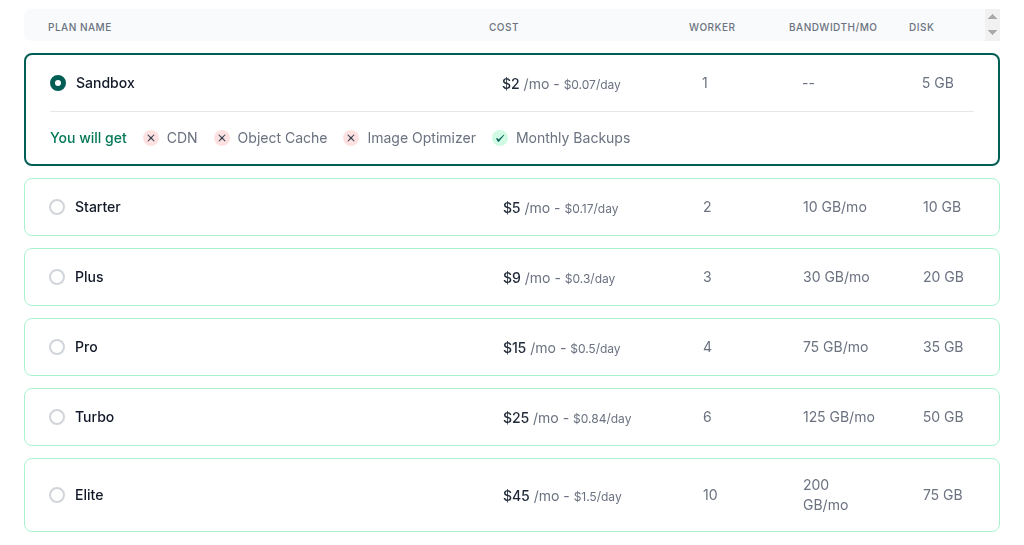
InstaWP site plans cost between $2 and $45 per site per month, and each site is billed daily at its own plan’s rate. Sandbox is the development tier. Starter, Plus, Pro, Turbo and Elite are the production hosting tiers, and each step up adds PHP workers, storage, CDN bandwidth and features.
The pay-as-you-go site plans are all charged the same way: InstaWP adds up each site’s daily cost and charges your card once a month. There is no annual contract and no minimum number of sites.
Which features depend on the plan?
Most of the developer toolkit is on every plan. The features below are the ones that switch on at a particular tier, which is usually what decides the upgrade.
Sources: the InstaWP pricing page and the plan dialog in the dashboard, checked on 5 October 2026.
Is InstaWP Free?
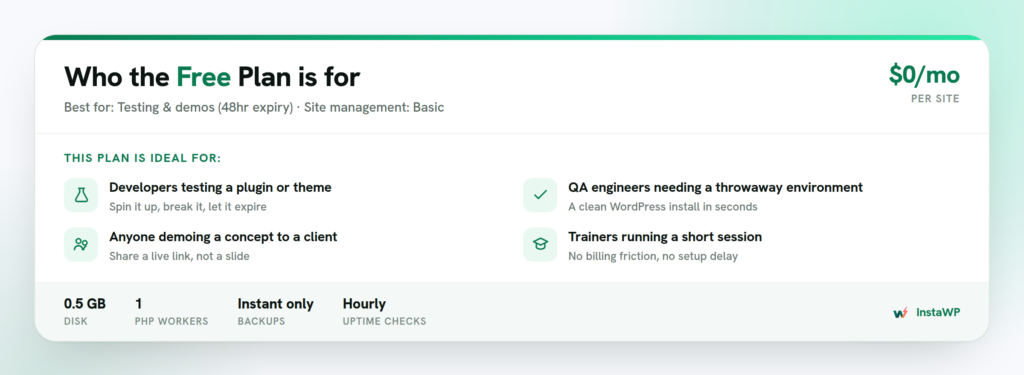
No. InstaWP no longer offers a free plan for new sites. Creating an account is free, but a card is required to launch a site, and adding one gives you $25 in credits you can spend on any plan. The cheapest paid option is the $2 a month Sandbox plan.
InstaWP used to offer a Free plan: sites with 0.5 GB of storage and one PHP worker that expired after 48 hours. It has been retired, and the plan chooser now shows it greyed out with a “Plan Disabled” label. The jobs it was used for, such as plugin tests, QA environments and quick client demos, now run on a Sandbox site, which costs about 7 cents a day and does not expire.
Which InstaWP Plan Should You Choose?
Choose by what the site does. Use Sandbox while a site is being built, Starter for a small live site, Plus once the site takes orders or changes daily, and Pro or above when you need built-in staging, image optimization or more PHP workers for traffic.
If you are unsure, start lower. A plan change takes effect in about a minute and billing prorates from that day, so there is no penalty for starting on Sandbox and moving up when the site is ready.
What Is the InstaWP Sandbox Plan For?
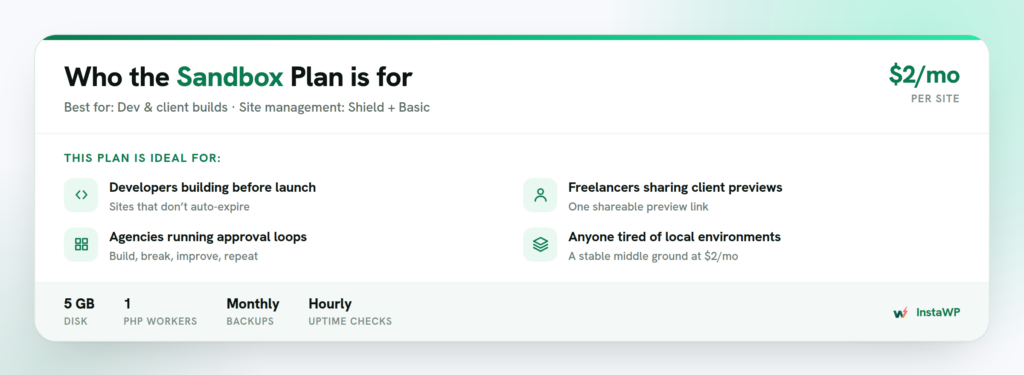
The Sandbox plan is InstaWP’s $2 a month development tier, for sites that are being built, tested or reviewed and are not yet live. A sandbox site never expires, has 5 GB of storage and one PHP worker, takes monthly backups, and gives you the same SSH, WP-CLI and Git access as a production site.
- 5 GB of storage and 1 PHP worker
- Monthly automatic backups (two kept), plus manual backups whenever you want one
- Magic Login for one-click wp-admin access, with no password to share
- Site tools such as the database editor, code editor, PHP config and log viewer
- The ability to run WP-CLI commands from the dashboard, or over SSH
- Basic site management functionalities: bulk updates, users, staging copies, 2-way sync and the database editor
A sandbox has no CDN and no firewall, because it is not meant to face real visitors. When the site is ready, change it to Starter or higher. It keeps the same URL and data, so there is nothing to migrate.
Useful add-ons on a sandbox:
- Snapshots and templates: save a site as a Snapshot for $1 a month and relaunch it in one click, or keep an instant template for $2.
- Migrations: moving a site onto InstaWP is free. An end-to-end migration away from InstaWP, or between two other hosts, is $2 per migration.
What Do You Get on the InstaWP Starter Plan?
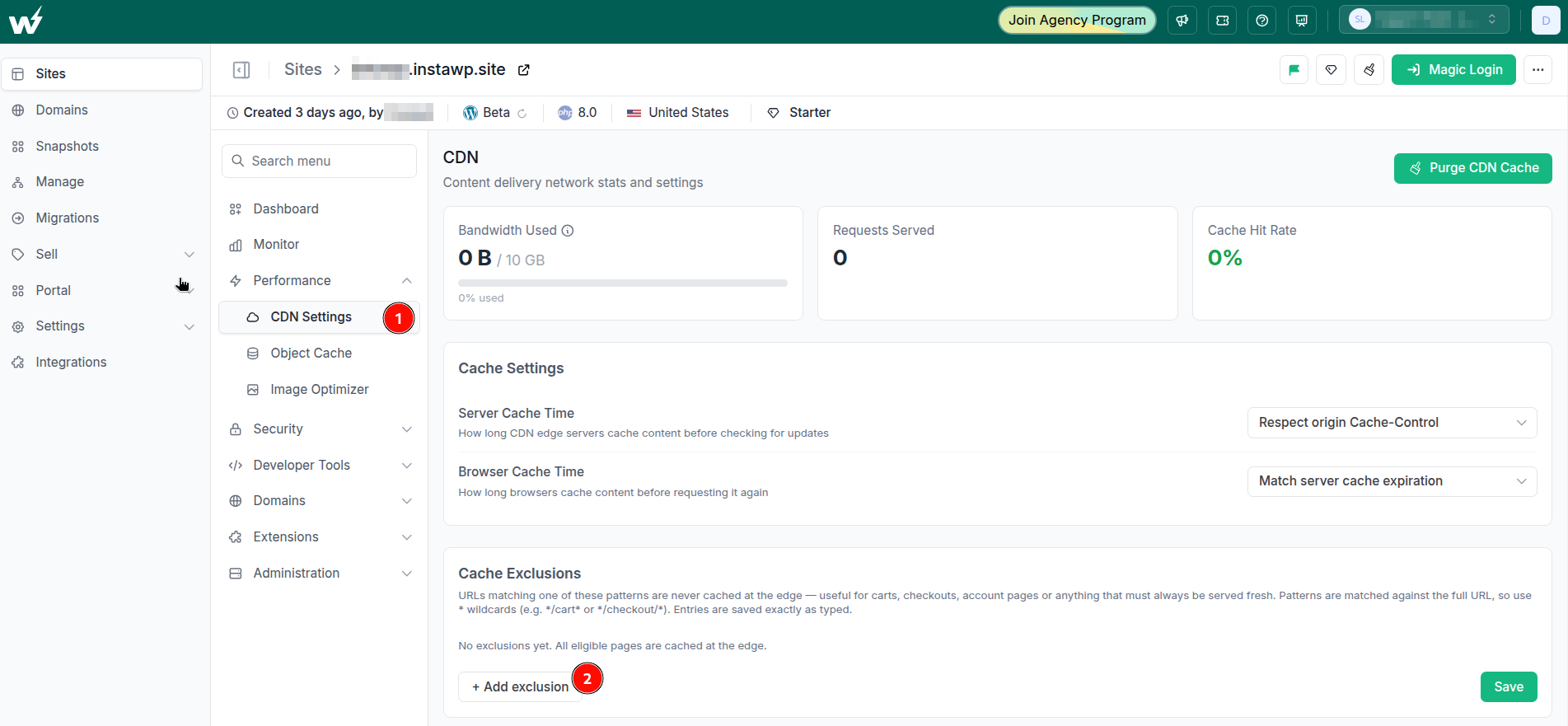
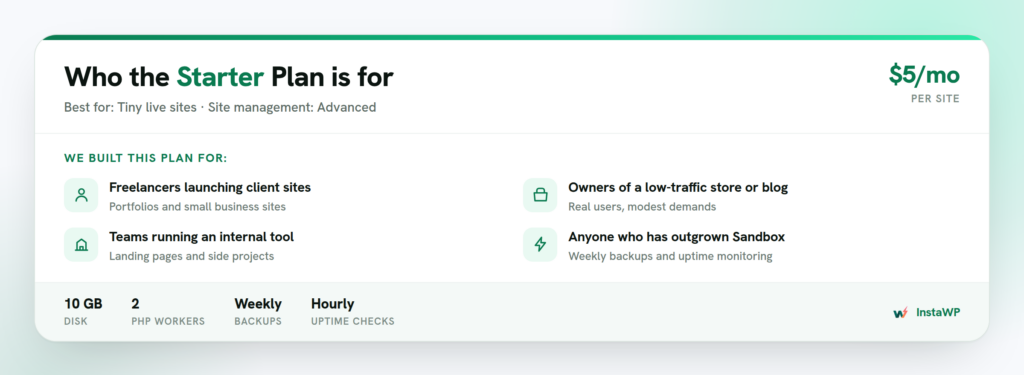
Starter is InstaWP’s entry production plan at $5 a month per site. It gives a small live site 10 GB of storage, two PHP workers, a Basic edge CDN with 10 GB of bandwidth, the Basic InstaShield firewall, free SSL and weekly backups, and it is the first plan that can map your own domain.
- 10 GB of storage and 2 PHP workers
- InstaCDN Basic edge with 10 GB of monthly bandwidth
- InstaShield Basic: managed WAF rules, DDoS mitigation and SSL
- Weekly automatic off-site backups, four kept
- Custom domain mapping and free SSL, issued and renewed for you
- Magic Login, site tools, SSH, SFTP, WP-CLI and Git
Starter fits a client portfolio, a small business site, a landing page or a low-traffic blog. Starter does not include object cache, bot protection, the vulnerability scanner or managed updates. If the site needs those, move it to Plus, and its site management switches to Advanced in the same plan change.
Workflow extras such as Git deployments come with every plan, and 2-way sync is billed by usage, so you pay only for the syncs you run.
Why Is Plus the Most Popular InstaWP Plan?
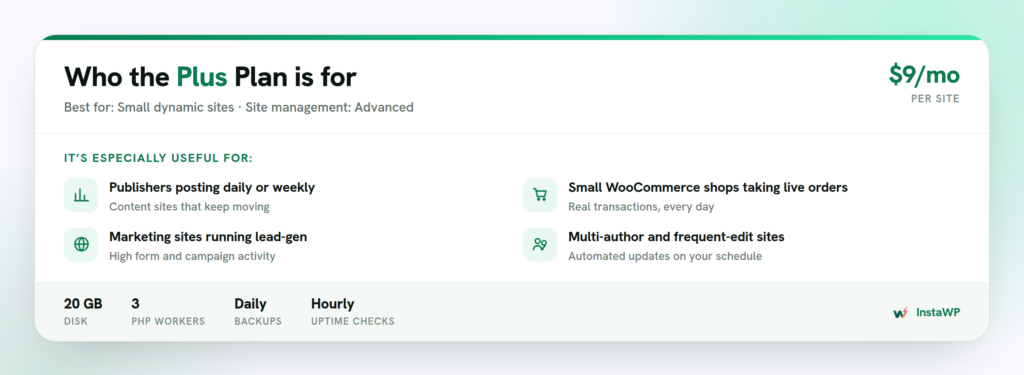
Plus, at $9 a month per site, is the first InstaWP plan with the full managed hosting set. It adds daily backups kept for 30 days, the Advanced InstaShield firewall with bot protection, a Redis-compatible object cache, the vulnerability scanner, and Advanced site management with uptime monitoring and managed updates at no extra cost.
- 20 GB of storage, 3 PHP workers and 30 GB of Premium edge CDN bandwidth
- Daily automatic backups, kept for 30 days
- InstaShield Advanced: bot detection, custom WAF rules and stronger DDoS mitigation
- Object cache, enabled for you, which speeds up logged-in, cart and admin pages
- Advanced site management included: uptime monitoring with email and Slack alerts, activity logs and scheduled updates
- Performance and vulnerability scanning for core, plugins and themes
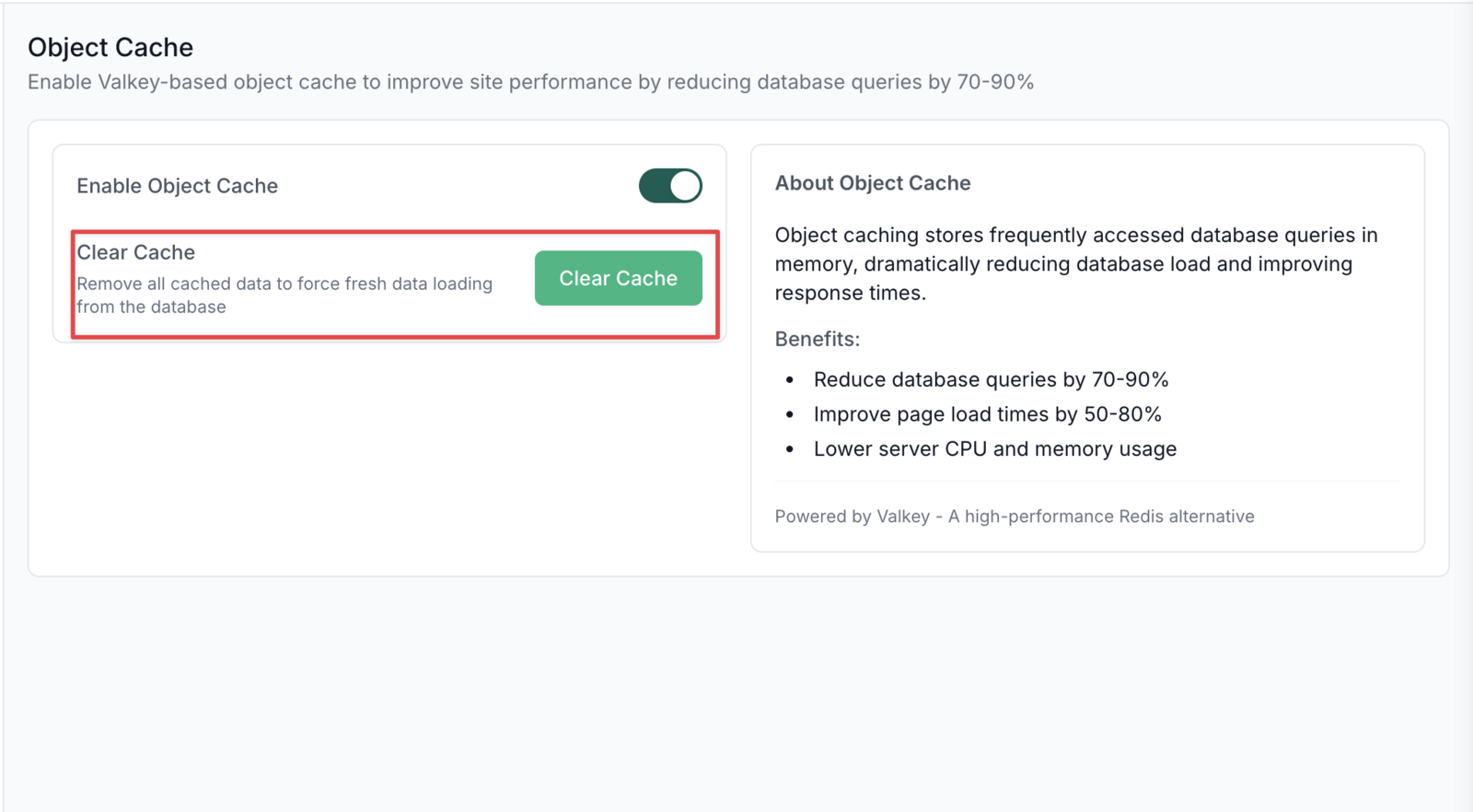
Plus is the plan for a site that people actually use: a blog that publishes every week, a marketing site collecting leads, a membership area, or one of the smaller WooCommerce stores taking live orders. Daily backups matter here because a day of orders or content is real work to lose.
See Advanced Site Management tools for everything the included management tier does, and how backups work on InstaWP for restore options.
When Do You Need the InstaWP Pro Plan?
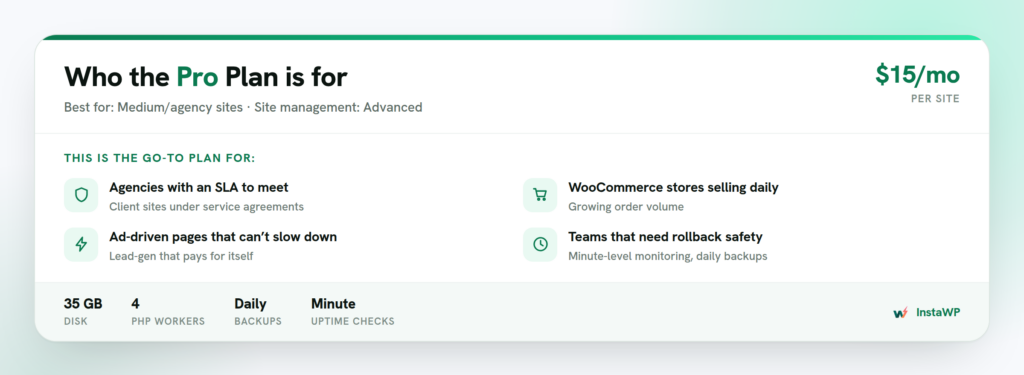
You need Pro, at $15 a month per site, when a site needs a safe place to test changes before they reach visitors. Pro is the first plan with a built-in staging environment and automatic WebP image optimization, and it raises the site to four PHP workers, 35 GB of storage and 75 GB of CDN bandwidth.
- Everything in Plus, including daily backups, object cache and Advanced site management
- A built-in staging copy of the live site, created from the dashboard and never billed separately
- Image optimization: automatic WebP compression, delivered from the edge
- 4 PHP workers, 35 GB of storage and 75 GB of Premium edge CDN bandwidth
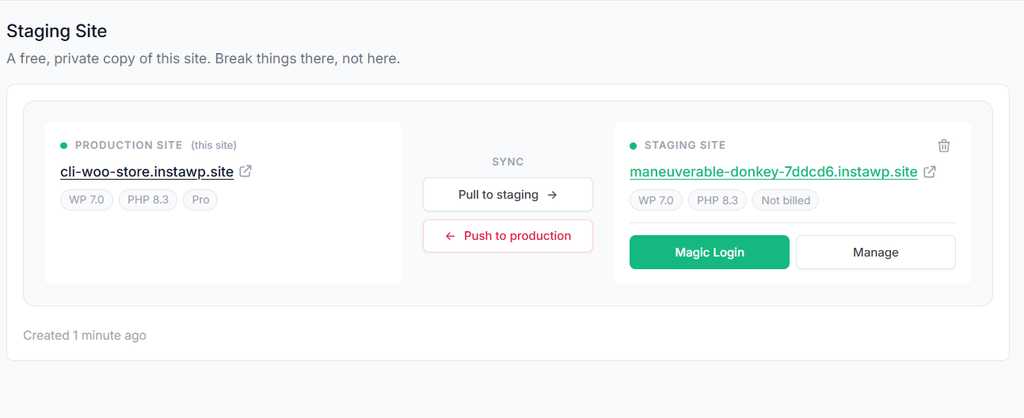
Pro suits client sites covered by a maintenance agreement, stores that sell every day, and ad or campaign pages that cannot afford a broken update. Staging is the deciding feature: test the plugin update or redesign on the copy, then push it live.
Is the InstaWP Turbo Plan Right for WooCommerce?
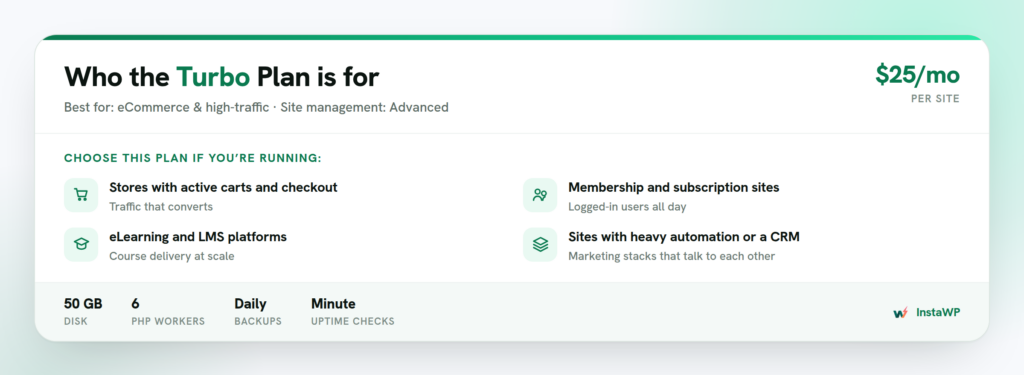
Yes, Turbo is the plan InstaWP sizes for WooCommerce stores, membership sites and course platforms. At $25 a month per site it gives six PHP workers, 50 GB of storage and 125 GB of CDN bandwidth, so more logged-in shoppers can browse, add to cart and check out at the same time.
Logged-in and checkout pages cannot be served from a page cache, so each one needs a PHP worker. That makes worker count the real limit on a busy store, and it is the main thing Turbo adds over Pro. Everything else carries over: staging, daily backups, object cache, image optimization and Advanced site management.
If you resell sites to clients, Turbo pairs well with InstaWP’s Website as a Service platform and reusable snapshots, so a proven store setup becomes a product you can launch again.
What Does the InstaWP Elite Plan Include?
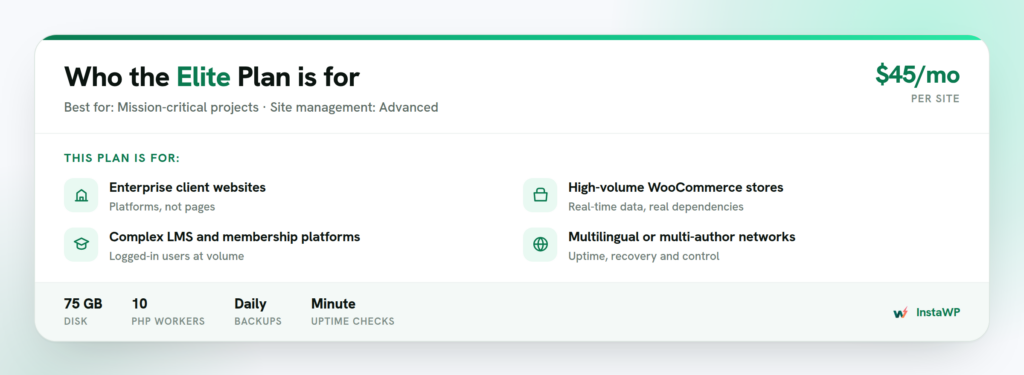
Elite is InstaWP’s largest standard plan, at $45 a month per site. It includes everything on Turbo with 10 PHP workers, 75 GB of storage and 200 GB of Premium edge CDN bandwidth, for high-traffic stores, large membership or LMS platforms and multilingual content networks.
- 10 PHP workers, 75 GB of storage and 200 GB of CDN bandwidth
- Daily backups kept for 30 days, staging, object cache and image optimization
- Advanced InstaShield, the vulnerability scanner and Advanced site management
For 20 or more sites, or for custom infrastructure, InstaWP’s sales team builds tailored plans for agencies and hosts, so contact sales from the pricing page rather than stacking Elite plans.
What Does Every InstaWP Plan Include?
Every InstaWP plan, including the $2 Sandbox, gets the full developer toolkit. The tiers change capacity and hosting features, never basic access, so you never pay more just to get SSH or a newer PHP version.
- SSH, SFTP, WP-CLI and Git access on every site
- PHP 7.4 through 8.5, switchable per site from the dashboard
- One-click promotion from sandbox to production on the same URL, with no migration
- Free migration onto InstaWP from any host (see the WordPress migration workflow)
- Free SSL, issued and renewed automatically
- In-site MCP, so AI tools like Claude can work on the site (see the WordPress MCP server)
- Human support from WordPress engineers on every plan

Each InstaWP site can be made MCP-ready with one toggle, so an AI client such as Claude can read content, run updates and manage the site with a scoped, revocable token. It is on the $2 Sandbox as well as Elite, which makes a sandbox a cheap, safe place to try agent workflows before they touch production.
Does a Higher InstaWP Plan Make Your Site Faster?
A higher InstaWP plan lets the site serve more visitors at the same time, but it does not make a single page load faster. Tiers add PHP workers, which are how many uncached requests the site can handle at once. A lone visitor on a quiet Starter site gets the same response time as on Elite.
What does change speed between plans is the feature set. Plus adds an object cache, which cuts database work on logged-in and cart pages, and moves the site to the Premium edge network. Pro adds image optimization, which shrinks page weight. If a site is slow for one visitor at a time, the fix is usually in the site itself; our guide on slow load time covers the usual causes.
The servers matter too. On InstaWP’s new-generation servers, the free WP Benchmark plugin from WordPress.org scored 9.8 out of 10, against 7.3 on the previous generation, in a test we ran in August 2026. The method and raw numbers are in our WordPress hosting benchmark, and the InstaWP hosting stack breakdown walks through every layer a request passes.
When Should You Upgrade Your InstaWP Site Plan?
Upgrade when a site needs something its current plan does not include, or when it runs out of room: storage, CDN bandwidth or PHP workers. A useful rule is to upgrade when the cost of not upgrading is higher than the price difference.
1. The site is ready to go live
Move a finished sandbox to Starter or higher. Production plans add the CDN, the firewall and more frequent backups, and they let you map your own domain. Because a plan change keeps the same site and URL, launch day is a plan change plus DNS, not a migration.
2. The site takes orders, logins or daily edits
Move to Plus. Daily backups keep a day of orders or content recoverable, the object cache speeds up the pages a page cache cannot help, and bot protection keeps scrapers and login attacks off checkout and wp-admin.
3. You are tired of maintaining it by hand
If you still update plugins one by one and check each site for problems by hand, move to Plus. Plus and above include Advanced site management: scheduled updates, uptime and SSL monitoring with alerts, and vulnerability scans. If you look after many client sites, our guide to managing 20+ sites from one dashboard shows how the pieces fit.

4. You need to test changes before visitors see them
Move to Pro for built-in staging. You get a full copy of the live site on its own URL, and you push changes back when they work. On Starter or Plus, a $2 sandbox clone is the cheaper alternative.
5. Traffic is growing or the site slows under load
If the site slows down only when many people use it at once, or storage and CDN bandwidth are running out, step up one tier at a time. Turbo is the usual answer for a busy store, because checkout traffic is limited by PHP workers.
How Do You Upgrade an InstaWP Site Plan?
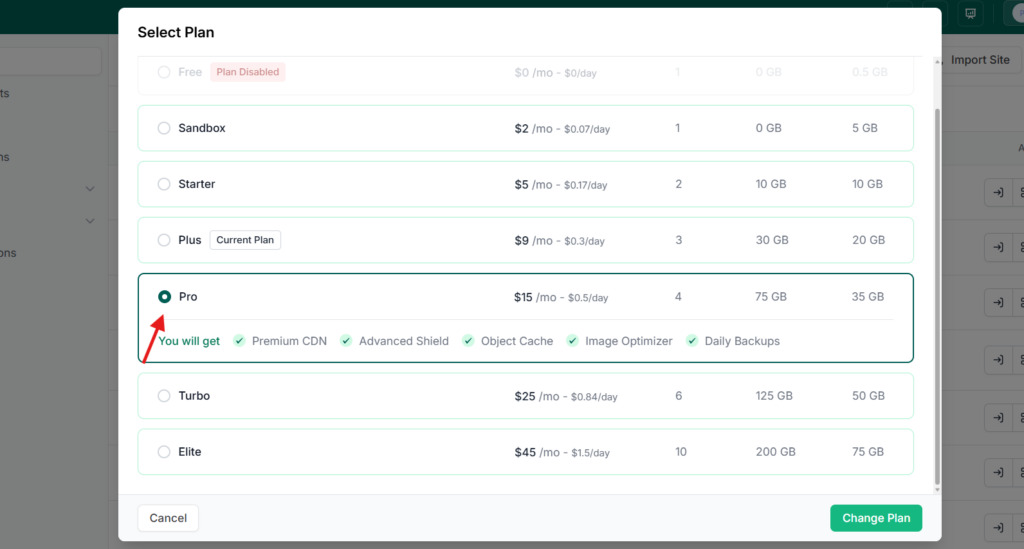
To upgrade an InstaWP site plan, open the Sites list, click the Change Plan icon next to the site, choose the new plan and click Change Plan. It takes about a minute. The site keeps its URL, content and settings, and billing switches to the new daily rate from that day.
Step 1: Sign in. Go to app.instawp.io and sign in. You land on your Sites list.
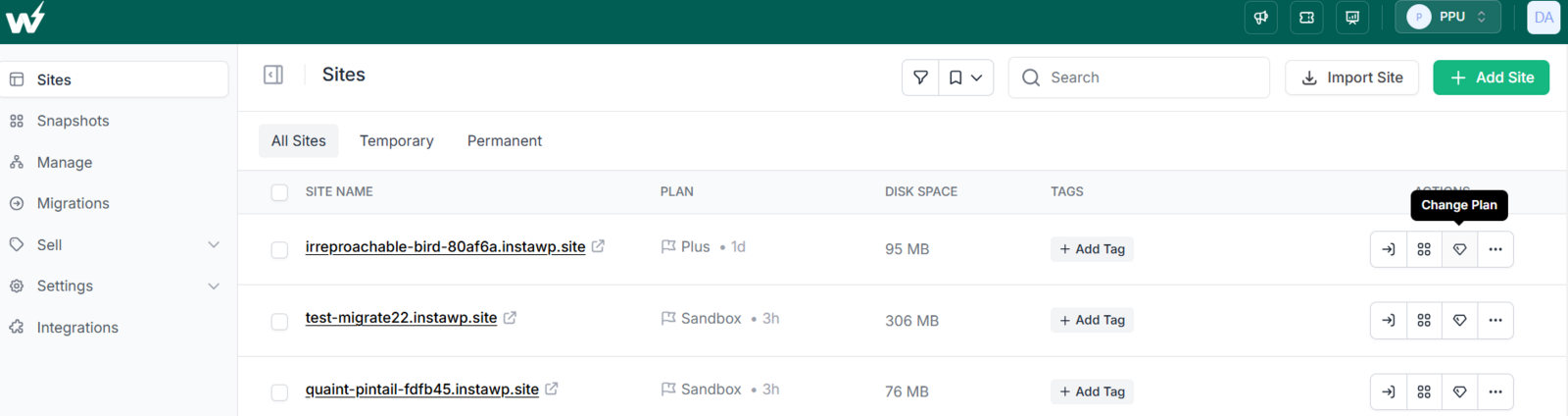
Step 2: Find the site and click Change Plan. In the Actions column, the Change Plan icon sits next to Magic Login.
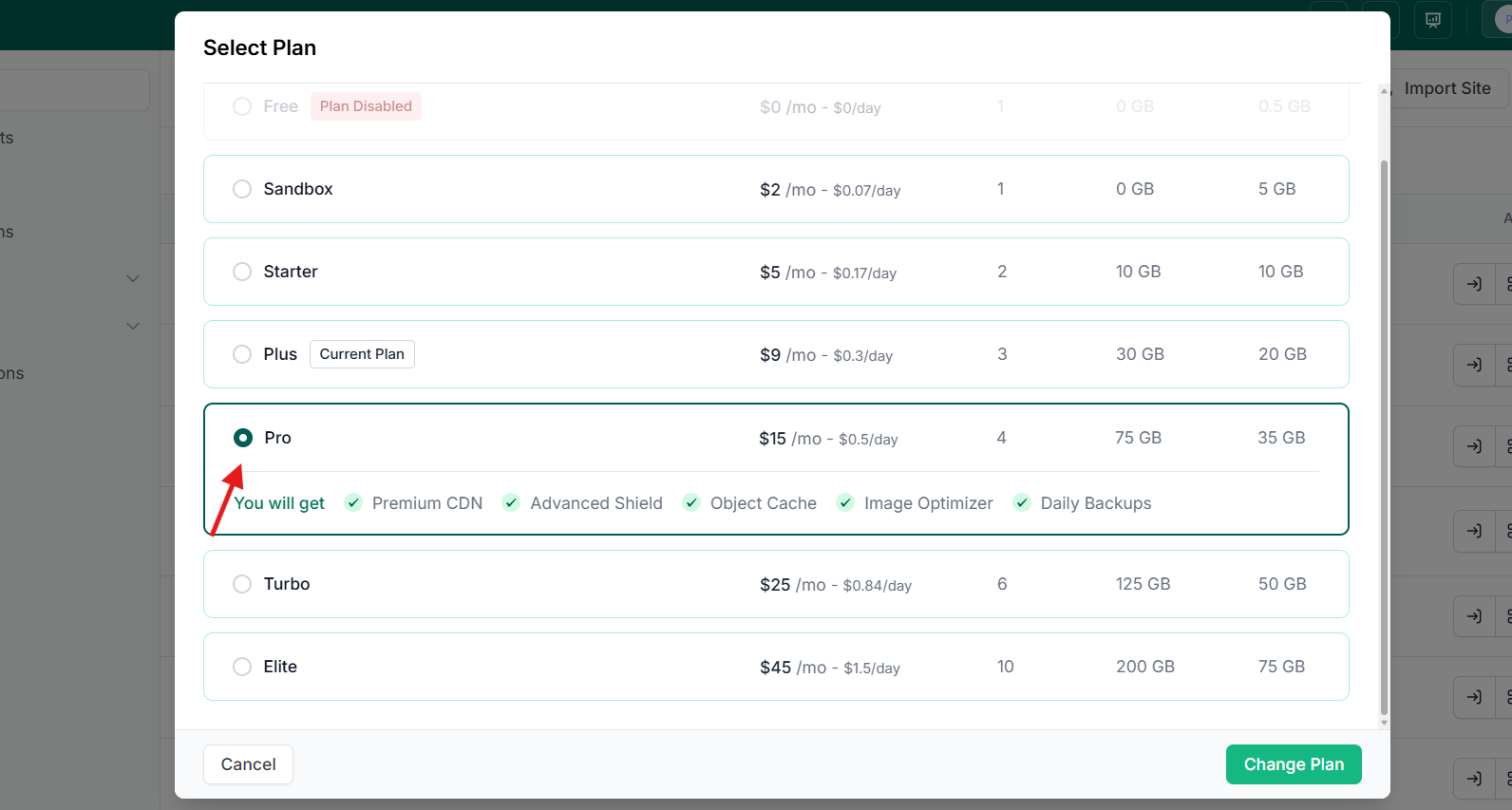
Step 3: Pick the new plan. The Select Plan dialog lists every plan with its monthly and daily price, PHP workers, CDN bandwidth and disk. Select a plan to see what it adds under “You will get”. The retired Free plan appears greyed out as “Plan Disabled”.
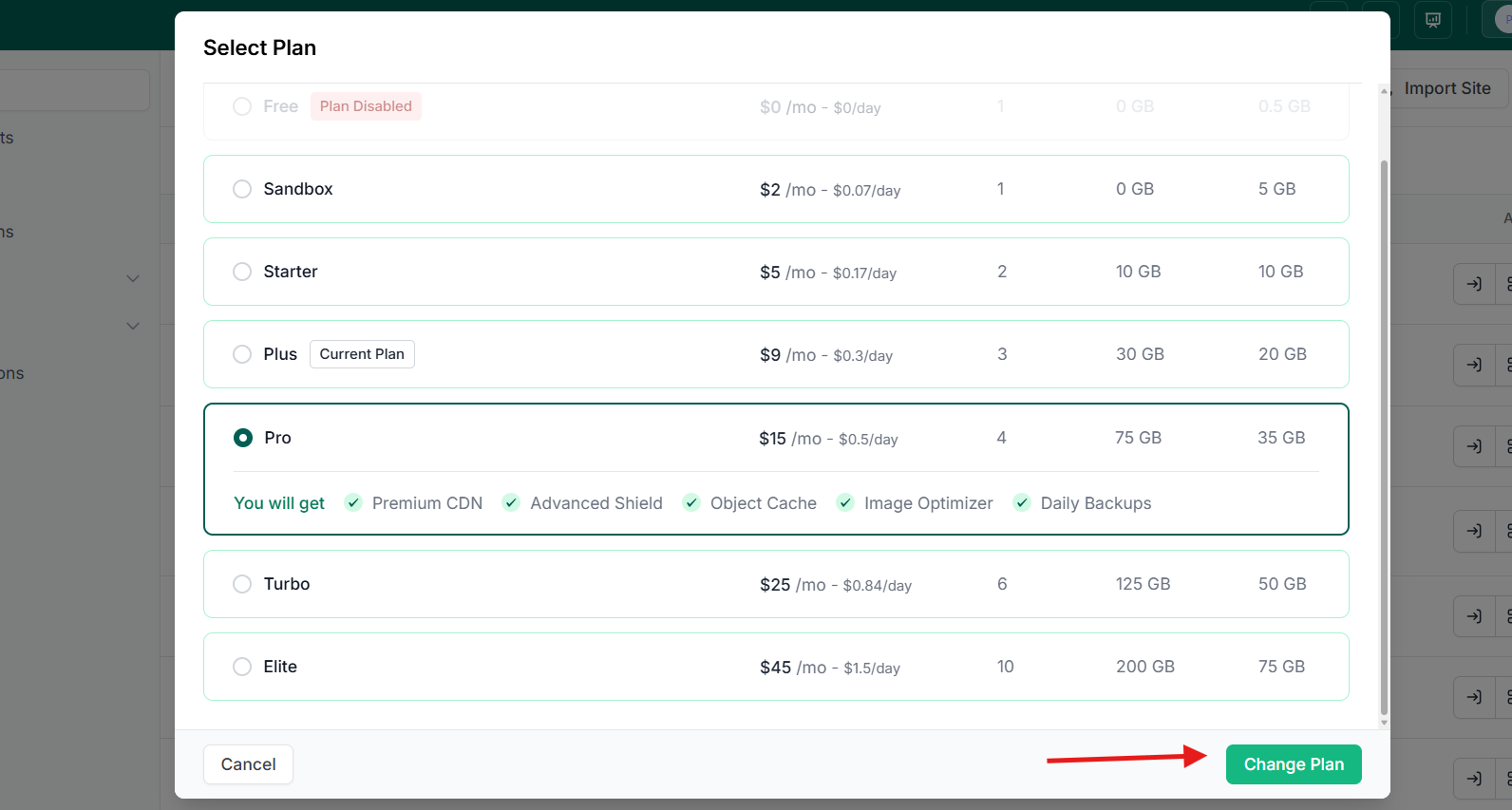
Step 4: Confirm. Click Change Plan. The new plan applies straight away, with no migration and no change to the site URL.
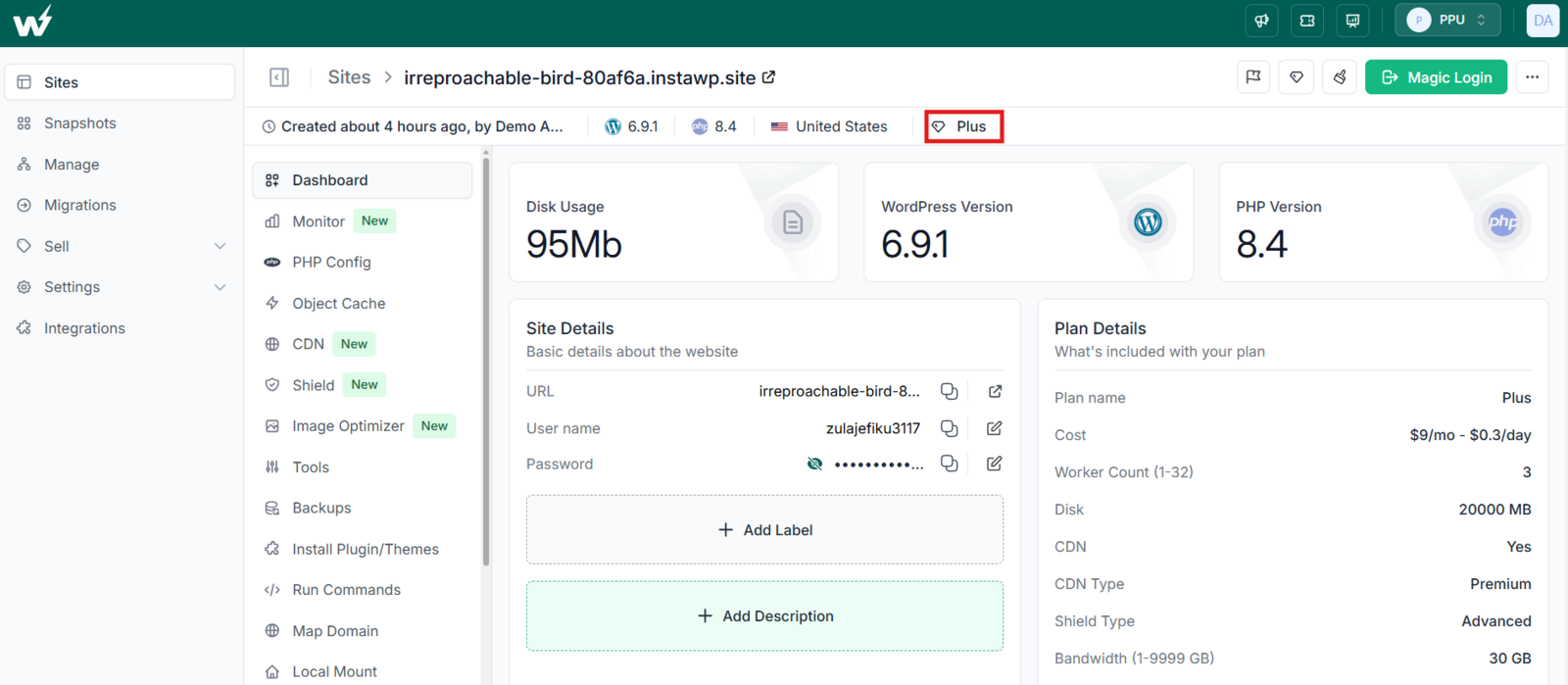
Check the current plan at any time from the site’s dashboard. The Plan Details panel shows the plan, its cost, worker count, disk and CDN.
For the docs version with every option, see how to upgrade a site plan.
Can You Downgrade or Park an InstaWP Site?
Yes. You can move a site to a lower plan the same way you upgrade, and billing drops from that day. The only requirement is that the site does not depend on a feature the lower plan lacks. For example, turn off InstaShield before moving a site down to Sandbox, because Sandbox has no Shield.
- Park a site: to keep a finished site cheaply, move it to the $2 Sandbox plan.
- Pausing does not stop billing: a paused site goes offline but stays on its plan and is still billed.
- Stop billing entirely: delete the site. InstaWP takes a final backup before a site is deleted.
How Does InstaWP Billing Work Across Plans?
InstaWP bills each site per day at its plan’s daily rate, totals every site in the account, and charges your card once a month. Starter, for example, costs about 17 cents a day. Change a plan any day and the bill follows from that day, with no setup fees, minimums or cancellation fees.
A typical agency mix of ten sites (five on Starter, three on Plus and two on Turbo) comes to about $102 a month. The full breakdown, including credits and invoices, is in how InstaWP billing works, and the reasoning behind the model is in pay-as-you-go WordPress hosting.
Which InstaWP Site Plan Is Right for You?
Build on a $2 Sandbox. Launch small sites on Starter at $5. Move anything with logins, orders or daily edits to Plus at $9, where daily backups, object cache, bot protection and site management are all included. Choose Pro at $15 when you need built-in staging, and Turbo or Elite when traffic needs more PHP workers. Every plan is per site and billed daily, so you can start low and move up the day a site needs it.
InstaWP is a managed WordPress hosting provider built for developers and agencies, so your sandboxes, staging copies and production sites all live in one dashboard. Explore pricing in detail here, or book a call from the pricing page and the team will help you choose. If your site lives somewhere else today, InstaWP will migrate it for free, and human support is on every plan.
InstaWP Site Plans: Frequently Asked Questions
Is InstaWP free?
No. InstaWP no longer offers a free plan for new sites. Creating an account is free, and adding a card gives you $25 in credits you can spend on any plan. The cheapest plan is the $2 a month Sandbox, billed at about 7 cents a day.
How much does InstaWP cost per month?
Between $2 and $45 per site per month. Sandbox is $2, Starter $5, Plus $9, Pro $15, Turbo $25 and Elite $45. Each site is billed daily at its plan’s rate, and the total is charged to your card once a month.
What happened to the InstaWP Free plan?
The Free plan, which gave 48-hour sites with 0.5 GB of storage, has been retired. It still appears greyed out as Plan Disabled in the plan chooser. A $2 Sandbox site now covers the same jobs and does not expire.
Which InstaWP plan is best for WooCommerce?
Plus is the minimum for a store taking live orders, because it adds daily backups, object cache and bot protection. A busy store with many shoppers checking out at once should run on Turbo, which has six PHP workers.
Which InstaWP plans include staging?
Built-in staging is included on Pro, Turbo and Elite. On Starter and Plus, clone the site to a $2 Sandbox and use that as your staging copy, then push changes back with 2-way sync.
Does changing an InstaWP plan need a migration?
No. A plan change applies to the same site, so the URL, content and settings stay put. It takes about a minute, and billing changes to the new rate from that day.
Do higher InstaWP plans make my site faster?
They let the site serve more visitors at once, because each tier adds PHP workers. A single page does not load faster on Elite than on Starter. Features such as the object cache on Plus and image optimization on Pro do improve speed.
Can I host my live WordPress site on InstaWP?
Yes. InstaWP is a managed WordPress hosting provider. Starter and above are production hosting plans with a CDN, managed firewall, free SSL and off-site backups, and moving a site onto InstaWP is free.
What is the difference between Sandbox and Starter?
Sandbox ($2) is for building and testing: no CDN, no firewall, monthly backups and no custom domain. Starter ($5) is production hosting with a CDN, the Basic firewall, weekly backups and custom domain mapping.


