When your WordPress site feels slow, your mind jumps to caching, bloated plugins, heavy themes, or maybe even the hosting provider. But one factor rarely crosses your radar, and it probably should: PHP workers.
Most developers and agencies don’t realize they might be running out of PHP workers, and that’s quietly stalling their WordPress performance.
If you hit the worker limit, new requests get queued, slowing everything down. This can directly impact your WordPress site speed, especially on traffic spikes or plugin-heavy builds like WooCommerce or LMS sites.
Understanding how PHP workers work, and how many you need, can be the key to unlocking better WordPress hosting speed without changing your entire stack. Let’s dig into what happens when those workers run out.
Table of Contents
The Link Between PHP Workers and WordPress Site Speed
If your WordPress site is slow and taking too long to load, especially under traffic surges, the real bottleneck might be something you can’t see directly: your PHP workers. These are the processing units on your server responsible for handling every dynamic request made to your WordPress site.
Each PHP worker can only handle one request at a time. So if your hosting plan allows two PHP workers and your site receives five simultaneous requests, three of those users will be left waiting in a queue.
That wait directly impacts WordPress site speed, especially on pages that rely on database queries or plugin logic, such as checkout pages, login forms, and search results.
Why This Matters for WordPress Hosting Speed
In shared or managed hosting environments, providers often set a hard limit on PHP workers. While your site may load fine during low traffic periods, it can become noticeably sluggish or even unresponsive when traffic increases.
This isn’t just a theoretical issue. If you’re managing client sites or running an eCommerce store, delays caused by PHP worker limits can lead to real revenue loss and poor UX.
Even aggressive caching can’t fully eliminate this problem. Logged-in users, personalized content, cart pages, or admin actions typically bypass page caching. In those moments, your site speed depends entirely on how many PHP workers are available to handle the task.
Tip for Agencies
If you’re running a WordPress agency, knowing how PHP workers affect hosting performance helps you choose plans that scale properly. Don’t just look at RAM or CPU specs. Ask about PHP worker allocation.
Better yet, test different configurations in an InstaWP sandbox to measure real-world impact before committing to a host.
How Many PHP Workers Does a WordPress Site Really Need?
There’s no universal answer to how many PHP workers your WordPress site needs. It depends on your traffic volume, site complexity, and user behavior. But here’s the truth: many slow WordPress sites aren’t underpowered, they’re under-allocated. They simply don’t have enough PHP workers to handle concurrent requests.
A Practical Breakdown
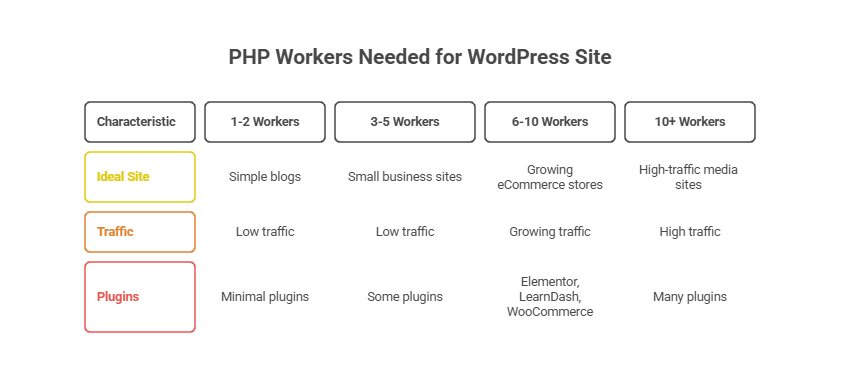
PHP Workers vs Caching: Are You Relying Too Much on Cache?
Caching is often the first thing developers turn to when speeding up a WordPress site. It’s fast, it works, and for anonymous users, it does a great job. But caching is not a substitute for having enough PHP workers, especially if your site relies heavily on dynamic content.
Why Caching Has Limits
WordPress caching plugins or server-level page caching help serve static content quickly. But once a request requires user authentication, form processing, cart calculations, or admin tasks, caching is bypassed. This is where PHP workers take over, and if you’re short on them, delays happen.
For example:
- A WooCommerce cart page with personalized totals cannot be cached
- Logged-in user dashboards in membership sites are served dynamically
- Admin area actions, like updating posts or plugins, always hit PHP
In these scenarios, no amount of caching can mask the slowdown caused by limited PHP worker capacity.
WordPress Hosting Speed Depends on Both
To achieve optimal WordPress hosting speed, you need both effective caching and enough PHP workers. Caching handles static delivery. PHP workers handle the real-time logic your site relies on. One without the other leads to bottlenecks, especially during high traffic or peak user interaction.
Pro Tip for WordPress Agencies
Before blaming “bad hosting” or loading more caching layers when a WordPress site is slow, check how your site behaves under dynamic conditions. Use a tool like InstaWP to clone your site, disable cache temporarily, and stress-test how your site handles multiple logged-in users or concurrent requests.
This will show you exactly how much you’re leaning on cache to hide poor backend capacity.
How to Improve WordPress Performance with Better PHP Worker Usage
Once you understand how PHP workers impact performance, the next step is optimizing your site around them. The easiest way to improve WordPress performance with better PHP worker usage is to upgrade your hosting plan immediately.
However, in some cases, smart website management can help you get more out of your existing PHP worker allocation.
1. Reduce Unnecessary Background Processes
Limit cron jobs, heartbeat API frequency, and heavy background tasks that consume PHP workers WordPress without contributing to user-facing speed. For example, scheduled plugin updates or backup operations can silently eat up PHP worker slots during peak times.
With InstaWP, you can shift updates to low-traffic windows, keeping PHP workers free when real users need them most.
2. Deactivate Heavy Plugins
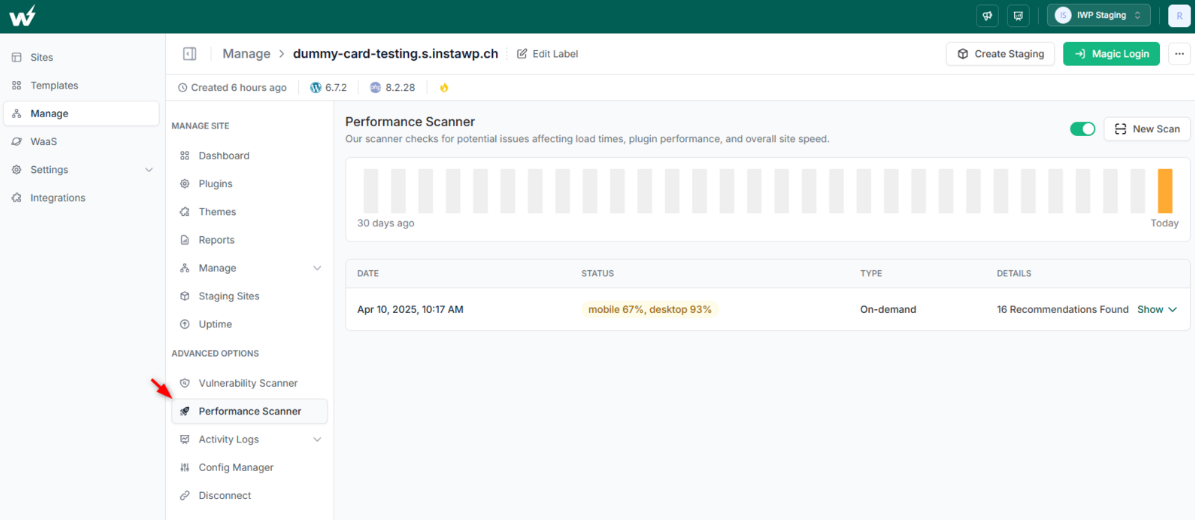
Not all plugins are equal. Some add seconds to your load time or overload the server on each request. Use a Performance Scanner (like the one built into InstaWP) to identify the worst offenders, and disable or replace them. This frees up workers and directly improves WordPress site speed.
3. Increase PHP Memory Limit and Execution Time
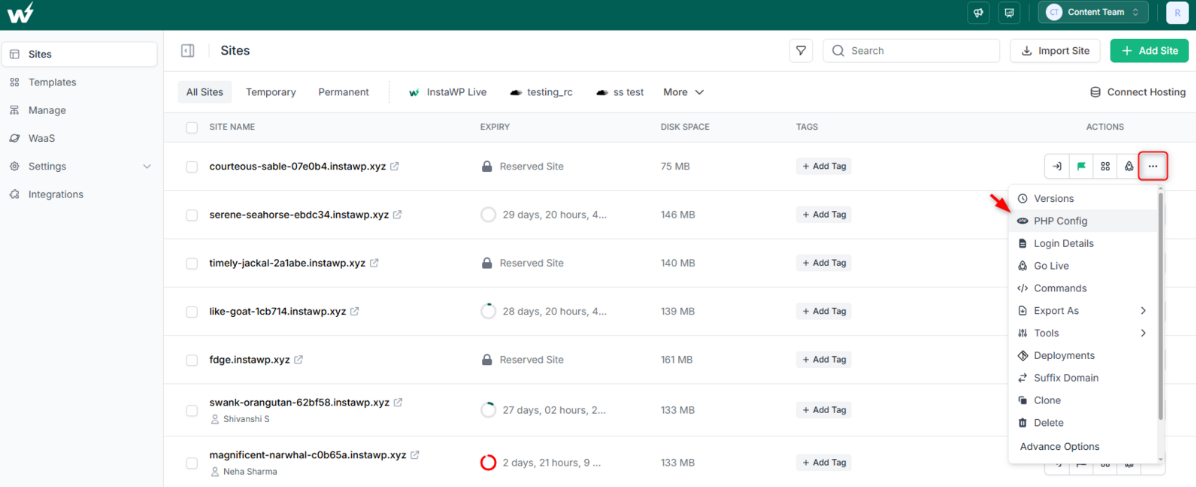
A common problem is when a worker starts a process but runs out of memory or time. That worker then gets stuck, impacting the queue. Using a PHP Config Editor, increase the memory_limit and max_execution_time values as needed, especially for sites with large queries or import/export tasks.
4. Enable Object and Opcode Caching
If you haven’t already, implement object caching (like Redis) and opcode caching (like OPcache). These reduce how much work PHP workers need to do on each request, keeping them available for new traffic and improving WordPress hosting speed.
5. Consider Vertical or Horizontal Scaling
If you consistently hit worker limits, it’s time to scale. Either:
- Vertically: upgrade to a plan with more PHP workers
- Horizontally: offload tasks to subdomains or separate sites (e.g., move checkout to a subdomain)
Both strategies can improve WordPress performance by distributing the processing load.
Ready to Test PHP Worker Impact in Real Time?
Understanding PHP workers is no longer optional; it’s essential if you’re serious about WordPress performance. Whether you’re building a WooCommerce store, managing a membership site, or handling client projects, the number of PHP workers can make or break your WordPress site speed.
If your current hosting plan is hitting worker limits, performance will suffer no matter how good your cache is.
Instead of guessing, get the right hosting plan with enough PHP workers on InstaWP and analyze how many concurrent requests your current setup can handle. It’s a risk-free way to make hosting decisions that improve speed and stability.
FAQs
1. What are PHP workers in WordPress hosting?
PHP workers are server-side processes that handle PHP code execution. Each worker can process one request at a time. In WordPress hosting, they determine how many requests can be handled concurrently.
2. Do more PHP workers mean faster WordPress performance?
Yes, up to a point. More PHP workers allow your site to handle more concurrent users without slowing down. However, other factors like CPU, memory, and caching also influence overall performance.
3. How can I check if I’m running out of PHP workers?
Common signs include slow admin panels, random 502 errors, or delays during peak traffic. Use performance monitoring tools or test your site under load in an InstaWP sandbox environment.
4. What’s the ideal number of PHP workers for WooCommerce sites?
WooCommerce sites with active carts and dynamic content usually need at least 4 to 6 PHP workers, depending on traffic and plugin usage.
5. Can caching replace the need for more PHP workers?
Caching helps, but does not eliminate the need for PHP workers. Logged-in user sessions, admin tasks, and personalized content still require real-time PHP processing.
6. How do I increase PHP workers on my site?
You can’t directly change the number unless you’re on a VPS or dedicated server. On managed hosting, upgrading your plan usually increases the allocated PHP workers. Check with your provider for specific limits.