Imagine this: you’ve just optimized images, added a cache plugin, and invested in a high-CPU hosting plan. But your WooCommerce store still slows down the moment 10 people check out at once. Sound familiar?
Most WordPress agencies and developers assume that throwing more CPU power at a slow site will fix the problem. But in reality, PHP workers, not just CPU cores, often decide whether your site scales smoothly or collapses under pressure.
In this guide, we’ll break down the often-misunderstood relationship between PHP workers vs CPU cores in WordPress. You’ll learn what each one does, how they interact, and when it makes sense to scale one over the other. And we’ll show you exactly how to test this using real examples, so you never overpay or underperform again.
Table of Contents
Why Do PHP Workers or CPU Cores Matter More for WordPress Performance?
When a WordPress site is slow, most developers check CPU usage or upgrade their hosting plan, assuming that more cores equal more speed. But performance isn’t just about raw power; it’s about how that power is managed.
That’s where PHP workers and CPU cores come in, working together in ways many WordPress users overlook.
To understand why both matter, let’s break down how a typical WordPress request flows:
- A visitor accesses your site.
- Nginx or Apache receives the request.
- If the page is not cached, it’s passed to PHP-FPM (FastCGI Process Manager).
- PHP-FPM assigns the request to an available PHP worker.
- That worker executes PHP code and uses a CPU core to do the actual processing.
This is where the important rule comes in: PHP is single-threaded, meaning each PHP worker can only handle one request at a time, using one CPU core.
So if you have:
- 2 PHP workers but 4 CPU cores → You’re underusing the server’s capacity.
- 6 PHP workers but only 2 CPU cores → Workers queue up, and the CPU gets overloaded.
In short, if your goal is to speed up a WordPress site, you need to consider both how many PHP workers you have and how many CPU cores WordPress can access. Ignoring one or the other leads to slow sites and wasted resources, especially for dynamic sites like WooCommerce, membership platforms, or LMS portals.
What are PHP Workers?
Every time a WordPress user logs in, adds an item to a cart, or submits a form, a PHP worker springs into action. These background processes handle all uncached requests by executing PHP code, querying the database, and returning a response.
For dynamic WordPress sites, PHP workers are the gatekeepers of how fast or slow your site feels during real user interaction.
When a request isn’t served from cache, here’s what a PHP worker handles:
- Processes your WordPress theme and plugin code
- Runs MySQL queries
- Generates the final HTML output
- Passes the result to the web server to return to the user
Each PHP worker takes one request at a time and holds it until it’s done. If all your workers are busy and another user submits a request, it gets queued, which slows things down or leads to 504 errors.
For high-traffic or complex WordPress sites, especially those using:
- WooCommerce (real-time stock checks, cart sessions)
- LMS plugins (logged-in dashboards, quiz submissions)
- Membership platforms (user-specific content, account pages)
…the number of PHP workers determines how many users your site can serve at the same time.
Let’s say you have:
- 3 PHP workers with the InstaWP’s Plus plan
- 10 logged-in users browsing your store at once
Only 3 of them will be served immediately. The rest wait in a queue. The longer they wait, the higher the bounce rate.
PHP workers WordPress performance isn’t just about speed; it’s about concurrency. The more real-time requests you expect, the more workers you need to avoid bottlenecks and lost revenue.
What are CPU Cores?
If PHP workers are the gatekeepers, then CPU cores are the actual machines doing the work behind the scenes. Each time a PHP worker is assigned a task, like generating a product page or processing a login, it consumes one CPU core to complete that request.
That’s why CPU cores WordPress performance is often misunderstood: they don’t handle requests directly, but they determine how fast a worker can finish the job.
A CPU core:
- Executes the PHP code assigned by the worker
- Handles operations like math, loops, conditional logic, and database calls
- Powers everything from plugin functions to API calls to security checks
Unlike RAM (which holds temporary data), CPU cores are responsible for actual processing. If you have more PHP workers than CPU cores, you create a traffic jam — your server constantly switches between tasks, increasing response times.
Here’s how CPU cores affect real-world WordPress scenarios:
- If your site uses 4 PHP workers but only 2 CPU cores, two workers will be waiting at any given time.
- Adding more cores allows your workers to run in parallel, reducing total execution time.
- But simply adding CPU cores without increasing workers won’t help if the worker count is too low — you’ll have idle CPU capacity.
Say you’re managing a WooCommerce store on a server with:
- 4 CPU cores
- 2 PHP workers
You’ve got the processing power, but only two simultaneous requests can be handled at once. The CPU cores sit idle because the workers are the bottleneck. Now flip it:
- 2 CPU cores
- 6 PHP workers
In this case, your server is overloaded. Workers compete for CPU time, slowing down all requests and creating a backlog.
In short, CPU cores power your workers, but they’re only effective when the number of PHP workers is balanced to use them efficiently. Understanding this relationship is key to avoiding slowdowns and resource waste.
What Causes Confusion Between PHP Workers and CPU Cores?
A common misconception among WordPress site owners and even experienced developers is that more CPU cores automatically fix performance issues. While CPU power is important, it’s the PHP workers that determine how many dynamic requests your site can process at once. This confusion often leads to scaling the wrong resource.
Here’s why the mix-up happens:
1. PHP and CPU Work Together — But Not Interchangeably
- Each PHP worker uses a single CPU core while handling a request.
- But multiple cores don’t mean multiple workers unless your host has configured it that way.
- Scaling the CPU without enough PHP workers is like adding more lanes to a highway but not opening the toll booths.
2. Hosting Plans Advertise CPU, Not Workers
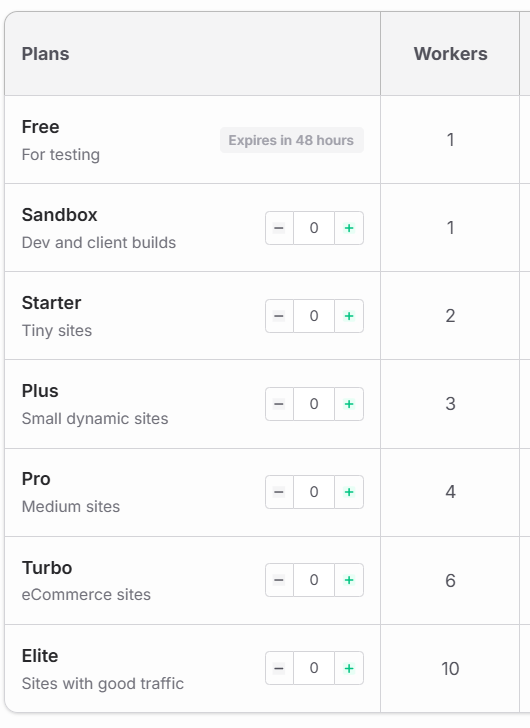
Most hosting providers showcase how many vCPUs you get, but don’t explain how many PHP workers WordPress will use. There are only a few hosting plans that mention the number of PHP workers you’re getting with each plan.
For instance, InstaWP’s managed WordPress hosting. If you choose to build and host a WordPress site with InstaWP, you will have a clear picture of the number of PHP workers you will be getting.
You can choose the PHP workers based on the type of sites you’re building. So, no confusion at all.
3. PHP Is Single-Threaded
Unlike modern apps that can distribute tasks across threads, PHP processes each request sequentially through one worker. So, if you have 1 PHP worker and 8 cores, you’re still handling only one request at a time, wasting the other 7 cores.
4. Caching Masks the Problem — Until It Doesn’t
Cached pages bypass PHP workers entirely, which hides performance issues. But during checkouts, logins, or form submissions, when caching is skipped, worker limitations become painfully visible.
If you’re managing dynamic WordPress sites, especially those with logged-in users or frequent interactions, you need to know that PHP workers and CPU cores are two parts of the same engine — and scaling just one won’t solve real-world bottlenecks.
PHP Workers vs CPU Cores: The Real Comparison
To truly optimize a WordPress site, you need to understand how PHP workers and CPU cores work together, and how they can bottleneck each other if misaligned. One doesn’t replace the other; they operate in tandem. But what does that actually mean in practice?
Let’s break it down.
1. Role in WordPress Request Handling
PHP workers are responsible for receiving and managing incoming uncached requests on your WordPress site. When a user logs in, adds a product to their cart, or accesses a dashboard, and that request bypasses the cache, a PHP worker is assigned to handle it.
Each PHP worker can process only one request at a time. If all workers are busy, additional requests are placed in a queue until a worker becomes available.
CPU cores are the processing power that executes the PHP code a worker is managing. Once a PHP worker receives a request, it passes the actual computing workload, such as plugin logic, MySQL queries, or rendering templates, to a CPU core.
The CPU core handles all the behind-the-scenes processing needed to generate the final HTML response sent to the browser.
✅ Key Difference
- PHP workers manage how many dynamic requests can be handled at the same time.
- CPU cores control how fast each of those requests can be processed.
In short, PHP workers handle the traffic flow. CPU cores handle the speed of processing. Both are essential, but for different parts of the request lifecycle.
2. How They Affect Concurrency
Concurrency in WordPress is directly controlled by the number of PHP workers. If your hosting environment allocates 4 PHP workers, your site can process 4 uncached requests simultaneously. Any additional requests will wait in a queue until a worker is available.
This is crucial for sites with logged-in users, such as:
- WooCommerce (checkout, cart updates)
- Membership sites (account dashboards)
- LMS platforms (lesson progress, quiz submission)
A lack of PHP workers causes bottlenecks during traffic spikes, even if your server is powerful.
CPU cores don’t control concurrency. Instead, they define how fast each PHP worker can execute its task. If you have 4 PHP workers but only 2 CPU cores, only 2 workers can run at full speed. The rest will be handled with delays as the CPU switches between them.
✅ Key Difference
- PHP workers set the limit for how many requests your site can handle at once.
- CPU cores affect how efficiently those requests are processed.
If users are waiting for pages to load due to request queuing, you likely need more PHP workers. If each request is slow, even with available workers, your CPU cores may be underpowered.
3. Response Time and Performance Impact
When PHP workers are fully occupied, any additional uncached request is placed in a queue. This leads to a delay in response time, even if the CPU is capable of processing more.
The user’s browser waits longer for the first byte, which increases TTFB (Time to First Byte) — a key metric in both performance testing and SEO.
The more concurrent users you have, the more critical it becomes to have enough PHP workers to prevent queue buildup.
CPU cores influence how fast each request is processed once it’s picked up by a PHP worker. If you’re running on limited cores and have a complex site (like one using heavy WooCommerce or LMS plugins), each request takes longer to complete, even with enough workers available.
This results in slower page load times and poor backend performance (e.g., slow admin dashboard).
✅ Key Difference
- Too few PHP workers → Requests get delayed in a queue before processing starts.
- Too few CPU cores → Requests are processed slowly, even if there’s no queue.
For a fast response time, you need the right balance. Agencies working with high-concurrency sites need to ensure that PHP workers handle load, while CPU cores handle speed.
4. Their Role During Traffic Spikes
When a traffic spike hits, the first bottleneck you’ll usually hit is PHP worker exhaustion. Since each PHP worker can only handle one request at a time, a limited number of workers means your server will start queuing requests almost immediately.
This leads to:
- Slower response times
- 504 gateway timeout errors
- Frustrated users and lost conversions
For WooCommerce stores, even 10–15 users checking out at once can overwhelm a setup with only 2–3 PHP workers.
During a traffic surge, CPU cores are responsible for powering each worker’s task. If you have more workers than CPU cores, the CPU begins “context switching” — rapidly toggling between tasks. This can lead to slower execution, especially if your site’s codebase is heavy (plugins, custom functions, etc.).
But here’s the key: even a powerful CPU won’t help if workers are unavailable. The CPU just waits idle until a worker dispatches a task.
✅ Key Difference
- PHP workers determine how many users your site can serve in parallel.
- CPU cores determine how fast your site responds once a request is in motion.
During traffic spikes, running out of PHP workers results in queuing. Running out of CPU cores results in processing delays. Both can hurt your site, but PHP workers are usually the first pressure point.
5. Visibility in Hosting Plans and Resource Monitoring
Most hosting providers don’t clearly advertise PHP worker limits, especially in shared or managed WordPress hosting plans. In many cases, agencies only discover worker limits after experiencing timeouts or performance issues.
Some premium hosting providers (like InstaWP) now state PHP workers per plan, which helps developers align hosting tiers with expected concurrency.
Monitoring PHP worker usage isn’t always straightforward. You often need:
- Access to PHP-FPM status pages
- Application performance monitoring tools
- Custom logs that track queue time or request failures
CPU cores are more prominently featured in hosting plans, especially for cloud or VPS services. Plans are often labeled by how many vCPUs (virtual CPU cores) they include, making it easier to compare offers.
CPU usage is also easier to monitor:
- Hosting dashboards often show real-time CPU usage
- Tools like htop, top, or InstaWP’s Performance Scanner provide visual indicators of CPU load
- CPU bottlenecks are more commonly flagged by uptime and monitoring services
✅ Key Difference
- PHP workers are often hidden limits unless you’re using transparent, developer-friendly hosting. Monitoring them takes extra effort.
- CPU cores are easy to identify, compare, and track — but don’t solve concurrency problems on their own.
If you’re managing multiple client sites, choose a host like InstaWP that provides clear PHP worker allocation and lets you spin up test environments to see how worker and CPU limits behave under real conditions.
6. When to Scale PHP Workers vs CPU Cores
You should increase PHP workers when your WordPress site experiences:
- Long queue times for dynamic requests
- 504 gateway timeout errors during moderate traffic
- Slow checkouts, form submissions, or dashboard interactions, even though CPU usage appears low
This typically happens when:
- Your site has many logged-in users
- Cache is frequently bypassed (e.g., WooCommerce, LMS, portals)
- You’re running AJAX-heavy frontends or REST API calls
Scaling PHP workers allows your site to handle more concurrent users, which is often the first fix for response delays.
You should scale CPU cores when you notice:
- High CPU usage across the board (90%+ during traffic peaks)
- Long response times, even with enough PHP workers available
- Tasks like plugin execution, report generation, or external API calls are slowing down
This often happens when:
- Each request is resource-intensive (e.g., large WooCommerce stores, big queries)
- You’re running heavy backend processes (e.g., cron jobs, imports)
- You have many services (MySQL, Redis, PHP) sharing the same CPU
Scaling CPU cores improves processing speed, especially for complex or compute-intensive tasks.
✅ Key Difference
- Scale PHP workers when you’re hitting concurrency limits and users are queued.
- Scale CPU cores when requests are slow to process, even when workers are available.
Smart agencies benchmark both. On InstaWP, for example, you can simulate traffic using sandboxes, then monitor queue build-up (workers) and CPU utilization (cores) using the Performance Scanner. This lets you scale what needs scaling, not just what’s advertised.
PHP Workers vs CPU Cores: Choose the Right Resource to Scale WordPress
For WordPress agencies and developers, improving performance isn’t just about “more power”; it’s about allocating the right resources. While CPU cores drive processing speed, PHP workers determine how many users your site can support at the same time. Mistaking one for the other leads to overspending or underperforming.
With InstaWP, you don’t have to guess. Every hosted plan shows how many PHP workers you get, and sandbox testing lets you simulate load scenarios to find performance limits before they affect your clients.
Test different worker-core combinations in seconds; no live risk, no config files, no plugin conflicts.
Launch Your Free WordPress Site on InstaWP →
Frequently Asked Questions
1. What’s the difference between PHP workers and CPU cores?
PHP workers handle how many uncached WordPress requests can run at the same time. CPU cores handle how fast those requests are processed. You need enough PHP workers for concurrency and enough CPU cores WordPress can access to ensure fast processing.
2. How many PHP workers do I need per CPU core?
Most developers recommend 1.5 to 2 PHP workers per CPU core. This allows for efficient concurrency without overloading the server. Too many workers per core can cause performance issues due to CPU contention and context switching.
3. Can I just add more CPU cores to speed up WordPress?
Not always. More CPU cores WordPress environments can help, but if your PHP worker count is low, concurrency will still be limited. You need a balance of both to improve dynamic performance, especially for logged-in user activity.
4. What happens if I have more PHP workers than CPU cores?
If your site has more PHP workers than available CPU cores, workers will wait for CPU time. This causes slower request processing, especially on high-traffic sites. It’s best to scale both workers and cores together based on usage.
5. How do I know if I need more PHP workers?
You likely need more PHP workers if your site experiences 504 errors, long queue times, or sluggish performance during spikes in logged-in traffic. WooCommerce, LMS, and membership sites often require 4 to 10 workers to stay responsive.
6. How can I test PHP workers vs CPU cores performance?
You can simulate load using tools like Loader.io or the Performance Scanner in InstaWP. Spin up a sandbox, apply traffic, and monitor CPU usage and request queuing. This lets you test both PHP workers performance and CPU limits safely.workers’


