Most WordPress developers think of plugins or bulky themes when troubleshooting a slow site. But the real bottleneck might lie in how your content is delivered. That’s where the debate around CDN vs cache becomes crucial.
Both cache vs CDN strategies aim to improve performance, yet they operate in very different ways. A well-configured WordPress CDN can reduce latency for global visitors, while smart caching cuts down server processing time.
If you’re managing client sites or scaling a WooCommerce store, knowing how CDN WordPress setups differ from traditional caching can help you make faster, more reliable websites.
Table of Contents
What is a CDN in WordPress Hosting?
A Content Delivery Network (CDN) is a network of geographically distributed servers that delivers static and dynamic content to users based on their location. In a typical CDN WordPress setup, files like images, scripts, stylesheets, and even video content are stored on multiple edge servers worldwide.
When a visitor lands on a WordPress site, the CDN routes the request to the closest server, drastically reducing latency.
For WordPress agencies, a WordPress CDN means faster global site access, less load on the origin server, and improved performance during high traffic. With InstaWP, this performance boost is built in; every site includes an edge CDN powered by BunnyCDN, serving assets from 100+ global PoPs.
This is especially valuable for media-heavy websites, online stores, or international brands where global consistency and speed are non-negotiable.
Popular WordPress CDN solutions include Cloudflare, StackPath, BunnyCDN, and KeyCDN. Many of these integrate seamlessly with WordPress plugins, hosting dashboards, or DNS providers.
In short, a CDN ensures that every visitor, whether in Manhattan or Madrid, experiences consistent speed and content availability.
What is Caching in WordPress?
Caching in WordPress is the process of temporarily storing copies of content so it can be served faster on repeat visits. Instead of generating a page from scratch every time a user loads it, WordPress can serve a saved version from memory, disk, or browser. This reduces server load, speeds up response times, and improves the overall user experience.
Here are the types of WordPress caching you can use.
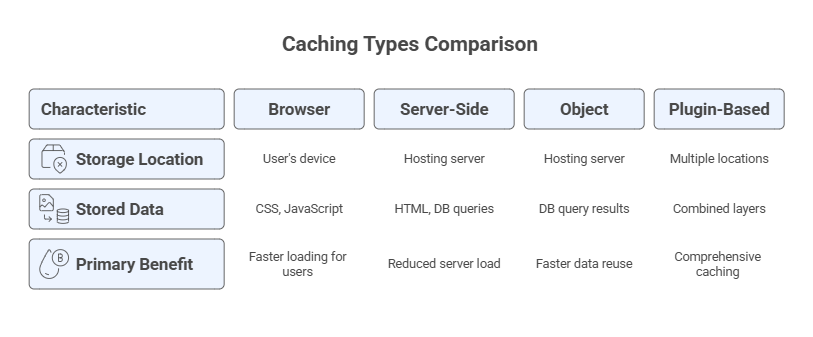
In the cache vs CDN debate, caching shines when you’re looking to optimize your site’s performance at the server or user level. It’s especially useful for sites with frequent return visitors or dynamic content that doesn’t change often.
But keep in mind: while caching improves speed, it only does so within a limited geographic scope. If your audience is global, you’ll still need a WordPress CDN to reduce the physical distance between your server and users. This is where the real value of CDN vs cache decisions becomes clear.
CDN vs Caching: What’s the Real Difference?
If you’re managing WordPress sites for clients, especially at scale, understanding the CDN vs cache distinction is critical. While both aim to improve speed and reduce load times, they work at different levels and solve different performance problems.
This section breaks it down aspect by aspect, so you can make informed choices for your tech stack, optimize deployment workflows, and avoid common bottlenecks in CDN WordPress setups.
How They Function
Understanding how CDN vs cache works starts with recognizing their roles in the content delivery pipeline.
As you build and host a website with an in-built CDN, you get a distribution layer between your WordPress site and global visitors. It delivers static assets like images, CSS, JavaScript, and sometimes even video, from the nearest edge server based on a user’s location.
In a CDN WordPress setup, this means users experience faster load times without repeatedly pinging your origin server.
Caching, by contrast, focuses on minimizing server workload by storing reusable versions of content. It could be at the browser level (client-side) or server-side (full-page, object, or opcode cache). Caching ensures that WordPress doesn’t have to regenerate identical pages or database queries for every visitor.
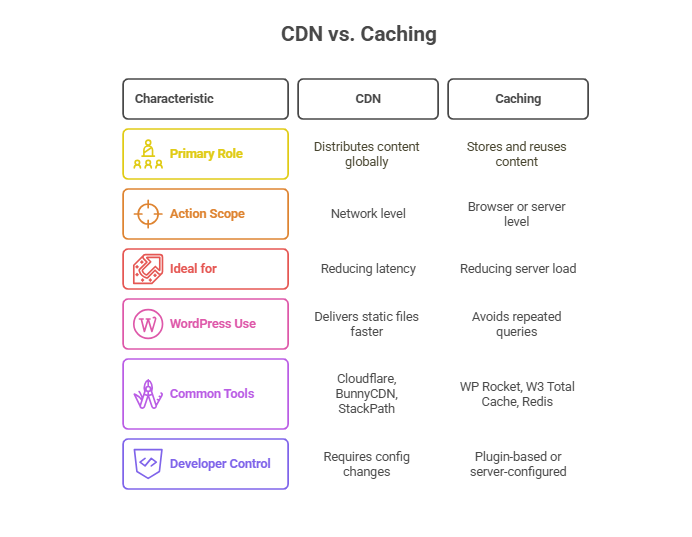
In short, a WordPress CDN distributes content globally, while caching reduces workload locally. Both improve performance, but through very different mechanics.
Where Content is Stored
To fully understand cache vs CDN, it’s important to know where your content lives. Storage location directly affects how quickly a visitor receives your site’s assets. For developers, this influences everything from TTFB to backend load and caching rules.
A CDN WordPress configuration pushes your content across a global network of servers, storing copies closer to international users. This is ideal for media-heavy or geographically distributed websites.
Caching, however, stores content locally, either on the browser (client-side), on the origin server (server-side), or in RAM or disk. It speeds up content retrieval for repeat visitors but does little to reduce geographical delay.
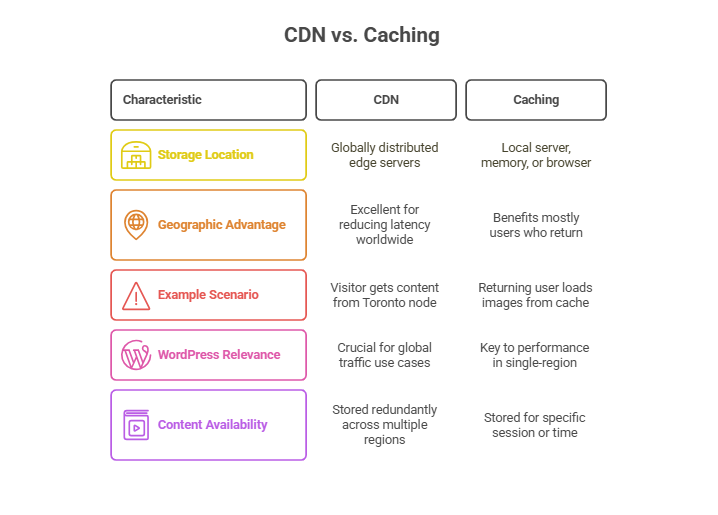
The CDN vs cache debate isn’t about which one to pick; it’s about understanding their storage strategies and using both where needed.
Setup and Maintenance Complexity
When deciding between CDN vs cache, developers must consider how much effort is involved in setup, integration, and ongoing website management. Not every client site needs both, and sometimes ease of implementation becomes a major deciding factor.
A CDN WordPress setup typically requires DNS updates, origin server configuration, and rule-based caching policies. While it offers global performance improvements, it can be slightly more complex to implement and troubleshoot.
Caching, especially with WordPress plugins, is often easier to activate. Tools like WP Super Cache, LiteSpeed Cache, or object caching with Redis let you control caching with minimal setup. However, advanced cache configuration, especially for dynamic content, can still require developer oversight.
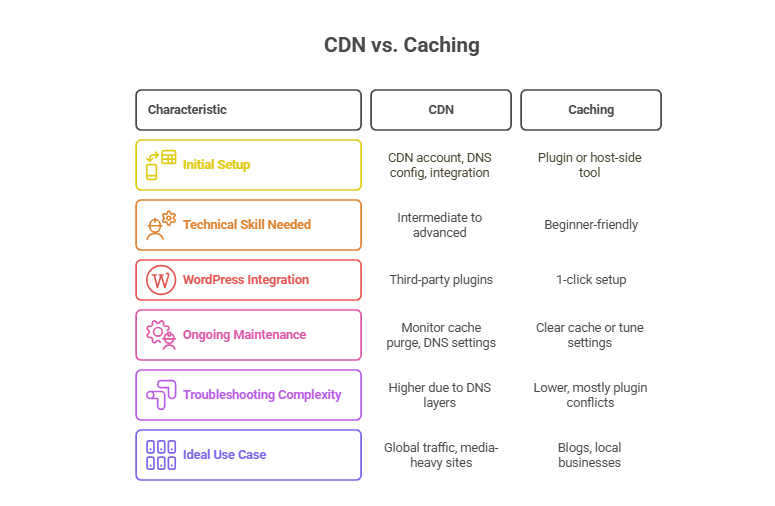
Developers should evaluate how much control they need. For global scaling, a WordPress CDN is worth the setup. For simple speed wins, caching is faster to roll out.
Content Type Supported
One of the most overlooked areas in the CDN vs cache conversation is the kind of content each method handles best. Developers are working on complex WordPress sites. Whether it’s an online store or a content-heavy blog, you need to know which tool is better suited for static files, dynamic content, or user-specific pages.
A CDN WordPress setup is versatile. It can serve static files like images, CSS, JavaScript, fonts, and even video streams. Advanced CDNs also support dynamic content acceleration using smart routing and real-time edge processing.
Caching is best suited for static HTML, page fragments, and repetitive database queries. While you can cache dynamic content, it often requires extra logic to prevent serving outdated or personalized data to the wrong users.
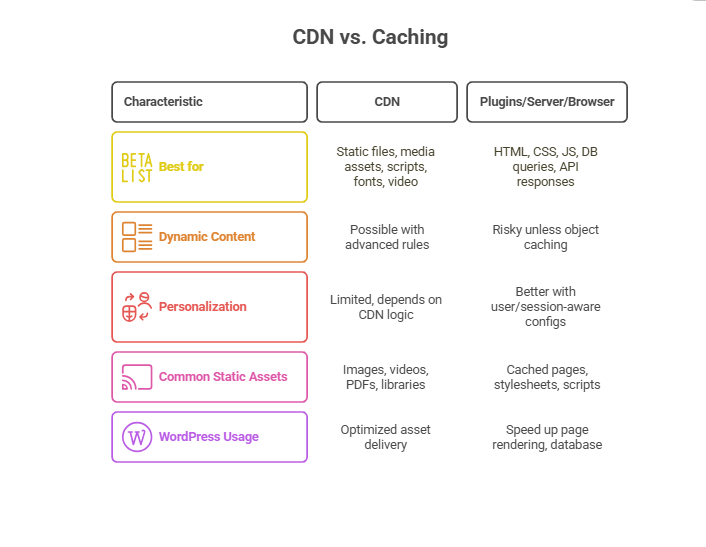
If your WordPress site serves a global audience with heavy media, rely on a WordPress CDN. For logged-in users or sites with lots of internal logic, complement it with smart caching rules.
How They Handle Traffic and Load
When traffic spikes hit a WordPress site, whether from a flash sale, a blog going viral, or bots crawling aggressively, how your hosting infrastructure responds is key. This is where the cache vs CDN strategy makes or breaks the user experience.
A CDN WordPress setup on cloud-managed hosting distributes incoming traffic across a network of edge servers. It offloads bandwidth and processing from the origin server. This means thousands of users can simultaneously fetch static assets like product images or video previews without hammering your main server.
For instance, every site you build and launch on InstaWP includes an edge CDN powered by BunnyCDN. This enables static assets to be automatically distributed across 100+ global locations.
You don’t need to configure separate CDN layers or worry about origin overload; InstaWP’s fully hosted stack handles it for you, making it ideal for testing high-traffic campaigns or media-heavy promotions before going live.
Caching, on the other hand, reduces the number of database calls and PHP executions during high traffic. Pages are pre-rendered and served directly from memory or disk. While this doesn’t help with global delivery, it’s incredibly effective at keeping origin servers stable under load.
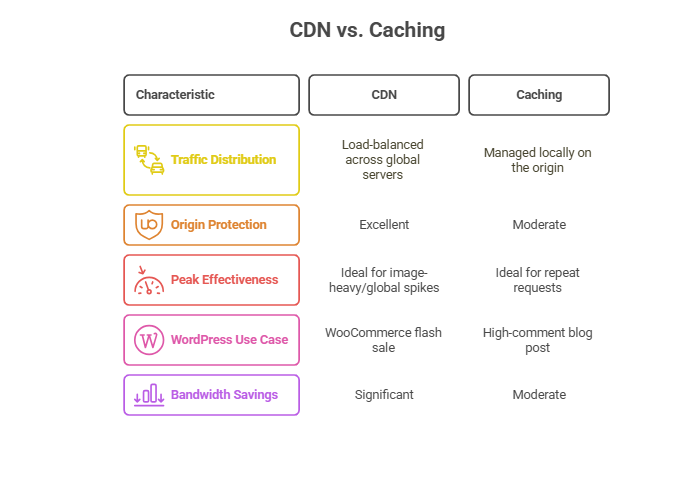
For high-traffic WordPress sites, using both is critical. CDN WordPress improves asset distribution, while caching shields the server’s compute layer.
Implementation and Developer Workflow Impact
For developers and WordPress agencies, speed isn’t just about the front end; it’s also about how fast you can implement and manage performance tools across multiple client projects. When choosing between CDN vs cache, consider how each option fits into your development pipeline.
A CDN WordPress setup often requires DNS changes, cache rule configuration, and integration with SSL, firewalls, or origin-pull rules. These steps demand attention during deployment and testing, especially when edge caching is involved.
Caching is much easier to apply during development. With InstaWP, you can spin up sandbox sites and test different caching layers in isolated environments without touching DNS.
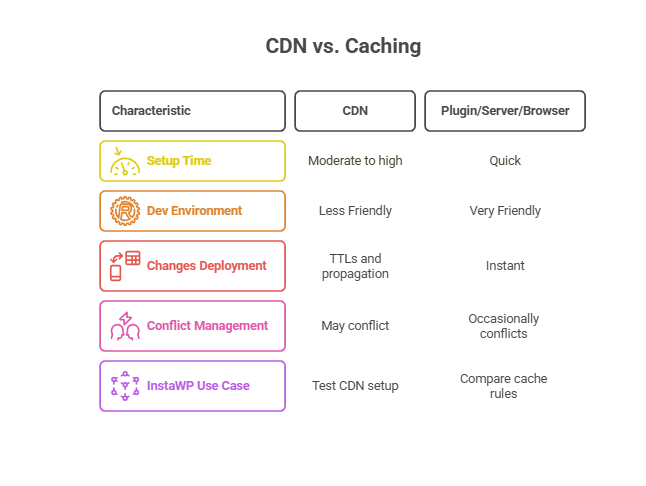
Developers should use caching for early-stage performance testing and roll out CDN WordPress configurations once the site architecture stabilizes.
Security, Redundancy, and Failover Support
Site performance is just one side of the CDN vs cache conversation. If you’re managing WordPress for clients, you also need to consider how each solution handles threats, failures, and service continuity.
A CDN WordPress configuration can absorb DDoS attacks, serve stale content when the origin is down, and mask your actual server IP. It adds a protective layer to your infrastructure. Many CDNs also include built-in WAF (Web Application Firewall), TLS handling, and rate-limiting.
Caching is limited in scope when it comes to failover. If the origin server crashes, even a cached page might not be served if the server can’t respond at all. Caching does improve performance, but not availability.
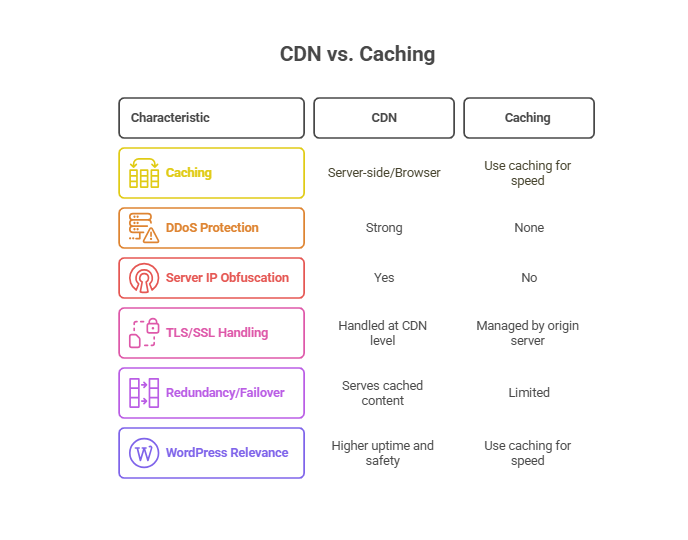
For mission-critical WordPress sites, combine caching with a reliable WordPress CDN to maintain both performance and uptime under pressure.
Cost and Resource Efficiency
When comparing CDN vs cache, cost is a major consideration, especially if you manage dozens of WordPress installs. While both improve performance, their pricing and resource usage differ significantly.
Most WordPress CDN providers operate on a pay-as-you-go or tiered pricing model based on bandwidth, storage, and edge rules.
For large-scale or media-heavy sites, this cost can add up, but the global speed gains often justify the expense.
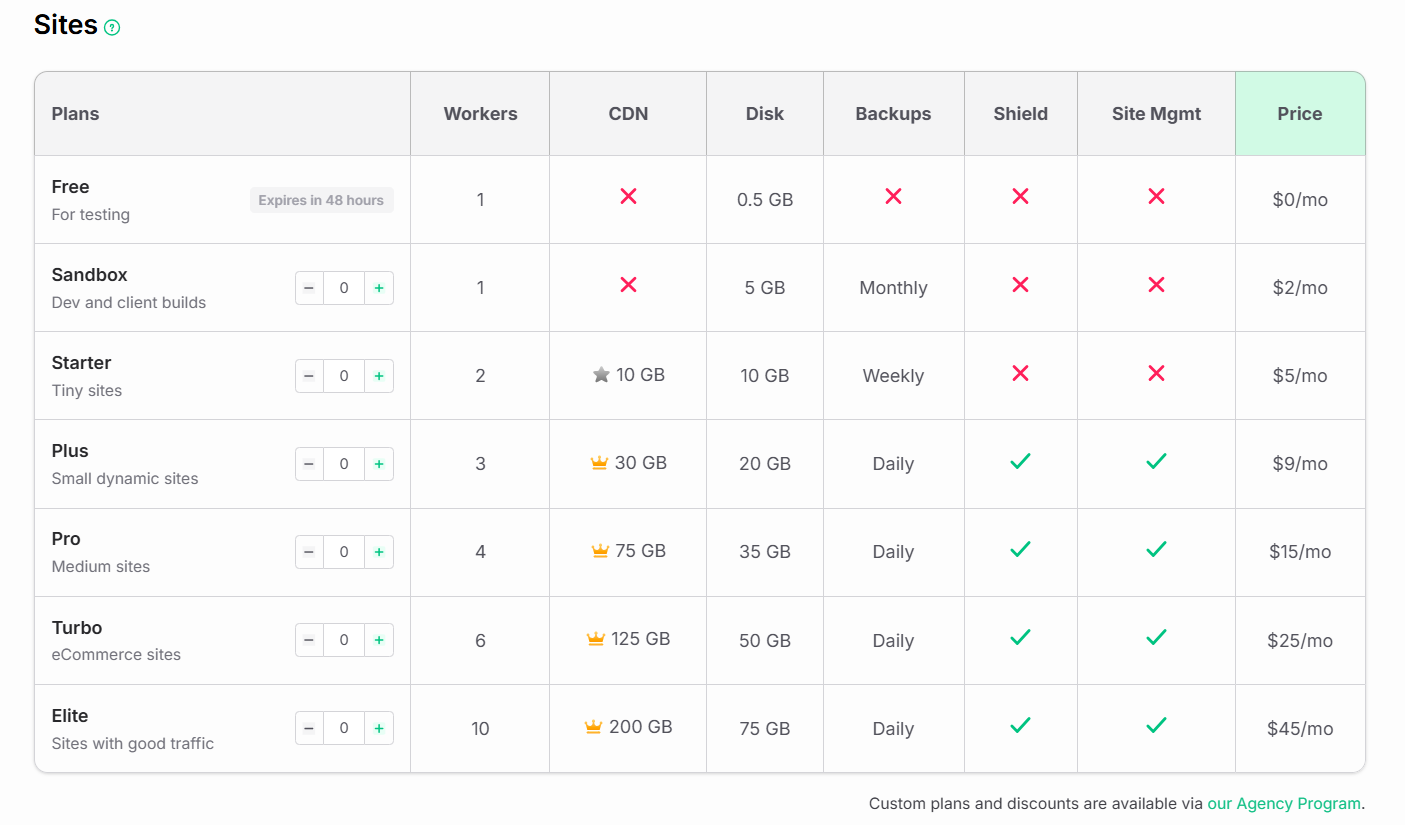
Instead of managing separate CDN integrations, agencies can opt for hosting platforms that include CDN support by default. For example, InstaWP offers fully hosted environments with an integrated edge CDN, allowing users to select site plans based on the nature and scale of the sites they’re building.
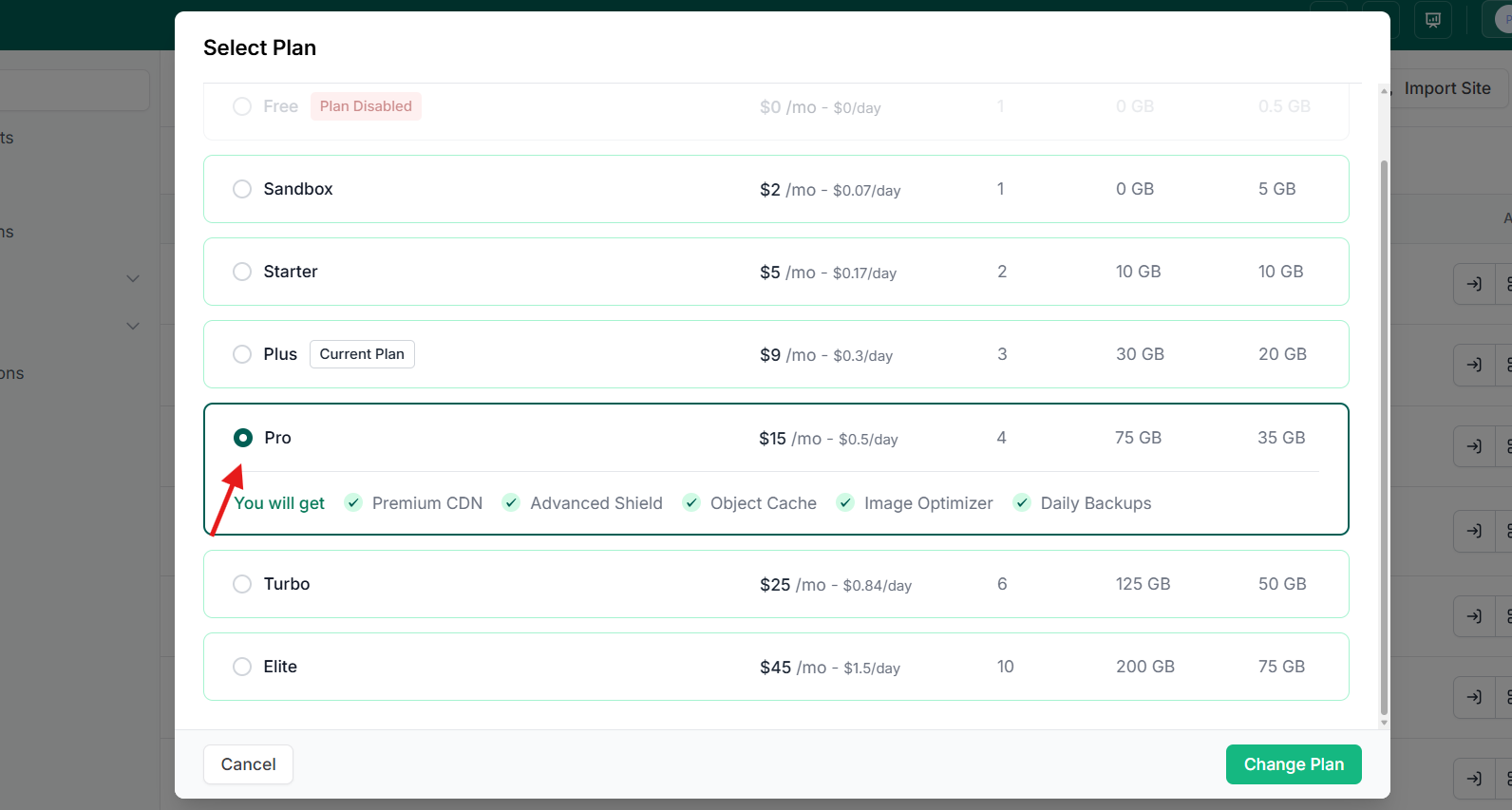
A Starter plan ($5/mo) works well for small brochure sites with 10 GB of CDN storage, while the Turbo plan ($25/mo) includes 6 PHP workers, 125 GB CDN storage, daily backups, and 50 GB backup storage, ideal for eCommerce or client-heavy builds.
This flexibility helps agencies match resource needs with budget, without the overhead of configuring a separate CDN WordPress setup.
Caching, particularly with WordPress plugins or server-level solutions, is usually free or bundled with your hosting plan. It requires fewer external services and consumes less bandwidth. However, it depends on your server’s resources, RAM, CPU, and disk I/O, so it’s not entirely without cost.
For agencies, using caching for most clients and layering in CDN WordPress only where necessary keeps budgets efficient and performance optimized.
How CDN and Caching Work Together in WordPress
It’s easy to frame CDN vs cache as a choice between two tools. But in reality, these technologies work best when combined. For most professional WordPress setups, especially those involving high traffic or global audiences, using both offers layered speed and efficiency.
Here’s how they complement each other:
- CDN WordPress setups serve static assets like images, fonts, and JS files from edge servers around the globe. This reduces physical distance between users and content, improving load times dramatically.
- Caching, on the other hand, handles page rendering and database queries at the server or browser level. It reduces the work your server must do on each request, even if the visitor is local.
Let’s take a practical example:
You run a WooCommerce site with users from the US, India, and Germany. A WordPress CDN like Cloudflare or BunnyCDN ensures product images and scripts load fast from local nodes. Simultaneously, a caching plugin ensures your homepage and product pages don’t re-render repeatedly, improving server response times and TTFB.
If you’re building with InstaWP environments, you can test both layers side by side:
- Use the Performance Scanner to compare cached vs uncached page speed.
- Run CDN integration tests using live staging domains.
- Fine-tune cache headers using the WP Config Editor or by viewing response headers in Dev Tools.
Instead of debating cache vs CDN, think of them as allies. Caching optimizes what your server delivers. The CDN optimizes how that content reaches the user.
Use Cases: When to Use Caching, CDN, or Both
Not every WordPress site needs both a CDN and caching, but many will benefit from the right combination. Understanding when to apply each solution helps agencies deliver better performance without overcomplicating the setup.
Here are real-world scenarios that show where CDN WordPress configurations or caching (or both) make sense.
WooCommerce Stores
- Use Both CDN and Caching
- CDNs serve product images, fonts, and third-party scripts faster to users worldwide.
- Caching speeds up category pages, homepages, and carts for return visitors.
WordPress Blogs
- Use Primarily Caching
- Blogs with local traffic benefit most from server-side or full-page caching.
- No major need for WordPress CDN unless there’s video, podcasts, or high image volumes.
If you’re running a personal blog or local niche site, caching alone often delivers excellent speed improvements.
Media-Heavy Sites (Video, Podcasts, Magazines)
- Use CDN
- CDNs deliver large media files and streaming assets with lower latency and reduced origin server stress.
- Caching alone won’t handle bandwidth surges during viral content hits.
This is where CDN WordPress solutions really shine. Media delivery becomes faster and more scalable.
Multilingual or Global Business Sites
- Use Both
- A WordPress CDN reduces the lag for international visitors, while caching makes sure pages render instantly.
Multisite installations benefit from edge caching at the CDN level and page caching per language.
Combine CDN and Cache for Peak WordPress Performance
If you’ve been stuck in the CDN vs cache debate, the answer isn’t choosing one over the other; it’s learning how to use both strategically. Caching improves how efficiently your WordPress site responds to repeat requests. A CDN WordPress setup ensures that content loads quickly for users, no matter where they are.
Smart developers don’t treat cache vs CDN as competing options. Instead, they stack them to reduce load times, improve uptime, and deliver consistent performance across devices and regions.
Want to test your caching rules and CDN configuration without breaking your live site?
Spin up a free InstaWP sandbox and test caching plugins, run TTFB scans, or trial a WordPress CDN setup in a safe environment. It’s the fastest way to find what works before deploying to production.
FAQs
What is the difference between CDN and cache in WordPress?
A CDN WordPress setup delivers content from global edge servers, reducing latency. Caching stores pre-rendered content locally—on the browser or server—to improve load speed for repeat visitors. So, the key CDN vs cache difference lies in scope: CDNs reduce distance, while caching reduces processing time.
Should I use CDN or caching for my WordPress site?
Ideally, use both. Caching improves local load times and server performance. A WordPress CDN enhances global content delivery. If your site has international traffic, static assets, or media-heavy pages, pairing CDN WordPress with caching gives you the best performance.
Is CDN part of caching?
Technically, yes. A CDN performs caching at the network edge, storing static files closer to users. But not all caching is a CDN. That’s the core of the cache vs CDN distinction—CDN is a caching strategy, but broader in function and location.
Can I use caching without a CDN in WordPress?
Yes. WordPress caching plugins like WP Rocket or LiteSpeed Cache work independently of CDNs. They improve speed by serving stored pages and assets locally. But for global performance, you’ll still need a CDN WordPress integration.
What types of content benefit most from a CDN?
Images, JavaScript, CSS, fonts, and video files benefit greatly from CDN WordPress delivery. CDNs reduce load times by serving these files from the nearest server. This complements caching, which handles dynamic page rendering.
Does using both CDN and cache improve SEO?
Yes. Faster load times from caching and better global delivery with a CDN WordPress setup improve Core Web Vitals and user experience, both critical for SEO. In most cases, combining them is better than debating CDN vs cache as a standalone choice.