Most WordPress hosting bills a fixed monthly amount, whether a site took orders all month or sat untouched since the client signed off. InstaWP billing works the other way round: every site is charged by the day, at its own plan’s rate, only for the days it is live, and the total is charged to your card once a month after any credits are used.
That is how InstaWP prices its managed WordPress hosting, which is why a $2 sandbox and a $25 store can share one account and each pay only for the days they run. This guide shows how the daily rate is worked out, what a plan change does to the bill, which add-ons can appear, and where to check every charge in your dashboard.
- Budget every site on its own. Starter at $5 a month is about 17 cents a day, and five Sandbox sites cost about $10 a month, not $2.
- Create and delete a test site inside one UTC day to pay for a single day. Crossing UTC midnight counts as two.
- Upgrade the day a site needs it. Plan changes are prorated by day, so a week on Plus costs about $2.10, not $9.
- Pausing does not save money. Park an idle site on the $2 Sandbox plan (turn InstaShield off first) or delete it.
- Check Billing Details before you query a charge. View Usage shows the site, the plan and the billing days behind every line.
- Your $25 sign-up credits are used before your card, so the first bills on a new account are usually covered.
Table of Contents
What Does Pay-As-You-Go Billing Mean on InstaWP?
Pay-as-you-go billing on InstaWP means you pay for each site only for the days it is live, at the daily rate of the plan you gave it. There is no fixed monthly bundle of sites and no annual contract. Spin up a site for two days and you pay for two days; delete it and its charges stop.
Most hosts charge the same fixed amount whether a site is busy or idle. InstaWP charges per site and per day instead, which the team calls pay-as-you-go WordPress hosting. It fits the way WordPress teams actually work: developers create throwaway sandboxes for plugin tests, agencies run staging copies while a client reviews, and freelancers shut down the build site after hand-over. None of those jobs match a fixed monthly subscription.
How Is the Daily Rate Calculated?
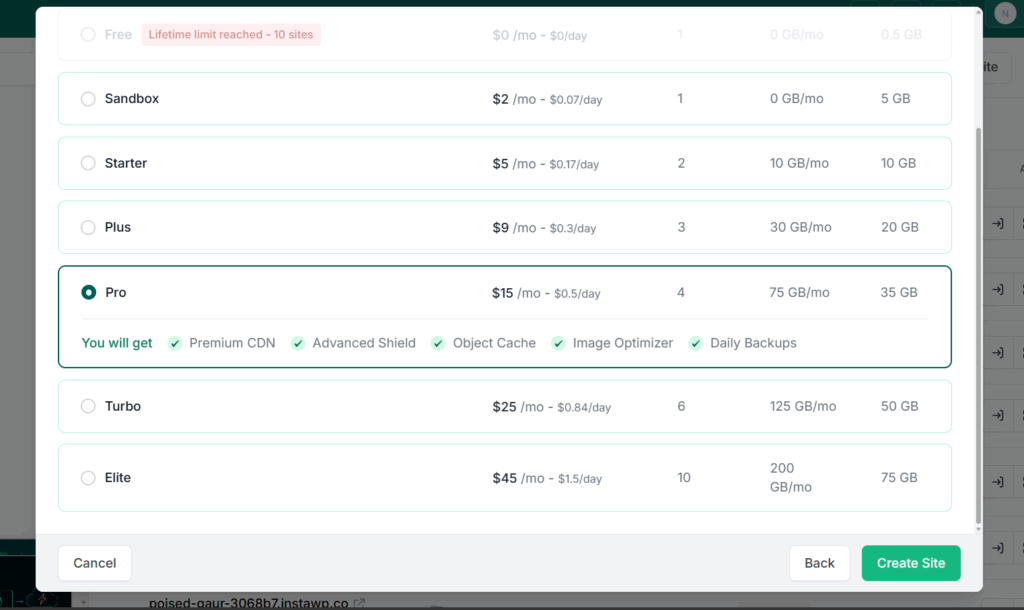
Divide the plan’s monthly price by 30 to get its daily rate. The InstaWP site plans guide explains what each tier includes. The pay-as-you-go hosting plans work out as follows:
Creating a Sandbox site does not charge $2 up front. It costs about 7 cents for each day it exists. Keep it for 10 days and then delete it, and that site costs about $0.70. Keep it all month and it comes to about $2.
Every site is billed on its own. Five Sandbox sites running for a full month cost about $10, not $2. That per-site model is what lets agencies running dozens of managed cloud hosting projects keep budgets predictable: every site has a known daily rate, and you scale one site up or down without touching the rest.
This video walks through the billing model in under five minutes:
Why does the UTC calendar matter?
InstaWP counts billing days by the UTC calendar, not by your local time zone and not by 24-hour blocks. A site created at 11:30 PM UTC and deleted at 1:00 AM UTC was live for 90 minutes, but it touched two UTC days, so the bill shows two billing days.
A site that is live for part of one UTC day is charged for that whole day. Spin up a sandbox at 9:00 AM UTC and delete it at 2:00 PM UTC and you pay for one day. Charging whole days keeps the maths simple and avoids fractional hourly billing. If you create and delete short-lived test sites often, doing it inside one UTC day keeps each one at a single billing day.
Where Can You See Your Billing Breakdown?
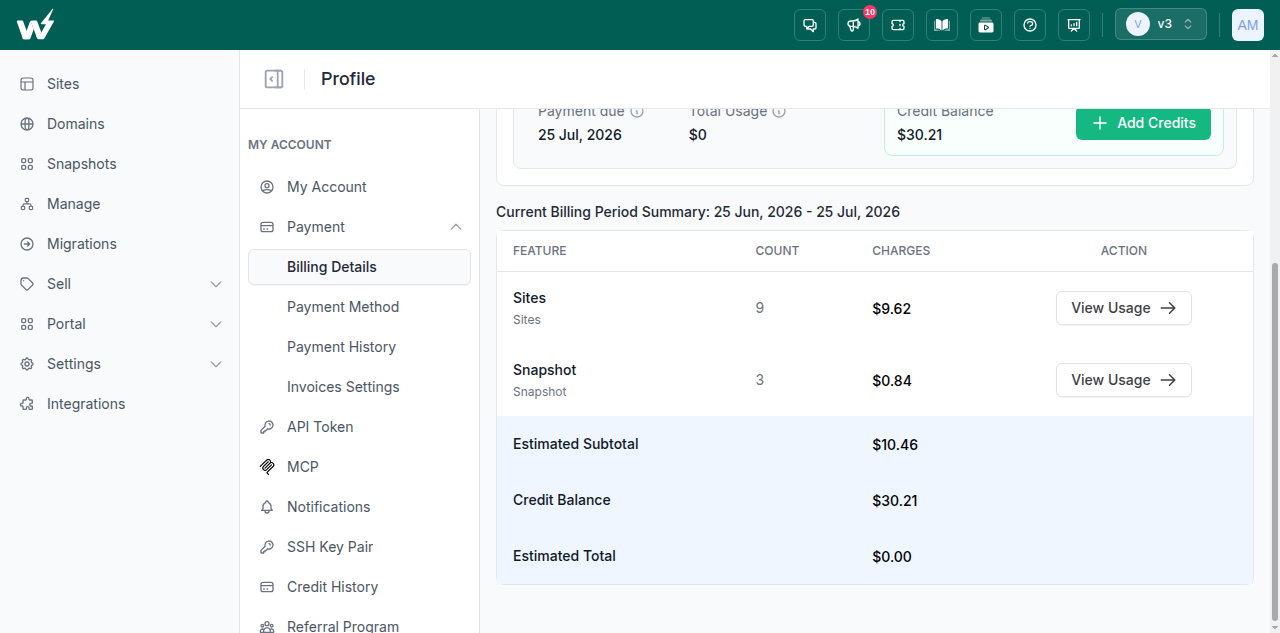
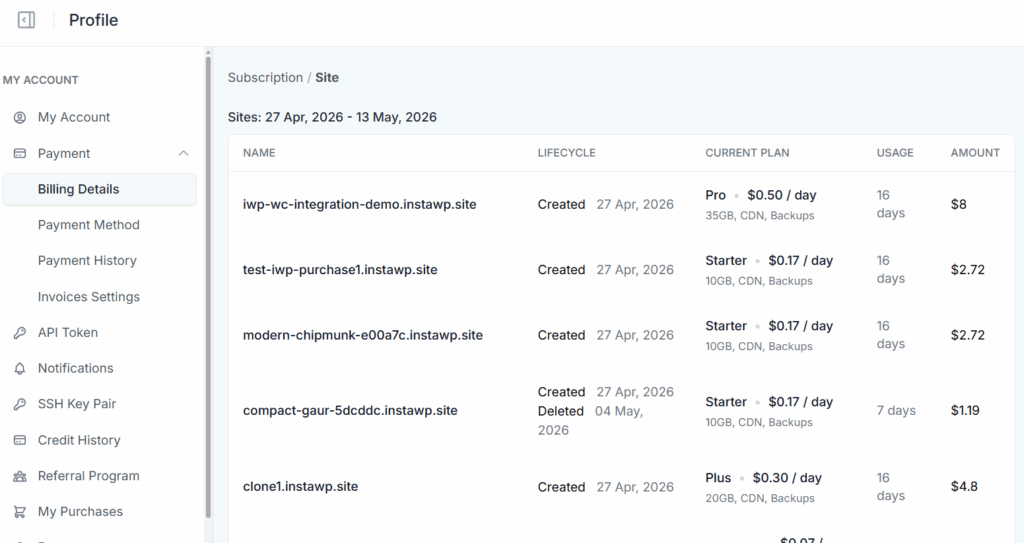
Open your InstaWP account and go to Account Settings, then Payment, then Billing Details. Instead of one combined number, the page lists every chargeable item for the current billing period, the credit balance that will be applied, and the estimated total.
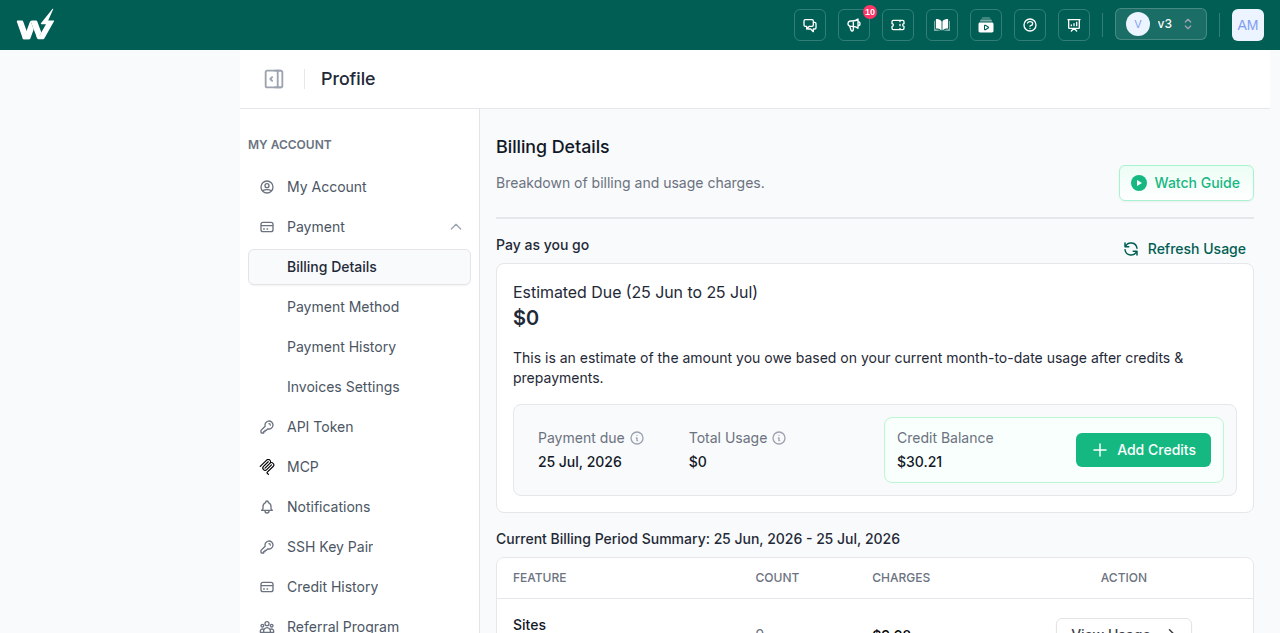
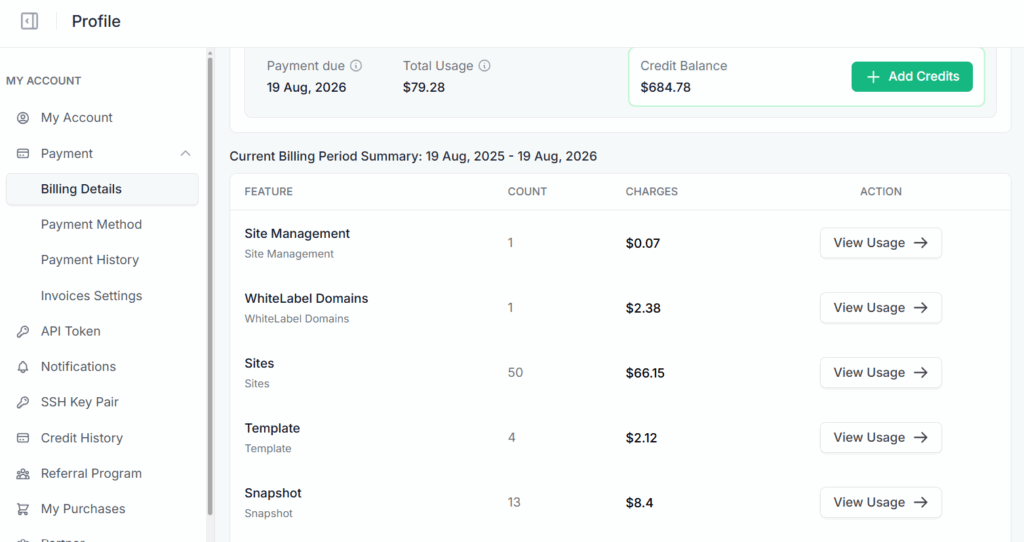
The breakdown typically includes:
- Site charges, based on each site’s plan and the days it was active
- Template charges for templates you have saved
- Snapshot charges for standard or instant snapshots
- Two-way sync charges, based on the number of synced events
- White-label domain charges for branded site URLs
Below the estimate, the Current Billing Period Summary lists each kind of charge with its count. Click View Usage on any line to see which site or service it covers, which plan was used and how many billing days were counted. If a charge looks unfamiliar, you can trace it to a specific site and date without opening a support ticket.
What Happens to Your Bill When You Change a Site Plan?
When you change a site’s plan, InstaWP prorates by day: each plan is charged only for the days the site spent on it. You can upgrade or downgrade any day, and the new daily rate applies from that day. The site keeps its URL and data, so there is no migration fee, and it can pick up features such as the object cache on Plus or built-in staging on Pro the same day.
Here is a worked example. You create a site on Sandbox on Monday, at about $0.07 a day. On Wednesday you upgrade it to Plus, at about $0.30 a day. On Sunday you delete it.
- Sandbox for 2 days: $0.07 × 2 = $0.14
- Plus for 5 days: $0.30 × 5 = $1.50
- Total for that site: $1.64
The same rule works in reverse. When a WordPress staging site goes quiet, drop it to a smaller plan and the lower rate starts that day.
Pause, park or delete: which one stops the charges?
Only deleting a site stops its charges completely. Pausing takes a site offline but keeps it on its plan, so it is still billed. To keep a site cheaply, park it on the $2 Sandbox plan.
Before parking a site on Sandbox, turn off InstaShield, because the Sandbox plan does not include it. The backups guide explains the final backup InstaWP takes before a site is deleted.
Which Add-On Charges Can Appear on an InstaWP Bill?
Beyond the site plan, five kinds of add-on can appear on the bill: snapshots, templates, site management for sites hosted elsewhere, 2-way sync events and white-label domains. Each is billed separately from the site and, like sites, by the day.
How much do snapshots cost?
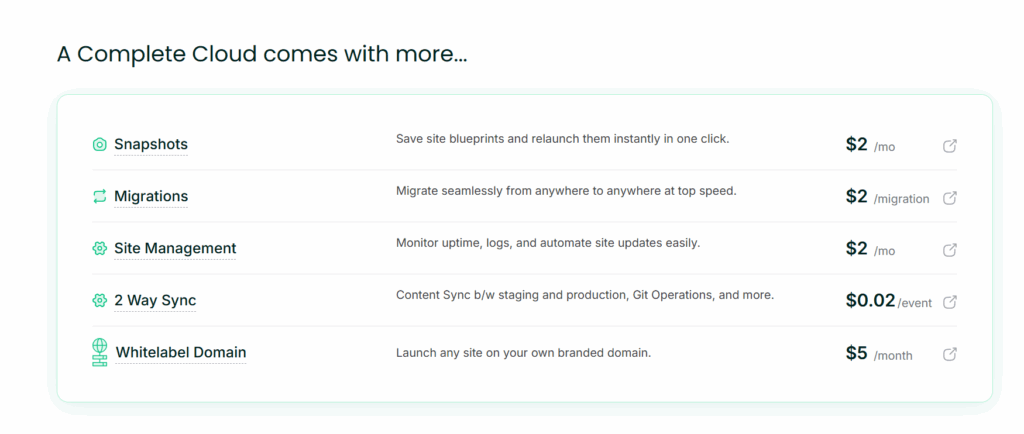
A snapshot saves a site’s full state so you can relaunch it later: you design the pages, install the plugins, configure the settings, then save the whole setup. A standard snapshot costs about $1 a month, or about 4 cents a day. An instant snapshot or instant template costs about $2 a month, because it launches new sites faster.
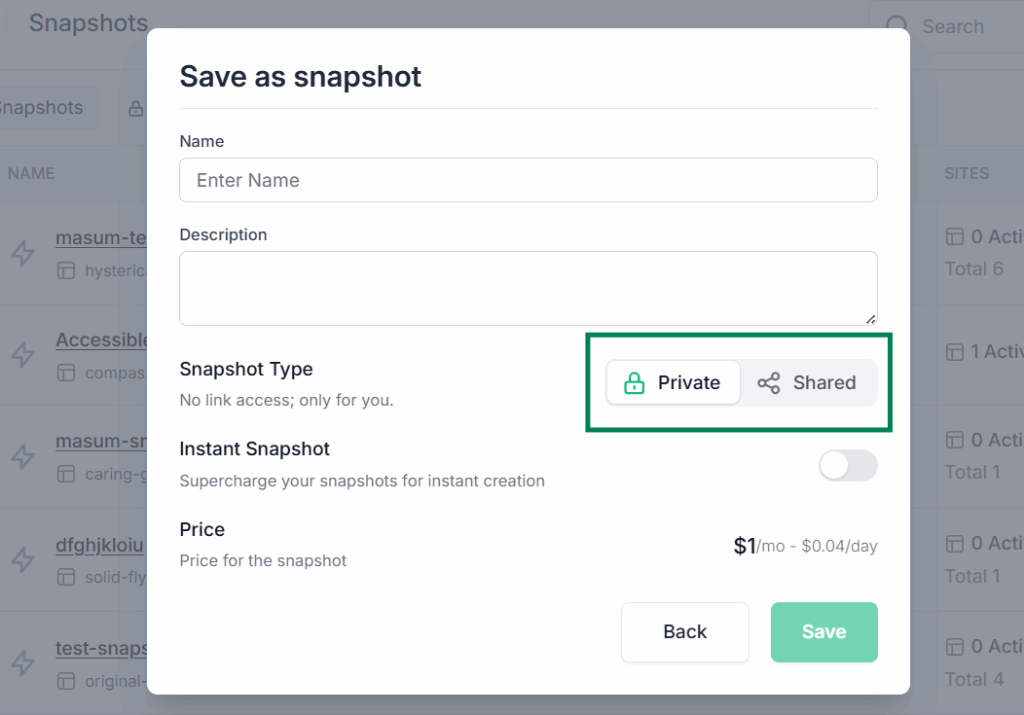
The snapshot charge comes on top of the site plan. It pays for itself when a team reuses the same WordPress baseline across many projects. The snapshots and templates guide explains when to use each.
How are WaaS templates billed?
A Template used in a WaaS workflow is billed the same way as a snapshot, for as long as it stays saved in your account. Demo sites your WaaS customers spin up are billed to you, the agency (the guide to reselling hosting covers pricing them), at the demo’s plan and duration, so you control the demo pricing and margin.
Is site management charged separately?
Not for sites hosted on Plus or above. Advanced Site Management is included on Plus, Pro, Turbo and Elite at no extra cost: uptime and SSL monitoring with email and Slack alerts, vulnerability and performance scans, activity logs, scheduled updates and client reports.
Sandbox and Starter sites run on Basic site management, which is free for life. It covers manual plugin and theme updates, Magic Login, user management, the database editor and cache purge.
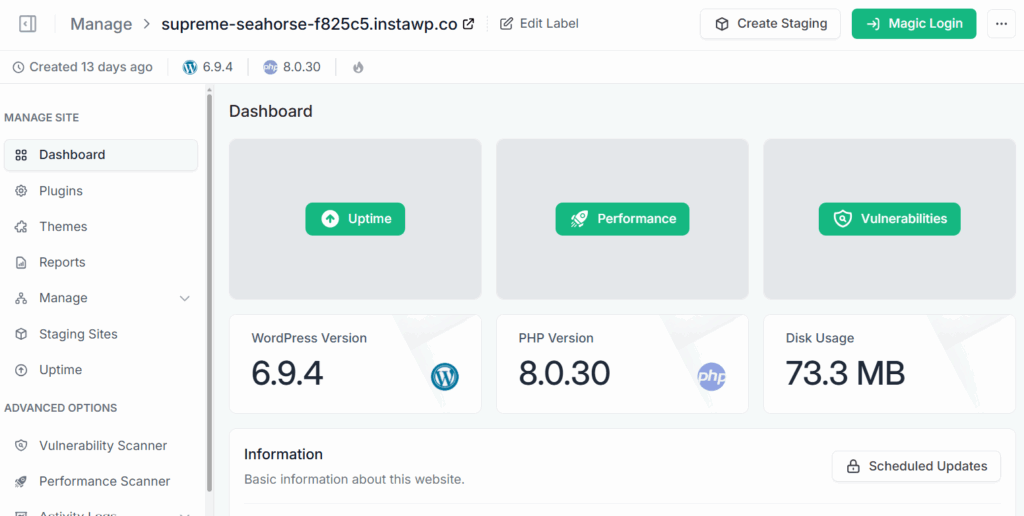
Advanced adds the monitoring, scanning, logs, scheduled updates and reports described in Advanced Site Management.
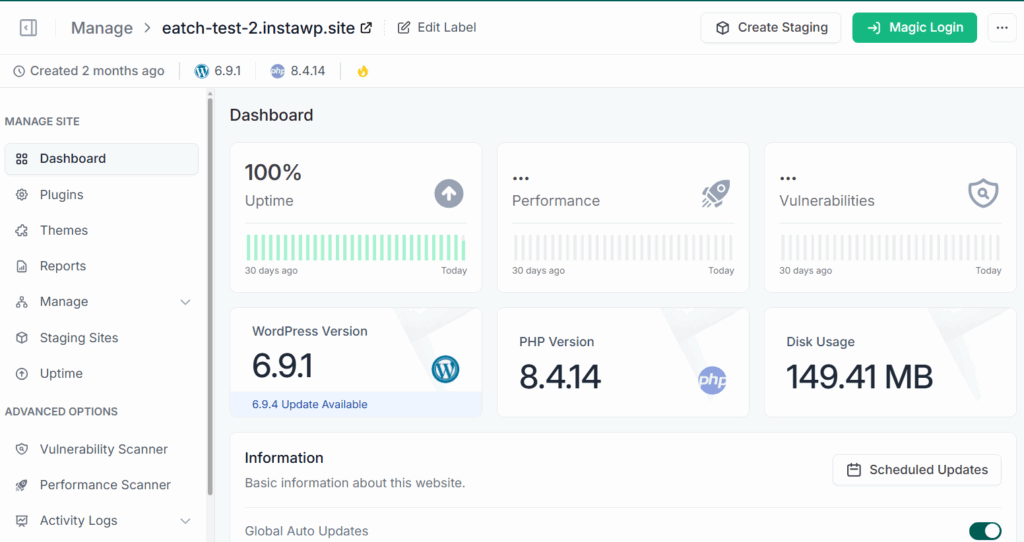
You can also manage WordPress sites hosted elsewhere. Install the InstaWP Connect plugin on the external site, connect it to your account, and manage sites from the same dashboard. Basic is free for those sites too, and Advanced costs $2 a month per site, billed daily. The bill is based on how many connected sites use Advanced, not on where they are hosted.
How much does 2-way sync cost?
Two-Way Sync pushes selected changes between two WordPress sites, such as plugin updates from staging to live (see how agencies use 2-way sync). It costs $0.02 per synced event.
An event is one change InstaWP records: a plugin update, a page edit, a template change, a deactivation, a post edit or a theme switch. You choose which events to push, so you never pay to sync everything. Make four changes on staging, push two of them, and the sync costs $0.02 × 2 = $0.04.
What does a white-label domain cost?
A white-label domain lets your sites open on your own branded domain instead of the default InstaWP URL. It costs about $5 a month per white-label domain, billed daily, and one domain covers every site you host on it.
Are migrations billed?
Moving a site onto InstaWP is free with the WordPress migration tool. An end-to-end migration away from InstaWP, or between two other hosts, costs $2 per migration.
What Does a Typical Monthly InstaWP Bill Look Like?
Here is a small developer account over one 30-day month, priced with the daily rates above:
At agency scale the same arithmetic holds. A typical mix of ten client sites, five on Starter, three on Plus and two on Turbo, comes to about $102 a month, and parking or deleting any one of them changes the bill from that day.
Why Did InstaWP Move to Pay-Per-Use Billing?
InstaWP moved to pay-per-use billing because fixed plans made people pay for capacity they were not using. In a pay-per-use model you are charged for the service you actually consume, the way an electricity bill follows the energy you use rather than a flat fee. On InstaWP the unit is a site-day: one site, on one plan, for one UTC day.
The change was planned in the open. InstaWP put it on the 2025 roadmap in its Year in Review, and in a user survey published in January 2025, about 85% of respondents said they were interested in pay-per-use pricing: 30% saw clear benefits and 55% wanted to learn more. The model shipped with the v3 platform in 2025. Accounts that joined before v3 can still be on legacy fixed plans.

In practice the model does four things for users:
- No paying for idle capacity: a freelancer with one project and an agency with fifty pay for the sites they actually run.
- Costs scale in both directions: add sites in a busy month, park or delete them in a quiet one.
- Every charge is traceable: each line on the bill maps to one site, one plan and a number of days.
- A low entry cost: a new user can start on a $2 sandbox instead of committing to a large plan.
Is InstaWP’s Daily Billing Right for You?
InstaWP charges each site its plan’s daily rate for every UTC day it is live, prorates plan changes by day, bills add-ons the same way, and charges your card once a month after applying credits. If your sites come and go (sandboxes, staging copies, client builds, demos), daily billing means you stop paying the day a site stops being useful. If they run all month, the cost matches the monthly price.
If you have not tried it yet, sign up, add your card to get $25 in InstaWP credits, and create a site on any plan to see the daily charges for yourself. Get started with InstaWP and your first site is ready in seconds.
InstaWP Billing: Frequently Asked Questions
Is InstaWP billed monthly or daily?
Daily. Each site is charged its plan’s daily rate, which is the monthly price divided by 30, for every UTC day it is live. InstaWP adds up all sites and add-ons and charges your card once a month.
Will I be charged if my site is paused?
Yes. A paused site stays on its plan and is still billed. To cut the cost, move it to the $2 Sandbox plan. To stop billing completely, delete it.
How is billing calculated if I upgrade a site mid-month?
Each plan is charged for the days the site spent on it. Five days on Sandbox and then ten days on Plus is billed as five days at the Sandbox rate plus ten days at the Plus rate. There is no migration fee when you change plans.
Is there a free plan on InstaWP?
No. Creating an account is free, but a card is required to launch a site. Adding one gives you $25 in credits, which your sites use before anything is charged to the card.
What is the difference between standard and instant snapshots in billing?
A standard snapshot costs about $1 a month and an instant snapshot about $2 a month, both billed daily and separately from the site plan. Instant snapshots launch new sites faster, which is why they cost more.
Do I pay for demo sites my WaaS clients create?
Yes. In a WaaS setup the agency covers the demo hosting cost, based on the demo’s duration and the plan attached to the template. The end user is not billed for the demo, so you control demo pricing and margin.
How does the UTC timezone affect my bill?
A billing day is one UTC calendar day, not 24 elapsed hours. A site that is live across two UTC days is charged for two days even if it ran for only a few hours. Creating and deleting a site inside one UTC day keeps it at one billing day.
Do credits pay my InstaWP bill automatically?
Yes. Any credits on your account are applied to charges first, and only the remainder is charged to your card. Purchased credits never expire; the $25 sign-up credit does.