Ever launched a WooCommerce sale only to watch your site crawl or crash under the pressure? You’re not alone, and the culprit is often something hidden deep in your server setup: PHP workers.
For most WordPress agencies and developers, performance tuning usually starts with caching plugins, image compression, or even upgrading to a faster server. But what if you’ve done all that, and your site still struggles when multiple users are logged in or making simultaneous requests?
That’s where PHP workers come in.
These behind-the-scenes processes power every uncached page view, AJAX request, or cart update. And if you don’t have enough of them? Your server queues requests, slows to a crawl, or throws dreaded 504 errors.
In this guide, we’ll demystify what PHP workers are, how they affect WordPress performance, how many you need, and how InstaWP helps you test and scale them across hosted site plans, without the trial-and-error chaos.
Let’s break it all down.
Table of Contents
What Are PHP Workers in WordPress?
If you’ve ever wondered how your WordPress site delivers dynamic content like logged-in dashboards, shopping carts, or contact form submissions, the answer lies with PHP workers.
A PHP worker is a background process on your server that executes PHP code when a request can’t be served from cache. These requests include anything dynamic, like generating a product page for a logged-in user or fetching order history from the database.
Here’s how it works in simple terms:
When a visitor lands on your site and the page isn’t cached, the server hands the request to a PHP worker. That worker processes the necessary code, often pulling data from the database, and returns an HTML page for the browser to display.
In WordPress, this can happen constantly. Whether it’s WooCommerce, LMS, or a multisite setup, many requests bypass the cache and need real-time processing. This is where PHP workers become essential. If all workers are busy, new requests have to wait. And the longer they wait, the slower your site feels to the user.
So, when developers talk about backend performance or request handling, PHP workers WordPress is a concept you need to understand. They are quite literally the engine behind your dynamic WordPress site.
How Do You Get PHP Workers in WordPress?
If you’ve ever asked, “Where do PHP workers actually come from?”, you’re not alone. Many developers and site owners use managed WordPress hosting every day without fully realizing what component controls PHP workers or how they’re allocated.
Here’s what you need to know:
PHP Workers Are a Part of Your Server’s PHP Processing System
Specifically, they’re controlled by something called PHP-FPM (FastCGI Process Manager). This is a backend module that manages how PHP code gets executed on the server. The number of PHP workers is a configuration setting in PHP-FPM, and this setting determines how many PHP scripts can run at the same time.
Who Controls That Setting?
You don’t usually set this number yourself. It’s determined by your:
- Hosting provider (in shared or managed hosting)
- Server stack (in VPS or dedicated setups)
- Hosting plan limits (in cloud-based platforms like InstaWP)
For example, if you’re using a standard shared host, the number of PHP workers is often fixed and unchangeable. With managed WordPress hosts, the number is typically tied to your plan.
On InstaWP, each site plan includes a specific number of PHP workers, so you know exactly what you’re working with.
So, How Do You Get More PHP Workers?
- Upgrade your hosting plan to one that includes more workers.
- Switch to a host that allows scaling or customization of PHP-FPM settings.
Why WordPress Site Owners Need PHP Workers
Not every page on your WordPress site can be cached. Think about a user browsing their account dashboard, checking order history, or submitting a form. These requests are unique to each visitor and must be processed in real time. That’s exactly where PHP workers come into play.
For site owners, especially those running WooCommerce stores, membership portals, or LMS platforms, PHP workers determine how many requests your site can process at once. Without enough workers, even simple tasks like logging in or adding products to a cart can create a bottleneck.
Let’s say your site has two PHP workers and five users visit at the same time. Only two requests can be handled immediately. The rest get queued. If this queue gets too long, users start seeing slow load times or 504 errors.
That’s why understanding how PHP workers WordPress is critical. They’re not just a server detail; they directly affect sales, conversions, and user satisfaction. Whether you’re building for clients or managing your own project, ignoring PHP worker capacity is one of the fastest ways to lose visitors.
Why PHP Workers Matter for WordPress Performance
When it comes to real-world performance, your WordPress site is only as strong as the number of PHP workers available to handle dynamic requests. While caching helps speed up delivery for repeat visitors or static content, it doesn’t eliminate the need for server-side processing.
Every time a user completes a checkout, updates a profile, or views a logged-in dashboard, the request bypasses the cache and hits a PHP worker. If there are enough workers available, the request is processed quickly and returned to the user in seconds. But if all workers are busy, your server queues the request, resulting in a slower experience or a timeout.
This becomes especially important during traffic spikes. A blog post going viral, a flash sale, or a plugin update on a busy LMS can instantly max out PHP worker capacity. Even a fast server with ample CPU and RAM won’t save you if the workers are blocked or overwhelmed.
For agencies managing high-stakes client sites, performance isn’t optional. A site with insufficient PHP workers WordPress support won’t just load slowly. It will directly impact engagement, transactions, and even SEO rankings due to longer Time to First Byte (TTFB).
That’s why optimizing PHP worker performance isn’t just a backend concern — it’s a core part of delivering fast, scalable, and reliable WordPress experiences.
How PHP Workers Affect WooCommerce, LMS & Multisite Sites
When you manage dynamic WordPress sites, PHP workers become essential for performance. These sites generate frequent uncached requests, which means PHP workers are constantly in use.
Here’s how PHP workers impact different types of high-traffic WordPress setups:
WooCommerce Sites
- Cart updates, checkout processes, and coupon validation all bypass the cache.
- Each customer action requires PHP processing in real time.
- If more users are shopping than workers are available, the site queues requests, leading to slow checkouts or 504 errors.
- For WooCommerce, you’ll typically need 3 to 6 PHP workers, depending on traffic.
LMS Platforms
- Logged-in users watching videos, taking quizzes, or submitting assignments trigger unique backend activity.
- These interactions can’t be cached and often overlap during course launches or exam days.
- Not enough workers? Expect lag, dashboard loading issues, or broken submissions.
WordPress Multisite Networks
- Admins and users may be performing tasks simultaneously across multiple sub-sites.
- Actions like posting, plugin updates, or user logins create a cumulative load on the server.
- Too few PHP workers WordPress wide? The whole network’s performance degrades, even on unrelated subsites.
Agencies working with any of these site types should monitor PHP worker usage closely. The more logged-in users you support, the higher your concurrent request load.
Choosing a site plan with enough PHP workers, like InstaWP’s Turbo or Elite, is often the difference between a smooth launch and a traffic meltdown.
How Many PHP Workers Do I Need?
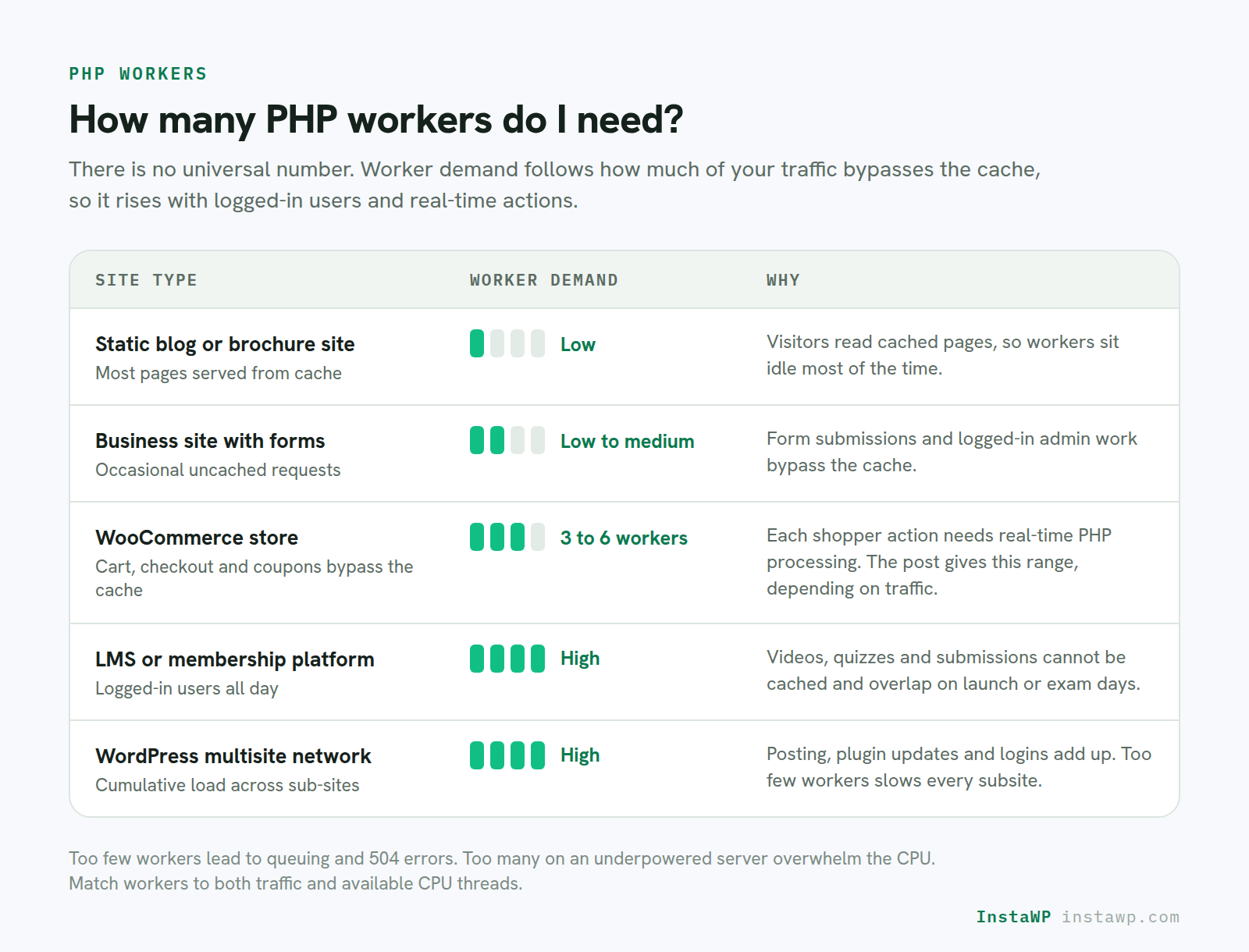
There’s no universal number of PHP workers that work for every WordPress site. The right amount depends on your site’s traffic, complexity, and how much of it bypasses the cache. But if you’re looking for guidelines, here’s a breakdown based on site types and workloads.
Developer Tip:
Too few PHP workers lead to queuing and 504 errors. Too many workers on underpowered servers can overwhelm CPU resources and slow everything down. The goal is to match workers to both traffic and available CPU threads.
When using InstaWP, each site plan comes with a set number of PHP workers:
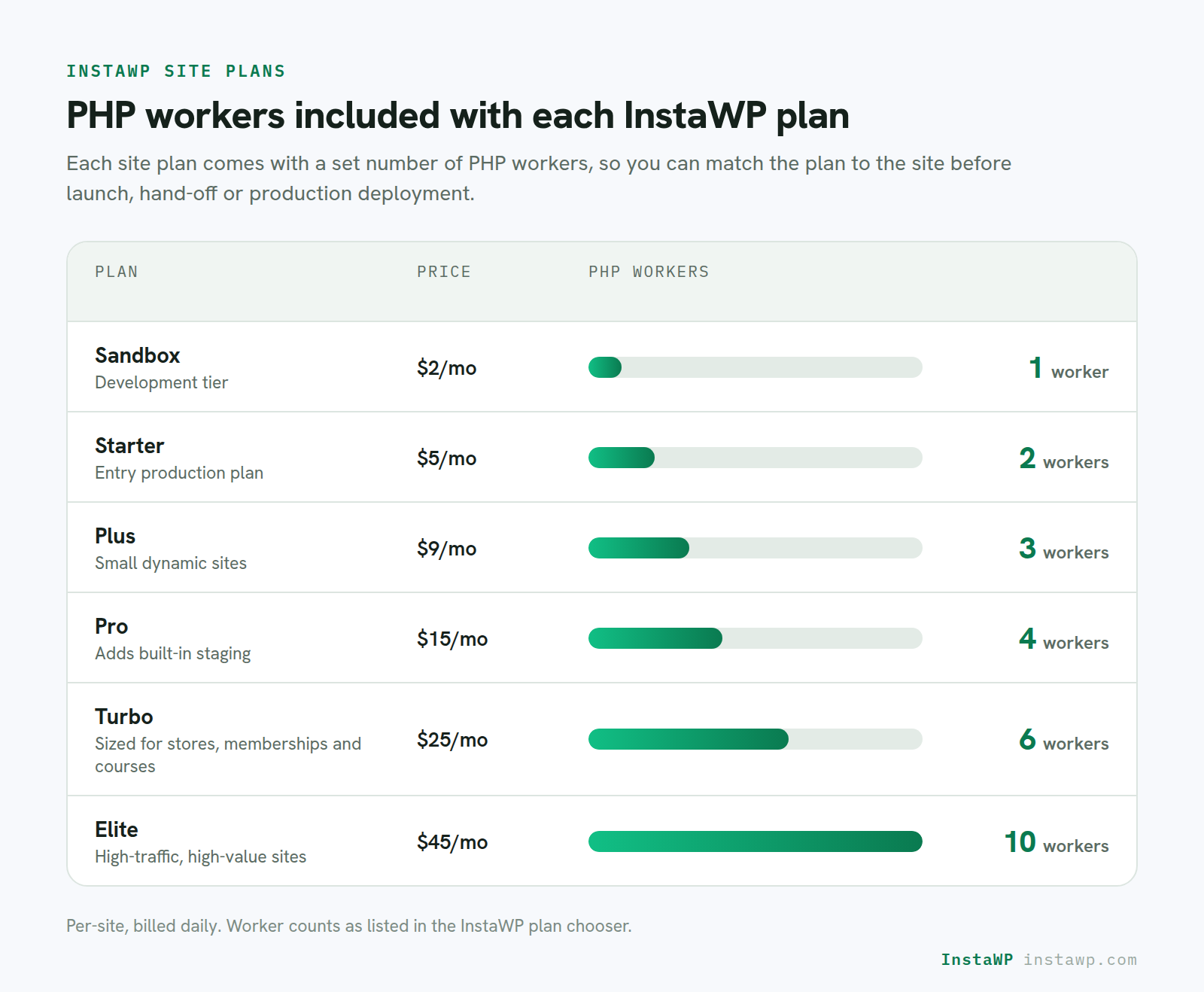
Use this as your reference when selecting the right plan for development, client handoff, or production-ready deployment.
What Happens When You Don’t Have Enough PHP Workers?
Running out of PHP workers is like having a full restaurant with no free waiters. Orders start piling up, and customers leave frustrated. If you create a WordPress site with not enough PHP workers, you have to deal with issues such as a slow WordPress site, frequent timeouts, or broken user interactions.
Here’s what typically happens when you hit your PHP worker limit:
Requests get queued
- When all PHP workers are busy, new requests wait in line.
- Users see delayed page loads, spinning loaders, or stalled checkouts.
504 gateway timeout errors
- If a request sits in the queue too long without being handled, it times out.
- These errors damage both your SEO and user trust.
AJAX and API calls fail silently
- Actions like adding items to a cart or submitting forms may not respond properly.
- Users often think your site is broken, not just slow.
Logged-in areas become unusable
- Admin dashboards, customer profiles, or LMS interfaces may fail to load if workers are maxed out.
- This affects conversions and backend workflows.
SEO and analytics suffer
- Longer Time to First Byte (TTFB) hurts Core Web Vitals scores.
- Users may bounce before the first paint, and Google takes notice.
For high-traffic WordPress environments, not having enough PHP workers WordPress can quietly kill your performance, especially during campaigns or content surges. Using InstaWP’s Performance Scanner to simulate traffic and test worker limits in a sandbox can help prevent these issues before they reach production.
How to Ensure Your Hosting Is Offering Enough PHP Workers
Your site’s speed and stability aren’t just about CPU or RAM — it’s also about whether your host allocates enough PHP workers for your needs. These workers determine how many dynamic requests your WordPress site can process at once, especially when the cache is bypassed.
If you’re building WooCommerce stores, membership portals, or any logged-in experience, here’s how to make sure your hosting plan won’t bottleneck your performance:
1. Check If PHP Workers Are Listed in Your Hosting Plan
Many hosting providers advertise bandwidth and storage, but skip details on PHP workers WordPress limits. That’s a red flag.
- Look for clearly stated worker counts per plan.
- If it’s not listed, ask support directly — vague or withheld answers usually mean restrictive allocations.
With InstaWP, PHP worker limits are transparent: from 1 worker on the Free plan to 10 workers on Elite. This helps agencies match hosting plans to project needs without guesswork.
2. Understand How PHP Workers Affect Performance
Here’s why PHP workers matter:
- They process uncached actions like cart updates, logins, or dashboard views.
- When all workers are busy, requests get queued. That’s when users experience slow load times or timeout errors.
- The fewer the PHP workers, the lower your concurrent request handling capacity, even if your server seems powerful.
If your hosting doesn’t mention PHP workers performance, it likely doesn’t scale well during traffic spikes.
3. Use Real-World Monitoring or Simulations
You can’t improve what you can’t measure. If you’re on a live production server, watch for 504 errors or lag in high-traffic events (like WooCommerce sales).
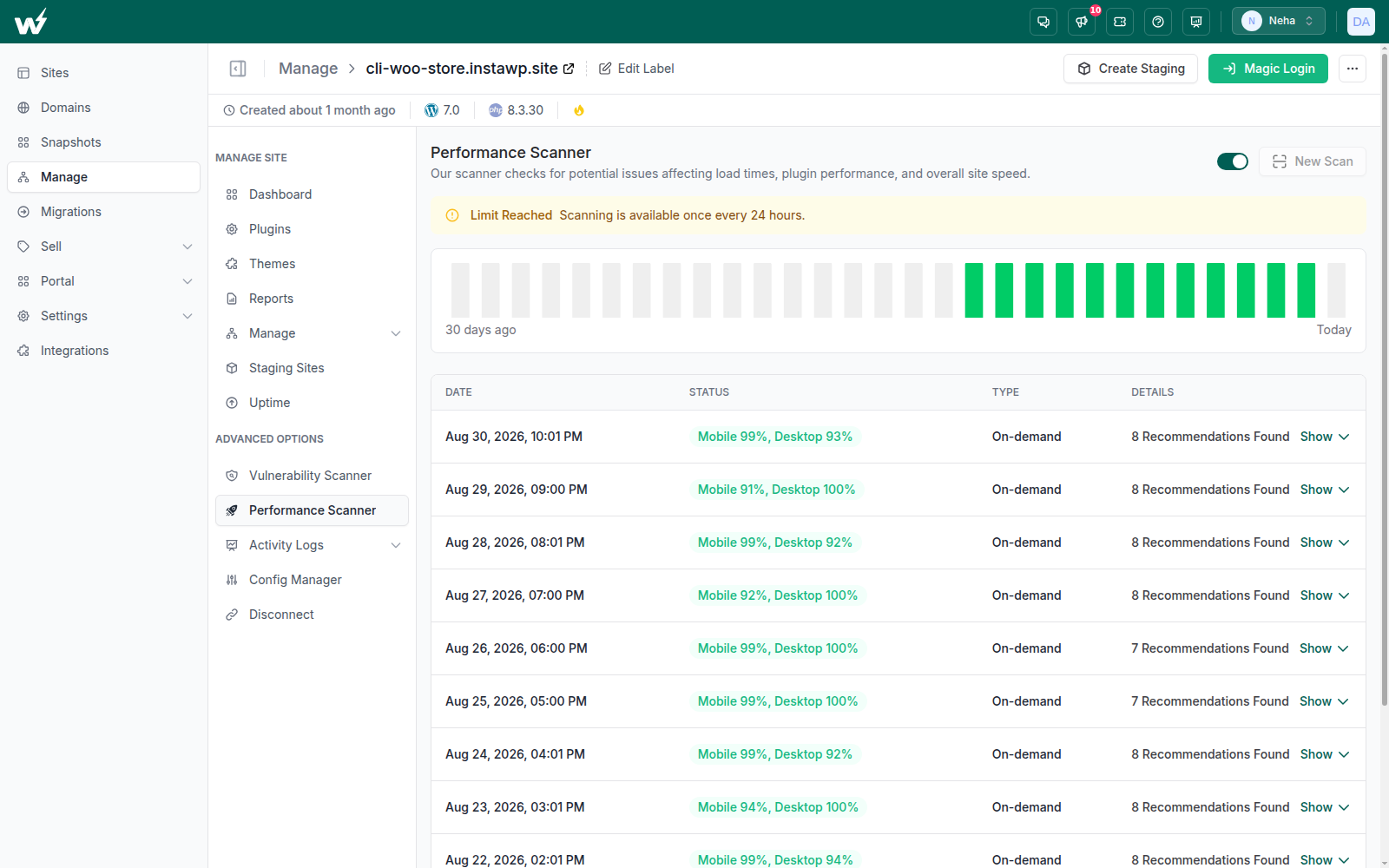
On InstaWP, you can run simulated traffic via the Performance Scanner. This helps you evaluate if your current PHP worker allocation is enough before you hit a performance wall.
4. Match PHP Workers to the Type of Site You’re Hosting
You should always match PHP workers with the type of site you own so that the site’s performance isn’t hampered. Here’s a simplified guide:
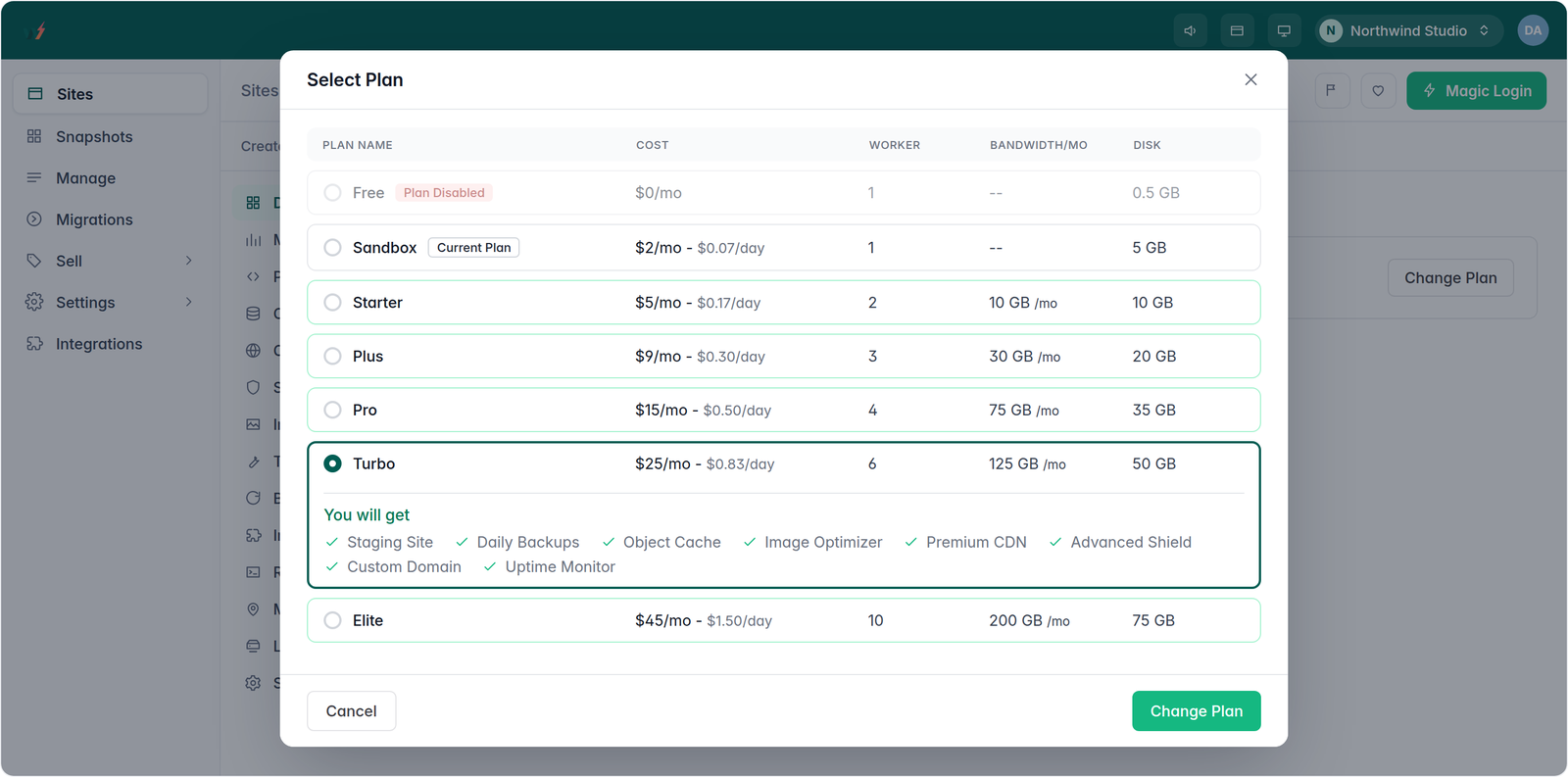
Using fewer PHP workers than required causes queue delays. Using more than needed can overload the CPU and degrade performance. You need the right fit, not just “more.”
Best Practices to Reduce PHP Worker Load
Even with the right number of PHP workers, inefficient code or heavy plugins can cause unnecessary strain. This affects performance, especially during peak traffic, and forces even well-resourced sites to feel slow or unstable. The good news? You can reduce the pressure on PHP workers by applying a few smart practices.
Let’s look at what you can do to free up your PHP workers WordPress setup and make them work smarter, not harder:
1. Use Full-Page Caching Wherever Possible
The easiest way to reduce PHP worker load is to avoid hitting them at all. Full-page caching allows your site to serve static HTML versions of pages instead of rebuilding them for each visitor.
- Cache all pages that don’t require real-time user data.
- Use WordPress cache plugins or server-level caching like Nginx FastCGI.
- Ensure WooCommerce “My Account” and cart pages are excluded to avoid errors.
By serving cached pages, your PHP workers can focus on logged-in users and actual dynamic content.
2. Offload Background Processes
Some tasks don’t need to be handled immediately during a page request, yet many WordPress sites process them anyway, wasting PHP resources.
To offload non-critical jobs:
- Shift email delivery to third-party services like Mailgun or SendGrid.
- Move analytics and event tracking to client-side tools or services like Cloudflare Zaraz.
- Use task queues (like Action Scheduler) to push bulk operations outside the main request.
This way, PHP workers aren’t tied up with tasks that the user doesn’t need to wait for.
3. Defer Non-Essential Scripts
Every frontend script doesn’t need to fire right away, especially if it calls back to your server and engages a PHP worker.
What to defer:
- Live chat widgets, popups, or social feeds
- Comment counters or real-time notifications
- External JavaScript that triggers PHP interactions
Defer these until after the initial page render, or until the user interacts with a specific element.
4. Clean Up Resource-Hungry Plugins
Heavy plugins often create recurring backend calls, sometimes in ways that aren’t immediately visible. Even plugins you trust can eat up worker capacity quietly.
What to do:
- Use InstaWP’s Performance Scanner to see what’s slowing down your site.
- Replace plugins that constantly trigger admin-ajax.php or use excessive queries.
- Keep plugins updated. Better to schedule updates.
The fewer backend calls you have, the more room your PHP workers have to breathe.
5. Schedule Heavy Cron Jobs During Off-Peak Hours
WordPress runs scheduled tasks (CRON jobs) using PHP workers. If they trigger during busy periods, they compete with real users for resources.
How to handle this:
- Use a real CRON system (via server or WP-CLI) instead of relying on the default WordPress CRON.
- Schedule database-intensive jobs during low-traffic hours.
- Stagger tasks like backups, email campaigns, or inventory syncing.
Even a well-optimized site can struggle if all scheduled jobs hit at the wrong time.
By applying these strategies, you can dramatically improve your PHP workers performance without upgrading your hosting plan. For agencies and developers working with WooCommerce or LMS clients, this kind of backend efficiency can be the difference between a smooth campaign and a complete crash.
PHP Workers: The Backbone of WordPress Performance
If your WordPress site has ever slowed down without explanation, during a sale, after a product launch, or while students log in to an LMS, chances are you’ve run into a PHP worker bottleneck.
They’re not flashy, but PHP workers control how many uncached, dynamic requests your site can handle at any moment.
With InstaWP, you can control the number of PHP workers WordPress sites will receive, from 1 worker for quick tests to 10 workers for high-traffic WooCommerce stores.
Launch Your Free Site on InstaWP →
FAQs
1. What are PHP workers in WordPress?
PHP workers are background processes that execute PHP code for uncached requests. They handle tasks like form submissions, checkout processes, and logged-in user interactions. In WordPress, PHP workers are essential for serving dynamic content and preventing slowdowns during high-traffic periods.
2. How many PHP workers do I need for WooCommerce?
A small WooCommerce store typically needs 3–4 PHP workers, while high-traffic stores may require 6–10. This ensures smooth checkouts and real-time cart updates. Choosing the right plan with enough PHP workers WordPress can help avoid slowdowns during peak sales.
3. Can I increase PHP workers in WordPress?
You can’t directly change PHP worker limits on most managed WordPress hosts. To increase them, you’ll need to upgrade your hosting plan. On platforms like InstaWP, each plan includes a fixed number of PHP workers — from 1 to 10 — so you can scale easily.
4. Do PHP workers affect site speed?
Yes. PHP workers directly impact how many dynamic requests your site can process at once. If all workers are busy, new requests get delayed, which slows down your website. Enough PHP workers mean faster performance, especially for WooCommerce or LMS sites.
5. What causes 504 errors in WordPress?
A 504 gateway timeout error often means your server’s PHP workers are overwhelmed. When all workers are occupied and a new request can’t be processed in time, it times out. This usually happens during traffic spikes or with slow, resource-heavy plugins.
6. Is 1 PHP worker enough for a WordPress site?
One PHP worker is enough for basic static sites with low traffic and no dynamic interactions. However, for WooCommerce, membership, or any site with logged-in users, 1 worker isn’t sufficient. You’ll need at least 2–4 PHP workers to avoid delays and timeouts.


