For agencies overseeing numerous WordPress sites, ensuring optimal uptime is a non-negotiable aspect of service. When every second counts, WordPress monitoring becomes your best ally in preventing costly downtimes.
WordPress uptime monitoring, a crucial aspect of site management, provides the peace of mind you need by alerting you instantly when your sites face performance issues, ensuring you can address them before they impact your clients.
In this guide, we’ll explore how WordPress uptime monitoring can empower agencies to keep their WordPress sites functioning seamlessly, guaranteeing that your clients’ websites are always up and running.
Table of Contents
What Is WordPress Uptime Monitoring and Why Should WordPress Agencies Care?
As a WordPress agency, your priority is ensuring that your client’s websites are always accessible and performing at their best. That’s where WordPress uptime monitoring comes in.
This practice involves tracking the availability of a website 24/7, alerting you if it goes down so that you can take immediate action. Regular uptime monitoring while managing multiple client sites helps agencies maintain trust, improve customer satisfaction, and prevent the negative impacts of downtime, such as lost revenue or a damaged reputation.
By implementing WordPress uptime monitoring, agencies can ensure they are proactive in maintaining their clients’ websites. When a site goes down, your team can receive instant notifications, enabling a quick response to resolve the issue before it escalates.
This service also allows you to provide your clients with detailed reports on site performance, showing your dedication to keeping their online presence running smoothly.
In short, WordPress uptime monitoring is a vital tool for agencies looking to deliver top-notch, reliable service while safeguarding their clients’ digital experiences.
Check out this guide to learn about WordPress site management, including WordPress uptime monitoring in detail.
Key Features of Effective WordPress Uptime Monitoring for Agencies
When it comes to WordPress uptime monitoring, having the right features is essential for ensuring your client’s websites stay online and perform well. For WordPress agencies, an effective uptime monitoring system offers a suite of tools that allow you to proactively manage and maintain site availability.
Real-Time Alerts: An essential feature of monitoring WordPress sites is receiving instant notifications via email, SMS, or other communication channels when downtime occurs. This ensures you can take quick action and minimize the impact on your client’s business.
Global Uptime Monitoring Locations: Monitoring from multiple global locations ensures that you can detect issues related to specific regions. This is particularly important for agencies serving clients with international audiences, as it helps identify localized performance problems.
Customizable Check Intervals: A great uptime monitoring service should allow you to adjust how frequently the system checks your clients’ websites for downtime. Shorter intervals provide faster detection, while longer ones save resources.
Detailed Performance Reports: Effective WordPress uptime monitoring includes providing your clients with detailed, easy-to-understand reports on uptime history, response times, and potential issues. These reports help demonstrate your agency’s reliability and commitment to keeping its website running smoothly.
Automatic Issue Resolution: Some advanced uptime monitoring systems offer automated remediation tools, such as restarting services or clearing the WordPress cache, to resolve minor issues before alerting you, saving you time and effort.
By incorporating these features into your WordPress uptime monitoring strategy, agencies can ensure they’re offering top-tier service and providing peace of mind to their clients, knowing their websites are being closely watched and maintained.
Benefits of Regular WordPress Uptime Monitoring for Agencies
Offering reliable WordPress uptime monitoring brings significant advantages to agencies. By incorporating consistent WordPress site monitoring into your services, you can ensure that your clients’ websites remain operational around the clock, leading to:
- Increased Client Trust: Regular WordPress uptime monitoring demonstrates your commitment to maintaining site reliability, and fostering long-term client relationships built on trust and dependability.
- Quick Issue Resolution: By actively monitoring website downtime, your agency can quickly detect and resolve issues, minimizing disruption and ensuring that your clients’ sites stay online, preventing revenue loss.
- Proactive Performance Management: Offering a WordPress uptime monitor helps agencies stay ahead of potential problems, allowing you to address issues before they impact site performance, and ensuring smoother experiences for both clients and their visitors.
- Competitive Edge: Agencies that provide reliable WordPress uptime monitoring stand out in a competitive market, showcasing their dedication to quality service and making it easier to retain clients.
- Better Client Reporting: With detailed WordPress maintenance reports, agencies can present tangible proof of the services offered, showing clients their dedication to monitoring and optimizing website performance.
Incorporating these benefits into your service offerings enhances your agency’s reputation, strengthens client satisfaction, and boosts overall performance.
How to Set Up WordPress Uptime Monitoring: A Quick Guide for Agencies
As a WordPress agency, ensuring your clients’ websites stay online is vital. One of the best ways to do this is through WordPress uptime monitoring. In this guide, we’ll explore two methods: using a WordPress uptime monitor plugin and a WordPress site management service.
Method 1: Using a WordPress Uptime Monitor Plugin
Agencies have ample of WordPRess uptime monitor plugins to do uptime monitoring for their client’s sites. They are easy to set up and provide basic uptime monitoring. However, they may lack the scalability and reliability needed for agencies managing multiple sites. Issues such as plugin conflicts and lack of centralized management can become problematic.
Method 2: Using a WordPress Site Management Service
For agencies managing several client sites, a WordPress site management service is a more efficient and reliable option. These services provide centralized dashboards, automated alerts, and reports, allowing you to monitor multiple sites from one place.
They save time, reduce manual effort, and offer advanced features like security monitoring and backups, ensuring your client’s websites remain in top condition.
| Feature | WordPress Uptime Monitor Plugin | WordPress Site Management Service |
| Setup | Quick and easy to install | Requires account setup and configuration |
| Scalability | Limited for managing multiple sites | Highly scalable for multiple sites |
| Centralized Management | No centralized dashboard | Centralized dashboard for all sites |
| Features | Basic uptime monitoring | Advanced monitoring, security, backups |
| Automation | Limited automation | Full automation for monitoring, alerts, and reporting |
| Credibility | Lacks professional reliability for agencies | Offers white-label solutions and professional features |
Let’s learn about setting up WordPress site monitoring through both means.
Method 1: Use WordPress Uptime Monitor
Go to WordPress Dashbaord>Plugin>Add New
Type the name of a reliable WordPress uptime monitor in the search section.
Click on Install Now>Activate to enable the plugin on your site.
Go to the plugin settings page, and set up the monitoring interval, notification methods (email, SMS), and other preferences.
Once everything is set up, the plugin will automatically monitor your site and send alerts when downtime occurs.
Method 2: Use WordPress Site Management Services
Agencies can sign up for a reliable WordPress site management service and make everything related to WordPress uptime monitoring fully sorted. Here are the steps to set up WordPress uptime monitoring through site monitoring.
Login to the site management dashboard.
Click on Connected/Managed Sites.
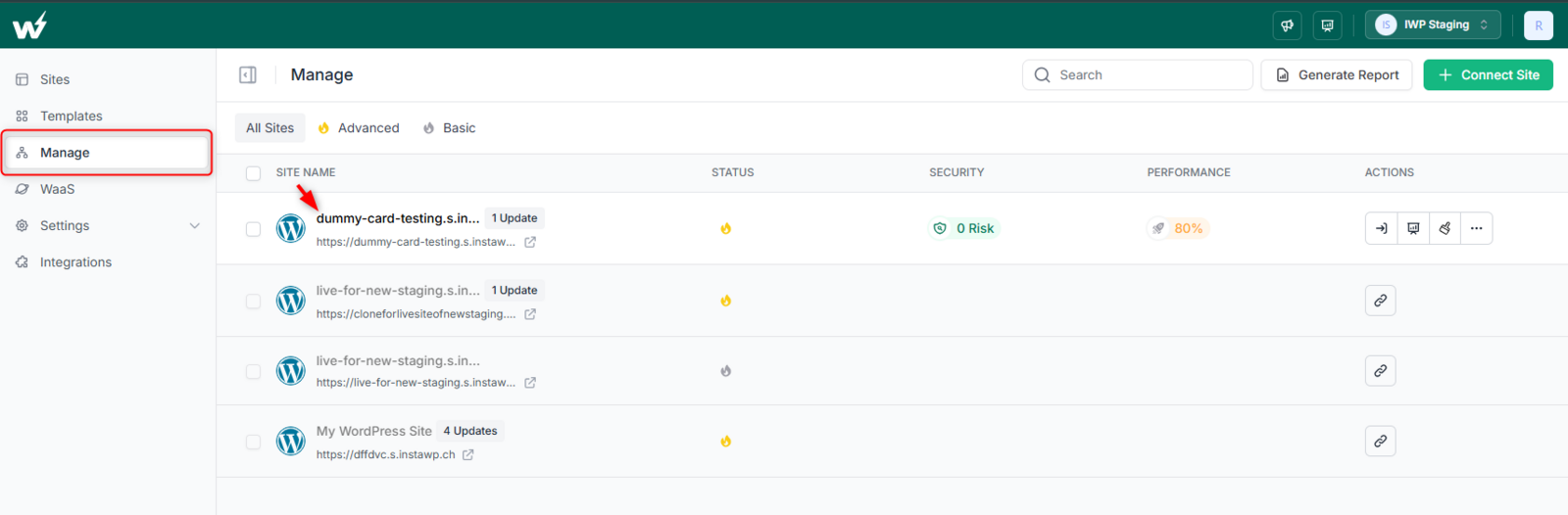
Select the client site you want to manage for uptime monitoring.
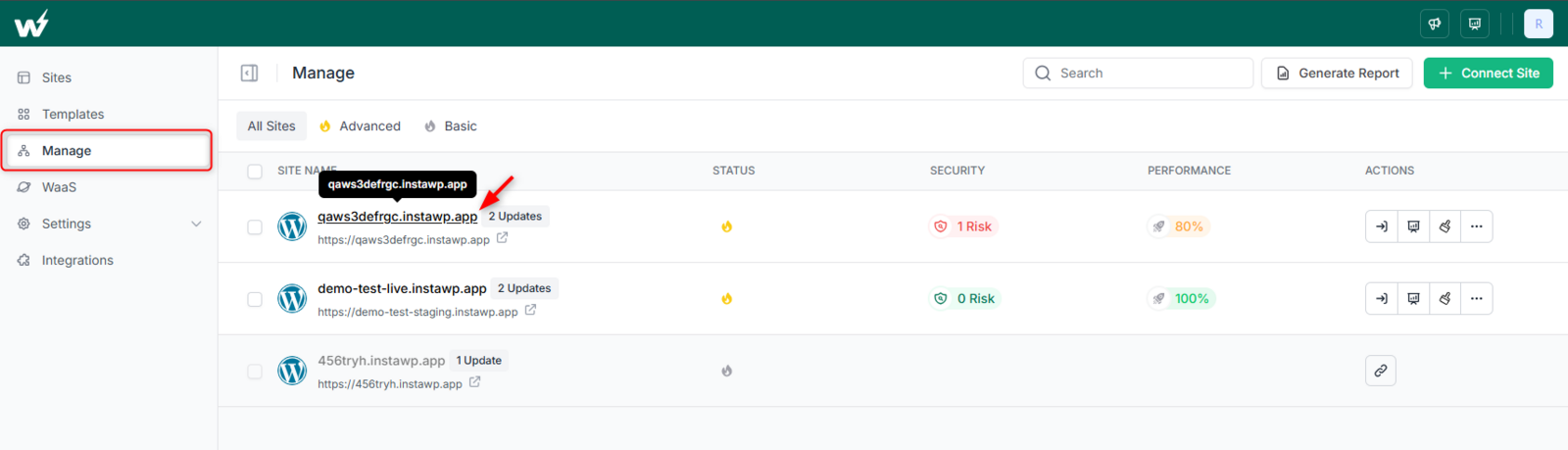
In the site management dashboard, navigate to the Uptime Monitoring section and enable the monitoring feature for each site.
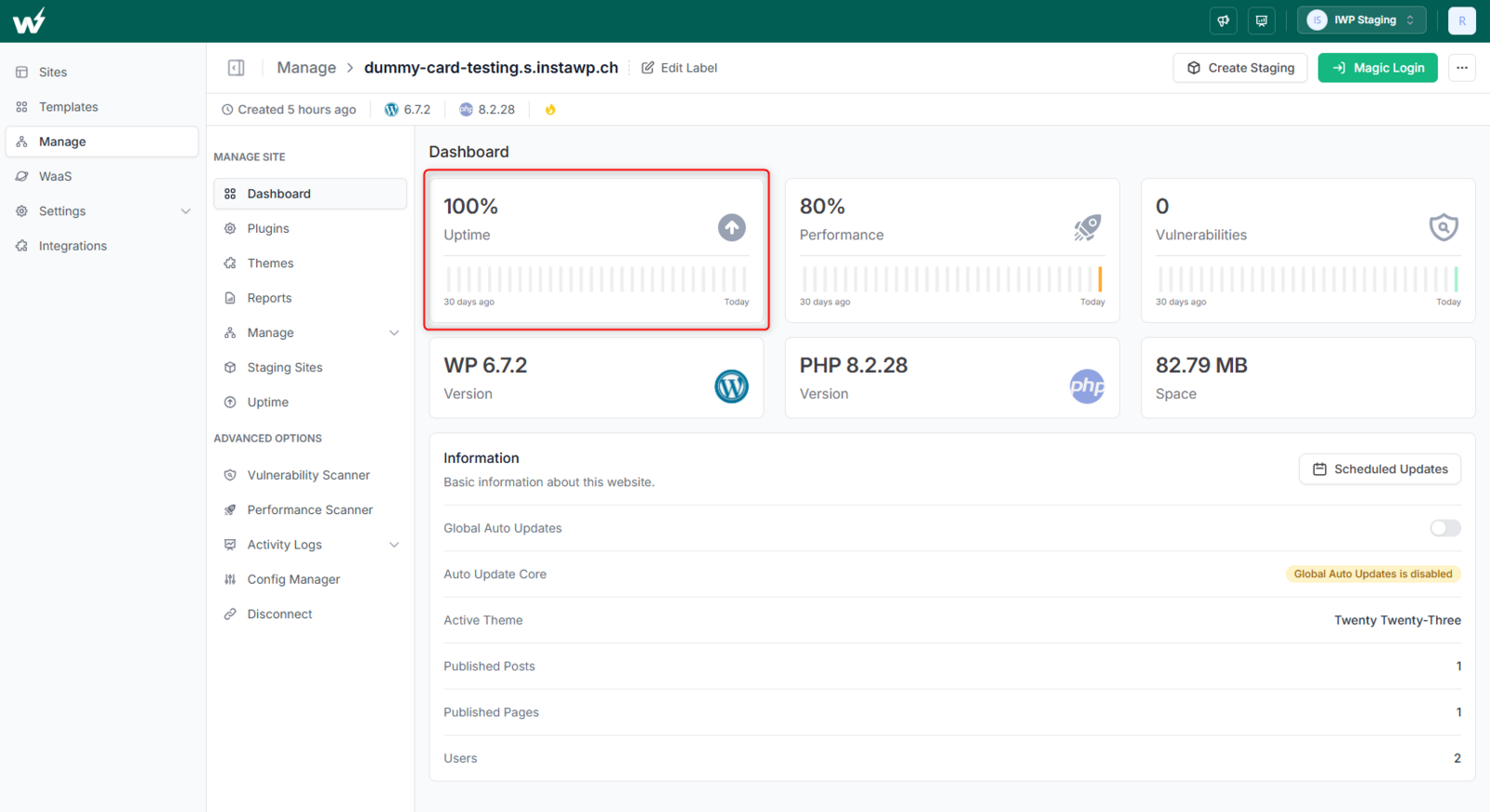
Enable uptime monitoring for site management.
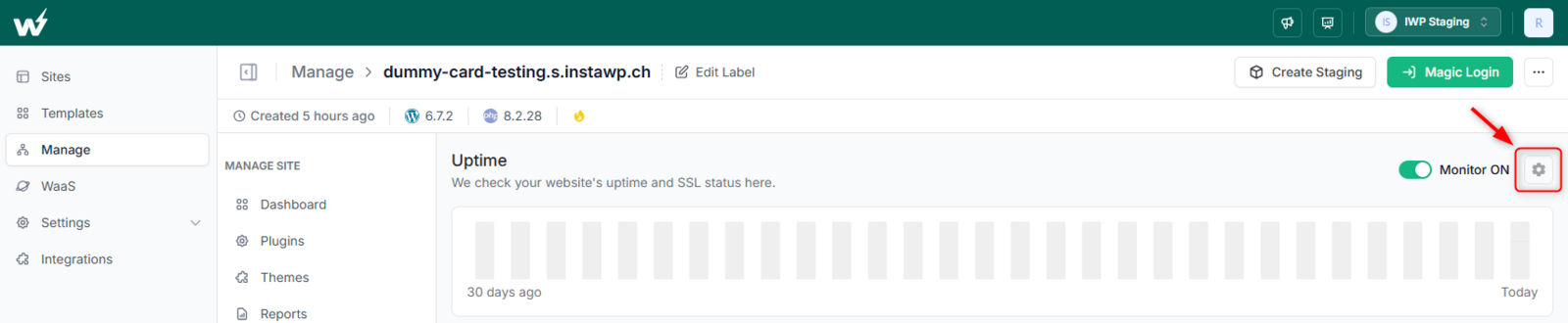
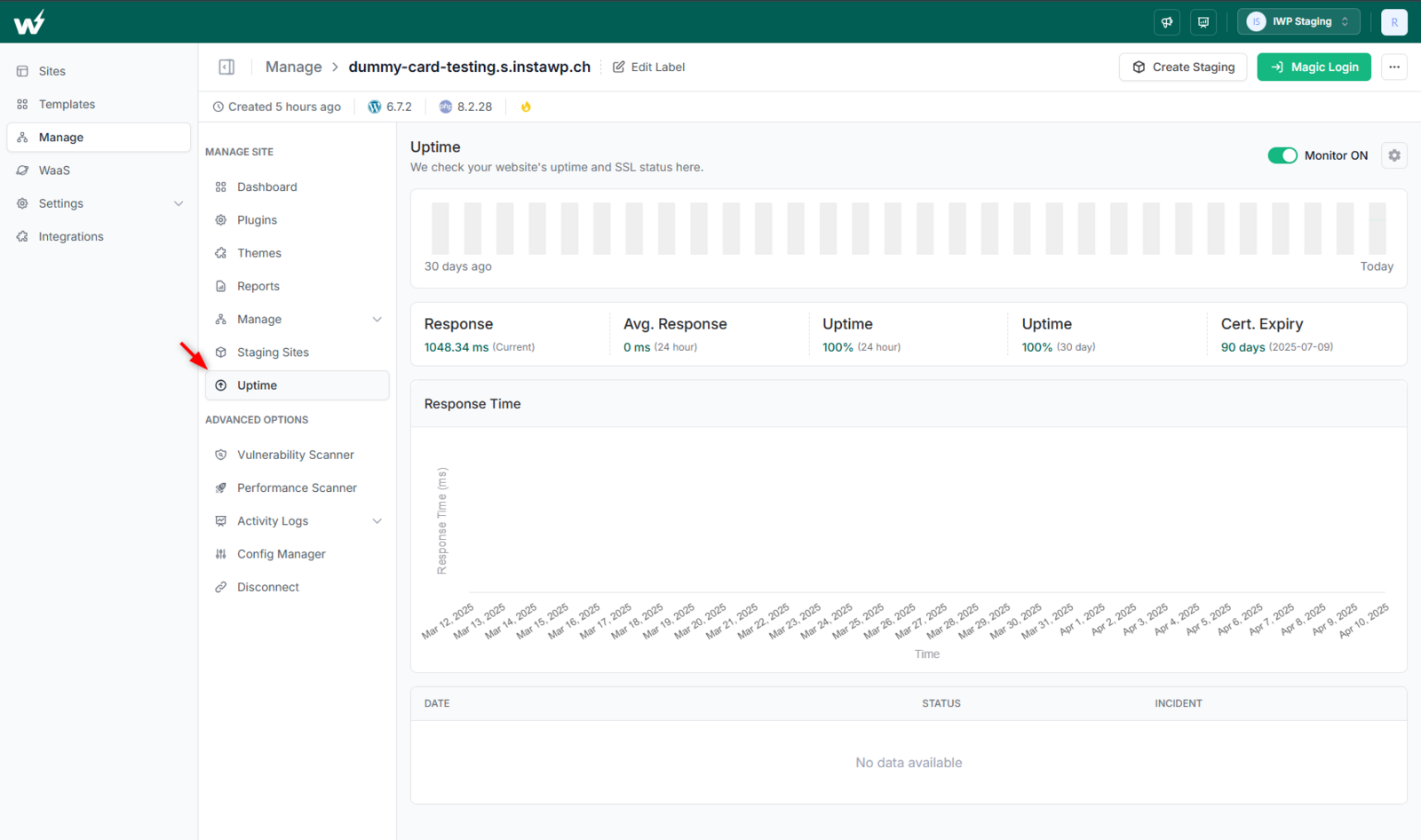
Once enabled, you will be able to view the key metrics related to uptime monitoring for the said site.
Agencies can customize monitoring frequency, alert settings, and notification methods (email, SMS, etc.).
Understanding the WordPress Uptime Monitoring Report and Using it to Improve Site’s Performance
As you can see, you’ve multiple metrics displayed on the site management dashboard. Wondering what all they mean and how you can use them? Well, we’re here to help.
1. Response Time
The response time of a site measures how quickly your server responds to user requests. A slower response time can lead to delayed page loading, impacting user experience and SEO.
Aim for a response time under 2 seconds. If it’s consistently higher, such as 2205 ms, it could signal server issues, high traffic, or poor optimization. Consider optimizing your server, and images, or implementing caching.
2. Avg. Response
This metric shows the average response time over the past 24 hours. A lower average indicates good server performance.
If your average response time is 1115 ms, it’s still relatively high for most websites. Aim for below 500 ms for better performance.
3. Uptime
Uptime is a key metric that shows how often your website is online without interruptions. 100% uptime over 24 hours or 30 days means your site hasn’t had any downtime during these periods.
A 100% uptime is ideal and indicates that your site has been continuously accessible. Any decrease in uptime can signal server problems or external disruptions.
If your uptime drops below 99.9%, investigate potential server issues, resource limitations, or network interruptions that may cause downtime.
4. Certificate Expiry
This shows when your SSL certificate will expire, ensuring your site remains secure and trusted by users and search engines.
Monitor SSL certificate expiration and renew it well before the expiry date to avoid security warnings and a loss of user trust.
If your certificate expiry is approaching (e.g., in 61 days), ensure timely renewal to avoid security risks and interruptions in service.
By closely monitoring these metrics, agencies can proactively resolve issues, ensure high website performance, and improve user experience and SEO rankings.
Final Say
For agencies juggling multiple WordPress sites, uptime monitoring isn’t just a luxury—it’s a must! Real-time monitoring ensures that any downtime or performance hiccups are spotted instantly, allowing you to tackle issues before they affect your clients’ businesses.
By investing in top-tier monitoring tools and mastering key performance metrics, agencies can guarantee that their client’s sites are always fast, reliable, and performing at their best—just as clients expect!
Don’t wait for a site outage to disrupt your workflow—start implementing comprehensive uptime monitoring today.
FAQs
What is WordPress Uptime Monitoring?
WordPress uptime monitoring is the process of tracking the availability of your WordPress website in real-time. It helps detect downtime and performance issues, sending alerts to the site owner or agency when the site is down or experiences any disruption.
Why is Uptime Monitoring Important for Agencies?
For agencies managing multiple WordPress sites, ensuring consistent uptime is crucial. WordPress monitoring helps detect issues early, preventing long periods of downtime that could affect the site’s performance, SEO rankings, and client satisfaction.
How Often Should I Monitor WordPress Uptime?
Ideally, WordPress uptime monitoring should be continuous, 24/7. This ensures that any downtime or performance dips are detected immediately, allowing for quick action to be taken and reducing the impact on the site’s availability.
Can Uptime Monitoring Prevent Downtime?
While WordPress monitoring tools can’t prevent downtime, they can alert you immediately when it occurs, so you can take swift action to restore the site’s performance and minimize disruption.
Does WordPress Uptime Monitoring Affect Site Performance?
No, site monitoring is designed to work in the background and does not impact the site’s performance. It typically runs in a separate server environment, ensuring that your site’s resources are not affected.