If you have ever looked at a slow WordPress site and thought, “It’s not the theme, it’s not the images, so what’s left?”, the answer is usually the database.
WordPress (and WooCommerce especially) can hit MySQL constantly. Same options, same settings, same product data, same queries, repeated across requests. That repetition is where object caching becomes one of the highest ROI performance upgrades you can make.
An object cache breaks that loop by keeping the answers in memory, so WordPress stops asking MySQL the same question on every request. On InstaWP’s managed WordPress hosting, a Redis-compatible object cache is part of every site from the Plus plan up, and turning it on takes one toggle. This guide covers what the InstaWP object cache stores, which sites gain the most from it, and how to switch it on without breaking a WooCommerce checkout.
Table of Contents
- Turn it on when the slow pages are the ones a page cache cannot help: wp-admin, carts, checkout, account pages and member areas.
- It comes with the Plus plan ($9 a month per site) and above. Sandbox and Starter sites do not have it.
- It caches database results, not pages, so keep your page cache and CDN. The three layers work together.
- One toggle does the setup. InstaWP installs and connects the Redis Object Cache plugin, so there is nothing to add to wp-config.php.
- Clearing it is always safe, because everything in it is a copy of data that already lives in MySQL.
- On a WooCommerce store, test cart, checkout and coupons on a staging copy straight after you switch it on.
What Is InstaWP’s Object Cache Feature?
InstaWP’s Object Cache feature is a built-in performance layer that enables persistent object caching for your WordPress site, so WordPress can reuse frequently requested data from memory instead of re-querying MySQL on every page load.
In simple terms, WordPress repeatedly asks the database for the same things: site options, query results, cached fragments, transients, menu structures, product metadata, and more. With object caching enabled, those repeated reads are stored in fast memory and served back instantly, which reduces database load and improves server response time.
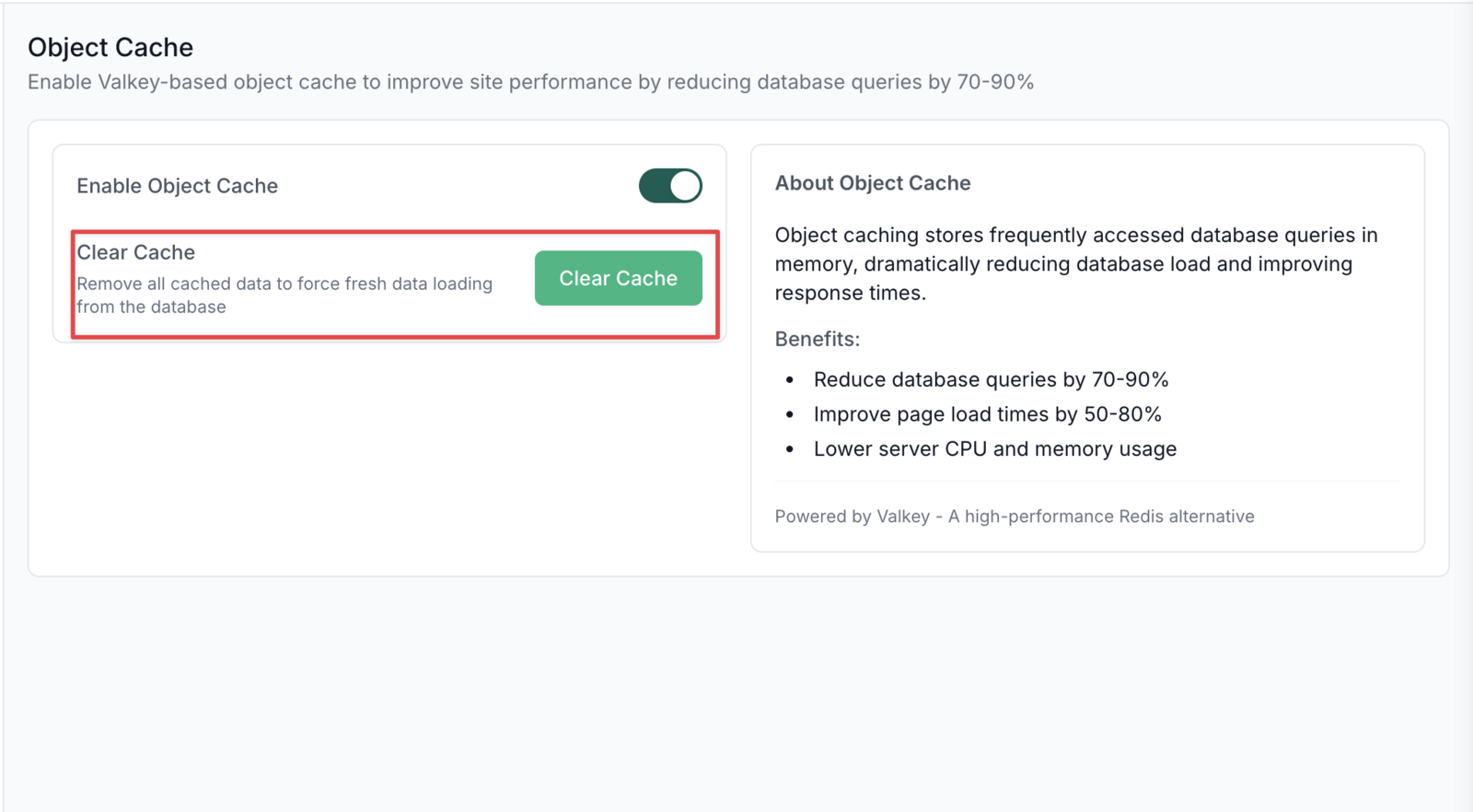
Check out the video below to learn more about Object cache feature of InstaWP.
This matters because most “slow WordPress” problems are not WordPress itself. They come from real-world usage patterns: plugin-heavy sites, logged-in dashboards, WooCommerce catalog filtering, cart and account flows, and admin screens that pull a lot of data at once.
Object cache targets that database bottleneck directly, which is why it’s one of the highest-impact performance upgrades for dynamic WordPress sites.
Which InstaWP Plans Include Object Cache?
Object Cache is included on InstaWP’s Plus, Pro, Turbo and Elite plans, at no extra cost. It is not available on the $2 Sandbox or the $5 Starter plan. Moving a Starter site up to Plus, at $9 a month, adds the object cache alongside daily backups, Advanced Shield and site management.
The cache runs on Valkey, an open-source, Redis-compatible in-memory store, which is why WordPress talks to it through the standard Redis Object Cache plugin that InstaWP installs for you. It is a cache rather than a database: anything in it can be rebuilt from MySQL, so clearing the cache is always safe. It runs next to the CDN, firewall and PHP-FPM layers described in the InstaWP hosting stack breakdown. If you want the general background first, our guide on what an object cache is in WordPress covers the concept, and the InstaWP site plans guide shows everything else each plan includes.
What Does an Object Cache Actually Cache, and What Doesn’t It?
Object caching is often misunderstood because people expect it to behave like “cache the whole page.” It does not. Object cache sits one layer deeper: it speeds up the back-end work WordPress does to build pages and power WordPress dashboards.
What InstaWP Object Cache does cache
Object caching in InstaWP stores PHP-level objects and database query results in fast memory so WordPress can reuse them across requests. In practice, that includes:
1) Database query results (repeated reads)
When WordPress runs the same read queries again and again, the object cache can store the result in memory.
Example:
- reading site options and settings repeatedly
- fetching the same post, page, or product data multiple times
- loading taxonomy terms, menus, widget data, and common lookups
Why it matters: these repeated reads are where MySQL time adds up fast, especially under concurrent traffic.
2) Computed data from WordPress core and plugins
Many parts of WordPress do work that is not just a raw query. Plugins and core often compute and assemble data before returning it. Object cache helps reuse those computed outputs.
Examples:
- results of helper functions that build complex arrays
- merged configuration values
- plugin-generated lookups that pull from multiple sources
Why it matters: you save both database time and PHP processing time.
3) Expensive logic outputs that run frequently
Some operations are “expensive” because they run many queries or do heavy processing, even if the page is not huge.
Examples:
- product query builders for category pages and filters
- permission checks and role-based logic in dashboards
- membership access checks that run on many requests
Why it matters: this is where WooCommerce and membership sites often slow down first.
4) Transients and cached fragments used across requests
WordPress transients are a caching mechanism that stores data with an expiration. A persistent object cache is commonly used to store and retrieve transients efficiently.
Examples:
- cached counts, summaries, and computed lists
- plugin fragments that are designed to be cached for a period
- pieces of data reused by multiple requests until they expire
Why it matters: transients are everywhere in modern WordPress, and object caching makes them far more effective.
What InstaWP Object Cache does not cache
Object cache is not a replacement for front-end caching layers. It does not directly cache:
1) Page caching (full HTML output): Page caching stores the final rendered HTML of a page so the server can return it without rebuilding it. Object cache instead helps WordPress rebuild pages faster when it must generate them dynamically.
2) Browser caching (client-side caching via headers): Browser caching is about making the visitor’s browser reuse assets it already downloaded, controlled by cache headers. Object cache is server-side and does not change browser cache behavior.
3) CDN caching (edge caching of assets): A CDN caches static assets like images, CSS, and JS at edge locations closer to users. Object cache deals with dynamic data and database work, not asset delivery
How Does InstaWP’s Object Cache Help Agencies?
For agencies and developers, performance is rarely about a single “speed score.” It’s about predictable builds, fewer client escalations, and infrastructure that does not fall apart the moment a store runs a sale. InstaWP’s Object Cache improves all three because it tackles the bottleneck that quietly eats time and margin: repeated database work.
1) You ship faster because your staging and QA cycles stop feeling heavy
Most agency sites are plugin-heavy by design. Builders, forms, SEO, security, WooCommerce add-ons, analytics, translation, you name it. On staging, that stack often feels sluggish, which makes QA slower and debugging painful.
With InstaWP Object Cache enabled, WP staging environments behave more like production-grade setups. Admin screens, list views, product editing, and preview workflows become noticeably more responsive, which speeds up every iteration.
This pairs naturally with a WordPress staging site workflow where you spin up a copy, enable Object Cache, validate key flows, then push changes when you are confident.
2) You reduce “random slowness” tickets because the database is no longer the first thing to choke
Agencies hear this all the time: “The site is slow today.” Not “always slow,” just slow at random times. That usually points to MySQL pressure: repeated reads, cron jobs stacking, background imports, admin usage, and traffic hitting at the same time.
Object Cache reduces those repeated reads, so MySQL has less work to do per request. The practical impact is stability: fewer slow WordPress admin sessions, fewer checkout timeouts, fewer mysterious spikes that turn into emergency support.
3) WooCommerce stores stay smoother under real shopping behavior
WooCommerce performance is rarely about the homepage. It’s about catalog browsing, filters, product variations, cart fragments, account pages, and checkout flows. Many of these pages cannot be safely cached for every visitor, especially when dynamic pricing, logged-in customers, or personalization are involved.
InstaWP Object Cache helps exactly here because even when the page output is dynamic, WooCommerce still repeats a lot of database work behind the scenes. By serving repeated query results from memory, the store feels faster and more consistent when multiple shoppers are active at once.
4) You get more headroom before upgrading hosting, which protects margins
A common agency trap is upgrading hosting to “solve” performance, then watching costs creep up across dozens of client sites. Object Cache creates breathing room because it reduces database load and improves concurrency handling. That means your existing resources go further before you need a bigger plan.
For agencies, that is not just a tech win. It’s a margin win. When WordPress performance improves without immediate infrastructure upgrades, you keep projects profitable and maintenance plans easier to price.
5) You can productize performance as a repeatable service
Object Cache is the kind of feature agencies can standardize. It becomes part of a “performance baseline” you apply to every serious site, alongside complementary layers like image optimization, monitoring, and security hardening.
That creates a clean offer: performance setup for new builds, performance rescue for slow sites, and performance maintenance as an ongoing plan. It also makes your delivery more consistent because you are not reinventing caching per client.
In a nut shell, InstaWP’s built-in Object Cache means:

Who Should Enable InstaWP Object Cache?
Having InstaWP Object Cache enabled is useful for almost every WordPress site because it reduces repeated database work and improves overall responsiveness. However, in certain cases it’s non-negotiable, especially when the site is dynamic, has logged-in users, or runs WooCommerce.
In those builds, object caching is not just a nice performance boost. It becomes part of the stability layer that keeps the site fast and predictable under real usage.
| Use case | Why it’s non-negotiable | Biggest wins | Typical red flags |
|---|---|---|---|
| WooCommerce stores | Dynamic carts, filters, sessions | Faster catalog, smoother checkout | Slow filters, cart lag, sale-time slowdowns |
| Membership sites | Logged-in views, access rules | Snappier dashboards | Members report “random” slowness |
| LMS sites | Progress tracking, user dashboards | Faster lessons, admin screens | Heavy course pages, slow dashboards |
| Community sites | Feeds, profiles, many users | Faster activity streams | Slow profiles, spikes break speed |
| Plugin-heavy builds | 25 to 60 plugins, complex logic | Stable performance, fewer DB hits | Performance drops after updates |
| Admin-heavy workflows | Large content, frequent edits | Faster wp-admin lists | Slow editor, laggy post/product lists |
How Do You Enable Object Cache on InstaWP?

Enabling WordPress object cache on InstaWP is literally a toggle away. You do not need to provision a cache server, touch wp-config.php, or spend hours debugging connections. InstaWP makes object caching a built-in switch you can turn on when a site needs more speed and stability.
Prerequisite: Object Cache is available on Plus plans and above.
For More Details: Speed Up Your WordPress Site with Object Cache | InstaWP Docs
-
Go to your Sites page in the InstaWP dashboard.
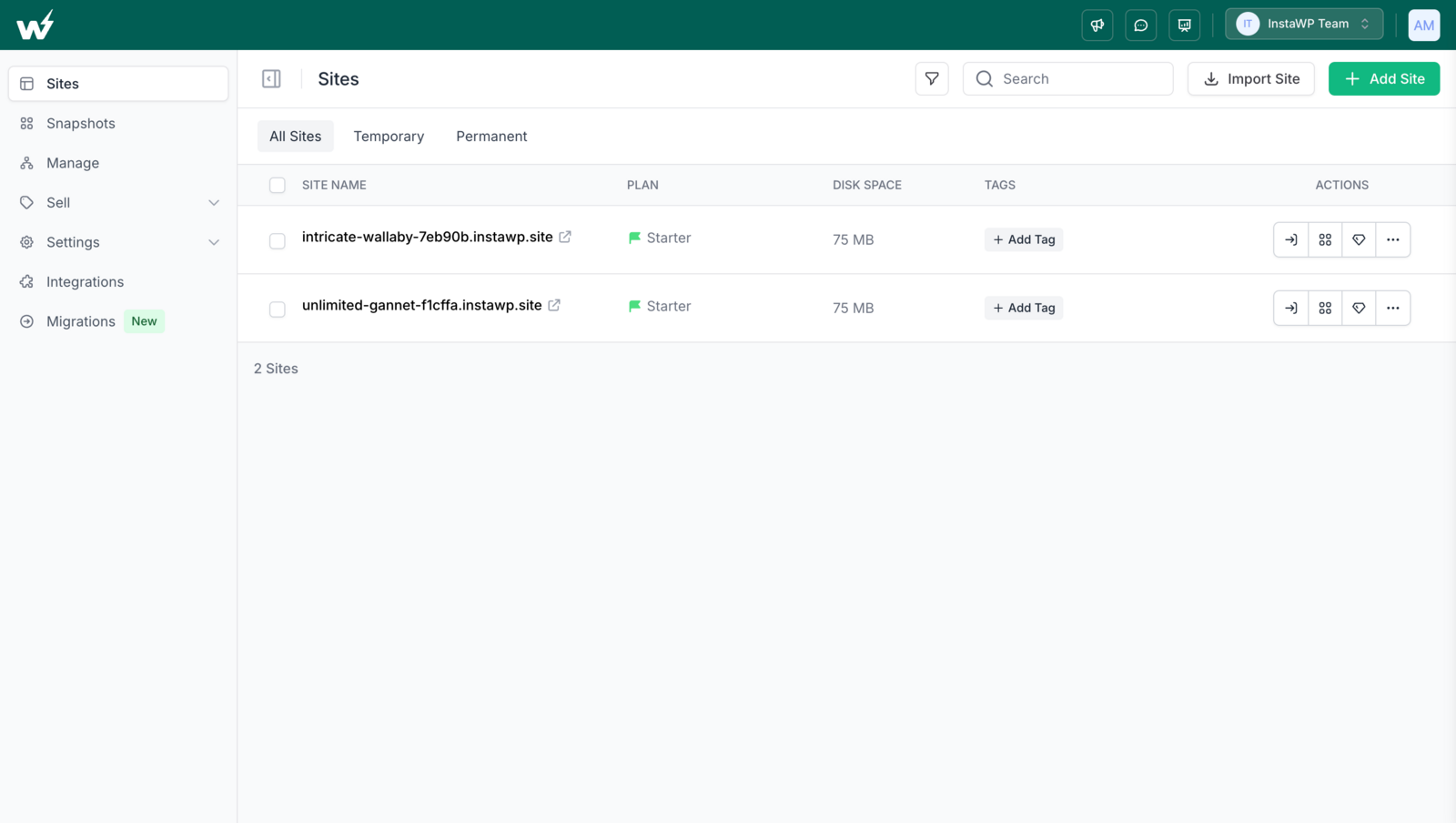
-
Click the site you want to optimize to open the site management panel.
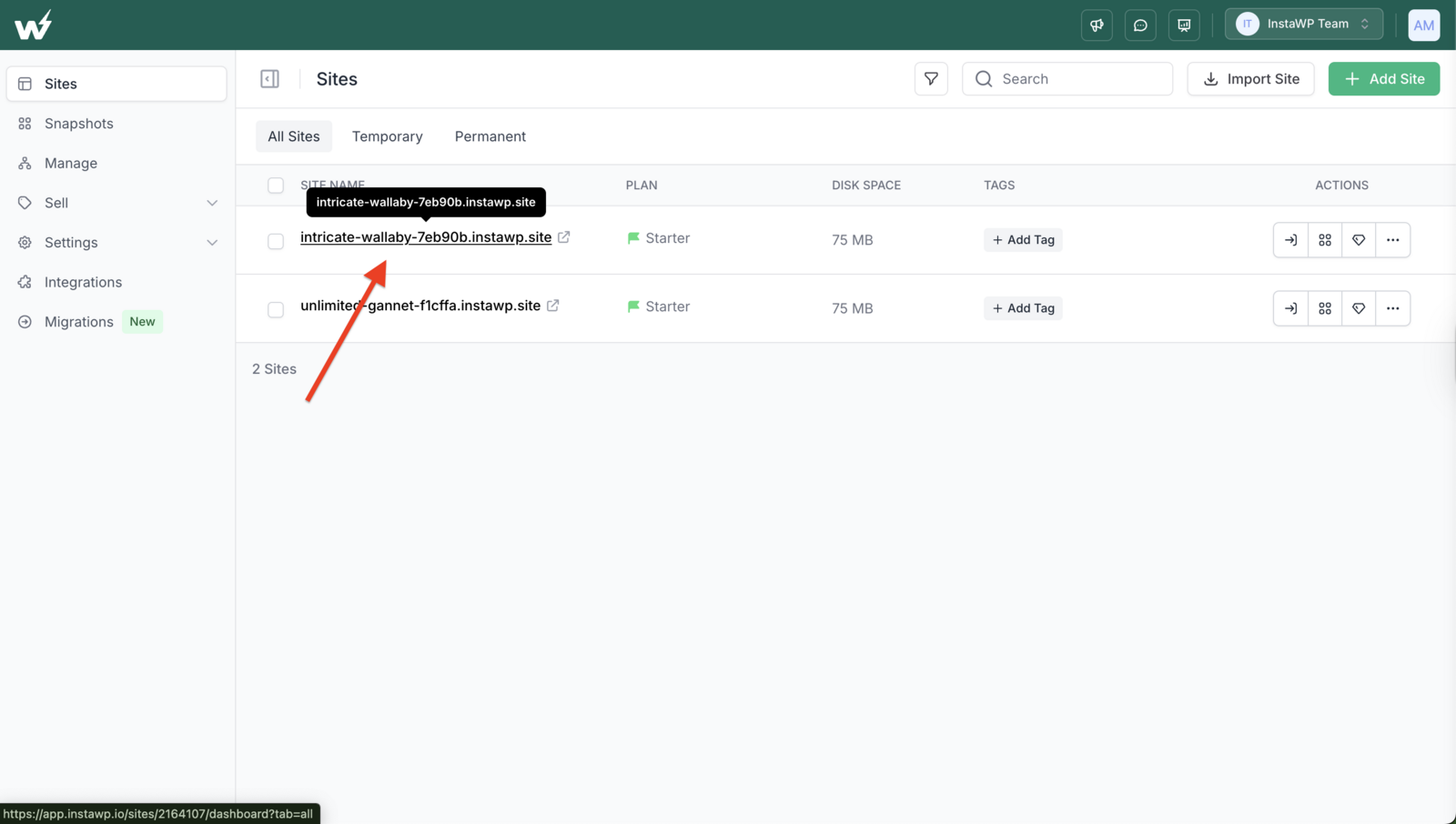
-
In the left sidebar, click Object Cache (you’ll see the toggle and feature details).
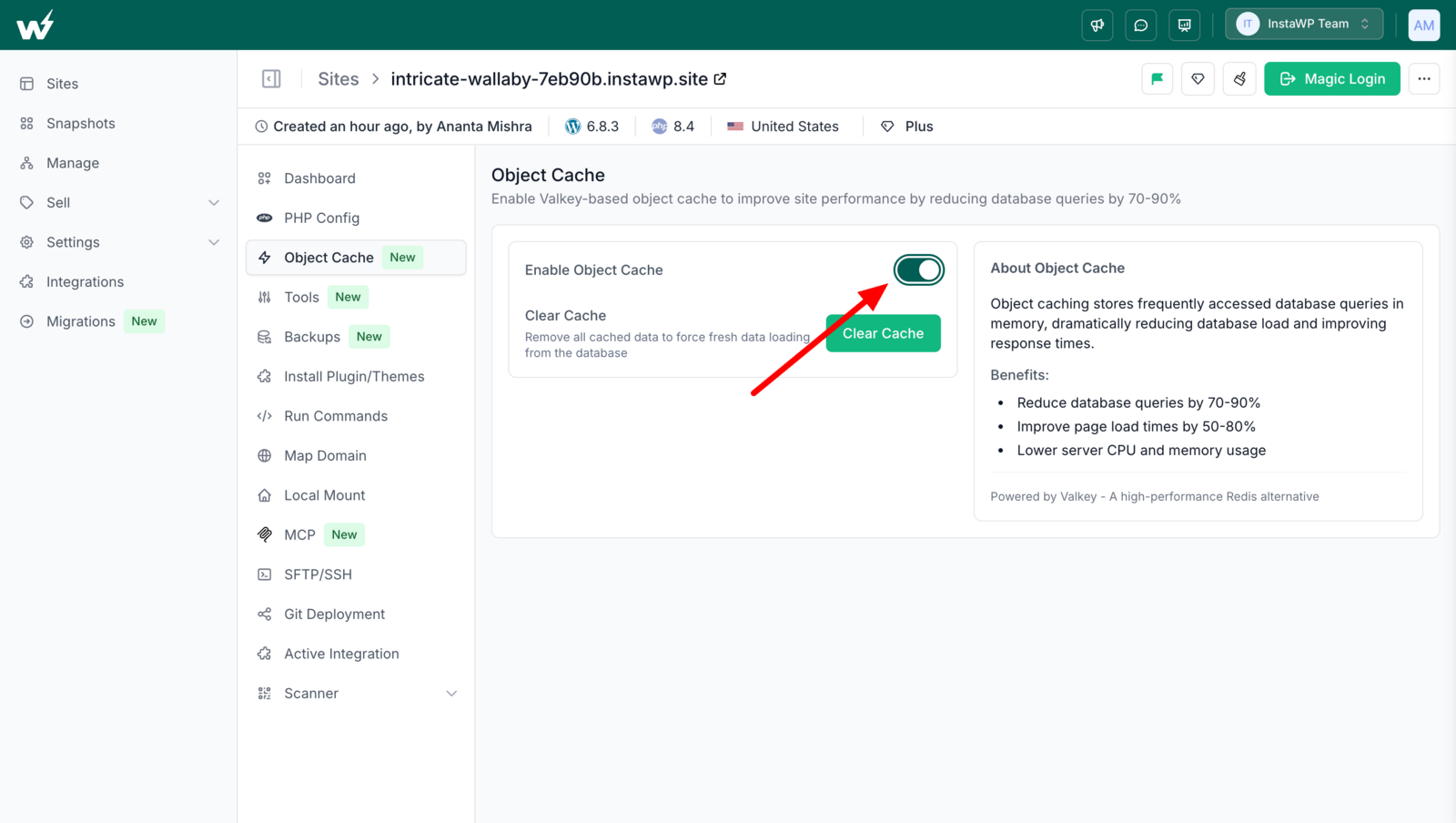
-
Toggle Enable Object Cache to ON.
Wait a few seconds while InstaWP completes setup. It will install the Redis Object Cache plugin, configure secure cache credentials, and enable caching for your site.
Once enabled, you’ll see a success message, and the Clear Cache button will appear.
How do you check the object cache is working?
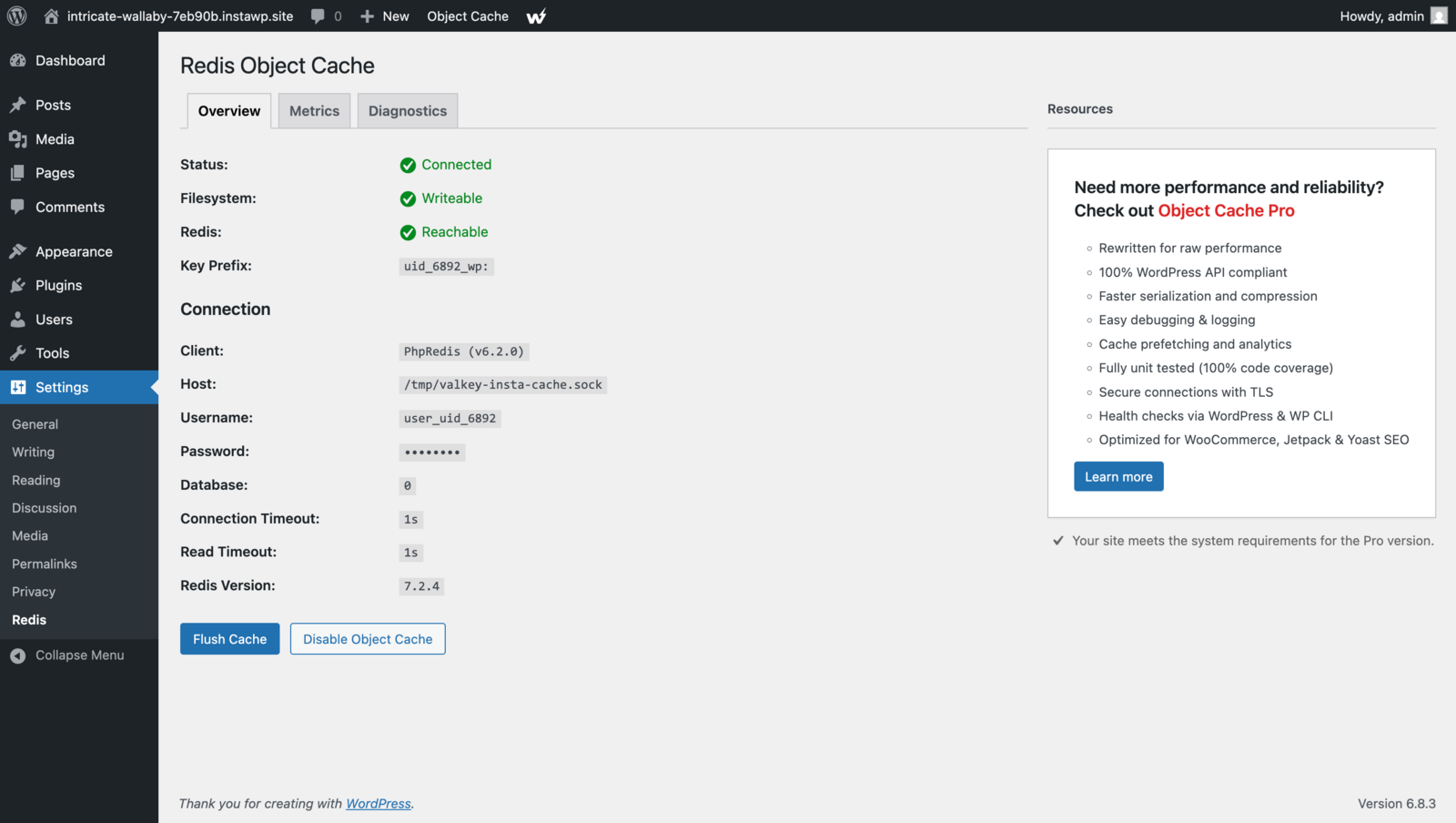
Log in to wp-admin and open Settings > Redis. When InstaWP has connected the cache, the Redis Object Cache plugin shows Status: Connected and Redis: Reachable. Its Metrics tab is the quickest way to watch cache hits climb as you click around the site.
Is InstaWP Object Cache Worth Turning On?
InstaWP’s Object Cache feature is the kind of performance upgrade agencies love because it solves the expensive problem: database load under real-world usage. It helps WooCommerce stores stay fast, makes wp-admin less painful, and improves stability when traffic climbs.
If you want a modern WordPress stack that feels snappy without constantly babysitting MySQL, enable Object Cache on your InstaWP site, test your key flows, and standardize it as part of your performance baseline.
InstaWP Object Cache: Frequently Asked Questions
Which InstaWP plans include Object Cache?
Plus, Pro, Turbo and Elite include it at no extra cost. Sandbox and Starter do not. Upgrading a Starter site to Plus adds the object cache in the same plan change.
Is InstaWP Object Cache the same as Redis object cache?
In practice, yes. It runs on Valkey, an open-source, Redis-compatible in-memory store, and WordPress connects to it through the Redis Object Cache plugin. InstaWP sets it up for you, so there is no server or credentials to configure.
Will object cache break WooCommerce checkout?
It should not, but WooCommerce sites deserve careful testing because carts and sessions are dynamic. Always validate cart, checkout, coupons, and account pages on staging first.
Do small sites need object cache?
If the site is simple and low-traffic, the gains may be modest. But as soon as you have dynamic plugins, logged-in users, or WooCommerce, object cache becomes valuable.
How do I know if object cache is helping?
Look for fewer database queries, lower DB query time, and more cache hits. Also watch server response time under repeat visits and concurrent traffic.
Can I use object cache along with page caching and a CDN?
Yes. That is the ideal stack: CDN for static assets, page caching where safe, and object cache for dynamic database-driven performance.
Is it safe to clear the object cache?
Yes. The object cache only holds copies of data that already lives in your database, so clearing it just means WordPress rebuilds those entries on the next requests. Use the Clear Cache button in the site’s Object Cache panel.


