On April 1, 2026, Cloudflare dropped a bombshell. Or at least, it sounded like one. The company announced EmDash, a brand-new content management system it described as “the spiritual successor to WordPress.” Built entirely in TypeScript, powered by Astro, running on Cloudflare Workers, and designed from scratch with AI agents and modern web architecture in mind.
The timing was interesting. WordPress 7.0, the biggest release since the block editor debuted in WordPress 5.0, had just been delayed from its April 9 ship date. And a new generation of developers, increasingly reaching for TypeScript and Astro over PHP and jQuery, was already quietly questioning whether WordPress was still the right starting point for new projects.
Into that environment, Cloudflare made its play.
The reaction was predictable. Some corners of the internet declared WordPress dead. Others dismissed EmDash as a marketing stunt. So what is the actual truth? This post exists to give you a real, side-by-side comparison across every category that matters.
Table of Contents
Why EmDash Is Being Called a “WordPress Killer”
Before we compare, let’s understand why this specific comparison is generating so much heat. Four things converge to make this moment unusual.
First, Cloudflare is not a startup
This is a publicly traded infrastructure company whose network handles a significant percentage of global internet traffic. When Cloudflare decides to build a CMS, the resources, distribution, and existing customer base behind the effort are substantial.
We also have a video tutorial to see how EmDash stands against WordPress.
Second, the “two Matts” narrative
EmDash was built by Matt “TK” Taylor and Matt Kane at Cloudflare. WordPress was co-founded by Matt Mullenweg. The internet loves a protagonist-versus-protagonist story, and the naming coincidence gave the hype machine exactly the fuel it needed.
Third, Cloudflare used AI agents to build EmDash in roughly two months
That timeline is itself a statement about where software development is heading. If you can rebuild the world’s most popular CMS from scratch in eight weeks using AI, what does that say about the pace of change ahead?
Fourth, EmDash directly targets WordPress’s most persistent weaknesses
Plugin security architecture, serverless readiness, GPL licensing constraints, and AI-native design are problems WordPress has struggled with for years, and EmDash’s pitch is that they cannot be fixed within WordPress’s existing architecture. They need a clean slate.
Matt Taylor, Cloudflare’s senior product manager, put it bluntly in an interview with Computerworld: “There is a whole new generation of developers, and WordPress is old news to them. If you are starting today, there is no way you are picking WordPress.”
That is a provocative claim. Let us test it.
EmDash vs WordPres: Is EmDash Really A WordPress Alternative
Now, let’s get deeper and try to do detailed EmDash vs WordPress comparision.
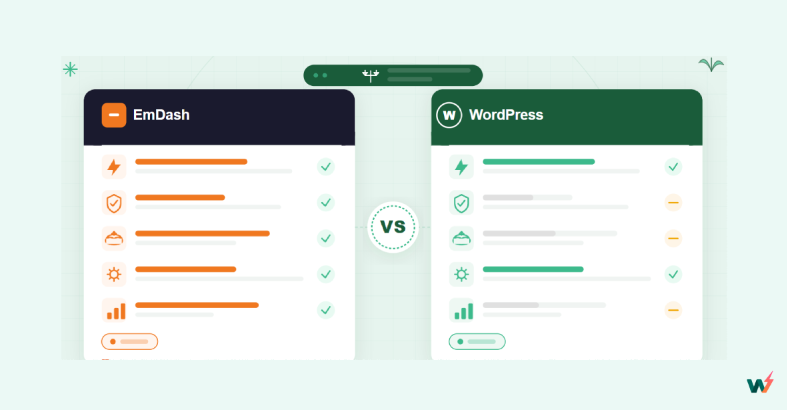
# 1: Plugin Security
Plugins are the backbone of any CMS. They extend functionality, add features, and let non-developers customize their sites. But they are also the single biggest attack surface. Cloudflare’s announcement led with security for a reason: it is the most defensible technical argument EmDash has.
Must Read; Is EmDash Really a WordPress Alternative? A Developer’s Honest Look at the Hype
What EmDash Offers
EmDash runs every plugin in its own isolated sandbox called a Dynamic Worker, which is a V8 isolate. Each plugin must declare its capabilities upfront in a manifest file, similar to how mobile apps request permissions or how OAuth scopes work.
A plugin that sends emails after content is saved declares exactly two capabilities: read:content and email:send. It cannot touch the database. It cannot access the filesystem. It cannot make network requests to any domain it has not explicitly declared.
If a plugin is compromised, the blast radius is contained to its own sandbox. It cannot reach other plugins, your data, or your infrastructure. The security model has a strict guarantee: a plugin can only do what its manifest says it can do.
What WordPress Offers
WordPress plugins are PHP scripts that hook directly into WordPress core. They run in the same execution context as everything else. A plugin has full access to the database, the filesystem, and the network by default. There is no permission system, no capability declaration, and no isolation.
WordPress mitigates plugin risk through its marketplace review process (which currently has a queue of 800+ plugins and takes at least two weeks), community reputation systems, and the broader ecosystem of security plugins and managed hosting platforms that monitor and patch vulnerabilities.
| Aspect | EmDash | WordPress |
|---|---|---|
| Plugin execution model | Sandboxed V8 isolates per plugin | Shared execution context with core |
| Permission system | Capability-based manifest (declared upfront) | No permission system (full access by default) |
| Network access | Must declare specific hostnames | Unrestricted |
| Database access | Only through declared capabilities | Full direct access |
| Blast radius of compromised plugin | Limited to its own sandbox | Entire site |
| Security review process | Trust model based on declared capabilities | Centralized marketplace review (800+ queue) |
| Real-world vulnerability rate | Too early to measure (v0.1.0) | 96% from plugins, but only 17% high severity |
Verdict
EmDash wins on architecture. The sandboxed, capability-based model is genuinely better engineering. But architecture is not the whole picture. WordPress plugin security is a solvable problem with proper management: use reputable plugins, keep them updated, run on managed hosting with vulnerability scanning and WAF protection, and use AI agents for security audits.
All-in-one-cloud platforms like InstaWP already provide vulnerability scanners, malware scanning, automated updates, and MCP-integrated AI workflows that let you run on-demand security checks across your fleet. The gap between “architecturally better” and “practically sufficient” is smaller than EmDash’s marketing suggests.
# 2: Architecture and Hosting Model
How a CMS runs under the hood determines its performance characteristics, hosting costs, scalability limits, and operational complexity. This is the layer most end users never see but every developer and hosting provider cares deeply about.
What EmDash Offers
EmDash is serverless-first. It runs on Cloudflare Workers (V8 isolates) or any Node.js server with SQLite. On Cloudflare, it scales to zero when there is no traffic and scales up instantly on demand. You pay only for CPU time, meaning actual compute work. There is no idle server cost. Cold starts are near-instant because V8 isolates spin up in milliseconds, not seconds.
The architecture is TypeScript end-to-end, with Astro handling the frontend rendering. The database layer uses Cloudflare D1 (a distributed SQLite database) on Cloudflare, or local SQLite when self-hosted.
What WordPress Offers
WordPress is a PHP application that requires a web server (Apache or Nginx), PHP runtime, and a MySQL or MariaDB database. It runs as a traditional server-side application. The server needs to be provisioned, maintained, and running at all times, regardless of traffic.
Performance optimization involves multiple layers: server-level caching (Redis, Memcached, Varnish), CDN configuration, PHP version tuning, database query optimization, and plugin-level caching. This complexity is both a weakness (operational overhead) and a strength (deep control and decades of optimization knowledge).
Modern WordPress hosting platforms have significantly reduced this complexity.
InstaWP, for example, provides instant site provisioning, built-in CDN with 119+ edge locations, object caching, image optimization, and the ability to spin up sandbox sites in seconds for development, staging, and demos. You get elastic provisioning without managing servers, covering many of the economic benefits EmDash promises while staying on WordPress.
| Aspect | EmDash | WordPress |
|---|---|---|
| Runtime | V8 isolates (Cloudflare Workers) or Node.js | PHP on Apache/Nginx |
| Database | D1 (distributed SQLite) or local SQLite | MySQL / MariaDB |
| Language | TypeScript | PHP |
| Scale-to-zero | Yes (on Cloudflare) | No (server runs continuously) |
| Cold start time | Milliseconds | Not applicable (always running) |
| Idle cost | Zero on Cloudflare | Server cost regardless of traffic |
| CDN | Cloudflare network (native) | Requires configuration or managed host |
| Caching layers | Built into platform | Server, object cache, page cache, CDN |
| Self-hosting complexity | Node.js + SQLite (moderate) | PHP + MySQL + web server (well-documented) |
| Hosting provider options | Cloudflare (optimized), any Node.js host | Hundreds of hosts worldwide |
Verdict
EmDash may sound a good option for low-traffic or spiky-traffic sites, but WordPress wins for traffic heavy websites. WordPress’s hosting ecosystem is vastly more mature, with hundreds of providers, deep optimization knowledge, and modern platforms like InstaWP that deliver instant provisioning and elastic sandbox environments without the operational overhead of managing your own infrastructure.
For production workloads with WooCommerce, membership systems, or heavy custom functionality, WordPress’s traditional model with proper hosting is still more battle-tested.
# 3: AI and Agent Integration
The web is shifting from human-first to human-plus-agent. AI assistants are writing content, building pages, debugging code, and increasingly creating entire sites autonomously. A CMS that is designed for AI agents to operate has a structural advantage as this transition accelerates.
What EmDash Offers
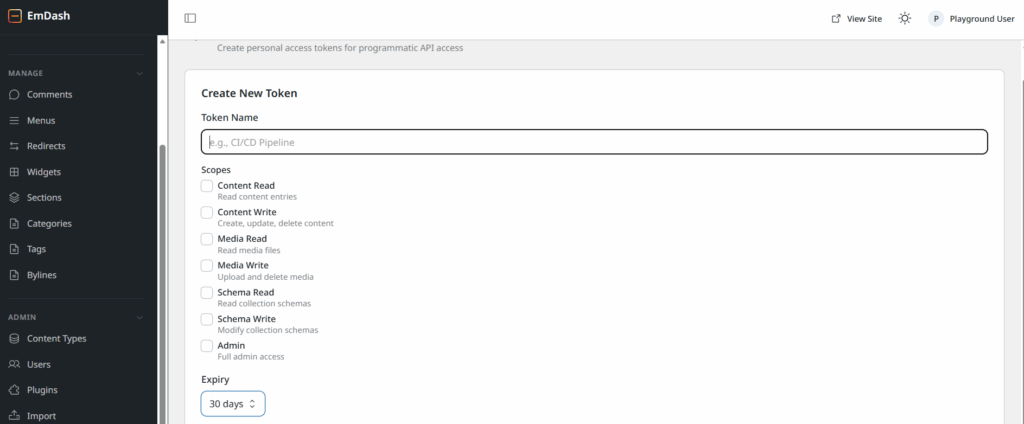
EmDash was designed AI-native from day one. Every instance ships with a built-in MCP (Model Context Protocol) server, an EmDash CLI for programmatic control, and Agent Skills that teach AI agents how to use the platform. AI agents can create content, manage schemas, upload media, write and install plugins, port WordPress themes, and do anything the admin UI can do, all programmatically.
What WordPress Offers
WordPress is adding native MCP support in version 7.0 (currently delayed to mid-to-late May 2026).
This includes the Abilities API (which lets AI systems understand what a site can do), AI Client Connectors (a dashboard for connecting AI providers), and standardized protocols for AI-to-WordPress communication. The Automattic-backed WordPress MCP plugin has been available since late 2025 for earlier access.
However, you do not need to wait for WordPress 7.0. InstaWP has already perfected MCP integration for WordPress. Every site built on InstaWP comes with built-in MCP integration, allowing you to connect Claude, ChatGPT, or any MCP-compatible AI assistant and have it operate your site like a senior developer. No plugin installation. No configuration headache. No waiting for core updates.
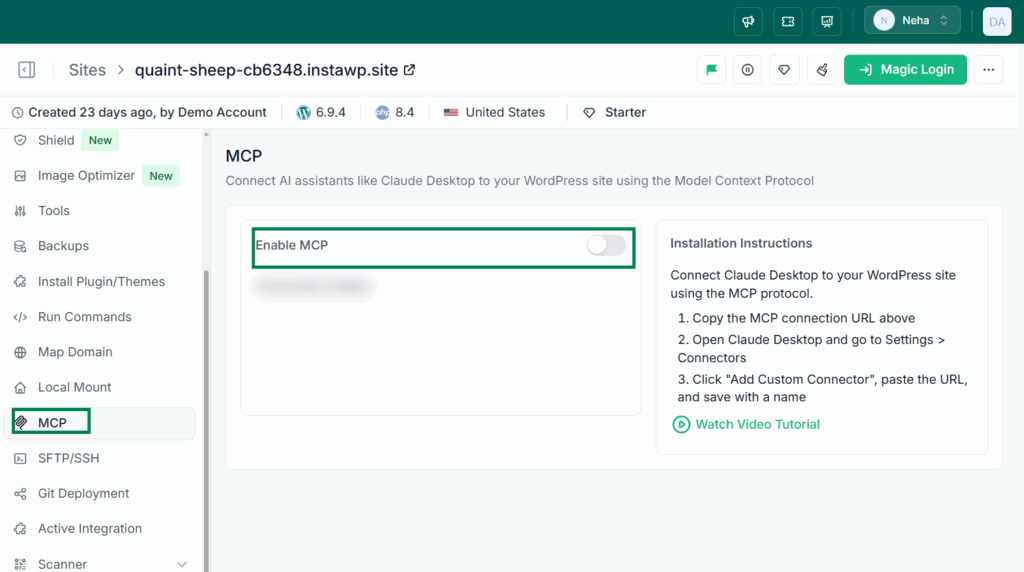
Through InstaWP’s MCP integration, AI agents can already edit theme files, write custom plugins, modify functions.php, run WP-CLI commands, manage content, upload media, install and configure plugins, debug errors, and handle roughly 90% of what a human developer does day-to-day.
Watch the video below to see how you can use Claude Code to secure WordPress sites.
| Aspect | EmDash | WordPress (with InstaWP) |
|---|---|---|
| MCP server | Built-in on every instance | Built-in on InstaWP; native in WP 7.0 |
| Agent Skills | Bundled (plugin writing, theme porting) | Available through MCP tool definitions |
| CLI for agents | EmDash CLI (full programmatic control) | WP-CLI (mature, well-documented) |
| Content operations via AI | Full CRUD | Full CRUD |
| Code editing via AI | Plugin and theme code | Theme files, plugin files, functions.php |
| AI provider support | Any MCP-compatible client | Any MCP-compatible client (via InstaWP) |
| Setup required | None (built-in) | None on InstaWP; plugin install elsewhere |
| Maturity | New (v0.1.0) | WP-CLI is 10+ years mature; MCP integration production-ready on InstaWP |
Verdict
EmDash wins on “designed for this from day one” purity. But the practical gap is much narrower than the narrative suggests. WordPress with InstaWP’s MCP integration gives you AI-native capabilities today, on a mature platform with a decade of CLI tooling behind it.
The question is not “can AI operate a WordPress site like a developer?” (yes, it can), but “was the CMS designed with that as the primary use case?” EmDash was. WordPress was not, but it has adapted faster than most people realize.
# 4: Content Modeling and Custom Types
Every serious site eventually needs more than posts and pages. Products, testimonials, portfolio items, recipes, courses, team members, events. How a CMS handles custom content types determines how flexible it is for real-world projects.
What EmDash Offers
EmDash lets you define custom content types (called “collections”) directly in the admin UI. You create a new type, add fields (short text, long text, image, etc.), set validation rules (required, unique, searchable, min/max length, regex patterns), and each collection gets its own separate database table. No plugins needed. No cramming everything into a shared posts table.
Content is stored as Portable Text (a structured JSON format) rather than HTML. This gives cleaner data portability but creates migration friction with existing HTML-based content.
What WordPress Offers
WordPress stores everything in the wp_posts table by default, with custom fields in wp_postmeta. Creating custom post types natively requires PHP code in functions.php or a plugin. For most users, this means reaching for Advanced Custom Fields (ACF), Pods, Toolset, or Meta Box to get a workable custom content type UI.
WordPress 7.0 and the Gutenberg block system have improved this, but the underlying data model remains a product of decisions made in the early 2000s. The single shared wp_posts table for all content types creates performance and organizational challenges at scale.
| Aspect | EmDash | WordPress |
|---|---|---|
| Custom type creation | Admin UI (no code needed) | Code (register_post_type) or plugins (ACF, Pods) |
| Database structure | Separate collection per type | Shared wp_posts table for all types |
| Field types | Built-in (text, image, etc.) | Via plugins (ACF, Meta Box, etc.) |
| Validation rules | Native (required, unique, regex, min/max) | Via plugins |
| Content format | Portable Text (structured JSON) | HTML (stored in post_content) |
| Plugin dependency | None | Usually requires ACF or equivalent |
| Migration compatibility | Limited (Portable Text is not HTML) | High (HTML is universal) |
Verdict
WordPress’s approach works, has worked for 23 years, and has an enormous ecosystem of plugins built around it.
#5: Theming and Frontend
The visual layer is what users and their visitors actually see. How a CMS handles theming determines the balance between design flexibility, developer experience, and non-developer accessibility.
What EmDash Offers
EmDash themes are Astro projects. You build pages, layouts, components, and styles using Astro’s component model, Tailwind CSS, and standard web technologies. Themes are fast, static-first, and familiar to modern frontend developers. A seed file (JSON) tells the CMS what content types and fields to create.
Critically, EmDash themes cannot touch the database. They render content that the CMS provides. This eliminates a class of theme-introduced security vulnerabilities that WordPress has struggled with (where functions.php can execute arbitrary code).
There is no visual page builder. No drag-and-drop. No Gutenberg equivalent. Theming is entirely code-based.
What WordPress Offers
WordPress theming is a massive ecosystem. At the code level, you have PHP template files, functions.php, theme.json for block themes, template parts, and the full Site Editor. At the user level, you have Gutenberg’s block editor plus third-party page builders (Elementor, Bricks, Divi, Beaver Builder, Breakdance) that let non-developers build sophisticated sites visually.
The tradeoff is complexity and security surface. WordPress themes, particularly through functions.php, have full execution access. This makes them incredibly powerful and potentially dangerous.
| Aspect | EmDash | WordPress |
|---|---|---|
| Theming framework | Astro (TypeScript, components) | PHP templates + block themes + theme.json |
| Visual page builder | None | Gutenberg + Elementor, Bricks, Divi, etc. |
| Non-developer theming | Not possible currently | Strong (page builders, Site Editor) |
| Theme security | Cannot access database | Full execution access via functions.php |
| Theme marketplace | None | 31,000+ free themes + premium ecosystem |
| Design flexibility (for developers) | High (modern frontend stack) | High (but with legacy complexity) |
| Design flexibility (for non-developers) | Very low | Very high |
| Learning curve for new developers | Low if you know Astro/TypeScript | Moderate (PHP + WordPress conventions) |
Verdict
WordPress wins decisively for everyone. The page builder ecosystem is WordPress’s killer feature for the mainstream market. Elementor alone powers millions of sites built by people who have never opened a code editor. Until EmDash has a visual builder (and there are no signs of one coming soon), it is a developer-only tool. For 80%+ of the CMS market, that is a dealbreaker.
# 6: Plugin Ecosystem and Extensibility
A CMS without extensions is a CMS that can only do what it shipped with. The plugin ecosystem determines how many real-world use cases a platform can serve: e-commerce, SEO, forms, analytics, membership, LMS, booking, CRM integration, email marketing, and thousands of niche needs.
What EmDash Offers
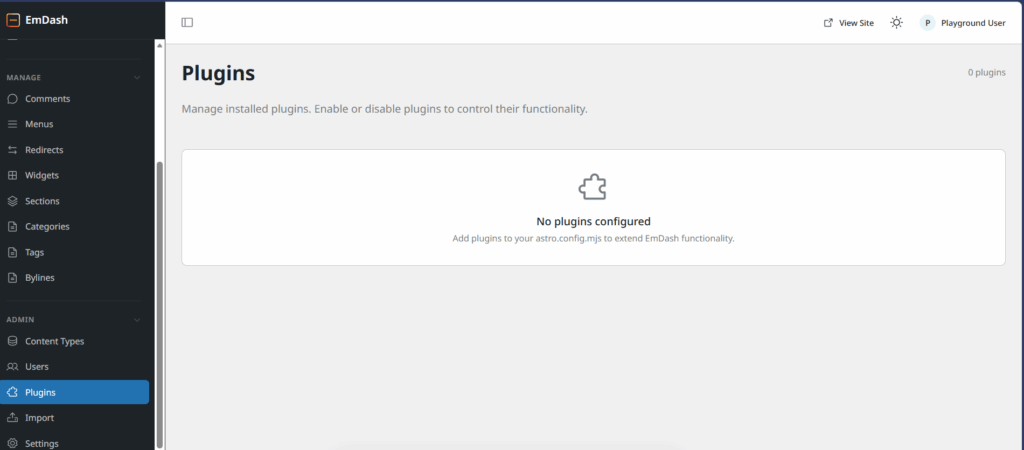
EmDash plugins are TypeScript modules added via astro.config.mjs. They are sandboxed, capability-based, and can use any license. There is no central plugin repository, no ratings, no reviews, no discovery mechanism, and no established plugin ecosystem. Paul C at WPTuts noted in his review that he could not confirm whether any plugins are currently available or how easy they are to add.
The plugin architecture is well designed. The plugin ecosystem is effectively zero.
What WordPress Offers
WordPress has over 60,000 plugins in its official repository, plus thousands more in premium marketplaces. WooCommerce alone turns WordPress into a full e-commerce platform powering millions of stores. Yoast SEO, Rank Math, Gravity Forms, WPForms, LearnDash, MemberPress, BuddyPress, bbPress, WPML, the list spans every conceivable use case.
This ecosystem represents hundreds of millions of dollars in commercial value and millions of developer-hours of accumulated work. It is WordPress’s deepest moat.
| Aspect | EmDash | WordPress |
|---|---|---|
| Total plugins available | Effectively zero | 60,000+ (free) + thousands premium |
| Plugin marketplace | None | WordPress.org + premium marketplaces |
| E-commerce | None | WooCommerce (massive ecosystem) |
| SEO | Built-in (basic) | Yoast, Rank Math, AIOSEO (comprehensive) |
| Forms | None | Gravity Forms, WPForms, Formidable, etc. |
| LMS | None | LearnDash, LifterLMS, Tutor LMS, etc. |
| Membership | None | MemberPress, Paid Memberships Pro, etc. |
| Page builders | None | Elementor, Bricks, Divi, Beaver Builder, etc. |
| Plugin licensing | Any license (MIT, proprietary, etc.) | GPL required for WordPress.org distribution |
| Discovery and trust | Based on declared capabilities | Ratings, reviews, install counts, community |
Verdict
WordPress wins overwhelmingly. This is not even close. EmDash has a better plugin architecture with no plugins in it. WordPress has a messier plugin architecture with 60,000+ plugins covering virtually every use case imaginable.
For any production site that needs functionality beyond basic content publishing, WordPress is the only viable option today. EmDash’s plugin ecosystem will take years to develop, if it ever reaches critical mass.
#7: User Experience and Accessibility
A CMS is not just for developers. It is for content creators, marketing teams, small business owners, bloggers, and anyone who needs to publish on the web. The easier a CMS is to set up and use, the larger its addressable market.
What EmDash Offers
EmDash’s admin UI closely resembles WordPress’s traditional admin. Left sidebar navigation, content management area, familiar concepts (posts, pages, media, comments, users). The editing experience uses a TinyMCE-style editor rather than Gutenberg’s block editor.
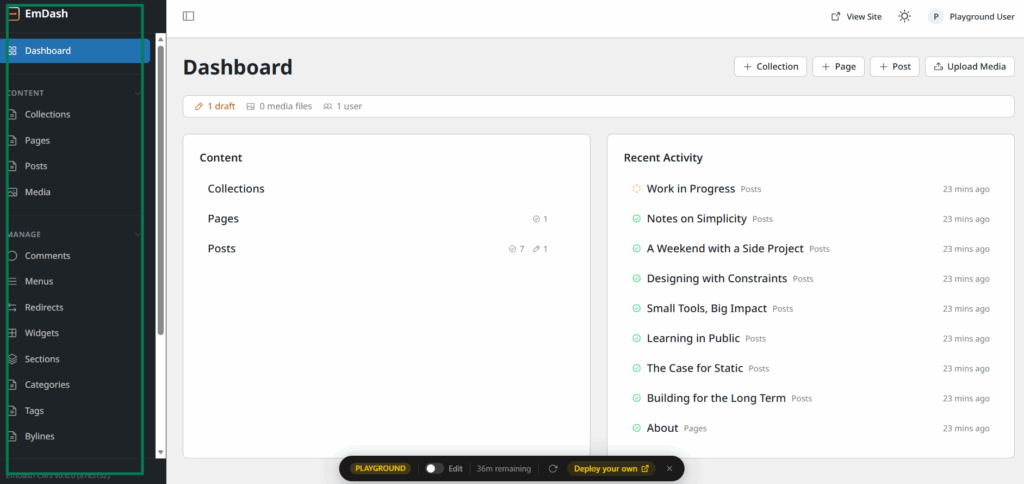
However, setup is developer-only. Creating an EmDash site involves running npm create emdash@latest in a terminal, connecting a GitHub repository, configuring database settings, and deploying to Cloudflare or a Node.js server. Even Cloudflare’s “one-click” deploy eventually requires terminal interaction with wrangler.jsonc configuration.
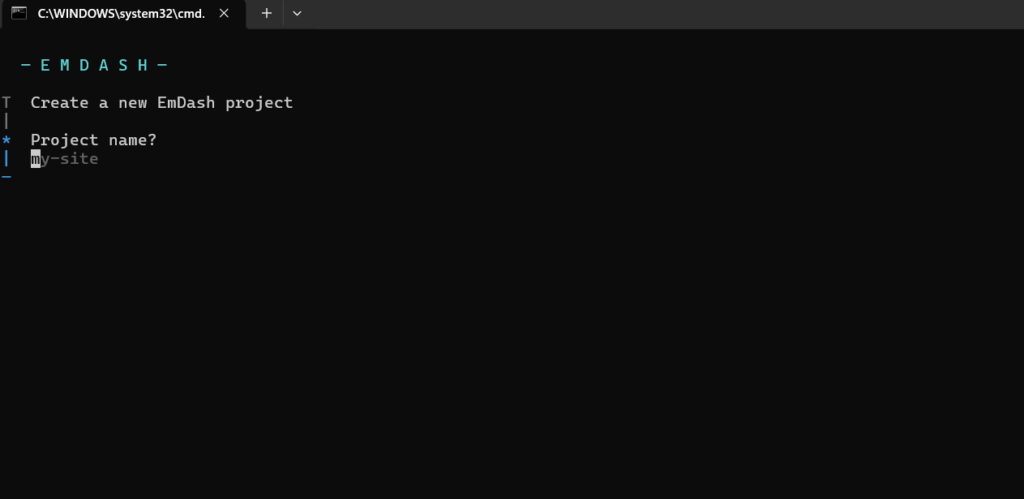
One Reddit user in the r/WordPress thread summed it up bluntly: “80% of people who have WordPress sites have no clue what a VPS is, no idea how to issue basic Linux commands, and would fail miserably installing a Node app.”
What WordPress Offers
WordPress has the “famous five-minute install.” On most modern hosts, it is even faster. On InstaWP, you can spin up a fully working WordPress site in under 60 seconds with a single click. No CLI. No GitHub. No configuration files.
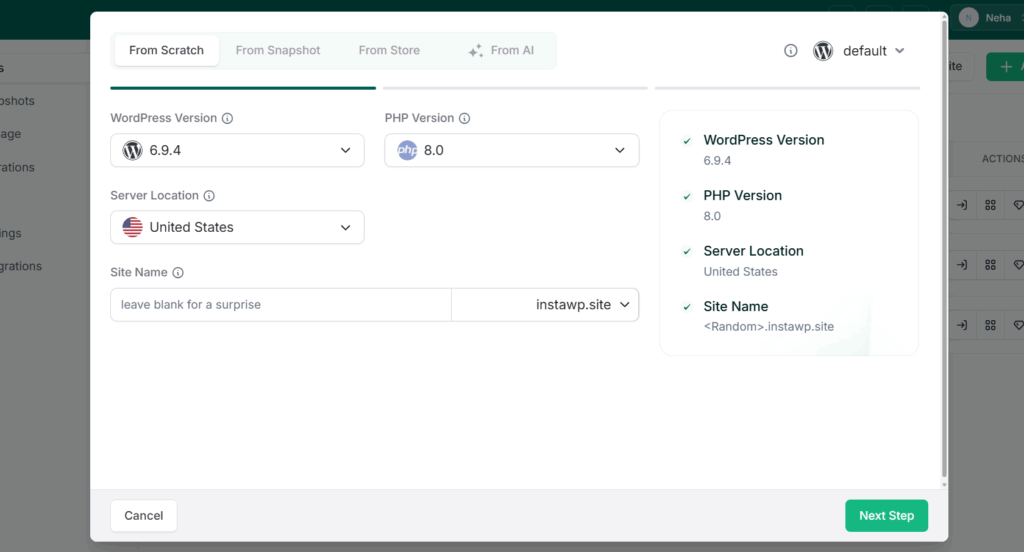
The admin UI is mature and well-understood. Gutenberg provides block-based editing. Page builders provide visual, drag-and-drop design. Millions of YouTube tutorials, courses, and documentation exist for every level of user from complete beginner to advanced developer.
| Aspect | EmDash | WordPress |
|---|---|---|
| Setup time (non-developer) | Not feasible without developer help | Under 60 seconds (InstaWP, other managed hosts) |
| Setup time (developer) | 10-30 minutes (CLI + config) | 5 minutes (traditional) or instant (managed) |
| Admin UI familiarity | Similar to WordPress classic admin | Established standard (23 years) |
| Content editor | TinyMCE-style | Gutenberg block editor + classic option |
| Visual site building | Not available | Page builders (Elementor, Bricks, Divi, etc.) |
| Documentation | Limited (early beta) | Extensive (official + community) |
| Community support | GitHub issues, early adopters | Millions of developers, forums, courses, agencies |
| Learning resources | Minimal | Massive (YouTube, courses, books, WordCamps) |
Verdict
WordPress wins decisively. WordPress’s five-minute install, visual builders, and enormous learning ecosystem make it accessible to a vastly wider audience. EmDash is currently a developer-only tool with CLI-dependent setup and no visual building capabilities.
Until that changes, EmDash is structurally limited to a small fraction of the CMS market. For agencies and freelancers whose clients need to manage their own sites, WordPress remains the only practical recommendation.
# 8: Licensing and Open Source Model
The license a CMS uses affects what developers can build with it, how they can distribute their work, and what business models are possible. This has been a particularly heated topic in the WordPress ecosystem.
What EmDash Offers
EmDash is MIT licensed. No WordPress code was used to build it, so it avoids GPL inheritance entirely. Plugins and themes can use any license the developer chooses. Commercial developers can build proprietary plugins without being forced to distribute source code.
Because plugins run in sandboxed isolation and share no code with EmDash core, there is no license contagion. This breaks the marketplace lock-in that WordPress’s GPL model creates, where the practical requirement for GPL licensing in the WordPress.org marketplace limits how commercial plugin developers can monetize their work.
What WordPress Offers
WordPress is GPL v2 licensed. Themes and plugins distributed through WordPress.org must also be GPL. This has been a source of ongoing debate, particularly around whether derivative work rules should apply to themes and plugins that interact with WordPress through APIs rather than sharing code.
The GPL model has benefits: it ensures the entire ecosystem remains open and accessible. But it also creates tension for commercial developers who want to protect proprietary code and limits distribution options.
| Aspect | EmDash | WordPress |
|---|---|---|
| Core license | MIT | GPL v2 |
| Plugin licensing | Any license (developer’s choice) | GPL required for WordPress.org |
| Theme licensing | Any license (developer’s choice) | GPL required for WordPress.org |
| License contagion risk | None (sandboxed isolation) | Debated (derivative work rules) |
| Commercial flexibility | Full | Constrained by GPL requirements |
| Open source commitment | Full source available (MIT) | Full source available (GPL v2) |
Verdict
WordPress’s GPL model has served the ecosystem well for two decades by keeping everything open, but it creates friction for certain business models. This is one of EmDash’s strongest non-security arguments.
#9: Monetization and Business Model
As AI agents become a larger share of web traffic, how content creators monetize access to their content is changing. A CMS that makes monetization easy, particularly for the emerging agent economy, has a forward-looking advantage.
What EmDash Offers
EmDash has built-in support for x402, an open standard for HTTP-native payments. When an AI agent sends a request, the server can respond with HTTP 402 (Payment Required), and the agent pays per request. No subscriptions, no paywalls, no engineering work. Configure which content requires payment, set the price, provide a wallet address, and you are done.
What WordPress Offers
WordPress has no native monetization system. Monetization is handled through plugins: WooCommerce for e-commerce, MemberPress for memberships, Easy Digital Downloads for digital products, and various paywall plugins for content gating. For AI-agent-specific monetization (per-request charging), there is no established solution yet.
| Aspect | EmDash | WordPress |
|---|---|---|
| Built-in monetization | x402 (HTTP-native payments) | None (requires plugins) |
| AI agent monetization | Per-request charging (built-in) | No established solution |
| E-commerce | None | WooCommerce (massive ecosystem) |
| Membership/subscription | None | MemberPress, Paid Memberships Pro, etc. |
| Digital products | None | Easy Digital Downloads, WooCommerce |
| Payment gateways | Wallet-based (x402) | Stripe, PayPal, Square, etc. (via plugins) |
Verdict
Split decision. EmDash wins on AI-agent monetization, which is a forward-looking bet on where the web is heading. WordPress wins overwhelmingly on traditional monetization through its massive e-commerce and membership plugin ecosystem.
The x402 model is speculative. The market for “AI agents paying per request for content” barely exists yet. By the time it matures, WordPress will likely have plugin solutions. Being early is valuable, but being early with no ecosystem is a risky position.
#10: Migration and Portability
No platform exists in isolation. The ability to move content in and out of a CMS, migrate between hosts, and maintain flexibility determines how locked-in you are.
What EmDash Offers
EmDash can import WordPress content via WXR (WordPress eXport) files or through the EmDash Exporter plugin installed on a WordPress site. Content, media, and custom post types can be migrated.
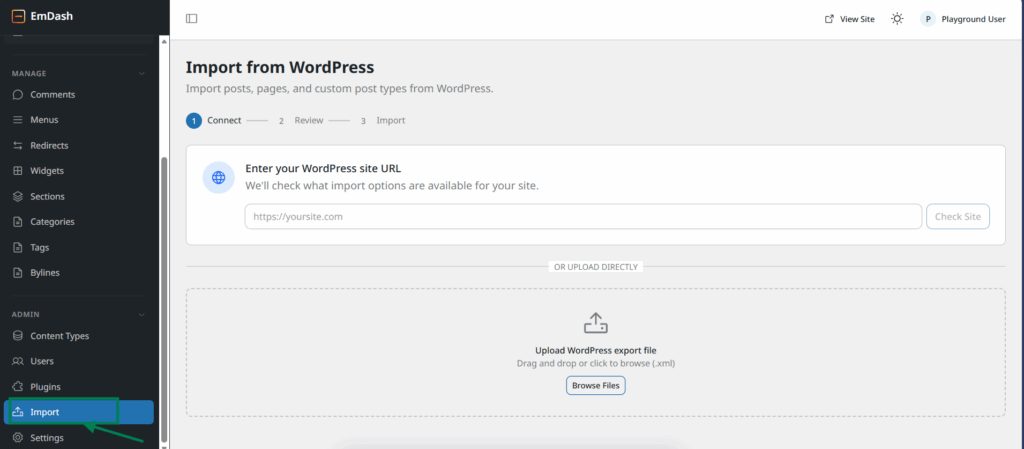
However, Thomas Randall from Info-Tech Research Group flagged a significant barrier: EmDash uses Portable Text (structured JSON), while WordPress uses HTML. This means automated migration is significantly complicated.
PHP themes and plugins do not carry over. Complex WordPress configurations (WooCommerce, membership sites, LMS platforms, advanced custom fields setups) would require substantial redevelopment.
Exporting from EmDash to other platforms is not well documented at this stage.
What WordPress Offers
WordPress is arguably the most portable CMS in existence. You can move it between hundreds of hosting providers with minimal friction. Export formats are well established. Migration tools (both free and commercial) have been refined over two decades.
Platforms like InstaWP offer one-click migration, staging-to-production workflows, 2-way sync between environments, and the ability to push local sites to the cloud and back.
| Aspect | EmDash | WordPress |
|---|---|---|
| Import from WordPress | Yes (WXR file or Exporter plugin) | N/A (is WordPress) |
| Export to other platforms | Not well documented | Mature export tools and formats |
| Content format portability | Portable Text (JSON, less universal) | HTML (universal) |
| Theme/plugin migration | Not compatible (requires rebuild) | Portable across all WordPress hosts |
| Host portability | Cloudflare (optimized), any Node.js host | Hundreds of hosts worldwide |
| Migration tooling maturity | Early | Decades of refinement |
| Staging and sync | Not established | Built-in on platforms like InstaWP (2-way sync, clone, staging) |
Verdict
WordPress wins decisively. WordPress’s portability is one of its greatest underrated strengths. You can move a WordPress site between hosts in minutes. InstaWP makes it even easier with clone, staging, 2-way sync, and one-click migration.
EmDash’s import capabilities are a good start, but the Portable Text versus HTML mismatch creates a real barrier for complex migrations, and the lack of export tooling means moving away from EmDash is an open question.
The Overall Verdict
Here is the honest summary across all eleven comparison areas:
| Comparison Area | Winner | Margin |
|---|---|---|
| Plugin Security | EmDash | Moderate (architecture wins, but WordPress is manageable) |
| Architecture and Hosting | EmDash | Narrow (WordPress hosting has caught up significantly) |
| AI and Agent Integration | EmDash | Narrow (InstaWP’s MCP closes the gap today) |
| Content Modeling | EmDash | Moderate (cleaner, but WordPress has mature tooling) |
| Theming and Frontend | Split | EmDash for devs, WordPress for everyone else |
| Plugin Ecosystem | WordPress | Overwhelming |
| User Experience | WordPress | Overwhelming |
| Licensing | EmDash | Moderate |
| Monetization | Split | EmDash for AI-agent future, WordPress for today |
| Migration and Portability | WordPress | Decisive |
| Community and Ecosystem | WordPress | Overwhelming |
EmDash wins on architectural vision. In plugin security, hosting efficiency, AI-native design, content modeling, and licensing flexibility, EmDash represents what a CMS looks like when you start from scratch with 2026 sensibilities.
WordPress wins on everything that requires an ecosystem. Plugins, themes, page builders, community, portability, user accessibility, documentation, commercial infrastructure, and the sheer weight of powering 40%+ of the internet.
The Sanchit Vir Gogia frame from Greyhound Research is the most accurate lens: this is “operating model versus operating model,” not “product versus product.” Incumbents have inertia. Insurgents have architectural purity. The two rarely move at the same speed.
What Should You Actually Do?
Stay on WordPress and move to a modern hosting platform like InstaWP that solves the practical gaps EmDash highlights (plugin security via vulnerability scanning, AI-native workflows via built-in MCP integration, elastic provisioning via instant sandboxes, and managed infrastructure that eliminates the operational overhead EmDash’s serverless model promises).
Get ready for WordPress 7.0. Connect AI agents to your sites today through MCP. Use InstaWP for your modern WordPress workflows. The WordPress ecosystem is adapting faster than the “WordPress is dead” narrative suggests.