Are you looking to build a WordPress site with a page builder—without writing a single line of code? Whether you’re an agency, freelancer, or solo creator, WordPress page builders are the go-to solution for crafting stunning, responsive websites with zero dev friction.
In this guide, we’ll break down the top WordPress page builder plugins in 2026, covering their key features, pros and cons, and use cases. Plus, we’ll show you how to test, stage, and launch these builders faster and smarter using InstaWP—your all-in-one WordPress development platform.
Table of Contents
Why Use a WordPress Page Builder?
WordPress page builders allow you to design visually without code. Instead of customizing with HTML, CSS, or PHP, you use drag-and-drop interfaces to build professional-looking pages that are mobile-friendly and SEO-optimized.
Here’s what makes them powerful:
- Drag-and-drop live editing
- Responsive controls for mobile/tablet
- Prebuilt templates and design elements
- Works with any theme or hosting
- No coding required!
Pro Tip: Want to compare multiple page builders without breaking your live site? Use InstaWP to spin up a staging environment in seconds, test performance, UI, and plugin compatibility, then delete it when you’re done.
Are you looking to build an impressive website without the need for extensive coding skills? Welcome to the world of WordPress Page Builders!
What Makes a Great WordPress Page Builder?
With so many options out there, it can be hard to pick the right tool. A great page builder should offer:
- Ease of Use: An intuitive drag-and-drop interface with a minimal learning curve
- Responsive Design: The ability to preview and edit how your pages look on mobile, tablet, and desktop
- Pre-Made Templates: Starter layouts to help you design faster
- Speed Optimization: Lightweight code output that doesn’t bloat your site
- Integration Ready: Compatibility with popular themes, WooCommerce, SEO plugins, and contact forms
- Global Elements: Reusable sections and blocks across pages
- Theme Builder: The ability to design headers, footers, and archive pages without custom code
When evaluating page builders, always consider the balance between design freedom, performance, and scalability.
Best WordPress Page Builders
We’ve curated a list of the top page builder plugins for WordPress based on functionality, speed, user experience, and how well they integrate into agency workflows.
1. Elementor Website Builder
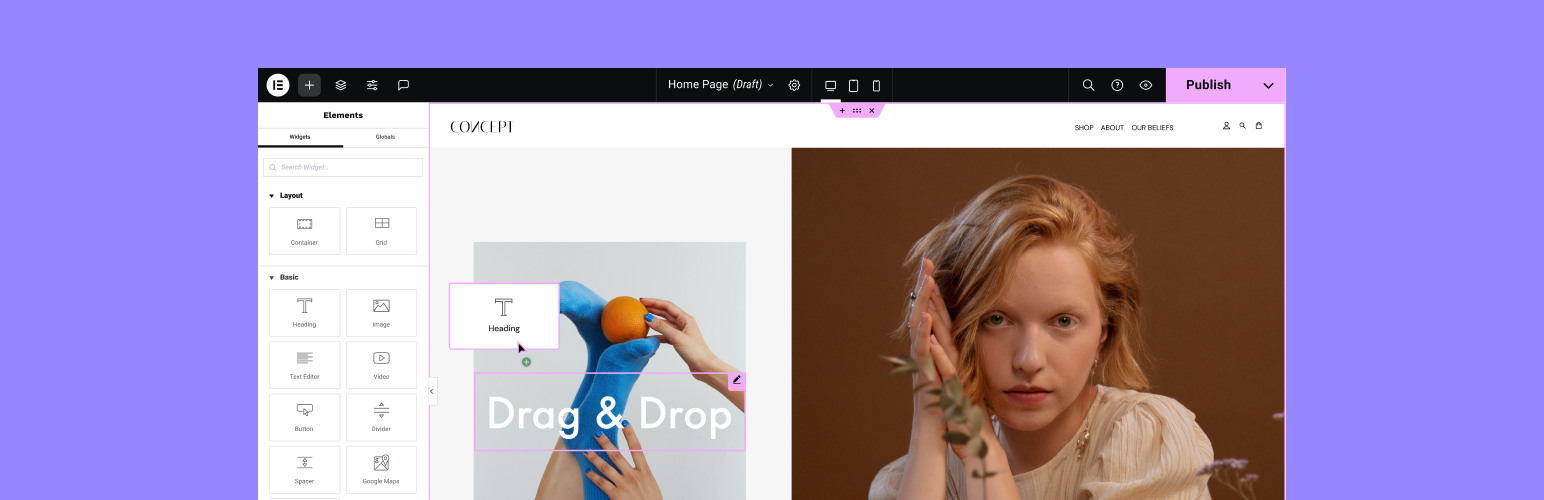
Elementor Website Builder is a leading WordPress website builder. This plugin empowers you to construct professional, pixel-perfect websites. Its intuitive drag-and-drop interface grants you complete control to build any type of website, all without writing a single line of code.
It also includes an AI integration that revolutionizes the way you build websites. The plugin is free, but a premium version, Elementor Pro, is available for additional features.
Key Features:
- Gain complete control over your website’s design and layout with an intuitive drag-and-drop interface.
- Use over 40 free widgets to create unique websites.
- Full Website Kits and Template Library
- Adjust the content and presentation of your website to every device.
- Includes a variety of widgets for you to build professional and engaging websites.
- Includes workflow-enhancing features and collaborative tools.
- Improves performance without impacting design.
- Built with accessibility in mind, offering tools and enhancements for a better user experience.
- Open-source and made to be extended, allowing developers full access to documentation.
In conclusion, Elementor Website Builder is a powerful tool for creating professional, engaging, and responsive websites with ease and efficiency. Whether you’re a beginner or an experienced developer, this plugin offers a wealth of features to enhance your web creation process.
With InstaWP: Instantly launch an Elementor-powered test site using a pre-configured template. You can even create a blueprint with all your favorite widgets and clone it for new projects
2. Divi Builder

Divi Builder is a revolutionary WordPress plugin that simplifies the process of website design and creation. It offers a powerful drag-and-drop builder, enabling users to visually construct their sites in real-time. With Divi Builder, even those without coding expertise can create stunning, professional-quality web pages.
Divi Builder is known for its responsive editing capabilities, ensuring that sites look great across all devices. Its user-friendly interface, combined with advanced design features, makes it an ideal choice for both beginners and experienced web designers looking to streamline their web development workflow.
Key Features:
- Witness your changes in real-time with Divi’s visual editing feature. From text and images to spacing and color, every detail is at your fingertips.
- Everything is adjustable, from the size of the editor to the arrangement of the elements.
- Kickstart your design process with a vast collection of beautifully crafted templates, suitable for all kinds of niches and styles.
- Easily save layouts, sections, rows, and modules for future use. Manage your library of designs for efficient workflow.
- From simple text and images to advanced sliders, testimonials, and call-to-actions, Divi’s modules cater to all your design needs.
Divi Builder is more than just a page builder; it’s a comprehensive design system that empowers you to create beautiful, responsive, and high-performing websites with ease. Whether you’re a novice or a seasoned professional, Divi Builder is the tool to unleash your web design creativity.
With InstaWP: Test custom Divi designs in a safe environment. Use Magic Login to switch between live, staging, and sandbox setups instantly
3. Page Builder by SiteOrigin

The Page Builder by SiteOrigin is a powerful WordPress plugin that allows users to create responsive, column-based content using familiar widgets. It features an intuitive interface that integrates seamlessly with the WordPress environment, making it easy to learn and use.
With this plugin, users can design and edit content in real-time, experiment with different layouts without fear of breaking content, and apply custom styles to rows, cells, and widgets.
The plugin is free, offering a democratized approach to content creation. For extra features and settings, users can opt for SiteOrigin Premium, which also includes access to a professional email support service.
Key Features:
- Intuitive, easy-to-learn interface
- Works with standard WordPress widgets
- Can be used anywhere, with the traditional Page Builder interface or Block Editor
- Compatible with any WordPress theme
- No coding required
- Live editing feature
- History Browser for rolling back and forth through changes
- Customizable row, cell, and widget styles
- Performance-focused, lightweight framework
- SEO optimized
- Accessibility-ready
- Actively developed with new features and enhancements added regularly
- Free support available on the SiteOrigin support forums
In conclusion, the Page Builder by SiteOrigin is an efficient and user-friendly tool for creating unique, responsive content on WordPress sites. It’s free, actively developed, and offers a premium version for those seeking additional features and professional support.
4. Beaver Builder

Beaver Builder is a flexible drag-and-drop page builder for WordPress websites. It’s designed for both beginners and professionals, allowing users to create beautiful and professional pages with ease. No need to write HTML or deal with confusing shortcodes, Beaver Builder makes building pages as simple as dragging and dropping elements.
Beaver Builder is a freemium plugin. The basic version is free, but there’s also a premium version that offers additional features and expert support. The premium version includes additional modules, support from the Beaver Builder team, pre-made layout templates, and the ability to save, export, and reuse full-page layouts, rows, and modules.
Key Features:
- Works with Pages, Posts, and Custom Post Types
- Content Modules Photo, Button, Heading, Icon, Text Editor, HTML, Audio, Video, and sidebar
- Full-width, column-based layouts
- Lightweight and semantic markup for maximum performance
- Mobile-friendly, responsive layouts
- Add your own CSS classes and IDs
- Use WordPress Widgets and shortcodes
Beaver Builder is loved for its ease of use and flexibility. It works with almost any WordPress theme, is 100% mobile-friendly, and is optimized for performance. This plugin is also compatible with ClassicPress. Whether you’re a beginner or a professional, Beaver Builder empowers you to take control of your website design.
With InstaWP: With InstaWP: Launch client-ready Beaver Builder demos from Instant Templates, collect feedback, and push live in one click using InstaWP hosting.
5. Brizy

Brizy Page Builder is a next-generation website builder that provides a fast and easy way to create web pages. Designed to be user-friendly, it doesn’t require any designer or developer skills. Once you start using Brizy, you’ll appreciate its intuitive design and straightforward approach to page building.
The plugin is freemium, meaning it offers both free and premium features. The pricing for the premium features is not detailed, but the free version provides a substantial range of tools to create a professional-looking website.
Key Features:
- Smart & clutter-free interface that shows only what’s needed, front & center, close to the element you’re editing.
- Intuitive drag & drop function for easy movement of content elements, columns, or rows.
- A wide range of design elements including text, buttons, images, icons, video, maps, and more.
- Over 500 pre-made blocks expertly crafted with conversions in mind to enable rapid website creation.
- Over 4000 icons are included, available in both Outline and Glyph versions.
- The global styling function allows a single-click color change across the entire web page.
- Mobile-friendly design with a dedicated Mobile View mode for optimizing smaller screens.
- Smart text editor for in-place editing of all text elements.
- Comprehensive image control options including upload, focus, zoom, and resize.
- Easy content adjustments for width, height, and alignment.
- Undo/Redo function to easily correct mistakes or accidentally delete elements.
In conclusion, Brizy Page Builder is an excellent plugin for any website owner, regardless of their technical skills. It offers a broad range of features that make building and customizing a webpage a simple and enjoyable process.
With InstaWP: Save Brizy setups as a blueprint and re-use them across staging sites. Combine it with auto-plugin selection for instant dev environments.
6. SeedProd

SeedProd is a versatile WordPress plugin that allows you to create a variety of pages including website themes, landing pages, coming soon pages, and maintenance mode pages. This plugin is a user-friendly, drag-and-drop page builder that requires no coding experience.
SeedProd offers a lite version that is free to use with limited features. The Pro version is a premium paid option that offers a host of enhanced features to aid in creating more professional-looking pages.
Key Features:
- Create custom headers, footers, pages, posts, archives, sidebars, and WooCommerce pages with the no-code Theme Builder.
- The page builder is super fast, lightweight, and responsive.
- Create a variety of landing pages like Sale Pages, Coming Soon Pages, Maintenance Mode Pages, Webinar Pages, Giveaway Pages, Thank You Pages, 404 Pages, and Login Pages.
- Pages created with SeedProd look great on any device.
- Get In-Plugin Access to over 2 Million Stock Images that are searchable, resizable, and optimized for the web.
- Track every subscriber with or without a 3rd party email provider.
- This feature allows you to tweak the style of an element on your page as needed.
- The code produced by the builder is minimal and bloat-free to ensure the page loads quickly.
- This feature protects your pages from spam, bots, and fraudulent submissions with Google ReCaptcha.
In conclusion, SeedProd is a comprehensive, user-friendly page builder that caters to novices and professionals alike, providing an easy and efficient way to create stunning websites or landing pages.
With InstaWP: Use performance scanning tools to test how SeedProd affects speed, Core Web Vitals, and mobile usability—all without impacting your main site.
7. Visual Composer

Visual Composer Website Builder is a free all-in-one WordPress Website Builder and Landing Page Builder. It is designed to give users the freedom to create websites with advanced design features, responsive fonts, an easy-to-use interface, and a seamless drag-and-drop editor powered by React.
This plugin is not only a website and page builder but also offers a theme builder, enabling users to create professional websites efficiently.
The plugin is free and comes with 50+ free elements, 10+ free landing page templates, and advanced design options with background and parallax effects.
Key Features:
- 500+ templates, elements, add-ons, and blocks are available for download from the Visual Composer Hub.
- Compatibility with other plugins and WooCommerce.
- Theme builder for creating custom post, page, and archive layouts in a code-free way.
- Built-in SEO tool for qualitative analysis of page content.
- Role Manager for controlling access to any feature or element of the site.
- Font Manager for customizing fonts, sizes, and styles.
In conclusion, Visual Composer Website Builder is a comprehensive tool for creating professional and attractive websites. It offers a wide range of features and templates, making it an ideal choice for both beginners and advanced users.
With InstaWP: Use Config Manager to quickly change server-side settings like PHP version, memory limit, and more—without touching wp-config.phpSite management.
7. Gutenberg (WordPress Block Editor)

Gutenberg, the default WordPress Block Editor, is a modern content creation tool that brings block-based design to the core of WordPress. Built natively into WordPress, Gutenberg allows users to craft pages and posts visually by combining blocks for text, media, layout, and more—without needing a separate page builder plugin.
With continuous improvements and Full Site Editing (FSE) support, Gutenberg is quickly evolving into a full-fledged website builder capable of handling headers, footers, templates, and reusable layouts.
Key Features
- 80+ built-in blocks for text, images, galleries, embeds, buttons, and more
- Block Patterns and Layout Grids for rapid design
- Native support for global styles via
theme.json - Lightweight and performance-friendly architecture
- Full Site Editing for theme-level customization
- Template Parts for reusable headers and footers
- Extensive third-party block libraries (Spectra, Kadence Blocks, etc.)
- Accessibility and mobile responsiveness out of the box
With InstaWP: Easily test Gutenberg-based themes or FSE functionality in a disposable sandbox. Use WordPress Git integration to build custom blocks locally and deploy them instantly inside a staging environment without breaking your main setup.
8. Themify Builder

Themify Builder is a flexible and intuitive drag-and-drop WordPress page builder that powers all Themify themes—and can also be used with third-party themes. It provides both front-end and back-end editing, allowing users to visually design pages with animations, responsive layouts, and dynamic content.
The builder offers a smooth experience with pre-designed layouts and the ability to create reusable templates. Its lightweight framework is built for performance while still offering rich visual tools.
Key Features
- Live preview drag-and-drop editor
- 40+ pre-designed layouts and 60+ animation effects
- Responsive grid system
- Layout parts for header/footer reuse
- Multi-row, multi-column layout options
- Module-specific styling (e.g., colors, spacing, visibility)
- Custom CSS integration for advanced customization
- Works seamlessly with all Themify themes, and is compatible with others
With InstaWP: Launch staging environments preloaded with Themify Builder to prototype layouts, create reusable demo templates, or test plugin conflicts. Save your setups as blueprints to replicate them in future client projects effortlessly.
9. WPBakery Page Builder

WPBakery Page Builder (formerly Visual Composer) is one of the original drag-and-drop WordPress builders, offering both frontend and backend editing. It remains popular due to widespread theme bundling and deep compatibility with classic themes and shortcodes.
While it lacks some modern features seen in newer builders, WPBakery still excels in reliability and customizability, especially for developers working on legacy WordPress setups.
Key Features
- Frontend and backend visual editing
- 50+ built-in content elements
- Grid builder for custom layouts
- Compatible with most WordPress themes
- Add-on marketplace with hundreds of extensions
- Support for shortcodes and custom post types
- Element presets, custom CSS, and responsive controls
- Role Manager to control builder access per user role
With InstaWP: Create testing environments to validate WPBakery compatibility with new themes or plugins. Use Magic Login to jump between cloned environments while debugging custom layouts or shortcode-heavy pages.
10. Otter Blocks

Otter Blocks is a performance-focused extension to the native WordPress Block Editor (Gutenberg). Designed for users who want more creative flexibility without switching to a full-fledged page builder, Otter adds a library of advanced blocks that integrate seamlessly with Gutenberg.
From customizable layouts to dynamic business elements like pricing tables and contact forms, Otter turns the block editor into a more powerful site design tool—without bloating your page speed.
Key Features
- 25+ unique content blocks (Section, Button Group, Testimonial, etc.)
- Block Conditions: Show/hide blocks based on user behavior or device
- Responsive Layouts with column and grid control
- Animation and Scroll effects
- Importable Patterns and Block Templates
11. Greenshift

Greenshift is a next-gen Gutenberg block plugin built for high-performance design and advanced animation. Unlike traditional page builders, Greenshift avoids heavy frameworks, relying instead on smart, on-demand loading of scripts and styles.
With dynamic motion controls, interactive layers, and 3D support, Greenshift is ideal for web creators who want to push the boundaries of frontend interactivity—while maintaining top scores in Google’s performance tests.
Key Features
- 50+ high-impact blocks for animation, sliders, and dynamic content
- Motion and scroll-triggered animation chains
- CSS grid, flexbox, advanced container layouts
- 3D/AR viewer block, Spline3D support
- Hover transitions, mobile-friendly carousels, smart scroll
- Popup and panel builder, dynamic countdowns, tables, and sliders
12. Pagelayer

Pagelayer is a fast and intuitive drag-and-drop WordPress page builder designed for users of all skill levels. With 100+ widgets and full real-time editing, it offers a smooth experience for building websites instantly—no coding required.
What makes Pagelayer unique is its seamless integration with Gutenberg, allowing users to combine block-based content with drag-and-drop layouts. Whether you’re designing portfolios, landing pages, or eCommerce sites, Pagelayer has the tools to make it happen.
Key Features
- 30+ free widgets with live inline editing
- 100+ advanced widgets in the premium version
- Responsive controls for typography, spacing, and layout
- Sticky headers, animations, mega menus, modals, image hotspots
- Full eCommerce compatibility for product pages and catalogs
- Cloning for sections, pages, and posts in one click
How InstaWP Supercharges Your Page Builder Workflow
Page builders are powerful, but when paired with InstaWP, your development flow becomes unstoppable. Here’s how:
| Feature | Benefit for Page Builder Users |
|---|---|
| ⚡ Instant Staging | Create test environments for any builder plugin |
| ? Magic Login | Jump into wp-admin without remembering credentials |
| ? Performance Scanning | Analyze load times and page builder overhead |
| ? Bulk Command Execution | Install and update builder plugins across 50+ sites |
| ? Save & Clone Templates | Reuse your favorite builder setups |
| ? 2-Way Sync | Merge staging and production changes with confidence |
| ? Security & Logs | Monitor plugin changes and role edits sitewide |
? “With InstaWP, I can test multiple page builders, switch versions, and collaborate with clients without spinning up separate dev servers. It’s a game-changer.” — A real InstaWP user testimonial.
Drag-and-Drop vs Block-Based: What’s the Difference?
WordPress page builders typically fall into two camps:
- Classic Drag-and-Drop Builders like Elementor, Divi, and Brizy let you build visually with high design control. They’re ideal for creative professionals or businesses that want full branding flexibility.
- Block-Based Builders like Gutenberg and Spectra integrate natively with WordPress. They’re faster and more lightweight but slightly less flexible out-of-the-box.
Your choice depends on your project goals—do you want speed and simplicity or complete visual freedom?
Tips for Choosing the Right Page Builder
- Try Before You Buy: Many builders offer a free version or demo. Use them to get a feel for the UI.
- Match with Your Workflow: If you build client sites regularly, look for features like reusable templates, white labeling, or multi-site support.
- Check Theme Compatibility: Always ensure the builder works well with your current theme or any theme framework you plan to use.
- Review Support & Community: A strong support system, documentation, and active Facebook groups or forums can make a big difference when you hit roadblocks.
- Think Ahead: Consider how easy it will be to scale, migrate, or change builders in the future.
Conclusion: Which WordPress Page Builder Is Right for You?
Choosing the right WordPress page builder comes down to your workflow, technical comfort, and the kind of websites you build.
- Beginners may find Pagelayer, Elementor, or Brizy easier to start with thanks to their real-time visual editors.
- Agencies and freelancers often prefer Divi, Beaver Builder, or Visual Composer for scalable design systems and template reuse.
- Developers focused on performance lean into Gutenberg, Otter Blocks, or Greenshift for lightweight, block-first builds with full design control.
- eCommerce creators should look for SeedProd, WPBakery, or Pagelayer, which support WooCommerce and offer product-focused widgets.
No matter which builder you choose, remember that the real power comes when you combine it with a solid staging and testing workflow. That’s what ensures your site not only looks good—but loads fast, works perfectly, and converts visitors into customers.
FAQs
u003cstrongu003e1. What is a page builder in WordPress?u003c/strongu003eu003cbru003e
A page builder is a plugin that lets you design custom pages using drag-and-drop elements like text, images, sliders, and forms—without writing any code. These tools work visually and offer full control over layout and styling.u003cbru003eu003cbru003eu003cstrongu003e2. Which is the best WordPress page builder for beginners?u003c/strongu003eu003cbru003eElementor, Pagelayer, and Brizy are excellent for beginners due to their user-friendly interfaces, pre-built templates, and live editing features.u003cbru003eu003cbru003eu003cstrongu003e3. Are WordPress page builders bad for SEO?u003c/strongu003eu003cbru003eNot necessarily. Most modern page builders generate clean, SEO-friendly code. However, avoid excessive use of animations, large media, or deeply nested structures that may affect site speed.u003cbru003eu003cstrongu003eu003cbru003e4. Can I switch page builders later?u003c/strongu003eu003cbru003eTechnically yes, but it can be messy. Some builders leave shortcodes or block-based layouts behind. Always test in a staging environment before making any major changes.u003cbru003eu003cbru003eu003cstrongu003e5. What’s the difference between Gutenberg and other page builders?u003c/strongu003eu003cbru003eGutenberg is WordPress’s native editor and is built into the core. It’s lighter and faster but less flexible than third-party builders like Elementor or Divi. Many users combine Gutenberg with block libraries like Otter or Greenshift for more power.u003cbru003eu003cbru003eu003cstrongu003e6. Do page builders work with WooCommerce?u003c/strongu003eu003cbru003eYes. Most popular builders support WooCommerce and offer product grids, category filters, and cart customization tools. Look for builders with dedicated WooCommerce widgets if you’re building an online store.u003cbru003eu003cbru003eu003cstrongu003e7. Are there free WordPress page builders?u003c/strongu003eu003cbru003eYes! Builders like Elementor, Pagelayer, Brizy, Otter, and Themify Builder all offer free versions with basic widgets and templates. Paid versions unlock advanced modules, integrations, and theme-building features.u003cbru003eu003cbru003eu003cstrongu003e8. Can I use multiple page builders on the same site?u003c/strongu003eu003cbru003eTechnically yes, but it’s not recommended. Mixing builders can cause conflicts, increase load time, and make long-term maintenance difficult. Stick to one builder per site for consistency and stability.


