Key takeaways
- WordPress.org now reviews every plugin and theme release before it ships. Since 5 June 2026 each release sits in a cooldown, currently six hours, while its changes are analysed. High-risk releases are blocked from distribution automatically.
-
This is a real improvement, and it is narrow on purpose.
The check gates a release before distribution. It has no view
of the version already sitting in your
wp-content/pluginsfolder. - Four gaps stay open: code already installed, malware that never used the update API, the window between a patch shipping and your site installing it, and plugins that never update at all.
- Silence from WordPress.org means nothing was flagged. Emails go only to plugin committers, and only when a release is blocked. Site owners are not in that loop at all.
- The layer that acts on a live site is your host. InstaWP does not screen plugin releases before distribution, and nothing except WordPress.org can. What InstaWP does is work on the other side of that line.
WordPress.org now analyses every plugin and theme release for security problems before distributing it, and blocks high-risk releases automatically. That closes one genuine gap in the supply chain. It does nothing about a vulnerable or compromised plugin already installed and running on your site, and that is where the four remaining gaps live.
If you maintain WordPress sites for clients, your practical question is whether this means plugin updates are safe now and you can stop worrying about them. One specific hole just closed. Four others did not, and knowing where the line falls is what tells you which WordPress plugin security best practices still earn their place.
What did WordPress.org actually change?
Since 5 June 2026, every plugin and theme release published to WordPress.org passes through a cooldown window before it is distributed through the WordPress.org update API, including the one-click updates offered inside the WordPress dashboard. The cooldown is currently six hours.
During that window the changes in the release are analysed by several AI models together with Jetpack Scan, the results are cross-checked, and the findings are combined into a single security score. Releases that score high risk are blocked from distribution automatically, as soon as the review finishes.
All of that is from the Plugin Review Team’s own announcement, Automated security review for plugin releases, published 9 September 2026. Three details in it are worth reading twice, because they change what you should do.
The score measures risk, not intent
A high score does not mean a plugin author did anything wrong. In the announcement’s own words, an accidentally introduced vulnerability can score just as high as intentional malware. A blocked release is a statement about what the code could allow, not about who wrote it or why. If you are a plugin author and a release of yours gets blocked, that is not an accusation.
Silence is the normal case, and you are not on the mailing list
Emails go out only when a release is blocked, and they go to the plugin’s committers. An author who hears nothing has nothing to do. A site owner hears nothing either way, because site owners are not part of this loop at all. So there is no notification stream here for you to monitor, and no dashboard on your site that will start showing you anything new.
Accuracy is high, and false positives are not zero
The announcement is explicit that cross-checking several tools keeps accuracy high and false positives low, “but not zero”. For plugin authors that is the practical reason the fix path is to publish a corrected release rather than to appeal: the Plugins Team handles a high volume of reviews, and shipping a fix is almost always faster than waiting for a manual review.
Why is this a bigger change than it sounds?
Because until now there was no consistent review step between a release being committed and that release reaching live sites. New plugins are reviewed before they enter the directory, but updates then ship continuously for years afterwards. A plugin can be entirely clean today and introduce a vulnerability, or malicious code, in any release after that.
The announcement gives the incident that made the case. On 28 July a backdoor was committed to a release of a plugin with around 20,000 active installations. The automated review detected it, scored it high, and because the release was still inside the cooldown window the compromised version was never distributed through the update API. The plugin was closed for downloads 26 minutes after the Plugins Team was notified by Wordfence.
Does this mean WordPress plugin updates are safe now?
Plugin updates are meaningfully safer to receive than they were in May 2026, and you should still install them promptly. What has not changed is everything that happens after a plugin is on your site. The review is a gate on distribution, and a gate only inspects what tries to pass through it.
The whole boundary fits in one sentence. WordPress.org’s check decides whether a new release reaches your site, and has no view of the code already running on it. Everything below is on the far side of that line.
To be equally plain about InstaWP’s side of it: InstaWP does not screen plugin releases before they are distributed, and no host can. Only WordPress.org sits in that position, because only WordPress.org runs the update API. Any host telling you it vets plugin releases for the directory is describing something that does not exist. What a host can do is act on the live site, which is exactly where the four remaining gaps are.
Gap 1: What about a vulnerable version that is already installed?
The review looks at new releases. It does not look backwards at the installed base. Every vulnerable plugin version that shipped before 5 June 2026 is still on the sites that installed it, and it will stay there until somebody updates that site. The review does not reach into WordPress installations and remove anything.
There is a second, quieter version of the same gap. The threshold is a threshold. A release that scores below it is distributed normally, which is the correct behaviour for the overwhelming majority of releases, but it means “not blocked” is not the same as “audited and certified safe”. Plenty of genuine vulnerabilities are found by researchers months after a release ships, through exactly the disclosure process that has always found them.
So the practice that mattered before still matters: know what versions you are running, and know when one of them turns out to be vulnerable. That is what InstaWP’s scanning and daily advisory watch are for, and there is a section on how both work further down. The part worth saying here is the distinction that makes such a watch useful rather than noisy.
Vulnerability feeds routinely publish an affected range wider than the flaw itself, because writing “everything before the fix” is easier than establishing which release actually introduced the vulnerable feature. InstaWP has seen a feed publish a critical advisory against every version a plugin ever shipped when the vulnerable code existed in exactly one release.
Two authoritative feeds can also grade the same flaw several points apart. Sizing an advisory against a real inventory, and confirming the vulnerable code exists in the version a given site runs, is the difference between an alert an agency acts on and a wall of alerts an agency learns to ignore. If you want the manual version of this work, InstaWP’s guide to identifying and fixing WordPress vulnerabilities covers it.
Gap 2: What about malware that never travelled through the update API?
A gate on the update API only sees traffic on the update API. Plenty of malicious code reaches WordPress sites by other roads, and none of those roads passes a WordPress.org review. There are three common ones, and InstaWP sees all three on real customer sites.
Nulled plugins and themes
A pirated copy of a commercial plugin is downloaded from somewhere that is not WordPress.org and uploaded by hand. The whole business model of distributing nulled software is that somebody added something to it. This route has never gone anywhere near the directory, and the new review changes nothing about it.
If you want the longer version of why this keeps ending badly, InstaWP wrote it up in the nulled WordPress theme guide for agencies.
Stolen wp-admin or SFTP credentials
This is the most common route of the three and the least dramatic. Somebody logs in with a working administrator password, opens Plugins, uploads a zip, activates it. No vulnerability is involved at any point. Every action is a supported WordPress feature used exactly as designed, performed through the standard admin screens. A review of plugin releases cannot see any of it, because nothing was released.
It follows that administrator credentials are a bigger part of your plugin security posture than plugin updates are. Unique passwords, two-factor authentication, and removing administrator accounts that nobody uses do more for this gap than any amount of update discipline.
A compromise that arrives inside a migration
This one is specific to agencies and it catches people out. When a site is imported from another host, the import carries whatever was on the old site, including anything malicious that was already there. InstaWP sees this often enough to have a standing tell for it: if every malicious file and every unfamiliar administrator account predates the date the new site was created, nothing was exploited on the new host at all. The infection travelled in inside the customer’s own export file.
That reading changes what you do next, in two ways that are easy to get wrong. First, cleaning the new copy fixes nothing on its own: the source site has to be cleaned or abandoned, or the next migration re-infects the new one. InstaWP has seen customers rebuild and re-import the same infected archive several times in a day, each time cleanly wiping out the previous attempt and each time restoring the same malware. Second, every backup taken while the site was infected is contaminated, so restoring one undoes the cleanup. Check the archive before you restore it, not after.
Do not conclude a site is clean from the WordPress plugins screen.
The self-hiding plugin is a standard technique now: the malicious plugin removes itself from the list you are looking at, and switches its payload off for logged-in administrators. wp-admin shows you a tidy list of legitimate plugins and a working site. The only honest check is at the filesystem, and in the database, from outside WordPress.
The hardest version of this is malicious code appended to a genuine, legitimate plugin the customer really does use, where nothing about the plugin’s name, directory or presence in the list looks out of place. InstaWP looks for that below the plugin list entirely, which is covered in the section on how InstaWP handles this. If you want to check a site by hand, the tells are in the signs your WordPress site is hacked.
Gap 3: What about the window between a patch shipping and a site installing it?
A release that clears the review is still a release nobody has installed. The moment a security fix is published, the flaw it fixes becomes public knowledge, the advisory goes out, and every unpatched site is a documented target. The patch existing does not protect anybody. The patch being installed does, and between those two events there is a window.
For one site that window is however long it takes you to notice and click update. For an agency running dozens of client sites it is days, sometimes longer, because you are working through a list, testing the ones that matter, and waiting on clients who have opinions about when their site changes. WordPress.org’s release check does nothing about this window, and it was never meant to. It governs distribution, not installation.
Two cases stretch that window well past days. A commercial plugin cannot be updated by your host at all, even when the fix is sitting there, because the update needs the customer’s own licence key, so the window lasts until the customer acts. And a major version jump on a plugin other things depend on is not a routine update: it deserves a staging test, which is correct and which also takes time.
What closes the window is a layer below WordPress. On its own managed hosting fleet, InstaWP ships virtual patches at the server level: a rule that stops the specific request pattern the exploit needs from reaching WordPress at all, applied across hosted sites, while the plugin keeps working normally for real visitors. It does not replace the update.
It buys the time to do the update properly, and it is the one capability in this post with no equivalent anywhere in the WordPress.org review, because WordPress.org does not run your server.
Where this does not help, and InstaWP will tell you so.
If a vulnerability is disclosed and the author never ships a fix, there is no patch window to cover, and a server rule is not the answer either. That is an abandoned plugin, and the honest advice is to remove and replace it rather than mitigate around it indefinitely. See gap 4.
This is not a capability described in the abstract, and the Elementor Pro case is the clearest illustration of the window. Elementor closed a critical unauthenticated remote code execution flaw in version 4.2.2 on 19 August 2026. The fix existed from that moment, and every site still on 4.2.1 was still vulnerable.
InstaWP blocked execution from the affected upload path across its hosting fleet the same day and published what the bug was, who was actually at risk and what InstaWP did about it the next morning. The advice to customers in that post is the point: update to 4.2.2 when it suits you. A WordPress core flaw got the same treatment in July, written up as the wp2shell response.
What InstaWP does not publish is the rules themselves. A copy-pasteable mitigation tells an attacker exactly what to route around, which is worth more to them than it is to you. Both of those write-ups say so explicitly and neither contains a rule you could lift.
Gap 4: What about plugins that never update at all?
A review of releases does nothing for a plugin that stopped releasing. Abandoned plugins are the obvious case and most people already know to look for them. The case almost nobody checks is the plugin that arrived with a migration and belongs to somebody else’s hosting platform.
Sites moved onto a new host routinely still carry the control-panel plugin of the host they left. It does nothing useful on the new host, so nothing ever prompts anyone to remove it, and it usually never updates either, because plugins of this kind are frequently not in the WordPress.org directory at all and update through their vendor’s own channel instead. It sits there, active, for years.
The instinct is to shrug at it. It is another host’s plugin, so what could it possibly do here? That instinct is backwards, and this is the most useful thing in this post. Several of these plugins authenticate their phone-home channel against a connection secret stored on the site.
A vulnerability disclosed in one of them this year came down to what happens when that stored secret is empty: the value it derives from the secret collapses to a constant, and the token an attacker needs becomes computable offline, with no access to the site at all.
Now ask which sites have an empty connection secret. Not the ones still hosted with that vendor, which are connected and hold a real token. The exposed population is precisely the sites that moved away and can never connect again.
A plugin orphaned by a migration is the maximally exposed case for that entire bug shape, not the least exposed one. InstaWP treats migrated-in host plugins as a standing vulnerability class for this reason, and re-checks the population after every migration wave, because a fresh migration reintroduces the plugin and the affected group regrows on its own.
The fix here is unusually cheap: for this class, the answer is removal rather than updating. The plugin provides no function on the new host, so deleting it costs nothing and closes the hole permanently. It is the customer’s plugin, so it is a conversation rather than something a host should do unannounced, but it is a conversation worth having on every site you inherit.
Which layer catches what?
The two layers are complementary, not competing. WordPress.org acts on the release. Your host acts on the site. Neither one can do the other’s job, and the table below is the honest division of labour.
How has InstaWP been handling plugin vulnerabilities on hosted sites?
The third column of that table is not new work prompted by this announcement. Connected-site vulnerability scanning has been in InstaWP since November 2023, automated scanning followed in 2024, and the whole thing predates WordPress.org’s release cooldown by about two and a half years.
The sharpest layer is documented publicly too: on 20 August 2026, three weeks before the review was announced, InstaWP published its response to a critical unauthenticated remote code execution flaw in Elementor Pro, which was to block execution from the vulnerable upload path across the entire hosting fleet in under two hours and then sweep every affected site for signs of earlier compromise. A WordPress core flaw got the same treatment on 19 July. Here is what each of the four layers actually does.
1. Every connected site gets its inventory scanned against known vulnerabilities
When a WordPress site is connected to InstaWP as a managed site or is running on managed hosting plans, InstaWP reads its installed plugins, themes and core version and checks that inventory against a vulnerability database. The result is a security scan report attached to the site, a severity recorded against it, and an email alert to the site owner when something critical turns up.
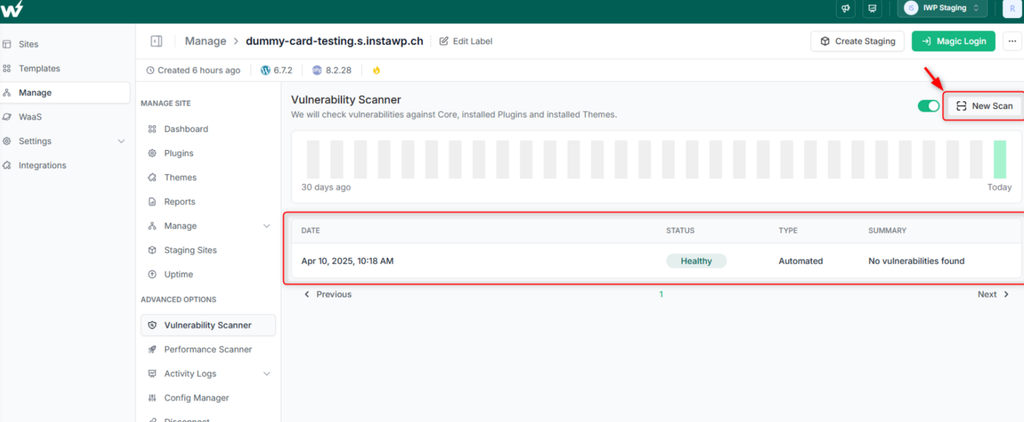
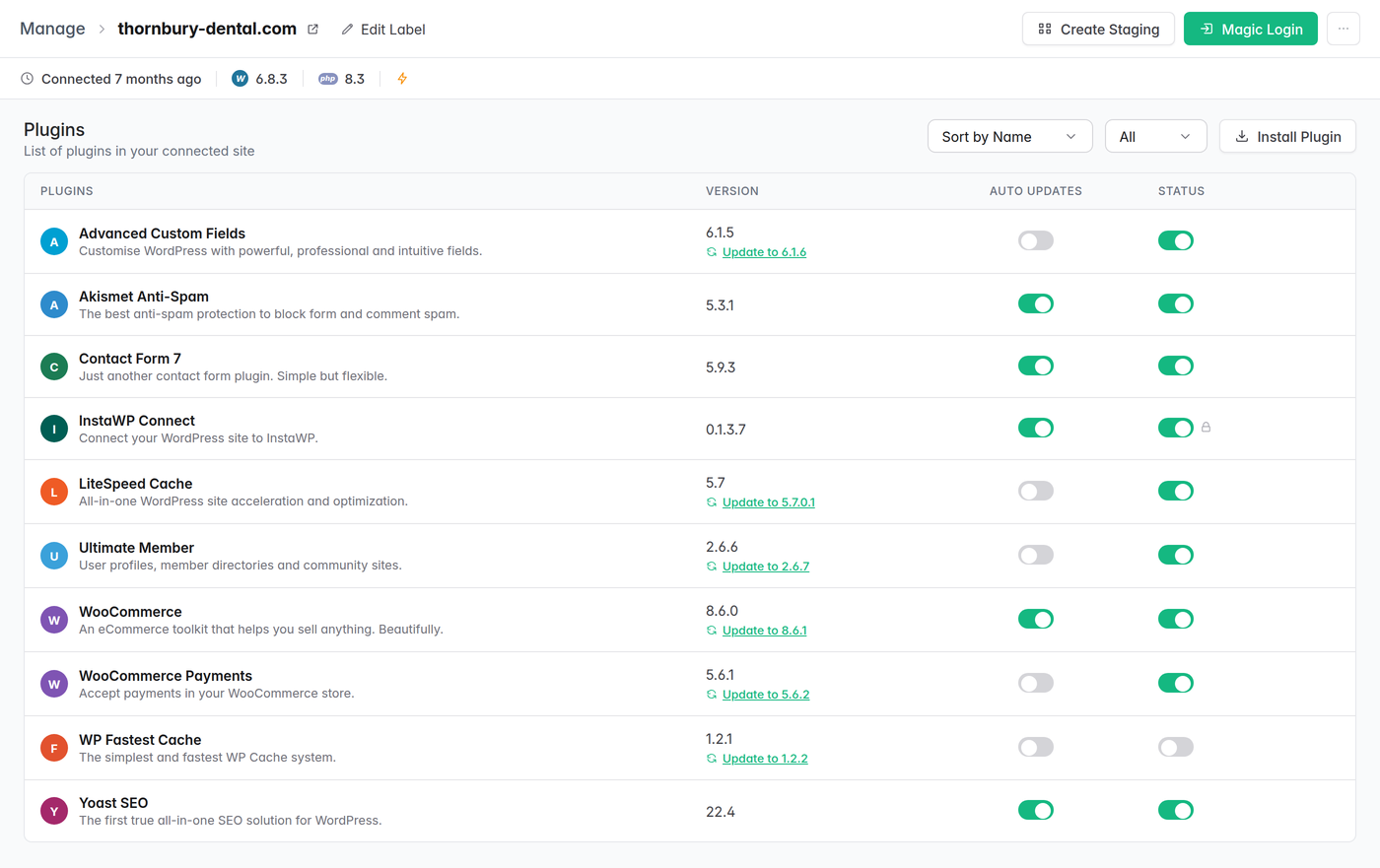
Those last two columns are the whole argument of this post in one row. WooCommerce Payments 5.6.1 installed, fixed in 5.6.2. The fix exists. The site does not have it yet. WordPress.org’s release review already did its job here and the site is still exposed, because distribution and installation are different events.
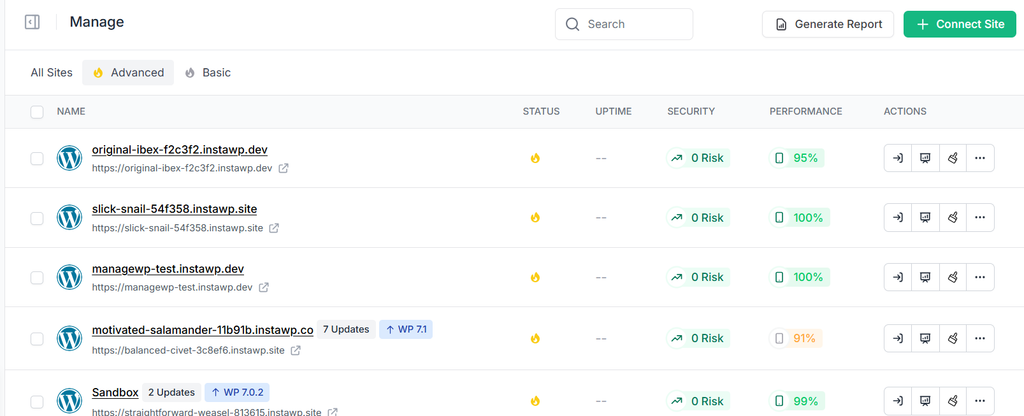
The reason this matters more than a per-site security plugin is the column it produces across sites. In the manage WordPress sites list, Security sits next to Status, Uptime and Performance as a per-site count of open risks. Thirty client sites, one screen, and the answer to “which of these is exposed right now” is a column rather than an afternoon.
2. New advisories are checked against what the fleet actually runs, daily
A scan tells you about a site at a moment. New advisories land every day, so InstaWP also sweeps authoritative WordPress vulnerability feeds daily and cross-references each one against the plugin, theme and core inventory that sites report. A list of today’s WordPress CVEs is a newsletter. What comes out of this is narrower: which advisory lands on which sites, on which versions, and what can be done about each one.
That last part splits every advisory into two piles that need completely different handling. Some plugins can be updated for the customer, because they are free and in the WordPress.org directory. Others cannot, because they are commercial and the update needs the customer’s own licence key. Sorting an advisory into the right pile is the most decision-useful line in any vulnerability report, and getting it wrong sends somebody down a dead end for a day.
3. While a fix is pending installation, the exploit path is closed at the server
This is the layer described in gap 3 and the one with no equivalent upstream. A virtual patch is a rule applied across hosted sites that stops the specific request an exploit needs from reaching WordPress at all. The plugin stays installed and keeps working for real visitors. Nothing about the site changes from the customer’s side, and the update still happens afterwards.
Be clear about what this is and is not. Every server-side block InstaWP has authored names the upstream version that fixes the flaw, which means these rules exist to cover the window while sites are being updated. They are not a substitute for a fix that does not exist. The situation they are worth the most in is the one where that window is longest: a commercial plugin, where InstaWP cannot install the update without the customer’s licence key and the block has to hold until the customer acts.
4. Infected sites are found at the filesystem, and cleanup has a defined end
This one is platform work rather than a button in your dashboard, and it is worth saying so plainly: there is no malware scanner for you to run in the InstaWP interface. What exists is InstaWP monitoring hosted sites for known malware signatures and periodically sweeping the fleet at the filesystem and database level rather than through WordPress.
Sweeping below WordPress is what makes it work at all. Modern WordPress malware removes itself from the plugins screen and suppresses its output for logged-in administrators, so anything that asks WordPress what is installed gets a clean answer back from an infected site. A filesystem sweep also finds payloads that are present but not yet active, which no page fetch can ever see.
When a site is found infected, InstaWP quarantines rather than deletes so the evidence survives, establishes how the attacker got in before cleaning anything, and keeps a watch running on the site afterwards on a front-loaded schedule.
That last step exists because of a specific, avoidable failure: a site cleaned but with the attacker’s credentials still valid can be re-infected within seconds of the all-clear going out, through a normal login. So the rule is that nobody sends an all-clear on a site that is not being watched, and a cleanup with an unresolved credential question is not closed just because the malware is gone.
For agencies, the output is a client-facing artefact.
A security scan is one of the sections you can include in the scheduled PDF reports InstaWP generates per site, alongside the summary, performance, uptime history and activity log. Care plans are easier to sell when “we monitor your plugins for vulnerabilities” arrives as a document every month instead of a promise.
Two honest limits to go with all of that. None of it screens releases before distribution, for the reason stated earlier in this post. And the inventory layer only sees sites that report their inventory, so a site nobody has connected is a site nobody is scanning, including for InstaWP. The agency workflow is built around connecting every client site for that reason.
What are the WordPress plugin security best practices now?
Most plugin security advice is a list of six things that have been true since 2015: update, choose reputable plugins, delete what you do not use, use strong passwords. All of that is still correct and none of it is the interesting part. Below is what changes, or newly matters, once you take the boundary above seriously.
1. Update faster, not slower
The reflex reaction to “a backdoor was committed to a plugin release” is to delay updates. That reflex is now wrong, and it was mostly wrong before. Delaying updates leaves you on versions with publicly documented flaws, which is a certainty, in order to avoid a poisoned release, which is rare and which now has a six-hour review standing in front of it. The cooldown means a release you install today has already been through the check. Install it.
2. Make updating cheap enough that you actually do it
Agencies do not delay updates because they disagree with the advice. They delay because an update broke a client site once and nobody wants to explain that twice. What fixes that is a faster undo rather than more caution. Take a restore point with a WordPress backup tool before a batch of updates, and run anything load-bearing on a WordPress staging site first.
InstaWP is built around this: a WP staging copy is a click, and so is restoring one. There is a walkthrough of the whole loop in how to test WordPress plugins without breaking your live site. When rolling back costs a minute, updating promptly stops being a risk decision rather than a routine one.
3. Keep an inventory you can actually query
You cannot patch what you do not know you are running. The moment an advisory lands, the only question that matters is which of your sites runs that slug, on which version, and whether it is active. If answering that means logging into thirty wp-admin screens, you will not answer it, and the CVE will sit unaddressed.
A central inventory across every site you manage turns a day of work into a query. This is what InstaWP Connect reports back for sites you manage from one dashboard, including sites hosted elsewhere.
4. Audit what came in with the migration
Every site you inherit is a site somebody else configured. Read its plugin list on day one and look specifically for the previous host’s control-panel plugin, plus anything with no update in two years and anything you cannot find in the WordPress.org directory. This is the single highest-yield audit on an inherited site and almost nobody runs it.
Build it into your WordPress migration workflow as a step rather than leaving it to whoever notices, and while you are there, resolve the compatibility notices too: managing plugin warnings in WordPress covers what each one means.
5. Treat administrator accounts as the main attack surface
The most common way malicious code reaches a WordPress site is somebody logging in and uploading it. Enforce unique passwords and two-factor authentication on every administrator, remove accounts nobody uses, and audit the administrator list on sites you take over. Most people on a client site do not need the administrator role at all, which is worth a pass of its own: WordPress user roles covers what each one can actually do.
WordPress documents the rest of this ground in its own hardening guide. One note from cleanup work worth passing on: on a site you believe is compromised, set the password directly on the user’s profile screen. WordPress’s bulk “send password reset” action only emails a link, it does not change anything, and if the account’s registered email address is the attacker’s, you have just mailed them a fresh credential.
6. Know who covers the gap between the patch and your update
Ask your host directly. A critical vulnerability is disclosed in a plugin running on thirty of your client sites and the author ships the fix the same afternoon. What happens over the next three days while you work through the list, and who does it? If the answer is that you will get an email telling you to update, that is not an answer, it is a notification.
This is the question that separates hosting from managed WordPress hosting, and it is worth asking before you need it rather than during.
7. Verify from outside WordPress
If you suspect a site is compromised, do not form a view from the WordPress plugins screen, and do not form one from loading the homepage in a browser. Both are things modern WordPress malware is specifically written to defeat: it hides from the plugin list, and it suppresses its payload for logged-in administrators.
Check the filesystem and the database. InstaWP’s own detection works this way for exactly this reason. If you are doing it by hand, start with these WordPress security steps and compare what a scanner would flag using the WordPress security plugin options.
8. Read the WordPress.org email if you publish plugins
If you ship a plugin to the directory, make sure the committer addresses on it are monitored, because a blocked release now generates an email that nobody else will forward to you. And if a release is blocked, publish a corrected release rather than opening an appeal. The Plugin Review Team says plainly that shipping a fix is almost always faster than waiting for a manual review of an appeal. The rest of what the team expects from a release is in the detailed plugin guidelines.
WordPress.org closed a real hole in the WordPress supply chain, and it closed it in the only place it could: between a release being committed and that release being distributed. That leaves code already installed, malware that arrived by other routes, the days between a fix shipping and your sites actually running it, and plugins that never update at all. All four live on the running site, which is your host’s half of the job. The correct response to this news is to update more promptly, not less, and to know who is covering the gap while you do.