WordPress 7.0 “Armstrong” is here. It shipped on May 20, 2026, and it marks the start of an AI-integrated WordPress: a new AI Client in core, an Abilities API, a central Connectors hub for AI providers, a modernized admin with a Command Palette, and a batch of new design tools and blocks.
This guide is for developers, agencies, and site builders who want to know exactly what changed, what to test, and how to roll it out safely.
Named after jazz legend Louis Armstrong, version 7.0 is the biggest WordPress release in years. The final release focuses on AI infrastructure in Core, a central Connectors hub, a refreshed dashboard, visual revisions, stronger design controls, new blocks, and developer APIs that make WordPress easier to extend.
Table of Contents
Now Available
WordPress 7.0 “Armstrong” was released on May 20, 2026.
The release is named after jazz musician Louis Armstrong, following WordPress’s tradition of honoring musicians.
You can download WordPress 7.0 now or spin up a test site to try it safely first.
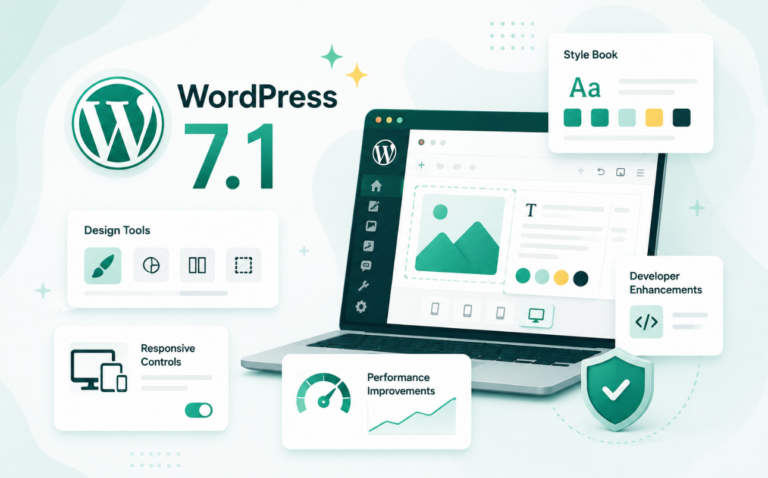
WordPress 7.1 is also now available.
See what’s new in WordPress 7.1, including the latest editor, media, design, and workflow improvements.
Key Takeaways
Release date: WordPress 7.0 “Armstrong” shipped on May 20, 2026, after being postponed from its earlier date of April 9, 2026.
Core focus: AI foundations in core, including the AI Client, Abilities API, and a central Connectors hub for AI providers.
Upgrade readiness: Check hosting compatibility, PHP version, plugin stack, theme behavior, editor workflows, and admin customizations in staging before updating production.
Admin overhaul: A modernized dashboard, a ⌘K Command Palette, a dedicated font management page, and visual revision scrubbing.
The Official WordPress 7.0 Release Schedule
WordPress 7.0 reached general availability on May 20, 2026. The release was originally targeted for April 9 to align with WordCamp Asia, but leadership pushed it back roughly six weeks to stabilize the AI infrastructure and finish the admin redesign. If you maintain client sites, the version is live now, so the planning question has shifted from “when” to “how soon do I roll it out.”
The final 7.0 release is backed by a large cross-functional release squad led by Matias Ventura, with coordination, technical, triage, and testing leads from across the project. It reflects more than 875 contributors, over 200 first-time contributors, more than 420 enhancements and fixes, more than 70 fully translated locales, and compatibility testing from more than 21 web hosts.
? Did you know? You don’t need to touch production to try WordPress 7.0. With InstaWP’s WordPress sandbox, you can launch a fresh 7.0 site in about ten seconds, test the new AI Connectors and Command Palette, then throw it away when you’re done.
What the Final Release Confirms
The final WordPress 7.0 release confirms the platform direction clearly: AI foundations in Core, a refreshed dashboard, stronger design tools, and more room for developers to build inside modern WordPress.
The release also reflects a large community effort: more than 875 contributors, over 200 first-time contributors, more than 420 enhancements and fixes, more than 70 fully translated locales, and testing support from more than 21 web hosts.
What is New in WordPress 7.0?
The core theme of WordPress 7.0 is AI foundations. For the first time, WordPress core can talk to generative AI models directly, with a standardized way for plugins and AI assistants to discover and act on what a site can do.
Around that headline sit a modernized admin, overhauled revisions, new design tools, responsive controls, new blocks, and developer-focused APIs. Here is everything that shipped, grouped by what it actually changes for you.
1. AI-Integrated WordPress: The Final Release Headline
What it is: A new AI foundation built into WordPress through the AI Client in Core, the Abilities API, Client-Side Abilities, the Connectors screen, and the optional AI plugin.
The final 7.0 release makes AI a platform capability rather than only a content-generation add-on. WordPress can now communicate with generative AI models, expose site abilities in a structured way, and give admins a central place to manage external AI connections.

To test this safely, create a WordPress 7.0 sandbox or staging site, open the Connectors screen, configure only the AI provider you want to evaluate, then test AI tasks such as image generation, title ideas, excerpts, and alt text suggestions before using them on a client site.

The practical value for agencies is workflow control. AI-enabled features should be tested in a temporary environment first, documented for the team, and only then introduced into production workflows.
For agencies looking to standardize delivery, this fits naturally into a professional agency workflow: test AI capabilities in staging, document what is approved, and keep production changes intentional.
What this actually means for you: WordPress 7.0 gives developers a more consistent base for AI integrations, while giving agencies a safer way to evaluate AI-powered publishing and site-management workflows.
Do not treat AI as a production shortcut on day one. Test prompts, permissions, provider connections, generated media, titles, excerpts, and alt text in a sandbox or staging site first.
We have covered these WordPress 7.0 features in detail for you as well.
2. Responsive Editing Mode
What it is: Show or hide specific blocks based on device screen size, directly inside the editor, no CSS or plugins required.
WordPress 7.0 adds a “Responsive Editing Mode” that gives content editors direct control over which blocks appear on desktop, tablet, or mobile.

What this actually means for you: Before this, if you wanted to show a condensed call-to-action on mobile and a full-width banner on desktop, you needed either a plugin, custom CSS classes, or a child theme hack.
Now an editor, with zero coding knowledge, can handle this from within the block editor. For agencies, this means fewer support requests about layout on mobile and more editorial control handed back to the client.
3. Pattern Editing, Spotlight & Isolated Editor Mode
What it is: A redesigned, less confusing way to edit synced patterns and template parts, without losing your place.
Previously, editing a synced pattern (a reusable block group used across multiple pages) required you to leave your current editor, open the pattern separately, make changes, and navigate back. It was disorienting, especially for non-technical users.
WordPress 7.0 introduces two new modes:
- Isolated Editor Mode lets you edit synced patterns inline, right where you are, without losing the context of the page you were working on.
- Spotlight Mode dims everything else in the editor and focuses your view on a single pattern or note at a time, useful when a page is complex and you need to concentrate on one section.

What this actually means for you: If you manage sites with global elements like announcement banners, CTAs, or footer content built as synced patterns, your editors can now update them without accidentally navigating away or getting confused about where they are. Fewer mistakes, faster edits.
4. Block Design Tools & Supports
What it is: A batch of typographic and dimensional controls that previously required custom CSS or a page builder plugin.
WordPress 7.0 ships the following new design tools natively:
- Text line indent: add indentation to paragraphs without writing CSS

- Text column support: flow a single paragraph across multiple columns (like a newspaper layout), without any plugin
- Aspect ratio controls: lock wide or full-width images to a specific ratio so they never look stretched
- Dimension presets: pre-defined spacing values that keep your layout consistent across the whole site
What this actually means for you: These were the features that used to push developers toward page builders like Elementor or Divi. Needing multi-column text or consistent spacing shouldn’t require a plugin. WordPress is closing that gap, giving theme developers and site builders more native control without adding plugin bloat.
5. Heading Block as Block Variations
Heading levels (H1-H6) are now proper Block Variations; meaning you can insert “Heading 2” directly from the block inserter, with its own icon, style, and default attributes.

What this actually means for you: This is a small change with a meaningful impact on editorial speed. Writers and editors who aren’t thinking about block mechanics can now just search for what they need and insert it cleanly. It also opens the door for theme developers to define distinct default styles per heading level, making design systems more consistent out of the box.
6. Final Collaboration Scope in WordPress 7.0
What changed: Earlier WordPress 7.0 coverage often focused on live multi-user collaboration. The final release announcement instead highlights AI infrastructure, the modernized dashboard, design tools, new blocks, responsive controls, revisions, and developer APIs.
For production planning, use the final release scope. Do not promise clients live cursor-by-cursor co-editing as a WordPress 7.0 feature unless a future official release or a specific plugin supports it for your workflow.
What you actually get in 7.0: The final release centers on AI, dashboard modernization, design controls, revisions, new blocks, and developer APIs. Test those shipped capabilities first, then treat collaboration-specific workflows as a separate compatibility review.
7. The Modern Admin Redesign (DataViews)
What it is: The Posts, Pages, and Media list screens rebuilt from the ground up to feel like a modern SaaS application instead of a 2005-era database table.
The WordPress dashboard has largely looked the same for over a decade. WordPress 7.0 introduces the most significant visual and structural change to the back-office in years through a system called DataViews.

DataViews components expand across more admin screens in 7.0, with cleaner typography, consistent spacing, inline filtering without page reloads, and visual alignment between the block editor and classic admin panels. This modernizes how you view and manage content:
- Post and Page lists are replaced with a flexible, app-like interface
- Filter, group, and sort content without page refreshes
- Multiple layout options: table, grid, or list views
- Persistent views that remember your preferences
What this actually means for you: If you manage a site with hundreds of posts or a team of editors, the old list table felt like a spreadsheet with no flexibility. DataViews makes content management feel fluid and fast.
The important note for developers: any plugin that hooks into or modifies the existing Posts or Pages list view may break. Audit plugins that customize admin screens before upgrading production.
8. The Modernized Dashboard, Command Palette, and Fonts
This is the change most people will feel every day. WordPress 7.0 ships a refreshed admin built around a new modern color scheme, with smoother transitions as you move between screens.

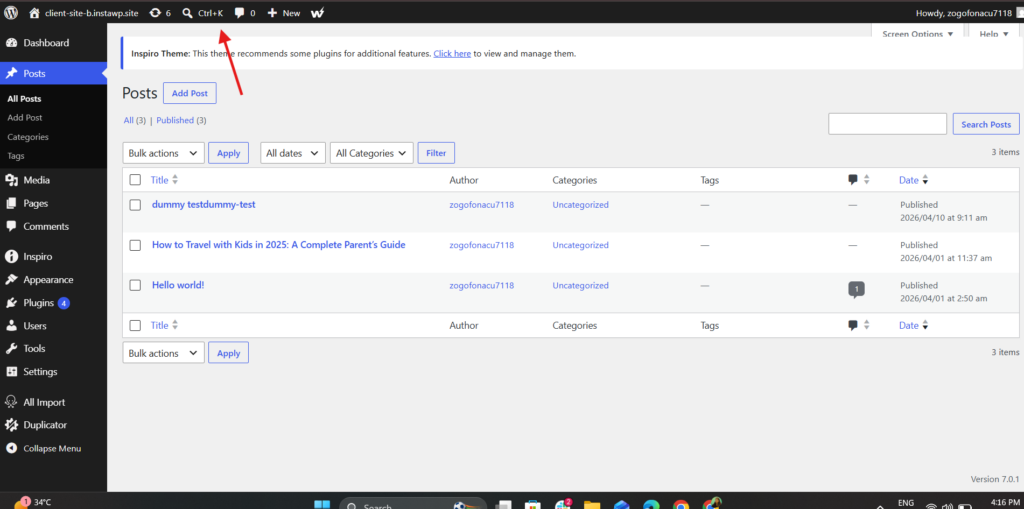
The headline interaction is a Command Palette: press ⌘K (or Ctrl+K), or click the icon in the upper admin bar, and a fuzzy-search prompt lets you jump to any screen, post, or registered command without hunting through menus. If you’ve used VS Code or Linear, it will feel instantly familiar.
Two more admin upgrades round this out. Typography now lives in one place: a dedicated font management page lets you install, upload, and manage fonts across block, hybrid, and classic themes, instead of relying on a fragmented mix of theme settings, plugins, and custom workarounds.
? Did you know? Agencies running dozens of client sites can test the 7.0 admin across many environments at once. With InstaWP’s managed WordPress cloud, you spin up disposable 7.0 sites from a template, validate the Command Palette and revisions flow, and only pay for what’s live.
And revisions have been overhauled. Instead of two columns of plain inserted-and-deleted text, you now visually scrub through versions with markers and color-coded overlays that show what actually changed, then restore the one you want in a single click.
What this actually means for you: Less time hunting through wp-admin and clearer editorial history.
For agencies onboarding clients, the Command Palette and the visual revisions screen make WordPress feel modern enough that you spend less time apologizing for the dashboard and more time shipping. If you manage many sites, it’s worth testing these flows in a sandbox before you push 7.0 to client production.
? Did you know? Agencies running dozens of client sites can test the 7.0 admin across many environments at once. With InstaWP’s managed WordPress cloud, you spin up disposable 7.0 sites from a template, validate the Command Palette and revisions flow, and only pay for what’s live.
9. Navigation Overlays and Block-Level Custom CSS
Two design controls close long-standing gaps. You can now design and build the navigation menu overlay (the panel that opens on mobile or on click) with blocks and patterns: add columns, style typography, or drop in your own close button, starting from a template or from scratch.
Separately, you can apply custom CSS at the block level, right inside the post or page, without touching a stylesheet or child theme.
What this actually means for you: Two more reasons to avoid a page builder for simple sites. Editors get a properly styled mobile menu without a plugin, and developers can scope a one-off style tweak to a single block instead of bloating the theme’s CSS.
10. No New Default Theme
WordPress 7.0 does not ship with a “Twenty Twenty-Six” theme. The project has stepped back from the tradition of a fresh default theme with every major version.
Instead, the focus is on making existing WordPress block themes like Twenty Twenty-Five more capable through the Site Editor. The next default theme, Twenty Twenty-Seven, is already in the works for a future release, with a public call for contributors underway.
11. The Abilities API and AI Client
WordPress 7.0 is not trying to be an AI writer. Instead, it’s building the infrastructure that allows AI to work better within the CMS.
The new Abilities API acts as a bridge. It provides a standardized way for AI services to understand what a specific WordPress site can do.
Rather than each plugin hard-coding its own connection to specific AI models, 7.0 introduces an “AI Client” in core that handles communication with generative AI models. The out-of-the-box functionality is intentionally limited; the value is the standardized interface that plugin developers build on top of.
This means plugin developers can build AI features that are consistent across the entire platform. Whether you’re using AI to generate alt text for images, suggest SEO improvements, or automate content workflows, these tools now have a native, secure way to communicate with WordPress core.
The Abilities API works with the Model Context Protocol (MCP), enabling AI assistants like Claude, ChatGPT, and others to:
- Discover what capabilities a WordPress site exposes
- Request permission to perform specific actions
- Execute tasks within defined boundaries

This isn’t theoretical; WordPress MCP integrations are already emerging across the WordPress ecosystem. For example, InstaWP’s MCP server lets AI assistants manage content and execute WordPress tasks through natural language commands over a single toggle.

It’s an early glimpse of what becomes possible when AI tools can natively understand and interact with WordPress infrastructure.
If you’re interested in experimenting with AI-powered WordPress development, you can start building and testing in a WordPress sandbox without affecting any production environments.
12. New Blocks: Breadcrumbs and Icons
WordPress 7.0 ships two new native blocks:
Breadcrumbs block : adds hierarchical navigation trails (e.g., Home > Category > Post) to any template without a plugin

Icons block : insert scalable icons directly into content or layouts

What this actually means for you: Breadcrumbs in particular have always been a plugin dependency for most WordPress themes. Having it as a native block means it integrates cleanly with the Site Editor and full-site editing themes. No more relying on a plugin that adds three extra database queries just to render “Home > Blog > Post Title.”
13. Gallery, Grid, and Cover Block Improvements
Several core blocks get meaningful upgrades:
Gallery block : now supports a lightbox mode, so clicking an image opens it in an overlay instead of a new page
Gallery block : now supports a lightbox mode, so clicking an image opens it in an overlay instead of a new page
Cover block : video backgrounds can now use embedded videos rather than requiring a direct file URL

What this actually means for you: These were features that agencies commonly handled with custom blocks or premium plugins. The lightbox alone eliminates a dependency that many sites carry. For clients who manage their own galleries, these upgrades mean a cleaner experience without extra plugin overhead.
14. PHP-Only Block Registration
What it is: Developers can now register blocks using only PHP; no React, no Node.js, no build toolchain required.

This is a significant shift in the development experience. Previously, creating a custom block meant setting up a JavaScript build environment with Node, npm, and React; a barrier that kept many traditional PHP WordPress developers from building blocks.
With PHP-only block registration, you write your block in PHP and WordPress automatically generates the inspector controls (the settings panel in the editor sidebar) for you.
What this actually means for you: If you’re a PHP developer who has avoided block development because the JavaScript toolchain felt foreign, this removes that barrier entirely. It also means lighter, faster plugin development for blocks that don’t need complex client-side interactivity.
15. Block Bindings and Pattern Overrides
What it is: An expansion of the system that connects block content to dynamic data sources; now extended to custom dynamic blocks.
Block Bindings, introduced in earlier releases, allow you to bind a block’s content to a data source like post meta or custom fields. In 7.0, pattern override support is expanded to custom dynamic blocks, giving developers more flexibility in how content is connected and controlled within patterns.
What this actually means for you: If you build custom blocks that pull content from ACF fields, custom post types, or external APIs, you can now tie those blocks into the pattern system more reliably. This is the foundation for building truly data-driven templates inside the block editor.
Technical Shifts Under the Hood
For the developers and site maintainers, version 7.0 brings some heavy-duty changes that require preparation.
Minimum PHP Version Bump to 7.4
The core team has proposed raising the minimum supported PHP version to 7.4. This is necessary to support the modern libraries required for collaboration features and AI APIs.
Why this matters:
- PHP 7.4 enables more consistent typing, making the codebase easier for both developers and AI tools to understand
- Many third-party AI SDKs already require PHP 7.4 or higher
- WordPress can adopt modern PHP features that improve performance and security
Recommended action: If your sites still run PHP 7.2 or 7.3, upgrade to PHP 8.2 or 8.3 before updating to 7.0. If your host runs anything below 7.4, WordPress 7.0 will not install at all, so confirming your PHP version with your host is the one readiness check you cannot skip. Test the upgrade thoroughly using a staging environment before touching production.
Editor Isolation and Iframing
To stop site styles from leaking into the editor, WordPress 7.0 enforces a fully iframed editor canvas when every block on a page uses the latest Block API. This sandboxes the editing surface and makes WYSIWYG significantly more accurate.
Benefits for developers:
- Third-party plugin scripts won’t accidentally break the editor layout
- Theme styles render exactly as they will on the frontend
- Clearer separation of concerns between editor and site styles
What WordPress 7.0 Means for Developers
This section breaks down the practical implications of WordPress 7.0 for different types of developers.
For Plugin Developers
The Abilities API opens new possibilities. If you’re building AI-powered features, the new Abilities API provides a standardized way to expose your plugin’s capabilities to AI assistants. Instead of building custom integrations for each AI model, you can register abilities that any AI client can discover and use.
The API works with the Model Context Protocol (MCP), allowing AI orchestration tools to understand what your plugin can do and interact with it programmatically.
For Theme Developers
Block theme evolution over replacement. WordPress 7.0 does not ship a new default theme. Instead, the focus is on making existing block themes like Twenty Twenty-Five more powerful through the Site Editor, with Twenty Twenty-Seven slated as the next default theme for a future release.
Editor iframing is now enforced. When every block on a page uses the latest Block API, WordPress 7.0 runs the editor inside an iframe so site styles and editor styles no longer leak into each other. This makes WYSIWYG much more accurate, but it also means you need to test how your theme’s editor styles render in the isolated environment.
For Agencies and Site Maintainers
The testing window matters even though 7.0 has shipped. Don’t rush a same-day upgrade on production. The safe play is to test your full plugin and theme stack against 7.0 on a staging copy first, watch for 7.0-compatible plugin updates, then promote once your stack is settled.
Final Thoughts: A Foundation for the Next Decade
WordPress 7.0 is more than a collection of features: it is a foundation release for AI-assisted, more customizable WordPress workflows. The final release shows WordPress moving toward a more modern dashboard, stronger design controls, and a deeper developer platform while maintaining the freedom of open source.
Whether you are a solo developer, freelancer, agency, or site owner, the safest next step is not to rush the update. Test WordPress 7.0 in a sandbox or staging site, review your plugins and theme behavior, and then roll it out when your stack is ready.
The message is clear: WordPress 7.0 is available now, and the correct rollout path is controlled testing first, production upgrade second.
Test WordPress 7.0 before you touch production
Spin up a fresh WordPress 7.0 sandbox in about ten seconds, try the AI Connectors, Command Palette, and new design tools, then push to staging when you’re ready. No local setup, no risk to live sites.
FAQs
When is the release date for WordPress 7.0?
Will there be more releases in 2026?
What is the main focus of WordPress 7.0?
What is the minimum PHP version for WordPress 7.0?
How does WordPress 7.0 handle AI?
Is there a new default theme in WordPress 7.0?
Will my current plugins work with WordPress 7.0?
Why is WordPress 7.0 called Armstrong?