When Cloudflare announced EmDash on April 1, 2026, calling it “the spiritual successor to WordPress,” the internet did what the internet does. Some declared WordPress dead. Others called it an April Fools’ joke. The truth, as usual, sits somewhere uncomfortable in the middle.
EmDash is real. It is well engineered. And in some specific ways, it genuinely shows what a CMS designed in 2026 (instead of 2003) could look like. But “WordPress alternative” is doing a lot of work in that headline, and most of the coverage so far has either been breathless hype or dismissive snark.
Table of Contents
What EmDash Actually Is
Before the comparison, the basics. EmDash is a content management system built by Cloudflare, written entirely in TypeScript, powered by Astro on the frontend, and designed to run on Cloudflare Workers (or any Node.js server). It is fully open source under the MIT license, currently at version 0.1.0, and explicitly described by Cloudflare itself as an “early developer beta.”
Must Read: EmDash vs WordPress: A Side-by-Side Comparison
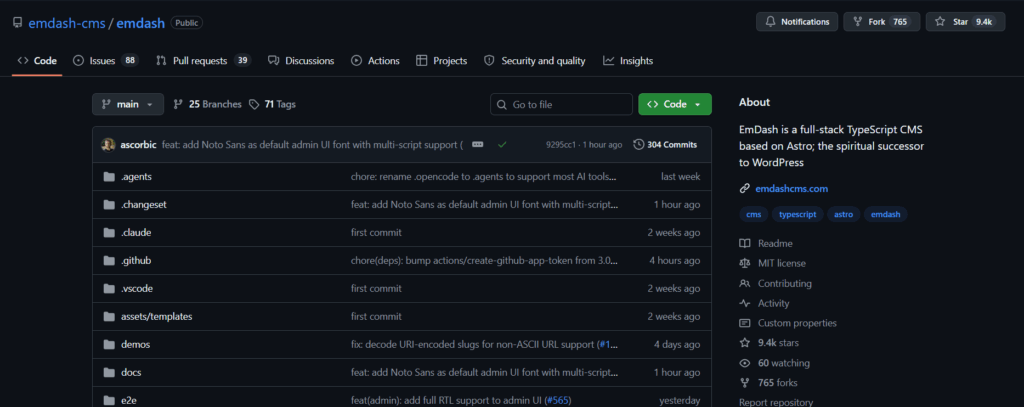
The pitch: WordPress is 23 years old, plugins create 96% of WordPress security vulnerabilities, hosting has fundamentally changed in those 23 years, and the time has come for a CMS designed for the serverless, AI-native, agent-driven web.
It is a bold pitch. Some of it is even right. Let’s look at where.
Where EmDash Genuinely Stands Out
Before we try to figure whether EmDash is actually a WordPress alternative, let’s give it the credit where it deserves.
Watch the video comparision.
1. Plugin Security Architecture (Credit Where It’s Due)
In EmDash, every plugin runs in its own isolated Dynamic Worker (a V8 isolate). A compromised plugin cannot reach your database, filesystem, or other plugins. Plugins declare their permissions in a manifest, similar to OAuth scopes. You see exactly what a plugin can do before you install it.
If a plugin needs to talk to an external API, it must declare the specific hostname in advance. No silent data exfiltration. No surprise database access.
This is materially better than WordPress’s plugin model, where every plugin runs in the same execution context as core and gets full access to everything by default. Cloudflare’s “96% of vulnerabilities originate in plugins” statistic is real. The architecture they’ve built genuinely addresses the root cause.
But here is the part nobody mentions in the hype.
Roger Montti at Search Engine Journal pointed out a crucial nuance using Patchstack data: only 17% of WordPress plugin vulnerabilities are high severity. Most are in plugins almost nobody uses. The real-world plugin security risk for a WordPress site running mainstream, well-maintained plugins is dramatically lower than the headline number suggests.
More importantly, WordPress plugin security is a problem you can solve with the right setup. You do not need to switch CMSes to fix it.
If you run your WordPress site on a managed hosting platform, you already get a security stack EmDash cannot match for an existing WordPress site:
- Vulnerability scanner that audits your plugins and themes against known CVEs
- Malware scanning built into the platform
- Automated security updates so out-of-date plugins (the actual cause of most exploits) get patched
- WAF and DDoS protection at the infrastructure level
- Daily backups on most plans, so even worst-case compromise is recoverable
- Object cache and isolated site environments that compartmentalize sites at the hosting level
And here is the modern twist that most WordPress security advice misses: with MCP-enabled AI agents connected to your WordPress sites through InstaWP, you can actually run AI-assisted security audits on demand.
Ask Claude or ChatGPT to scan your installed plugins, check for vulnerabilities, identify outdated code, and even patch known issues. This is not theoretical. It works today. We covered the mechanics of this in our recent post on AI-assisted WordPress development.
The honest framing: EmDash’s plugin security is better by architecture. WordPress plugin security, with the right hosting and tooling, is good enough by management. For 99% of real-world sites, the latter is the practical answer.
2. Scale-to-Zero Serverless Architecture
EmDash runs on Cloudflare Workers and bills only for actual CPU time. No idle compute. No provisioning. Sites can scale from zero to millions of requests per second on the same infrastructure that powers some of the largest sites on the internet.
For a low-traffic personal blog or a spiky-traffic launch site, this economics is genuinely better than traditional WordPress hosting where you are paying for a server running 24/7 even when nobody is visiting.
But here is the catch. Cloudflare Workers needs your site to fit a serverless execution model. Long-running tasks, complex backend logic, file system writes, and persistent connections all need workarounds. For most WordPress use cases, particularly anything with WooCommerce, membership systems, LMS plugins, or heavy custom functionality, this is not a clean fit.
And the practical alternative for WordPress is more sophisticated than people give it credit for. InstaWP’s pay-as-you-go hosting model, for instance, gives you the ability to spin up fully-managed WordPress sites in seconds, run staging environments on demand, and pay only for what you use.
You get instant WordPress provisioning, snapshot-based backups, and the ability to spin sites down when you do not need them. For WordPress developers who actually need scale-on-demand, InstaWP gets you most of EmDash’s economic advantages without abandoning the WordPress ecosystem.
For agencies running development environments for client work, this matters more than EmDash’s serverless story. You spin up a sandbox to demo a client redesign, share the link, get feedback, kill the site. No idle servers. No infrastructure overhead. You stay on WordPress, your clients stay on WordPress, but you get the elastic economics that make modern hosting work.
3. AI-Native Design (The Forward-Looking Bet)
Every EmDash instance ships with:
- A built-in MCP (Model Context Protocol) server, so any AI assistant can connect and operate the site
- Agent Skills bundled into the platform that teach AI agents how to use EmDash, write plugins, and port WordPress themes
- An EmDash CLI for full programmatic control
Melody Brue at Moor Insights & Strategy made an observation that stuck with us: AI agents never pick WordPress for new sites unless explicitly instructed. As more sites get built by or with AI agents, that bias matters.
WordPress is responding. WordPress 7.0 brings native MCP support, the Abilities API, and AI Client Connectors. But that is a bolt-on to a 24-year-old foundation. EmDash was designed for this from day one.
While WordPress core’s native MCP support is still taking shape and will not ship until 7.0 lands, InstaWP has already perfected MCP integration for WordPress. Every site built on InstaWP comes with built-in MCP integration ready to use.
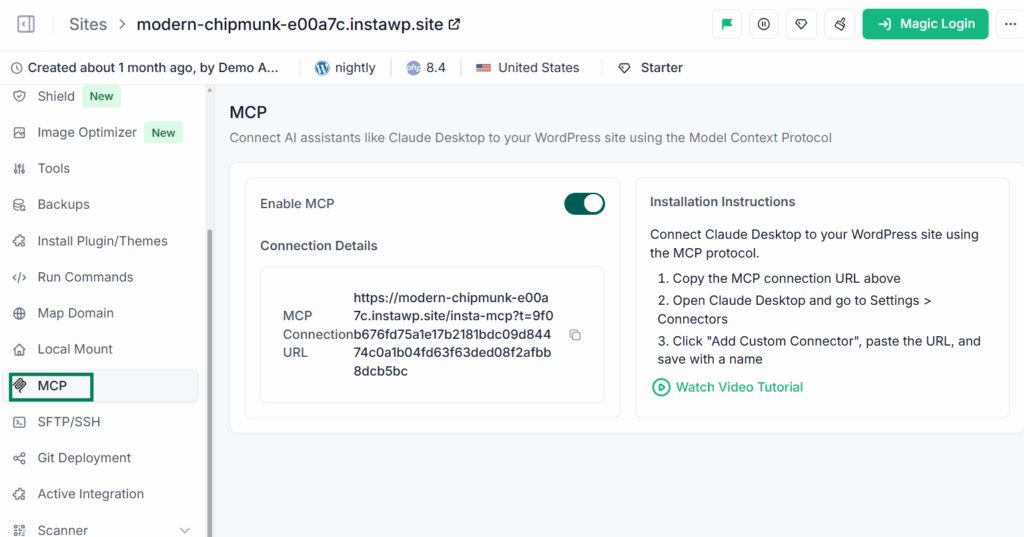
You connect your AI tool of choice (Claude, ChatGPT, or any MCP-compatible assistant), authenticate once, and the AI can read your content, edit your themes, write plugins, run WP-CLI commands, and operate your site like a senior developer.
You do not have to install plugins. You do not have to wait for WordPress 7.0. You do not have to choose between staying on WordPress and getting AI-native capabilities. InstaWP gives you both today.
EmDash’s AI-native design is real and forward-looking. But “AI-native” on WordPress is not a future story anymore. It is here, working, and available to anyone running their site on the right hosting platform.
4. Marketplace and Licensing Freedom
EmDash plugins can use any license. Because they run in sandboxed isolation, code never touches WordPress’s GPL-licensed core, which means no license contagion. Commercial plugin developers locked out of monetization options by WordPress’s GPL plus marketplace dynamic have a real reason to look at EmDash.
This is a genuine differentiator for one specific audience: commercial plugin developers building proprietary code who want flexibility on licensing.
For everyone else, the WordPress plugin marketplace is a feature, not a bug. The 60,000+ plugins, the ratings, the reviews, the community vetting, the discovery mechanism, all of that is what makes WordPress usable by non-developers. EmDash trades that ecosystem for licensing freedom. For most users, that trade does not pencil out.
5. Native Pay-Per-Use Monetization (x402)
EmDash ships with HTTP 402 Payment Required support built in. You can charge AI agents per request to access content, no subscription system needed. As more web traffic shifts from human readers to AI crawlers and agents, this becomes a genuinely interesting revenue model.
WordPress has nothing equivalent natively. You can bolt on paywall plugins, but it is not a first-class capability.
This is forward-looking and worth watching. But it is also speculative. The market for “AI agents paying for content per request” is barely a thing yet. By the time it becomes a thing, WordPress will likely have plugin solutions, or even core support. Being early is not always being right.
This is forward-looking and worth watching. But it is also speculative. The market for “AI agents paying for content per request” is barely a thing yet. By the time it becomes a thing, WordPress will likely have plugin solutions, or even core support. Being early is not always being right.
6. Modern Developer Experience
TypeScript end-to-end. Astro for theming. Schema definition in the admin UI without needing Advanced Custom Fields. Passkey authentication by default. For a developer starting fresh in 2026, this stack matches how they already work.
This is real and credit is due. WordPress’s PHP plus jQuery plus Gutenberg React plus theme.json plus block.json plus Site Editor plus REST API plus WP-CLI is, charitably, a layered cake of two decades of decisions. EmDash’s stack is cleaner.
But “cleaner stack” does not win in a market where ecosystem, tooling, and existing developer skill matter more than architectural elegance.
Where EmDash Falls Short (And Why It Probably Will Not Beat WordPress)
Now, let’s get to the real question:
Is EmDash Really a WordPress Alternative?
Short answer: It’s a real alternative for a specific audience, but not a WordPress replacement for the broader market, and almost certainly never will be in its current form. Let us break this down properly.
1. The Ecosystem Moat Is Two Decades Deep
This is the single biggest reason EmDash will not displace WordPress, and it is basically insurmountable. WordPress has 60,000+ plugins, 31,000+ themes, millions of developers worldwide, page builders that run actual businesses, an enormous support community, educational infrastructure, courses, books, conferences in 100+ countries, and agencies in every major city.
EmDash has GitHub stars and a v0.1.0 release. Architecture does not beat ecosystem. Users do not switch platforms because the alternative has cleaner code. They stay because the tools they need exist for their current platform today.
2. It Is Not Built for the Actual User
Jamie Marsland from Automattic captured this perfectly: EmDash is “a tidy desk for developers, but most people are not trying to tidy their desk. They are trying to run a business from it.”
The real WordPress user base looks like this: restaurant owners managing menus, recipe bloggers worried about traffic, small e-commerce stores running WooCommerce, marketing teams updating landing pages, photographers showcasing portfolios, local service businesses, freelancers, agencies serving non-technical clients.
None of these people care about V8 isolates, capability manifests, or x402. They care about: “Can I drag this image where I want it? Can I sell something? Can I rank on Google? Can I do this without calling a developer?”
WordPress answers those questions today. EmDash does not.
3. No Visual Page Builder
This is crippling for the mainstream market. WordPress’s modern strength is not even Gutenberg. It is that Elementor, Bricks, and Divi let non-technical users build sophisticated sites visually. EmDash has no equivalent. For 80% of WordPress users, “no visual page builder” is “no thanks.”
4. CLI and Code-Heavy Setup
Setting up EmDash involves GitHub repos, database configuration, and command-line work. Even Cloudflare’s “one-click” deployment eventually requires terminal interaction and configuration of wrangler.jsonc files. WordPress’s “famous five-minute install,” and modern hosts that get you to a working site with a single click on InstaWP, set a usability bar EmDash cannot currently meet.
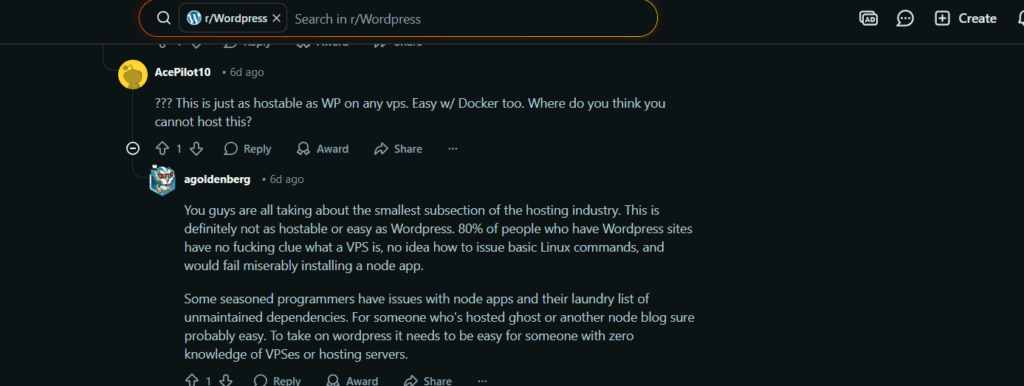
The Reddit thread on r/WordPress made this point bluntly. As one developer put it: “80% of people who have WordPress sites have no clue what a VPS is, no idea how to issue basic Linux commands, and would fail miserably installing a Node app.” That is the real market. EmDash is currently not for them.
5. Migration Is Brutal for Existing Sites
Thomas Randall from Info-Tech Research Group flagged this clearly. EmDash uses Portable Text. WordPress uses HTML. Automated migration is significantly complicated. PHP themes and plugins do not carry over and would need substantial redevelopment. WooCommerce stores, membership sites, LMS platforms, and complex custom field configurations do not migrate cleanly.
For any existing WordPress site of meaningful complexity, the migration cost dwarfs any architectural benefit. Enterprise IT teams running WordPress at scale are not moving. Period.
6. Cloudflare’s Own UI Is Widely Disliked
Here is something the analyst pieces missed but the Reddit thread surfaced. Cloudflare’s own dashboard has a reputation among its users for being confusing, constantly reorganized, and difficult to navigate. As one Cloudflare customer of many years put it on Reddit: “UI is NOT their strength.”
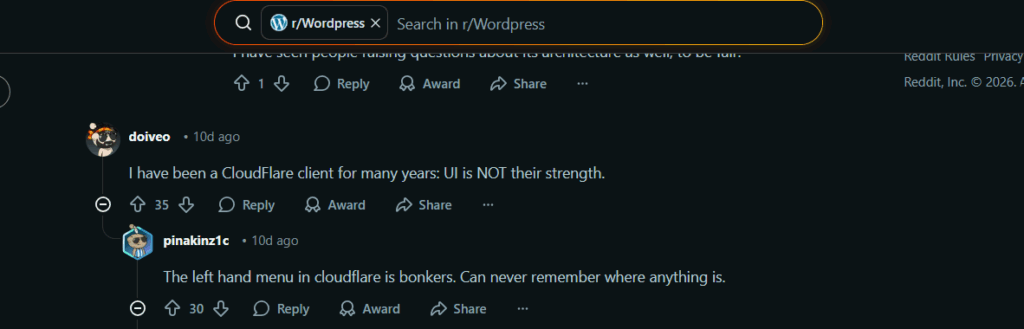
If you cannot trust Cloudflare to make a good admin UI for their existing products, why would you trust them to build a non-developer-friendly CMS?
7. Cloudflare Lock-In Concerns
EmDash can technically run on any Node.js server with SQLite, but the optimal experience is on Cloudflare’s stack: Workers, R2, D1. For organizations wary of single-vendor dependencies, especially after watching Heroku, Parse, or any number of platform-as-a-service flameouts, that is a yellow flag.
WordPress’s portability is one of its underrated superpowers. You can move a WordPress site between hundreds of hosts with minimal friction.
8. The Plugin Marketplace Problem
EmDash has no plugin repository, no ratings, no reviews, no discovery mechanism. Plugins are added by editing astro.config.mjs. Even if developers wanted to build EmDash plugins, there is currently no commercial path or distribution surface.
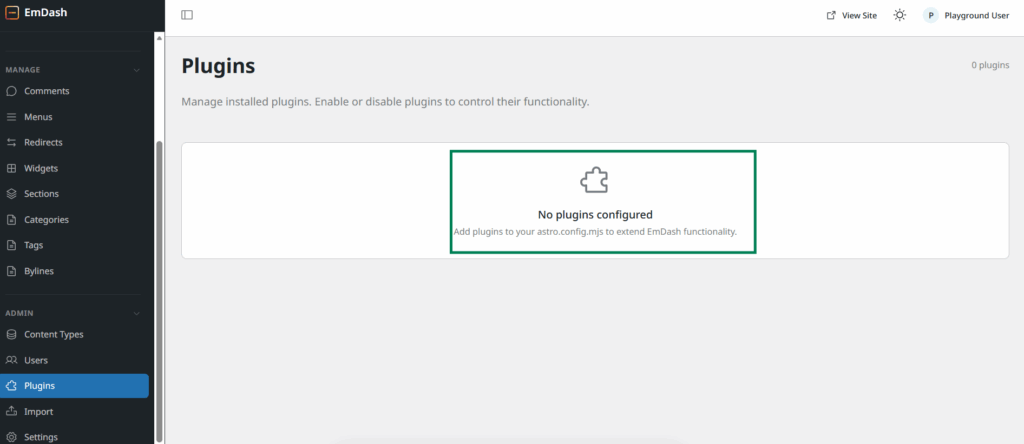
WordPress’s plugin economy is worth hundreds of millions of dollars. That ecosystem will not mirror itself onto EmDash overnight, and without it, EmDash has nothing for users who need extended functionality.
9. The “Headless WordPress” Comparison Is Devastating
Headless WordPress promised similar architectural benefits: decoupled, modern frontend, better performance, cleaner separation of concerns. It never went mainstream. It stayed niche. EmDash faces the same adoption ceiling for the same reason. Architectural elegance does not win in markets where usability and ecosystem matter more.
10. v0.1.0 Means v0.1.0
Cloudflare itself calls EmDash an “early developer beta.” It is missing media editing, a visual builder, a plugin marketplace, an established theme ecosystem, and battle-tested production deployments at scale. Roger Montti’s bottom line is the honest one: “EmDash is not ready for general use. It is literally not for the average user.”
That is not a hit piece. That is reality.
11. WordPress Itself Is Catching Up
WordPress 7.0 is shipping native MCP support, AI Client Connectors, the Abilities API, real-time collaboration, and a modernized admin. The gap EmDash is exploiting is closing while EmDash is still in v0.1.0.
By the time EmDash matures into a mainstream-ready product (realistically 18 to 24 months minimum), WordPress will have absorbed many of its strongest ideas, minus the architectural rebuild, but with the ecosystem still intact.
Combined with what hosting platforms like InstaWP already deliver (instant sandboxes, built-in MCP integration, AI-native workflows, vulnerability scanning, scale-on-demand sandbox sites), the practical reasons for a WordPress user to switch keep shrinking, not growing.
The Honest Verdict
EmDash is a real alternative for a specific audience: new developers starting fresh in 2026, AI-agent-driven sites that need programmatic and secure CMS infrastructure, composable and headless CMS evaluators (where EmDash competes with Strapi, Contentful, and Sanity, not WordPress), Cloudflare-native shops who want everything on one stack, and security-sensitive enterprise use cases where plugin isolation is non-negotiable.
EmDash is not a WordPress alternative for: existing WordPress sites of any complexity, non-technical users (small business owners, bloggers, marketers), anyone who needs a visual page builder, anyone who needs the WordPress plugin ecosystem, anyone unwilling to use a CLI, and anyone who cannot accept Cloudflare lock-in.
This is “operating model versus operating model,” not “product versus product.” Incumbents have inertia. Insurgents have architectural purity. The two rarely move at the same speed.
EmDash will influence the next decade of CMS architecture. Some of its ideas (sandboxed plugins, capability-based permissions, AI-native design) will end up inside WordPress core. Some will inspire competitors. A meaningful slice of new sites, especially AI-agent-built sites, will land on EmDash or things like it.
But “spiritual successor to WordPress”? Not yet, and probably not ever in the way Cloudflare’s marketing suggests. WordPress is not dying. It is adapting. And the practical gap EmDash is trying to exploit is mostly closable with the right WordPress hosting, the right AI tooling, and the WordPress 7.0 modernization that is landing in the next few weeks.
What WordPress Developers Should Actually Do
Stay on WordPress. Watch EmDash. Learn from its good ideas where they apply. But here is what we would actually recommend right now:
- Move to a modern WordPress host that solves the things EmDash claims as differentiators: InstaWP’s vulnerability scanner, automated backups, isolated sandbox environments, and built-in MCP integration cover most of the practical security and modern-workflow gaps.
- Connect AI agents to your WordPress sites today, do not wait for WordPress 7.0: Built-in MCP integration on platforms like InstaWP means you can have Claude or ChatGPT operating your site like a developer right now. We have a video on this coming soon and the previous posts in this series cover the setup.
- Use sandbox sites for everything: Demos, staging, client previews, experimental builds. The economics that EmDash promises through serverless are already available to WordPress developers through modern instant-provisioning hosting.
- Audit your plugins: The WordPress plugin security problem is real but solvable with discipline. Use reputable plugins, keep them updated, run vulnerability scans, deactivate what you do not need. The gap between “WordPress plugin security” and “EmDash plugin security” closes a lot when you actually manage your plugins.
- Get ready for WordPress 7.0: Real-time collaboration, native MCP, AI Client Connectors, and the Abilities API are landing soon. The features EmDash is positioning as future-of-CMS are mostly arriving in WordPress core within months.
The question is not whether EmDash is interesting. It is. The question is whether you should rebuild your business on it. For almost everyone reading this, the answer is no. Build on the platform that 40% of the internet already runs on, host it somewhere modern, connect it to AI, and let WordPress’s ecosystem do the heavy lifting while you focus on actually shipping work.
EmDash is a fascinating preview of what a CMS designed in 2026 looks like. WordPress, well hosted and well managed, is a fascinating example of how a mature platform adapts to stay relevant. Both stories are worth following. Only one of them is ready to power your business today.