Drupal has long been praised for its flexibility, especially among large enterprises and government organizations. But as of Drupal 7’s end-of-life (January 5, 2025), thousands of website owners have found themselves at a crossroads: continue investing in complex Drupal upgrades, or migrate from Drupal to WordPress and simplify everything from publishing to performance.
And the shift is very real.
Agencies, developers, and SMBs are increasingly choosing WordPress not just for its ease of use, but for the massive ecosystem it brings. This blog breaks down the 10 Drupal to WordPress migration benefits, covering everything from cost savings and faster development to broader plugin support and better client usability.
Table of Contents
Drupal to WordPress Migration Benefits You Can Bag
Migrating from Drupal to WordPress is more than just a CMS switch; it’s an upgrade in efficiency, flexibility, and growth potential. By choosing to migrate from Drupal to WordPress, you gain access to a platform that’s built for modern publishing, faster development, and effortless scalability.
From reduced maintenance costs to a rich ecosystem of 55,000+ plugins, the Drupal to WordPress migration benefits we’re about to explore will show you why so many agencies, SMBs, and even large enterprises are making the move.
Benefit #1: Faster Development and Launch Cycles
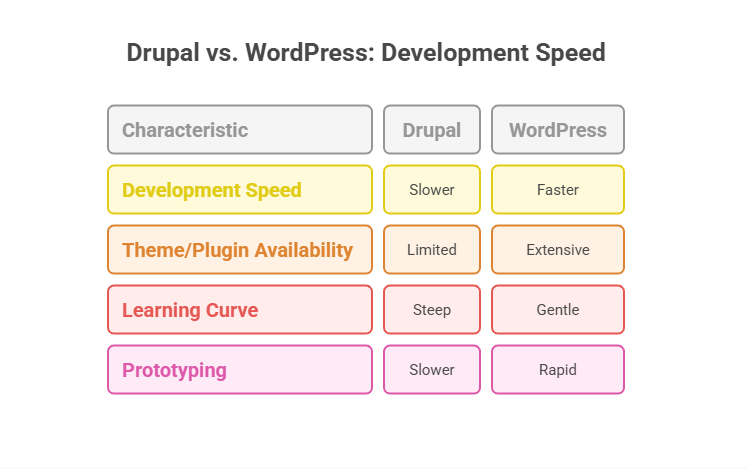
One of the most noticeable Drupal to WordPress migration benefits is the massive improvement in development speed. Building, customizing, and launching websites with WordPress is significantly quicker compared to Drupal.
1. Theme and Plugin Availability
Drupal relies heavily on custom development and module configuration, which often means longer dev cycles and deeper backend knowledge. Even creating a simple blog or marketing site on Drupal can demand a dedicated developer.
WordPress, on the other hand, offers thousands of ready-to-use themes and plugins. This reduces the need to build everything from scratch. For example, instead of writing custom code for layout management in Drupal, WordPress users can drag and drop content using tools like Elementor or Gutenberg.
And with all-in-one WordPress cloud development platforms such as InstaWP, this makes it even easier.
You get a fully integrated build + host + manage workflow under one roof. Developers can spin up fully functional websites within 5 minutes, host them with fully managed cloud hosting that offers features such as CDN, multiple PoPs, edge caching, security shield, and many more, and can manage 100+ sites from one dashboard.
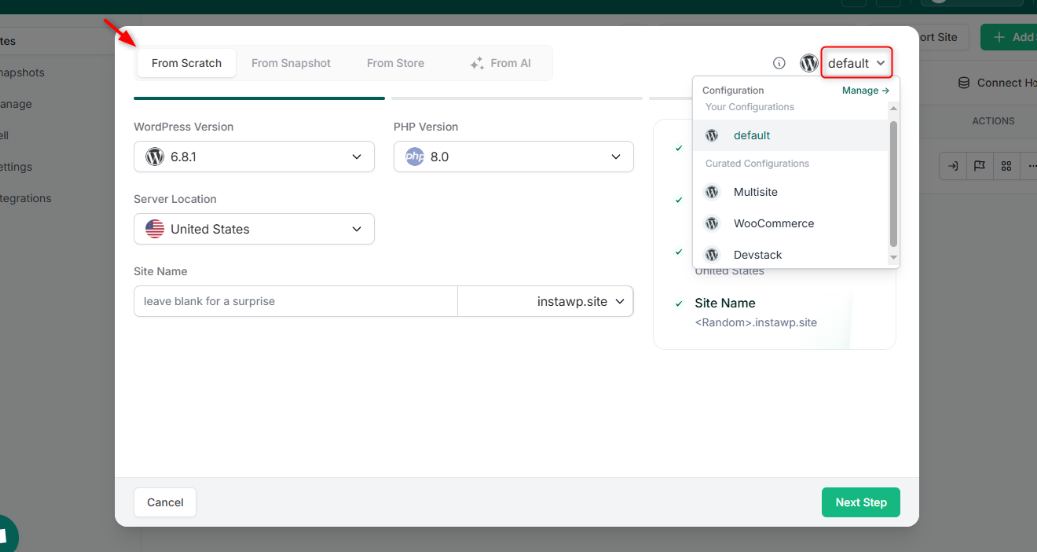
With its flexible pay-as-you-go plans, you can control the development cost as well.
2. Learning Curve
Drupal has a steep learning curve. It demands knowledge of custom hooks, content types, taxonomy, and YAML-based configuration. This makes onboarding new team members time-consuming and expensive.
WordPress is beginner-friendly. Most developers and even non-technical users can get comfortable with its dashboard in a day or two. For agencies, this means less time training staff and more time shipping client work.
3. Rapid Prototyping
In WordPress, you can test design ideas, page layouts, and content models on the fly. With platforms like InstaWP, developers can instantly create temporary WordPress environments to simulate or test a site before going live. This is especially helpful when planning to migrate from Drupal to WordPress and you want to validate content structure or design options quickly.
Benefit #2: Lower Cost of Development and Maintenance
Another major reason why agencies and developers choose to migrate from Drupal to WordPress is the drastic reduction in development and ongoing maintenance costs. With Drupal, you’re often locked into high development overheads, expensive hosting requirements, and a limited pool of specialists. WordPress flips that equation entirely.
1. Developer Costs
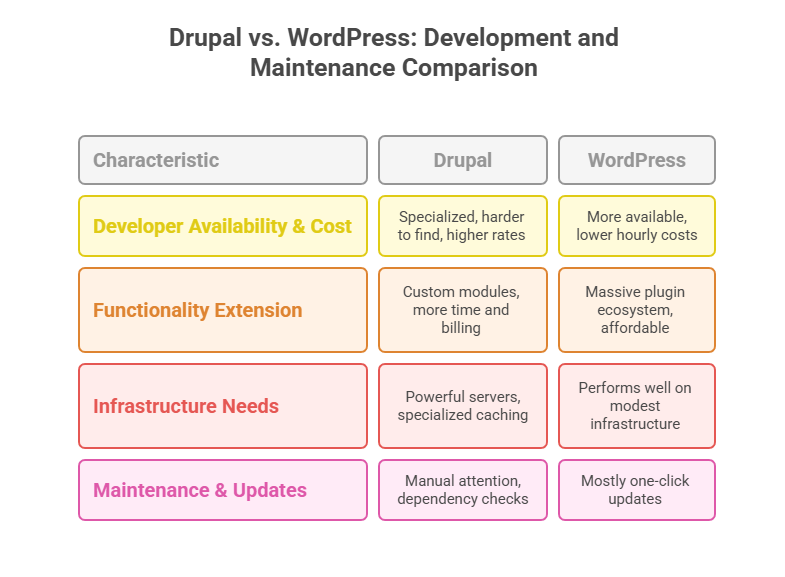
Drupal projects usually require specialized developers who are well-versed in Symfony, PHP, and the Drupal API. These developers are harder to find and typically charge higher rates. In contrast, WordPress developers are more widely available, often at lower hourly costs, thanks to the platform’s popularity and easier learning curve.
As you migrate from Drupal to WordPress, your development talent pool multiplies, and you’re not forced to pay premium prices for routine tasks like theming, content modeling, or plugin customization.
2. Plugin-First vs Custom-First
In Drupal, extending functionality usually means writing or adapting custom modules, which increases time and billing. WordPress solves this with its massive plugin ecosystem. You can add complex features, forms, marketing, SEO optimization, caching, and CRM integrations, using plugins that are either free or affordably priced.
Even if you need custom development, WordPress allows developers to build on top of existing tools, not from scratch.
3. Reduced Infrastructure Requirements
Drupal sites often require more powerful servers, reverse proxies like Varnish, and specialized caching mechanisms to perform well. This drives up hosting costs. WordPress performs well even on modest infrastructure, especially when paired with optimized managed cloud hosting solutions such as InstaWP.
Did You Know:
With InstaWP, you can instantly launch a fully configured WordPress staging instance on blazing-fast servers. There’s no need to pay for expensive development environments or staging servers. Whether you’re testing a new feature, building a custom site, or performing a Drupal to WordPress migration, you can do it on-demand, without touching your live environment.
4. Maintenance and Updates
Drupal core and module updates require manual attention, careful dependency checks, and sometimes even developer intervention. In WordPress, core and plugin updates are mostly one-click.
And if you’re managing multiple client sites, using InstaWP’s site management features makes website maintenance and updates a way to easier.
You can automate them, schedule them, or bulk-manage them with a single click. From users to security threats, all are managed without any hassle.
If budget, scalability, and turnaround time matter to your project or agency, the Drupal to WordPress migration benefits stack up fast. You’ll cut costs at every stage, from hiring to hosting, while gaining the agility to deliver more value to your clients.
Benefit #3: Easier Content Management and Client Usability
One of the most user-loved Drupal to WordPress migration benefits is how much simpler content creation and editing become after switching. Drupal is powerful, but its content admin UI often overwhelms clients, editors, and even junior developers. WordPress, in contrast, is built for humans.
1. Intuitive Dashboard
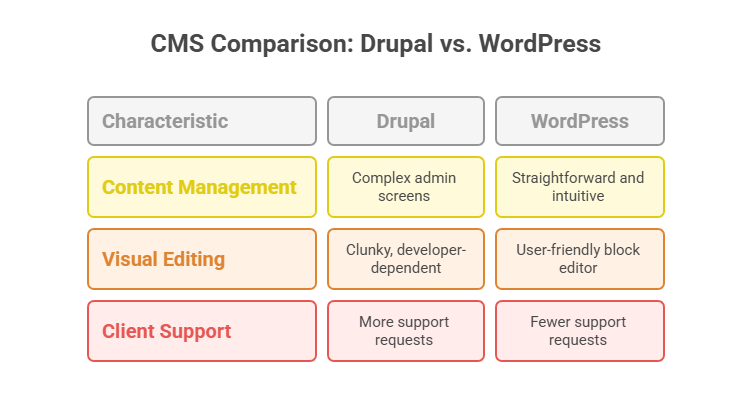
In Drupal, managing content types, taxonomy, and blocks often requires navigating a maze of admin screens. Editors sometimes need developer assistance to publish a basic landing page.
WordPress makes everyday content management incredibly straightforward. The dashboard is clean, the post editor is familiar (think Google Docs with blocks), and actions like adding media, changing URLs, or updating SEO metadata can be done in seconds.
Clients love WordPress because they can work independently without “breaking” the site.
2. Visual Editing with the Block Editor
Drupal’s layout builder is evolving, but it’s still clunky and developer-dependent. WordPress’ native block editor (Gutenberg) allows users to build dynamic pages visually, using reusable blocks, patterns, and templates. There’s no need for custom code to arrange text, images, or call-to-actions.
Pair this with visual builders like Elementor or Spectra, and even non-tech teams can design polished pages in real-time.
3. Fewer Support Tickets from Clients
Agencies that migrate Drupal sites to WordPress often report a sharp drop in client support requests post-launch. Why? WordPress is self-explanatory. Clients can edit menus, publish blogs, and update images without developer help, saving your agency countless hours.
After you convert a Drupal site to WordPress, you can clone it into a sandbox and hand it off to your client for training and approval, before going live.
Example: Create a branded training environment using InstaWP Snapshots. Your client can experiment in a safe, isolated WordPress instance, with zero risk of breaking the production site.
Benefit #4: Greater Flexibility with Themes and Visual Builders
A core reason why many agencies and developers migrate from Drupal to WordPress is the unmatched design flexibility that WordPress offers. Unlike Drupal, where theming is tightly coupled with backend configuration and templating systems like Twig, WordPress enables you to create, customize, and deploy visually rich layouts faster, with or without code.
Whether you’re planning a Drupal website migration or are already midway through, the visual freedom you’ll gain with WordPress is a game-changer.
We have already mentioned that you have a variety of themes and WordPress page builders to choose from when you build and host a WordPress site. But here is more to add. As you migrate from Drupal to WordPress, you gain the ability to reuse and scale your designs.
WordPress Patterns, Templates, and Global Styles lay the foundation, but InstaWP takes it to the next level. With InstaWP’s Snapshot and Template features, agencies and developers can instantly replicate entire website designs across projects.
By saving a site as a Snapshot or Template, you can launch a fully functional, production-ready WordPress site in under 5 seconds. Achieving this kind of speed and efficiency is nearly impossible in Drupal without custom development.
Once you convert your Drupal site to WordPress, you’ll have the ability to create consistent, editable layouts that marketing teams can update without engineering intervention.
Benefit #5: Easier SEO Optimization and Better Visibility
A huge reason why businesses and agencies migrate from Drupal to WordPress is to gain better control over their SEO without depending on developers.
While Drupal does offer SEO modules, they often require manual setup, theme-level tweaks, and technical know-how. WordPress, in contrast, delivers SEO-friendliness out of the box and scales it easily with plugins.
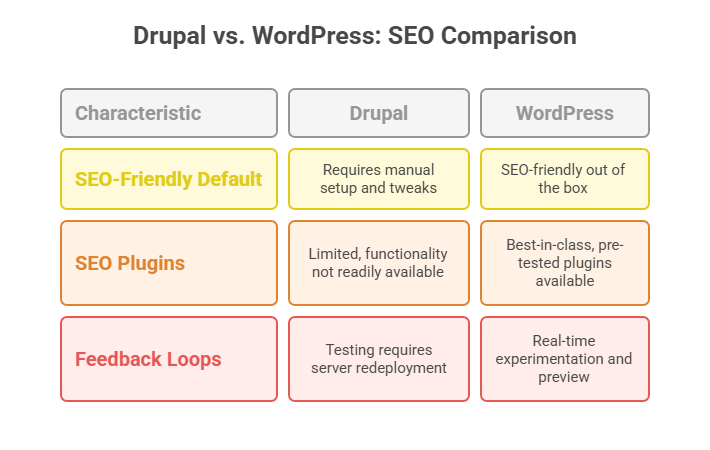
1. SEO-Friendly by Default
WordPress generates clean, indexable permalinks, allows you to edit metadata per post, and ensures mobile-first rendering.
During your Drupal website migration, you can quickly spin up a new WordPress instance using InstaWP, apply your content structure, and immediately preview how URLs, headings, and content will appear in search engines. There’s no need to configure routing or content types as you would in Drupal.
2. Best-in-Class SEO Plugins, Pre-Tested
WordPress offers a suite of industry-grade SEO plugins like Yoast, Rank Math, and SEOPress. Each plugin offers XML sitemap generation, schema markup, breadcrumbs, and instant indexing support.
Before choosing one, you can install multiple plugins across different WordPress sandboxes at a mere cost of $2 per month with InstaWP’s Sandbox plan and compare their impact on layout, page speed, and admin usability.
This lets you validate your SEO stack as part of the Drupal to WordPress migration, without bloating your production site or risking plugin conflicts. This type of functionality is not available with Drupal.
3. Quick Feedback Loops for SEO Optimization
Unlike Drupal, where testing changes may require server redeployment or permission tweaks, WordPress allows you to experiment with titles, meta descriptions, and structured data in real-time. InstaWP lets you preview how those changes affect your front end, run Lighthouse audits, and even share demo links with your SEO team or clients for feedback; all in one go.
Benefit #6: Simplified User Role and Permissions Management
Another key Drupal to WordPress migration benefit lies in how user roles and permissions are handled. Drupal is known for its granular access control, but that granularity often leads to over-complication. Creating new roles, assigning permissions, and maintaining user hierarchies can feel like managing a developer-only database.
WordPress simplifies this drastically. Its default roles, Administrator, Editor, Author, Contributor, and Subscriber, are logical, easy to manage, and extendable with plugins. And when you’re migrating from Drupal to WordPress using a testing environment like InstaWP, managing and previewing user role behavior becomes effortless.
With InstaWP, you don’t have to guess or push changes live to test role behavior. You can log in as a Contributor, Author, or custom role user inside your staging sandbox and instantly see how they interact with the block editor, media uploads, or page drafts.
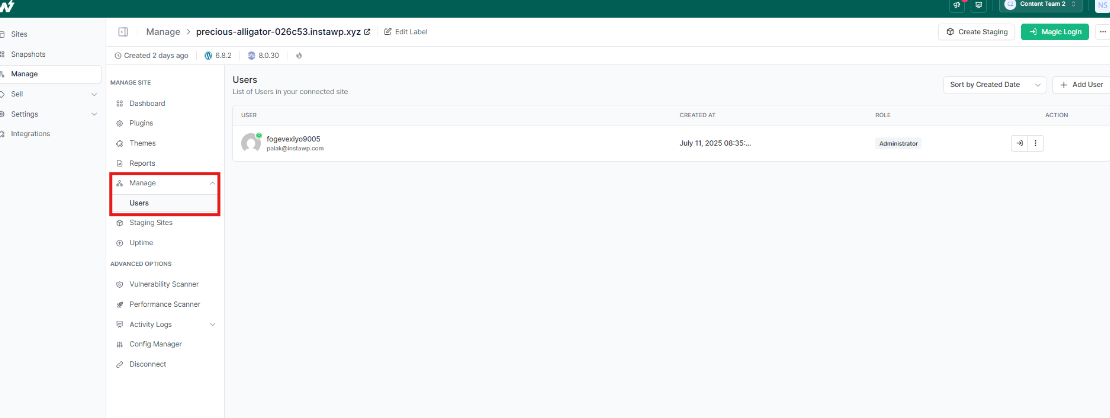
This helps agencies and teams eliminate guesswork during the migration phase and ensures accurate role behavior before launch.
Benefit #7: Faster Page Speed and Performance Optimization
Performance isn’t just a nice-to-have; it directly impacts SEO, conversions, and user satisfaction. One of the most business-critical Drupal to WordPress migration benefits is the ability to optimize your website speed more efficiently in WordPress.
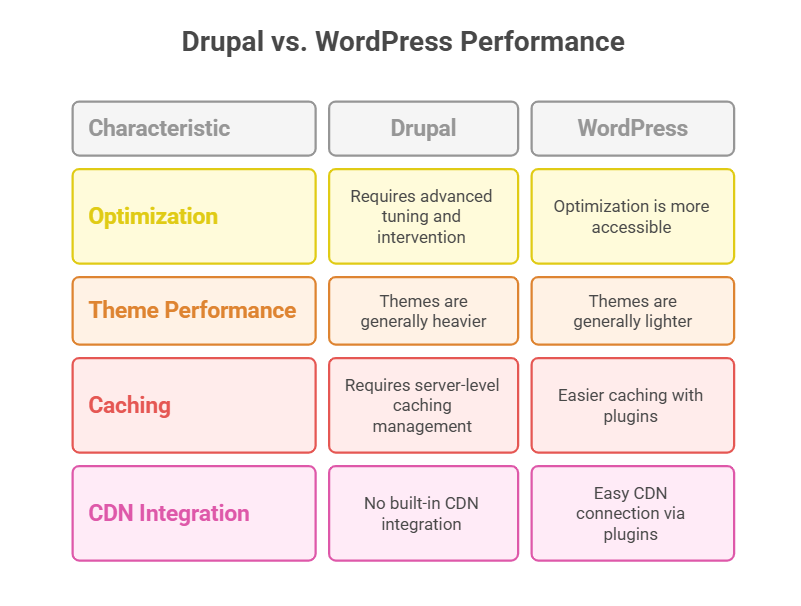
- While Drupal is capable of fast performance, getting there often requires advanced server tuning, caching configuration, and developer intervention. WordPress makes optimization accessible.
- Out of the box, WordPress themes are generally lighter than Drupal themes. Many WordPress themes follow clean code practices, avoid unnecessary dependencies, and prioritize performance. During your Drupal to WordPress migration, selecting a lightweight theme like Astra, GeneratePress, or Blocksy instantly improves your Core Web Vitals.
- Drupal requires server-level caching (Varnish, Memcached), often managed by a DevOps engineer. WordPress puts those tools in your hands with plugins like WP Rocket or FlyingPress.
- Drupal doesn’t come with built-in CDN integration. WordPress allows you to connect CDNs like Cloudflare or BunnyCDN using plugins or your hosting provider’s dashboard; no developer required.
Pro Tip:
You take WordPress performance optimization to a whole new level when you build and host sites with InstaWP. Instead of risking your live environment, you can safely test lightweight themes, plugins, or configurations in an isolated sandbox.
InstaWP’s managed cloud hosting includes built-in CDN support and flexible Points of Presence (PoPs), ensuring fast global delivery. Even better, you have full control over performance factors like PHP worker limits, disk space, and CDN configuration, all through scalable, pay-as-you-go hosting plans.
Unlike Drupal, where fine-tuning often requires complex server management or custom development, WordPress + InstaWP gives you streamlined power and performance, without the overhead.
Benefit #8: Easier E-Commerce Expansion with WooCommerce
For businesses looking to add or expand e-commerce capabilities, this is one of the most high-impact Drupal to WordPress migration benefits. While Drupal offers e-commerce options like Drupal Commerce or Ubercart, they are developer-heavy, less intuitive, and require significant configuration time.
In contrast, WordPress integrates seamlessly with WooCommerce, the most popular e-commerce platform on the web, making it far easier to launch, manage, and scale an online store.
Unlike Drupal Commerce, which involves custom entities, views, and module dependencies, WooCommerce is plug-and-play. You can install it in seconds and immediately start adding products, setting up payments, and configuring shipping rules.
WooCommerce isn’t just a product catalog; it’s an entire ecosystem. You get access to:
- Payment gateways like Stripe, Razorpay, PayPal
- Advanced shipping calculators and tax automation
- Subscription, membership, and booking plugins
- Storefront-optimized themes like Shoptimizer and Flatsome
Drupal’s backend commerce interface can be confusing for non-technical users. WooCommerce provides a much cleaner, visual interface for managing products, orders, customers, and inventory.
If you’re building for a client, create a dedicated InstaWP site where they can practice using the WooCommerce dashboard, test transactions with sandboxed payment gateways, and learn how to update inventory, all before launch.
If e-commerce is on your roadmap, switching from Drupal to WordPress opens the door to faster store builds, simpler management, and far more integration possibilities. And with InstaWP powering your migration journey, you can validate everything, from payments to performance, in a real store environment without touching production.
Benefits #9: Better Compatibility with Modern Tools and APIs
When it comes to integrating with modern services, WordPress clearly outpaces Drupal in flexibility and ease. Drupal often requires custom module development, developer time, and testing for each integration. WordPress, on the other hand, offers official plugins or native support for most tools, ready to go in minutes.
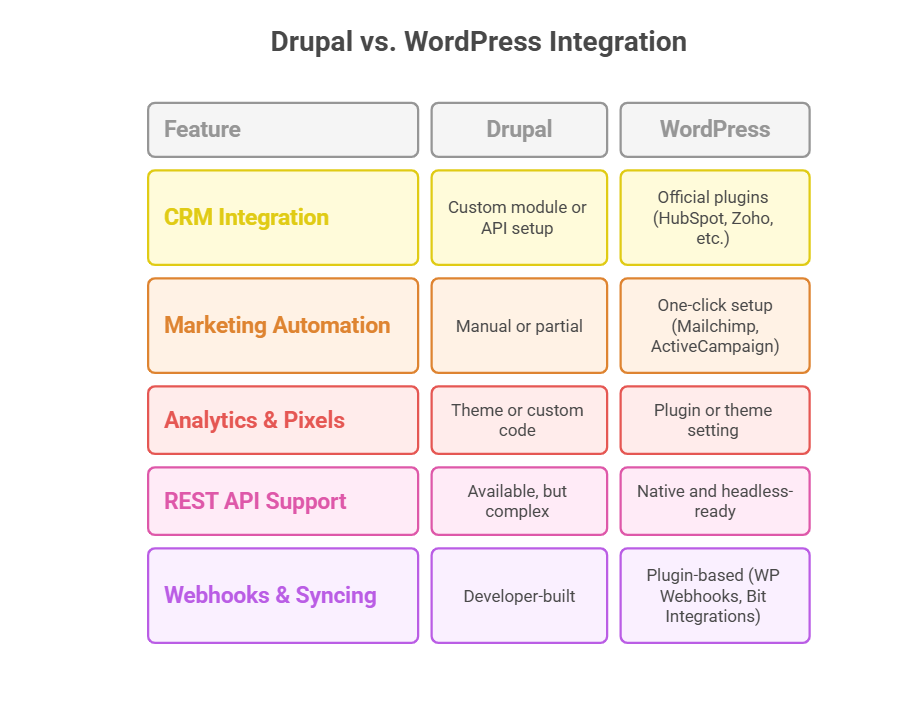
InstaWP enhances this advantage even further. You can launch an instant WordPress sandbox and test any integration, from syncing form data to HubSpot, to configuring REST endpoints for a headless frontend.
There’s no need to wait for staging server access or risk breaking a live site. Agencies and developers can validate every plugin, API connection, and third-party sync in a clean, isolated environment.
This level of control and speed simply isn’t possible in Drupal without custom engineering. With WordPress + InstaWP, you can modernize your stack and deploy confidently; no surprises, no rollbacks.
Benefit #10: Better Client Handoff and Post-Launch Workflow
A smooth post-launch experience is often the difference between a one-time client and a long-term partner. One of the most valuable yet underrated Drupal to WordPress migration benefits is how much easier it becomes to train, support, and hand over websites to clients.
Drupal tends to keep clients dependent. WordPress sets them free, and InstaWP gives you a frictionless way to facilitate that transition.
Drupal has complex admin menus, nested configuration, and technical labels that make the backend feel overwhelming for non-developers. On the other hand, WordPress offers a clean, user-friendly dashboard that’s easy for clients to understand without a manual.
Editing even basic pages may require backend access or technical knowledge of content types and fields in Drupal. The drag-and-drop editors and the block interface of WordPress make page edits quick, visual, and non-destructive.
Drupal requires a structured training session or detailed documentation just to get clients started. In the case of WordPress, clients can be trained in under an hour and start managing content independently.
Agencies and developers working with InstaWP make this even easier as they can clone a live site in seconds and use it for:
- Client training: Let them practice on a real copy of their site without risk
- Role-based previews: Log in as Editor, Author, or Contributor and show how access levels work
- Troubleshooting: Test updates or changes in a sandbox before applying them to production
You can even set up dedicated training environments for different team members or departments, each with customized roles and example content. This removes the fear of breaking things and empowers clients to manage their WordPress site confidently from day one.
Unlike Drupal, which keeps clients dependent on developers for every small update, WordPress + InstaWP gives you a seamless transition plan, making you look like the pro who not only builds but builds with longevity in mind.
By switching from Drupal to WordPress and using InstaWP as your WordPress development platform, you turn post-launch chaos into a streamlined, scalable process that both you and your clients appreciate.
Why Migrating from Drupal to WordPress Is a Strategic Win
As Drupal 7 reaches end-of-life and maintenance costs rise, the case for moving to WordPress becomes clearer than ever. From faster development and lower overhead to user-friendly design, SEO flexibility, and plugin-rich extensibility, the Drupal to WordPress migration benefits aren’t just technical upgrades. They’re business accelerators.
You’re not just swapping one CMS for another. You’re choosing:
- Easier client workflows
- Faster go-to-market cycles
- More scalable site management
- Lower long-term costs
- A broader talent pool and toolset
And when you pair this migration with InstaWP, the transition becomes smooth, testable, and safe. You can preview themes, test plugins, simulate content imports, onboard clients, and validate performance, all before going live.
Whether you’re an agency, a solo developer, or managing an in-house site migration, migrating from Drupal to WordPress using InstaWP is how you de-risk the move and unlock WordPress’s full potential from day one.
Thinking of making the switch?
Set up a WordPress sandbox and test your WordPress build right now; no installs, no commitments, just instant validation.
FAQs
Q1. Why should I migrate from Drupal to WordPress?
Migrating from Drupal to WordPress simplifies content management, reduces development costs, and gives you access to a vast ecosystem of plugins and themes. With Drupal 7’s end of life, many users are switching to WordPress for better long-term flexibility and lower maintenance overhead.
Q2. Is it hard to migrate a Drupal site to WordPress?
Not necessarily. You can use tools like FG Drupal to WordPress or WP All Import to transfer content and media. Testing your migration inside an InstaWP sandbox helps avoid errors before deploying the live site, making the Drupal to WordPress migration process safer and faster.
Q3. Will I lose my content or SEO during the migration?
No, as long as your Drupal website migration is done carefully. You can preserve URLs, metadata, and content hierarchy using the right tools. Running pre-launch SEO tests inside InstaWP helps ensure nothing breaks before you go live.
Q4. What’s the best plugin to convert a Drupal site to WordPress?
The most popular plugin is FG Drupal to WordPress, which automates the content import process. For advanced control, WP All Import with Custom Post Type UI is also effective. Always validate the results inside a sandbox before final migration.
Q5. Can I migrate only part of my Drupal content to WordPress?
Yes, a partial Drupal to WordPress migration is possible. You can choose specific content types, user roles, or taxonomies to import. InstaWP helps you isolate and test these segments without touching your main site.
Q6. How long does it take to migrate from Drupal to WordPress?
For small to medium sites, it may take a few hours to a day. Larger enterprise migrations can take a few weeks, depending on complexity. InstaWP accelerates the timeline by letting you test and stage your migration instantly.
Q7. Do I need a developer to migrate my Drupal site to WordPress?
While developers can help with complex migrations, many users successfully convert Drupal sites to WordPress using automated tools. If you’re unsure, you can prototype the entire process inside an InstaWP sandbox before hiring professional help.
Q8. Is WordPress really easier to manage than Drupal?
Yes. WordPress has a simpler dashboard, easier content editing, and a more intuitive user experience. Most clients and marketers prefer it over Drupal, especially after seeing it firsthand in a sandbox or demo environment.
Q9. Can I keep the same design when migrating from Drupal to WordPress?
You can replicate your design using custom themes or builders like Elementor. However, it’s often better to modernize the layout using WordPress block themes. InstaWP lets you preview design options side-by-side during your Drupal to WordPress migration.
Q10. What’s the safest way to test my Drupal to WordPress migration?
Use a sandbox on InstaWP. It allows you to test content imports, plugin compatibility, user roles, and performance, all in an isolated, disposable WordPress environment. No risk to your live site, and no need for local setup.


