If you’ve ever wondered why your WordPress site loads faster for users in one region and slower in another, the answer often comes down to a critical piece of infrastructure: the point of presence.
A point of presence (PoP) is a physical or virtual location that connects users to your web server through the shortest, fastest route possible. It plays a direct role in how efficiently your content is delivered, how responsive your site feels, and whether or not you meet Core Web Vitals targets.
In this guide, we’ll break down what a point of presence is, how it works behind the scenes, and why it should matter to anyone building or managing WordPress websites.
Table of Contents
What is a Point of Presence?
A point of presence (PoP) is a physical or virtual location where networks connect to route traffic efficiently. It’s made up of infrastructure like routers, switches, and servers, designed to handle data transfers between users and web applications. In simpler terms, it’s a gateway that brings your website closer to your users.
For WordPress agencies and developers, this concept becomes especially relevant when optimizing the site for speed or seeking the best WordPress hosting providers.
Whether you’re serving clients across multiple countries or running WooCommerce stores that need to load quickly worldwide, the location of the nearest PoP can make or break the user experience.
If your hosting or CDN provider has a point of presence near your audience, your WordPress site loads faster by reducing the distance data needs to travel. This leads to lower latency, better Core Web Vitals scores, and higher engagement.
From page speed audits to global staging environments, PoPs are now a hidden but vital part of every performant WordPress site.
What Makes Up a PoP: Components and Architecture
A point of presence (PoP) is not just a location. It’s a mini data routing facility designed to optimize how fast and securely content is delivered to users. Understanding its components helps WordPress developers make smarter decisions when evaluating hosting providers or performance setups.
A typical PoP includes:
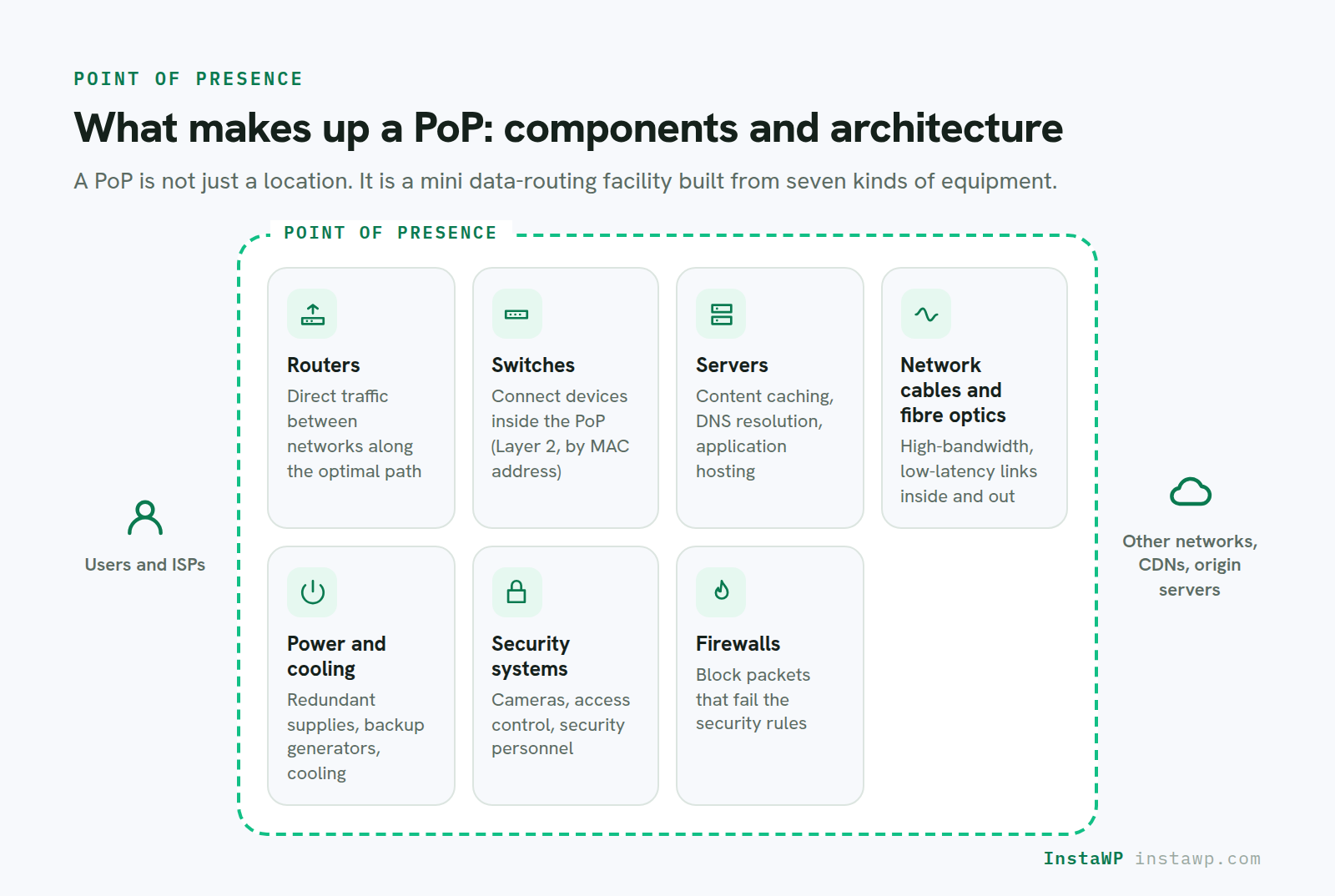
- Routers: These are the core of a PoP, responsible for directing network traffic between different networks. They analyze the destination IP address of data packets and forward them along the optimal path. High-performance routers are crucial for handling the large volumes of traffic that pass through a PoP.
- Switches: Switches connect devices within the PoP itself, such as servers, routers, and other network equipment. They operate at Layer 2 of the OSI model, forwarding data based on MAC addresses.
- Servers: PoPs often house servers for various purposes, including content caching, DNS resolution, and application hosting. Caching servers store frequently accessed content closer to users, reducing latency and improving website loading times.
- Network Cables and Fiber Optics: These physical connections provide the infrastructure for transmitting data between devices within the PoP and to external networks. Fiber optic cables are preferred for their high bandwidth and low latency.
- Power and Cooling Systems: PoPs require reliable power and cooling systems to ensure continuous operation. Redundant power supplies and backup generators are essential to prevent downtime in case of power outages. Cooling systems prevent overheating of the equipment, which can lead to performance degradation or hardware failure.
- Security Systems: Physical security measures, such as surveillance cameras, access control systems, and security personnel, protect the equipment within the PoP from unauthorized access and theft.
- Firewalls: Firewalls protect the PoP network from unauthorized access and malicious traffic. They examine network traffic and block any packets that do not meet the defined security rules.
How a Point of Presence Works: The Behind-the-Scenes View
When someone visits a WordPress site, their browser sends a request to fetch content like HTML, CSS, images, and scripts. This request travels across the internet to reach the server hosting the site. A point of presence (PoP) acts as a checkpoint along that path, helping route the request through the fastest possible connection.
Each PoP has its own IP address and networking hardware that directs traffic efficiently. Instead of a request bouncing across continents, it first reaches the nearest PoP, which then relays the data to the correct server or cached location. This process significantly reduces the time it takes for a WordPress site to load.
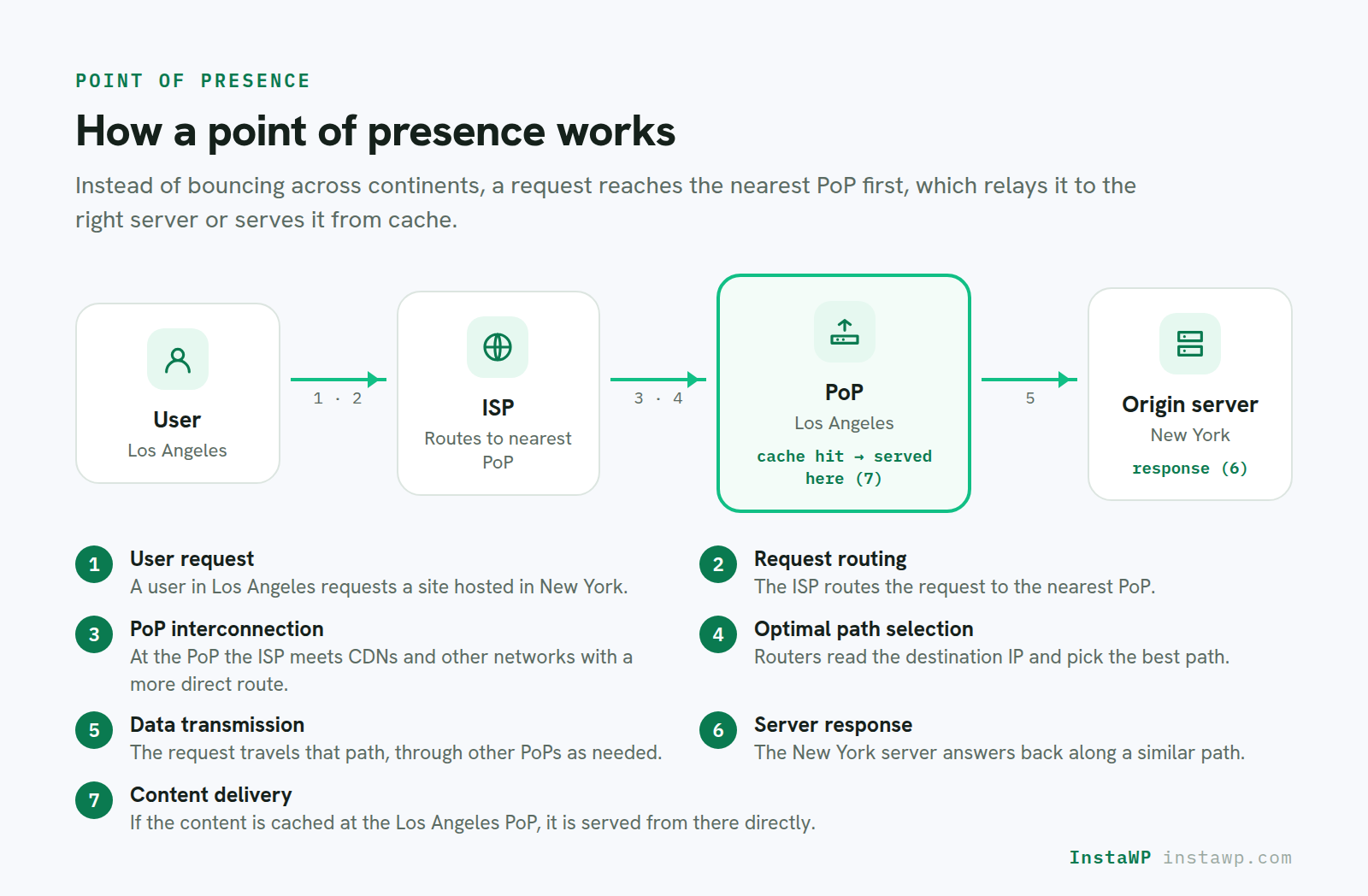
Let’s illustrate how a PoP works with a simple example:
- User Request: A user in Los Angeles wants to access a website hosted on a server in New York.
- Request Routing: The user’s request is sent to their Internet Service Provider (ISP). The ISP’s network routes the request to the nearest PoP.
- PoP Interconnection: At the PoP, the ISP’s network connects with other networks, including those of content delivery networks (CDNs) or other ISPs that have a more direct route to New York.
- Optimal Path Selection: The routers within the PoP analyze the destination IP address of the request and determine the optimal path to the server in New York. This path may involve traversing multiple networks and PoPs.
- Data Transmission: The request is forwarded along the selected path, passing through other PoPs as needed.
- Server Response: The server in New York receives the request and sends a response back to the user in Los Angeles, following a similar path through the network and PoPs.
- Content Delivery: If the website content is cached on a server within the PoP in Los Angeles, the user receives the content directly from the PoP, reducing latency and improving the user experience.
Different Types of Points of Presence You Can Have
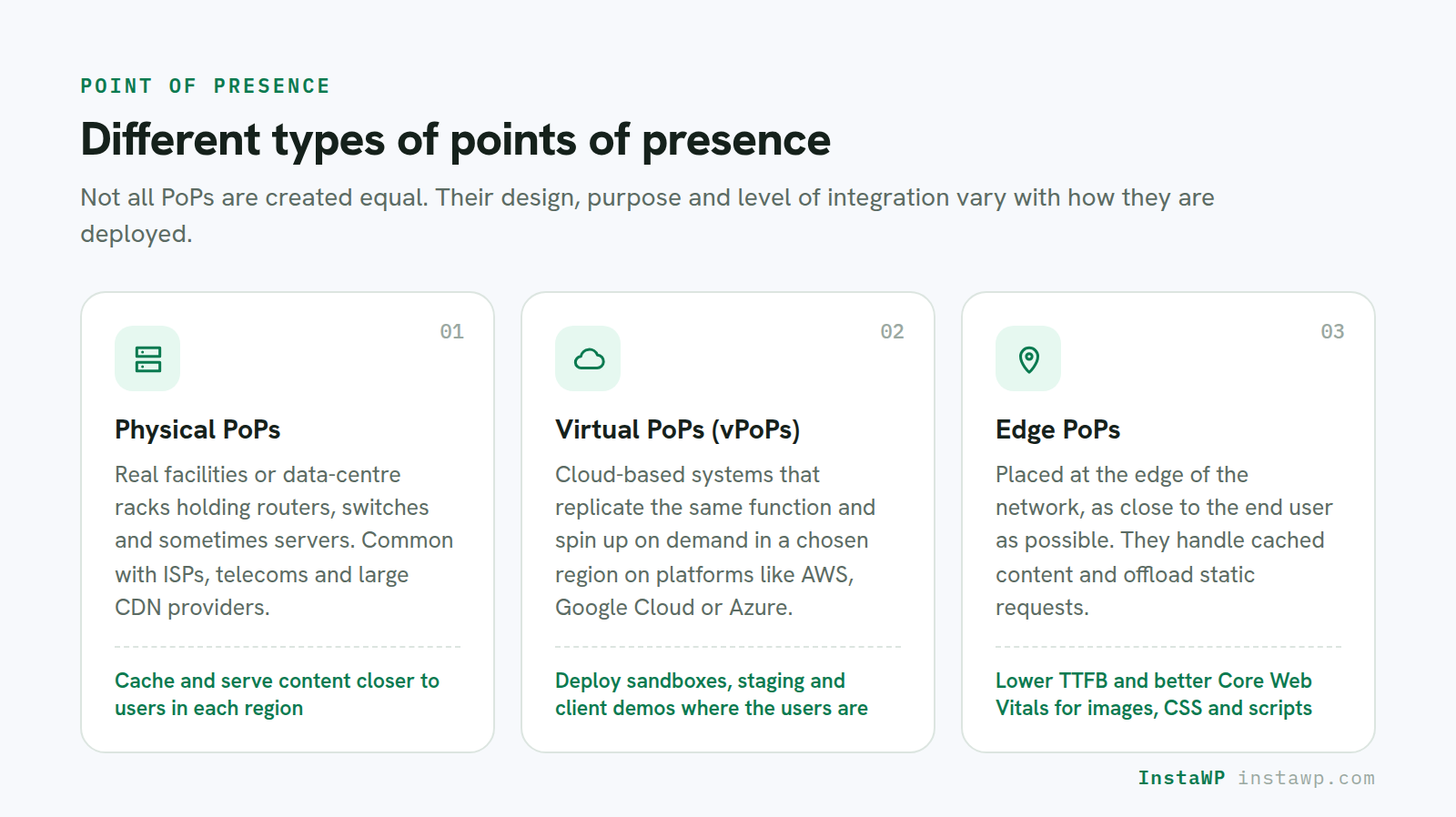
Not all points of presence (PoPs) are created equal. Their design, purpose, and level of integration can vary based on how they’re deployed, and for hosting a WordPress site, this matters more than most developers realize.
1. Physical PoPs
These are actual facilities or data center racks that contain networking gear like routers, switches, and sometimes servers. Physical PoPs are common with ISPs, telecom providers, and large-scale CDN providers.
Hosts with physical PoPs across regions can cache and serve content closer to users. For example, a provider with PoPs in North America, Europe, and Asia can offer consistently fast loading times for global traffic.
2. Virtual PoPs (vPoPs)
Instead of relying on hardware in a fixed location, virtual PoPs use cloud-based systems to replicate similar functionality. They can spin up on demand in specific locations using platforms like AWS, Google Cloud, or Azure.
If your hosting provider is built on cloud infrastructure, they’re likely using virtual PoPs. This allows developers to deploy sandboxes, staging sites, or client demos in regions that match user locations without investing in physical servers.
3. Edge PoPs
These PoPs are placed at the “edge” of the network, as close as possible to the end user. Edge PoPs often handle cached content and offload static requests, improving load times significantly.
Using a CDN with edge PoPs, such as BunnyCDN, can drastically reduce TTFB and improve Core Web Vitals. This is especially useful for image-heavy themes, e-commerce stores, and traffic-heavy blogs.
For instance, if you choose to build and host your sites with InstaWP, you get to enjoy 10–110 global edge PoPs through BunnyCDN, depending on your region and site configuration.
These edge PoPs ensure your WordPress assets, like images, CSS files, and scripts, are served from the closest possible location to your visitors. This dramatically improves load times, especially for users accessing your site from different continents.
Whether you’re launching a WooCommerce store, a client portfolio, or a blog, InstaWP’s integrated CDN ensures consistently fast performance across devices and geographies with its Edge PoPs.
4. Regional or IX PoPs
These are PoPs deployed in large exchange hubs (like internet exchange points). They handle traffic handoffs between networks at scale.
Understanding the type and distribution of points of presence used by your host or CDN partner can help you deliver faster, more reliable websites. For WordPress agencies serving clients across regions, this can be a key differentiator when pitching hosting performance.
PoP vs Data Center: What’s the Difference?
Although both are part of the internet infrastructure, a point of presence (PoP) and a data center serve different purposes. A PoP is like a high-speed checkpoint, while a data center is the main storage facility where your WordPress files, databases, and applications actually live.
A PoP handles routing. It receives user requests, determines the fastest path, and forwards those requests to the correct server, often located in a data center. This helps reduce latency and improves how quickly your WordPress site loads, especially when using a CDN or a global hosting setup.
If you’re hosting a WordPress client site on a server in New York, and a visitor from Paris opens the site, a Paris-based PoP will handle the request first, sending it quickly across the fastest backbone route to the New York data center. Without that PoP, the request might take longer, passing through less optimal routes.
Understanding this difference is important when selecting a WordPress host. A provider with global points of presence and well-placed data centers can offer both speed and reliability, something your clients will notice in real-world performance.
Benefits of Choosing a Host With Enough PoPs
When selecting WordPress hosting, many developers focus on server speed, RAM, or PHP versions. But without enough points of presence (PoPs), those specs won’t translate into fast performance, especially for global users.
A hosting provider’s PoP coverage plays a key role in how quickly your site loads, how much stress is placed on your origin server, and how well your infrastructure scales.
Here’s why you should care:
1. Faster Load Times for Global Visitors
PoPs reduce the distance between users and your website’s assets. The more PoPs your hosting provider has, the faster your site loads worldwide, crucial for agencies serving diverse client locations.
2. Better SEO and Core Web Vitals
PoPs lower latency and TTFB, which directly improves your Core Web Vitals. Faster sites earn higher rankings, particularly for mobile-first indexing.
3. Reduced Server Load
With caching handled by edge PoPs, your WordPress server has more capacity to focus on dynamic tasks, like running WooCommerce checkouts or logged-in sessions, without slowing down.
4. Higher Resilience and Uptime
PoPs provide alternate routing paths in case of network failures or regional congestion. This results in better uptime, which your clients will appreciate during traffic surges or peak seasons.
5. Streamlined Content Delivery
CDN-backed PoPs handle static assets like images, CSS, and JavaScript. This creates a consistent experience for end users, regardless of where they access your site.
How InstaWP Gives You the Right Number of PoPs for Your Site
Not every WordPress site needs 100+ points of presence. A small staging site won’t have the same demands as a global eCommerce store. So, if you’re choosing a host that doesn’t offer the right kind of point of presence based on the site you own, changes are higher that you’re overpaying for the resources.
However, this isn’t the case with InstaWP’s pay-as-you-go pricing model. It doesn’t take a one-size-fits-all approach. Instead, it matches your CDN and PoP coverage based on the real-world purpose of your site, so you’re not paying for infrastructure you don’t need, nor struggling with limited reach when your site demands more.
Basic Tier CDN with 10 PoPs starts from its Starter Plan ($5/month). This tier is designed for lightweight and temporary sites, such as:
- WordPress staging environments
- Client preview or QA links
- Local business sites or personal blogs with low traffic
This plan includes:
- 10 globally placed PoPs using BunnyCDN’s “Core” network
- Sub-150ms latency for static assets like images, fonts, CSS, and JavaScript
- Built-in CDN support at no extra charge
Even though this is an entry-level plan, it still delivers better frontend performance than traditional local-only servers. This is ideal when you’re building prototypes or running demos and want snappy load times without the complexity of integrating an external CDN.
Those who’re hosting a heavy site can enjoy Premium CDN with 119 PoPs with the Plus Plan ($9+/month) onward. This tier is made for WordPress sites that need to scale confidently and perform globally, such as:
- Production sites with international traffic
- WooCommerce stores with frequent shoppers
- Blogs, SaaS products, or agency portfolios that rely on speed
It includes:
- 119+ edge PoPs via BunnyCDN’s full SmartEdge network
- Median TTFB under 50ms—fast from nearly anywhere in the world
- Instant cache purging so updates go live across all regions immediately
- Unlimited custom edge rules for advanced caching control
- Enterprise-level DDoS protection and a web application firewall (WAF) built in
This tier ensures that your WordPress content is delivered fast and securely, no matter where your users are. For agencies building and managing multiple client sites, this performance edge can be a game-changer, especially when you’re showcasing load speeds as a value-add in your service.
How InstaWP Uses Points of Presence to Speed up
InstaWP is a modern WordPress development platform, built with developer efficiency and client experience in mind. One of the key factors behind its fast performance is the way it leverages points of presence (PoPs) across the globe.
Through its partnership with BunnyCDN, InstaWP intelligently routes WordPress site content, like images, fonts, CSS, and JavaScript, through strategically placed edge PoPs. This allows every site, from a lightweight preview build to a full-scale production store, to load with minimal delay regardless of the visitor’s location.
Here’s how InstaWP uses PoPs to your advantage:
- Faster First Impressions: Whether you’re sharing a staging site with a client or publishing a product page, your content loads through the nearest PoP, ensuring sub-second initial paint times for global users.
- Scalable Deployment: As your WordPress site grows, from demo to production, you can upgrade your plan and automatically scale from 10 to 119 PoPs without migrating your site or changing your setup.
- Secure and Distributed: Premium-tier PoPs include DDoS protection and caching rules, so your high-traffic sites stay online and stable even under pressure.
- Real-time Workflow Optimization: Edits to content, themes, or layouts are instantly purged across all PoPs. This means your changes reflect immediately worldwide, which is especially helpful when testing versions or debugging with clients in different regions.
- No Manual CDN Setup: Unlike traditional hosting, where you have to manually configure and manage a CDN, InstaWP has it already wired in. Every site you spin up benefits from PoP-powered delivery out of the box.
In short, InstaWP’s use of points of presence isn’t a background feature; it’s part of what makes the platform reliable, fast, and agency-ready. It takes the complexity out of global delivery and gives you full confidence that your sites are optimized for real-world performance, right from the start.
Ready to Deliver WordPress Sites That Load Fast Everywhere?
Understanding what a point of presence (PoP) is and how it affects your WordPress site’s performance can give you a serious edge as a developer or agency. Whether you’re building for a local client or launching global eCommerce stores, the speed and reliability of your hosting infrastructure start with how traffic is routed.
With InstaWP, you don’t have to manage this complexity manually. From 10-core PoPs for staging to 119+ SmartEdge PoPs for production-grade delivery, the platform automatically aligns your site’s CDN strategy to match your real-world use case.
Ready to try this with zero risk?
Spin up a free sandbox on InstaWP and see the PoP-powered performance for yourself, with no manual setup and $25 in credits when you add a card.
FAQs
1. What is the meaning of a point of presence in networking?
A point of presence (PoP) is a physical or virtual location where internet traffic is routed through to connect users with web servers or networks. It improves speed and reduces latency by bringing content delivery closer to the end user.
2. Is a point of presence the same as a data center?
No. A data center stores and processes data, while a point of presence primarily routes network traffic. Some PoPs are housed within data centers, but they serve different core functions.
3. Why are PoPs important for WordPress hosting?
PoPs improve site speed, lower latency, and reduce server load by serving content closer to users. This is especially helpful for agencies managing global WordPress sites or traffic-heavy stores.
4. Can I choose my PoP location with WordPress hosting?
Most managed hosts don’t offer manual PoP selection, but they do automatically route traffic through the nearest available PoP. InstaWP, for example, does this using BunnyCDN.
5. How many PoPs do I need for my WordPress site?
It depends on your site’s traffic and audience location. Small sites may be fine with 10 PoPs, while production or international sites benefit from 100+ PoPs for better performance and uptime.
6. Does InstaWP include PoPs in its hosting plans?
Yes. InstaWP includes CDN-backed PoPs in all plans—10 PoPs for Starter, and 119+ PoPs with the Plus plan and above. No manual configuration is needed.