For nearly two decades, building a WordPress site meant the same setup ritual: install a local environment, configure a server, wire up SSH, move changes between staging and production, and hope nothing broke on the way. In 2026, AI coding agents like Claude Code, Cursor, and Gemini CLI can write and operate WordPress for you. The bottleneck is no longer the code. It is the setup around the code.
That is the problem InstaWP is built to remove. This guide walks through the InstaWP tools that simplify WordPress development, from the command line to the browser to one-click AI, and shows why each one matters for agencies and developers working in an AI-first workflow.
Key takeaway
- InstaWP simplifies WordPress development by removing four friction points: creating environments, getting shell access, running commands at scale, and connecting AI to real sites.
- The InstaWP CLI creates local and cloud WordPress sites from your terminal with no Docker and no MySQL, and runs WP-CLI across your whole account.
- The Web Terminal gives you a browser shell on any site with no SSH client to install.
- Run Commands executes WP-CLI across dozens of sites at once from one dashboard.
- InstaMCP connects Claude, ChatGPT, Cursor, and 10 other AI clients to a real WordPress site with a single toggle.
What “simplified WordPress development” actually means
Simplified WordPress development means removing the setup work that sits between an idea and a running site. For agencies and developers, that work falls into four buckets: creating environments, getting command-line access, running the same commands across many sites, and now, connecting AI agents to real WordPress installs. InstaWP addresses all four from one platform.

The rest of this guide takes each in turn, starting with the tool that removes the most friction.
1. InstaWP CLI: provision, run WP-CLI, and sync from your terminal
The InstaWP CLI (@instawp/cli) is an open-source, npm-installable tool that creates and manages WordPress sites from your terminal. It provisions cloud sites on InstaWP and spins up local sites using WordPress Playground, with no Docker, no MySQL, and no config files.
It is MIT licensed and needs only Node.js 18 or higher, so installation is a single line.
Here is why it matters. WP-CLI is excellent, but it manages a site that already exists. It does not create the environment or provision the server. The InstaWP CLI covers that gap: it makes the site exist, in the cloud or on your machine, and keeps the two in sync.
For developers, that means no more lost afternoons to Docker. A local WordPress site runs on Playground (PHP compiled to WebAssembly with SQLite), so the only requirement on your machine is Node. For agencies, it means one binary to spin up a client site, clone it locally, push changes back, and tear it down when the project ships.
The AI-era part is the transport options. Every command supports --json for machine-readable output, and setting a single INSTAWP_TOKEN environment variable lets the CLI run with no browser and no manual login. That is what an AI agent or a GitHub Actions runner needs.
The CLI runs cleanly inside Claude Code, Cursor, and OpenAI Codex, which turns a disposable, real WordPress environment into something your agent can operate directly.
Watch the video to learn more about InstaCLI.
A few examples:
instawp wp my-site plugin listruns WP-CLI on a hosted site without opening the dashboard.instawp wp my-site plugin update woocommerce --apiruns the same command over the API, useful on restricted networks or in CI.instawp local clone my-cloud-siteclones a cloud site to your laptop, with database conversion, URL replacement, and file sync handled for you.
New accounts get $25 in free credits to try it. Read the InstaWP CLI overview.
2. The InstaWP Web Terminal: a shell in your browser, no SSH client needed
The Web Terminal is a browser-based SSH shell that runs commands on one site’s server. It runs as the site user (no root access), and you reach it from the site’s dashboard with nothing to install. Inside it you can run ordinary Linux commands like ls, cat, and df, and WP-CLI commands like wp plugin list, all in real time.

The value here is access without setup. You do not configure an SSH client, generate keys, or hunt for connection details. You open the site, click Web Terminal, and you are in a live shell. It is the fastest path for a quick fix, a config check, or a debugging session on a single site.
One clarification worth making for your team: the Web Terminal expects real shell commands, not natural language. Type “build a landing page” and it will tell you the command is not found. For natural-language site work, that is what InstaMCP is for, covered below.
Need persistent SSH or SFTP access from your own client instead? Enable SFTP/SSH.
3. Run Commands: WP-CLI across every site at once
Run Commands is a dashboard tool that executes WP-CLI and shell commands remotely across one or more sites, with no SSH required. You select sites, run your command, and get the output from all of them in one place. It ships with a library of tested commands and supports variables using the {{var_name}} syntax, so you can save reusable templates.

This is where agencies managing many client sites save the most time. Updating a plugin, running a search-replace, flushing cache, or auditing for hacked core files across fifty sites becomes one action instead of fifty logins. Where the Web Terminal is hands-on for a single site, Run Commands is built for repeatable work at scale.
4. InstaMCP: one-click AI for real WordPress sites
InstaMCP is InstaWP’s built-in MCP server that connects AI assistants directly to a WordPress site. Where other MCP setups ask you to install a plugin, create application passwords, and configure a proxy, InstaMCP activates with a single toggle.
The platform installs the plugin, generates a secure 64-character token, and gives you a connection URL.

That URL works with 14 AI clients that have setup guides in the dashboard, including Claude Desktop, Claude Code, Claude.ai, ChatGPT, Cursor, VS Code, Windsurf and Gemini CLI, so your site is not locked to one AI ecosystem.
On InstaWP sites, the tools register through the WordPress 6.9 Abilities API, so the AI calls first-class WordPress abilities rather than a bolted-on layer. The feature is available on Sandbox plans and above.

Two things make this a boon rather than a demo.
First, safety by design: the execute_php tool that lets an agent run PHP is off by default and sits behind four layers (admin opt-in, an mcp:admin token scope, the manage_options capability, and a 30-second limit). You decide how much power the agent gets.
Second, InstaMCP works on sandbox and staging sites, not only production. You can point Claude at a real environment, run real operations, verify the results, and promote the proven version to production, with no risk to a live client site.
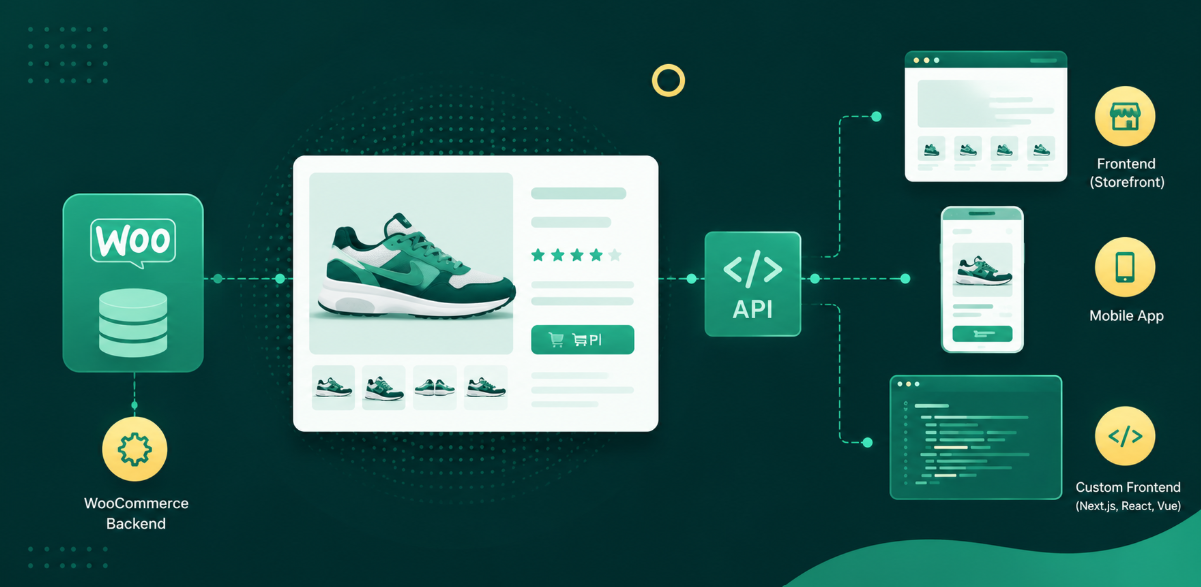
InstaWP is also rolling out an account-level MCP that gives an AI assistant control of your whole account: list sites, create new ones, take snapshots, run backups, and change PHP settings from a chat window.
Together, the per-site and account MCP cover the full picture, one manages content inside a site, the other manages every site you host.
Connect AI to your WordPress site.
5. Which tool for which job
The tools overlap on purpose, so here is a quick reference for your team.
| Tool | Where it runs | Best for |
|---|---|---|
| InstaWP CLI | Your computer | Creating sites, cloning, syncing, and running WP-CLI across your account |
| Web Terminal | Your browser, on one site | Quick hands-on shell access with nothing to install |
| Run Commands | InstaWP dashboard | Bulk WP-CLI and shell commands across many sites |
| InstaMCP | Your AI client | Managing a real site in natural language with Claude, ChatGPT, or Cursor |
| WP-CLI | Inside any WordPress site | The underlying WordPress commands you run in the tools above |
A useful way to explain it: WP-CLI is the command vocabulary, and the InstaWP tools are the different places you run it, from your terminal, your browser, the dashboard, or an AI chat.
6. Why this is a boon for agencies
For agencies, the math is direct. Every hour spent on environment setup, server access, and repetitive site maintenance is an hour that does not bill. InstaWP compresses that overhead so a small team can manage more sites.
AI adds a second gain on top: an agent can spin up a sandbox, build against it, and hand back a working draft while your developers focus on the parts that need judgment.
That capability is also a service you can sell. With InstaMCP on sandbox and staging, you can offer clients an AI-assisted WordPress workflow (content updates, audits, maintenance reports) without giving an agent unguarded access to production. Package it into a retainer, and the same tooling that speeds up your team becomes a line item.
If reselling WordPress hosting and AI-enhanced services is the goal, the InstaWP Agency Program is built for it.
Start Building
WordPress development in 2026 rewards teams that spend less time on setup and more time shipping. The InstaWP CLI, Web Terminal, Run Commands, and InstaMCP each remove a layer of that setup, and together they give agencies and developers an AI-ready workflow from day one.
FAQs
What is the difference between WP-CLI and the InstaWP CLI?
WP-CLI manages a WordPress site that already exists (plugins, users, database) and works on any host. The InstaWP CLI runs on your computer and creates and manages sites: local sandboxes, cloud sites on InstaWP, sync between them, and WP-CLI execution across your whole account.
Do I need Docker or MySQL to use the InstaWP CLI?
No. Local sites run on WordPress Playground (PHP in WebAssembly with SQLite), so the only requirement on your machine is Node.js 18 or higher. There is no Docker daemon and no MySQL service to install.
What is the InstaWP Web Terminal?
It is a browser-based SSH shell that runs commands on one site’s server as the site user, with no SSH client to install. You can run Linux commands and WP-CLI inside it in real time.
Can I run WP-CLI on multiple WordPress sites at once?
Yes. The Run Commands feature executes WP-CLI and shell commands across many sites from one dashboard, with a library of saved commands and variable templates for reuse.
How do I connect Claude or ChatGPT to my WordPress site?
Enable InstaMCP from the site dashboard with one toggle, copy the generated connection URL, and paste it into your AI client. InstaMCP has setup guides for 14 clients, including Claude Desktop, Claude Code, ChatGPT, Cursor, VS Code and Gemini CLI. It is available on Sandbox plans and above.
Is it safe to let AI make changes to a WordPress site?
Yes, when scoped correctly. InstaMCP keeps powerful actions like running PHP off by default, behind admin opt-in, token scope, a capability check, and a 30-second limit. Best practice is to run AI workflows on a sandbox or staging copy first, then promote the proven version to production.