EasyWP vs Kinsta is a choice between a budget host and a premium one. EasyWP, from Namecheap, is the low-cost way to put one simple WordPress site online. Kinsta is the premium managed host on Google Cloud, with free staging, built-in APM and 24/7 expert support, starting at $35 a month for a single site.
What is the best Kinsta alternative for agencies? For agencies running many client sites, InstaWP is the strongest Kinsta alternative. Each site is billed by the day on its own plan from about $5 a month, object cache is included from the $9 Plus plan, and sandboxes, external-site management, MCP and white-label resale share one dashboard.
The real difference is in how the bill is built. Kinsta sells plans that hold a fixed number of installs, while InstaWP’s managed WordPress hosting prices every site separately, so a portfolio grows one site at a time. Below are the head-to-head, the cases where Kinsta still wins, and the cost of 6, 10 and 20 client sites on each.
- EasyWP fits one small site on a tight budget. Each subscription covers one WordPress site, with SFTP and database access, but no staging environment is listed on its plans.
- Kinsta fits sites that need premium support and compliance. Plans run from $35 a month, and SOC 2 Type II and ISO 27001 sit on its Enterprise tier.
- Kinsta charges by install count. Ten sites cost $169 a month on its Scale plan or $225 on WP 10, and an eleventh site is a $30 add-on.
- Object cache is the add-on that moves agency invoices most. Kinsta charges $100 per site per month for Redis. InstaWP includes a Redis-compatible object cache from Plus ($9).
- At 20 sites the gap is about $119 a month: $299 on Kinsta’s Lead plan against $180 with every site on InstaWP Plus.
- InstaWP covers jobs Kinsta does not sell: $2 sandboxes, managing sites hosted elsewhere, MCP access for AI agents, and white-label WaaS.
Table of Contents
EasyWP vs Kinsta: What Is the Difference?
EasyWP is an entry-level managed WordPress host aimed at bloggers, freelancers and small businesses with one site each. Kinsta is a premium managed WordPress host aimed at businesses and agencies that want staging, performance monitoring and expert support built in. The gap shows up in price, developer tooling and how much hands-on help you get.
What is EasyWP?
EasyWP is the managed WordPress hosting product from Namecheap, the domain registrar. It runs on Namecheap’s own cloud and is sold on both Namecheap and Spaceship. According to easywp.com, each site runs in an isolated cloud container, and every plan includes SFTP and database access, free SSL, a backup and restore tool, a web application firewall and malware scanning.

There are three plans: Starter, Turbo and Supersonic. Each subscription covers one WordPress site, so a second site means a second subscription. A monthly Starter plan comes with a 30-day free trial. EasyWP promises 99.9% uptime on Starter and Turbo and 99.99% on Supersonic.
EasyWP vs WordPress: they are not alternatives to each other. WordPress is the free software that runs your site. EasyWP is a company that hosts WordPress for you, the same way Kinsta and InstaWP do.
What is Kinsta?

Kinsta is a premium managed WordPress host built on Google Cloud. Every plan includes free one-click staging, a built-in APM tool, a managed firewall with Cloudflare Enterprise DDoS protection, free malware removal and free migrations done by its own team. Support is 24/7 by humans in eight languages, according to Kinsta’s pricing page.
Kinsta’s cheapest plan is $35 a month billed monthly, or $30 a month billed annually, for one WordPress install. Multi-site plans step up in fixed sizes of 2, 5, 10, 20 and 40 installs, and agency plans start at $340 a month.
How Do EasyWP and Kinsta Compare Head to Head?
Kinsta wins on tooling, support and scale. EasyWP wins on entry price and simplicity. If a site needs staging, SSH or hands-on expert help, Kinsta is the better host of the two. If it is one brochure site or blog where every dollar counts, EasyWP does the job.
Pricing checked: 6 October 2026. Kinsta figures come from kinsta.com/pricing and kinsta.com/add-ons. EasyWP feature lines come from easywp.com. EasyWP list prices sit behind Namecheap and Spaceship checkouts and change with frequent sales, so check them there before you buy.

Should you pick EasyWP or Kinsta?
- Pick EasyWP for one blog or brochure site where low cost matters more than tooling, and where you are happy working over SFTP.
- Pick Kinsta for a revenue-critical site that needs staging, APM, fast human support and someone else to clean up malware.
- Look past both when you manage a portfolio of client sites. EasyWP has no agency workflow, and Kinsta’s install-based plans get expensive as the site count grows. The rest of this guide covers that case.
Why Do Agencies Look for a Kinsta Alternative?
Agencies rarely leave Kinsta over speed or support. They leave over how the bill scales. Kinsta prices a plan by the number of installs it holds, and features that dynamic client sites rely on are sold as monthly add-ons per site or per environment.
- Install counts come in fixed steps. Six client sites fit a 5-install plan plus a $30 add-on site, or a 10-install plan with four empty slots.
- Storage and bandwidth are pooled. The Lead plan gives 20 installs 60 GB of storage between them, about 3 GB per site on average. More disk is $20 per 20 GB per month.
- Object cache is a $100 add-on per site. Stores, membership sites and course platforms show logged-in visitors pages that cannot come from the page cache, so this is often the line that doubles a store’s hosting cost.
- Overages are billed. Kinsta counts each unique IP within 24 hours as one visit and charges overage fees past a plan’s visit, storage or CDN limits, with notices at 80% and 100%.
- A dormant site still fills a slot. A paused client project keeps using an install until you delete it.
Kinsta add-on prices, checked 6 October 2026:
Source: Kinsta add-ons and Kinsta’s Redis documentation.
What should an agency look for in managed WordPress hosting?
Managed hosting matters to an agency because it moves server work off the team: updates, caching, backups, security and support. The right host for a portfolio also bills in a way that tracks the portfolio.
Check four things before you sign: what one more site costs, whether object cache and daily backups are included, how cheaply you can spin up a test site, and whether the host can see client sites that live somewhere else. Why managed hosting matters for agencies goes deeper, and the hosting cloud stack breakdown explains what sits under a modern WordPress host.
When Is Kinsta Still the Better Pick?
Kinsta is the better pick when one site carries very high traffic, when a client’s procurement team needs certified compliance, or when you want the host to do the hands-on work for you. InstaWP does not match Kinsta on those points, and an honest comparison should say so before it makes the case for switching.
- Very high bandwidth on one site. Kinsta’s Single 500GB plan includes 1,500 GB of CDN bandwidth a month. InstaWP’s top plan, Elite, includes 200 GB per site.
- Certified compliance. Kinsta lists SOC 2 Type II and ISO 27001 certification on its Enterprise plans. InstaWP does not publish an equivalent certification.
- Done-for-you services. Kinsta’s team runs unlimited migrations for you and removes malware at no extra cost.
- Support in your language. Kinsta offers 24/7 human support in eight languages.
- Larger edge network and APM. Kinsta advertises a CDN with 260+ PoPs and a built-in application performance monitoring tool on every plan.
- A contractual SLA. Kinsta advertises up to a 99.99% uptime SLA. InstaWP does not publish an uptime SLA.
If your book of business is one or two high-traffic flagship sites, or enterprise clients with security questionnaires, Kinsta is often worth what it costs. For an agency comparing more hosts on these points, the Kinsta vs WP Engine comparison covers the other premium option.
What Is the Best Kinsta Alternative for Agencies?
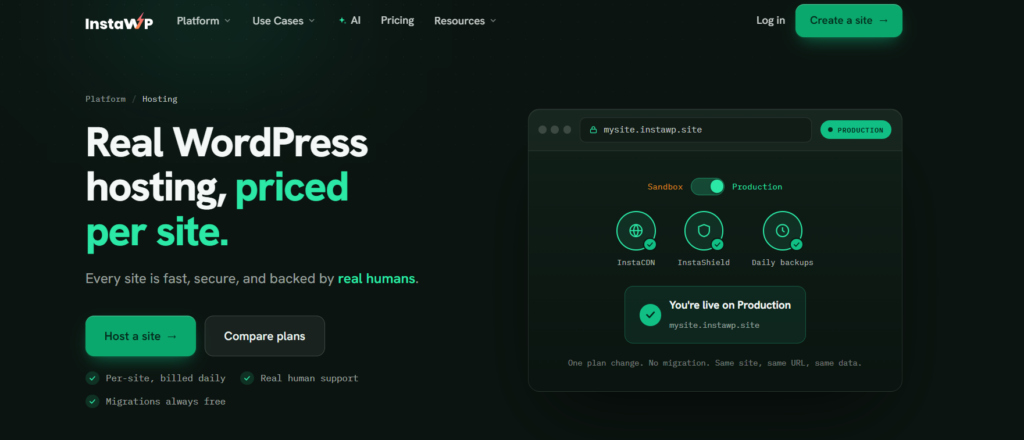
For an agency with a mixed portfolio of client sites, InstaWP is the strongest Kinsta alternative. It is managed WordPress hosting where each site has its own plan, its own storage and its own line on the bill, charged by the day. It also includes the build, manage and resale tools agencies usually buy from other vendors.
The billing unit is the whole difference. On InstaWP, a small brochure site can run on Starter while a busy store runs on Turbo, and each one is charged at its own rate. Win a new client and you add one site at its own price. Finish a project and you park the site on the $2 Sandbox tier or delete it, and the cost changes that day.
Which InstaWP plan fits each client site?
Every production plan includes a CDN, the InstaShield firewall, free SSL, off-site backups, SSH, WP-CLI, Git and SFTP. Higher plans add PHP workers, storage and features. A bigger managed hosting plan lets a site serve more visitors at once; it does not make one page load faster.
Source: InstaWP pricing, checked 6 October 2026. Built-in staging and image optimization start at Pro, and bot protection and the vulnerability scanner start at Plus. Choosing the right InstaWP site plan matches each plan to the kind of site it suits.

How Much Does Kinsta Cost Compared With InstaWP for 6, 10 and 20 Sites?
For an agency portfolio, InstaWP costs roughly 30% to 60% less than the cheapest matching Kinsta plan, before any add-ons. The table below uses monthly billing on both sides and Kinsta’s cheapest configuration for each site count. Kinsta now lists three Business plan lines on one pricing page: billed by bandwidth (WP 2 to WP 40), by visits, and a resource-based line from Launch to Lead. The resource-based line is the cheapest for multi-site use, so that is the one used here.
Pricing checked: 6 October 2026. Two InstaWP portfolios are shown: every site on Plus ($9), which matches Kinsta on daily backups and adds object cache, and a mixed portfolio of small sites and stores. The 10-site mix is the same example InstaWP’s pricing page uses.
The gap grows once object cache comes in. Say two of the sites are WooCommerce stores that need it. On Kinsta that is two Redis add-ons, 2 × $100 = $200 a month, on top of the plan. On InstaWP, Plus, Pro, Turbo and Elite already include a Redis-compatible object cache, so both InstaWP columns above already cover it.
Two things the arithmetic does not show, and both favour Kinsta. Its pooled CDN bandwidth is larger at 20 sites (1,000 GB on Lead against 600 GB across 20 InstaWP Plus sites), and its plans include staging for every site, where InstaWP’s built-in staging starts at Pro. Annual billing also cuts Kinsta’s plan prices by about 17%, which takes Lead to $250 a month. InstaWP has no annual contract and no annual discount.
How the daily bill is totalled is covered in how InstaWP billing works, and the model itself in pay-as-you-go WordPress hosting.
What Can InstaWP Do That Kinsta Does Not Sell?
InstaWP covers four agency workflows that Kinsta does not sell at all: cheap disposable sandboxes, managing sites hosted elsewhere, AI agent access over MCP, and white-label hosting you resell under your own brand. It also changes how staging, backups and developer access are priced. You can use any of them alongside Kinsta as well as instead of it.
Sandboxes and staging without buying another install
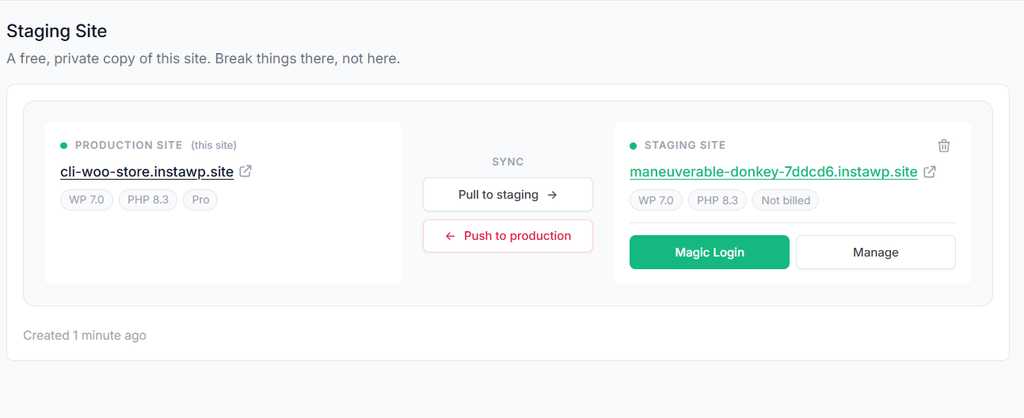
On InstaWP, a sandbox is a full WordPress site with SSH and WP-CLI for $2 a month, about 7 cents a day. Use one to reproduce a bug, test a plugin update, or show a client a draft, then delete it. When a sandbox becomes the real site, change its plan and it goes live on the same URL with the same data, with no migration.
Pro, Turbo and Elite add built-in WordPress staging with push and pull between staging and production. On Starter and Plus, clone your production site to a sandbox and test there. The full workflow is in the WordPress staging environment guide.

Backups you can restore yourself on every plan
Every InstaWP plan takes automatic off-site backups, stored in the same region as the site. Starter backs up weekly and keeps 4. Plus and above back up daily and keep 30, which is 30 days of restore points. You can restore the files, the database or both from the dashboard, or download a backup and keep it. You can also take a backup on demand before risky work.
Snapshots add a reusable restore point you name yourself, for $1 a month per snapshot. Backups on InstaWP explains the schedule and restore options in full.

One dashboard for client sites hosted anywhere
Kinsta manages the sites it hosts. InstaWP can also manage the sites it does not. The free InstaWP Connect plugin brings a WordPress site on any host into the same dashboard, so the client who insists on staying with their old host is no longer a separate process. Advanced site management adds uptime monitoring, activity logs and update automation. It costs $2 a month per site, and it is included free on InstaWP Plus and above.

See WordPress site management for the full feature list.
AI agents that can work on the site

The WordPress MCP server guide walks through connecting each client.
White-label hosting you can resell
Kinsta’s Agency Partner Program offers hosting credits, a directory listing and an unbranded WordPress admin, but you stay a Kinsta reseller in all but name. InstaWP’s Website as a Service platform gives you a branded storefront, checkout and client portal on your own domain, with your own plans and prices. There is no platform fee; native checkout takes 7% with Stripe fees included, and WooCommerce or custom API sales take 0%. Your cost is each site’s plan, and the margin above it is yours.
Developer tools on every plan
SSH, SSH/SFTP access, WP-CLI, Git deployments and a database editor come with every InstaWP plan, including the $2 sandbox. PHP 7.4 to 8.5 is switchable per site from the dashboard. These are the same tools Kinsta includes, at a far lower price per site, and you can use SSH and SFTP access from the first day a site exists. The developer tools page lists everything.
More visitors and storage per dollar
InstaWP does not meter visits. Each plan has a CDN bandwidth allowance instead, from 10 GB on Starter to 200 GB on Elite, plus its own storage. A busy store gets more room by moving that one site to a bigger plan, prorated from the day you change it, without moving the rest of the portfolio. On InstaWP’s new-generation servers, the free WP Benchmark plugin scored 9.8 out of 10 against 7.3 on the previous generation in August 2026; the method is in the WordPress hosting benchmark.
EasyWP vs Kinsta vs InstaWP: Which Should Your Agency Choose?
Choose EasyWP for one cheap site, Kinsta for premium hands-on hosting of high-traffic or compliance-bound sites, and InstaWP for a portfolio of client sites where per-site cost, test environments and fleet management matter most.
For a wider list of hosts in the same bracket, see the best Kinsta alternatives for agencies hosting multiple sites.
How Do You Move a Site From Kinsta or EasyWP to InstaWP?
Move one site first, test it on InstaWP’s temporary URL, and keep the old host running until DNS has switched. Migration onto InstaWP is free, and the old site stays live while the copy is made.
The WordPress migration page explains the migration options in detail.
Final Word: EasyWP, Kinsta vs InstaWP
EasyWP is the cheap, simple host for one small site. Kinsta is the premium host for sites that need certified compliance, very high bandwidth or done-for-you support, and it charges by install count plus add-ons. For an agency running many client sites, InstaWP is the stronger Kinsta alternative: each site is billed daily on its own plan from about $5, object cache comes from Plus, and sandboxes, external-site management, MCP and white-label resale are part of the same platform.
If your portfolio is growing one client at a time, run one site on InstaWP’s managed WordPress hosting and compare the bill. Try InstaWP on one client site before you move the rest.
EasyWP vs Kinsta: Frequently Asked Questions
What is the difference between EasyWP and Kinsta?
EasyWP is Namecheap’s entry-level managed WordPress host, sold one site per subscription on Namecheap’s own cloud. Kinsta is a premium managed host on Google Cloud with free staging, built-in APM, free malware removal and 24/7 expert support, from $35 a month.
Is EasyWP the same as WordPress?
No. WordPress is the free software that runs a website. EasyWP is a hosting service from Namecheap that installs and runs WordPress for you, in the same way Kinsta and InstaWP do.
Is EasyWP good for agencies?
EasyWP suits a freelancer with a few simple sites. It has SFTP and database access but no staging environment listed on its plans and no tools for managing a client portfolio, so most agencies outgrow it.
What is the best Kinsta alternative for agencies?
For agencies with many client sites, InstaWP is the strongest Kinsta alternative. It bills each site daily on its own plan from about $5 a month, includes object cache from the $9 Plus plan, and adds sandboxes, external-site management, MCP and white-label WaaS.
How much does Kinsta cost per month?
Kinsta starts at $35 a month billed monthly, or $30 a month billed annually, for one site (checked 6 October 2026). Ten sites cost $169 a month on the Scale plan or $225 on WP 10, and agency plans start at $340 a month.
Does Kinsta charge extra for Redis?
Yes. Kinsta’s Redis object cache is a $100 per site per month add-on. InstaWP includes a Redis-compatible object cache on Plus, Pro, Turbo and Elite.
Can I host my agency’s client sites on InstaWP?
Yes. InstaWP is a managed WordPress hosting provider. Starter and above are production plans with a CDN, managed firewall, free SSL, off-site backups and SSH, and each site is billed daily on its own plan.
Does InstaWP have staging like Kinsta?
Yes. Built-in staging with push and pull is included on Pro, Turbo and Elite. On Starter and Plus you can clone a site to a $2 sandbox and test there.
Can I move my site from Kinsta or EasyWP to InstaWP?
Yes. Migration onto InstaWP is free, and the original site stays live while it is copied. Test on the temporary URL, then point your domain and SSL is issued automatically.