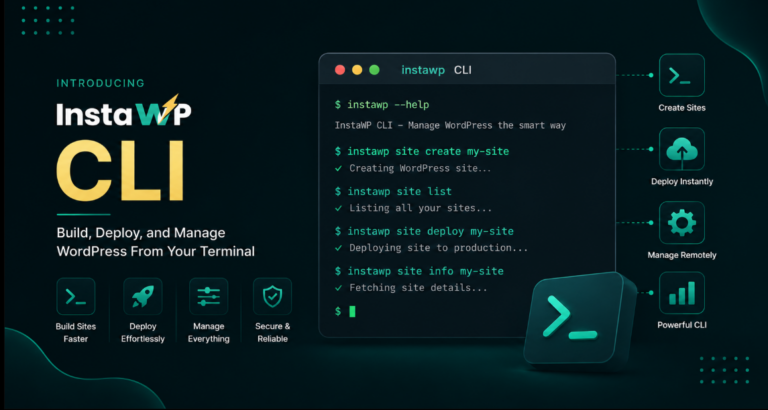
A MAMP alternative is worth a look once your local stack starts getting in the way. MAMP 7.4 is still a good free stack on the Mac, but the Windows edition has not been updated since April 2024 and ships only MySQL 5.7, older than the MySQL 8.0 WordPress recommends. Per-site PHP sits behind a US$99 MAMP PRO licence. For WordPress work, the strongest replacement is InstaWP: build on a free local site with its CLI, then move the same site onto InstaWP’s managed WordPress hosting with one command instead of a manual migration.
This guide covers what MAMP does well, why developers move off it, a close look at InstaWP, and nine other MAMP alternatives for Mac, Windows and Linux, each checked against its vendor’s own site.
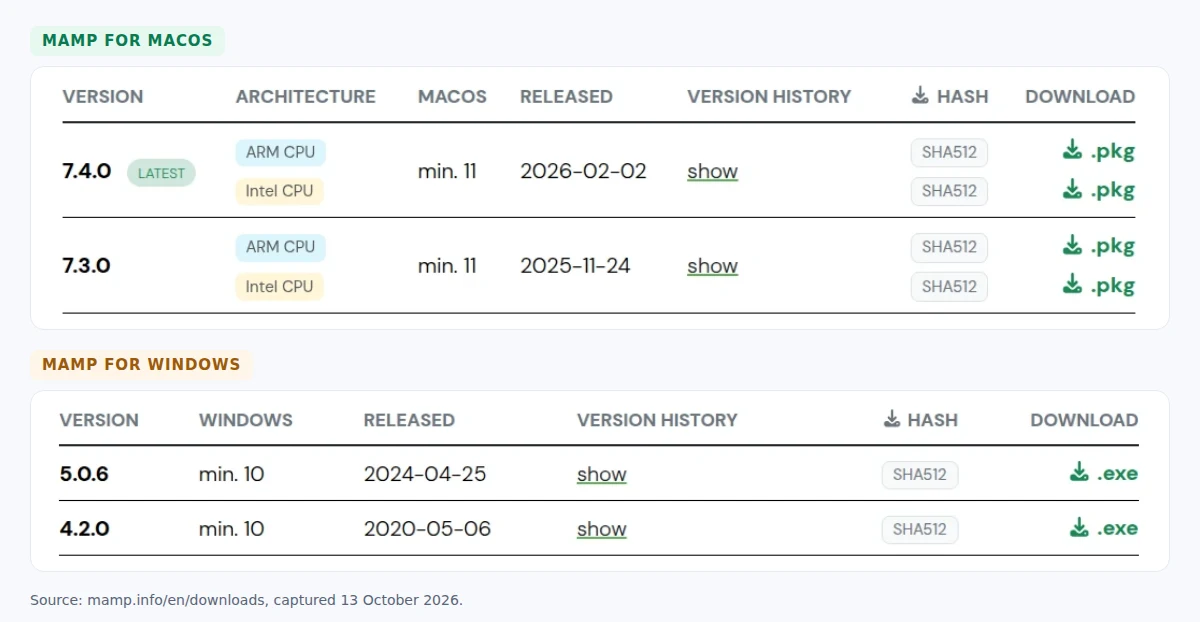
- MAMP for Windows is still version 5.0.6 from April 2024 and lists only MySQL 5.7, which reached end of life in October 2023. WordPress recommends MySQL 8.0 or MariaDB 10.11 and up.
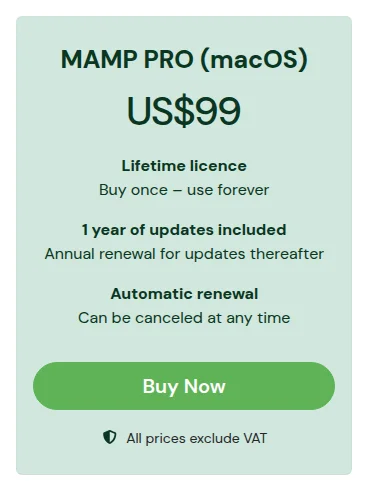
- MAMP PRO costs US$99 on the Mac with one year of updates, then €99 a year. On Windows, US$99 buys the older MAMP PRO 5.
- InstaWP is the best MAMP alternative for WordPress. Its CLI runs free local sites (WordPress was serving in 10 seconds in our test), and a cloud sandbox with a shareable URL costs $2 a month.
- Moving an existing MAMP site to InstaWP is one InstaCLI command run from the site folder. The new site starts on the Sandbox plan, so switch plans before it takes real traffic.
- For a free local stack, pick LocalWP or Laravel Herd on a Mac, Laragon or WampServer on Windows, and DDEV when a team needs identical environments on every OS.
Table of Contents
What is MAMP?
MAMP is a free local server environment for macOS and Windows that bundles Apache, Nginx, PHP and MySQL, so you can run WordPress and other PHP sites on your own computer. The name stands for Mac, Apache, MySQL and PHP. MAMP installs into its own folder and leaves any system Apache alone, so deleting the folder removes it completely.

The two operating systems get very different products. On the Mac, MAMP 7.4.0 was released on 2 February 2026, runs natively on Apple Silicon and Intel, needs macOS 11 or later, and ships MySQL 5.7 and MySQL 8. On Windows, the latest release is MAMP 5.0.6 from 25 April 2024, and the Windows component list names only MySQL 5.7.

MAMP vs MAMP PRO: what does the free version leave out?
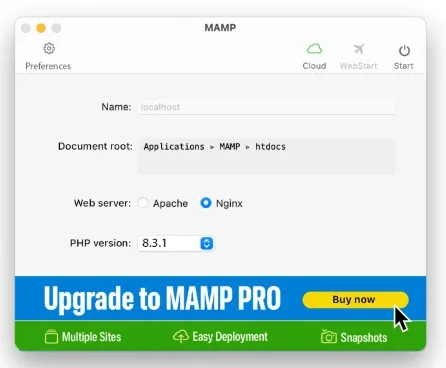
The free MAMP serves your projects from one document root with one active PHP version at a time. MAMP PRO is where per-site settings live: unlimited hosts, each with its own hostname, PHP version and web server, plus snapshots, Blueprints, one-click WordPress installs and Composer. MAMP PRO 7 also ships an MCP server that lets Claude Desktop read files, run SQL queries and run WP-CLI on your local sites.
Prices exclude VAT and come from the MAMP store and purchase FAQ, checked on 13 October 2026.
Why do developers look for a MAMP alternative?
Most developers leave MAMP for one of five reasons: the Windows edition is out of date, the useful features cost extra, a localhost site cannot be shown to a client, going live is a manual migration, and the free version has no undo. None of this matters much for a weekend project, but it adds up quickly with client work.
The Windows edition has fallen behind
MAMP for Windows is two major versions behind the Mac build and still lists MySQL 5.7, which stopped receiving updates in October 2023. WordPress.org recommends MySQL 8.0 or MariaDB 10.11 and PHP 8.3 or newer. A Windows developer testing on MAMP is testing against a database older than the one their host runs, which is how a site that works locally breaks after launch.
Multiple sites and per-site PHP are paid features
An agency with ten client sites on different PHP versions needs MAMP PRO, not MAMP. That means US$99 per Mac plus €99 a year to keep receiving updates, and the Windows edition of PRO is the older version 5.
A localhost site has no link you can send a client
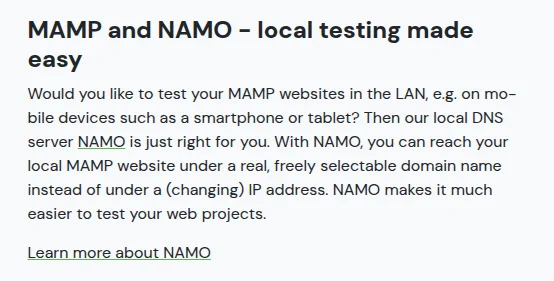
MAMP sites live on your computer. MAMP’s NAMO DNS server makes them reachable from phones and tablets on your own network, but a client in another office still needs a copy uploaded somewhere or a tunnel you set up yourself.
Going live is a separate migration
To publish a MAMP site you export the database from phpMyAdmin, replace every localhost:8888 URL, upload the files, and edit wp-config.php on the new server. Each step is a chance to break serialized data or miss a path, and MAMP itself cannot host the result.
instawp migrate push runs all four steps from the site folder. See how to move a MAMP site to InstaWP.The free version has no backups or snapshots
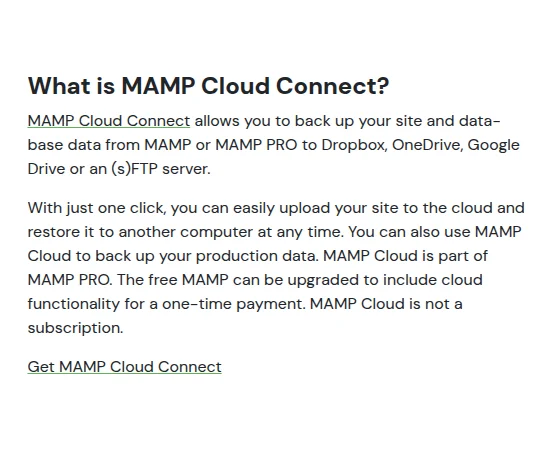
Snapshots are a MAMP PRO feature, and cloud backup is either part of PRO or a one-time paid add-on for the free MAMP. Without either, one bad plugin update on a local site means rebuilding it from whatever copy you made by hand.
What are the best MAMP alternatives in 2026?
The best MAMP alternatives are InstaWP for WordPress sites that have to go live, LocalWP and Laravel Herd for free local work on a Mac, Laragon and WampServer on Windows, and DDEV or wp-env when a team needs identical Docker environments. XAMPP, AMPPS and EasyPHP still exist but lag on PHP and database versions. Here is each one, starting with the option that covers both local work and hosting.
1. InstaWP: the best MAMP alternative for WordPress
InstaWP starts from the other end of the problem. It is a managed WordPress hosting platform, so every site you build, locally or in the cloud, is one step away from production on the same account. For MAMP users it covers the two halves MAMP keeps apart: a free local WordPress install for offline work, and cloud sandboxes with a real URL for anything a client or teammate needs to see.
To follow along, create an InstaWP account. Adding a card gives you $25 in credits, and a cloud sandbox costs $2 a month per site.
Free local WordPress sites with the InstaWP CLI
The InstaWP CLI runs WordPress on your own machine through WordPress Playground: PHP compiled to WebAssembly, with SQLite as the database. There is no Apache, MySQL or Docker to install, only Node.js 18 or newer, and local sites are free and unlimited. It runs on macOS, Windows and Linux, which makes it a MAMP alternative for Mac users and Linux users alike.
$ npm install -g @instawp/cli@beta
$ instawp local create --name client-site --php 8.3
$ instawp local list
We timed it on 13 October 2026 with InstaWP CLI 0.0.1-beta.34 and Node 22 on Ubuntu (12-core Intel Xeon E-2356G). The npm install took 8.3 seconds. The first local create had WordPress serving in 17.3 seconds, most of that a one-time download of WordPress Playground. The next two runs were ready in 10.3 and 10.0 seconds.
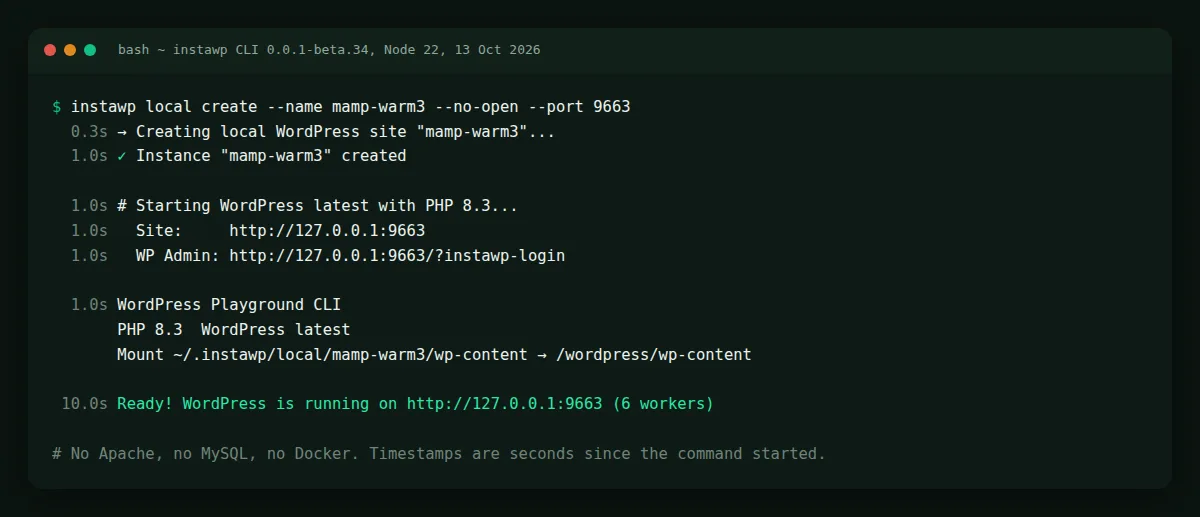
The --php flag accepts 7.4 to 8.5, so every local site can run its own PHP version, which MAMP reserves for PRO. When the site is ready to share, instawp local push client-site --with-db creates a cloud site and deploys the files and database to it, backing up the cloud database first. The full command set is on the InstaWP CLI feature page.
local push on a site you made with local create provisions a new hosted site, which is billed like any other. Name an existing cloud site as the second argument if you want to deploy into it instead.A cloud sandbox with a URL you can share
When a client needs to see progress, a cloud sandbox replaces the upload-or-tunnel routine. In the InstaWP dashboard, open Sites, click Add Site, and start from scratch, a snapshot, the template store or AI. Pick the WordPress version, PHP version and server location, and the site is online with HTTPS a moment later.
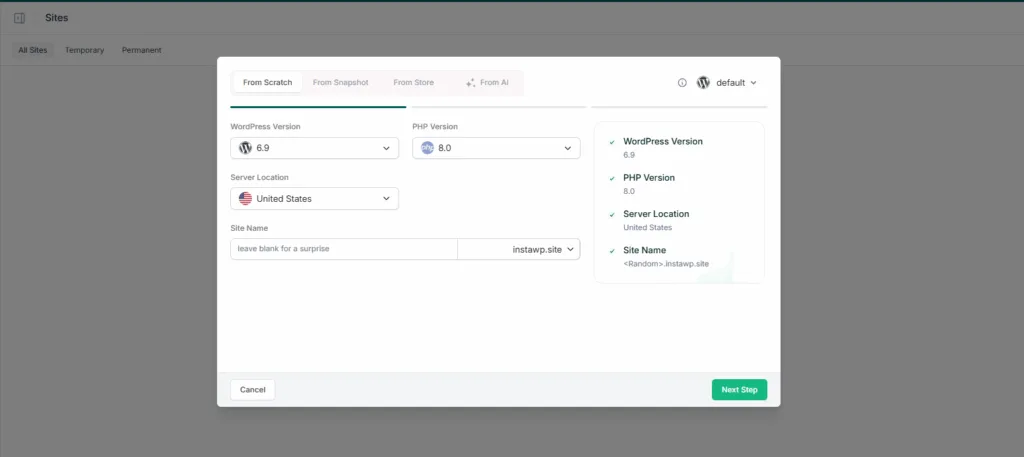
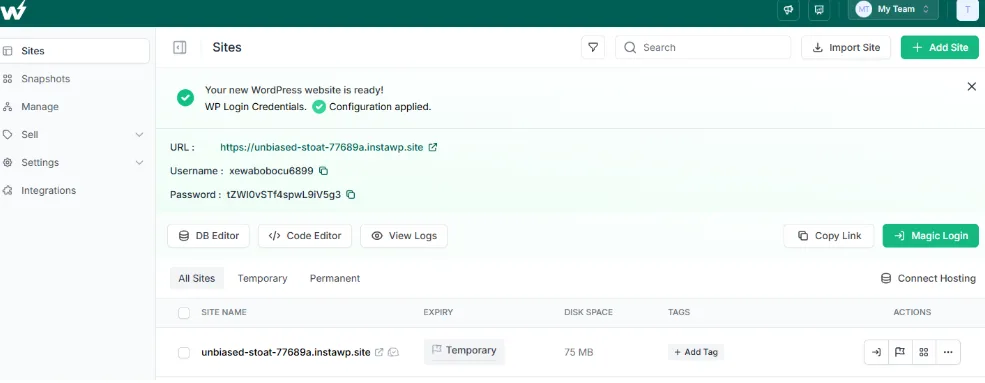

Have a live site that needs changes? Set up a testing or staging environment with InstaWP, make the edits there, and share that link without touching production.
Switch PHP versions per site
Every InstaWP site, on every plan, can run any PHP version from 7.4 to 8.5, changed from the PHP Config screen along with limits such as memory_limit and max_execution_time. That makes it easy to test a theme or plugin on a higher or lower PHP version before your host upgrades.

Backups, versions and snapshots
InstaWP keeps scheduled backups on every hosted site: monthly on the Sandbox plan, weekly on Starter and daily with 30 days of retention from Plus. You can also save a version before a risky change and restore files and database in one click, or save the whole site as a snapshot to start new sites from. The WordPress backup tool and snapshots have their own guides.

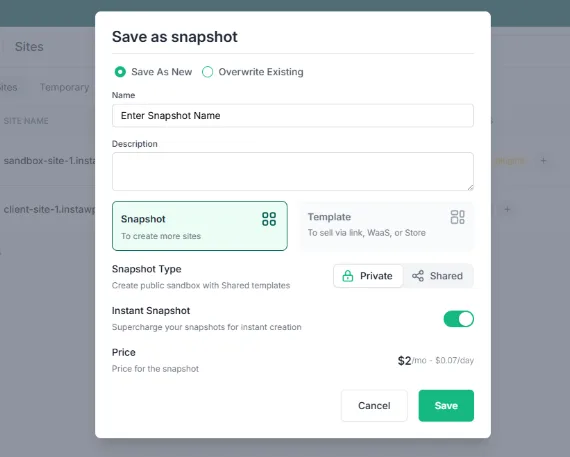
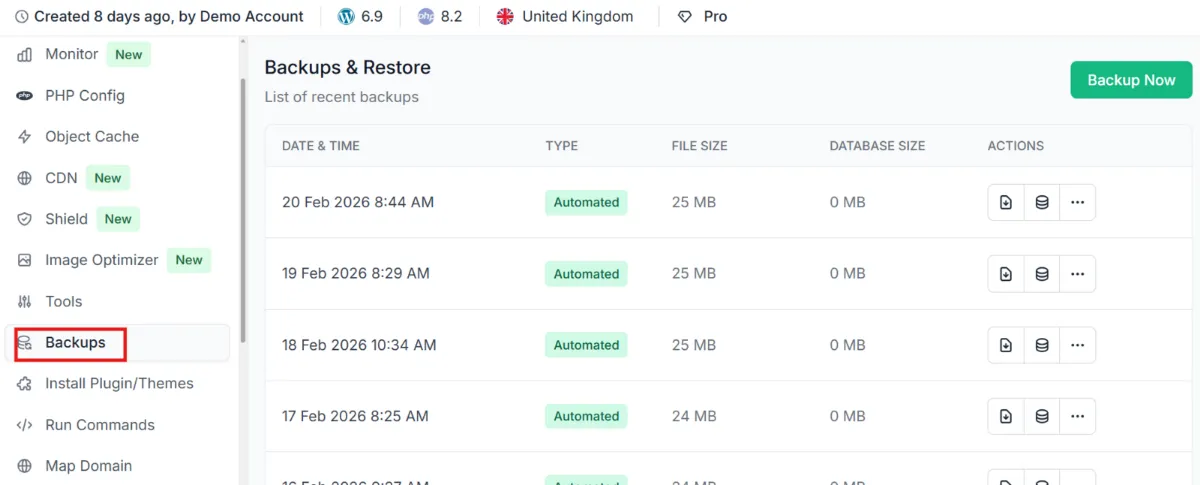
Manage many client sites from one dashboard
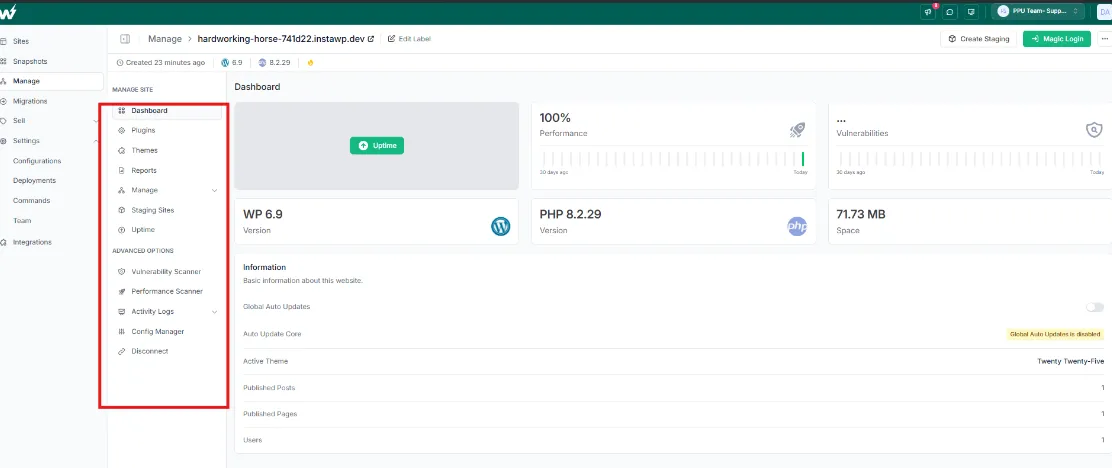
Running ten local MAMP hosts means ten places to check. InstaWP lists every site in one dashboard, and its site management module adds uptime monitoring, performance and vulnerability scanners, activity logs and bulk plugin and theme updates. Site management is $2 a month per site and included from the Plus plan. The guide to managing WordPress sites with InstaWP walks through each tool.

Templates and preconfigured sites
MAMP PRO has Blueprints; InstaWP has configurations and templates. Pick the plugins, theme and settings a project needs before the site is created, or start from a saved template, so a new client build begins from a known state instead of a blank install.

Git deployments
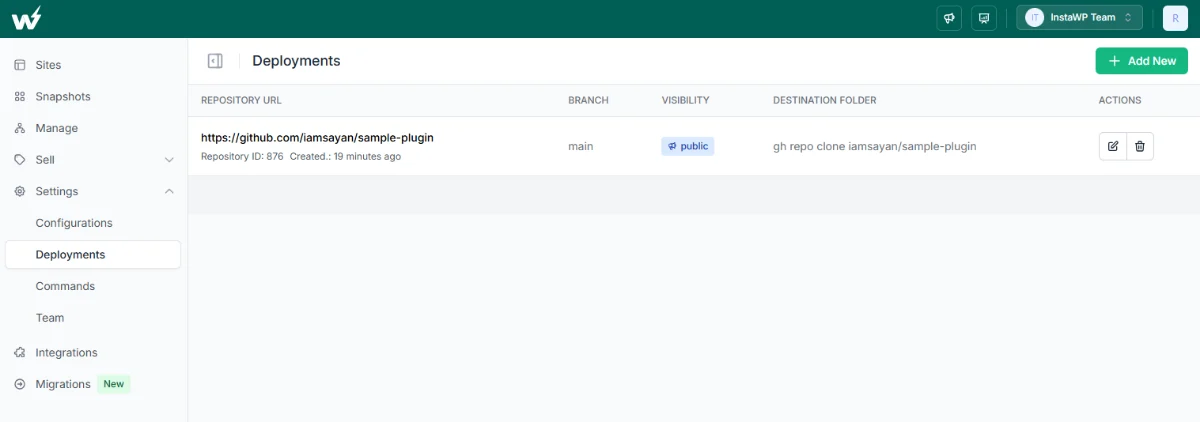
Connect a GitHub, GitLab or Bitbucket repository to a site and deploy your theme or plugin code from a branch. The steps are in the WordPress Git integration guide.

Clone and stage a site
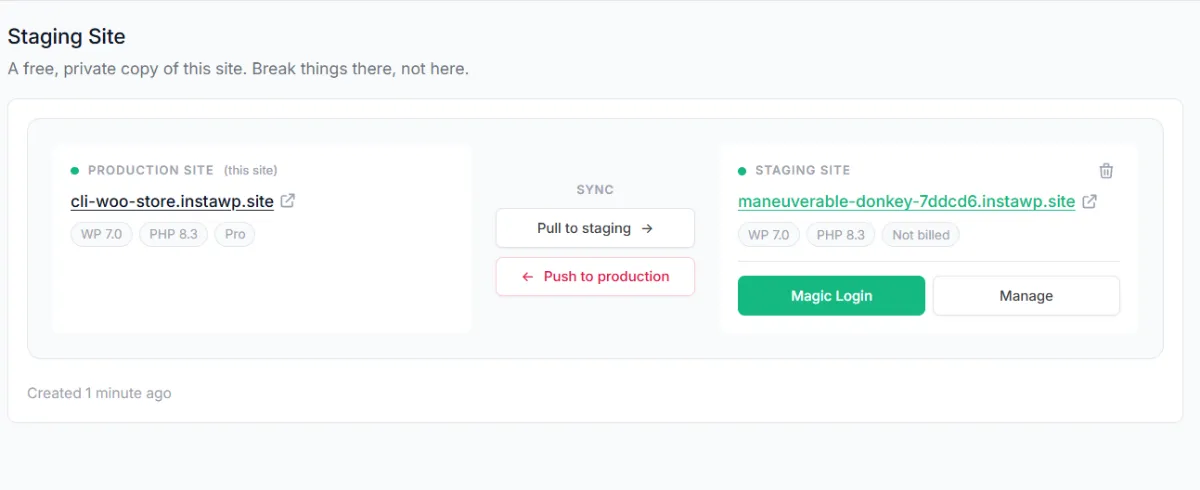
Cloning a MAMP site means copying a folder and a database by hand. On InstaWP, Clone is one item in the site menu. Hosted sites on the Pro plan and above also get a built-in staging copy with Pull to staging and Push to production buttons; the WordPress staging environment guide covers how push and pull behave.

Edit cloud files in your local editor
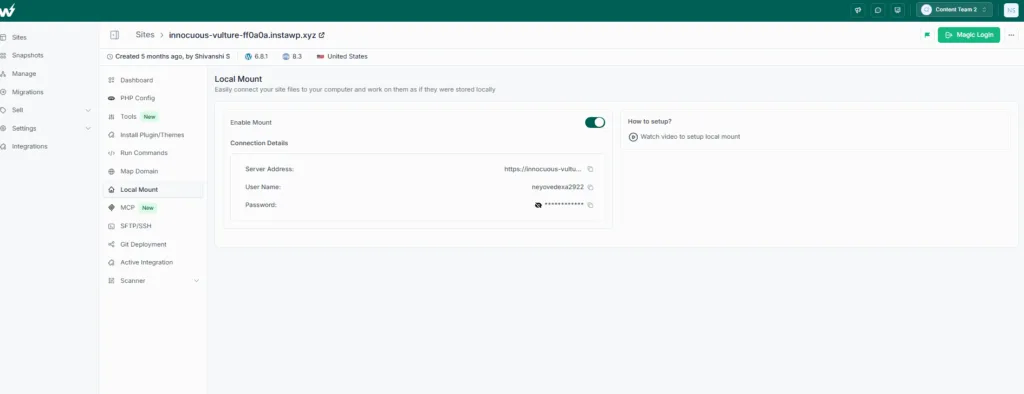
If you like MAMP because your files sit in a folder on your Mac, Local Mount keeps that habit. It mounts a cloud site’s files as a local folder, so you can open them in VS Code or PhpStorm and save straight to the live sandbox.
Connect AI agents with InstaMCP
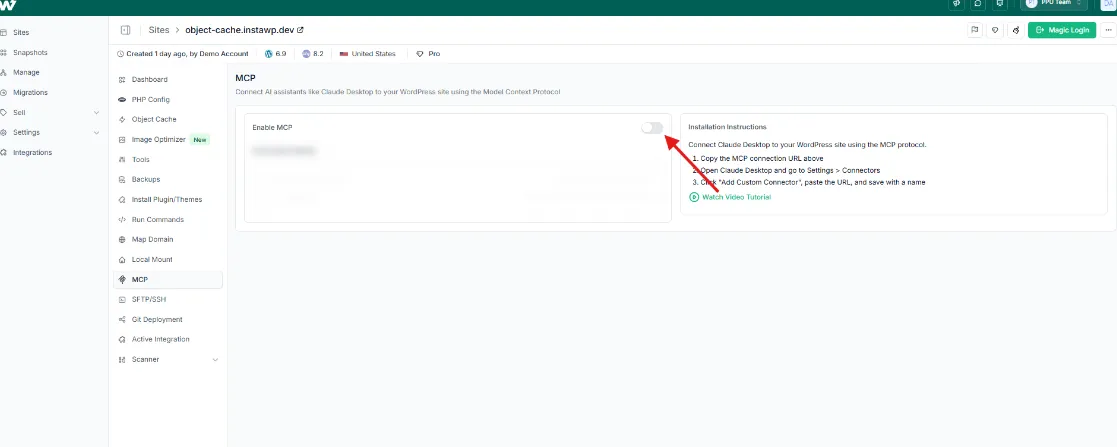
MAMP PRO 7’s MCP server connects Claude Desktop to sites on your own computer. InstaMCP does the same job for sites on InstaWP: switch on Enable MCP in a site’s MCP panel and copy the connection URL into your AI client. It exposes 43 typed tools behind scoped, revocable tokens, and the raw PHP, SQL and file tools stay off until an admin enables them. The InstaWP docs include setup guides for 14 AI clients, from Claude and ChatGPT to Cursor and VS Code. Read more about the WordPress MCP server.
How to move a MAMP site to InstaWP
To move an existing MAMP site to InstaWP, run instawp migrate push from the site’s folder. InstaCLI exports the database with mysqldump, copies the files to a new hosted site and rewrites the local URLs, and it works from localhost with no tunnel because it connects outbound. Here are the steps on a Mac.
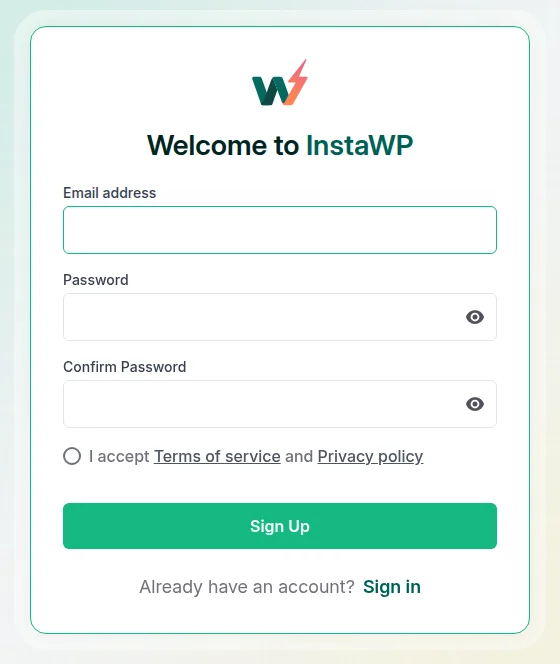
Step 1: Create your InstaWP account. Visit InstaWP’s signup page and sign up with your email address. Pushing a local site needs a paid plan, and adding a card gives you $25 in credits.
Step 2: Start MAMP and note your site’s address. Open MAMP and click Start. The button turns green when Apache (or Nginx) and MySQL are running. MAMP serves the web server on port 8888 by default, so a site in htdocs/yoursite loads at http://localhost:8888/yoursite/. Open it in a browser to confirm what you are about to move.
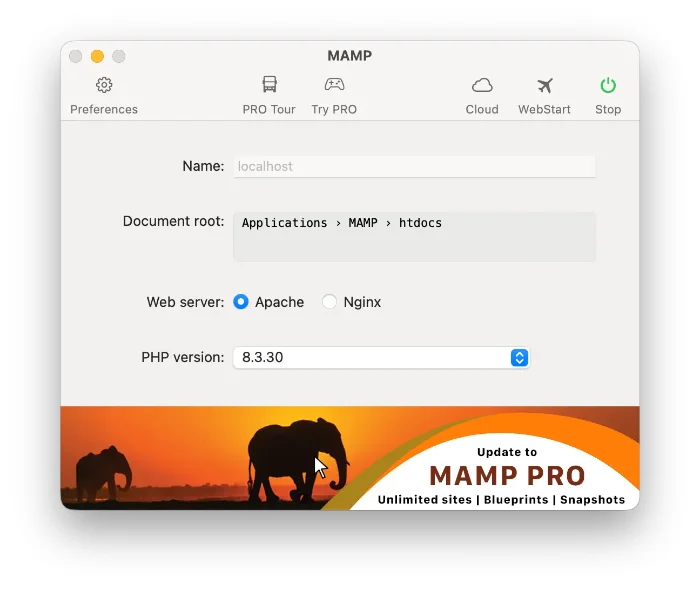
/Applications/MAMP/htdocs. Screenshot from the MAMP documentation.Step 3: Open Terminal in the site folder and add MAMP’s mysqldump to your path. The site folder is the one that holds wp-config.php. InstaCLI uses mysqldump to export the database, and MAMP 7 keeps it in a per-version folder, mysql80 or mysql57, without adding it to your path. Use the folder that matches the MySQL version your site runs on.
$ cd /Applications/MAMP/htdocs/yoursite
$ export PATH=/Applications/MAMP/Library/bin/mysql80/bin:$PATH
$ mysqldump --version   # should print a version number
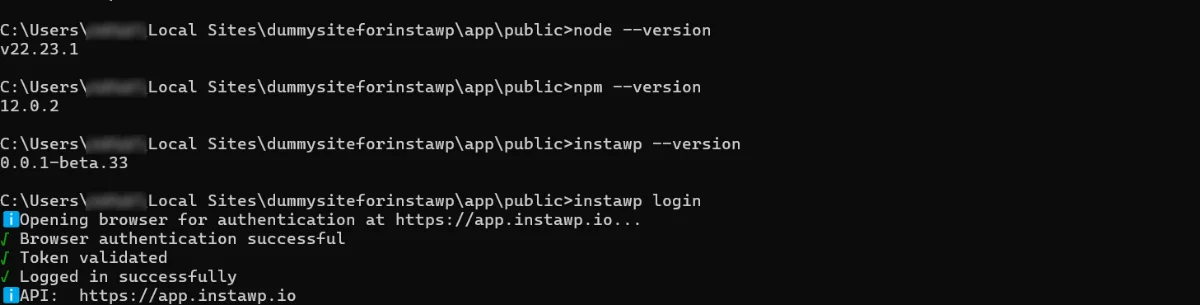
Step 4: Install InstaCLI and sign in. InstaCLI needs Node.js 18 or newer. Install it with npm, run instawp login to authenticate in the browser window that opens, then run instawp whoami to confirm the cloud site will be created in the right account.
$ node --version
$ npm install -g @instawp/cli@beta
$ instawp login
$ instawp whoami
Step 5: Preview the migration with a dry run. Run migrate push from the site folder with --dry-run. It prints the plan (the WordPress root, the source URL and the new site’s name) without creating or uploading anything. If you leave out --source-url, InstaCLI tries to detect it from the install.
$ instawp migrate push . --name yoursite --source-url http://localhost:8888/yoursite/ --dry-run

Step 6: Run the migration. Run the same command without --dry-run. InstaCLI exports the database, packages the files, creates the hosted site, uploads everything and rewrites the local URLs. Keep MAMP running until it finishes.
$ instawp migrate push . --name yoursite --source-url http://localhost:8888/yoursite/
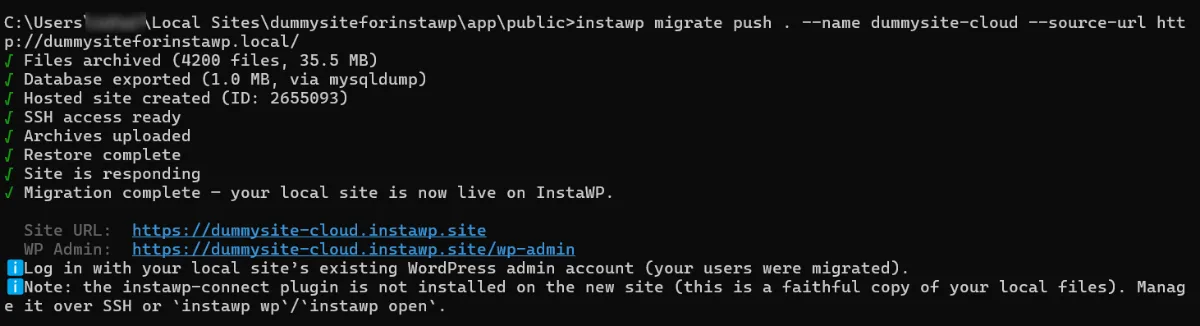
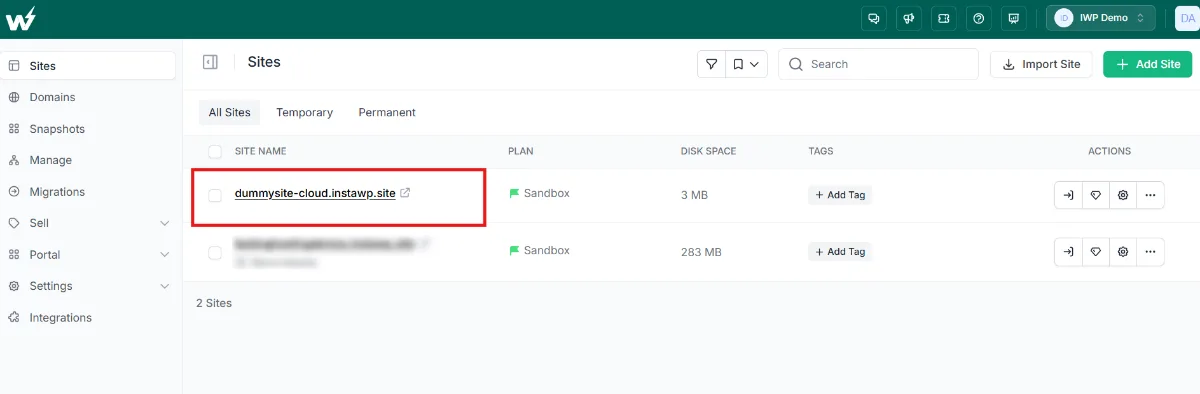
Step 7: Open the site and switch it to a production plan. Open the new site from your InstaWP dashboard and log in with your local admin username and password. The pushed site starts on the Sandbox plan, so change it to a production plan before you point a domain at it or send it real traffic.
wp instawp local push command. That route has been retired, and no plugin is needed on the local site any more. The Connect plugin now handles managing external sites and 2-Way Sync. Every current step is in the InstaWP guide to pushing a local WordPress site to InstaWP.This walkthrough shows the CLI workflow end to end:
The earlier, plugin-based push is in the video below, kept for readers who still run that setup:
Need to move the site on from InstaWP later? The AI migration under Migrations, New Migration copies a WordPress site between any two hosts with its files and database, and verifies the result. See the WordPress migration tool, the migration docs, or this guide to WordPress migration.

Host the finished site on InstaWP
MAMP is not a web host, so a finished MAMP site always needs somewhere to live, and on InstaWP the hosting is already part of the account. Each production site runs on InstaWP’s own infrastructure with its own Linux user, database, PHP-FPM pool and CPU allocation, billed per site per day with no annual contract, in five regions: the US, UK, Germany, Singapore and Australia. Going live is a plan change on the same site, with the same URL and data.
What each plan adds, from the InstaWP pricing page on 13 October 2026:
Prices are per site per month, billed daily. Adding a card adds $25 in credits to your account, and production plans carry a 14-day money-back guarantee. On the free WP Benchmark plugin, InstaWP’s new-generation servers scored 9.8 out of 10 against 7.3 on the previous generation in August 2026; the method is in the InstaWP hosting benchmark. See every plan on InstaWP hosting.
InstaWP vs MAMP at a glance
2. XAMPP

XAMPP is the free, open-source stack most people try first, and unlike MAMP it has a Linux build. It bundles Apache, MariaDB, PHP and Perl. Its last release was 8.2.12 on 19 November 2023, the macOS installer stops at 8.2.4, and the bundled MariaDB 10.4 is older than WordPress recommends. Apache Friends describes it as a development tool, not a production server.
Best for: a free stack on Windows, Linux or an Intel Mac, for learning.
3. LocalWP

LocalWP (Local), made by WP Engine, is the closest free MAMP alternative built only for WordPress. It runs on Windows, Mac and Linux, gives each site its own PHP version with a choice of nginx or Apache, and adds Live Links to share a site temporarily. One-click deploys go to WP Engine and Flywheel. With several sites running it uses a fair amount of RAM.
For a side-by-side breakdown, read our comparison of LocalWP and InstaWP.
Best for: free, offline WordPress work on any desktop OS.
4. Laravel Herd
Laravel Herd is a fast native PHP environment for macOS and Windows with Nginx and PHP 7.4 to 8.5 built in, plus site sharing through Expose. Herd is free; Herd Pro ($99 a year) adds MySQL, Redis, mail and debugging tools, so on the free tier you bring your own database for WordPress. For many Mac developers it is the most direct MAMP PRO alternative.
Best for: Mac or Windows developers who want speed and per-site PHP.
5. Laragon

Laragon is the MAMP alternative Windows developers usually reach for. It is a portable Apache or Nginx, MySQL and PHP environment that starts in seconds and gives each project a pretty URL like project.test. It also runs Node.js, Python and other stacks. Since version 7, Laragon is free for non-commercial use, and commercial licences start at $49 a year.
Best for: fast PHP and WordPress work on Windows.
6. WampServer
WampServer is a free, Windows-only stack that, unlike MAMP for Windows, is still updated. Version 3.4 bundles Apache 2.4.65, PHP 8.0 to 8.5, MySQL 8.4 and MariaDB 11.4, switchable from the tray icon. It needs the Visual C++ runtime packages installed first.
Best for: Windows users who like MAMP’s model but need current MySQL.
7. DDEV
DDEV is a free, open-source tool that runs PHP projects in Docker containers on macOS, Windows and Linux. It has a WordPress preset with PHP, MySQL or MariaDB, nginx or Apache, and Mailpit, plus HTTPS on local domains. Docker has to be installed and running.
Best for: teams that need identical environments on every machine, and Linux users.
8. wp-env
wp-env is the official @wordpress/env package from the WordPress project. Run wp-env start in a plugin or theme folder and WordPress comes up at http://localhost:8888 in Docker. Its default login (admin / password) must never face a network.
Best for: plugin and theme developers, and automated tests.
9. AMPPS

AMPPS, from the makers of Softaculous, bundles Apache, MySQL, PHP, Perl and Python with the Softaculous one-click installer for WordPress and hundreds of other apps. It runs on Windows and macOS. The free tier covers one PC without updates or multiple PHP versions, and paid plans start at $49 a year.
Best for: one-click installs of WordPress and other apps.
10. EasyPHP

EasyPHP Devserver is a free, portable Windows package with Apache or Nginx, MySQL, phpMyAdmin and Xdebug. Its latest Devserver release still lists PHP 7.x, older than anything current WordPress recommends.
Best for: maintaining an old PHP 7 project, and little else.
What is the best MAMP alternative?
The best MAMP alternative for WordPress is InstaWP, because it is the only option here that covers free local sites, shareable cloud sandboxes and managed hosting on one account, so the site you build is the site that goes live. If you only need a free local stack, LocalWP is the strongest WordPress-specific choice on every OS.
Versions and prices checked on each vendor’s site between 29 September and 13 October 2026.
Best MAMP alternative for Mac
On a Mac, InstaWP is the best MAMP alternative for anything a client will see, since its CLI runs natively on Apple Silicon through Node and the same account hosts the result. For a free, offline-only setup, LocalWP is the easiest switch, and Laravel Herd is the fastest if you are comfortable bringing your own database.
Best MAMP PRO alternative
People pay for MAMP PRO to get several sites with their own PHP versions, snapshots, Blueprints and, since version 7, an MCP server. InstaWP covers each of those: per-site PHP from 7.4 to 8.5, versions and snapshots, templates and configurations, and InstaMCP, with local sites free and cloud sandboxes at $2 a month. Herd Pro ($99 a year) is the closest like-for-like desktop replacement.
Best MAMP alternative for Windows
Because MAMP for Windows is stuck on version 5.0.6 and MySQL 5.7, Windows users have the most reason to switch. Laragon and WampServer are the strongest free desktop stacks, WampServer if you need MySQL 8.4, and the InstaWP CLI runs on Windows too, in PowerShell or Command Prompt.
Is there a MAMP for Linux or Ubuntu?
No. MAMP has no Linux build. On Ubuntu, use XAMPP for Linux, a native LAMP stack installed with apt, DDEV in Docker, or the InstaWP CLI, which only needs Node.js.
Keep MAMP if you build one simple site at a time on a Mac and never need to show it to anyone. If you work on Windows, juggle several sites, or hand sites to clients, InstaWP replaces both MAMP and the manual migration that follows it: build locally for free, share a sandbox, and go live on InstaWP’s managed WordPress hosting. You can sign up and open your dashboard in a minute.
MAMP alternative FAQs
Is MAMP no longer free?
MAMP is still free. The paid product is MAMP PRO, which costs US$99 on the Mac with one year of updates and €99 a year for updates after that. The free MAMP covers one document root with one PHP version at a time, while multiple hosts, per-site PHP and snapshots need PRO.
What is the difference between MAMP and MAMP PRO?
MAMP is a free local server with Apache, Nginx, PHP and MySQL. MAMP PRO adds unlimited hosts with their own PHP version and web server, snapshots, Blueprints, one-click WordPress installs, cloud backup and, in version 7, an MCP server for Claude Desktop.
Is XAMPP better than MAMP?
XAMPP and MAMP do the same job. XAMPP runs on Linux as well, but its last release was in November 2023 and it ships MariaDB 10.4. MAMP on the Mac is more current (7.4, February 2026) and ships MySQL 8. For WordPress sites that have to go live, InstaWP replaces both, since it adds shareable sandboxes and hosting.
What is the equivalent of MAMP in Ubuntu?
MAMP has no Linux version. The usual equivalents on Ubuntu are a LAMP stack installed with apt, XAMPP for Linux, DDEV in Docker, or the InstaWP CLI, which runs local WordPress sites with only Node.js installed.
Is LocalWP better than MAMP for WordPress?
For WordPress alone, LocalWP is usually easier: every site gets its own PHP version and web server for free, and Live Links let you share a site temporarily. MAMP needs MAMP PRO for per-site PHP. MAMP is the better fit if you also run non-WordPress PHP projects.
Does MAMP work on Apple Silicon Macs?
Yes. MAMP 7.4.0 has native builds for Apple Silicon (ARM) and Intel and needs macOS 11 or later.
How do I move a WordPress site from MAMP to a live server?
The quickest route is InstaCLI: open Terminal in the site folder, add MAMP’s mysqldump to your path, and run instawp migrate push with your local URL. It creates a hosted InstaWP site with your files and database and rewrites the URLs. The manual route is exporting the database, replacing the URLs, uploading the files and editing wp-config.php.
Why should I consider switching from MAMP to InstaWP?
InstaWP gives you free local WordPress sites, per-site PHP from 7.4 to 8.5, cloud sandboxes with a public URL, backups and snapshots, and managed hosting on the same account. Features that need MAMP PRO on a Mac are included, and going live does not need a manual migration.
Can I host my MAMP site on InstaWP?
Yes. Push it with instawp migrate push, then switch the new site from the Sandbox plan to a production plan. Production hosting starts at $5 a month per site, billed daily, with free SSL, a CDN and a firewall, and the site keeps the same URL when it goes live.