If your perfect .com is taken, squatted, or priced like a used car, .co is usually the next name on the list. The question every agency, founder, and developer ends up asking is the same: is .co a good domain, is it actually legit, and will it hurt SEO?
Short answer: .co is a legitimate, search-safe domain that Google treats as generic, so it ranks on the same rules as .com. The rest of this guide covers what .co really is, whether it is trustworthy, how it compares to .com and .co.in, and how to buy, map, and host a .co site end to end on InstaWP.
- Yes, .co is a good, legit domain. It is Colombia’s country code, but Google lists .co among the ccTLDs it treats as generic, so it is not geo-locked and carries no ranking penalty.
- SEO depends on the site, not the suffix. Content, speed, links, and experience decide rankings. A fast .co outranks a slow .com.
- .co and .co.in are different. .co is global and startup-friendly. .co.in is India’s commercial second-level domain under .in, meant for businesses targeting India.
- The real risks are type-in traffic and price. Some users default to .com, and .co usually costs more than .com, so check the renewal price and own the matching .com as a redirect when budget allows.
- Most big .co names stayed on .co. Of seven well-known .co domains we checked on 5 October 2026, all are still registered and four still serve their site on .co.
- You can run the whole lifecycle in one place. InstaWP is a managed WordPress host with built-in domain registration, so you buy the .co, build the site, link the domain with SSL, and host it from a single dashboard.
Table of Contents
What Is a .co Domain?
A .co domain is a top-level domain that people read as short for “company,” “corporation,” or “commerce.” Technically it is the country code top-level domain (ccTLD) assigned to Colombia, opened to global registration in 2010. In everyday use it works as a clean, modern stand-in for .com, which is why startups, SaaS products, and creators reach for it when the .com they want is gone.
If you have searched “where is .co from” or “what does .co stand for in a web address,” that is the full story: the letters point to Colombia by origin, but the market adopted them as a business extension. Google agrees with that reading.
Google publishes a list of country codes it treats as generic for search, and .co sits on that list next to .io, .ai, .me, and .tv. So a .co website behaves like a generic domain, and if you do want to target one country, Google asks you to signal it explicitly (hreflang, local content and links) rather than relying on the extension.
Is a .co Domain Legit and Trustworthy?
Yes, .co is a legitimate domain that real companies use for real businesses. Hinge runs on hinge.co, Lever on lever.co, and 500 Global on 500.co. When clients ask “is .co legit” or “are .co websites reliable,” the honest answer is that legitimacy comes from how a site is built and who runs it, not from the three letters after the dot.
The trust gap that did exist a decade ago has mostly closed. People now interact with .io, .ai, and .co products every day, so the extension no longer reads as suspicious to a tech-aware audience. What still moves the needle on trust is the basics: a valid SSL certificate, a professional design, a real email address on the domain, and a site that loads fast and looks finished.
Is co.com legit?
“Is co.com legit” is a different question from “is .co legit,” and the two get confused constantly. co.com is a single, privately owned .com domain whose owner sells names underneath it, such as yourname.co.com. Those are subdomains of co.com, not a top-level domain, so whoever controls co.com ultimately controls the address. A real yourname.co is registered through the .co registry and belongs to you. For most brands, the real .co is the stronger, simpler choice.
Is a .co website a reliable source?
A .co website is as reliable as the organisation behind it. The extension says nothing about accuracy, so judge a .co source the way you would judge a .com: check who publishes it, whether claims are cited, and whether the site is maintained. Because .co is one letter away from .com, also confirm you are on the brand’s real domain and not a lookalike.
If you build and host the site on managed WordPress hosting, the trust signals are handled for you. On InstaWP, SSL is auto-provisioned and renewed, a web application firewall sits in front of the site, and uptime monitoring flags problems before clients notice.
Which Famous Brands Use .co, and Did They Stay?
Most well-known .co names are still registered and still in use, which is a good sign that .co holds up over time. On 5 October 2026 InstaWP checked seven famous .co domains: their registration date in the .co registry WHOIS, and what the address actually serves today. All seven are still registered 14 to 16 years later. Four still serve their product on .co, and the three that moved tell you where .co gets risky.
Method: registration dates come from the .co registry WHOIS (whois.registry.co, port 43). “What it serves” is the final URL after following redirects with a desktop browser user agent, both checked on 5 October 2026. The two lessons that matter for a client project: plan your redirects before a rebrand, and if the audience is mainstream rather than web-savvy, own the matching .com.
Is .co Good for SEO? Is .com Better?
A .co domain does not hurt SEO. Google ranks .co on the same signals it uses for every generic domain, so choosing .co over .com does not put you at a built-in disadvantage. If you have wondered “is com better for seo,” the extension itself is not the deciding factor.
Here is what actually drives rankings, whether you are on .co or .com: content quality and relevance, page speed and Core Web Vitals, technical SEO like schema and crawlability, the strength of your backlink profile, and real user engagement. A fast, well-structured .co will outrank a neglected .com.
There are two situations where a .com holds an edge. First, an established .com that has run for years usually has more backlinks and more branded traffic simply because it has had more time. Second, if someone else owns the matching .com and ranks for similar terms, you can run into brand overlap.
Both are strategy questions you can answer before launch. Before you commit a client to product.co, audit whether product.com is active and competing. If it is inactive or unrelated, you are clear to proceed.
The same logic applies to “.co company subdomain SEO” questions, such as blog.brand.co versus brand.co/blog (see subdomain vs subdirectory for SEO). Speed and crawlability decide the outcome, so benchmark the site before launch with the WordPress performance scanner, fix the slow plugins and bloated themes it flags, and ship clean.
.co vs .com: Which One Should You Pick?
Pick .com when the exact name is available at a normal price and your audience is mainstream. Pick .co when the .com is taken or overpriced, your audience is web-savvy, and a shorter name matters more than habit. Both are treated as generic by Google, so the decision is about people and budget, not rankings.
For agencies building brands from scratch, or launching MVPs where a short name matters, .co reads as agile and current. Hinge, Lever, and 500 Global show how the extension can become part of the brand itself rather than a fallback.
History offers two cautionary tales. In 2011, Overstock tried to rebrand as O.co and pulled back after too many shoppers typed O.com instead; o.co still redirects to overstock.com today. And angel.co now redirects to wellfound.com after AngelList’s talent business rebranded as Wellfound. Neither case means .co fails. They show that a broad consumer audience defaults to .com, so .co works best when your audience is web-savvy or when you protect the matching .com with a redirect.
What Is a .co.in Domain? Is It the Same as .co?
No, .co.in is not the same as .co. A .co.in domain is a second-level domain under India’s .in country code, meant for commercial entities and companies operating in or targeting India. The “co” there signals “commercial,” much like .co.uk does in the United Kingdom.
The practical difference is reach. A plain .co is treated as global, so it suits a brand chasing an international audience. A .co.in sends a clear India-specific signal to both users and search engines, which is exactly what you want if your client serves the Indian market and not much beyond it.
If you are weighing “.co.in domain means” against “.co,” ask one question first: is this brand global or India-first? That answer picks the extension for you. Either way, a .co.in you registered elsewhere can still point at an InstaWP site through Map Domain, the same way a .co can. Our guide on how to map a WordPress domain covers the DNS side for any extension.
Should You Get a .co Domain?
Get a .co domain if the .com you want is taken, your audience is comfortable with modern extensions, and you can afford the renewal price. Skip it if your audience is mainstream and non-technical, your brand lives on email, or a client already ranks well on a strong .com. Use the quick split below to decide fast for a client.
A smart way to remove the guesswork is to prototype both. Clone an existing site, point it at a test .co, and compare how it performs before you ever touch live traffic. Then you are choosing on real numbers instead of a hunch.
How Do You Buy, Map, and Host a .co Domain?
The easiest way to buy a .co domain is to buy it on InstaWP. InstaWP is a managed WordPress hosting provider that lets you buy, map, and manage domains from the same dashboard as your WordPress sites, so you never have to keep a separate registrar account, copy DNS records between panels, or renew a certificate by hand. Its built-in Domains feature covers the whole domain lifecycle:
- Search and register: search a name across hundreds of extensions, see the first-year and renewal price before you buy, and get free WHOIS privacy, on by default.
- Link to a site in one step: Link Site writes the DNS record for you and issues free SSL automatically.
- Managed DNS beside the site: edit A, AAAA, CNAME, MX, TXT, NS, CAA, SRV and Redirect records without leaving the dashboard.
- Bring a domain you already own: connect a domain to WordPress by mapping it with a CNAME record, point its nameservers to InstaWP, or transfer the domain name in.
- One bill, no surprises: auto-renewal and domain lock are built in, and the domain renews on the same invoice as your hosting.
If you are new to this, read how to buy a domain for WordPress first. Pick your situation below. Every path ends with the .co serving a site on InstaWP managed hosting.
Step 1: Buy your .co domain inside InstaWP
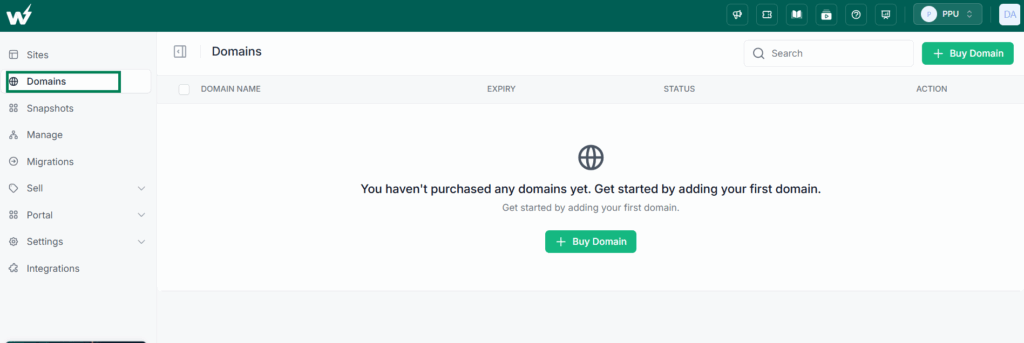
Open Domains from the left sidebar of your InstaWP dashboard and click + Buy Domain.
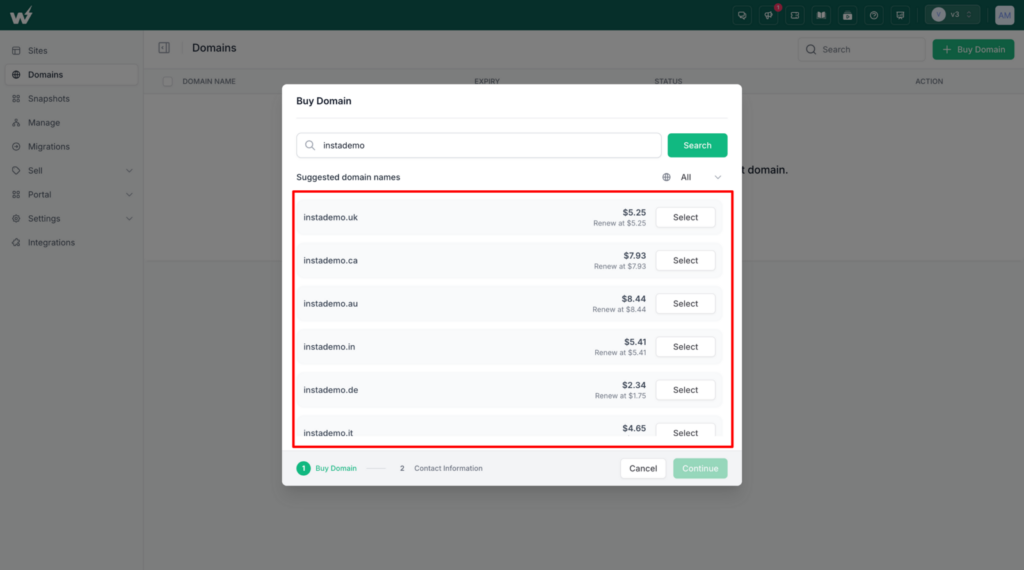
Type the name you want and click Search. InstaWP checks the name across hundreds of extensions and lists each available one with its first-year price and its renewal price, so you can see what the .co will cost in year two before you commit. Click Select next to your .co, then Continue.
Fill in the contact details used for the WHOIS record. WHOIS privacy protection is on by default and free, and .co supports it, so your personal details stay out of public lookups. Click Purchase Domain. The domain moves from In Progress to Active, usually within minutes to a few hours, and it lands on the same invoice as your hosting.
Step 2: Create the WordPress site
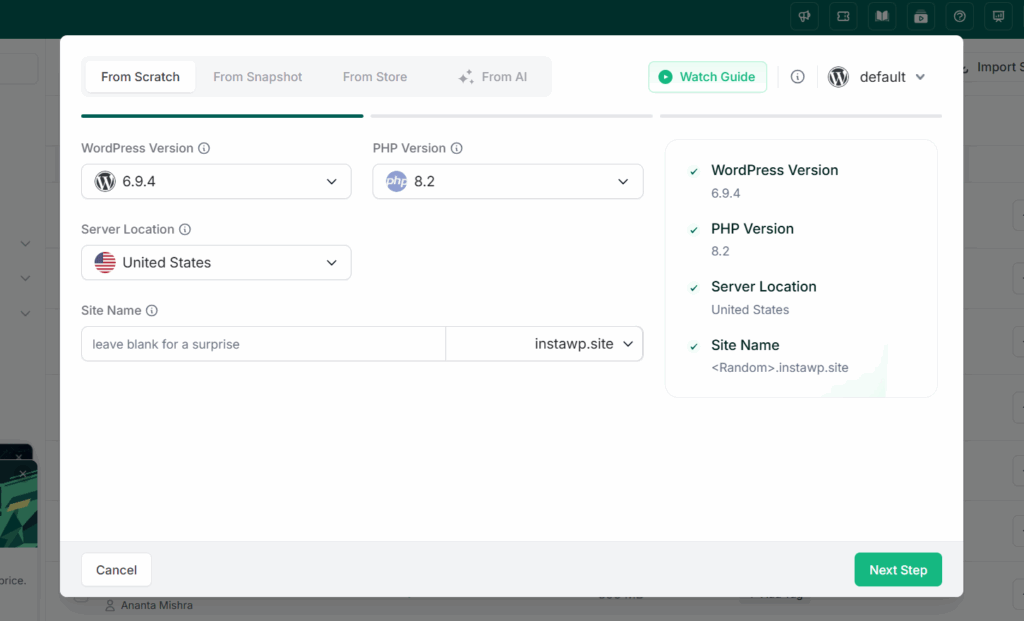
Spin up a real WordPress site from scratch, from a saved WordPress site snapshot, or from the template store in seconds. For a client pitch, build on a template so the demo already looks like their brand. A Sandbox is fine for the build itself. When you are ready to put the .co on it, change the site’s plan to Starter or higher from the Sites page, and it keeps the same URL and data.
Step 3: Connect the .co domain to the site
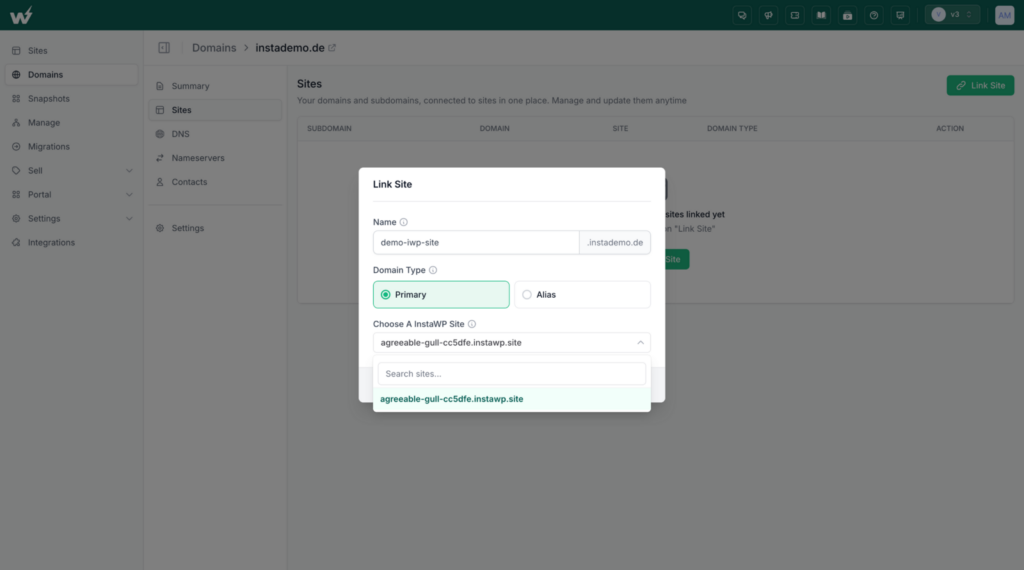
If you bought the .co on InstaWP, go to Domains, open the domain, choose Sites in its left menu, and click Link Site. Enter www or a subdomain name (use @ for the root), choose Primary or Alias, pick the site, and click Confirm. InstaWP writes the CNAME record and issues SSL itself, so there is nothing to copy.
If the .co lives at another registrar, open the site from the Sites page and choose Map Domain, then click the Map Domain button.
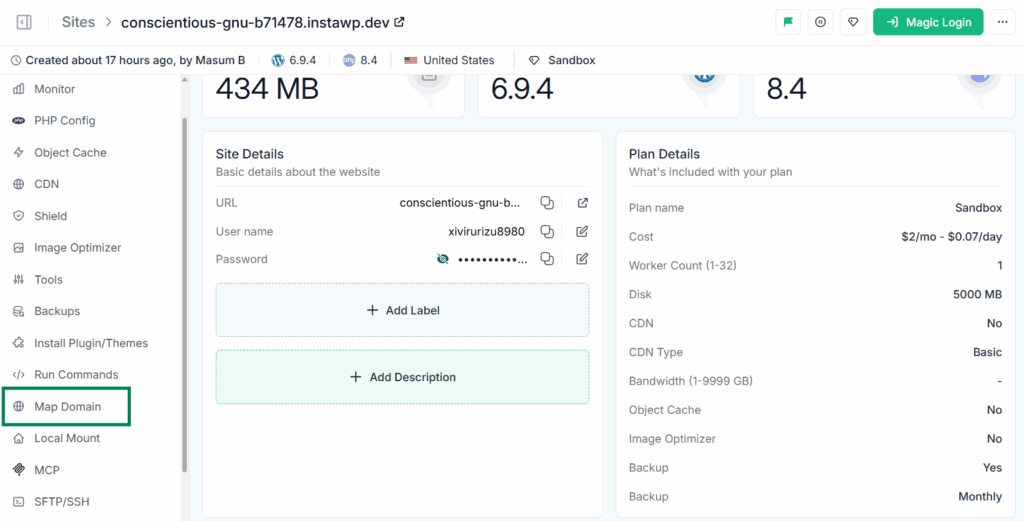
Enter your .co, set it as Primary, and copy the hostname shown under Point ‘CNAME’ records to. If you also own the .com, map it later as an Alias so it redirects to the .co.
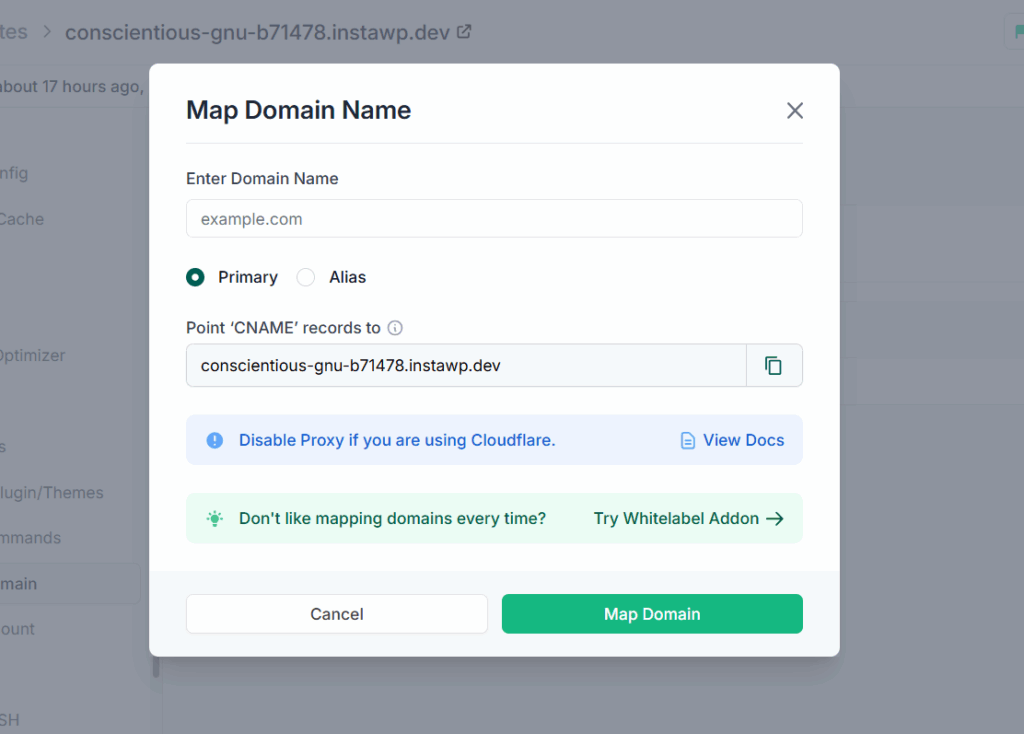
At your registrar, add a CNAME record for @ and another for www, both pointing at that hostname. InstaWP sites sit behind a CDN with changing IPs, so use a CNAME, not an A record. If your registrar will not accept a CNAME on the root, use an ALIAS or ANAME record instead. Turn off the Cloudflare proxy (grey cloud) while you map. Save, return to InstaWP, and click Map Domain to confirm. SSL is provisioned automatically.
Your .co now points to the hosted site. The full walkthrough lives in the guide to map a domain in WordPress. You can also watch the video guide.
Step 4: Redirect your .com to the .co
If you also own the matching .com, point it at the .co so stray type-in traffic and misdirected visitors still arrive. A redirect also stops the two domains from serving duplicate content to Google. Two ways on InstaWP: map the .com to the same site as an Alias, which redirects to the primary .co, or, if the .com is registered on InstaWP, add a Redirect record for @ in its DNS tab with https://yourbrand.co as the value. The redirect record comes with HTTPS and needs no server.
Step 5: Host and manage it as a managed site
Once the .co is live, the hosting plan decides how fast and safe the site is. On a hosted plan the site sits behind InstaCDN and the InstaShield firewall, with automatic backups, and from Plus upward, uptime monitoring and managed updates, all handled from the same dashboard. From Pro you also get one-click WordPress staging sites for safe changes, so you never edit a client’s live .co directly.
Is It Better to Buy a .co From Your Host or a Separate Registrar?
Buying the .co from the company that hosts the site removes the handoffs that break launches: copying DNS records between two panels, a certificate nobody renewed, and two renewal dates on two cards. A separate registrar still makes sense when a domain portfolio is managed by a different team or must stay independent of any host. For one brand or a set of client sites, keeping the .co and the WordPress site together on InstaWP is the simpler setup.
Which option fits which job:
Can You Host a .co Site on InstaWP?
Yes. InstaWP is a managed WordPress hosting provider, and any .co, whether bought on InstaWP or elsewhere, can serve a site on its own infrastructure. Each hosted site gets its own isolated resources, is billed per site per day, and is promoted from sandbox to production in place, with the same URL and data and no migration. Moving an existing site? See how to migrate a WordPress site to a new domain and new hosting.
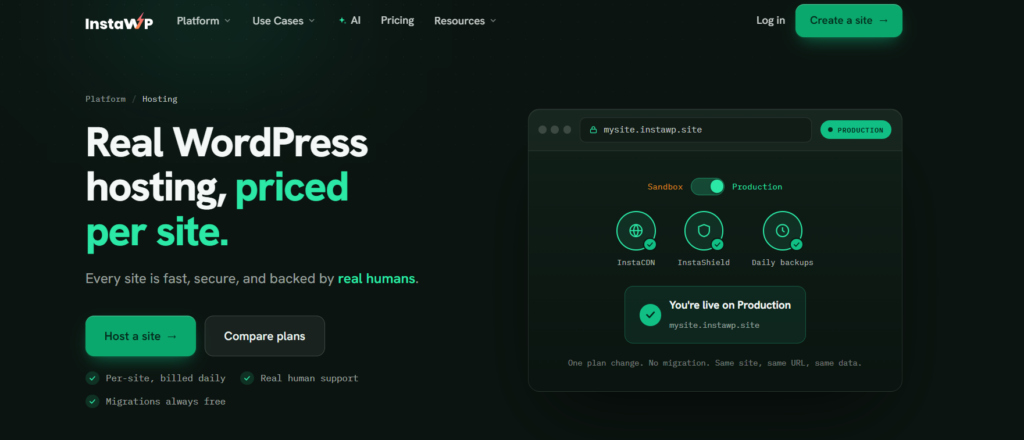
Here is what each plan adds once the .co is mapped, taken from the InstaWP pricing page in October 2026:

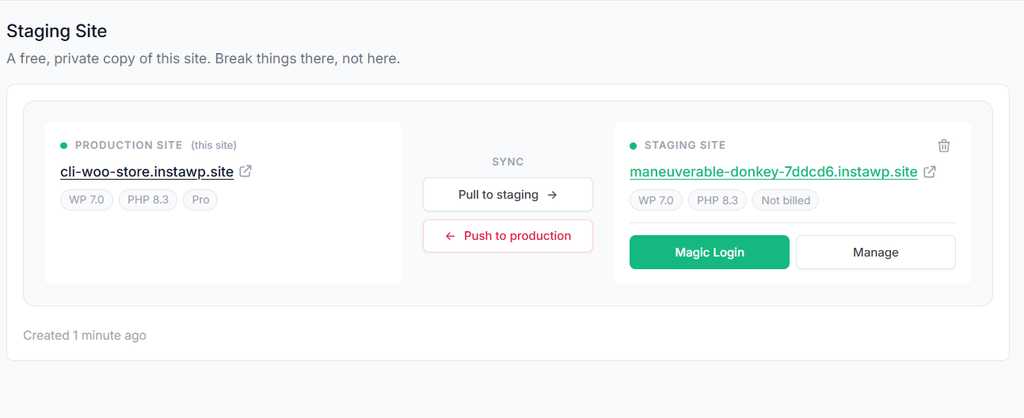
Read how a WordPress staging environment protects a live client site before you push changes.
On speed, InstaWP ran the free WP Benchmark plugin from the WordPress repository on the same site in August 2026: the new-generation servers scored 9.8 out of 10, against 7.3 on the previous generation. The method and raw numbers are in the WordPress hosting benchmark.
Billing is daily, there is no annual contract, new accounts get $25 in credits, and there is a 14-day money-back window.

Can an AI Agent Set Up a .co Website for You?
Partly today, and the parts that matter most are already scriptable. InstaWP exposes domains over its v2 domains API (search, register, DNS records, link a site, renew), alongside the InstaWP site API, and every InstaWP site can turn on InstaMCP, the WordPress MCP server, so an AI client such as Claude, ChatGPT, Cursor, or VS Code can build and edit the WordPress content with structured tools. Buying the domain is an API call your own tooling or agent makes; editing the site is an MCP conversation.
# 1. is the name free, and what does it cost?
POST /api/v2/domains/check-availability
# 2. register it
POST /api/v2/domains
# 3. point it at a site (the CNAME is written for you)
POST /api/v2/domains/{domain}/link-site
# 4. manage records, e.g. a .com to .co redirect
POST /api/v2/domains/{domain}/dns
Turn on MCP from the site’s MCP panel, copy the connection URL into your AI client, and the agent can create pages, posts, menus and media on the new .co site through 40+ structured tools. It works with a scoped, revocable token, Safe Mode is on by default, and raw PHP, SQL and file tools stay off until an admin enables them.
A practical split for agencies: script the domain and site provisioning once against the API, then let the agent fill in the content per client. The domain step never touches the WordPress admin, and the content step never needs DNS access. The two InstaWP connection types are compared in account MCP vs site MCP.
How Do Agencies Run .co Client Sites at Scale?
Agencies rarely buy one .co. They launch and brand many client sites and resell hosting for them, and the workflow has to hold up at that volume. Because InstaWP covers the domain, the site and the hosting, you can standardize how every client site is created and run.
Add a white-label suffix domain to your team, for example brand.co, and every new build is created as client1.brand.co or shop2.brand.co instead of an instawp.site address. The white-label suffix is a $5/month add-on. Pair it with WordPress templates and snapshots and you can deploy a batch of branded client sites on one .co in an afternoon.
Run it as a Website-as-a-Service and you set the pricing, keep the margin, and hand clients a white-label client portal under your brand, not InstaWP’s. Domains plug into the WaaS checkout too (in beta), so a client can buy their .co as part of the website package you sell them. If the client already owns a domain, set up a WaaS site with a custom domain instead.
Day to day, you manage multiple client sites from one screen: updates, monitoring, security scans, and client-ready PDF reports.
Keeping the domain, the hosting, the maintenance and the client billing in one account is what the InstaWP Agency Program is built around. It adds cashback and commissions on hosted sites, priority support, and free WordPress migrations for every client you bring over.
What Are the Best Practices for Mapping or Switching to a .co?
Clone the site first, redirect every old URL, and recreate your mail records before you touch DNS. The checklist below covers the details.
- Clone the site before you map anything, so you always have a fallback.
- Moving from a .com to a .co? Set up 301 redirects from every old URL so existing links and rankings carry over rather than evaporate. Follow Google’s guide to site moves with URL changes, and see how to change the domain name on WordPress safely.
- Recreate your mail records first if you move nameservers to InstaWP. Connecting a domain replaces the DNS your old provider served, so note your MX and TXT records before you switch.
- Turn off the Cloudflare proxy while mapping and while SSL is issued.
- Transferring the registration? The domain must be older than 60 days (the ICANN transfer policy lock), unlocked, and you need the auth code from your current registrar.
- Watch uptime while DNS propagates, check the activity log for conflicts, and turn on managed updates once the domain is live.
One more naming tip that saves future headaches: keep the name under about 15 characters, skip hyphens and tricky spellings, and pass the radio test. If someone hears it out loud and can type it correctly, it will travel well on .co.
Is .co a Good Domain? The Verdict
Yes. If you are building modern products, launching client sites, or running a hosting business, .co is a good domain and a search-safe alternative to .com. It is legit, Google treats it as generic, and the famous .co names we checked are still registered and mostly still serving on .co. Its real weaknesses, type-in confusion and a higher price, are easy to manage: check the renewal price and own the matching .com as a redirect.
On InstaWP you can buy the .co, build the WordPress site, link the two with SSL, and host it on managed WordPress hosting from one dashboard. Add a card, claim your $25 in free credits, and launch your first branded .co today.
Frequently Asked Questions About .co Domains
Is .co a good domain for SEO?
Yes. Google treats .co as a generic domain, so it has no SEO disadvantage compared to .com. Rankings come down to content quality, speed, links, and user experience, not the extension. A fast, well-built .co can outrank a slow or inactive .com.
Is a .co domain legit for business websites?
Yes. Hinge, Lever, and 500 Global all run on .co. To reinforce trust, use SSL, a professional design, a branded email address, and reliable hosting. With those in place, a .co reads as credible to both users and search engines.
Is co.com legit?
co.com is a real, privately owned .com that sells subdomains such as yourname.co.com. It is not a top-level domain, and the owner of co.com controls the parent address. A real yourname.co is registered through the .co registry and belongs to you, so it is the safer choice for a brand.
For a US-focused social media startup, would a .co feel credible to brands and advertisers?
Yes, especially with a tech-aware audience that already knows .co, .io, and .ai. The main caution is type-in traffic: some advertisers may default to .com. Owning the matching .com and redirecting it to your .co removes that friction while keeping the modern brand feel.
Should I own both .co and .com? How many domains do I need for SEO?
For SEO you only need one canonical domain. Owning extra extensions is about brand protection, not ranking. A common setup is one primary domain (your .co) plus the matching .com bought defensively and 301-redirected to it. That captures stray type-in traffic without splitting your SEO across two sites.
Does a .co domain cost more than .com?
Usually, yes. A .co typically costs more than a standard .com to register and to renew. Always check the renewal price, not just the first-year price. InstaWP’s Buy Domain search shows both side by side before you purchase.
Is a .co domain good for email?
It works like any other domain for email, but because .co is one letter away from .com, some senders will type .com by mistake. If email matters to the business, own the matching .com and forward or redirect it so misdirected visitors and messages are not lost.
What is the difference between .co and .co.in?
The .co extension is global and treated as generic by Google. The .co.in extension is India’s commercial second-level domain under the .in country code, sending a clear India-specific signal. Choose .co for an international brand and .co.in when the audience is primarily in India.
Can I buy a .co domain on InstaWP?
Yes. InstaWP is a managed WordPress host with built-in domain registration. Open Domains, click Buy Domain, search the name, and register the .co with free WHOIS privacy. You can then link it to any of your InstaWP sites with SSL issued automatically.
Can I host my .co site on InstaWP?
Yes. Any .co, bought on InstaWP or elsewhere, can be mapped to an InstaWP site on the Starter plan ($5/month) or higher. You get free SSL, CDN, firewall and backups, and higher plans add daily backups, uptime monitoring, and staging.
Can I switch from .com to .co safely?
Yes, if you do it carefully. Set up 301 redirects from every old URL, update internal and external links, and keep both domains live during the transition. Cloning the site first gives you a safe rollback, and on InstaWP the old .com can stay mapped as an alias that redirects to the new .co.
What are the best domain extensions for startups in 2026?
The .co, .io, .ai, and .tech extensions lead the pack for tech and startup brands. The .co option stands out for availability, global neutrality, and brandability, which is why it remains a top pick when the ideal .com is gone.