Choosing between a WordPress subdomain and a WordPress subdirectory is more than a technical setup choice. It shapes how search engines view your site, how visitors navigate it, and how easily you can manage growth over time.
Many site owners start with a single domain and eventually face the question: Should I install WordPress on a subdomain to separate certain content, or keep everything under one WordPress subdirectory for simplicity and SEO benefits?
The subdomain vs subdirectory debate has been around for years, and while Google says both are treated equally, real-world results often tell a more complicated story. Factors like SEO equity, analytics tracking, branding consistency, and maintenance can all be influenced by whether you choose a subdirectory vs subdomain setup.
This guide will break down the differences, show you when each option makes sense, and explain how to set up both in WordPress.
Table of Contents
What is a WordPress Subdomain?
A WordPress subdomain is a section of your site that lives under your main domain but functions as its own address. It appears before your primary domain name, separated by a dot. For example:
- blog.example.com
- shop.example.com
- staging.example.com
When you create a subdomain WordPress setup, you can point it to the same hosting account as your main site or to a completely separate server. This flexibility makes subdomains useful for projects that need their own identity, structure, or technical environment.
In WordPress, a subdomain can be used in several ways:
- Hosting different content in a separate space while still tying it to your main brand.
- Creating a multilingual site where each language has its own subdomain, like fr.example.com or es.example.com.
- Running a WordPress multisite installation where each subsite is a subdomain of the main site.
- Setting up a testing or staging area so you can experiment without affecting your live site.
Large companies often rely on subdomains to keep their offerings organized. Google, for example, separates services into mail.google.com, drive.google.com, and docs.google.com. Each has its own focus but shares a connection to the main Google brand.
If you decide to install WordPress on a subdomain, you will typically need to create the subdomain in your hosting account’s DNS settings, then point it to a WordPress installation. Once set up, it can run with its own themes, plugins, and database, giving you full control over how it looks and functions.
When to Use a WordPress Subdomain
A subdomain WordPress setup is ideal when you want to create a section of your site that feels distinct from the main domain. It works best for projects that need their own structure, branding, or technical environment while still remaining connected to your primary site.
Here are the most common scenarios where a WordPress subdomain makes sense:
1. Separate a New Business Line or Service
If you offer different products or services, a subdomain lets you give each one its own space. For example, a marketing agency could use courses.example.com for training programs and resources while keeping the main site focused on client services. This approach can also make it easier to target a different audience or create a unique design without affecting the rest of the site.
2. Create a Client Portal or Member Area
Subdomains are often used for password-protected areas that require separate access. This can include client dashboards, project workspaces, or membership communities. Because the subdomain operates independently, you can install WordPress on subdomain with its own plugins for user management, security, and file storage.
3. Build a Staging or Testing Environment
A staging site is where you test updates, design changes, and new features before they go live. Setting up a WordPress staging site on a subdomain keeps it isolated from your main domain, which means any mistakes or broken features won’t impact your visitors. With modern platforms like InstaWP, you can create and map a subdomain staging site in minutes, complete with SSL and DNS setup.
4. Run a WordPress Multisite Network
If you manage multiple sites under one installation, a subdomain-based WordPress multisite lets each subsite have its own unique address. For example, you could have site1.example.com, site2.example.com, and site3.example.com; all managed from the same dashboard. This is especially useful for franchises, regional websites, or large content networks.
5. Launch a Multilingual Website
Many businesses use subdomains to manage translations and localized content, such as fr.example.com for French or es.example.com for Spanish. This helps you structure content for different markets while keeping the main domain as the core brand.
What is a WordPress Subdirectory?
A WordPress subdirectory is a folder within your main website that organizes content under the same domain. Instead of creating a separate web address like a WordPress subdomain, a subdirectory keeps everything under the primary domain name.
It appears in your URL after the root domain, separated by a forward slash. Examples include:
When you set up a subdirectory in WordPress, all the content lives under the same site architecture. This means that your main domain and all subdirectories share the same SEO authority, analytics tracking, and backend management. Unlike subdomain WordPress setups, you do not need to create separate DNS records or SSL certificates for each folder.
In practical terms, a subdirectory vs subdomain setup is simpler for smaller websites or brands that want to consolidate everything in one place. You can create pages, categories, or entire sections without affecting the main domain’s SEO or requiring extra technical configuration.
For example:
- A freelance photographer might keep their portfolio at example.com/portfolio and their blog at example.com/blog.
- An online store could keep its main shop at example.com/shop and customer support pages at example.com/support.
Because subdirectories live under the same domain, search engines treat them as part of one cohesive site. This can make a big difference in subdomain vs subdirectory for SEO, especially if your goal is to build a single, strong domain authority.
When to Use a WordPress Subdirectory
A WordPress subdirectory setup is best when you want to keep all of your content under the same domain and share the same SEO authority. Compared to a WordPress subdomain, it is easier to manage, track, and optimize because everything is consolidated into one site structure.
Here are common scenarios where a subdirectory vs subdomain choice leans toward using a subdirectory:
1. Consolidate SEO Equity
If your goal is to maximize domain authority, a subdirectory keeps all your backlinks, keyword rankings, and “link juice” within a single domain. This can be especially important when comparing a subdomain vs a subdirectory for SEO, since a subdomain is often treated as a separate site by search engines.
2. Simplify Analytics and Tracking
With a subdirectory, you can track all your website activity in one analytics property without cross-domain tracking. This makes reporting and user behavior analysis easier compared to a subdomain WordPress setup.
3. Maintain Brand Consistency
A subdirectory ensures that all sections of your site have a consistent URL format, which can improve trust and brand recognition. For example, a company could have example.com/blog, example.com/resources, and example.com/contact, all following the same structure.
4. Keep Technical Overhead Low
Unlike installing WordPress on subdomain, a subdirectory requires no additional DNS setup or SSL certificates. You simply create a new page or folder in your existing WordPress installation, making it ideal for smaller sites or businesses without dedicated technical staff.
5. Organize Related Content
If your content topics are closely connected, placing them in subdirectories helps search engines understand their relationship. For example, a cooking website might have example.com/recipes, example.com/cooking-tips, and example.com/meal-plans, all benefiting from the main site’s authority.
Subdomain vs Subdirectory for SEO
The subdomain vs subdirectory for SEO discussion is one of the most debated topics in search optimization. While Google has stated that it treats both structures equally in terms of crawling and indexing, real-world SEO results often suggest otherwise.
Many site owners and SEO professionals have seen better performance with subdirectories, especially when the goal is to consolidate topical authority and maximize link equity.
The key difference lies in how search engines process authority signals, topical relevance, and backlinks for each structure and how those signals are distributed across your site.
Subdomain vs Subdirectory: Quick Comparison
Here is a side-by-side view of how the two structures compare before we get into the detailed breakdown.
| Factor | WordPress Subdomain | WordPress Subdirectory |
|---|---|---|
| URL format | blog.example.com | example.com/blog |
| SEO authority | Built separately, treated as its own site | Shared with the main domain |
| Link equity | Isolated to the subdomain | Pooled across the whole domain |
| Setup (DNS and SSL) | Needs its own DNS records and SSL certificate | No extra DNS or SSL needed |
| Analytics | Cross-domain tracking required | Unified in one property |
| Maintenance | Updated per site, unless you run multisite | One installation covers everything |
| Best for | Distinct brand, separate audience, regional or staging sites | Consolidating SEO under a single brand |
| On InstaWP | Map the subdomain, add two A records plus a wildcard, and SSL provisions automatically | Runs under one site, with nothing extra to configure |
How Search Engines Treat Them
As we know, a WordPress subdomain (e.g., blog.example.com or store.example.com) is typically treated by search engines as a completely separate website. Even though it shares the same root domain, it maintains its own SEO profile.
This means:
- Separate Authority Building: You must build domain authority for the subdomain independently through backlinks, high-quality content, and consistent topical relevance.
- Isolated Link Equity: Backlinks pointing to the subdomain do not automatically benefit the main domain or its subdirectories.
- Independent Rankings: Search rankings earned by the subdomain usually won’t directly lift rankings for the main site.
While this separation can be beneficial for targeting a different audience, keyword set, or content intent, it often requires running a parallel SEO strategy ; which can double the workload.
On the other hand, a WordPress subdirectory (e.g., example.com/blog or example.com/shop) is seen as part of the main site’s architecture. Search engines index it under the same domain authority profile, meaning all SEO value is pooled together.
This offers several advantages:
- Shared Domain Authority: Backlinks to the main site benefit the subdirectory, and backlinks to the subdirectory benefit the main domain.
- Cumulative Link Equity: Every link, citation, and mention contributes to one consolidated authority source.
- Unified Topical Relevance: Content in the subdirectory reinforces the main site’s themes, helping search engines see it as an authoritative resource on related topics.
Because all authority signals are combined, a WordPress subdirectory can help improve rankings across the entire site, not just the section you’re working on.
When deciding between a subdomain WordPress setup and a WordPress subdirectory, the choice should align with your SEO goals:
- If you want to strengthen the main site’s visibility and build long-term topical authority, subdirectories usually deliver faster and more consistent results.
- If you need clear separation for brand, audience, or functionality, and you are prepared to invest in building SEO for each property separately, subdomains can work, but they require more resources.
User Experience and Branding
When deciding between a WordPress subdomain and a WordPress subdirectory, the way users perceive and interact with your site is just as important as SEO.
A subdomain, like shop.example.com or blog.example.com, often feels like a separate website. This can be a positive if you want to create a unique brand identity for a product line, campaign, or region. You have the freedom to change the design, navigation, and tone without impacting the main site.
However, this separation can also create friction. Users may feel like they’ve left the primary website, which could reduce trust or cause them to disengage. Even small differences in branding, layout, or functionality can make the experience feel inconsistent.
A subdirectory, like example.com/shop or example.com/blog, keeps all sections of the site under one familiar domain. This creates a seamless navigation experience where users always know they’re still on your main site. The consistent branding and URL structure can strengthen trust and make it easier for users to explore other sections.
This cohesion is especially important for businesses that rely on brand recognition, repeat visits, or cross-promotion between content areas.
Bottom line:
- Choose a subdomain if you want a distinct identity, design freedom, and a clear separation from your main brand.
- Choose a subdirectory if you value brand consistency, unified navigation, and a smooth user journey across all content.
Analytics and Tracking
When comparing subdomain vs subdirectory setups in WordPress, one of the most overlooked factors is how each structure affects your ability to collect and interpret data.
A WordPress subdomain (e.g., blog.example.com) is typically tracked as a separate property in analytics tools like Google Analytics. This means you’ll need to configure cross-subdomain tracking to follow users as they move between the main site and the subdomain.
Without this setup, your data will be fragmented, making it harder to measure true engagement, conversions, and customer journeys. For marketing teams running multiple WordPress instances on subdomain projects, this can add complexity and require more technical resources.
A WordPress subdirectory (e.g., example.com/blog) keeps all analytics under a single domain. This means every page, whether it’s part of your main content or a niche section, is tracked within the same analytics property.
You get a complete view of user behavior without extra configuration, making it easier to optimize content, funnels, and campaigns.
This simplicity is why, when comparing subdirectory vs subdomain, many SEO and analytics teams prefer subdirectories for unified data collection.
Bottom line:
- Choose a subdomain if you need separate analytics profiles for different audiences or business units and have the resources to set up advanced tracking.
- Choose a subdirectory if you want streamlined, all-in-one analytics reporting with minimal configuration.
Content Organization and Site Architecture
The structure you choose, WordPress subdomain or WordPress subdirectory, will directly influence how your site’s content is organized and how search engines understand its hierarchy.
As the subdomain WordPress creates a completely separate branch in your architecture, it will keep the content very different from your main site. Each subdomain can have its own navigation, categories, and even its own WordPress installation if needed.
The downside is that search engines treat each subdomain as an independent site, so they don’t automatically associate topical relationships between the subdomain and the main domain.
A WordPress subdirectory (e.g., example.com/blog or example.com/resources) places all content under a single hierarchy. This makes it easier for search engines to see how sections relate to each other, which can help with subdomain vs subdirectory for SEO decisions.
For example, your blog can directly support your product pages with internal links, strengthening topical authority for your entire domain. It’s also easier for users to navigate related content when it’s all under the same structure.
Bottom line:
- Choose a subdomain when content needs a completely separate architecture, purpose, or audience.
- Choose a subdirectory when you want to create a clear, connected hierarchy that benefits both SEO and user navigation.
Technical Maintenance
From a management standpoint, WordPress subdirectory setups are generally simpler to maintain than WordPress subdomain sites. The difference comes down to how updates, security, and domain settings are handled.
A subdomain WordPress site often requires its own DNS records, SSL certificates, and in some cases, separate hosting environments. Unless you are running a multisite network, updates to plugins, themes, and core WordPress files must be applied to each subdomain individually.
Analytics, backups, and security monitoring also need to be configured for each subdomain. Without proper tools, this can double or triple the workload, especially if you install WordPress on subdomain for multiple projects.
With InstaWP, subdomain setup and maintenance are streamlined. You simply map the subdomain in the dashboard, copy the two provided IP addresses into your DNS as A records, and add a wildcard A record (*) to automatically route future subdomains.
SSL is provisioned automatically in 5–30 minutes, and each subdomain is added as an alias for the main site, cutting down manual setup dramatically.
A WordPress subdirectory doesn’t require extra DNS configuration or SSL installation. Everything runs under the same site environment, so updates, backups, and security scans are applied once and cover the entire site.
From a maintenance perspective, subdirectory vs subdomain favors subdirectories for smaller teams or businesses without dedicated technical staff.
Bottom line:
- Choose a subdomain if you need flexibility and separation, but be prepared for higher technical upkeep, or use a managed solution like InstaWP to simplify it.
- Choose a subdirectory if you want minimal configuration and a single environment to maintain.
Either structure still needs a registered domain underneath it. You can buy the domain and the site together rather than wiring a registrar to a host.
Development and Deployment Workflow
Your choice between a WordPress subdomain and a WordPress subdirectory can significantly affect how you roll out updates, test new features, and deploy changes.
With a subdomain WordPress structure, each subdomain can operate on its own installation, design, and plugin set. This gives developers flexibility; you can run completely different themes or experiment with a unique tech stack without affecting the main domain.
However, the trade-off is deployment complexity. If you want to roll out the same feature or plugin update across multiple subdomains, you’ll need to repeat the process unless you’re using a multisite configuration. Even with multisite, you must still ensure DNS, SSL, and alias mapping are correctly set for each subdomain.
If you install WordPress on subdomain for staging purposes, you’ll need a clear migration process to push those changes to the live environment without overwriting critical data.
With InstaWP, you can spin up WordPress staging sites on subdomains instantly, test your changes, and use push-to-live or two-way sync to update your production site. Wildcard DNS and alias mapping mean new subdomains are ready to use without repeating DNS steps, making deployment much faster.
In a WordPress subdirectory environment, everything runs from the same WordPress installation. When you update a theme, deploy a new feature, or patch a security vulnerability, the change applies to all subdirectory content automatically.
This makes deployment faster and reduces the risk of version mismatches across site sections. However, the shared environment means you have less flexibility to experiment with entirely different setups for each section; any breaking change could impact the whole site.
Bottom line:
- Choose a subdomain if you need isolated development environments or separate deployment cycles for different site sections.
- Choose a subdirectory if you want a streamlined, single-deployment workflow where updates roll out site-wide in one step.
Internationalization and Localization
If your WordPress site serves audiences in multiple countries or languages, choosing between a WordPress subdomain and a WordPress subdirectory will impact both SEO performance and user experience.
Using a subdomain WordPress structure for localization means creating language or region-specific subdomains, such as fr.example.com for French or au.example.com for Australia.
Benefits include:
- Clear regional separation: Each subdomain can have its own language, currency, and localized content without affecting other versions.
- Separate SEO targeting: You can optimize each subdomain for local keywords, use local hosting, and tailor the backlink strategy to a specific market.
- Technical flexibility: Each subdomain can run on a different server or WordPress installation, allowing more control over regional performance and compliance requirements.
The drawback is that search engines treat each localized subdomain as a separate site. You’ll need to build domain authority for each one and set up hreflang tags correctly to help search engines understand the relationship between versions.
A WordPress subdirectory for localization looks like example.com/fr/ for French or example.com/au/ for Australia.
Benefits include:
- Shared domain authority: All backlinks and SEO value from your main site help the localized content rank.
- Easier SEO management: You can track and optimize all languages from a single domain property in your analytics tools.
- Simplified maintenance: Only one WordPress installation to update and secure, even if you use multiple language plugins like WPML or Polylang.
However, subdirectories offer less flexibility if you need unique technical setups for each region, and you may have to manage complex caching or CDN rules to serve content quickly worldwide.
Bottom line:
- Choose a subdomain if you need fully independent regional sites with separate hosting, SEO strategies, and branding.
- Choose a subdirectory if you want to consolidate SEO value across all languages and manage everything from one installation.
How to Set Up a Subdomain in WordPress with InstaWP
If you decide a subdomain is the right structure, here is how to set one up on InstaWP without touching a server. The whole process is a dashboard mapping step plus two DNS records, and SSL is handled for you.
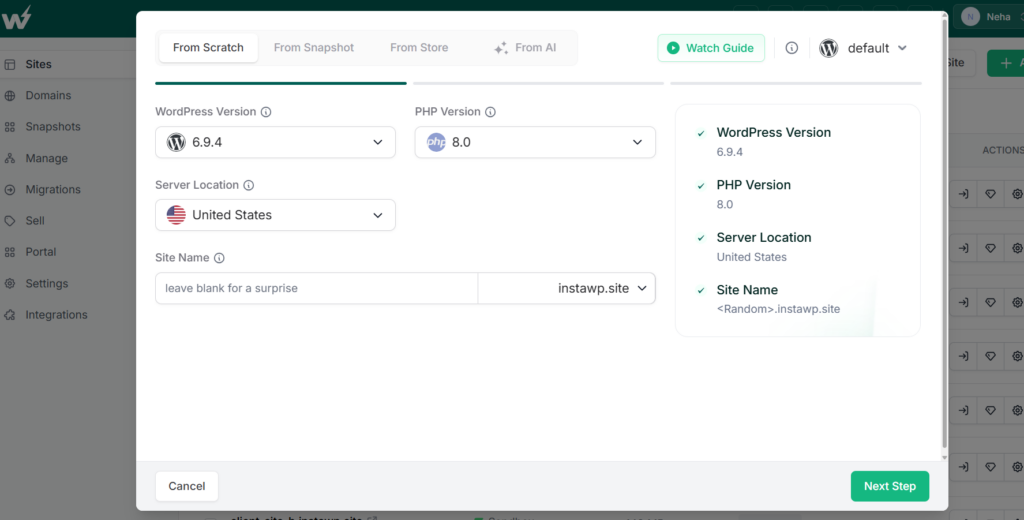
- Create your WordPress site. Every new site on InstaWP spins up on its own working subdomain, so you have a live environment before you touch DNS.
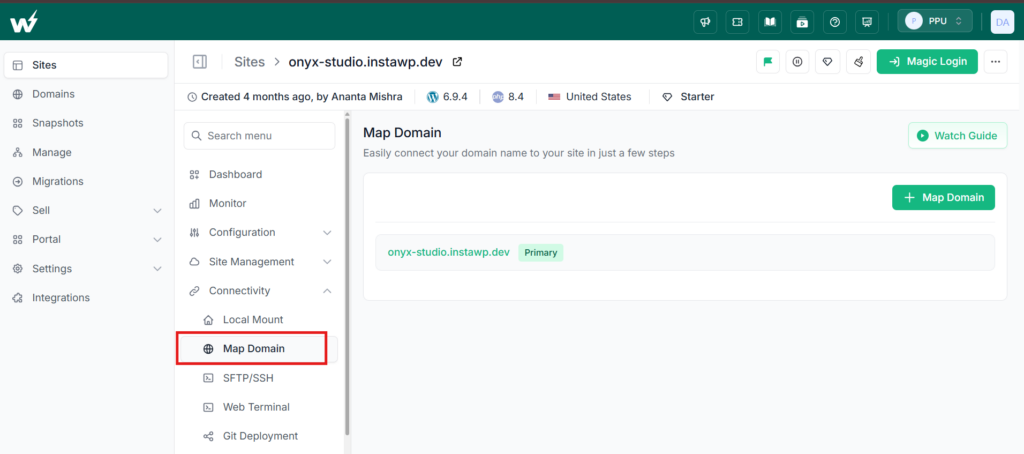
- Map your subdomain. In the dashboard, map the subdomain you want to use, for example blog.example.com.
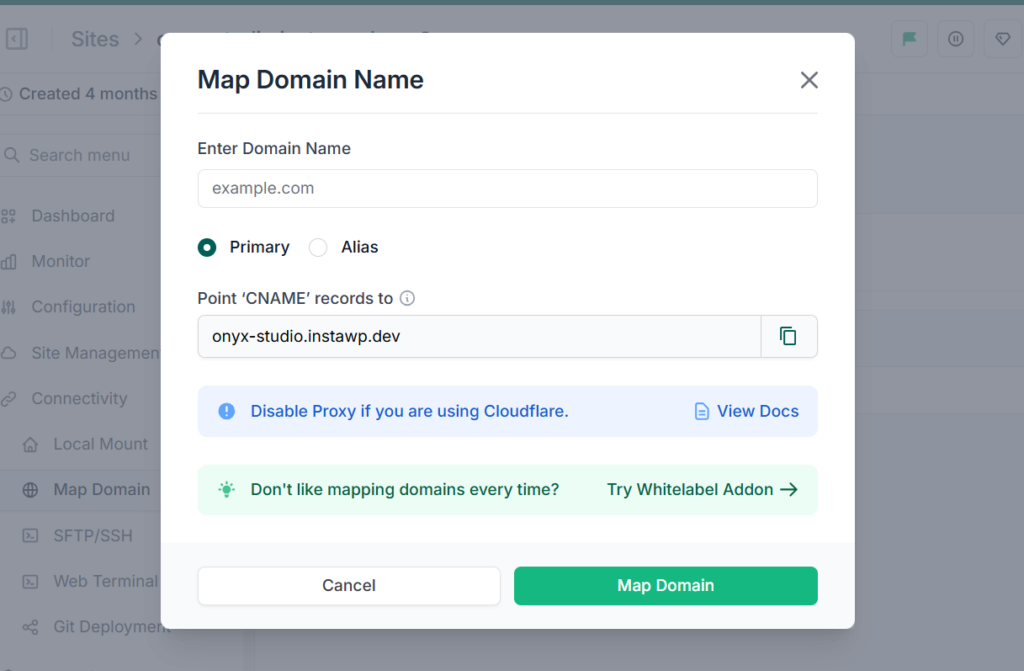
- Add the two A records. InstaWP shows two IP addresses. Copy each one into your domain’s DNS as an A record pointing to your subdomain.
- Add a wildcard A record. Add a * A record so future subdomains such as shop.example.com or docs.example.com route automatically, without repeating these steps.
- Let SSL provision. InstaWP issues the SSL certificate automatically, usually in 5 to 30 minutes, so the subdomain loads securely over HTTPS.
- Test, then push live. Once DNS propagates, your subdomain serves WordPress. If you built it as a staging subdomain, use push-to-live or two-way sync to move changes to production.
Tip
If your domain runs through Cloudflare, set the DNS record to DNS only (turn the proxy off) while you map the subdomain, then re-enable it after SSL is issued. This avoids certificate and redirect conflicts during setup.
Set up your subdomain in minutes, not hours
Spin up a WordPress site, map a subdomain, and get automatic SSL from one dashboard.
Create a WordPress site on InstaWPChoosing Between Subdomain and Subdirectory in WordPress
The subdomain vs subdirectory decision in WordPress isn’t about which one is universally better; it’s about which one aligns with your SEO goals, content strategy, and technical resources.
A WordPress subdomain gives you the freedom to create fully independent sections of your site. It’s ideal when you need distinct branding, separate functionality, or region-specific content, but it also means building authority for each subdomain individually and managing extra technical overhead.
A WordPress subdirectory, on the other hand, keeps everything under one roof. It’s often the stronger choice for consolidating SEO signals, sharing link equity, and delivering a consistent brand experience. Updates, analytics, and tracking are simpler because everything lives within the same site structure.
If your priority is to boost topical authority and strengthen your main domain’s visibility, a WordPress subdirectory is usually the safer, more efficient path. If you need flexibility, independence, or different user journeys for each section, a subdomain WordPress setup can work, as long as you’re prepared to invest in its SEO and maintenance.
Pro Tip: You don’t have to decide blindly. Use a staging or sandbox environment on InstaWP to test both setups. Measure SEO performance, user engagement, and workflow efficiency before committing to one structure for the long term.
FAQs
1. Is a WordPress subdomain bad for SEO?
Not necessarily. A WordPress subdomain is treated as a separate site by search engines, so you’ll need to build its own authority, backlinks, and relevance. This can be effective if you’re targeting a different audience or product line, but it won’t automatically share SEO value with your main domain like a WordPress subdirectory would.
2. Which is better for SEO: subdomain or subdirectory?
For most websites, a WordPress subdirectory is better for SEO because it consolidates link equity, domain authority, and topical relevance. A subdomain WordPress setup works best for content that’s intentionally separate in branding, audience, or purpose.
3. How do I install WordPress on a subdomain?
To install WordPress on subdomain, first create the subdomain in your hosting or DNS manager, then point it to your server’s IP address. From there, install WordPress as you normally would. With InstaWP, you can map the subdomain in the dashboard, add the provided A records, and have SSL automatically provisioned in minutes.
4. Does moving from subdomain to subdirectory improve rankings?
In many cases, yes. Real-world examples like the HotPads blog and Vicara blog show improved rankings and traffic after migrating to a WordPress subdirectory. However, results depend on your content, backlinks, and technical setup, so it’s best to test before making a permanent change.
5. Can I use both subdomains and subdirectories on the same WordPress site?
Yes. You can run a subdomain WordPress setup for completely separate sections (like a client portal or regional site) while using WordPress subdirectories for closely related content. The key is to plan your site architecture so SEO, branding, and user experience all align.
6. Which is easier to maintain: subdomain or subdirectory?
A WordPress subdirectory is easier to maintain because it runs under the same installation, SSL, and hosting environment. A subdomain WordPress setup usually requires extra DNS records, SSL certificates, and separate updates; unless you use a managed solution like InstaWP that automates those steps.


