Choosing the right online course platform can make or break your success as a digital creator, educator, or WordPress agency offering client LMS setups. With countless platforms claiming to be the best, two names consistently rise to the top in 2026: Thinkific and Teachable.
In the debate of Thinkific vs Teachable, both platforms offer robust tools for course creation, sales, student engagement, and branding. But they differ in critical areas like pricing, mobile experience, feature flexibility, and integrations.
Whether you’re a solopreneur launching your first product or an agency building revenue streams for clients, knowing how Teachable vs Thinkific stack up can save you hours of trial and error—and potentially thousands in fees.
Table of Contents
Thinkific and Teachable Introduction
If you’re comparing Thinkific vs Teachable, you’re already exploring two of the most trusted online course platforms in the market today. Both platforms allow you to create, host, and sell digital courses without needing to write a single line of code. But their core philosophies and features cater to slightly different user needs.
Thinkific is a powerful online course platform known for its flexibility, enterprise-readiness, and deep feature set. It offers strong customization options, bulk student management, communities, branded mobile apps, and over 90 integrations.
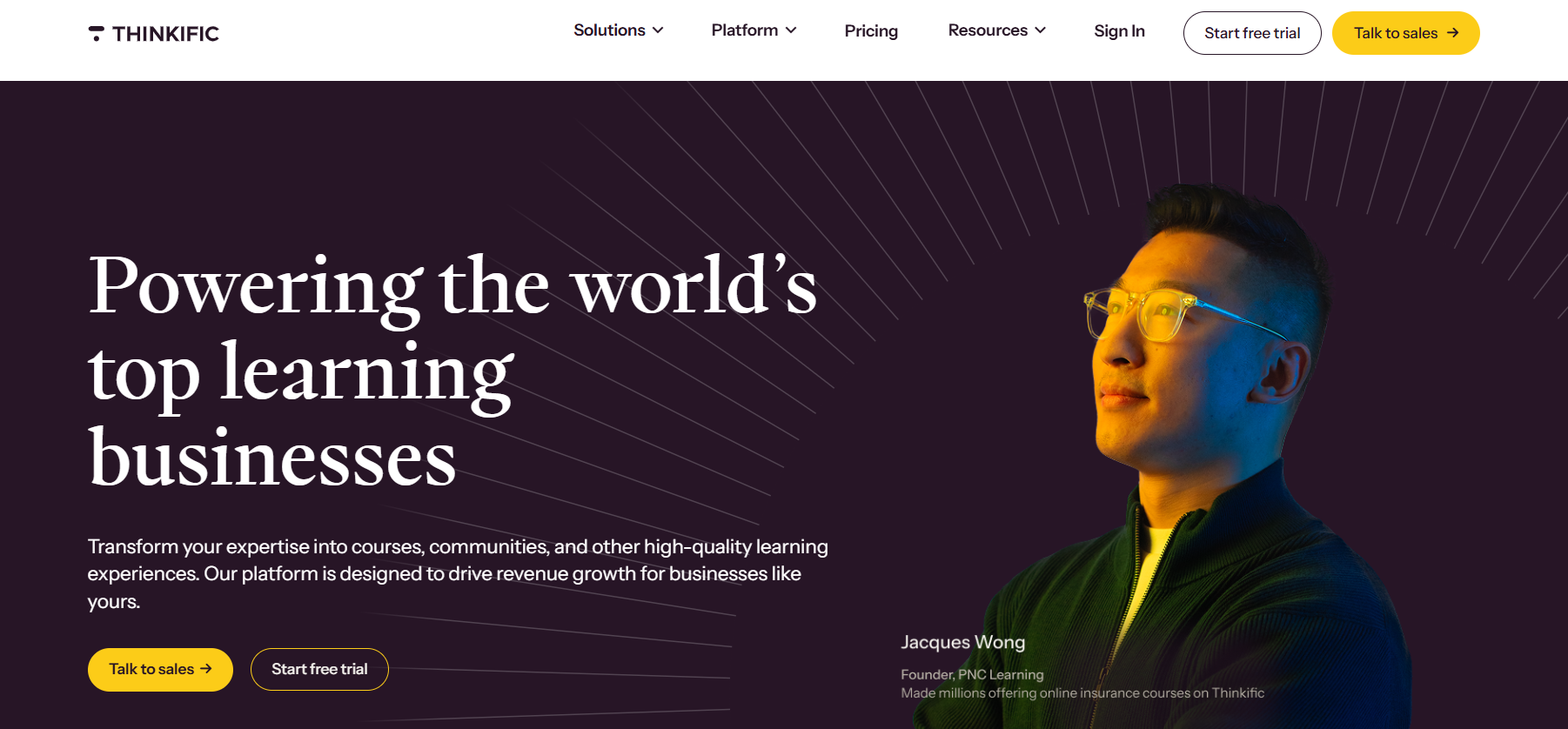
It’s ideal for growing businesses, WordPress agencies building WaaS products, and creators who want control over every part of their learning experience.
Teachable, on the other hand, focuses on simplicity and speed. It shines in ease of use, especially for beginners launching their first course. With built-in tools for email marketing, upsells, and affiliate payouts, it appeals to solopreneurs who want to get started quickly with minimal setup.
The Teachable vs Thinkific debate comes down to what matters most to your workflow—powerful customization or quick publishing. In the next sections, we’ll break down the differences in pricing, course creation, marketing tools, mobile features, and more so you can confidently choose the best online course platform for your needs.
Thinkific vs Teachable: Feature Comparison
Before diving into the full breakdown, here’s a quick side-by-side snapshot of how Thinkific vs Teachable compare across key areas. If you’re short on time, this table gives you a clear view of which online course platform excels in each category.
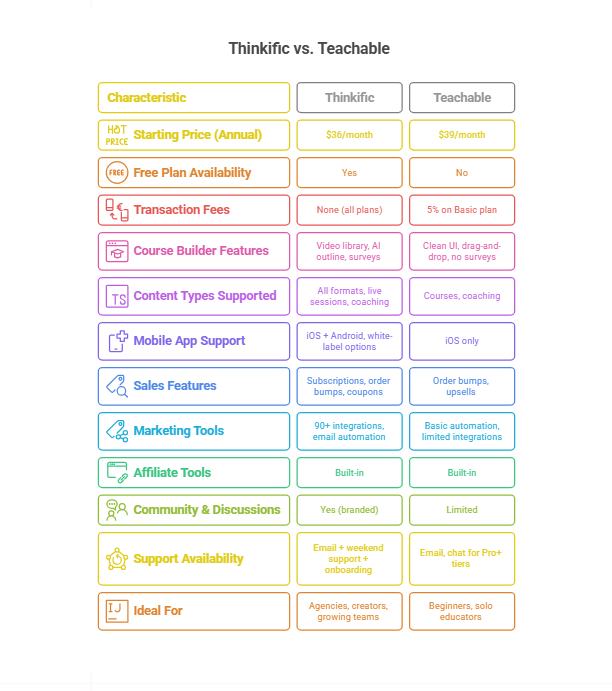
Let’s dig a little deeper into the Teachable vs Thinkific comparison.
Course Builder & Content Creation Tools
For educators, coaches, and agencies, course creation isn’t just about uploading videos. It’s about flexibility, speed, and engagement. In the Thinkific vs Teachable comparison, both platforms offer solid builders, but they approach the process differently.
Thinkific Course Builder: Modular and Scalable
Thinkific’s course builder is known for its modular, user-friendly interface. You can create lessons with video, audio, PDFs, quizzes, surveys, presentations, and even live Zoom sessions. The platform includes:
- A drag-and-drop builder with a hierarchical lesson structure
- A built-in video library, so uploaded videos can be reused across multiple courses
- An AI-powered course outline generator to help plan the structure
- Native quizzes, surveys, and assignments
- Branded learning communities that integrate directly into the content flow
It supports creators building complex curricula, especially useful for agencies managing structured learning journeys across client sites.
Teachable Course Builder: Beginner-Friendly, Less Flexible
Teachable also offers a clean and intuitive drag-and-drop editor. It supports basic lesson types like video, text, and downloadable files, and includes:
- Easy lesson organization and bulk upload
- The ability to host coaching sessions alongside courses
- Compliance features like lesson prerequisites and drip scheduling
- A separate (external) AI tool for course outline generation
- Quiz and assignment support with limited customization
While great for first-time creators, Teachable lacks a reusable video library or built-in community features. It also offers fewer supported content types and relies more on external integrations.
Verdict: Thinkific Wins for Power Users
In the Teachable vs Thinkific builder comparison, Thinkific offers more flexibility and advanced content features that appeal to growth-focused creators and client projects. But if you want even deeper customization—like integrating SCORM files, using block editors, or embedding complex widgets—WordPress is the clear winner.
Plugins like:
- LearnDash lets you control lesson flow, quizzes, and certificates
- Tutor LMS supports multi-instructor management and marketplace-style sites
- LifterLMS gives you drip content, gamification, and flexible access controls
With WordPress, you can combine a course builder with custom themes, third-party design tools, and your performance stack to build an online learning platform.
And, if you use InstaWP to build with WordPress, you unlock a whole new world of possibilities. From a centralized dashboard, you can:
- Create and host online learning websites
- Manage multiple client sites
- Create product demos to pitch to your clients
- Test and deploy different LMS plugins before going live
- Keep development, staging, and production environments separate with one click
This isn’t just a tech stack—it’s a creator growth engine. Whether you’re building a coaching academy, onboarding program, corporate LMS, or a client’s branded learning portal, InstaWP + WordPress gives you flexibility, power, and speed that no SaaS LMS can match.
Sales & Marketing Tools Comparison
A solid online course platform isn’t just about building content—it’s about helping you sell it. When comparing Thinkific vs Teachable, the quality and range of marketing tools can make a big difference in your revenue growth, especially if you’re aiming for automation, upsells, or affiliate marketing.
Thinkific: Deep Integration and Advanced Customization
Thinkific focuses on giving creators and WordPress agencies the freedom to connect with best-in-class marketing tools through its App Store with 90+ integrations. Out of the box, you get:
- Coupon creation and order bumps to boost checkout conversions
- Subscription models, payment plans, and product bundling
- Deep integration with tools like ActiveCampaign, ConvertKit, Mailchimp, Constant Contact, and Salesforce
- Affiliate management, white-labeled checkout, and customizable pricing options
- Support for abandoned cart recovery and flexible payment gateways (Stripe, PayPal)
These tools are useful for agencies that want to build course funnels and upsell workflows across client LMS sites.
Teachable: Streamlined and Optimized for Digital Product Sales
Teachable takes a creator-first approach by offering built-in sales and upsell tools, even on lower-tier plans. The platform now supports:
- Abandoned cart emails and automated upsells
- Custom coupon codes and limited-time offers
- One-click order bumps and in-lesson upsells
- Integrated affiliate management
- Simple but effective checkout that converts well on mobile and desktop
- Global tax and currency support for over 200 countries
Teachable recently closed the gap by improving automation around email, upsells, and global selling. It’s a smart choice for digital product creators who want out-of-the-box monetization with minimal setup.
Verdict: Teachable Wins for Solopreneurs, Thinkific Wins for Advanced Funnels
In the Teachable vs Thinkific sales battle, Teachable takes the win for newer creators. It provides a sales-ready environment with all the basics in one place—ideal for launching quickly and converting early traffic.
For WordPress agencies and advanced sellers, Thinkific is more scalable. Its flexibility with third-party tools and checkout customization allows for more complex marketing funnels, affiliate structures, and data workflows.
But even Thinkific hits a ceiling compared to what’s possible with WordPress.
With tools like:
- CartFlows or FunnelKit for WooCommerce
- Email marketing plugins (FluentCRM, MailPoet)
- AffiliateWP, WP Fusion, and full control of checkout UX
- WooCommerce Subscriptions and dynamic pricing rules
You can craft a completely custom, high-converting sales stack using WordPress as the best online course platform for selling and scaling courses.
And when paired with InstaWP, managing your course sales site becomes incredibly efficient. You can:
- Instantly spin up staging sites to test price changes or new landing pages
- Use Site Versioning to roll back failed A/B tests without downtime
- Clone top-performing funnels for new campaigns or clients
- Automate plugin/theme updates across all your sales sites
- Monitor uptime, performance, and CRM integrations in one dashboard
It’s not just about building faster. It’s about running your entire course business smarter, with fewer headaches and more control. WordPress gives you the tools. InstaWP makes them effortless to manage.
Pricing Comparison: Thinkific vs Teachable
When comparing Thinkific vs Teachable, pricing is often the dealmaker or dealbreaker. But looking at base costs alone isn’t enough. Course creators and WordPress agencies need to consider hidden transaction fees, plan limitations, scale-readiness, and long-term platform flexibility.
Thinkific Pricing: Transparent and Transaction-Free
Thinkific is one of the few online course platforms that offers a genuinely usable free plan. You can create and sell one full-featured course to unlimited students at zero cost, with no transaction fees on any tier. This is perfect for creators testing product-market fit or WordPress agencies building MVPs for clients.
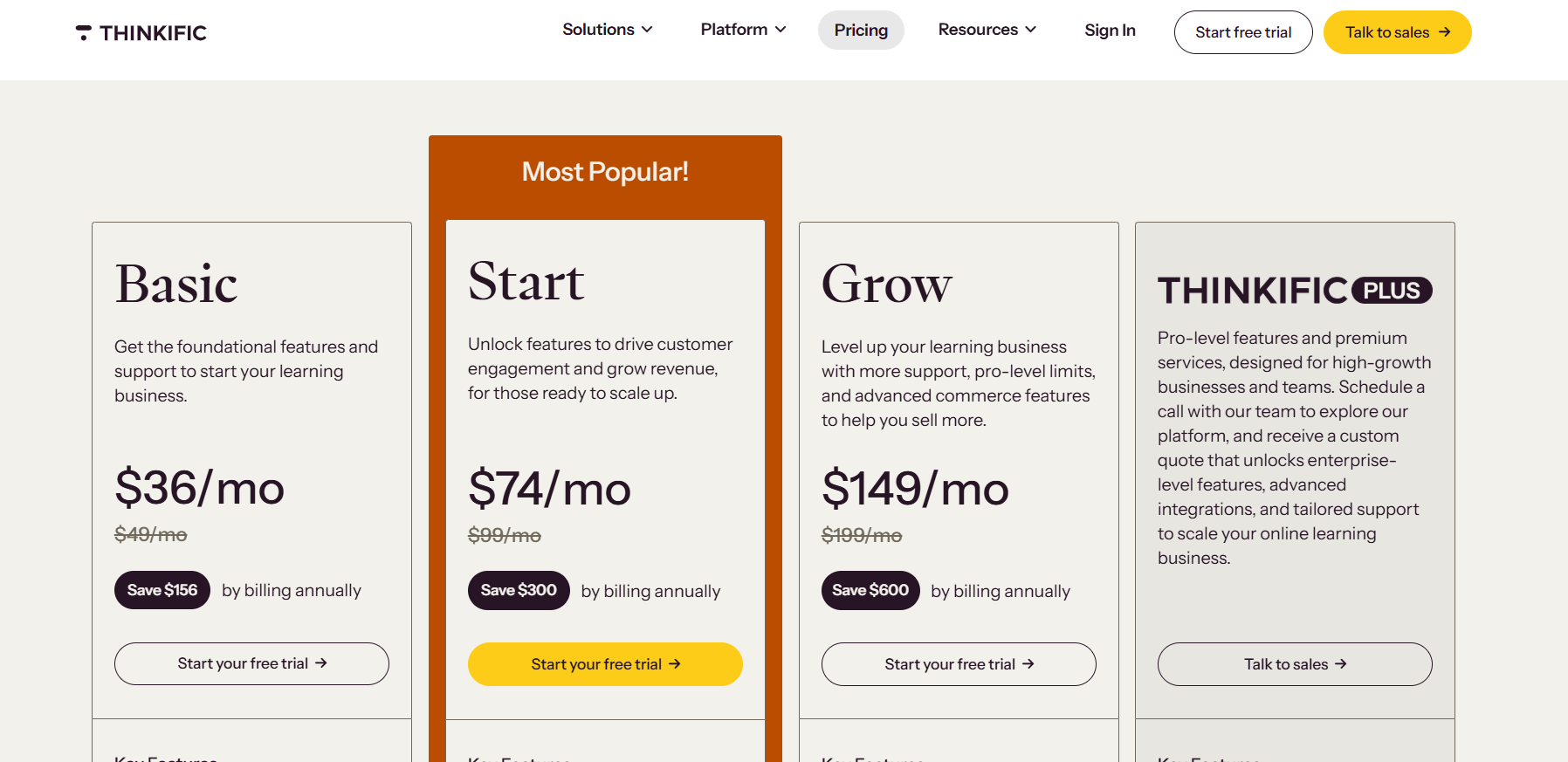
Its paid plans unlock:
- Unlimited students and courses
- Custom domains and coupons (Basic – $36/month)
- Communities, Zoom integration, and assignments (Start – $74/month)
- Bulk enrollments, groups, advanced APIs, and email white labeling (Grow – $149/month)
Thinkific also makes it easy to switch tiers without losing content or settings, a bonus for agencies who build in stages.
Teachable Pricing: Higher Tiers = Lower Restrictions
Teachable discontinued its free plan and now starts at $29/month (billed annually) with a 7.5% transaction fee. That means for every $1,000 in sales, you lose $7.50—money that scales quickly with success.
Here’s what each tier gets you:
- Basic ($29/month): Limited email tools, 5% fee, no advanced reporting
- Builder ($69/month): 0% transaction fee, 5 published products, Affiliate program, live chat support, and course certificates
- Growth ($139/month): 25 published products, White-label site, custom admin permissions, subtitles
- Advanced ($309/month): Unlimited admin tools and automation for scaling operations
While Teachable now includes more flexibility and AI tools across tiers, the Starter plan charges 7.5% in transaction fees, and publishing limits apply to every plan below “Advanced.”
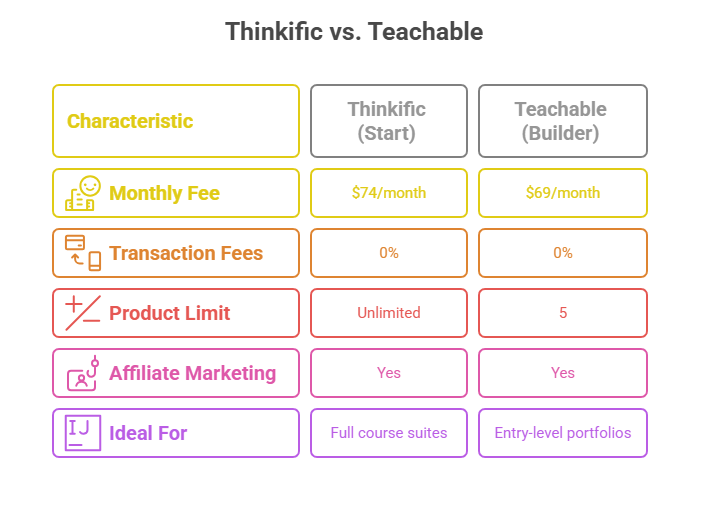
Teachable’s Starter plan may seem cheaper, but with 7.5% fees and limited publishing, it’s more suited to testing than scaling. For anyone selling multiple courses, those restrictions can become costly and frustrating.
Verdict: Thinkific Wins for Cost Clarity
In the Teachable vs Thinkific pricing battle, Thinkific offers more generous limits and transparent billing. It’s especially advantageous for course sellers scaling their product line or working with multiple client brands.
However, if you’re looking for maximum flexibility, lower long-term cost, and brand control, building your own LMS on WordPress is a strategic advantage.
Tools like LearnDash, Tutor LMS, and LifterLMS allow agencies to bypass publishing restrictions entirely, use any payment gateway, and avoid ongoing platform fees. With tools like InstaWP, you gain full control over your infrastructure and spending, thanks to its pay-as-you-go pricing model and site plans that scale with your needs.
You can spin up course sites for clients, test pricing models in isolated sandboxes, and only pay for the resources you use. It’s the most cost-efficient way to run multiple learning sites without being locked into rigid platform tiers.
So, while Thinkific beats Teachable on structure and cost-efficiency, WordPress remains the best online course platform for developers and agencies who want to scale without limits.
Support, Security & Platform Reliability
Whether you’re an agency building course platforms for clients or a solo creator scaling your first digital product, your platform needs to be secure, reliable, and supported when things go wrong. Let’s look at what Thinkific and Teachable bring to the table and when WordPress might be the better fit.
1. Support Options
- Thinkific offers email support on all plans, with live chat available from the Start plan ($74/month) upward. For larger businesses or agencies, Thinkific also provides a dedicated onboarding and customer success manager on high-tier plans.
- Teachable now includes live chat support starting from its Builder plan ($69/month), which is more affordable than Thinkific’s chat-enabled plan. For creators on the Starter plan ($29/month), only email support is available.
2. Security Infrastructure
- Thinkific includes multi-factor authentication, single sign-on (SSO), and sandbox environments for testing—ideal for agencies and larger teams.
- Teachable does offer secure hosting and global payment/tax compliance, but it lacks MFA, sandbox support, and enterprise admin tools unless you’re on their highest plan ($309/month).
3. Platform Uptime and Monitoring
- Thinkific maintains a 99.9% uptime SLA with 24/7 performance monitoring. This ensures your course site remains accessible globally without disruptions.
- Teachable does offer high uptime, but it does not guarantee it via SLA publicly. While it’s stable, it lacks Thinkific’s enterprise-grade assurance.
Verdict: Thinkific Wins for Enterprise Readiness
In this round of Teachable vs Thinkific, Thinkific offers a more secure, enterprise-ready environment. It’s especially useful for agencies handling sensitive user data, offering courses to regulated industries, or needing SSO access for teams.
But here’s where WordPress shines.
With the right stack, WordPress gives you:
- Granular user roles and permissions
- Built-in and custom firewall/security tools via plugins like Wordfence or iThemes Security
- Full control over server environments (cloud, VPS, or managed hosting)
- SSL, MFA, backups, and audit trails on your own terms
- Staging sites, sandbox environments, and version control for safe updates
- Custom login paths, user metadata, and data privacy compliance (GDPR/CCPA)
Whether you’re building client LMS portals or managing your own course empire, WordPress is the best online course platform when you need unmatched security, privacy, and infrastructure flexibility. And with InstaWP, you can test every client use case securely before pushing live.
Teachable or Thinkific: Which is Best
When it comes to choosing between Thinkific vs Teachable, there’s no one-size-fits-all answer—each online course platform shines in its own way.
✅ Choose Teachable if you’re a solo creator looking for a clean interface, built-in upsells, and quicker time to market. Its Starter and Builder plans offer strong out-of-the-box tools at a competitive price, especially for those focused on video-based courses or digital products.
✅ Choose Thinkific if you’re building a structured learning experience with quizzes, certificates, live lessons, or multiple client sites. Its sandbox features, zero transaction fees, and deep integrations make it ideal for developers, educators, and agencies scaling operations.
But here’s the real insight most comparison blogs won’t tell you:
? If you’re serious about owning your platform, customizing every aspect, and building something uniquely branded and scalable, WordPress is your best long-term bet.
Why? Because with WordPress, you get:
- Total control over design, data, and checkout
- Integration with powerful LMS plugins like LearnDash or Tutor LMS
- A wide array of monetization and membership models
- The ability to host, migrate, and sandbox with all-in-one cloud platforms
While Teachable and Thinkific are excellent SaaS options, WordPress gives you the power to build the best online course platform tailored to your business, not bound by SaaS limitations.
Today, building a complete online learning website with WordPress is as simple as a walk i the park. All thanks to modern all-in-one cloud platforms like InstaWP.
Here’s how InstaWP makes WordPress development instant, hassle-free, and code-optional:
✅ One-click LMS-ready site creation
InstaWP lets you spin up a fully functional WordPress site—complete with Tutor LMS or LearnDash pre-installed—in under 10 seconds. No hosting setup, no cPanel, no FTP.
✅ No coding required—ever
You can launch course platforms, install plugins, edit themes, and manage users with zero technical skills. InstaWP’s visual interface and site management tools handle all the complexity behind the scenes.
✅ Use Templates for LMS, Coaching, Membership Sites
InstaWP offers ready-to-launch WP templates for online schools, coaching sites, learning communities, and membership platforms—so you don’t start from scratch.
✅ Built-in sandboxing and staging
Need to test course flows, payment gateways, or design updates before going live? Use InstaWP’s free sandboxes and shareable links to preview everything risk-free.
✅ Perfect for agencies and freelancers
Create client demos, onboarding environments, and custom LMS sites in minutes. No local setup. No back-and-forth with staging URLs. Just build, share, and deploy.
✅ Auto-install plugins like Tutor LMS, MemberPress, WooCommerce
Choose from curated plugin stacks when launching a site and skip the manual setup entirely.
In short, InstaWP + WordPress is the new gold standard for building modern, scalable online learning platforms—without the SaaS limitations or technical overhead.
? Want to see how easy it is? Launch your LMS sandbox now and build a powerful WordPress course site with zero risk, zero hosting commitment, and zero delay.
FAQs
1. Is Thinkific better than Teachable for course creation?
Thinkific offers more advanced course creation tools, including reusable video libraries, native quizzes, assignments, and survey features. It’s ideal for structured curricula or client sites.
Teachable, while easier for beginners, lacks some of this depth. If you’re building multi-lesson programs or need advanced engagement tools, Thinkific is a stronger online course platform.
2. What is the difference between Teachable and Thinkific pricing?
Teachable’s Starter plan begins at $29/month but includes a 7.5% transaction fee. Thinkific starts at $36/month with no transaction fees. Thinkific offers a free plan for up to 3 courses, while Teachable doesn’t. For agencies and creators scaling their offerings, Thinkific is often more cost-effective in the long run.
3. Can I sell memberships on Thinkific or Teachable?
Yes, both platforms allow you to sell online course memberships. Teachable supports recurring subscriptions, upsells, and abandoned cart recovery. Thinkific offers similar tools along with customizable pricing tiers and bundle options. For more control, WordPress + WooCommerce Memberships provides greater flexibility.
4. Which is the best online course platform overall?
Both Thinkific and Teachable are among the best online course platforms in the SaaS category. Thinkific excels in structure and scalability; Teachable shines in ease of use and built-in sales tools. However, WordPress with LMS plugins like LearnDash or Tutor LMS is best for full control, customization, and long-term growth.
5. Is WordPress better than Thinkific or Teachable for building courses?
Yes—WordPress is better for developers, agencies, and creators who want total ownership and flexibility. Unlike Teachable or Thinkific, WordPress lets you customize every detail, use any plugin, and scale your business without SaaS restrictions. With tools like InstaWP, setting up an LMS on WordPress is now just as fast as launching a SaaS site.