Duplicate content is one of the most misunderstood and untackled nightmares of WordPress users when they think of SEO for their websites. It is the type of content that encompasses multiple blocks of text that appear across various URLs.
They may appear within the same website or across different domains. Many people think that such a scenario triggers Google penalties. The reality is more nuanced. The situation silently harms the SEO of any website.
It impacts rankings and dilutes link equity. If you want to get rid of the problem, familiarizing yourself with it and finding its fixes is a must. This post breaks down the impact of duplicate content on WordPress sites and outlines common causes and detection methods.
It also suggests practical fixes to tackle duplicate content and prevent it. Stick around to get some key takeaways from this comprehensive guide.
Table of Contents
Understanding Duplicate Content in WordPress
Content duplication in WordPress often occurs because of the presence of the same blocks of text across multiple URLs, usually within your own site. You can’t rule out the likelihood of the existence of duplication across different sites.
WordPress websites are prone to duplication because of the flexibility of this CMS. This adaptability leads to the unintentional creation of duplicate content. These instances of duplicate content can confuse search engines and deteriorate your SEO efforts if they are left unchecked.

Internal Duplication
The existence of the same content across various URLs within a WordPress site is termed internal duplication. Here are some WordPress-specific examples:
- Category/Tag Archives
Category and tag archives are often the main culprits behind internal duplication in WordPress. Similar tags or categories to a single post result in the creation of multiple archive pages, listing the same article.
- Author Archives
WordPress can automatically generate author archive pages that offer a preview of all posts by a particular user. Duplicate content often appears on author archives.
- Pagination
The same page splits into multiple parts because of its length. Duplication and creation of multiple versions occur when these sub-pages display the same title and meta tags.
- Printer-Friendly or AMP Versions
The same post is presented in alternate formats that are compatible for printers and mobiles to optimize content consumption. This scenario also leads to internal duplication and impacts the SEO of WordPress sites.
External Duplication
It occurs when the same text appears on another site without the use of canonical tags or attribution. This situation confuses search engines because they see the same text across various domains. Some examples are:
- Lack of canonical tags while republishing content on another website.
- Scraped and republished content by competitors.
Impact of Duplicate Content on SEO
Keep in mind that duplicate content doesn’t trigger a direct penalty from Google. The renowned search platform has also clarified it time and time again. Still, turning a blind eye to content duplication, internal or external, is not in your favor because it confuses algorithms.
As you create a site on WordPress, you must avoid duplicate content as it can silently deteriorate the SEO performance of your website in multiple ways. A few of them are discussed below:
- Crawl Inefficiency
A “crawl budget” is allocated to each website by search engines. Bots responsible for crawling a website analyze the content posted on each page. Most crawl resources get wasted because of multiple versions of the same page.
Fewer unique pages are indexed because of this inefficiency. Resultantly, a WordPress site witnesses a sharp decline in its ability to gain higher rankings for new content.
- SERP Confusions
The consequences of duplication are not limited to a wasted crawl budget. They go beyond and SERP confusion is also an outcome. Google or other search engines rank wrong pages in search results. You fail to show the optimized blog post on SERPs.
Instead, a thin archive page or duplicate URL gets indexed. This situation significantly hurts visibility and CTR. You may see a category archive outranking the actual blog post on your WordPress website. Users will see a less useful page resultantly and reduced visibility of the preferred URL.
- Loss of Link Equity
Inbound links or backlinks are considered one of the strongest ranking signals. Links pointing to duplicate versions split the equity and weaken the domain strength of your WordPress website.
The lack of canonical tags or redirects worsens the situation. Your website and content fail to get the full benefit of backlinks from other authoritative online platforms. The simple reason behind it is the failure of backlinks that are spread across the website to consolidate authority.
Did You Know?
You can avoid duplicate content issues on WordPress from the very start by choosing InstaWP to build your site. When creating a site from scratch, you can select SEO plugins like Yoast SEO or Rank Math right during the setup process.
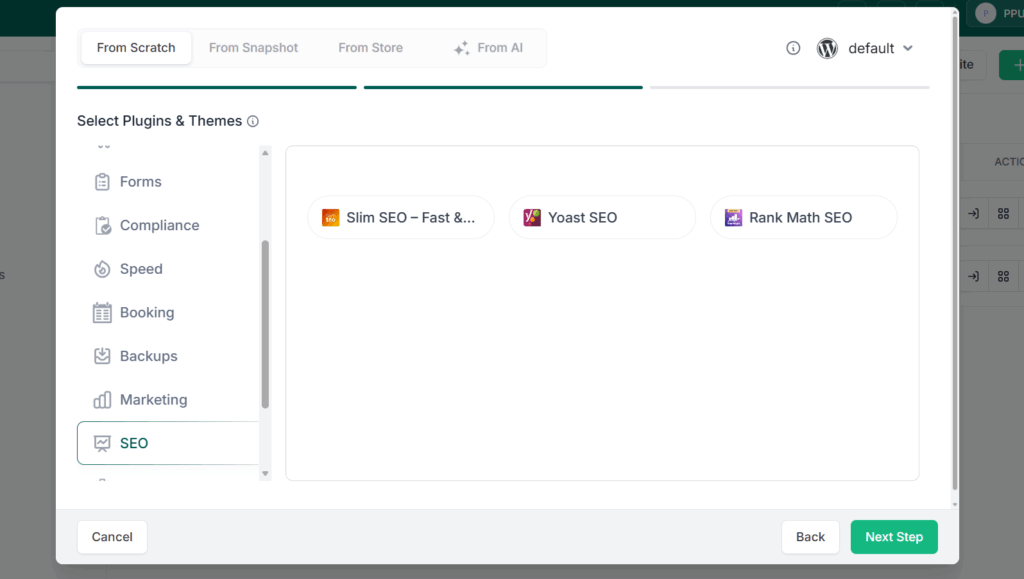
These plugins get installed automatically without any manual intervention, so your site is SEO-ready from day one, with canonical URLs, meta tags, and sitemap configurations already in place.
Usual Causes of Duplication in WordPress
A common myth about duplicate content within WordPress websites is its occurrence because of technical issues. The problem goes beyond technicalities. Duplication occurs within a WordPress website for multiple reasons. Technical quirks and default settings are equally responsible for it. Editorial oversights also fall into the category of culprits.
Here is a detailed overview of all these issues:
Technical Causes
Technical issues that are common to WordPress and other websites are among the most common culprits. Here is a breakdown:
- Multiple URLs
Duplication often occurs because of the accessibility of your WordPress website through multiple protocols or subdomains. Different URL versions of the same page because of “http://”, “https://”, “www”, or non-www variations exist. Content on all these URLs is identical, which confuses search engines.
- Tracking Parameters and Session IDs
The use of tracking parameters or session IDs in URLs also becomes the reason for duplication within your WordPress website. The addition of UTM codes for marketing campaigns leads to the existence of the same page “xyz.com/post?utm_source=facebook” and “xyz.com/post?utm_source=twitter”.
Search engines consider them as separate URLs but the content stays identical. This issue splits ranking signals between both URLs.
WordPress-Specific Causes
In addition to technicalities, some WordPress-specific issues are also the reason behind duplication within websites. This section helps you understand them:
- Auto-Generated Archives
WordPress was developed to democratize publishing and help everyone create, sort, manage and publish content easily. Its default settings generate multiple archives sorted according to categories, tags, authors and dates. All these archives can display identical posts.
The creation of archives ensures easier navigation across the website. Its downside is the indexation of duplicate content. For instance, it is very likely that a single blog post appears in category, tag, and author archive similarly.
- Thin Content Because of Plugins
The use of WordPress plugins surely makes the process of managing the website easier. There are some loopholes of using them and duplicate content is also one of them. These plugins generate landing pages, tag clouds or archives, replicating existing content, on their own.
These thin pages offer better navigation but often lack unique. Such pages are duplicate in the eyes of search engines. They treat them like duplicates that clutter your index and waste crawl budget.
- Posts Published Under Multiple Categories
Some posts fall into multiple categories because of the topic they cover. They are a common source of duplication within WordPress. When you assign a single post to multiple categories, separate URLs are generated to justify its inclusion in various categories. This practice improves navigation for creators but confuses search engines.
A single blog post covering “SEO Basics for WordPress” may appear in categories like “SEO”, “WordPress” and “Digital Marketing” simultaneously. The content will be identical but three different URLs will be created.
This duplication dilutes link equity over time. It also splits keyword relevance and leads to outranking of origin website by less valuable archive pages. Such a scenario will undermine your entire SEO strategy.
Editorial Causes
Editorial oversights also cause duplication. Many website owners and digital marketers don’t pay much attention to these issues but they can significantly hurt the SEO performance of your website. A couple of them are outlined below:
- Lack of Vigilance Regarding Accidental Overlaps
Editorial teams often publish multiple posts covering the same topic that leads to duplication. An obvious example could be publishing a post titled “Top 10 SEO Tips” and another with “10 SEO Tips for Newbies” as a headline. Both posts will come with nearly identical set of recommendations.
Search engines will get confused while ranking posts. Keyword cannibalization and diluted visibility will follow the situation. Chances of plagiarism identification because of unintentional overlaps from other sources that remain overseen is also possible.
- Careless Repurposing
Repurposing content is a smart idea if it is done thoughtfully. Careless repurposing often results in duplication. Scraping large chunks of text from an existing post and adding them to another draft without necessary tweaks or inclusion of fresh insights leads to creation of appreciably similar content.
Search engines treat such a situation as intentional duplication and may reduce the authority of both posts. This phenomenon will harm rankings.
Detection of Duplicate Content
You can’t think of fixing duplicate content without detecting it. Consider duplication detection the first step toward the rectification process. You can make monthly audits an essential part of your workflow after understanding the way to spot duplication.
The process requires you to leverage manual checks and audit tools to avoid missing out on the slightest instance. Here are a few effective methods you can use to detect duplicate content.
- Perform Manual Google Checks
Running manual searches in Google is the simplest and most obvious way to recognize duplication. Just copy a unique sentence or paragraph from your post, encompass it in quotation marks, and hit the search button. You will be able to see if the same appears elsewhere on your WordPress site or anywhere across the web.
It is a highly effective method to spot external duplication occurring because of scraped content. The only downside to this method is it is not scalable for larger sites hosting tons of text. Still manual checks offer you a quick way to confirm originality of high-value posts and spot duplication.
- Use Specific Tools
Performing manual Google checks is not a scalable solution. You should turn toward specific tools to spot duplication for larger websites. Here are some tools you can use for this purpose:
Take Insights from Google Search Console
The tool offers you a robust, free solution to spot indexing issues, including duplication. It allows you to review the coverage and indexing reports and check if the various URLs are indexed for the same content.
Google Search Console also flags canonicalization issues. This possibility enables you to figure out where Google is confused about the master version of a page. Consider it your first line of defense as a WordPress user. It offers you direct insights into how Google views your site.
Leverage Dedicated tools to Detect Duplication
Specialized SEO-centric tools like SEMrush and Ahrefs can mark keyword cannibalization for you. Using these tools will help you identify pages that are competing for the same search terms. WordPress users should consider them invaluable resources for the management of their sites due to the scalable detection these tools offer.
- Take Advantage of WordPress SEO plugins
WordPress SEO plugins come in handy for the detection of duplication. They come with features to detect and deter duplication. They can flag structural duplication that occurs because of the default settings of WordPress.
You can ensure alignment of your website’s technical SEO with best practices by using these plugins. Their use will also mitigate the risk of duplication because of technicalities slipping through.
Plagiarism Detection: A Necessity
Many WordPress users overlook the need for originality verification to mitigate the risk of duplication or plagiarism and its repercussions. Drawing a line between technical duplication and plagiarism is essential.
The former usually confuses algorithms. The latter leads to deindexation, DMCA takedowns and SEO damage in the longer term. This is why plagiarism detection should be an inevitable part of your WordPress workflow.
Hidden Risks You Should Know
You expose your WordPress website to the following hidden risks by overseeing the likelihood of plagiarism and avoiding the use of an effective solution for its timely detection:
- Unintentional plagiarism due to repetitive phrasing and lack of citations.
- SEO penalties as Google deindexes plagiarized content.
- Brand reputation damage due to lost trust of readers.
- Legal repercussions like takedown notices or lawsuits for copyright infringement.
Effective Solution to Avoid Hidden Risks
Access an advanced plagiarism checker that uses AI-driven algorithms for precise detection of content and massive database coverage to map your text against billions of online sources.
Use it as a safety net by running every draft through it before publishing. This practice will help you ensure originality and brand protection. You can also pair online plagiarism checks with SEO plugins to ensure originality and optimization of your content before you publish it on your website.
Expert-Level Fixes to Tackle Duplication
Fix duplicates after identifying them by implementing the solutions given below:
- Add Canonical Tags
Specify the master version of a page with the addition of canonical tags. This practice will make it easier for search engines to index the preferred copy of the page. Plugins like Yoast SEO and Rank Math can help you with that. You will be able to consolidate ranking signals and prevent confusion by implementing this solution.
- Use 301 Redirects
You can easily redirect duplicate URLs to preferred versions by using 301 redirects. This practice will help you permanently signal the preferred version. It will also help you ensure all link equity flows to a single master copy of the page. This solution works perfectly for the consolidation of multiple domain variations or outdated URLs into a single source.
- Apply Noindex Meta Tags
Prevent search engines from indexing duplicate or thin pages like the one shown in archives by applying noindex meta tags. You can keep your index clean and clutter-free by following this strategy. This method will also help you ensure that only high-quality pages compete for ranking.
- Keep URL Structures Consistent
Only choose HTTPs for your site and decide between www or non-www format. This practice will make it easier for you to stick to a single permalink format and avoid duplication across protocols. When combined with redirects, this strategy ensures indexation of the preferred version of each page by Google.
- Make Originality-Centric Tweaks to Content
Run plagiarism checks and focus on eradicating overlaps before publishing content. Take help of an advanced paraphraser to eradicate duplication if your publishing team finds it tricky to make necessary tweaks on their own. Using an AI-driven tool for this purpose will make it easier for you to ensure uniform writing style and get rid of duplication before it does any harm.
- Take Advantage of Plugin Solutions
Plugins solution make s it easier for you to manage WordPress sites. Yoast SEO will help you manage canonical tags and noindex settings.
Rank Math will make it easier for you to provide comprehensive sitemap configurations and make necessary tweaks to advanced canonical settings. Proper configuration of these plugins mitigate the likelihood of duplication that occurs because of WordPress’s default behavior.
- Make Necessary Fixes to Content Strategy
Don’t publish multiple overlapping posts. Instead, consolidate them into one comprehensive guide to make the most of published content and drive more organic traffic to your website by achieving higher ranking. This practice will eradicate duplication and reinforce your authority by ensuring a single, in-depth resource on your website.
Tips for Prevention of Duplication in the Future
You should show technical and editorial vigilance to mitigate the chances of duplication within a WordPress website. A combination of plagiarism checks with technical configurations can help you ensure originality and SEO efficiency.
Keep in mind that prevention is easier than constant fixes. You should also make a few technical and editorial prevention tips an essential part of your workflow to properly tackle the duplicate content issue. Here is a breakdown:
- Limit Unnecessary Archives
Be mindful of WordPress’s behavior that leads to multiple duplicate posts because of unnecessary archives. You can disable them or apply noindex to limit archives. You can prevent duplication before it starts by doing so.
- Monitor Plugins Carefully
Plugins can generate thin content on their own by creating landing pages, tag clouds, and archives. Audit installed plugins on a regular basis and configure them properly. This strategy will make plugins valuable resources for your website and keep your index clean.
- Train Writers to Avoid Duplication
Ensure a clear editorial calendar and educate your writers and publishing team to be careful about similar posts. Doing so will prevent writers from covering the same topic multiple times and mitigate duplication on the editorial level.
- Ensure Unique Meta Descriptions and Titles
Duplicate meta titles and descriptions are just as harmful as similar pages in WordPress. Posts or archives with the same metadata can confuse search engines because they struggle to determine high relevance, dilute rankings and cannibalize keywords. Ensure unique metadata to ensure clear signals and unique search intent for each post and archive.
The Sum Up
Duplicate content doesn’t lead to penalization. It hurts SEO indirectly with diluted signals and confusion of search engines. You should stay proactive and tackle duplication before it actually harms the SEO strategy of your WordPress website.
Be mindful of its impact on SEO, the reasons behind it, the methods you can use to detect it, and the fixes you can apply. Your core objective should be its prevention because it is always better than making fixes later. Understand prevention tactics and make them an inevitable part of your WordPress workflow to permanently fix the duplication issue.
Pay attention to auditing your site and running plagiarism checks to ensure authentic, optimized and competitive content on your WordPress site.