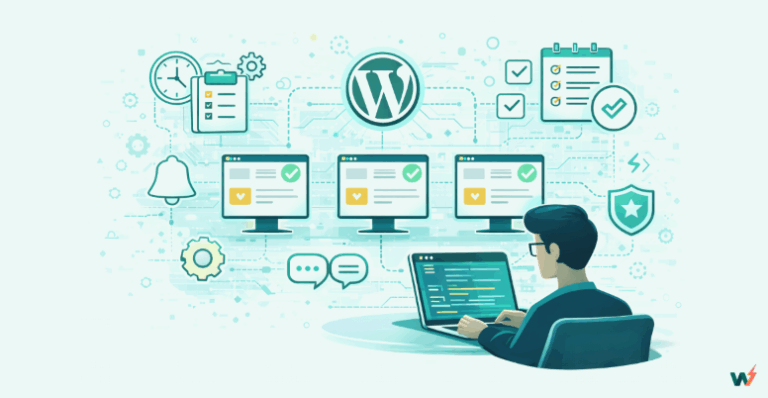
Managing WordPress projects for multiple clients can feel like spinning plates while running a marathon. One site needs urgent plugin updates, another has a sudden drop in performance, and a third requires a full staging setup before launch.
For many agencies, this means jumping between dashboards, logging into each site separately, and relying on a messy mix of tools that eat into billable hours.
When you manage multiple WordPress sites at once, the real challenge is staying on top of security, updates, and hosting without slowing down new builds.
In this guide, we will explore how agencies can take control of their WordPress projects, reduce the chaos of day-to-day website maintenance, and choose hosting plans that match the needs of each client site.
Table of Contents
How Managing Multiple WordPress Projects Becomes Overwhelming for Agencies
If you run an agency, you already know that building and launching a website is just the start of the project. The moment a site goes live, the website maintenance cycle begins. Multiply that by ten, twenty, or even fifty clients, and managing WordPress projects quickly turns into a full-time balancing act.
Here is a list of challenges one might face when
- When you manage multiple WordPress sites, the first challenge is time. Each site needs regular updates to the WordPress core, plugins, and themes. Logging into every site separately and running updates one by one eats into your team’s schedule and leaves less room for strategic work.
- Security is another constant concern. Without a single place to monitor all sites, you risk missing vulnerabilities until they become critical issues. A slow response to a security problem can mean downtime, lost revenue for your client, and damage to your agency’s reputation.
- Performance tracking is equally fragmented. One site may be hosted on a premium server, another on budget hosting, and both need uptime monitoring, speed checks, and optimization. Jumping between hosting dashboards and third-party tools slows everything down.
- Client expectations only add to the pressure. Some want detailed monthly reports, others need staging environments for ongoing changes, and eCommerce clients expect instant fixes when sales pages go down. Without the best way to manage multiple WordPress sites from one dashboard, your team risks burnout, and clients risk inconsistent results.
- Finally, cost control is a hidden pain point. A small brochure site does not need the same resources as a high-traffic online store, yet traditional fixed hosting plans often force agencies to overpay for some sites while under-resourcing others. The lack of flexibility makes scaling harder and profit margins tighter.
In short, the challenge is not just how to manage WordPress sites effectively, but how to do it in a way that saves time, reduces risk, keeps clients happy, and scales with your agency’s growth.
So, what’s the solution? Well, you need a centralized website management dashboard that brings every aspect of website management under one roof.

With a unified view, you can log into any site instantly, see which projects need updates, and monitor uptime and performance without leaving the same interface. This eliminates the need for scattered tools and manual check-ins, saving hours each week.
For agencies handling WordPress projects at scale, a centralized dashboard also reduces the risk of missed updates or overlooked security vulnerabilities. Instead of waiting for a client to report an issue, you can spot problems the moment they appear and fix them before they impact the live site.
How InstaWP Transforms the Way Agencies Manage Multiple WordPress Sites
InstaWP is more than just another WordPress tool; it is a complete cloud-based platform built to help agencies build, launch, and manage multiple WordPress sites from one place.
Designed for teams that handle dozens or even hundreds of client projects, InstaWP replaces the patchwork of hosting dashboards, staging plugins, and security tools with a single connected workspace.
At the heart of InstaWP is its Managed Sites feature, which turns complex multi-site management into a streamlined, centralized process. Once your client sites are connected, every task, from updates to performance checks, is handled inside one dashboard.
This is where agencies start reclaiming time, reducing errors, and delivering consistently better results for every client.
Key website management capabilities include:
- Magic Login for instant access to any client site without searching for credentials or resetting passwords.
- A Centralized Site Dashboard with real-time data on uptime, performance, PHP version, WordPress version, and storage.
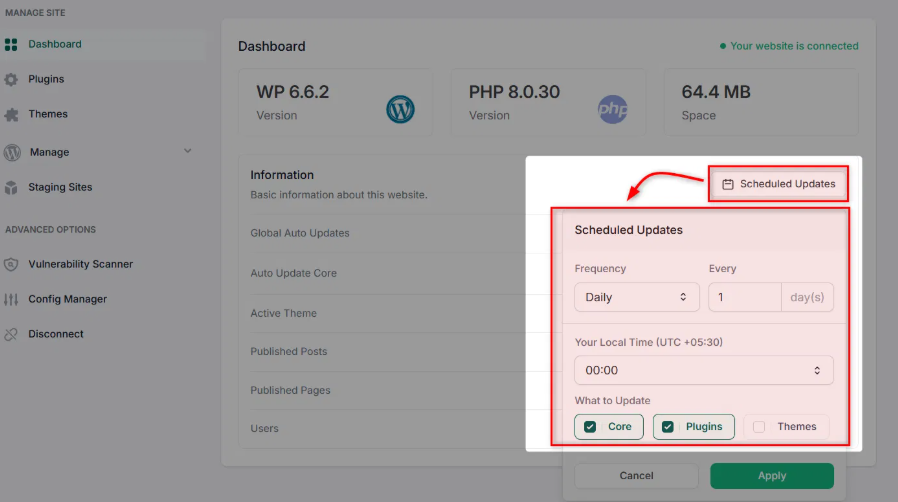
- Auto and Scheduled Updates so you can set updates for core, plugins, and themes to run automatically at the time you choose.
- Bulk Plugin and Theme Updates to push changes across multiple WordPress sites in just a few clicks.

- User Management to add, remove, or adjust access permissions for multiple sites from one location.
- A Vulnerability Scanner that continuously monitors for security risks and flags them before they become serious issues.
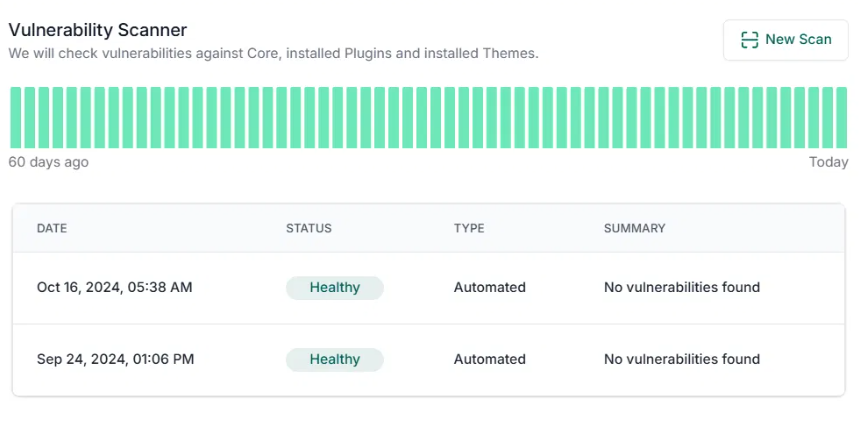
- Uptime and Performance Monitoring to track site health and speed for every project you manage.
- Config Manager to tweak settings without diving into the wp-config.php files.
- Maintenance Reports and Activity Logs to give clients clear proof of the work you are doing behind the scenes.
For agencies looking for the best way to manage multiple WordPress sites from one dashboard, InstaWP delivers a platform that’s not only feature-rich but also scalable, with flexible pricing that fits everything from small maintenance retainers to large enterprise portfolios.
Managing the Entire WordPress Project Lifecycle with InstaWP
Most platforms handle only one part of a project; they either help you build a site, or they host it, or they let you manage it after launch. For instance, if you choose ManageWP, you can build and host WordPress sites with this platform.
And, if you choose a non-managed WordPress hosting platform, there is no website management feature. Experiencing the best of both worlds is rarely possible unless you choose InstaWP.
InstaWP brings all three under one roof, giving agencies complete control over the entire lifecycle of a WordPress project.
It starts with instant site creation. You can create a functional WordPress environment in seconds, complete with the themes, plugins, and settings your agency uses most. This eliminates the delays that come with local setup, manual staging creation, or waiting for hosting accounts to be provisioned.

From there, you can create a staging site for WordPress for testing updates and new features risk-free. You can maintain multiple staging sites for each client, experiment with changes, and push them live only when you are certain they work perfectly. This keeps downtime at zero and client satisfaction high.
Must Read: Guide to Creating a WordPress Staging Site with InstaWP
Once a WordPress project is live, website management takes over. You can monitor uptime, run performance scans, schedule updates, manage users, and generate WordPress maintenance reports; all from the same dashboard.
This unified approach means your team spends less time switching between tools and more time delivering high-value work.
Must Read: WordPress Website Management with InstaWP (Detailed Guide)
With InstaWP, agencies are not just managing WordPress sites; they are managing the entire journey of each project, from the first click to long-term growth, without ever leaving one platform.
Pay-as-You-Go WordPress Plans for Every WordPress Project
One of the biggest challenges agencies face when they manage multiple WordPress sites is balancing performance needs with cost control. A small business brochure site does not require the same resources as a high-traffic eCommerce store, yet fixed hosting plans often force agencies into paying for unused capacity.
InstaWP’s Pay-as-You-Go WordPress plans solve this problem by letting you choose the right plan for each client site. You only pay for what you use, and you can upgrade or downgrade at any time; perfect for agencies managing seasonal campaigns, project-based work, or high-growth websites.
- Basic Sites (Free) – You can do basic website management for free with the free tier of InstaWP. With 3 sites at a time, this free tier is ideal for low-maintenance projects. It includes essential website management features like manual updates, Magic Login, user management, and staging (500 MB limit).
- Advanced Sites ($2/site) – Adds automation and security with auto updates, vulnerability scanning, uptime monitoring, performance tracking, advanced staging limits, website maintenance reporting, and backups.
- Volume Discounts – The more sites you manage, the lower your per-site cost. Pricing drops for portfolios over 10, 25, 100, and even custom rates for 500+ sites.
This flexibility means you can assign Basic Sites to smaller, low-traffic clients and Advanced Sites to mission-critical projects without locking your entire portfolio into one expensive plan. For agencies, it is the best way to manage multiple WordPress sites from one dashboard while keeping budgets predictable and scalable.
Real-World Use Cases: How Agencies Manage Multiple WordPress Sites with InstaWP
Agencies come in all shapes and sizes, and so do their client portfolios. Whether you are handling a few high-value accounts or hundreds of smaller sites, InstaWP gives you the flexibility to manage WordPress projects in a way that fits your business model.
1. Maintenance-Focused Agencies
For agencies offering monthly care plans, efficiency is everything. With InstaWP’s Centralized Dashboard, you can schedule WordPress core, plugin, and theme updates across all client sites, monitor uptime, and run vulnerability scans without logging into each dashboard individually.
Assign smaller, low-maintenance clients to the free Basic Site tier and keep costs at zero while still delivering reliable service.
2. High-Volume Development Shops
When you are building new WordPress sites every week, speed and consistency are critical. InstaWP’s instant site creation and WordPress staging environments let you prototype and test before launch without slowing your development pipeline.
Bulk updates and Magic Login make post-launch maintenance seamless. Assign high-traffic or complex builds to the Advanced Site tier for better performance monitoring and automated backups.
3. Campaign-Based Projects
Marketing agencies running seasonal or short-term campaigns often need temporary sites that do not justify long-term hosting costs. With InstaWP’s Pay-as-You-Go WordPress hosting, you can launch sites on the Basic tier during the campaign period, then scale up to Advanced if traffic spikes.
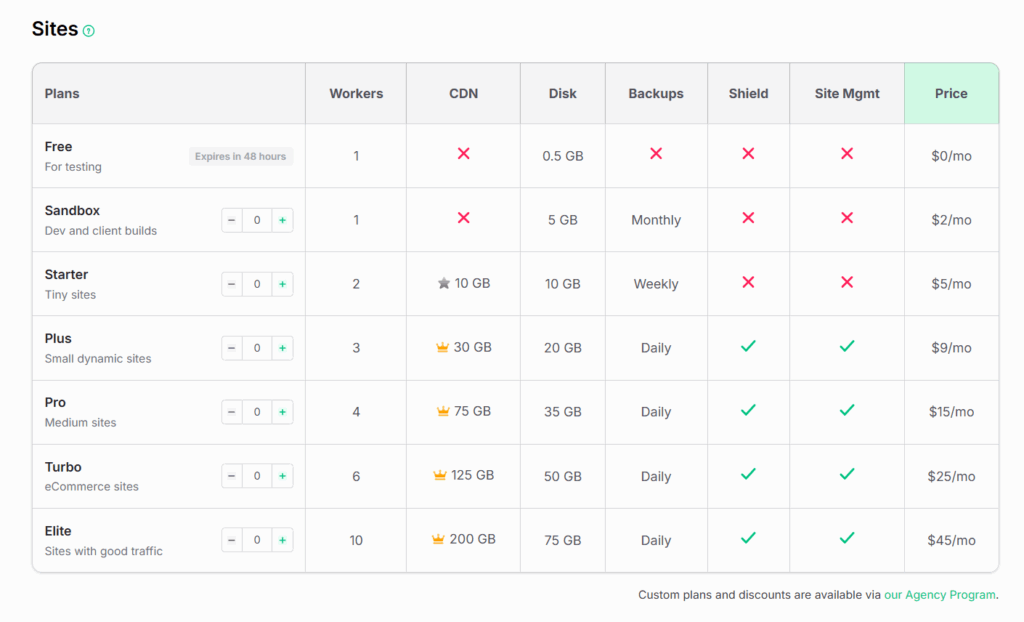
When the campaign ends, downgrade or remove the site and stop paying instantly.
4. E-commerce Agencies
WooCommerce sites demand constant monitoring and fast performance. InstaWP’s performance scanner, uptime monitoring, and safe update features ensure that sales pages stay online and transactions remain smooth. Advanced Sites give you the tools to handle high-traffic events without compromising on security or speed.
These scenarios prove that the best way to manage multiple WordPress sites is to have a platform that adapts to your workflow. With InstaWP, agencies get exactly that control, flexibility, and a clear view of every client project from a single dashboard.
Best Practices for Managing Multiple WordPress Projects at Scale
When your agency is responsible for multiple client websites, having the right tools is only half the equation. The way you organize your workflow and monitor your portfolio can be the difference between smooth operations and daily firefighting.
Here are proven best practices to help you manage WordPress sites efficiently and deliver consistent results.
- Keep all your client projects in one dashboard so you can see uptime, performance, and security status at a glance. This reduces the time spent switching between accounts and lowers the risk of missing critical updates.
- Manual updates across dozens of sites are not scalable. Use automated and scheduled updates for WordPress core, plugins, and themes, paired with regular backups, to keep sites secure without adding to your workload.
- Never push updates directly to live sites. Test in a staging environment first to catch errors before they affect users. Managing multiple staging sites ensures client projects remain stable during development or maintenance work.
- Maintain a central system for adding, removing, and adjusting permissions across all sites. This keeps client access organized and prevents security oversights.
- Set up real-time alerts for downtime and speed drops so you can act before clients notice a problem. Performance tracking should be an ongoing process, not just a reaction to complaints.
- Not every site requires the same resources. Assign smaller projects to an entry-level plan and high-traffic, mission-critical sites to a more robust tier. This approach keeps costs predictable while ensuring performance.
- Weekly WordPress maintenance reports and activity logs not only build trust but also show the value of your ongoing work. Transparency is a competitive advantage when managing multiple WordPress sites.
By combining these best practices with a platform that offers instant site access, automated updates, bulk management tools, and flexible hosting options, agencies can scale operations without sacrificing quality.
Wrapping Up: Managing WordPress Projects the Smart Way
Agencies don’t just build websites; they keep them running, secure, and performing at their best long after launch. But juggling multiple clients across different hosting dashboards, plugins, and tools can quickly become overwhelming. That’s where InstaWP changes the game.
With its centralized dashboard, automated updates, vulnerability scanning, staging environments, and pay-as-you-go hosting, agencies finally get a platform that adapts to their workflow instead of the other way around. Whether you manage 5 sites or 500, InstaWP helps you scale without sacrificing performance, security, or client trust.
Ready to simplify your workflow?
? Spin up your first managed WordPress site on InstaWP today and see how much smoother client projects can be.
FAQs
What’s the biggest challenge in managing multiple WordPress sites?
The biggest challenge is staying on top of updates, security, and performance without wasting hours logging into each site. Without centralized management, agencies risk errors, missed updates, and client dissatisfaction.
2. How does InstaWP make multi-site management easier?
InstaWP gives agencies a single dashboard where they can manage updates, monitor uptime, track performance, handle staging, and generate maintenance reports—all in one place.
3. Can I manage sites hosted outside of InstaWP?
Yes. Using the InstaWP Connect plugin, you can link client sites hosted elsewhere and manage them alongside your InstaWP-hosted projects from the same dashboard.
4. Why are staging environments important for agencies?
Staging sites let you test updates, plugins, and design changes without risking downtime on live client sites. With InstaWP, you can create multiple staging environments instantly.
5. What makes InstaWP’s Pay-as-You-Go hosting different?
Instead of locking you into one expensive plan, InstaWP lets you assign different plans based on client needs. Smaller sites can be on Basic plans while high-traffic stores use Advanced, saving agencies money.
6. How does InstaWP improve client reporting?
With built-in activity logs and maintenance reports, agencies can provide clients with clear proof of work done—covering updates, uptime, vulnerabilities, and performance. This builds trust and transparency.