Ask a developer where their client’s domain is and you will often get a pause. It is at a registrar someone signed up for in 2019, on a card that has since expired, under an email address belonging to a person who left the agency. The site is on one platform, the DNS is on another, the certificate renews somewhere else, and the whole arrangement holds together mostly out of habit.
That split has never made much sense. The domain is the address of the thing you built; it belongs next to the thing you built. So InstaWP is now a domain registrar as well as a WordPress host. With Domains you can search for a name, register it, spin up a site on it, manage its DNS, and renew it; all from the dashboard you already use, on the same invoice as your hosting.
This post is an introduction to the feature: what Domains on InstaWP actually is, everything it can do, and who it changes things for. If you want the click-by-click version of buying your first domain, read how to buy a domain and launch a WordPress site on it instead.
On this page
- What Domains on InstaWP is
- Buy: register a domain in the dashboard
- Build: launch a site on it in one flow
- Connect: point a domain you already own
- Managed DNS, without a second provider
- SSL, issued and renewed for you
- Auto-renew, privacy, and one renewal date
- Subdomains: staging, demos and client previews
- The Domains API
- Who this changes things for
- What takes three logins elsewhere takes one here
- Frequently asked questions
Key takeaway
Domains on InstaWP puts the registrar, the DNS and the host in one place. One search, one dashboard, one invoice, one renewal date.
- ✓ Buy. Search across popular extensions and register in the dashboard. No third-party registrar account.
- ✓ Build. Register a name and bring a fresh WordPress site up on it in the same flow, SSL and all.
- ✓ Connect. Already own the name? Point it at an InstaWP site and keep it where it is.
- ✓ Managed DNS + free SSL. A full record editor when you want it, and certificates you never have to think about.
- ✓ Auto-renew and privacy by default. The two settings that quietly cost people their domains, handled.
What Domains on InstaWP is
Domains is a registrar built into the InstaWP dashboard. You can search for and register a name across popular extensions, and every domain you register comes with managed DNS, automatic SSL, WHOIS privacy protection and auto-renewal, sitting alongside the sites it serves.
The important word is alongside. Plenty of hosts will sell you a domain; the difference here is that the registrar knows about your sites. When you link a domain to a site, the DNS record is written for you and the certificate is issued for you, because the system holding the name is the same system running the server. There is no copying values between two control panels and hoping you typed them correctly.
Everything below is part of it.
Buy: register a domain in the dashboard
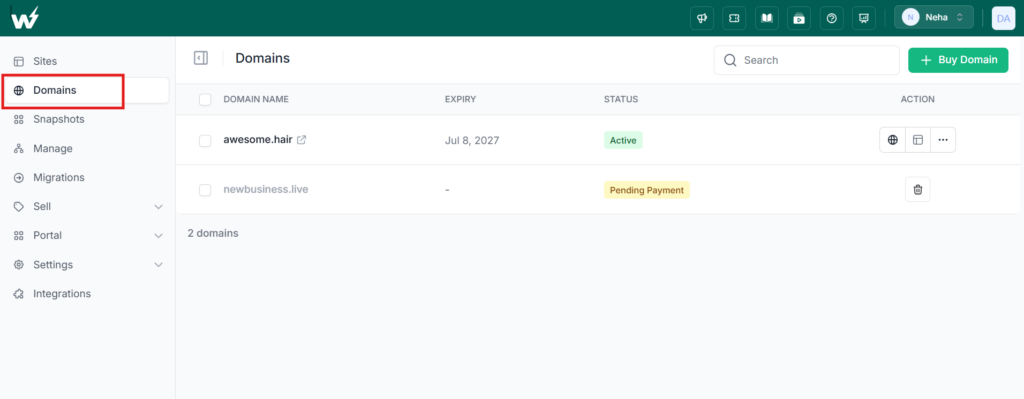
Open Domains in the sidebar, click + Buy Domain, and search for the name you want. InstaWP returns what is available across a range of extensions with the price shown against each one, so you can weigh a .com against a .io or a .co before you commit rather than after.
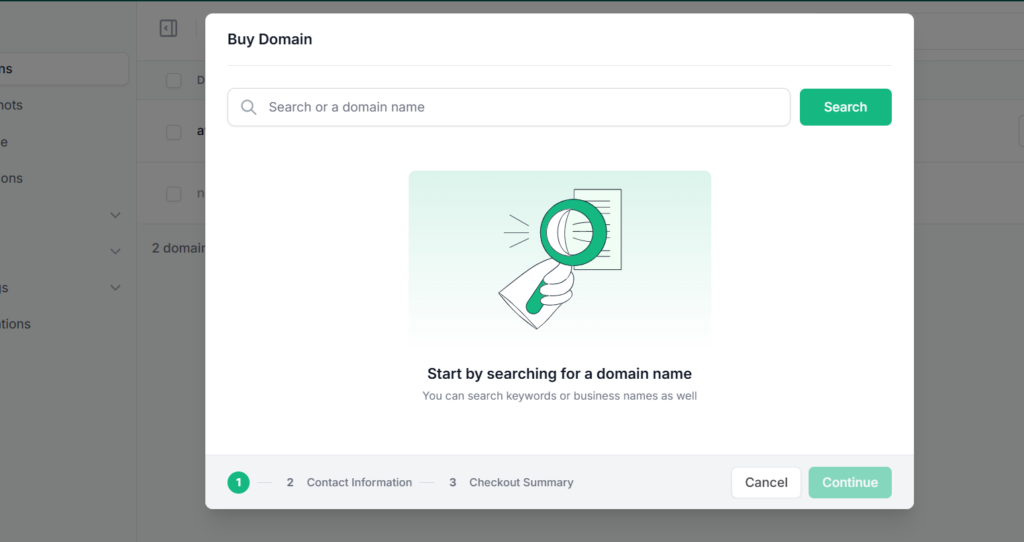
Here is the whole flow, start to finish:
Pick one, enter the contact details the registry requires, and register; the docs cover every field. Privacy protection is on by default, so your name, email and phone number do not end up in the public WHOIS record every registrant has, where scrapers and cold-callers harvest them.
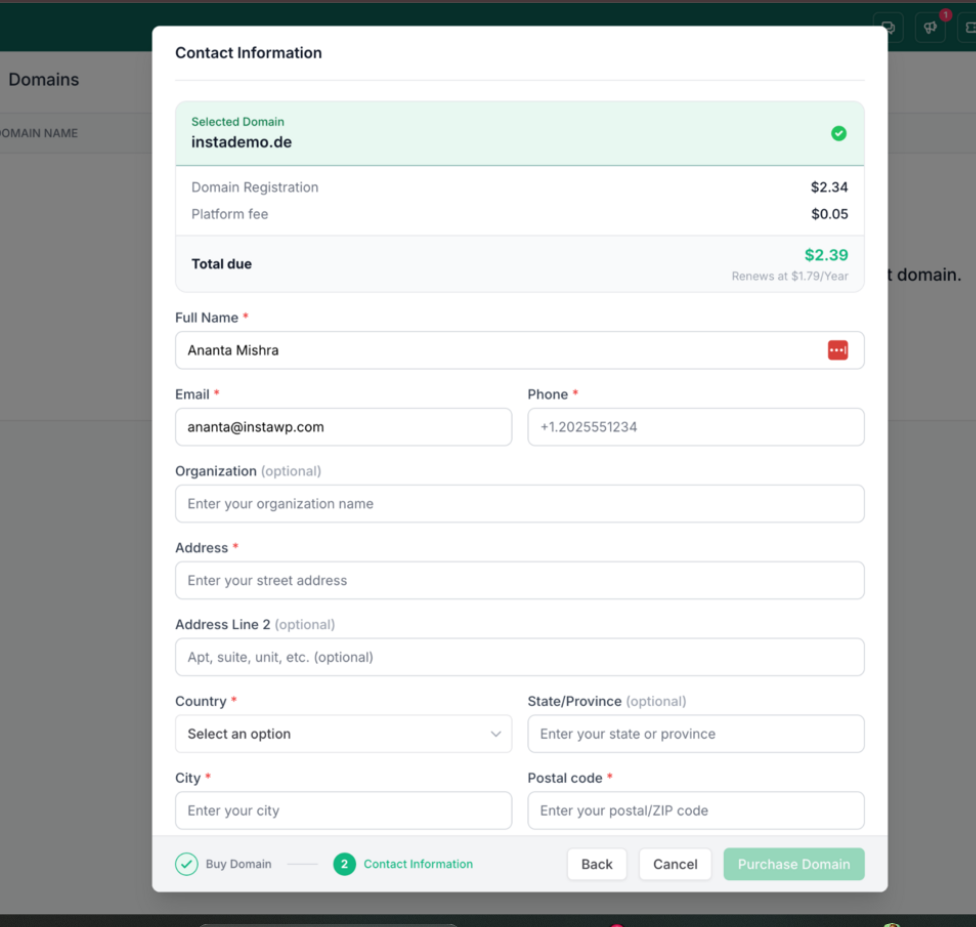
The domain shows up in your list, moves through validation, and turns Active; usually within minutes, though some extensions take longer.
It arrives on the same invoice as your hosting; InstaWP bills pay-as-you-go, so the domain simply joins the account you already have. That sounds like a small thing until you have twenty client domains renewing on four different cards at a registrar nobody at the agency has logged into since 2021.
Build: launch a site on it in one flow
Here is where the registrar being inside the host actually pays off. You do not register a name and then go off to connect it later. You can register the domain and bring a fresh WordPress site up on it in the same flow; the domain and the site come up together, SSL included, live in minutes.
The same mechanism works in reverse for a site you already have. Open the domain, choose Sites, click Link Site, pick the subdomain and the site from a dropdown, and confirm.
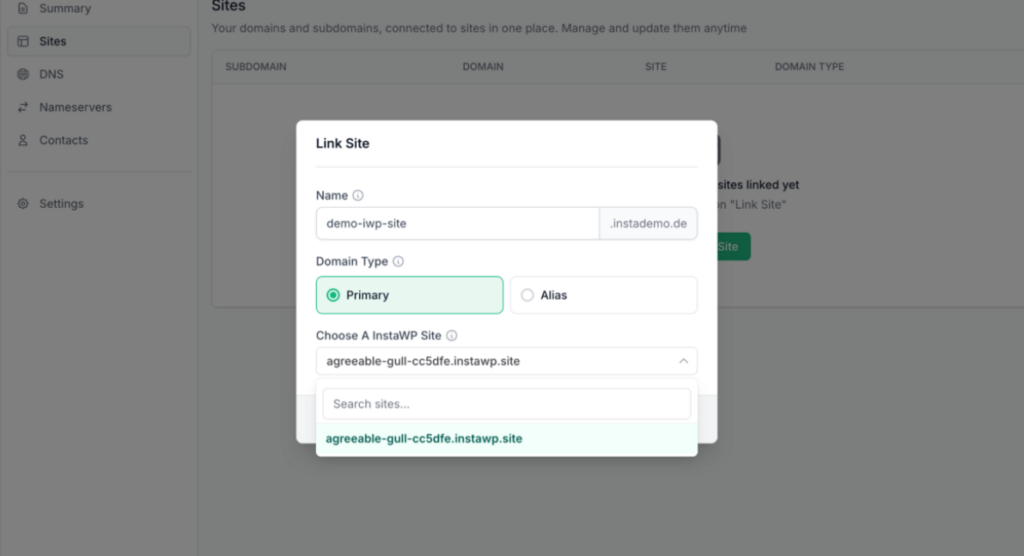
The CNAME record is created automatically. You can mark a domain Primary, making it the site’s main address, or Alias, an additional address pointing at the primary; and your original your-site.instawp.site address keeps working either way.
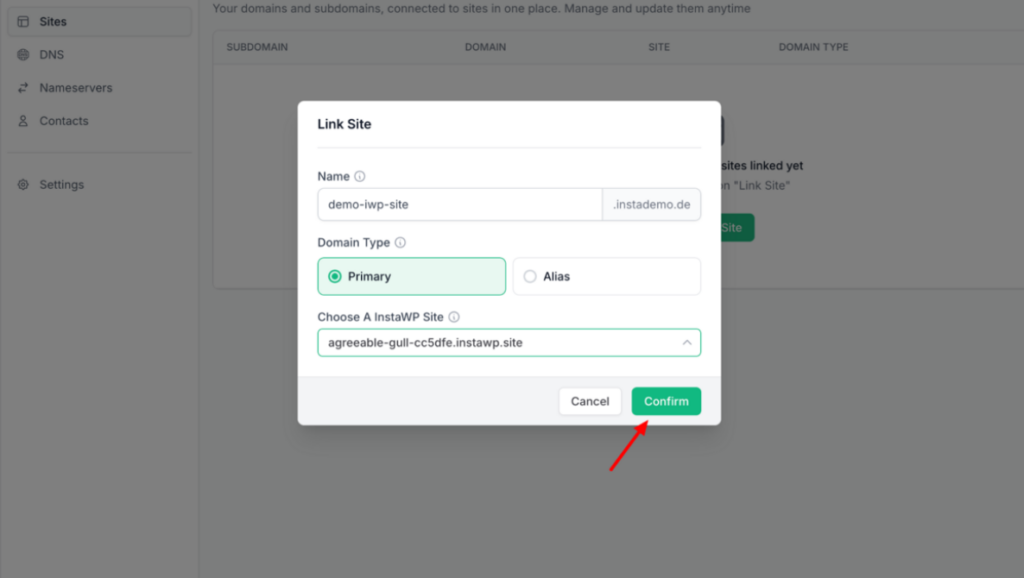
Sandbox to live, with a real name. An InstaWP sandbox is where a lot of work starts — a throwaway site to test an idea, prototype a build, or show a client a direction. With Domains, promoting one to production is not a migration. You buy the name, link the site, and the thing you have been iterating on is now the real website at the real address.
Connect: point a domain you already own
You do not have to buy a new name to use any of this. A domain registered anywhere else can point at an InstaWP site in one of two ways: add the DNS records we give you at your current provider, or point the domain’s nameservers at InstaWP and manage its DNS here alongside everything else.
The second option is the one worth considering, because it gets you most of the benefits; the automatic record creation, the DNS editor sitting next to your sites without moving the registration itself. Our docs cover mapping a custom domain in full.
Managed DNS, without a second provider
Every domain registered with InstaWP gets a full DNS manager under its DNS tab. Not a cut-down version; the actual record types you need to run a domain properly:
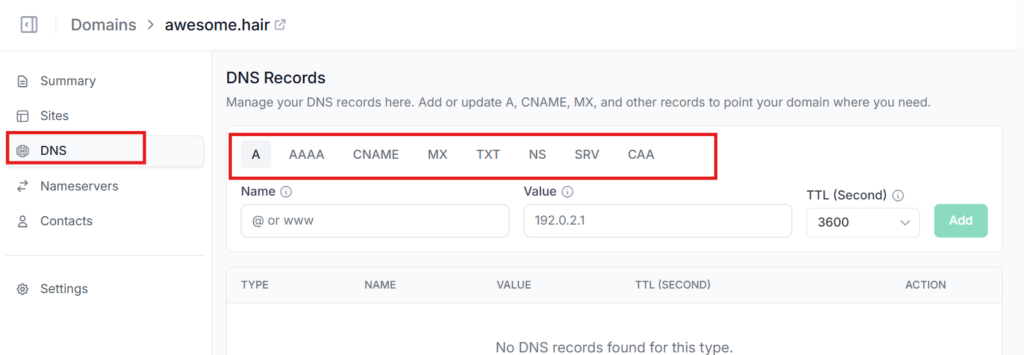
Most people will never open this tab, because linking a site writes what it needs on its own. It is there for the moment you need to put Google Workspace on the domain, or prove ownership to an analytics tool, or send the root domain somewhere specific; the moments that would otherwise force you to go and sign up for a DNS provider.
And if you would rather keep DNS where it already is, you can. Point the domain at up to four custom nameservers Cloudflare or anyone else from its Nameservers tab.
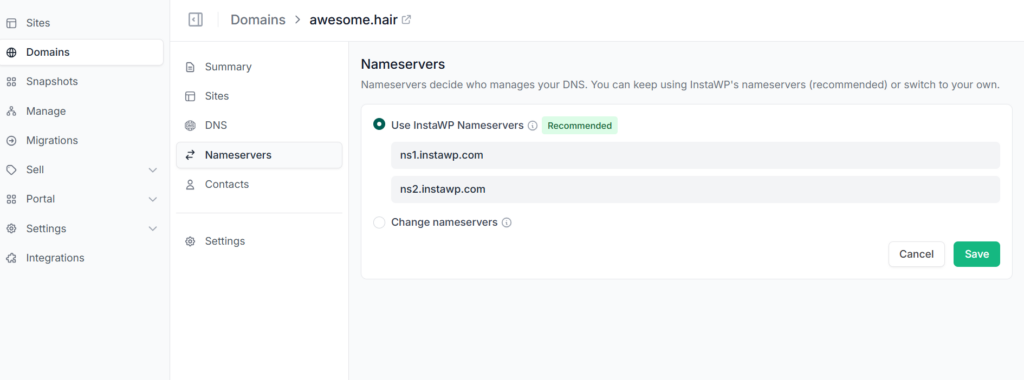
The registration, the renewal and the billing stay with InstaWP; only DNS management moves. You can move it back whenever you like. Every record type is documented in Add and update DNS records.
SSL, issued and renewed for you
Every domain you connect to an InstaWP site gets a free SSL certificate, provisioned automatically when you link it and renewed automatically before it expires. There is no certificate step, no CSR, no calendar reminder, and no chance of the site going red in a browser because a renewal quietly failed on a Sunday.
Expired certificates are one of the most common ways a perfectly healthy site suddenly looks broken to visitors. Removing that as a thing anyone has to remember is worth more than it sounds.
Auto-renew, privacy, and one renewal date
Domains are rarely lost on purpose. They are lost because a renewal notice went to an inbox nobody reads any more. By the time someone notices, the site is down and the name is in redemption, where getting it back is expensive and not guaranteed; ICANN’s Expired Registration Recovery Policy spells out how little room you have once that clock starts.
Three defaults deal with that:
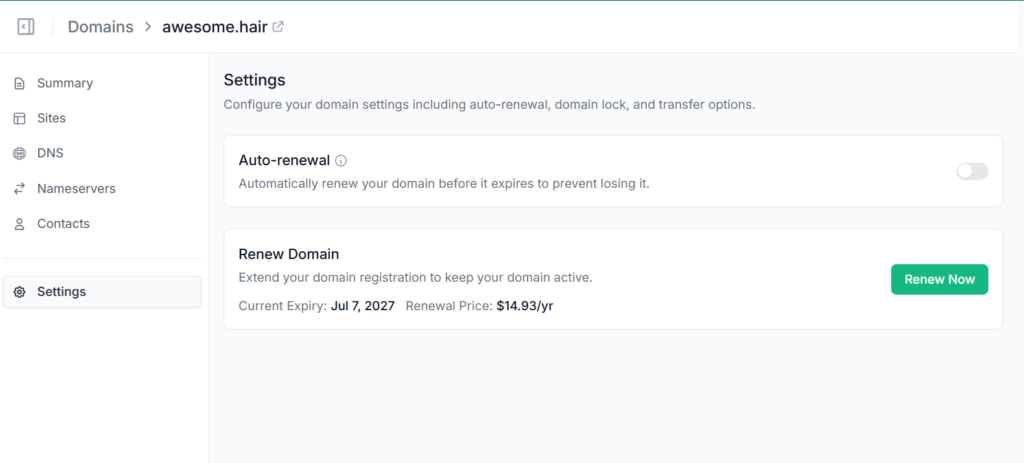
- Auto-renewal is a toggle on the domain’s Settings page. Leave it on and InstaWP renews the domain before it expires. If you would rather do it by hand, you can renew for up to four years at a time and see the price before confirming.
- Privacy protection is on by default, keeping your personal contact details out of public WHOIS lookups.
- One renewal date. The domain and the hosting sit on the same invoice, so you are not tracking two separate renewals for the same website.
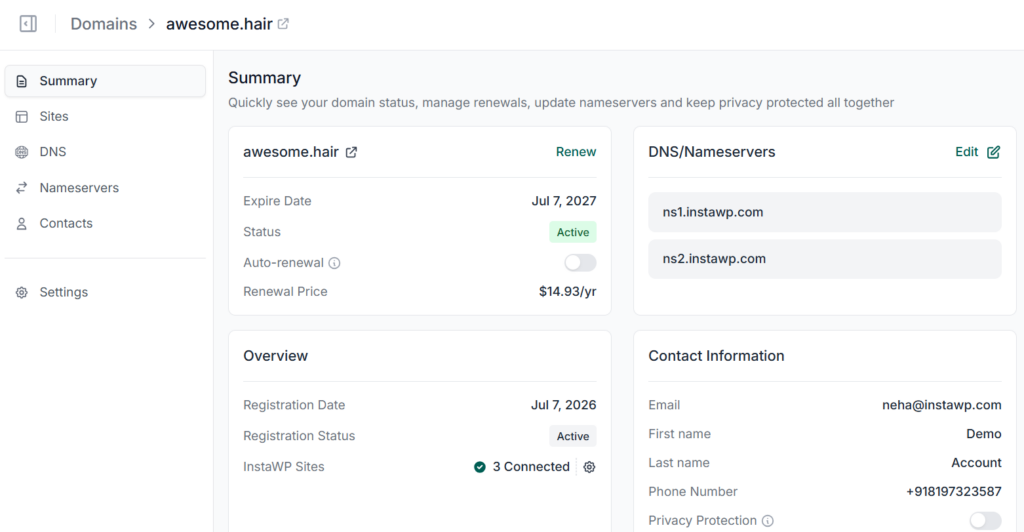
Each domain also has a Summary page that answers, in one screen, every question you would otherwise go digging for: when it expires, whether auto-renewal is on, what it costs to renew, which nameservers it uses, how many sites are connected to it, and what WHOIS contact is on record.
Subdomains: staging, demos and client previews
Every subdomain of a domain you own is yours to use, and each one can point at a different InstaWP site. Link one site to staging.yourdomain.com, another to demo.yourdomain.com, another to clientname.youragency.com. Each gets its own DNS record and its own certificate, automatically.
For agencies this is quietly the best part. Sending a client a preview link on your own domain instead of a generic platform URL is a small detail that makes the work look finished. Our guide on closing clients faster with a live demo link makes the case; Domains is what lets you do it on your own brand. If you are running a Website-as-a-Service business, the same mechanics cover mapping domains for WaaS sites.
The Domains API
Everything above is also available programmatically. The Domains API covers search, registration, DNS management, linking a site and renewal; so if you are provisioning sites from your own backend, from a script, or from the InstaWP CLI, the domain is not the one manual step left in an otherwise automated pipeline. Combined with webhooks, a site and its domain can come up without anyone touching a dashboard.
That matters for anyone running WordPress at scale: a hosting business provisioning customer sites, an agency spinning up client environments, or a product that creates a site per customer. The name can be part of the automation instead of a ticket someone has to action.
Who this changes things for
Freelancers
One less vendor, one less login, one less invoice to explain to a client. Buy the name and ship the site in the same sitting.
Agencies
Every client domain in one account, with auto-renew on, instead of scattered across registrars nobody remembers the passwords to.
Developers
A real DNS editor and a full API, so domains fit into the same automated flow as the sites themselves.
Anyone shipping something new
Go from an idea in a sandbox to a live site on a real name without a detour through a registrar you have never heard of.
What takes three logins elsewhere takes one here

| What you need | On InstaWP | The usual setup |
|---|---|---|
| The name | Searched and registered in your dashboard | A registrar account, plus a checkout full of upsells |
| The DNS | Managed here; records written for you when you link a site | A DNS panel, and values copied by hand between tabs |
| The certificate | Free, automatic, auto-renewing | A separate step, and a separate thing to forget |
| The site | Launched on the domain in the same flow | Built first, connected later, debugged after that |
| The bill | One invoice, one renewal date | Two or three renewals on two or three cards |
| When it breaks | One place to look, one team to ask | Three vendors, each pointing at the other two |
Get the domain where you build the site
None of this is complicated on its own. A registrar is not hard. DNS is not hard. Certificates are not hard. What is hard is the seams between them; the copied values, the forgotten renewals, the login only one person has, the hour spent working out which of three vendors is responsible for a site being down.
Domains on InstaWP removes the seams. The name, the DNS, the certificate and the site all live in the same place, and the system that holds the name is the system that runs the server. Buy it, link it, and get on with the work.
Buy a domain. Launch a site on it.
One registrar, wired to where you host and build.
Search for a Domain See the FeatureNew to this? Start with how to buy a domain and launch a WordPress site on it, or browse the Domains documentation for the click-by-click detail on DNS records, nameservers and renewals. Agencies managing client domains at scale should also look at the Agency Program and at how to resell hosting.
Frequently asked questions
What is the Domains feature on InstaWP?
It is a domain registrar built into the InstaWP dashboard. You can search for and register a domain, launch a WordPress site on it, manage its DNS records, control its nameservers, and renew it; all in the same place you host your sites, on the same invoice.
Do I have to buy my domain from InstaWP to host with InstaWP?
No. A domain registered anywhere else can be pointed at an InstaWP site, either by adding the DNS records we give you at your current provider or by pointing the domain’s nameservers at InstaWP. Buying it here simply removes the manual steps.
Is SSL included?
Yes. Every domain connected to an InstaWP site gets a free SSL certificate, provisioned automatically when you link the domain and renewed automatically before it expires. There is no certificate step to perform and no extra cost.
Can I manage DNS records myself?
Yes. Every InstaWP-registered domain has a full DNS manager supporting A, AAAA, CNAME, MX, TXT, NS, CAA, SRV and Redirect records. You will not usually need it linking a site writes the record for you but it is there for email, ownership verification and anything else you need to point at.
Can I keep using Cloudflare for DNS?
Yes. Point the domain at up to four custom nameservers from its Nameservers tab and manage DNS at your provider instead. Registration, renewal and billing stay with InstaWP, and you can switch DNS management back at any time.
Can a subdomain point at a different site
Yes. Each subdomain can be linked to a different InstaWP site, so staging.yourdomain.com, demo.yourdomain.com and a client preview can all run as separate sites on your own domain, each with its own certificate.
Is there an API for domains?
Yes. The Domains API covers search, registration, DNS management, linking a site and renewal, so domains can be part of an automated provisioning flow rather than a manual step at the end of it.
How much does a domain cost?
It depends on the extension; a .com, a .io and a .store are priced differently, and some renew at a different rate than they register. The price is shown next to each available extension when you search, and the renewal price is shown on the domain’s own page.
What stops me from losing a domain?
Auto-renewal, which is a toggle on the domain’s Settings page and which we recommend leaving on. With it enabled, InstaWP renews the domain before it expires, so it never lapses into the grace and redemption periods where recovery gets expensive.
Can I turn a sandbox site into a real site on a real domain?
Yes, and that is one of the neater uses of the feature. Buy the name, link the sandbox site to it, and the prototype you have been iterating on becomes the live website at its real address; no migration required.