The fastest way to close a website client is to stop describing the website and start letting them use it. A live demo link, a real, working WordPress site the prospect can click around in, removes the single biggest reason deals stall: the client cannot picture what they are buying.
Instead of sending a PDF mockup or a Figma file and waiting a week for feedback, you send a URL, they log in, they fall in love with their future site, and the conversation shifts from “should I do this?” to “how do I pay you?”
This guide shows you exactly how to use a live demo link to close clients faster, plus how to turn that same demo into a paid, hosted site the moment the client says yes.
Table of Contents
Key Takeaway
- A live demo link lets prospects experience a real working site instead of imagining one, which shortens the sales cycle dramatically.
- With InstaWP, you build a demo once, save it as a Shared Snapshot, and share a single link that spins up a fresh demo for each prospect, no setup on their end.
- You can brand the demo as your own, set an auto-expiry, and enable auto-login so the prospect lands straight inside a polished site.
- When the client says yes, the same demo converts into a live, hosted, paid site, so the demo is not throwaway work, it is the start of the project.
Why Live Demos Close Clients Faster Than Mockups
Every web design agency has lost a deal to hesitation. The prospect liked the proposal, nodded along to the mockups, then went quiet for three weeks. The problem is rarely price.
The problem is that a static mockup asks the client to do imaginative work: to picture how the menu feels, how the pages connect, what it is like to actually own the thing. Imagination creates doubt, and doubt delays decisions.

A live demo removes that imaginative gap entirely. When a prospect clicks into a real WordPress site with their industry’s layout, real navigation, and working pages, the buying part of their brain switches on.
They stop evaluating a proposal and start feeling ownership. Sales teams have understood this for years: a short live demo can lift conversions meaningfully compared to passive formats, because experiencing something beats being told about it.
For a WordPress agency, the live demo has a second advantage that generic sales demos do not. The demo you show is built on the exact platform you will deliver on, so there is no gap between the sales promise and the final product. The demo is not a sales prop you throw away. It becomes the live site. That changes the economics of demoing, which we will come back to.
What a Live Demo Link Actually Is
A live demo link is a single URL you share with a prospect that instantly launches a working WordPress site they can explore, with no account creation, no installation, and no setup on their part. They click, and within seconds they are inside a real site.
In InstaWP, this is powered by a Shared Snapshot. A snapshot is a saved blueprint of a WordPress site, every theme, plugin, page, and setting captured exactly as you built it.
When you mark a snapshot as “shared,” InstaWP gives you a public link. Anyone who opens that link gets their own fresh copy of your site to play with, spun up on demand. You build the demo once, and the same link serves an unlimited number of prospects, each getting a clean, identical demo.
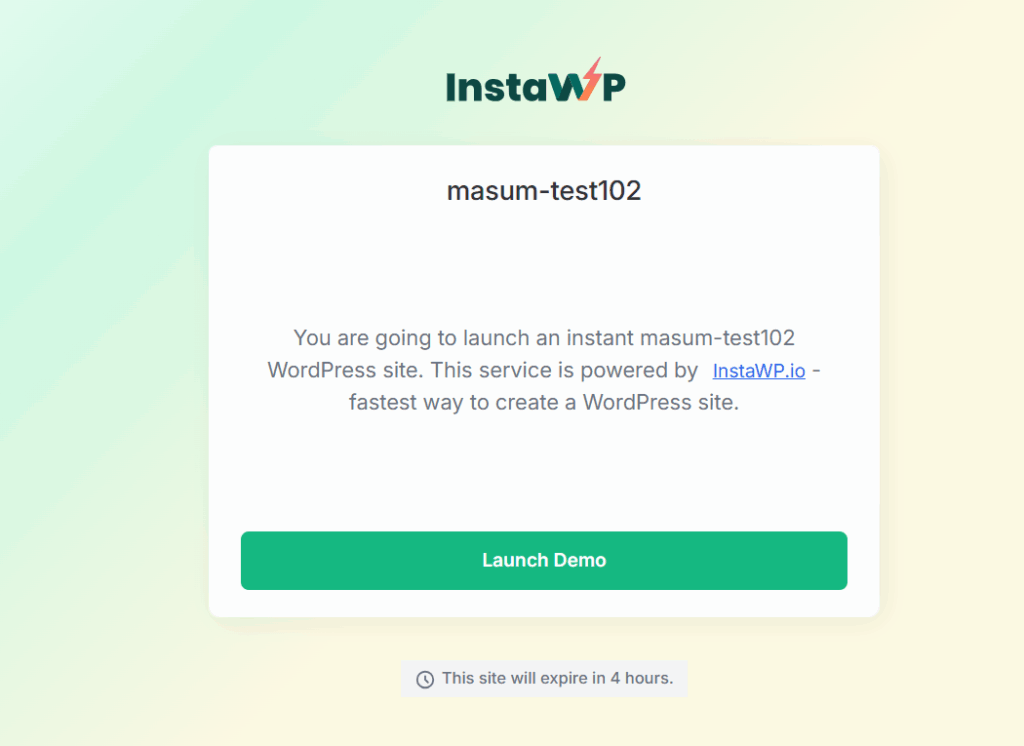
This is fundamentally faster than the old approach of manually building a one-off demo site for each prospect. You prepare your best work a single time, and it scales to every sales conversation you have.
Did you know? Because each prospect gets their own copy of the demo, they can click, type, and experiment freely without affecting your master template or anyone else’s demo. Nothing they do can break the version you show the next client.
How to Create a Live Demo Link in InstaWP (Step by Step)
Here is the complete process, from building the demo site to copying the shareable link. The whole thing takes one afternoon to set up, and then you reuse it forever. If you do not have an account yet, you can create a WordPress site on InstaWP for free to follow along.
Step 1: Create your demo site
From the InstaWP dashboard, click Add New. In the site creation pop-up, choose your PHP version, server location, and WordPress version.
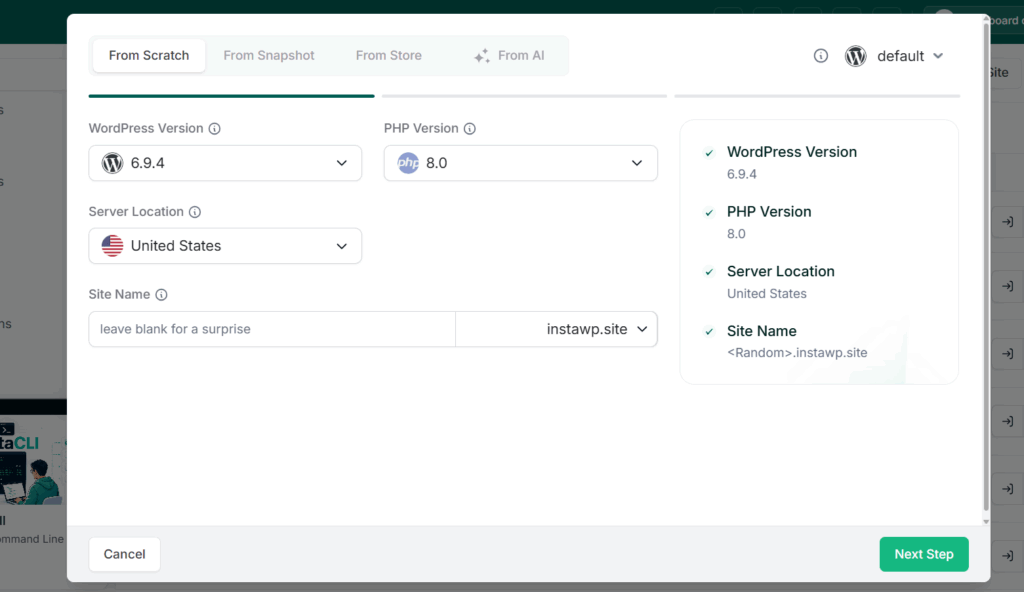
You can build this site any way you like: from scratch, from a pre-made template in the store, or even using an AI builder like ZipWP or Kadence AI to generate a full site in minutes. Leading with AI here is the fastest route, you describe the business, the AI assembles a starting site, and you refine from there.
Set a site name and click Next Step. Choose any plugins you want pre-installed, select the suitable hosting plan, and click Create Site.
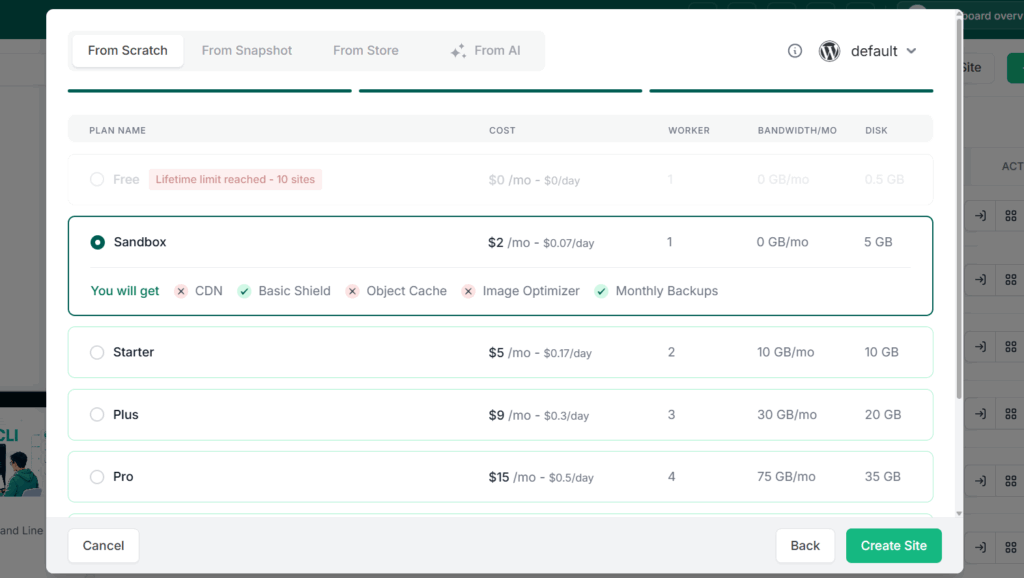
Your site spins up in seconds, and you can open the admin panel instantly using the Magic Login link.
Learn the full process here:
Step 2: Prepare the demo for your prospects
This is where you make the demo persuasive. Treat it like the site you would hand the client on day one. A few things to do at this stage:
- Install and configure the theme and essential plugins that define this type of site.
- Build a polished landing page and the core pages a real client would have.
- Add realistic demo content, sample pages, images, and copy, so it feels lived-in, not empty.
- Add a short welcome message on the WordPress dashboard explaining how to explore the demo.
- Update the fields under Settings > General so the site name and tagline match the pitch.
The goal is that when the prospect lands inside, it feels like their site, not a blank WordPress install.
Building a demo flow for your agency?
The InstaWP team helps agencies set up demo-to-paid workflows that convert. Have questions about your setup? Book a free call and we’ll walk you through it.
Book a Free Call →Step 3: Save your site as a Shared Snapshot
Once your demo site looks the way you want, you turn it into a reusable, shareable demo. From the Site page, click the Save as Template/Snapshot icon next to your site.
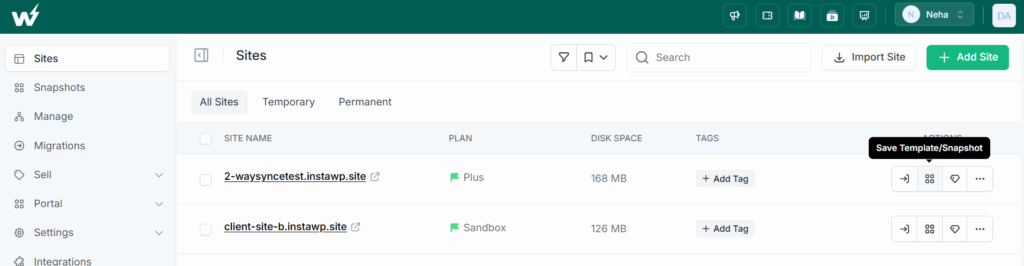
Add a name and a short description, select Snapshot, and mark it as Shared. You can also tick Instant Snapshot to make demos load faster for your prospects. Click Save.
Learn more about it here:
One important note: the name and description you enter here are visible to anyone who opens the demo link (and to search engines), so keep them crisp and client-friendly.
Step 4: Copy your shareable demo link
Go to the Snapshots page and click the Copy icon next to your snapshot’s name. That copies your live demo link, which looks something like https://app.instawp.com/launch?t=yourdemo.
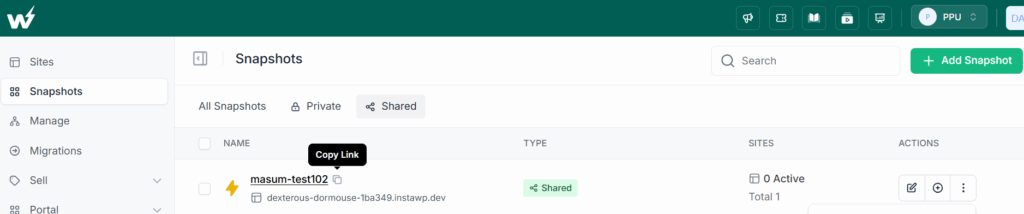
This single link is now your sales weapon. Drop it into proposals, sales emails, your website, a “Try a live demo” button, or paste it into a call. Every prospect who clicks gets their own fresh demo.
Create demo site
Polish the content
Save as Shared Snapshot
Copy & share link
How to Brand and Customize Your Demo
A demo that carries your agency’s brand closes better than a generic one, because it reinforces that the client is buying from you. From the Snapshots page, find your shared snapshot and click Edit to access the customization options.
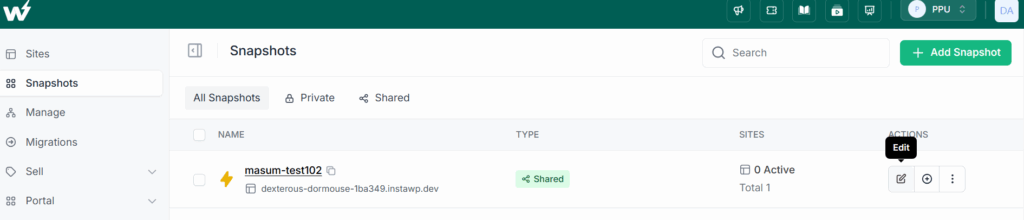
- Branding: Add your logo, brand colors, privacy policy, and custom CSS so the demo landing page looks like your agency, not a stock page.
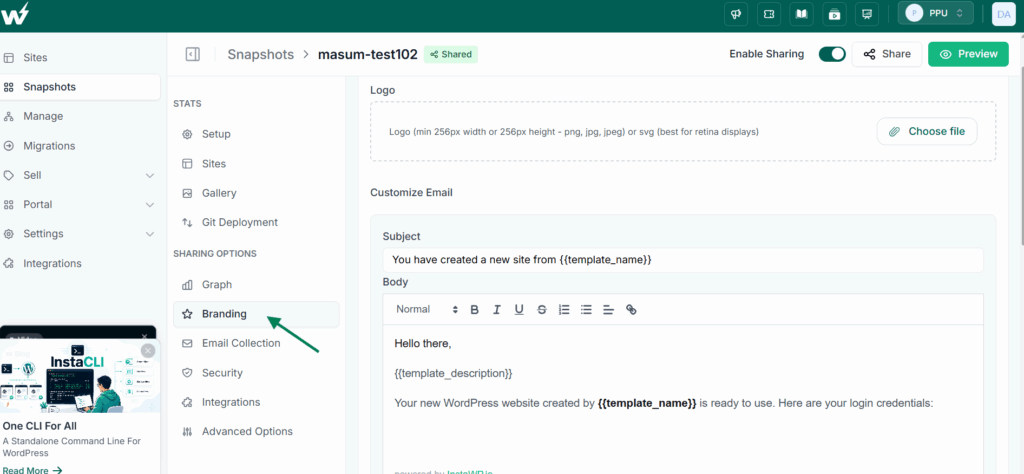
- Gallery: Add images that showcase the site or your work on the demo landing page.
- Setup: Fine-tune the name, description, and other essentials prospects see when they land.
The Advanced Options are where you make the demo experience frictionless and sales-smart:
You can also configure the Reply-To Name and Reply-To Email in the snapshot’s email collection settings, so confirmation emails come from your agency and prospects can reply directly to you.
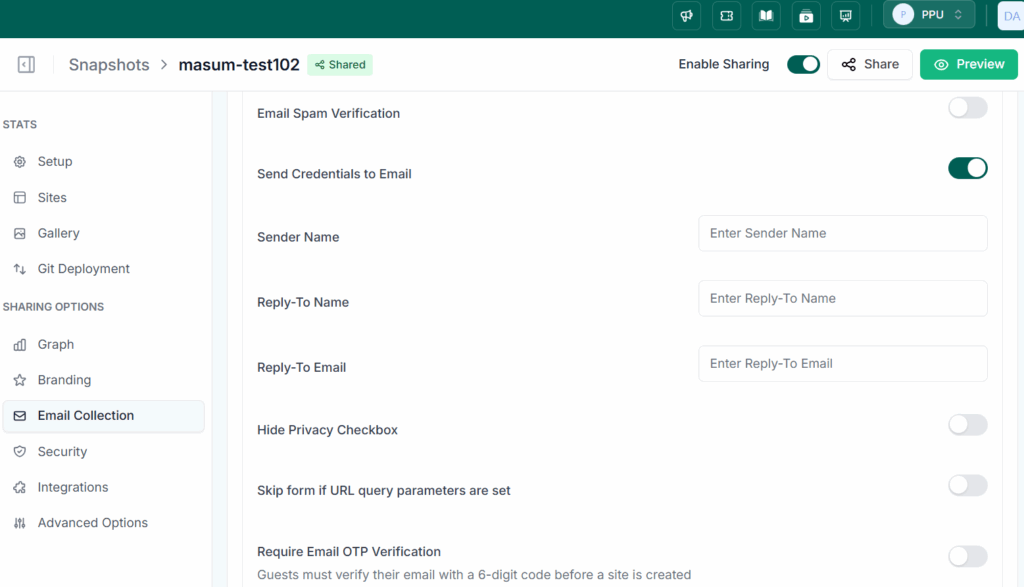
Small touches like this keep every interaction on your brand. If you want to go further and put the demo on your own domain, you can use a white-label suffix domain so the entire experience reads as your agency.
How to Use the Demo Link in Your Sales Process
Having the link is half the battle. Using it at the right moments is what compresses your sales cycle. Here are the highest-leverage places to deploy it.
- In cold outreach: “I built a quick example of what your new site could look like, take a look: [link].” A working site in a cold email stops the scroll far better than a pitch.
- During the sales call: Share your screen, open the demo live, and let them direct you. “Want to see the booking page? Here.” Real-time exploration builds real-time desire.
- Inside your proposal: Replace static screenshots with a “Try the live demo” button. The prospect interacts instead of reading.
- As a website lead magnet: Add a “Try a free demo site” button to your agency site so prospects self-qualify before they ever talk to you. Beyond inbound demos, AI lead generation tools can help agencies identify, qualify, and prioritize additional prospects using firmographic data, intent signals, and automated scoring.
- In follow-up: If a deal goes quiet, a “your demo is still live, here is the link again” nudge re-engages far better than “just checking in.”
The throughline: every touchpoint becomes an invitation to experience, not a request to imagine. That is what shortens the path to yes.
From Demo to Paid Site: Closing the Deal
Here is where the InstaWP workflow truly separates from a generic sales demo. When the client says yes, you do not start over. The demo becomes the live site. There are two ways to handle the conversion, depending on how hands-on you want to be.
Option 1: Sell it through a WaaS storefront (most automated)
If you want the close to be self-serve, turn your demo into a full Website as a Service (WaaS) offering. The prospect tries the demo, clicks to buy a plan, enters payment, and a live, hosted site is provisioned automatically on your branding. Payment, hosting, and provisioning all happen without you lifting a finger. This is ideal for agencies selling productized sites at volume.
Option 2: Convert the demo to a hosted site manually
For higher-touch client work, you take the same snapshot the demo was built from and deploy it as a live, hosted site under your management. The work you did to win the deal is the same work that delivers it, no rebuilding, no migration headaches. From there you manage the WordPress site (and all your other client sites) from one dashboard, with backups, updates, and monitoring handled.
Either way, the demo was never throwaway work. It was the first deliverable of a project the client just paid for. That is what makes demoing on InstaWP economically smart, not just persuasive. And if you bundle hosting into the deal, you create recurring revenue by reselling hosting on top of the build fee.
Want to turn demos into recurring revenue?
The InstaWP Agency Program helps you set up demo-to-paid flows, white-label everything, and migrate existing clients for free. Questions? Book a call with our team.
Book a Call →Other Ways to Demo a Site (and Why They’re Slower)
The InstaWP shared snapshot method is the fastest, but for completeness, here are the other approaches agencies use, and the tradeoffs that make them slower.
- Building a one-off demo on your own hosting. Works, but you manually create a fresh site for every prospect, manage credentials, and clean up afterward. It does not scale across many sales conversations.
- Static mockups (Figma, PDF, screenshots). Fast to produce, but they put the imaginative burden back on the client and create the hesitation you are trying to avoid.
- Screen-recording a walkthrough video. Better than static, but passive. The prospect watches instead of touching, and cannot explore the parts they care about.
- Sending a link to a live theme demo. Generic and unbranded. It shows a theme, not their site, so it does little to create ownership.
All of these can play a supporting role, but none create the “this is mine” feeling of a real, branded, interactive demo that converts into the actual site.
Conclusion: Let Them Click, Then Close
The agencies that close fastest are not the ones with the slickest pitch decks. They are the ones who put a real, working site in the prospect’s hands and let the product sell itself.
A live demo link collapses the distance between “interested” and “sold,” because experiencing a website is infinitely more convincing than reading about one. And because the demo you build in InstaWP becomes the live site you deliver, you get all of that persuasive power without any wasted work.
Build your demo once, share the link everywhere, and watch your sales conversations get shorter. When you are ready to turn those demos into recurring, hosted revenue, the InstaWP Agency Program is the fastest way to set it up properly.
Close Faster, Earn Recurring
Build a live demo flow that turns prospects into paying clients
Have questions about setting up demos, white-labeling, or selling hosting under your brand? Book a free call with the InstaWP team and we’ll map it out with you.
Book a Free Call →Further reading
- How to Resell Hosting in 2026: A Guide for WordPress Agencies
- White-Label WordPress for Agencies
- Manage WordPress Sites from One Dashboard
- InstaWP for Agencies and Freelancers
Frequently Asked Questions
What is a live demo link for a website?
A live demo link is a single URL that instantly launches a working WordPress site a prospect can explore, with no account creation or setup on their end. In InstaWP, it is powered by a Shared Snapshot, so each prospect gets their own fresh copy of your demo site from the same link.
How does a demo link help close website clients faster?
It replaces imagination with experience. Instead of asking a prospect to picture their future site from a mockup, you let them use a real one. That removes hesitation, generates reactions in the meeting rather than days later, and creates a sense of ownership that accelerates the decision to buy.
Do prospects need to install or sign up for anything?
No. They click the link and the demo opens. With auto-login enabled, they land directly inside the WordPress dashboard or your chosen landing page, with no credentials to enter and nothing to install.
Can I brand the demo as my own agency?
Yes. You can add your logo, brand colors, and custom CSS to the demo landing page, set the reply-to email to your own, and even serve the demo on your own white-label suffix domain so the entire experience reads as your agency rather than InstaWP.
What happens to the demo after the client buys?
The demo becomes the live site. You either convert it through a WaaS checkout that provisions a hosted site automatically, or deploy the same snapshot as a managed live site for higher-touch projects. The work that won the deal is the same work that delivers it.
How long does it take to set up a demo link?
Building and polishing your master demo site takes an afternoon. After that, saving it as a Shared Snapshot and copying the link takes a couple of minutes, and you reuse that same link for every prospect from then on.