The best WooCommerce hosting is managed WordPress hosting that meets WooCommerce’s own server requirements (PHP 8.3 or newer, MySQL 8.0+ or MariaDB 10.6+, a 256 MB memory limit and HTTPS), has enough PHP workers for uncached cart and checkout traffic, includes a persistent object cache, and lets you test updates on staging. This guide turns that into a 9-point checklist, a test you can run during any money-back window, and a dated shortlist of hosts, including where InstaWP fits.
- Start from the official numbers. WooCommerce 10.8 recommends PHP 8.3+, MySQL 8.0+ or MariaDB 10.6+, 256 MB of memory and HTTPS. A host still offering older defaults is a red flag.
- Cart, checkout and my-account never come from page cache. PHP workers and a persistent object cache decide how a store holds up during a sale, not the CDN.
- Bigger plans buy concurrency, not speed. On InstaWP a higher plan adds PHP workers (2 to 10), so more shoppers are served at once. A single page is built at the same speed on every plan.
- Price the whole bill. Renewal jumps, object cache add-ons (Kinsta lists Redis at $100 a month per site) and staging tiers change what a store really costs.
- InstaWP managed hosting runs WooCommerce from about $5 a month, with object cache from Plus ($9), staging from Pro ($15) and daily backups kept 30 days from Plus.
Table of Contents
What is WooCommerce hosting?
WooCommerce hosting is WordPress hosting sized and configured for an online store. It gives a store enough PHP capacity and database performance for carts, checkouts and orders, page caching that skips the pages that must stay dynamic, and the security and backups a business taking payments needs. It is not a separate kind of server: any good WordPress host can run WooCommerce, and the difference is how the plan is sized and configured. If you plan to let an AI agent manage products and orders, InstaWP’s WooCommerce MCP test shows which servers can be trusted with that.
If you are setting up an online store using WooCommerce for the first time, four things make a store harder to host than a blog or brochure site:
- Cart, checkout and my-account are excluded from page cache by design. Every visit to them runs PHP and queries the database.
- Cart fragments and AJAX add-to-cart fire on pages that otherwise look cacheable, so even “cached” product pages make uncached requests.
- A store writes while people shop. Orders, stock levels, sessions and Action Scheduler jobs all hit the database during a sale.
- Stores run more plugins. Payments, shipping, tax, email and analytics push memory use per request up.
WooCommerce hosting vs WordPress hosting: what’s the difference?
WordPress hosting is sized for content that can be cached once and served to everyone. WooCommerce hosting is sized for transactions that cannot. In practice that means more PHP workers, a persistent object cache, a database tuned for frequent writes, and cache rules that exclude cart and checkout. The server software underneath is the same.
That is why a cheap shared plan that runs a blog well can stall at checkout the first time a promotion lands. If you are running a real store, look for managed WordPress hosting that is WooCommerce-ready, not a generic shared plan. Here is a quick breakdown of WooCommerce hosting against standard WordPress hosting:

A WooCommerce-optimized host is built for these e-commerce pressures: bursty traffic around sales, dynamic pages that cannot be cached, and payment flows that must not fail halfway.
Why does WooCommerce hosting affect speed, SEO and sales?
Hosting sets the floor for how fast your store can be. No theme or caching plugin can make an uncached checkout faster than the server that builds it. According to Deloitte’s retail performance study (Milliseconds Make Millions, 2020), a 0.1-second improvement in mobile site speed lifted retail conversions by 8.4% and average order value by 9.2%.
1. Load speed and conversion rates
Delay hits hardest at the moment a customer is about to pay. A store with dozens of plugins, live inventory and real-time pricing needs fast PHP execution, a CDN for static assets and server-side caching for everything that can be cached. Akamai’s 2017 State of Online Retail Performance report found a 2-second delay in load time raised bounce rates by 103%.
2. Backend operations and database efficiency
WooCommerce touches the database on every cart update, stock change and shipping calculation. Without enough memory, a persistent object cache and a modern MySQL or MariaDB version, these queries stack up and slow both the storefront and wp-admin. Large catalogs and high order volumes feel it first.
3. Search engine optimization (SEO)
Google uses page experience signals, including Core Web Vitals and HTTPS, and a slow server response shows up as a poor time-to-first-byte before any other metric. Slow sites also lose visitors before they convert, which wastes the traffic you rank for.
4. Paid advertising ROI
Google Ads scores landing page experience as part of Quality Score, and a slow landing page raises what you pay per click. If you buy traffic to product pages, hosting speed is part of your ad budget.
What are the WooCommerce hosting requirements in 2026?
WooCommerce 10.8 and later recommend WordPress 6.9+, PHP 8.3+ (tested up to PHP 8.4), MySQL 8.0+ or MariaDB 10.6+, a WordPress memory limit of at least 256 MB, and HTTPS, according to the official WooCommerce server recommendations (checked 5 October 2026). Older stacks (PHP 7.4, MySQL 5.6, MariaDB 10.4) still run WooCommerce but are past end of life.
Before you call any plan “WooCommerce ready”, it should also clear the checks the official list leaves out:
- A persistent object cache (Redis, Valkey or Memcached) for the pages page caching cannot serve.
- A CDN with cart and checkout exclusions, so product pages load from the edge and payment pages stay dynamic.
- Automatic backups you can restore yourself, daily for any store taking regular orders.
- A staging environment to test plugin, theme and WooCommerce updates before they touch live orders.
- Enough PHP workers for your busiest hour, not your average one.
- Support that understands WooCommerce, including checkout bugs, tax rules and shipping glitches.
If your current WooCommerce hosting misses these, you are leaving money on the table in every campaign and sale.
How do you choose the best WooCommerce hosting?
Work through nine questions in order. The first five decide whether a store stays fast at checkout; the last four decide what it really costs and how quickly you recover when something breaks. Ask each host the same questions and write the answers down: the gaps show up fast.

1. Do you need managed or unmanaged WooCommerce hosting?
Managed WooCommerce hosting means the provider runs the server layer for you. Depending on the plan, that covers the operating system, web server, PHP, database, SSL, CDN, firewall, backups and core and plugin updates, plus tools like 1-click staging. You get a tuned stack without the server work. Managed WooCommerce hosting suits agencies, growing stores and solo founders who would rather spend time on sales than on server logs.
Unmanaged WooCommerce hosting gives you a server (sometimes bare metal) with minimal configuration. You install WordPress and WooCommerce, set up caching and the CDN, and handle every update, patch and backup yourself. It is flexible but demands real sysadmin skill and time. It suits developers who want full control of the stack or need niche security configurations.
For agencies managing multiple client stores, managed WooCommerce hosting with built-in staging is usually the better trade: InstaWP’s managed WordPress hosting keeps SSH, WP-CLI and Git on every managed WordPress hosting plan, so you lose no control by letting someone else run the servers.
2. How many PHP workers does the plan include?
A PHP worker handles one uncached request at a time. When every worker is busy, the next shopper waits in a queue, which is why a store can feel fine on a quiet Tuesday and stall during a sale. Ask every host for the number in writing; some publish it, others hide it behind a “visits” allowance.
Signs you have outgrown your worker count: checkout slows only at peak times, shoppers see 502 or 504 errors under load, and your PHP-FPM log reports “server reached max_children”. Before a big promotion, run through our WooCommerce peak season checklist.
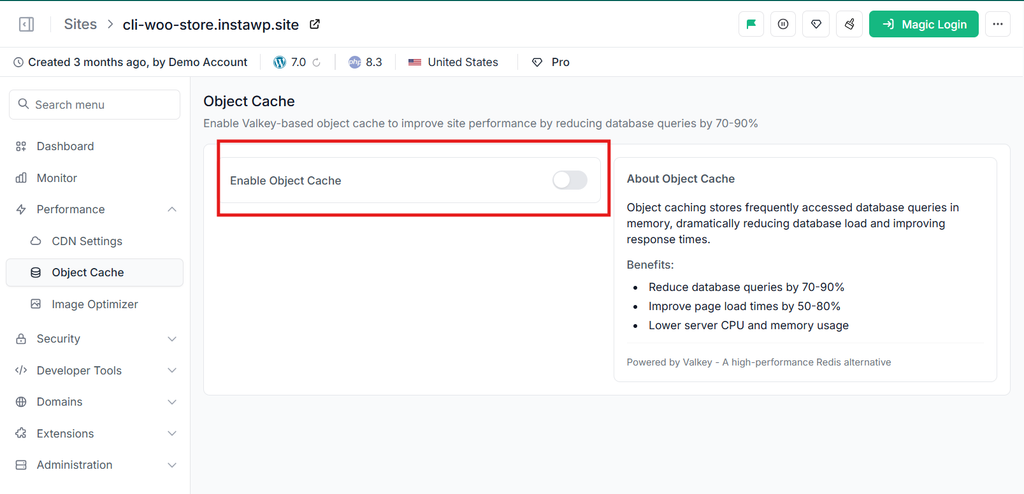
3. Is a persistent object cache included, or sold as an add-on?
WooCommerce repeats the same database queries for product data, options and sessions. A persistent object cache keeps those results in memory between requests, which speeds up exactly the pages page caching cannot: cart, checkout, my-account and wp-admin. Check the price as well as the feature.
Kinsta lists Redis as a $100 a month add-on per site (read September 2026). InstaWP includes a Redis-compatible object cache from the Plus plan at about $9 a month, enabled for you with no plugin to configure.
4. Do the CDN and page cache handle cart and checkout correctly?
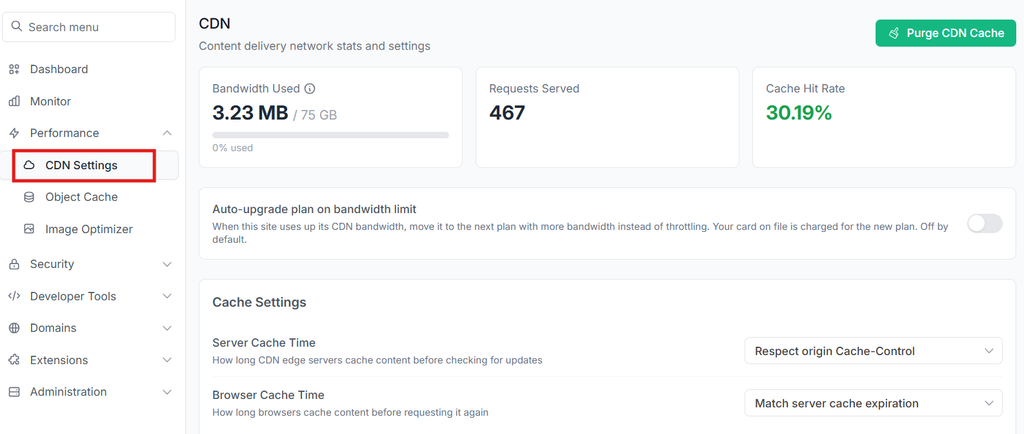
A CDN serves images, CSS and JavaScript from a location near each visitor. Server-side page caching stores ready-built HTML for pages like product listings. Both are essential, and both must exclude cart, checkout and account pages, or customers will see someone else’s cart. Caching that is pre-configured by the host saves you from writing those rules yourself.
Choose a host with an integrated CDN and cache exclusion rules for cart, checkout and my-account built in. On InstaWP, the InstaCDN edge network is included from Starter (basic, 10 edge locations) and upgrades to the premium global network with instant purging from Plus.
5. Is staging included on the plan you will actually buy?
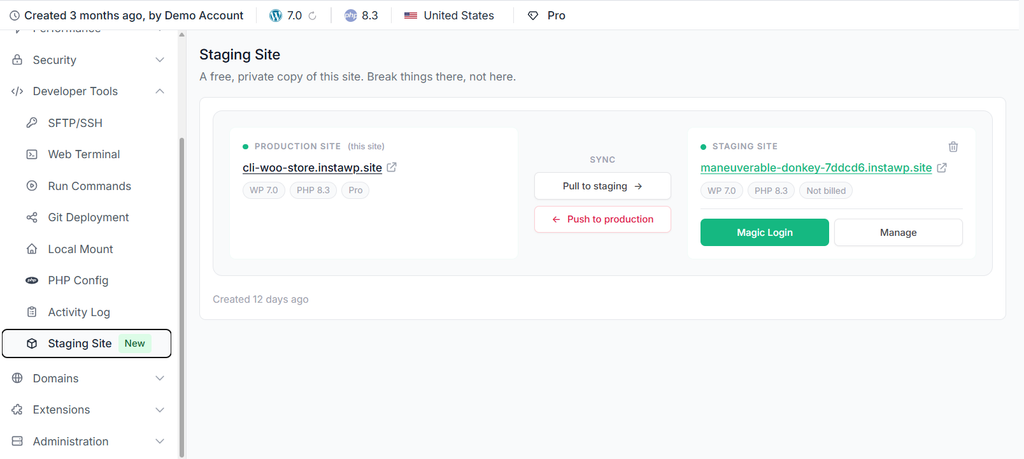
Developers working on stores need more than cPanel and FTP. The best WooCommerce host for a developer offers a staging copy, SSH access and WordPress Git integration for version control. If a provider markets itself as the best WooCommerce hosting but does not offer staging, SSH and version control, you are buying marketing copy, not a developer stack.
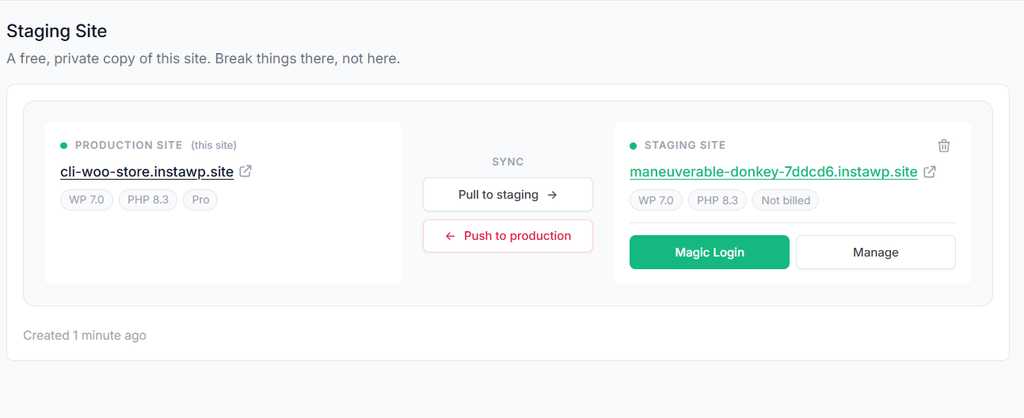
Check the tier, not the feature list: staging often appears on the pricing page but only on higher plans. On InstaWP, SSH, WP-CLI, Git and SFTP are on every plan, and built-in WP staging with pull-to-staging and push-to-production arrives on Pro ($15). Testing in staging, as managed WooCommerce hosting should allow, is how you avoid a plugin conflict breaking checkout on a live store.
6. How often are backups taken, how long are they kept, and can you restore them yourself?
Plugin conflicts, accidental deletions and malware all end the same way: a restore. Look for automatic daily backups, on-demand backups before risky changes, storage off the server itself, and restores you can run without opening a ticket.
On InstaWP, Starter takes weekly backups and keeps four; Plus and above take daily backups and keep them for 30 days. Backups are stored off-server in the same region as your site, and you can restore files, the database or both from the dashboard on every plan, or download a backup and take it with you.
7. What security does the host handle, and what stays your job?
Stores hold personal details, addresses and order histories, so Secure WooCommerce hosting for enterprises and small shops alike should include:
- Free SSL certificates on every site, including your own domain
- A web application firewall (WAF), plus bot and DDoS protection
- Vulnerability scanning for plugins and themes
- Site isolation, so one compromised site cannot reach another
- SSH and SFTP instead of plain FTP
PCI DSS scope mostly sits with your payment gateway when you use hosted payment fields or redirects (Stripe, PayPal, WooPayments). The host’s job is a hardened server, a firewall and fast patching; yours is strong admin passwords, two-factor authentication and trusted plugins. On InstaWP, each site gets its own Linux user, docroot, database and PHP-FPM pool.
The InstaShield WAF is Basic on Starter and Advanced (with a log of what it stopped) from Plus, where bot and DDoS protection and the vulnerability scanner are also included.
8. What will the hosting really cost after year one?
A $3 a month plan looks attractive until renewal, backups, staging, object cache or priority support are billed separately. Many hosts advertise an introductory rate and renew at two to six times the price. Ask:
- Is SSL included, or extra?
- Are daily backups, CDN access, object cache and staging bundled on this tier, or sold as add-ons?
- What is the renewal price after year one?
- Does the plan force an upgrade when traffic grows, or can you move one store up a tier on its own?
- Is WooCommerce-aware support included, or a paid upgrade?
Here is how to evaluate the total cost of ownership (TCO) before you commit to site plans:

Prices read from each provider’s own pricing page on 9 and 10 September 2026, cheapest plan able to run a production store. Check the live page before you buy.
9. What does the support and uptime promise actually cover?
Even the fastest server is useless if support goes quiet during a sale. Look for human support from people who know WordPress, and test it during your trial: ask how to raise PHP memory, whether OPcache and object caching are on, and which pages the cache excludes. If they cannot answer confidently, they are not a WooCommerce host.
Read any uptime promise closely: what counts as downtime, how it is measured and what you get back when it is missed. A percentage on a pricing page is not a service level agreement. Growing stores often pair a host with expert ecommerce development services to keep caching, server setup and infrastructure tuned as the catalog scales.
How do you test a WooCommerce host before you commit?
Use the money-back window as a test period. Most WooCommerce hosting providers offer 7 to 30 days, and InstaWP offers 14. Clone your real store to the candidate host and run these seven checks before you move DNS.
- Copy your real store, not a demo. Use the host’s free migration or a plugin such as Duplicator or All-in-One WP Migration, so the test includes your plugins and catalog.
- Measure the pages a host cannot cache. Run the script below against the copy. It compares the homepage with /cart/ and /checkout/ using a cart cookie, which most page caches treat as “do not serve from cache”.
- Check front-end speed. Run a product page through PageSpeed Insights or GTmetrix and note the server response time.
- Place test orders end to end with your payment gateway in test mode, including coupons, shipping and tax.
- Ask support three hard questions about PHP memory, OPcache and the object cache, and time the answers.
- Check plugin compatibility. Install your must-have WooCommerce extensions and confirm none is on the host’s disallowed list.
- Restore a backup yourself and see how long it takes without a ticket.
# woo-host-test.sh : median TTFB for a cacheable page vs the pages a host cannot cache
# usage: ./woo-host-test.sh https://your-test-store.example
SITE="${1%/}"
for path in / /cart/ /checkout/; do
  for i in 1 2 3 4 5; do
    curl -s -L -o /dev/null -A "woo-host-test" \
      -H "Cookie: woocommerce_items_in_cart=1" \
      -w "%{time_starttransfer}\n" "$SITE$path?nocache=$RANDOM"
  done | sort -n | awk -v p="$path" '{a[NR]=$1} END {printf "%-12s median TTFB %.0f ms\n", p, a[3]*1000}'
done
How to read it: if /cart/ and /checkout/ come back several times slower than the homepage, the host is fast only when it can serve from cache, and your store will feel that at checkout. Run it at two different times of day; a big swing points to busy neighbours or too few PHP workers. We ran this script on Ubuntu 24.04 with curl 8.5 on 5 October 2026 to confirm it works as written.
Finally, judge the admin panel. The best WooCommerce host gives you quick access to backups, staging, PHP versions, logs and resource usage without a support ticket.
Best WooCommerce hosting providers compared (2026)
For developers and agencies running several stores, InstaWP. For one high-revenue store that needs deep support, Kinsta. For unmetered traffic, Rocket.net. For choosing your own cloud, Cloudways. For a first store on a tight budget, Hostinger. Prices were read from each provider’s own pricing page on 9 and 10 September 2026.
This table is a summary. For the full head-to-head across ten hosts, with PHP worker counts, object cache pricing and renewal rates, see our comparison of the best managed WooCommerce hosting providers.
InstaWP: best for developers and agencies running WooCommerce stores
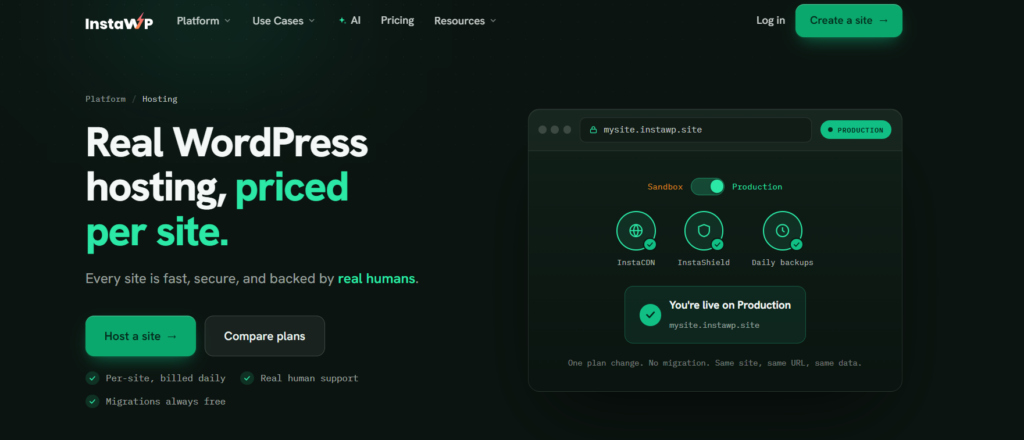
InstaWP is a managed WordPress hosting provider built for developers and agencies. Each store runs in its own isolated environment, is billed per site per day, and can be promoted from a sandbox to production on the same URL with no migration. You get staging, Git, SSH, WP-CLI, the DB Editor and InstaMCP in one dashboard.
- Per-site pricing from about $5 a month, billed daily, no annual contract
- Redis-compatible object cache from Plus; built-in staging from Pro
- SSH, WP-CLI, Git, SFTP and PHP 7.4 to 8.5 on every plan
- InstaShield WAF on every production plan; bot and DDoS protection from Plus
- Daily off-server backups kept 30 days from Plus, self-serve restore on every plan
- Free migrations and human support on every plan
Best for: WordPress agencies, freelancers managing several WooCommerce clients, and growing stores that need safe staging and fast rollouts.
Kinsta: best for one high-revenue store that needs deep support
Kinsta runs on Google Cloud’s premium tier with server-level caching, a free CDN, daily backups and the DevKinsta local tool. Plans start at $35 a month for one site with 2 PHP threads. Redis object caching is a paid add-on, so budget for it if your store relies on logged-in or cart traffic.
Best for: a single store where support depth matters more than price.
WP Engine: best for large agency portfolios
WP Engine pairs its EverCache system with staging, Git and SSH, and has a long track record with enterprise WordPress. Plans are metered by monthly visits, so check what happens when a campaign pushes you over.
Best for: agencies with large portfolios and brands with large catalogs.
Pressable: best for Automattic-native WooCommerce stores
Pressable is owned by Automattic, the company behind WordPress.com and WooCommerce, and bundles Jetpack Security with its plans. Plans are metered by visits and start at $20.83 a month billed annually.
Best for: stores already deep in the Jetpack and WooPayments ecosystem.
Cloudways: best for choosing your own cloud provider
Cloudways lets you pick the underlying cloud and size the server by RAM and vCPU, with Object Cache Pro included. You manage more yourself than on a fully managed host.
Best for: developers who want server control with managed convenience.
Rocket.net: best for unmetered traffic
Rocket.net offers unlimited PHP workers and unmetered visits from $25 a month, with an edge-first architecture. Object cache sits on enterprise tiers.
Best for: steady-traffic stores where checkout concurrency is the worry.
SiteGround: best for small to medium stores on a budget
SiteGround offers free SSL, daily backups and caching on Google Cloud infrastructure, with good onboarding documentation. The $2.99 entry price renews at $17.99, and some performance and staging features depend on the tier.
Best for: small businesses launching their first stores.
Hostinger: best budget WooCommerce hosting
Hostinger is the cheapest credible entry point in this list, with an object cache included and plans from $3.99 a month that renew at $16.99. Resources sit under a fair usage policy, so plan a move once order volume grows. A2 Hosting, listed here in earlier versions of this guide, rebranded as hosting.com in 2025. Best for: a first store where budget is the constraint.
InstaWP vs Kinsta for WooCommerce: how do they compare?
For the price of one Kinsta Single 35k site, InstaWP Pro gives a WooCommerce store twice the PHP workers, more than three times the storage, an object cache with no add-on fee and 30 days of daily backups. Kinsta includes more CDN bandwidth and a larger support organisation. The table compares the plans a growing store would realistically choose.
Kinsta figures from kinsta.com/pricing and Kinsta’s Redis knowledge base, read 1 September 2026. InstaWP figures from instawp.com/pricing, read 5 October 2026.
How do you launch a WooCommerce store on InstaWP?
You can go from nothing to a staged, backed-up WooCommerce store on InstaWP in a few minutes. Here is the full path, from site creation to connecting an AI assistant.
Step 1: Create a site with the WooCommerce configuration
In the InstaWP dashboard, click New Site, choose From Scratch, and pick your WordPress version, PHP version and server location (US, UK, Germany, Singapore or Australia). Pick the region closest to your customers: checkout is never served from the CDN, so the origin region sets how fast your most important page loads.

Then open the configuration menu and choose WooCommerce, so the site starts with WooCommerce ready to set up.

Step 2: Open the store with Magic Login
When the site is ready, use Magic Login to open wp-admin without a password, then run the WooCommerce setup wizard. New to store setup? Follow our step-by-step guide to building WooCommerce stores. The same screen links to the DB Editor, Code Editor and logs.

Step 3: Pick a plan sized to your store
Start on Plus ($9) if you want object cache and daily backups from day one, Pro ($15) when you want staging, and Turbo ($25), the plan the InstaWP pricing page labels for eCommerce, when checkout traffic needs 6 PHP workers. Because billing is per site per day, each client store can sit on a different plan.
Step 4: Check backups and restore yourself
Under Backups & Restore you can take a backup before any risky change and restore files, the database or both. The same sidebar holds Object Cache, CDN, Shield and Image Optimizer settings for the site.

Step 5: Test updates on staging before they touch orders
On Pro and above, create a staging copy, apply WooCommerce, theme or plugin updates there, test checkout, then push to production. Pull to staging refreshes the copy with live data first.
Step 6: Monitor every client store from one dashboard
If you run stores for clients, InstaWP site management adds a Manage dashboard with uptime, performance metrics, vulnerability scanning and activity logs across all of them. Uptime and SSL monitoring are part of site management rather than the hosting plan.

Step 7: Connect an AI assistant with InstaMCP
Open the site’s MCP panel and switch on Enable MCP. Copy the connection URL into Claude Desktop, ChatGPT, Cursor or VS Code, and your assistant can work with the site through 40+ structured tools, using a scoped token you can revoke at any time.

Can you host a WooCommerce store on InstaWP managed hosting?
Yes. InstaWP is a managed WordPress hosting provider that runs WooCommerce stores on its own infrastructure. Every site gets its own Linux user, docroot, database and PHP-FPM pool, and is billed per site per day from about $5 a month. For a store taking daily orders, Pro ($15) or Turbo ($25) is the realistic starting point because they add staging and more PHP workers.
Source: instawp.com/pricing, read 5 October 2026. Every account starts with $25 in credits and a 14-day money-back guarantee, with no annual lock-in. A $2 Sandbox plan exists for development and testing, not for a live store.
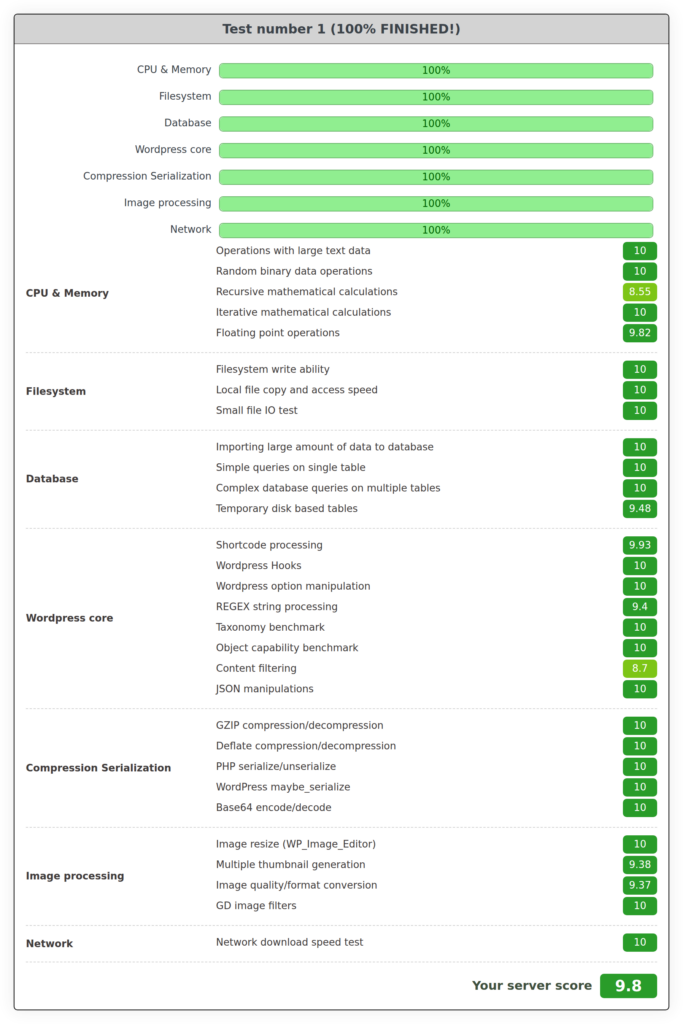
Performance. In the August 2026 WordPress hosting benchmark, InstaWP’s new-generation servers scored 9.8 out of 10 in the free WP Benchmark plugin, against 7.3 for the previous generation, and built the block editor in a median 56.3 ms of server time against 148.8 ms. Those tests used WordPress with no plugins and no caching, so they show server speed rather than a WooCommerce result. New-generation servers are rolling out by region, and visitor load time also depends on network, images and scripts.
Migration. Moving an existing store is free on every plan. Most migrations finish in under an hour, typically around half an hour, and your store keeps running on the old host until you switch DNS. Schedule the final cut-over for a quiet hour so no orders land on the old copy.
How do you optimize WooCommerce hosting for peak performance?
Good hosting sets the floor; these five habits keep a store near it. Start with images and caching, which give the biggest wins for the least work.
Optimize and compress images
Make sure your images are optimized: the right resolution, responsive sizes, lazy loading below the fold, and modern formats like WebP or Avif that cut file size without visible quality loss. Plugins such as Imagify, Smush or EWWW Image Optimizer handle this automatically. On InstaWP managed hosting, Pro plans and above add automatic WebP conversion at the edge.
Use a content delivery network (CDN)
A CDN serves images, CSS and JavaScript from a location near each visitor, which matters most for stores selling internationally or with media-heavy product pages. Many CDNs also add DDoS protection and a WAF. InstaWP includes InstaCDN on every production plan, with the premium global network from Plus.
Implement caching solutions
Caching reduces server load, but a store needs it applied carefully because login, cart, account and checkout pages are dynamic. Use three layers:
- Page caching: serve product and category pages as static HTML with your host’s cache or cache plugins like WP Rocket or LiteSpeed Cache, excluding cart, checkout and account pages. See the best cache plugins for WooCommerce.
- Object caching: Redis, Valkey or Memcached store query results in memory, which speeds up large catalogs and logged-in traffic.
- Browser caching: caching headers let returning visitors reuse images and stylesheets.
Optimize the WooCommerce database
A growing store collects post revisions, expired transients, orphaned metadata from removed plugins, old sessions and completed Action Scheduler rows. That bloat slows queries and adds risk during busy checkouts. Clean it on a schedule, and confirm your store uses High-Performance Order Storage (HPOS), which keeps orders in dedicated tables and is the default for new stores since WooCommerce 8.2.
If you are building and hosting your WooCommerce site on InstaWP, the DB Editor lets you browse and query tables in the browser without phpMyAdmin, and the Optimize Database site tool cleans up in one click. Take a backup first.

Optimize the theme and reduce plugin load
Heavy themes and overlapping plugins slow server response time and create conflicts. Choose lightweight themes built for WooCommerce, audit plugins quarterly, and replace several single-purpose plugins with one that does the job well. On managed WooCommerce hosting with staging, test the slimmed-down setup before it goes live. For checkout-specific fixes, see how to speed up WooCommerce checkout.
What are the WooCommerce hosting security best practices?
Security is shared between your host and you. The host secures the server, network and isolation between sites; you secure accounts, plugins and payment setup. A single tool cannot cover every threat, so layer the measures below. Most providers, including InstaWP, include free SSL certificates, and HTTPS is a Google ranking signal as well as a requirement for payments.
Choose a secure WooCommerce hosting provider, not just a generic one
Look for daily backups, a WAF, ongoing core and plugin updates, isolated environments per site, SSL and SFTP, and vulnerability scanning. Many generic hosts leave all of this to you. With InstaWP best WooCommerce hosting plans, each store gets:
- Its own Linux user, docroot, database and PHP-FPM pool, isolated from other sites
- InstaShield WAF, plus bot and DDoS protection from Plus
- Managed WordPress, plugin and theme updates and a vulnerability scanner from Plus
- SSH and SFTP access, with no plain FTP
- Self-serve restore from off-server backups on every plan
For a step-by-step setup, see how to build a secure WooCommerce store.
Enable two-factor authentication (2FA)
Two-factor authentication adds a second check, usually your phone, to every admin login. Turn it on for every administrator and shop manager, and use strong, unique passwords for SSH, SFTP and database accounts.
Block brute-force attacks
Bots hammer wp-login.php and xmlrpc.php to guess passwords. Limit login attempts, disable XML-RPC if you do not use it, and put a WAF in front of the site. On InstaWP, InstaShield filters malicious traffic before it reaches WordPress.
Update your plugins
Updates patch the vulnerabilities attackers scan for, but updating by hand across many client stores is slow and error-prone. Pair your hosting with a reliable site management service so you can see every installed plugin across stores, update in bulk and enable auto-updates for trusted plugins. Test risky updates on staging first, and follow a WooCommerce maintenance routine so nothing is missed. Read more about site management here.
Regularly scan for malware
Malware can redirect shoppers or skim card details on the checkout page. Run scheduled scans, watch for unexpected admin users and file changes, and keep a clean backup you can restore. Where a patch is not yet available, WordPress virtual patching blocks known exploits at the server.
Choose secure plugins and themes
Install plugins and themes only from WordPress.org, the WooCommerce Marketplace or trusted marketplaces. Remove anything abandoned, and never install nulled or pirated plugins: they are a common way malware gets in.
Restrict user privileges
Follow least privilege: keep the Administrator role to a few people, use Shop Manager for staff who run orders, and Customer for buyers.
Use secure payment gateways
Payment gateways such as Stripe, PayPal or WooPayments handle card data on their own PCI-compliant systems. Use hosted fields or redirects, and never store card numbers in WordPress. Secure WooCommerce hosting then keeps the rest of the store hardened.
Implement content security policies (CSP)
A content security policy tells browsers which scripts may run on your pages, which blocks most cross-site scripting (XSS) and card-skimming injections. Start in report-only mode on staging, then enforce it.
Final thoughts on choosing the best WooCommerce host
The best WooCommerce hosting is the plan that meets WooCommerce’s own requirements, has enough PHP workers and object cache for checkout, and lets you test and restore without a ticket, at a price that does not jump at renewal. Score each host against the nine questions above, then prove it with a real copy of your store during the money-back window.
Look for PHP 8.3+, MariaDB 10.6+ or MySQL 8.0+, 256 MB+ memory and HTTPS; enough PHP workers for your busiest hour; an included object cache; daily backups you restore yourself; and staging on the tier you buy. For developers and agencies, InstaWP managed hosting covers all of it from about $9 a month per store, with staging from $15, SSH and Git on every plan, and InstaMCP for AI-assisted management. Try it now.
Updated 5 October 2026: refreshed the requirements for WooCommerce 10.8, rebuilt the checklist around PHP workers and object cache, added a host test script and a dated InstaWP vs Kinsta comparison, and corrected plan details against the current pricing page.
WooCommerce hosting FAQs
What is the best WooCommerce hosting?
The best WooCommerce hosting is managed WordPress hosting that meets WooCommerce’s requirements (PHP 8.3+, MySQL 8.0+ or MariaDB 10.6+, 256 MB memory, HTTPS) and includes enough PHP workers, a persistent object cache, daily backups and staging. For developers and agencies, InstaWP fits that model from about $9 a month per store with object cache included. Kinsta suits one high-revenue store that needs deep support, and Hostinger suits a first store on a tight budget.
What are the minimum hosting requirements for WooCommerce?
WooCommerce 10.8 and later recommend WordPress 6.9 or newer, PHP 8.3 or newer, MySQL 8.0+ or MariaDB 10.6+, a WordPress memory limit of at least 256 MB, and HTTPS. WooCommerce still runs on PHP 7.4 and MySQL 5.6 or MariaDB 10.4, but those versions are end of life. Every paid InstaWP plan includes PHP 7.4 to 8.5, MariaDB 11.4, a 512 MB PHP memory limit and free SSL.
Is shared hosting suitable for WooCommerce stores?
Shared hosting can run a very small store, but it is a poor fit once you take regular orders. Cart and checkout cannot be cached, so they depend on PHP workers and memory that shared plans limit, and neighbouring sites can affect your performance and security. Choose hosting that isolates each site and states its PHP worker count.
How many PHP workers does a WooCommerce store need?
Enough to cover your busiest hour, not your average one. Each worker handles one uncached request at a time, and cart, checkout, account pages and AJAX calls are all uncached. If checkout slows only at peak times or you see 502 or 504 errors under load, you need more workers. InstaWP plans include 2, 3, 4, 6 or 10 PHP workers from Starter to Elite.
Is managed WooCommerce hosting worth it?
For most stores, yes. Managed hosting handles server updates, backups, security and caching, so you spend time selling instead of patching servers. The cost difference is often small: InstaWP managed hosting starts at about $5 a month per site, with staging from Pro so updates are tested before they reach checkout.
What is the best WooCommerce hosting for agencies?
Agencies need per-site pricing, staging, client site management and developer access in one place. InstaWP fits that model: each client store is billed per day on its own plan, staging is built in from Pro, SSH, WP-CLI and Git are on every plan, and InstaWP site management adds bulk updates, scanners and activity logs across every store.
How can I test a WooCommerce host before committing?
Use the money-back window. Copy your real store to the new host, measure /cart/ and /checkout/ response times with caching bypassed, run PageSpeed Insights on a product page, place test orders in gateway test mode, ask support about PHP memory and object caching, and restore a backup yourself. InstaWP offers a 14-day money-back guarantee and $25 in credits.
Can I host my WooCommerce store on InstaWP?
Yes. InstaWP is a managed WordPress hosting provider that hosts WooCommerce stores on its own infrastructure, with each site isolated and billed per day. Plans run from Starter at about $5 to Elite at about $45 a month. Pro ($15) and Turbo ($25) are the usual choices for a store taking daily orders, and migration from your current host is free.
What tools can help migrate a WooCommerce store to a new host?
Plugins such as Duplicator and All-in-One WP Migration move a store’s files and database, and many hosts offer free migration. InstaWP migrates stores free on every plan; most moves finish in under an hour and your store stays live on the old host until you switch DNS. Schedule the cut-over for a quiet hour so no orders land on the old copy.
Which hosting is best for high-traffic WooCommerce stores?
Choose a plan by PHP workers and object cache, not by visits or storage. High-traffic stores need enough workers for peak checkout traffic, a persistent object cache and a CDN that excludes cart and checkout. On InstaWP, Turbo (6 PHP workers) and Elite (10 PHP workers) are built for busier stores, and each store can move up a plan on its own as traffic grows.