Peak season sales can be truly exciting.
For many WooCommerce stores, Black Friday, Cyber Monday, holiday promotions, and seasonal campaigns bring some of the biggest revenue days of the year.
In fact, 73% of merchants say this period accounts for more than 20% of their annual revenue.
But here’s something I’ve noticed. Most store owners spend their time planning discounts, offers, and marketing campaigns. Then, when the traffic arrives, they run into problems they never planned for. The site slows down, products go out of stock, checkout issues appear, or Google Shopping listings stop syncing correctly.
Instead of focusing on sales, they’re stuck fixing problems during the busiest time of the year. The interesting part is that most of these issues are preventable. The stores that perform well during peak season usually aren’t the ones with the biggest discounts. They’re the ones who prepare before the rush begins.
In this guide, you’ll learn a complete WooCommerce peak season preparation checklist to help you handle traffic spikes, avoid costly disruptions, and make the most of your busiest sales season.
Table of Contents
Key Takeaway
Peak season results come from preparation, not just discounts. Audit performance, move to hosting that scales, test every change on staging, validate your product feeds, sync inventory, and streamline checkout before the traffic arrives. Stores that prepare early stay fast under load, keep their feeds accurate, and convert the rush instead of firefighting it.
What Does Peak Season Preparation Mean for a WooCommerce Store?
Peak season preparation is the work you do weeks ahead to stress-test your store’s performance, inventory, checkout, and marketing, so that when traffic spikes, it turns into sales instead of problems. Most owners think preparation starts when the sale does. The ones who come out ahead start weeks, sometimes months, earlier.
And the stakes are real. Around half of all ecommerce shoppers have run into slow site performance during high-traffic periods like Black Friday, which is exactly the kind of problem that doesn’t show up on a quiet Tuesday. Your store can feel perfectly fine right up until everyone shows up at once, and then the cracks appear.
So here’s the shift I’d encourage you to make. Peak season success isn’t really about the offer. It’s about whether your store can actually deliver on the offer when the crowd arrives. A bit of structured preparation is what closes the gap between a great campaign and a great result.
Why Peak Season Preparation Matters
Preparing early isn’t busywork. Each thing you handle ahead of time removes a specific risk that costs you money during the rush. Here’s how that plays out:
| Risk You Avoid | What It Means for Your Store |
|---|---|
| Website slowdowns during traffic spikes | More conversions, fewer people bouncing |
| A clunky checkout experience | Fewer carts abandoned at the final step |
| Inventory and stock sync issues | No overselling, no disappointed buyers |
| Feed errors across channels | Your ads actually reach the right people |
| Technical emergencies mid-sale | Your team sells instead of firefighting |
| Stopping at the sale itself | Repeat revenue after peak season ends |
Common Problems WooCommerce Stores Face During Peak Season
The most common peak-season failures are slow performance, broken checkouts, and inventory mismatches, and they almost always show up at the worst possible moment, when your traffic is highest. That’s the tricky part. These issues rarely appear during a calm week of testing. They surface under load, which is exactly why your preparation has to simulate that load ahead of time.
| Problem | Business Impact |
|---|---|
| Slow website performance | Lost conversions |
| Checkout failures | Abandoned purchases |
| Inventory mismatch | Overselling products |
| Feed errors | Poor ad performance |
| Security incidents | Revenue loss |
| Hosting limitations | Site downtime |
Every one of these is preventable with the right prep. So let’s walk through the checklist that handles each of them, in order.
Peak Season Preparation Checklist for WooCommerce Stores
A complete WooCommerce peak season checklist covers four layers: your technical setup, your operations, your marketing, and your post-sale retention. Skip any one of them and that’s usually where you’ll lose money. Work through the twelve steps below in order; the early ones make the later ones easier.
1. Review Last Season’s Data Before Making Decisions
Start with last season’s data, not this season’s discounts. Your past revenue, top products, best channels, and cart-abandonment trends tell you exactly where to put your energy. Most guides send you straight to planning offers, but the data you already have is the cheapest research you’ll ever do.
Before you decide anything, pull and look at:
- Revenue analysis: which days and campaigns actually drove your sales last year
- Top-performing products: the items worth protecting stock for and pushing hardest
- Best marketing channels: where your conversions really came from
- Cart abandonment trends: where buyers dropped off, and why
- Customer acquisition sources: which channels brought new buyers vs. returning ones
This one habit separates the stores that guess from the stores that plan. Let your own data point you to the highest-impact moves before you spend a dollar on discounts.
2. Audit Your Store Performance Before Traffic Arrives
Audit your Core Web Vitals, page speed, and mobile experience at least four weeks out, because fixing performance mid-sale is nearly impossible. Just look at the numbers: a one-second delay in load time can cut conversions by around 7%, and 53% of mobile visitors will leave a page that takes more than 3 seconds to load (source).
During peak season, when shoppers are comparing several stores at once, that impatience only gets worse.
So run through this mini-checklist while you still have time to act on it:
- Core Web Vitals: check your LCP, INP, and CLS in PageSpeed Insights
- Page speed: aim for your product and cart pages under 2.5 seconds
- Product page performance: compress your images and lazy-load anything below the fold
- Mobile responsiveness: test the whole journey on a real phone, not just a desktop preview
- Database cleanup: clear out expired transients, spam, and old revisions to lighten the load
3. Prepare Your Hosting Infrastructure for Traffic Spikes
Hosting is the number-one bottleneck during peak season, because shared servers can’t absorb the flood of concurrent checkout requests a campaign creates, and that’s what causes timeouts right when traffic peaks. You can optimize every image and plugin and still go down if the server underneath can’t keep up.
This is where managed WooCommerce hosting earns its keep. Instead of scrambling to scale on the day itself, the right setup soaks up traffic spikes for you. InstaWP’s managed hosting is built around the things that matter most when load multiplies:
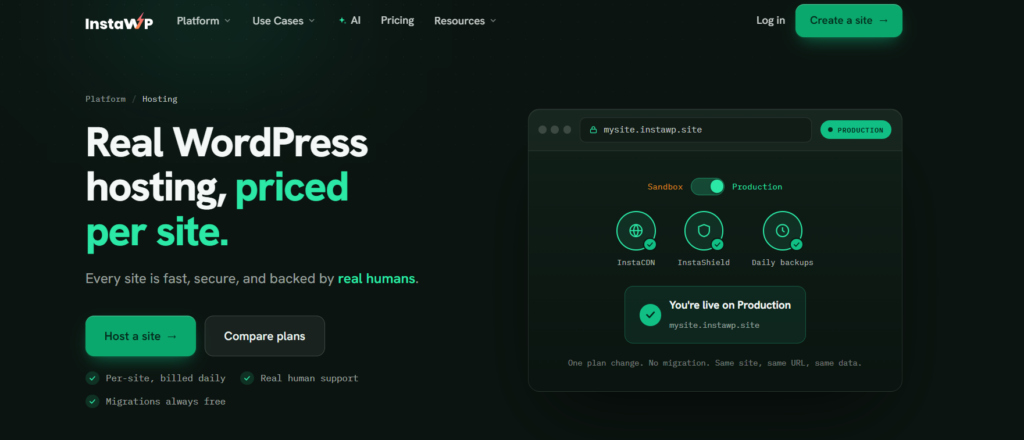
| Capability | Why It Matters at Peak |
|---|---|
| Edge CDN | Serves your pages from servers near each visitor, cutting load time |
| Built-in and object caching | Eases database strain under heavy concurrent traffic |
| Automated backups | A clean restore point if something breaks mid-sale |
| Uptime monitoring | Alerts you in minutes, not after the sale is over |
| Staging environments | Lets you test changes safely before they go live |
| Security protection | Blocks the attacks that spike right alongside your traffic |
Think of hosting as the foundation that everything else sits on. Get it right early, and the rest of this checklist has something solid to build on.
Put your store on hosting that scales for peak season
Edge CDN, object caching, automated backups, and uptime monitoring, built in. Spin up a real WordPress site in seconds and stress-test it before the rush.
See Managed Hosting4. Create a Staging Environment and Test Every Change
A staging environment is a private copy of your live store where you can test discounts, checkout, payment gateways, plugins, and theme updates before any of it reaches a real customer. This is the step most peak-season guides skip, and it’s one of the smartest things you can do.
Every change you’re planning before the sale should be proven on staging first:
- Discounts: confirm your coupon logic and pricing rules behave exactly as you intend
- Checkout flows: walk the full path from cart to confirmation yourself
- Payment gateways: run real test transactions on each method
- Plugins: catch conflicts before they ever hit your live site
- Theme updates: make sure your layout and speed don’t quietly regress
InstaWP makes this practical with one-click staging and two-way sync, so you can branch off a copy, test as much as you want, and push the approved changes back to live without rebuilding anything by hand. The goal is simple: nothing reaches your customers on Black Friday that you haven’t already watched work.
Watch the video tutorial to create the staging site with InstaWP.
Quick win: Branch a staging copy of your store today, run your full Black Friday checkout on it, and only push back the changes that pass. Create your first site free.
5. Optimize Product Pages for Higher Conversions
Your product pages convert during peak season when they answer a buyer’s hesitation before it even comes up, with clear descriptions, real images, social proof, and a FAQ right there on the page. Peak-season shoppers move fast and compare hard, so the page has to close the sale on its own.
Put your focus here:
- Product descriptions: lead with the benefit, then back it up with the specifics
- Images: multiple angles, zoom, and real-use shots
- Product videos: a short clip can settle doubts that text can’t
- Social proof: reviews and ratings placed where buyers actually look
- Product FAQs: answer the sizing, shipping, and compatibility questions right inline
- Mobile experience: most of your peak traffic is on phones, so design for thumbs
Small move, outsized impact: add a short “how it fits / what’s included” FAQ to your top three products. It quietly removes the hesitation that otherwise sends shoppers off to compare you with someone else.
6. Prepare Your Product Feeds Before Launching Campaigns
Validate your product feeds before your campaigns launch, because Google Shopping and the marketplaces reject listings with missing GTINs, wrong attributes, or stale pricing. And a rejected listing means zero ad reach on your biggest days. This is the gap almost every peak-season guide leaves out, and it quietly sinks otherwise great campaigns.
Before a single ad goes live, get your feeds in order:
- Google Shopping readiness: all the required attributes present and approved
- Meta catalog accuracy: titles, images, and prices that match your store
- Marketplace synchronization: listings that stay consistent across every channel
- Product attribute optimization: GTINs, categories, and variants mapped correctly
- Promotional pricing updates: your sale prices reflected everywhere, on time
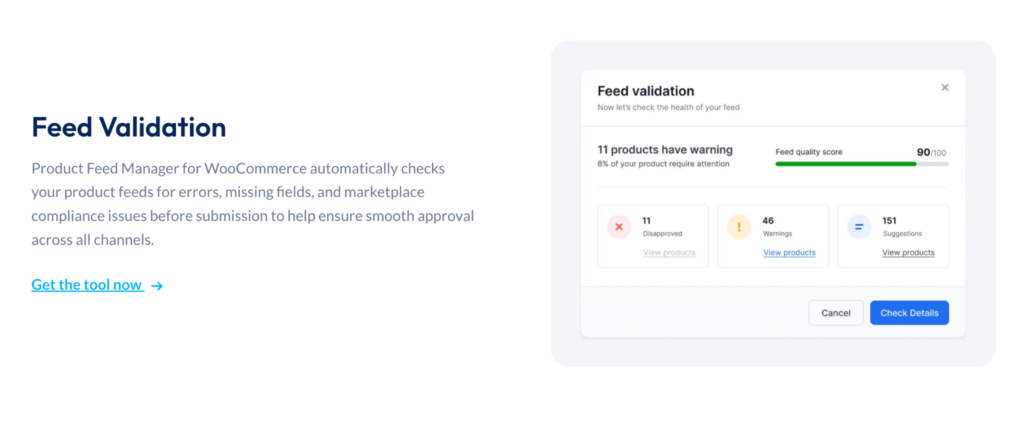
Keeping all that accurate by hand across channels is overwhelming. A feed tool like Product Feed Manager for WooCommerce generates marketplace-ready feeds automatically, supports 200+ marketplace templates, and runs scheduled updates so your promo pricing stays in sync everywhere your products show up.
Not just that, with PFM’s built-in Feed Validator, you can identify and fix feed errors before submitting products to Google Shopping and other marketplaces, reducing the risk of rejected listings. So when your Black Friday prices go live on the store, they go live in your feeds too.
7. Verify Inventory and Stock Synchronization
Overselling happens when your marketplace inventory lags behind your store, so set safety-stock buffers and confirm your sync intervals before the traffic hits. Nothing burns trust faster than selling someone something you can’t actually ship.
Get your inventory tight before the rush:
- Best-sellers: identify what you absolutely cannot afford to run out of
- Safety stock: hold a buffer to absorb sync delays and demand surges
- Forecasting: use last season’s numbers to predict this season’s demand
- Marketplace consistency: confirm your stock matches across every channel
Picture a product you’re selling across your store, Amazon, and Google at the same time. During peak traffic, even a few minutes of sync lag can let you sell that last unit twice. A small safety-stock buffer on your top sellers prevents that, and it doesn’t leave money on the table.
8. Streamline the Checkout Experience
Checkout friction costs you the most during peak season, so turning on guest checkout, mobile-friendly fields, and multiple payment methods recovers sales that delays and surprises would otherwise lose. And the data here is hard to argue with.
Why shoppers abandon checkout
Source: Baymard Institute
None of those are about your product. They’re about friction. So tighten up the final stretch:
- Guest checkout: don’t force account creation before someone can buy
- Mobile checkout: big tap targets, minimal typing, autofill support
- Payment methods: offer wallets and BNPL alongside cards
- Transparent costs: show shipping early, ideally on the product or cart page
- Cart recovery: set up reminders for the shoppers who drop off
During peak season, even a small delay or a surprise fee has an outsized effect, because your shopper is comparing several stores at once. The smoother your checkout, the more of that hard-won traffic actually converts.
9. Prepare Your Email Automation Before the Sale Starts
Set up your welcome, abandoned-cart, sale-reminder, and post-purchase email flows before the sale, not while it’s happening. Automation you build in advance keeps working through your busiest hours, when nobody on your team has time to send anything manually.
The core flows to have ready:
- Welcome flows: convert the new subscribers who arrive during the rush
- Abandoned cart emails: recover the carts that peak-season urgency leaves behind
- Sale reminders: nudge your subscribers before the offer ends
- Post-purchase sequences: set up the next purchase before the box even ships
Built ahead of time, these flows do the follow-up your team simply won’t have bandwidth for during the busy days.
10. Build a Backup and Emergency Response Plan
A peak-season emergency plan spells out who does what when something breaks, your backup frequency, recovery steps, monitoring alerts, and contact list. When something goes wrong at 9 a.m. on Black Friday, you want a plan, not panic.
Put this in place before you need it:
- Backup procedures: automated, frequent, and actually tested for restore
- Recovery plans: clear steps to get back online fast
- Team responsibilities: who owns hosting, payments, and customer comms
- Monitoring alerts: so you hear about issues before your customers do
- Emergency contacts: your host, developer, and payment provider on speed dial
A simple one-page version of this plan, shared with your team before the sale, is worth more than a detailed one nobody’s ever read.
11. Monitor Performance Throughout the Campaign
Keep an eye on your server resources, checkout completion rates, error logs, and feed health in real time during the campaign, so you catch failures in minutes instead of after the sale’s over. Preparation gets you to the start line. Monitoring keeps you in the race.
Watch these throughout the sale:
- Traffic: spot the surges and where they’re coming from
- Server resources: keep an eye on CPU, memory, and response times
- Checkout completion: a sudden drop is your early warning sign
- Error logs: catch failing scripts and gateway errors early
- Feed health: confirm your listings stay live and accurate
Managed hosting with built-in uptime monitoring, like InstaWP’s, gives you a lot of this automatically, so issues reach you as alerts instead of as lost sales you only discover later.
12. Plan Post-Sale Retention Before the Campaign Begins
The real profit comes after peak season, so plan your follow-up campaigns, loyalty offers, cross-sells, and review requests before the sale, while you’ve still got the attention to set them up. This is the biggest gap competitors leave: most guides just stop at the sale itself.
Set up the after-sales engine in advance:
- Retention: turn those one-time buyers into repeat customers
- Follow-up campaigns: re-engage peak-season buyers with offers that fit
- Loyalty programs: reward the customers worth keeping around
- Cross-sells: recommend complementary products after the purchase
- Reviews: ask for them while the purchase is still fresh
A peak-season buyer you turn into a repeat customer is worth far more than that single discounted order. The stores that plan for the weeks after the sale, before it even starts, are the ones that turn one big weekend into lasting growth.
Peak Season Readiness Checklist (Quick Summary)
Use this as your at-a-glance checklist. Work top to bottom, since each task builds on the ones above it.
| Task | Status |
|---|---|
| Review previous sales data | ☐ |
| Optimize store speed | ☐ |
| Upgrade hosting infrastructure | ☐ |
| Test on staging site | ☐ |
| Audit product feeds | ☐ |
| Verify inventory | ☐ |
| Optimize checkout | ☐ |
| Configure email automation | ☐ |
| Create backups | ☐ |
| Set up monitoring | ☐ |
| Plan post-sale retention | ☐ |
Final Thoughts
Peak season success isn’t created by discounts alone, it comes from preparing across performance, hosting, product feeds, inventory, checkout, marketing, and retention. Work through this checklist once, well before the rush, and you’ll see the difference where it counts. Your store stays fast when traffic triples. Your feeds stay accurate when your ads go live. Your checkout holds up when everyone arrives at once.
And your team gets to spend the big days watching sales come in, instead of putting out fires. Prepare early, and you’re simply in a far better spot to handle the traffic, protect your revenue, and give your customers a smooth experience during the busiest sales days of your year.
Get your store peak-season ready on InstaWP
Managed WordPress hosting with edge CDN, caching, automated backups, one-click staging, and uptime monitoring. Build a site, stress-test it on staging, and go into Black Friday knowing your store can take the load.
Start Building FreeFrequently Asked Questions
How early should I start preparing my WooCommerce store for Black Friday?
Start at least four to six weeks out, and ideally one to three months ahead if you’re a larger store. Performance audits, hosting upgrades, and staging tests all take time to do safely, and you can’t really do them mid-sale. WooCommerce’s own data shows that bigger merchants, those over a million in annual revenue, typically begin one to three months in advance.
Why does my WooCommerce site slow down during high traffic?
It’s almost always the server, not the design. Shared hosting struggles to handle a lot of concurrent checkout requests, database queries pile up, and uncached pages get rebuilt on every single visit. Caching, a CDN, and hosting that scales under load are the core fixes, and worth sorting before your traffic climbs.
Does WooCommerce need a CDN for peak season?
For most stores, yes. A CDN serves your images and pages from servers close to each visitor, which cuts load times and takes pressure off your origin server during spikes. Managed WooCommerce hosts like InstaWP include an edge CDN, so you don’t have to configure one separately.
How do I stop overselling products during a sale?
Set safety-stock buffers on your best sellers and double-check how often your inventory syncs across your store and your marketplaces. Overselling happens when a marketplace’s stock count lags behind a sale on another channel. A small buffer plus reliable sync intervals stops you from selling the same unit twice.
Do I need a staging environment for my WooCommerce store?
If you’re making any changes before a big sale, yes. A staging site is a private copy of your store where you can test discounts, plugins, payment gateways, and theme updates without risking the live site. Tools like InstaWP offer one-click staging with two-way sync, so your approved changes push back to live cleanly.
How do I get my WooCommerce products ready for Google Shopping?
Make sure every product has its required attributes, GTINs, the right categories, accurate titles, and current pricing before you submit the feed, because Google rejects listings with missing or wrong data. A feed tool like Product Feed Manager builds a Google-ready feed automatically and keeps it updated on a schedule.
What should a WooCommerce backup plan include?
Automated, frequent backups with a restore process you’ve actually tested, clear recovery steps, defined team responsibilities, monitoring alerts, and an emergency contact list for your host, developer, and payment provider. Keep it simple enough that your team can act on it under pressure.
What should I do after a Black Friday sale to retain customers?
Set up your post-purchase email sequences, a loyalty offer, cross-sell recommendations, and review requests before the sale begins, then let them run afterward. A peak-season buyer you turn into a repeat customer is worth far more than a single discounted order, which is why retention belongs in your prep, not as an afterthought.