Have you ever worried about your WordPress website being vulnerable to online attacks? With the ever-growing presence of cyber threats, it’s a concern that plagues many website owners.
Here’s the truth: WordPress, while a fantastic platform for building websites, can be a target for hackers due to its widespread use. But fear not! There’s a powerful tool at your disposal to fortify your website’s defenses – the WordPress Firewall Plugin.
Just like a security guard protects a building, a WordPress Firewall Plugin acts as a shield, vigilantly monitoring and filtering incoming traffic to block malicious attempts before they can harm your website.
Table of Contents
Best WordPress Firewall Plugins
Here are the best WordPress firewall plugins to check out.
All-In-One Security (AIOS) – Security and Firewall

The All-In-One Security (AIOS) plugin is a top-rated WordPress security and firewall solution designed to provide comprehensive protection for your website.
Developed by the team at UpdraftPlus, AIOS is renowned for its ease of use and extensive range of features, all aimed at safeguarding your website from security threats. AIOS addresses a critical need for robust security measures, particularly in a digital landscape fraught with potential cyber threats.
Features and Benefits
- Login Security Tools: AIOS provides advanced login security features to protect against brute-force attacks and bot intrusions. These include detecting default ‘admin’ usernames, hiding your login page from bots, changing the default ‘wp_’ prefix, and implementing two-factor authentication.
- Web Application Firewall: This feature offers automatic protection from security threats, including known exploits. The firewall settings can be progressively activated, offering varying levels of protection.
- Content Protection Features: Keep your hard work safe with AIOS’s content protection capabilities. This feature eliminates comment spam, prevents other websites from stealing your content, and offers iFrame prevention and copywriting protection.
- Additional Security Features: AIOS extends its security measures with a range of added features, including a general visitor lockout, WordPress Salts security feature, file change detection, and permission setting alerts.
- Premium Options: For enhanced protection, consider the AIOS Premium version. It provides malware scanning, blacklisting alerts, response time monitoring, and uptime monitoring.
Pricing Structure
The plugin is free to use with a premium version starting from $70/ year.
Sucuri Security – Auditing, Malware Scanner and Security Hardening

When it comes to website security, Sucuri Security is a household name. This WordPress plugin, currently managed by GoDaddy, provides a comprehensive security suite to ensure the safety of your website. The plugin is designed to complement your existing security measures, emphasizing on enhancing your website’s security posture.
Features and Benefits
- Security Activity Auditing: The plugin helps you track security-related activities on your website. This aids in identifying potential security breaches and taking timely action.
- File Integrity Monitoring: This feature checks your website files for any unauthorized changes, thus ensuring their integrity and safety.
- Remote Malware Scanning: Sucuri Security helps you scan your website for malware remotely, eliminating the need for manual scanning.
- Security Notifications: The plugin sends you real-time notifications about any security threats to your website.
- Website Firewall (premium): This premium feature provides an extra layer of security by blocking malicious traffic before it reaches your website.
Pricing Structure
The plugin is free to use with a premium version starting from $199.99/ year.
MalCare WordPress Security Plugin – Malware Scanner, Cleaner, Security Firewall

MalCare is an innovative WordPress security plugin designed to ensure your website stays safe and secure, providing you with peace of mind so you can focus on growing your business. Recognized as the fastest malware detection and removal plugin, MalCare offers an automatic one-click malware removal, keeping your website clean before Google blacklists it or your web host takes it down.
Features and Benefits
- WordPress Malware Scanner: With this feature, you get a cloud-based deep malware scanner that doesn’t slow down your site, detects malware before it’s too late, and identifies all types of malware, including new and complex ones.
- WordPress Malware Removal: This feature allows you to view hacked file details, clean your site instantly in less than 60 seconds, remove all traces of malware, and offers unlimited hack cleanups.
- WordPress Website Protection: This feature blocks hacker bots from attacking the login page, identifies and blocks malicious traffic, enables users to harden their WordPress sites, and allows users to block entire countries.
Pricing Structure
The plugin is free to use with a premium version starting from $149/ year.
Spam protection, Anti-Spam, FireWall by CleanTalk

The CleanTalk Anti-Spam plugin offers absolute protection for your WordPress site. It serves as a universal anti-spam plugin, eliminating the need for CAPTCHA, questions, puzzles, or any other user interaction. This plugin addresses the major challenge of spam infiltration which can negatively impact a website’s performance and user experience.
Features and Benefits
- Stops spam in comments, registrations, contact emails, orders, bookings, subscriptions, surveys, polls, and widgets.
- Real-time email validation.
- Compatible with mobile users and devices and General Data Protection Regulation (GDPR) (EU).
- Blocking disposable & temporary emails.
- Mobile friendly Anti Spam & FireWall.
- Stops spam in Search Form.
- Spam FireWall
Pricing Structure
The plugin is free to use with a premium version starting from $12/ year.
Anti-Malware Security and Brute-Force Firewall

Anti-Malware Security and Brute-Force Firewall is a powerful WordPress plugin designed to provide robust security to your website. The plugin is capable of identifying and removing known security threats, backdoor scripts, and database injections that can compromise the safety of your site.
It also secures your site from dangerous malware like SoakSoak that exploit vulnerabilities in plugins like Revolution Slider. It addresses the need for comprehensive security on your website, giving you peace of mind and ensuring your website’s smooth operation.
Features and Benefits
- Download Definition Updates: This feature allows you to protect your site against new threats by downloading the latest definitions.
- Complete Scan: The plugin can perform a comprehensive scan of your site to identify and automatically remove known security threats, backdoor scripts, and database injections. This ensures your site is clean and safe.
- Firewall Protection: The plugin blocks malware like SoakSoak from exploiting vulnerabilities in other plugins, further enhancing the security of your site.
- Upgrades Vulnerable Scripts: The plugin can upgrade vulnerable versions of timthumb scripts, enhancing the overall safety of your site.
Pricing Structure
The plugin can be registered at GOTMLS.NET to get access to new definitions of “Known Threats” and added features like Automatic Removal, plus patches for specific security vulnerabilities.
The updated definition files can be downloaded automatically within the admin once your Key is registered. The pricing structure is not openly available and users are advised to visit the website for more information.
Hide My WP Ghost

Hide My WP Ghost is an advanced, user-friendly WordPress Security plugin designed to elevate your website’s security without changing any directory or file physically. It features an array of security solutions that have successfully secured over 200,000 websites, blocked over 8 million brute force attempts, and stopped over 140,000 monthly hacks.
The plugin enhances your website’s security by adding filters and security layers that deter Scripts and SQL Injections, Brute Force attacks, XML-RPC attacks, XSS, and more.
Features and Benefits
- Hides WP common paths, plugins, and themes paths: This feature increases protection against hacker bots attacks.
- Filters and security layers: Prevent Scripts and SQL Injections, Brute Force attacks, XML-RPC attacks, XSS, and more, enhancing your website’s security.
- No physical change to files or directory: All changes are made by server rewrite rules without affecting SEO or loading speed.
- Compatibility: The plugin works with other security plugins like Wordfence, iThemes Security, Sucuri, and is compatible with all servers, hosting services, and WP Multisite.
- Hide and change authentication paths: This helps protect your WordPress website by hiding the authentication paths like wp-admin, wp-login.php, wp-login, and changing the common WordPress paths like wp-content, wp-includes, uploads, and more.
Pricing Structure
The plugin is free to use with a premium version starting from $29.
BBQ Firewall

BBQ Firewall is a powerful and efficient WordPress plugin designed to protect your site from a broad spectrum of threats. It operates as the fastest firewall plugin for WordPress, offering a lightweight, super-fast solution for sites that cannot utilize a robust Apache/.htaccess firewall.
This plugin provides an easy-to-use, plug-and-play service that requires zero configurations, working silently in the background to safeguard your website from harmful traffic.
Features and Benefits
- Powerful protection: The plugin shields your site from SQL injection attacks, executable file uploads, directory traversal attacks, unsafe character requests, excessively long requests, PHP remote/file execution, XSS, XXE, and related attacks. It also protects against bad bots, bad referrers, bad POST content, and many other bad requests.
- High ratings: BBQ Firewall is rated 5 stars on WordPress.org, reflecting its reliability and effectiveness.
- Zero configuration: The plugin is 100% plug-and-play, simplifying the setup process for users.
- Broad coverage: It blocks a wide range of malicious URL requests, ensuring comprehensive protection for your site.
- Fast performance: As the fastest Web Application Firewall (WAF) for WordPress, BBQ Firewall offers high-speed protection without compromising your site’s performance.
- Compatibility: The plugin works well with other security plugins, ensuring a seamless integration into your existing security set-up.
Pricing Structure
BBQ Firewall is a free plugin available for download on WordPress.org.
NinjaFirewall WP Edition

NinjaFirewall (WP Edition) is a robust Advanced Security Plugin and Firewall tailored for WordPress. This stand-alone firewall stands in front of WordPress, offering blog administrators access to advanced and powerful security features usually unavailable at the WordPress level.
The plugin addresses the need for robust web security, safeguarding your website from threats such as hackers, brute-force attacks, and various security vulnerabilities.
Features and Benefits
- True Web Application Firewall: NinjaFirewall functions like a standalone firewall, providing an advanced level of security typically found in dedicated security applications.
- Powerful Filtering Engine: The plugin boasts a powerful filtering engine that can detect evasion techniques and obfuscation tactics used by hackers.
- Brute-Force Attack Protection: NinjaFirewall can protect your website against large scale brute-force attacks, even those distributed from numerous different IPs.
- Real-Time Detection: The File Guard feature offers real-time detection of any access to a recently modified or created PHP file, alerting you immediately.
- File Integrity Monitoring: NinjaFirewall’s File Check feature allows you to perform file integrity monitoring, detecting any modification to a file.
- Live Traffic Log: Monitor your website traffic in real-time. This feature does not affect server load, making it highly efficient.
- Event Notifications: Receive alerts via email on specific events triggered within your blog, such as administrator login, plugin upload, WordPress update, etc.
- Automatic Security Updates: NinjaFirewall can automatically update its security rules, ensuring you stay protected against the latest WordPress security vulnerabilities.
Pricing Structure
The plugin is free to use with a premium version starting from $55.
Defender Security – Malware Scanner, Login Security & Firewall

Defender Security – Malware Scanner, Login Security & Firewall is a comprehensive WordPress plugin that provides robust security for your website. With just a few clicks, you can fortify your site against brute force login attacks, SQL injections, cross-site scripting (XSS), and other WordPress vulnerabilities and hacks.
Its features include a malware scanner, firewall, activity log, security log, and two-factor authentication (2FA) login security. This plugin is designed to remove the complexity from security settings, giving you peace of mind and robust protection.
Features and Benefits
- Malware scanner: This tool scans the WordPress core files for modifications and unexpected changes, which may be caused by malware. It tightens up the security of your files to prevent breaches.
- WordPress Security Firewall: This feature allows you to block or whitelist IPs, implement IP blocking and Geo IP blocking, ban certain user agents, and protect against brute force attacks.
- Two-factor authentication (2FA): This feature provides an extra layer of security, preventing most login attacks such as brute force, app verification, backup codes, lost device email, WooCommerce 2FA, and Web Authentication.
- Login masking: This feature changes the location of WordPress’s default login area to improve login security.
- Login lockout: This feature locks out users after a certain number of failed login attempts.
- User Agent Banning: This feature allows you to block bad bots and user agents from accessing your site.
- Security Headers: This feature adds an extra layer of defense and protects against common attacks like XSS, code injection, and more.
- The benefits of these features to users or websites include improved security, prevention of unauthorized access, protection against common cyber threats, and ease of managing security settings.
Pricing Structure
The plugin is free to use with a premium version starting from $15/ month.
BulletProof Security

BulletProof Security is a comprehensive WordPress security plugin designed to keep your website safe from potential threats and vulnerabilities.
This plugin is a one-stop solution to secure your website, providing a malware scanner, firewall, login security, database backup, and anti-spam measures all in one package. The plugin is known for its proactive approach, automatically resolving more than 100 known issues or conflicts with other plugins.
Features and Benefits
- One-Click Setup Wizard: This feature simplifies the installation and setup process, making it quick and user-friendly.
- MScan Malware Scanner: Helps in detecting and eliminating malware to keep the website safe.
- .htaccess Website Security Protection: Provides firewall protection to block potential threats.
- Login Security & Monitoring: Ensures only authorized users can access the website and monitors login activities for any suspicious behavior.
- DB Backup: Enables full or partial database backups, both manual and scheduled and allows email zip backups and cron delete old backups.
- Security Logging: Keeps a detailed log of the security-related activities on the website.
- FrontEnd and BackEnd Maintenance Mode: Allows you to put your site in maintenance mode during updates or when making changes.
- Force Strong Passwords (FSP): Enforces strong password policies to enhance user account security.
- Send email alerts when new Plugin & Theme updates are available: This feature keeps you updated on the availability of new plugin and theme updates.
- BulletProof Security also offers a Pro version with additional features such as a Real-time File Monitor, Quarantine Intrusion Detection & Prevention System, Plugin Firewall, and more for enhanced security.
Pricing Structure
The plugin is free to use with a premium version starting from $89.95.
Security & Malware scan by CleanTalk

“Security & Malware scan by CleanTalk” is a comprehensive WordPress firewall plugin that provides you with a formidable shield against online threats. This plugin is highly beneficial for those who value their website’s security and seek to protect it from malware and hackers.
Features and Benefits
- Security Firewall: This feature filters access to your site, allowing you to control who gets to view your content. This ensures your website is only accessible to your intended audience.
- Web Application Security Firewall: This feature protects your website from unauthorized access, even in the presence of critical vulnerabilities.
- Security Malware Scanner: This feature scans your website for malware and removes any harmful code it finds. This ensures that your website remains safe and secure.
- Daily Auto Malware Scan: This feature automatically scans your site for malware daily. This means you do not have to remember to manually scan your site regularly.
- Brute Force Attack Protection: This feature protects your site from brute force attacks that aim to crack your passwords or find your WordPress account.
- Limit Login Attempts: This feature limits the number of login attempts, adding an extra layer of protection to your WordPress login form.
Pricing Structure
The plugin is free to use with a premium version starting from $12 for a single site.
Security Ninja
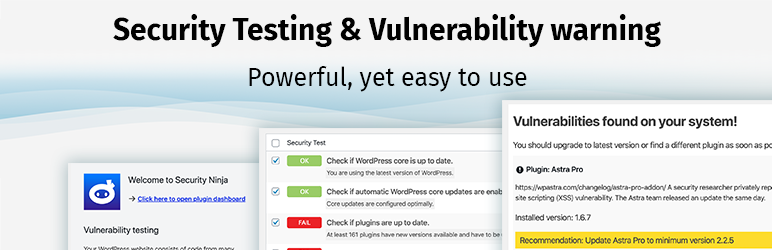
Security Ninja is a powerful WordPress plugin designed for the security of your website. It provides a robust firewall and an effective malware scanner to secure your site against potential threats. This plugin has been serving site owners for over a decade, helping them feel safe by running more than 50 security tests instantly to identify any hidden issues.
The new feature of this plugin is a vulnerability scanner that warns you if your website has any known vulnerabilities. Additionally, it can automatically block over 600 million bad IPs to keep your website one step ahead of the attackers.
Features and Benefits
- Vulnerability scanner: It warns you of any known vulnerabilities on your website, allowing you to take immediate action and secure your site.
- Database optimization: The plugin can optimize and speed up your database, which can improve your website’s performance.
- Extensive security tests: It runs a wide range of tests including checking for brute-force attacks on user accounts, file permissions, version hiding, 0-day exploits tests, database configuration tests, and many more.
- Pro features: In the Pro version, you get additional features such as a firewall, blocking suspicious page requests, country blocking, core scanner, malware scanner, auto fixer for some tests, events logger, and scheduled scans.
Pricing Structure
The plugin is available for free download. For premium features, you need to upgrade to the Pro version.
What are WordPress Firewall Plugins
WordPress firewall plugins are security tools designed to protect WordPress websites from various online threats, such as hacking attempts, malware injections, and unauthorized access. These plugins work by monitoring incoming traffic to the WordPress site and analyzing it for potentially malicious behavior. Here’s how they typically function:
- Traffic Monitoring: Firewall plugins analyze all incoming traffic to the WordPress site, including requests to access web pages, submit forms, or interact with plugins and themes.
- Rule-based Filtering: They use a set of predefined rules or algorithms to filter out potentially harmful requests. These rules can include patterns of known malicious behavior, such as SQL injection attempts, cross-site scripting (XSS) attacks, or brute-force login attempts.
- IP Blocking: Firewall plugins can block access from specific IP addresses or ranges that are identified as sources of malicious activity. This helps prevent hackers from accessing the site or launching automated attacks.
- Blacklisting/Whitelisting: They allow site administrators to blacklist certain IP addresses, user agents, or specific URLs that are deemed suspicious or known to be associated with malicious activity. Conversely, they can whitelist trusted IP addresses or user agents to ensure they’re not inadvertently blocked.
- Real-time Threat Detection: Many firewall plugins employ real-time threat detection mechanisms to identify and respond to emerging security threats promptly. This may involve leveraging threat intelligence feeds, machine learning algorithms, or community-driven security updates.
- Logging and Reporting: Firewall plugins often provide logging and reporting capabilities, allowing site administrators to review security events, track suspicious activity, and investigate potential security breaches.
- Customization and Configuration: They typically offer a range of customization options, allowing site administrators to tailor the firewall rules and security settings to their specific needs. This may include adjusting the sensitivity of the firewall, defining custom rules, or integrating with other security tools and services.
Overall, WordPress firewall plugins serve as an essential layer of defense for WordPress websites, helping to mitigate the risk of security breaches and safeguard sensitive data from unauthorized access. By continuously monitoring and filtering incoming traffic, these plugins help enhance the overall security posture of WordPress sites and protect them from a wide range of online threats.
Final Word
In summary, having the right WordPress Firewall plugins can radically improve your website’s security, providing you with an extra layer of defense against potential threats. These plugins will not only help you ward off unwanted cyber attacks but also boost engagement by ensuring your website runs smoothly, thus establishing your credibility in your niche.
So, don’t wait! Secure your website today and create a safer environment for your audience. Remember, a well-protected website is a trusted website. Pro Tip: Always keep your plugins updated to the latest version to ensure maximum security effectiveness.
FAQs about WordPress Firewall Plugins
- What is a WordPress Firewall Plugin?
A WordPress firewall plugin is a security tool designed to protect WordPress websites from online threats such as hacking attempts, malware injections, and unauthorized access. - How does a WordPress Firewall Plugin work?
These plugins monitor incoming traffic to the WordPress site and analyze it for potentially malicious behavior. They use rule-based filtering, IP blocking, blacklisting/whitelisting, real-time threat detection, logging, and reporting to enhance security. - Why do I need a WordPress Firewall Plugin?
WordPress sites are frequently targeted by hackers due to their popularity. A firewall plugin acts as a crucial defense layer, helping to prevent security breaches, protect sensitive data, and ensure the uninterrupted operation of your website. - Can a WordPress Firewall Plugin prevent all security threats?
While a firewall plugin significantly enhances your site’s security, it’s important to understand that no solution can guarantee 100% protection. However, using a firewall plugin alongside other security measures such as strong passwords, regular updates, and secure hosting can greatly reduce the risk of security incidents. - Are WordPress Firewall Plugins easy to install and configure?
Yes, most WordPress firewall plugins are designed to be user-friendly, with easy installation and configuration processes. They typically offer a range of customization options to tailor the security settings to your specific needs. - Do WordPress Firewall Plugins impact website performance?
Generally, the impact on website performance is minimal. However, this can vary depending on the specific plugin and the settings configured. It’s essential to choose a reputable plugin and optimize its settings to minimize any potential performance impact. - Are there free WordPress Firewall Plugins available?
Yes, there are both free and premium WordPress firewall plugins available. While free plugins offer basic security features, premium plugins often provide more advanced functionality, dedicated support, and regular updates. - Can a WordPress Firewall Plugin protect against DDoS attacks?
Some WordPress firewall plugins offer protection against Distributed Denial of Service (DDoS) attacks by detecting and mitigating abnormal traffic patterns. However, specialized DDoS protection solutions may be required for large-scale attacks. - Do I still need other security measures if I use a WordPress Firewall Plugin?
Yes, a WordPress firewall plugin should be used in conjunction with other security measures such as regular updates, strong passwords, security audits, and backups to create a comprehensive security strategy for your website. - Which WordPress Firewall Plugin is best for my website?
The best WordPress firewall plugin for your website depends on your specific security requirements, budget, and technical expertise. It’s essential to research and compare different plugins to find the one that best fits your needs.


