v3.25.0 is an infrastructure and experience release. It turns on high-performance object caching by default for new sites, and adds edge cache exclusions so dynamic pages like cart and checkout stay dynamic.
On the experience side, new users get a guided product tour and inline InstaWP Academy videos, while pay-per-use teams get an invoice preview email before every billing date. Underneath all of that, this release closes a long list of SFTP, SSH, CDN, SSL, and domain reliability gaps that were affecting real workflows.
Here is what you’ll find with this release.
Table of Contents
Key Takeaways
v3.25.0 leads with a built-in domain module for WaaS, object caching on by default, and CDN cache exclusions, paired with a smoother first-week experience and a deep round of infrastructure fixes across SFTP, SSH, CDN, SSL, and domains.
Object caching on by default: New sites on entitled plans launch with high-performance object caching already active.
CDN cache exclusions: Define URL patterns like cart, checkout, and account pages that should never be cached at the edge.
Invoice preview emails: Pay-per-use teams get an estimated invoice 2 days before billing, projected through the end of the cycle.
Faster first week: A post-onboarding product tour and inline InstaWP Academy videos help new users find their way around sooner.
Stronger infrastructure: Fixes across SFTP, SSH, CDN restoration, SSL issuance, domain reliability, and brute-force protection.
What’s New
#1: Object Caching On by Default
New sites created on entitled plans now launch with high-performance object caching already enabled.
Object caching stores the results of expensive database queries in memory, so WordPress does not have to recompute them on every page load. Previously this was something you turned on after setup. Now it is on from the first request, which means new sites are faster out of the box with no manual step to remember.
#2: CDN Cache Exclusions
You can now define URL patterns that should never be cached at the CDN edge.
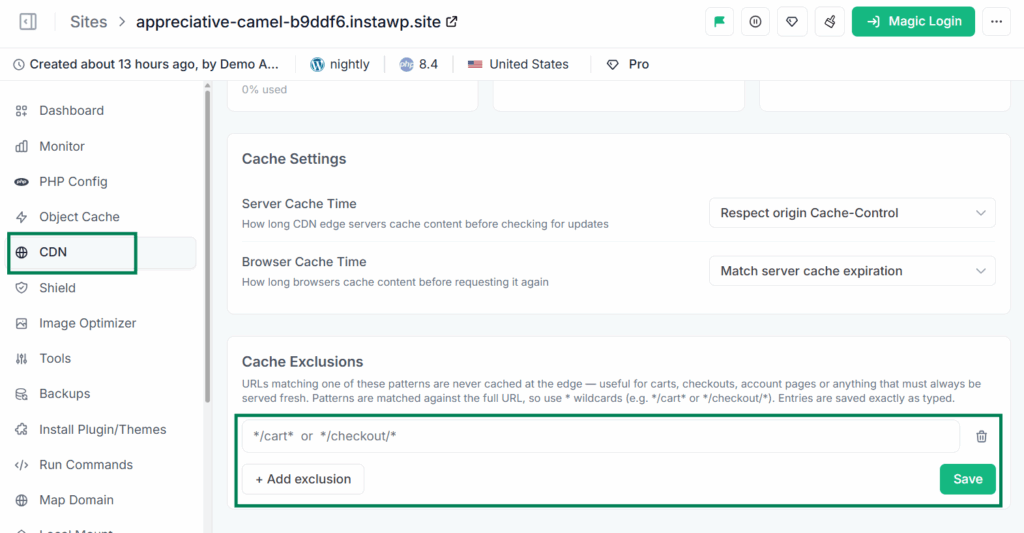
Some pages are meant to be dynamic. Cart, checkout, account dashboards, and membership portals all show user-specific content that should never be served from a shared edge cache.
With CDN cache exclusions, you set the URL patterns that stay dynamic while everything else keeps the full speed benefit of the CDN. This gives WooCommerce stores and membership sites the performance of edge caching without the risk of a logged-in visitor seeing someone else’s session.
#3: Invoice Preview Emails for Pay-Per-Use Teams
Pay-per-use teams now receive an email 2 days before their billing date with the estimated invoice amount, projected through the end of the cycle.
Usage-based billing is flexible, but it can also be hard to predict. This email removes the guesswork by showing you the projected number before the charge lands, so there are no surprises when the invoice is finalized.
#4: Domain Renewal Reminder Emails
You are now notified by email before any registered domain auto-renews, using the registrant’s contact details on file.
Domain renewals are easy to forget until a charge appears or, worse, a name lapses. This reminder keeps you ahead of every auto-renewal so you can confirm, update, or cancel before it processes.
#5: Post-Onboarding Product Tour
After completing onboarding, new users now get a guided tour that walks them through the InstaWP dashboard.
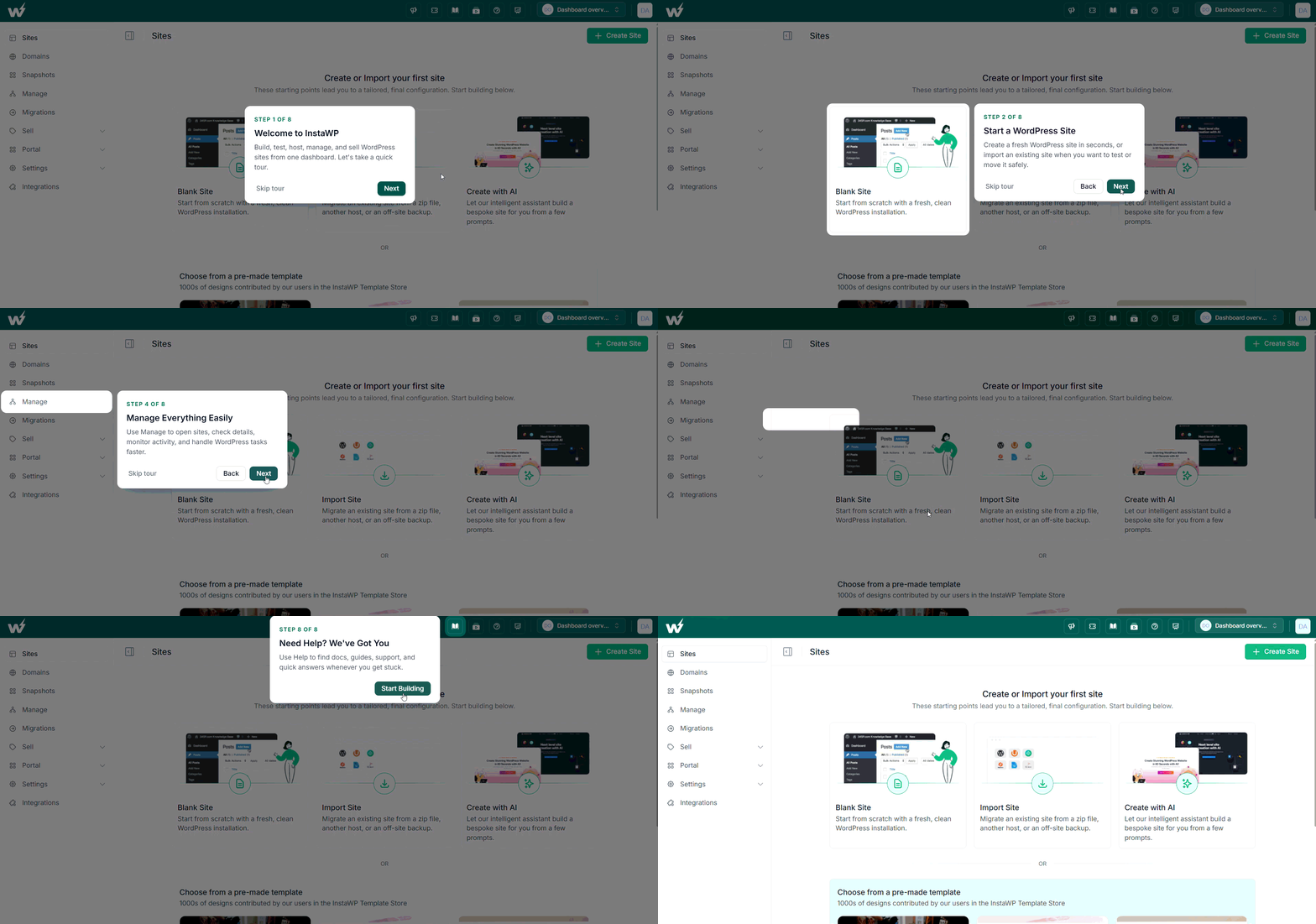
The tour picks up right where the setup flow ends and points out the features that matter most for getting started. The goal is simple: help a new account reach its first useful action faster, without hunting around the dashboard to figure out where everything lives.
#6: InstaWP Academy, Inline Where You Need It
Inline video tutorial links from InstaWP Academy now appear directly on the site creation, snapshots, and billing/subscription pages.
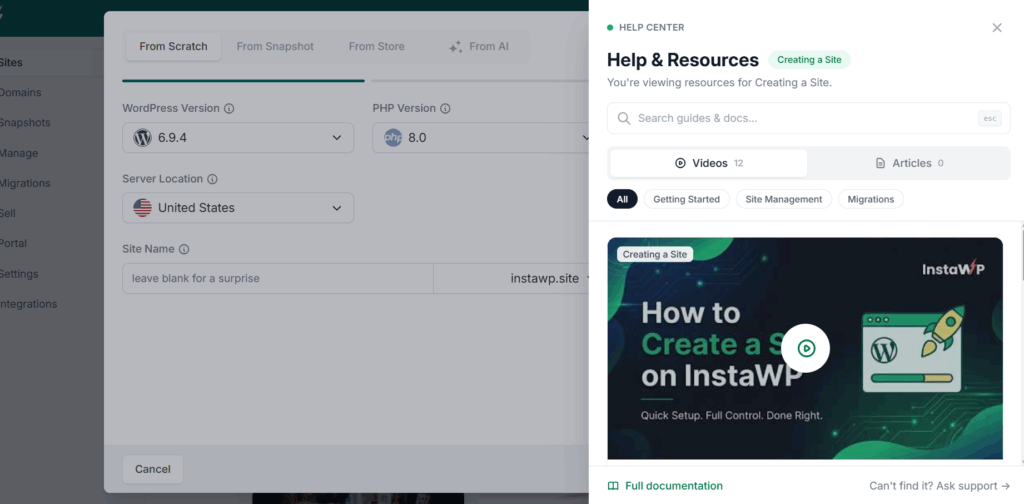
Instead of opening a separate tab or searching through docs, you get the right tutorial at the exact moment you need it, embedded in the page where the action is happening. It is contextual help that meets you where you already are.
Improved
A Clearer Empty State for New Teams
The Sites page empty state has been redesigned with clear Create, Import, and AI Builder entry points for teams that do not have any sites yet. The first screen now points directly to the three ways to get a site running, instead of leaving a new team to figure out where to start.
PHP Settings That Stick
The per-site PHP configuration form now prefills with the actual values from your server, so you can see your real settings instead of generic defaults. Your PHP configuration (memory limit, execution time, upload size, and more) is now stored on the platform and automatically re-applied if your site is moved to a new server, so a server move no longer resets your tuning.
Updated New Site Defaults
New sites now default to PHP 8.2 and the latest WordPress (7.0), so every fresh site starts on a current, well-supported stack.
Easier Domain Purchases
We removed the PPU eligibility checks and upfront payment requirements that previously stood between you and buying a domain, making domain purchases far more direct.
Smoother Credit Purchases
Buying credits is now a cleaner experience end to end: clearer errors when a payment method is missing, an integrated add-card modal so you never leave the flow, instant credit-balance updates after purchase, stronger duplicate-purchase protection, and a paginated credit history that is easier to scan.
Shareable, Refresh-Proof Site Search
Search terms on the sites list are now reflected in the browser URL, so a filtered view survives a page refresh and can be shared with a teammate by copying the link. Searching also correctly resets the list to page 1.
Login, Token, and UI Refinements
The forgot-password page was redesigned to match the new login card layout, the API tokens page now uses a simplified and cleaner management table, and we polished smaller details including the domain-mapping modal styling and removing stale “new” badges from the site edit navigation.
Fixed
SFTP and SSH Access Reliability
This release resolves three connected access issues. Accounts created after early May were missing a server group membership, which caused SFTP sessions to die immediately after authenticating; affected users were fixed fleet-wide and new accounts are now auto-corrected.
Enabling SSH from the SFTP/SSH page previously left users locked in SFTP-only mode on dedicated servers, and they are now properly un-jailed when SSH is enabled. SFTP jail mounts that lost a boot-order race after a server reboot, breaking SFTP for up to a day, are now restored immediately at boot.
“Auto Login to wp-admin” 404 Fixed
Magic-login redirects to wp-admin pages with query strings, such as plugin setup pages, were arriving URL-encoded and landing on a 404. The redirect now decodes correctly and takes you to the intended page.
Custom SMTP Connections Restored
A firewall policy bug could block outbound SMTP ports 465 and 587, breaking WP Mail SMTP and similar plugins with a “Connection refused” error. Only port 25 is blocked now, so custom SMTP works as expected.
No More “Error Establishing a Redis Connection” Flashes
Brief object-cache hiccups, for example during server maintenance, no longer show visitors a fatal error page. The site now gracefully falls back to the database for that request, so a momentary cache blip stays invisible to your visitors.
PHP Timeout Settings Now Respected
The max_execution_time and max_input_time values set from the dashboard were being capped at 120 seconds regardless of what you configured. Per-site overrides now take effect as set.
Legitimate Visitors No Longer Blocked on Membership Sites
The security scanner was mistaking normal login-redirect traffic on sites like Woffice and BuddyBoss for a distributed crawl and rate-limiting real users with HTTP 429. Benign authentication and redirect parameters are now ignored, so genuine members get through.
Faster Restores for Sites with Huge User Bases
Restoring or cloning a site with thousands of WordPress users could hang for hours and then roll back. A reconciliation step that previously took 3.7 hours now completes in under a second.
Site Creation and Sites Page Fixes
Several site creation and listing issues are resolved. Teams with only InstaWP Live sites saw the onboarding empty state instead of their sites, and the tab bar now appears correctly. Sites created with a custom name were temporary even when “permanent” was selected, which is fixed.
Out-of-order status updates could flip a completed site creation back to “in progress,” and status now only moves forward. Sites created from templates or snapshots now consistently use the correct suffix domain.
CDN Restoration, Stats, and Server Moves
CDN acceleration that was suspended for a bandwidth overage is now automatically restored when you upgrade your plan, and a date-range bug that skewed CDN bandwidth and request stats has been corrected so figures reflect the selected period.
When a site is migrated to a new server, its plan features are re-applied and the CDN is correctly reconnected to the new origin instead of pointing at the old server, DNS is updated, and suspended sites stay suspended.
SSL Certificate Issuance
We fixed an edge case where Let’s Encrypt certificate orders failed because of a missing contact email, so SSL provisioning is more dependable.
Domain Purchase and Renewal Reliability
Domain handling is more robust across the board: re-purchasing a previously deleted domain no longer fails, free credits are now correctly applied to domain purchases and renewals, failed registrations are automatically refunded with credits reversed, and a currency exchange-rate issue in domain pricing was corrected.
Billing and Site Transfer Fixes
Installing plugins and themes from signed S3 or R2 zip URLs is no longer rejected. Unintended trial periods on pay-per-use billing were ended so summaries reflect the correct period. Transfers between legacy and new PPU billing teams are now handled correctly with a clear message, and transfer actions are visible for legacy-plan users.
Smaller UI and Consistency Fixes
The Protect Site modal was fixed to work correctly, broken action buttons in the sites table and a stale team name showing after switching teams in another browser session are resolved, and sites with an expiry set can no longer be incorrectly marked as reserved.
Security
This release includes two important security-focused changes.
- Block User Enumeration (Site Tools): A new toggle blocks the
/wp-json/wp/v2/usersREST endpoint and itsrest_routevariant, preventing the username harvesting that feeds brute-force attacks, without disabling the whole REST API. - Stronger Brute-Force Protection: Rate limiting for
wp-login.phpand XML-RPC is now keyed per site instead of per IP, so distributed credential-stuffing botnets that spread a few requests across thousands of IPs are actually throttled.
Both changes reduce the attack surface on WordPress sites while keeping the REST API and legitimate logins fully functional.
Enterprise
- WaaS: Archived Plans: Archived plans now move to a dedicated section, with settings inputs disabled for archived plans.
- Portal: Custom Domain Reliability: Edge domain registrations are now de-duplicated to prevent reload failures that could block custom-domain attachment on portal sites.
- Operator: Server Tiers and Migration Picker: Server tier (demo, general, or production) is now visible and editable on the admin Servers and Sites lists, and the site-migration destination picker is searchable by ID, IP, or size, with each server’s provider size shown.
Final Thoughts
v3.25.0 makes InstaWP a more complete platform to sell on and a faster one to start with. The Domain Module turns checkout into a true sell-to-launch flow, object caching and CDN exclusions tune performance without trade-offs, and the new tour and inline Academy videos shorten the path to a new user’s first win.
For developers, agencies, and resellers, that adds up to fewer abandoned checkouts, faster sites by default, and a long list of access, CDN, SSL, and domain reliability issues quietly put to rest.
? Try the latest InstaWP updates now and build, host, manage, and sell WordPress sites on faster, more reliable infrastructure.