If you build WordPress sites, you have almost certainly heard of LocalWP. It is one of the most popular free tools for running WordPress on your own machine, and for years it has been the default starting point for theme work, plugin testing, and quick experiments.
But the way developers and agencies work has changed, and a fair question now follows the tool everywhere: is LocalWP still the right choice in 2026, is it safe, and what should you use alongside or instead of it?
This is a complete, up to date LocalWP review. We will cover what LocalWP is, whether it is safe, its real pros and cons, how it stacks up against MAMP and XAMPP, and the strongest modern alternative for local WordPress development. By the end you will know exactly where LocalWP fits and what a faster, cloud connected workflow looks like.
Key takeaway
- LocalWP is safe, free, and a solid pick for offline prototyping and quick local testing.
- Its limits show the moment you need to share a site, collaborate, test under real traffic, or move to production.
- In 2026 the better setup for most developers and agencies is a local plus cloud workflow.
- InstaWP is the all in one WordPress cloud platform that delivers exactly that:
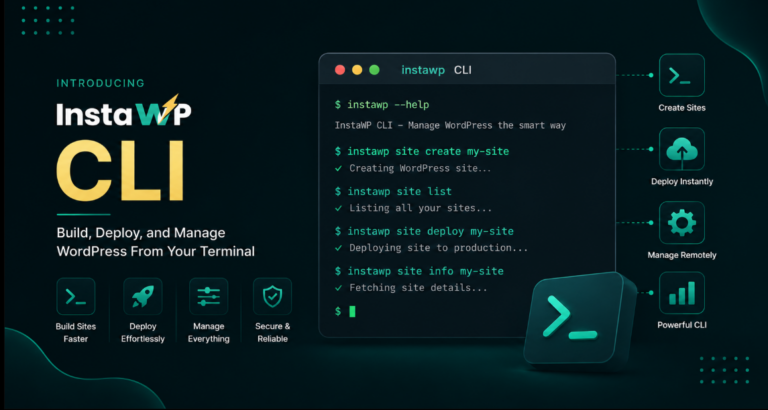
- Real local and cloud sites from one InstaWP CLI, plus instant browser sandboxes.
- Hybrid local editing through Local Mount.
- Production grade managed WordPress hosting, all in a single account.
Table of Contents
What is LocalWP?

LocalWP, formerly known as Local by Flywheel and now owned by WP Engine, is a free desktop application for building WordPress sites on your own computer.
You download it for Windows, macOS, or Linux, create a site in a few clicks, and get a self contained WordPress install running locally with its own PHP, web server, and MySQL database. Nothing is published to the internet, so it is a private space to develop and test.
It is popular for good reasons. It is free, the interface is friendly for beginners, and it bundles helpful extras such as one click SSL for local sites, easy switching between PHP versions, a built in mail catcher, and a Live Link feature that creates a temporary public URL to share work.
For developers already inside the WP Engine and Flywheel ecosystem, it also offers convenient one click connections to those hosts.
The defining characteristic, and the source of every limitation we discuss below, is right there in the name. LocalWP runs locally. The site lives on one machine, which is exactly what you want for private experimentation and exactly what gets in the way the moment you need to share, collaborate, or go live.
Is LocalWP safe to use?
Yes, LocalWP is safe to use for the vast majority of WordPress developers. It is a legitimate, actively maintained product backed by WP Engine, and the sites it creates are stored on your own machine and are not publicly accessible by default.
Search engines, bots, and random visitors cannot reach a site that only exists on your laptop, which makes it a genuinely safe sandbox for trying out themes, plugins, and custom code without any risk to a live website.
There are a few sensible precautions worth knowing about:
- Keep your system updated. Because LocalWP runs on your own operating system, your security is only as good as your machine. Keep your OS, browser, and antivirus current.
- Be careful with Live Link. The temporary public URL feature is handy, but it does expose your in progress site to anyone with the link. Turn it off when you are done sharing.
- Only install trusted plugins and themes. A local site is a great place to test, but nulled or pirated extensions can carry malware that lands on your machine. Use a cloud sandbox you can throw away if you need to inspect something risky.
- Mind the move to production. The real risk with any local only setup is not the local site itself, it is the manual export and import when you push to staging or live. A careless migration can overwrite data or misconfigure an environment.
This is exactly why many teams pair LocalWP with a cloud platform. You keep the safe local space on your laptop and use cloud sandboxes, staging, and managed hosting for anything that needs to be shared, tested under real traffic, or exposed to the public internet.
With InstaWP, every site runs in a secured cloud environment with automatic SSL, a web application firewall, DDoS protection, malware scanning, and a vulnerability scanner, so the risky parts of the workflow happen somewhere built to handle them.
Want a safe, disposable WordPress site you can spin up in seconds and share with a real URL? Launch one free on InstaWP.
Create your free site →LocalWP review: pros, cons, and pricing
After years of real world use across the WordPress community, the picture of LocalWP is clear. It does one job, local WordPress development, very well, and it asks nothing in return. Here is the honest balance sheet.
What LocalWP does well
- Completely free, with no site limits
- Beginner friendly, fast to set up a first site
- Works fully offline
- One click SSL, PHP version switching, mail catcher
- Tight integration with WP Engine and Flywheel
Where LocalWP falls short
- Tied to one machine, hard to share or collaborate
- Manual, error prone migrations to staging or live
- Heavy on local CPU, memory, and disk
- Cannot replicate real server, CDN, or traffic conditions
- Ongoing environment maintenance and version drift
On pricing, LocalWP itself is free. The cost only appears later, in the hosting you deploy to and in the hours lost to manual setup, syncing, and the classic “it works on my machine” debugging. That hidden cost is what modern cloud workflows are designed to remove.
LocalWP vs MAMP vs XAMPP
LocalWP is not the only way to run WordPress locally. MAMP and XAMPP are long standing local server stacks that many developers still reach for. The difference is that LocalWP is purpose built for WordPress, while MAMP and XAMPP are general purpose web server bundles that leave the WordPress setup to you.
| Factor | LocalWP | MAMP | XAMPP |
|---|---|---|---|
| Built for WordPress | Yes, one click WP install | No, manual setup | No, manual setup |
| Ease of use | Beginner friendly | Moderate | Technical |
| PHP version switching | Built in | Limited | Manual |
| Share a live URL | Temporary Live Link | No | No |
| Cloud or hosting | No | No | No |
| Price | Free | Free and paid Pro | Free |
For pure WordPress work, LocalWP is the friendliest of the three. MAMP and XAMPP give you more general control if you also run non WordPress projects, at the cost of a more manual setup. The catch is that all three share the same ceiling: they are local only. None of them can hand you a real, shareable, production ready site. That is the gap the next section is about.
Why local only WordPress development is not enough in 2026
Local development gives you control, offline access, and fast debugging. Those are real strengths. But relying on a local only setup in 2026 runs into six recurring problems for developers and agencies.
1. Environment drift
Different OS, PHP, and software versions cause “works on my machine” bugs that only surface after deployment.
2. Manual migrations
Moving from local to staging or live means manual database and file exports, which are slow and easy to break.
3. Limited collaboration
A local site is isolated by design, so sharing progress with teammates or clients is clumsy and slow.
4. Resource limits
Running several sites or heavy plugins drains local CPU, memory, and disk, capping realistic testing.
5. No real world testing
A laptop cannot reproduce real server behavior, network latency, or CDN caching before you go live.
6. Maintenance overhead
Updating PHP, managing database servers, and fixing compatibility steals time from actual development.
This is where a CLI push and pull loop earns its keep. Instead of exporting a database and find-replacing URLs by hand every time you move a site, instawp local push and instawp local pull keep local and cloud in sync in one command with the InstaWP CLI, so drift never gets a chance to build up.
Learn more about it here.
None of this means local development is obsolete. It means a local only stack is no longer the whole answer. The modern approach keeps local where it shines and adds a cloud layer for everything local cannot do.
When local WordPress development still makes sense
To be fair to LocalWP and to local setups in general, there are clear cases where working on your own machine is still the right call:
- Offline work and quick prototyping. No internet, no problem. Spin up a site and experiment freely.
- Deep debugging. Direct access to server logs, PHP error files, and the database is convenient when you need it.
- Learning safely. Beginners can break things without consequences for a live site.
- Fast iteration with no network latency. Editing a file and refreshing is instant when everything runs on your machine.
The ideal in 2026 is not local versus cloud. It is the ability to switch between them freely, using whichever fits the task. That is precisely what the next section delivers.
The best local WordPress development environment in 2026
If you want one platform that gives you genuine local development, instant cloud sites, hybrid editing, and production hosting without juggling separate tools, the answer is InstaWP. It is the all in one WordPress cloud platform built to Build, Host, Manage, and Sell WordPress sites, and it is also a full managed WordPress hosting provider, so the same place you develop is the place you ship to.
Three capabilities make InstaWP the strongest LocalWP companion or alternative. Together they remove the local only ceiling while keeping the speed and control developers love.
Pillar 1: InstaWP CLI, real local and cloud WordPress from your terminal
This is the most direct answer to anyone searching for a local WordPress development environment, and it is built for an AI first workflow. The InstaWP CLI is an open source, npm installable tool (@instawp/cli, MIT licensed, Node.js 18 or higher) that creates and manages WordPress sites entirely from your terminal.
Critically, it spins up genuine local WordPress sites using WordPress Playground, which runs PHP in WebAssembly with SQLite, so you get a real local site with no Docker, no MySQL, and no Apache to install or maintain. The same single binary also provisions cloud sites on InstaWP infrastructure, so local and cloud live under one tool.
What that unlocks in practice:
- One command to create a site, locally or in the cloud, with zero config files.
- Clone any InstaWP cloud site straight to your machine, with database conversion, URL replacement, and auto login handled for you.
- Real SSH and remote WP-CLI on hosted sites through the same tool, with SSH keys managed automatically.
- File sync between local and cloud, plus scripting into CI and CD pipelines.
- A clean target for AI coding agents that need a real WordPress environment to build and test against on demand.
npm install -g @instawp/cli
# create a site, then clone a cloud site to local
instawp create –name my-project
instawp sync pull my-project
One honest note: Playground based local sites use SQLite and WebAssembly PHP, which is perfect for development and testing but is not a full MySQL production runtime. When you are ready for production, you deploy to InstaWP managed hosting, covered below. The CLI is open source and evolving quickly, and the roadmap is shaped in the open on GitHub.
The hybrid workflow isn’t a metaphor, it is two commands. Develop in your local IDE, then push to a real cloud environment when you need to share or ship:
instawp local clone my-cloud-site      # cloud to local, DB + URLs rewritten for you
instawp local push blog my-cloud-site  # local to cloud when you're ready
The database conversion and URL replacement that make local-to-live migrations painful are handled automatically by the InstaWP CLI, which is the whole reason “local vs cloud” is a false choice in 2026.
Pillar 2: Local Mount, edit cloud sites with your local editor

If you prefer to keep a cloud site as the source of truth but still want to work in VS Code, PhpStorm, or Sublime Text, Local Mount mounts your cloud hosted InstaWP site onto your local file system.
You edit files in your favorite editor and changes sync to the cloud site, so you get local editing comfort with cloud power behind it. It is the hybrid sweet spot for developers who want the editor on their machine and the runtime in the cloud.
Pillar 3: Managed WordPress hosting, ship to production in the same platform
This is where InstaWP goes beyond any local tool. The platform is a full managed WordPress hosting provider, so the site you build is the site you launch, with no separate host to wire up.
Production sites get a global CDN with 119 plus edge locations, Redis object caching, automatic image optimization, a web application firewall, DDoS protection, automatic SSL, malware scanning, a vulnerability scanner, and automated backups with one click restore. Pricing is pay as you go, so you only pay for the sites and days you actually use.
119+
global CDN edge locations
Seconds
to launch a new site
1 platform
build, host, manage, sell
Get local development, cloud sandboxes, and managed hosting in one account. Add a card and start with $25 in credits.
Try InstaWP free →InstaWP vs LocalWP: side by side
Here is the head to head comparison so you can see why developers and agencies are choosing a cloud connected workflow over a local only one.
| Capability | InstaWP | LocalWP |
|---|---|---|
| Local development | Yes, via CLI and Playground, plus Local Mount | Yes, desktop app |
| Instant cloud sandbox | Yes, in seconds | No |
| Shareable live URL | Yes, real URL with SSL | Temporary Live Link only |
| Team collaboration | Built in | Limited |
| Staging and 2 way sync | Yes | No |
| Managed production hosting | Yes, CDN, WAF, backups | No, deploy elsewhere |
| Multi site management | Centralized dashboard | No |
| Sell sites (WaaS) | Yes, white label | No |
LocalWP is excellent at the one thing it does. InstaWP covers that same ground and then everything that comes after it, which is why it works as either a complete alternative or the perfect cloud companion to your existing local setup.
How to migrate from LocalWP to InstaWP
Moving from a local only setup to a hybrid local plus cloud workflow takes only a few minutes. You have two easy paths.
Path A: Import your LocalWP site
Sign in to InstaWP, export your site from LocalWP, then use Import in the InstaWP dashboard to upload it. Once the import finishes, your site lives in the cloud, ready to host, manage, and share with a real URL.
Path B: Go cloud first with the CLI
Install the InstaWP CLI, run instawp create to provision a cloud site, then clone it to your machine with instawp sync pull. You develop with your local editor and push changes back to the cloud whenever you are ready.
Either way, you keep the local comfort you are used to and gain a real, shareable, production ready environment. New to the platform? Create your free InstaWP account and try it on a throwaway sandbox first.
FAQs
Is LocalWP free?
Yes. LocalWP, formerly Local by Flywheel and now owned by WP Engine, is completely free to download and use with no site limits. You only pay for hosting when you deploy your finished site somewhere.
Is LocalWP safe to use?
Yes. LocalWP is a legitimate, actively maintained product, and the sites it creates are stored on your own machine and are not public by default. Keep your operating system and antivirus updated, turn off the Live Link feature when you are done sharing, and avoid nulled plugins and themes.
What is the best alternative to LocalWP in 2026?
For most developers and agencies, InstaWP is the strongest alternative or companion. It offers real local sites through its CLI and WordPress Playground, instant cloud sandboxes, hybrid editing with Local Mount, and managed WordPress hosting, all in one platform. LocalWP only covers the local piece.
LocalWP vs MAMP vs XAMPP, which should I use?
LocalWP is the easiest for WordPress specifically because it installs WordPress for you. MAMP and XAMPP are general purpose local server stacks that need manual WordPress setup but suit mixed projects. All three are local only, so none can give you a shareable or production ready site on their own.
Can I use LocalWP and InstaWP together?
Absolutely. Many teams develop locally in LocalWP and use InstaWP for cloud sandboxes, staging, sharing, collaboration, and managed hosting. You can also use InstaWP Local Mount to edit a cloud site from your local editor, which gives you the best of both.
Do I need Docker or MySQL to develop locally with InstaWP?
No. The InstaWP CLI creates local sites using WordPress Playground, which runs PHP in WebAssembly with SQLite. You do not need Docker, MySQL, or Apache installed. For production you deploy to InstaWP managed hosting.
The verdict
LocalWP is safe, free, and still a fine choice for offline work and quick local testing. But local only is no longer the full picture. In 2026 the developers and agencies moving fastest are the ones who pair local comfort with cloud power.
InstaWP gives you both in one platform: genuine local sites from the CLI, hybrid editing with Local Mount, instant cloud sandboxes, and managed hosting to take any project all the way to production.
Build, host, and manage WordPress in one place
Spin up your first site in seconds with $25 in credits when you add a card. No setup, no Docker.
Create your free WordPress site →