To sell websites with hosting, an agency builds a site once, saves it as a template, and charges each client one monthly fee that covers the site, hosting and upkeep. You pay your host a wholesale cost per site and keep the difference. On InstaWP‘s managed WordPress hosting, priced per site, that wholesale cost starts at $5 a month.
This playbook is for agencies and freelancers selling WordPress websites to clients, and it turns every build into something you sell on a monthly subscription. It covers what goes in a website and hosting package, what to charge, what hosting really costs you per site, who owns the site when a client leaves, and the exact setup on InstaWP, with screenshots of the real checkout and client portal. (Selling a website you own outright to a buyer is a different job, handled by site marketplaces and brokers.)
- A website and hosting package is one recurring fee for the site, its hosting and its upkeep. You build once from a template and bill every month.
- Your floor is the per-site hosting cost. On InstaWP that is $5 a month on Starter or $9 on Plus, billed daily, so a $19 plan on Starter leaves $14 before any checkout fee.
- The checkout you choose sets your fee. InstaWP’s native WaaS checkout takes 5% with Stripe fees included, while WooCommerce or your own API costs 0%. There is no platform fee.
- Write ownership and exit terms down before the first sale. Each InstaWP client site is a standalone WordPress install, so a client who leaves can take a complete copy.
- Attach paid client plans to Starter or higher. Sandbox sites cannot map a custom domain.
- A paused site still bills. Move sites you are not selling to the $2 Sandbox tier, or delete them.
Table of Contents
What does selling websites with hosting mean?
Selling websites with hosting means the client buys a working website and the place it lives from you, as one product. You set the price, the site runs on a hosting account you control, and you handle updates and support. There are three common ways to package it, and they differ in how the client pays and who owns what.
What is website as a service (WaaS)?
Website as a service is the subscription version: the agency sells a ready-made site, its hosting and its upkeep for one monthly fee instead of a one-off price. Read the full definition of website as a service (WaaS), and see how agencies run a WaaS business before you commit to the model.
Why should agencies sell websites with hosting?
A build fee is paid once; a hosting fee is paid every month. Selling the two together turns each client into recurring revenue, keeps the site on infrastructure you chose, and makes you the first call when the client wants changes, which is where follow-on work comes from.
- Predictable revenue. Twenty clients on a $49 plan is $980 a month before costs, and it arrives again next month.
- Fewer support surprises. You pick the stack, so you are not debugging a cheap shared host a client chose years ago.
- Easier upsells. New pages, SEO work and bigger plans are an easy conversation with a client who already pays you monthly.
It does not suit every agency. If most of your work is large custom builds for clients who want to own everything outright, read is the WaaS model right for your agency first.
What should a website and hosting package include?
A client should be able to read your package and know exactly what they get each month. At minimum that is the website, hosting, SSL, backups, security, software updates and a defined amount of support or edits. Anything you leave unsaid turns into an argument later.
- The website, built from your template and branded for the client
- Hosting, with the region and resources stated
- SSL, issued and renewed automatically
- Backups: how often, and how long they are kept
- Security: a firewall plus vulnerability and malware checks
- Updates to WordPress core, plugins and themes, and who tests them
- Uptime monitoring, and what you do when the site goes down
- Support: response time and how many edits or hours a month are included
- The domain: who registers it, who pays the renewal, and whose name it is in
- A short monthly report of what you did
On InstaWP, most of the hosting half of that list comes with the site plan you attach to each client. This is what each plan covers, from the InstaWP pricing page on 7 October 2026:
The support and edits half is yours to define, because no host does that part for you. For detail on the hosting side, see InstaWP backups, the InstaShield WordPress firewall, the WordPress uptime monitor and WordPress staging.
How much should you charge for a website with hosting?
Charge for the outcome, not the server. Start from your hosting cost per site, add the time you will spend on updates, support and edits, then add your margin. Most agencies sell two or three tiers so a client can start small and move up.
Here is how the arithmetic works on three example tiers sold through InstaWP’s native checkout. The retail prices are examples, not a market rate:
Sell through WooCommerce or your own API and the checkout column drops to $0 in InstaWP fees, though your payment gateway still charges its own. For pricing models, setup fees and what to charge in more depth, see our guide to website as a service pricing.
What does hosting cost you per client site?
On InstaWP, each client site is billed on its own plan, by the day: $5 a month for a Starter production site up to $45 for Elite, and $2 for a Sandbox staging site. You pay only for the sites that are running, and you can move a site up or down a tier any day, with billing prorated daily.
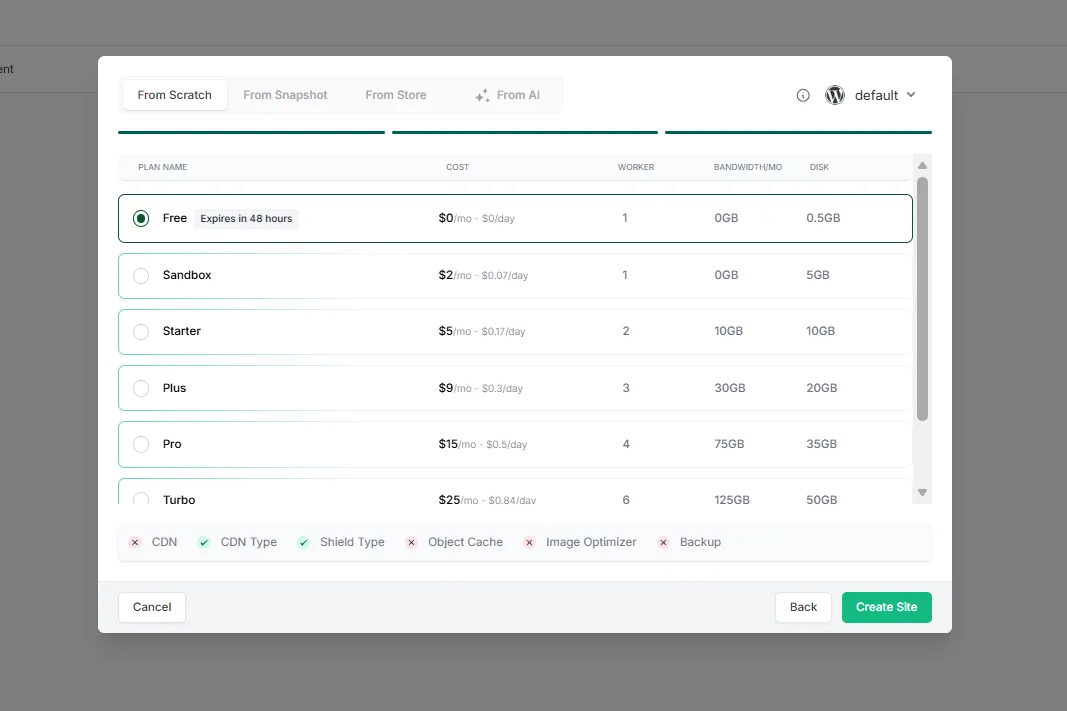
Two smaller costs to budget for: templates and snapshots you sell from cost $1 a month each (instant templates are $2), and adding a card gives you $25 in credits, with a 14-day money-back period. See the full InstaWP pricing and our guide to choosing the right InstaWP site plan. If you are still comparing hosts, our checklist of WordPress hosting for agencies covers what matters at agency scale.
Which setup should you use: Multisite, a reseller account, or isolated sites?
For selling WordPress websites, isolated sites are the safest default: each client gets a separate WordPress install that can be moved, upgraded or cancelled on its own. WordPress Multisite is cheaper to run but ties every client to one install and one set of plugins. A cPanel/WHMCS reseller account fits when email, domains or non-WordPress hosting are your main product.
Read WordPress Multisite vs WaaS for the longer comparison, and the WordPress developer documentation on how Multisite networks work if you are weighing it seriously.
When is a cPanel/WHMCS reseller account the right choice?
Choose a classic reseller account when the hosting itself is the product: you sell email boxes, domains and space to clients who build their own sites, or you host many non-WordPress apps. If you are selling WordPress websites you built, you would be paying to manage servers your clients never notice. Our guide on how to resell hosting walks through the options, and InstaWP’s page on how to resell WordPress hosting shows the per-site alternative.
How do clients pay for a website with hosting?
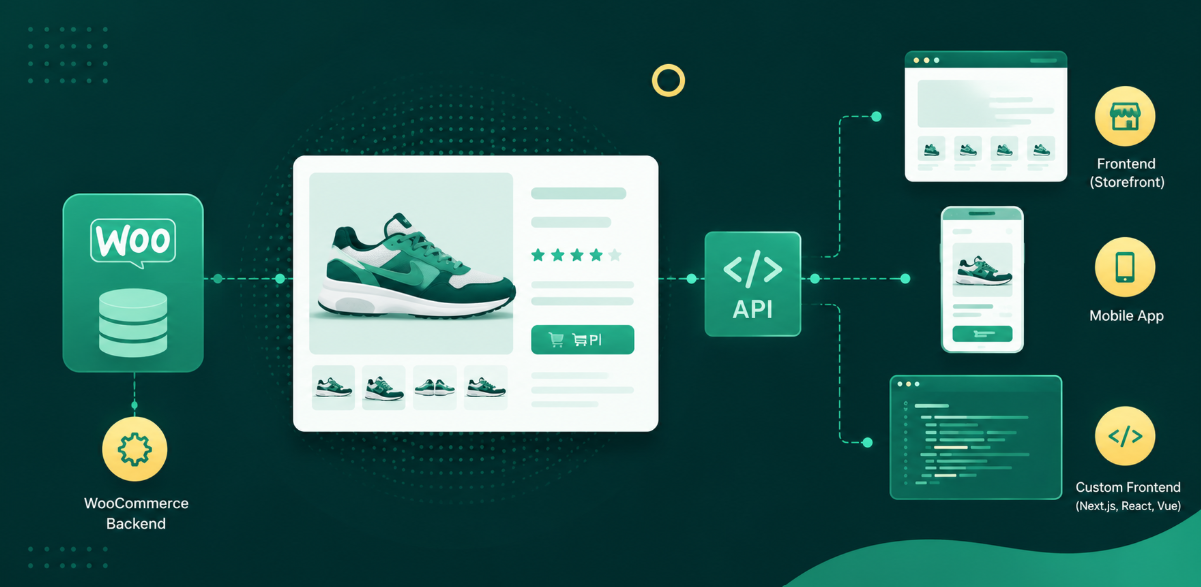
Through a checkout you control. On InstaWP there are three: the hosted native WaaS checkout, which takes 5% per sale with Stripe fees included; WooCommerce on your own site; or your own app over the API. The last two cost 0% in InstaWP fees, and there is no monthly platform fee on any of them.
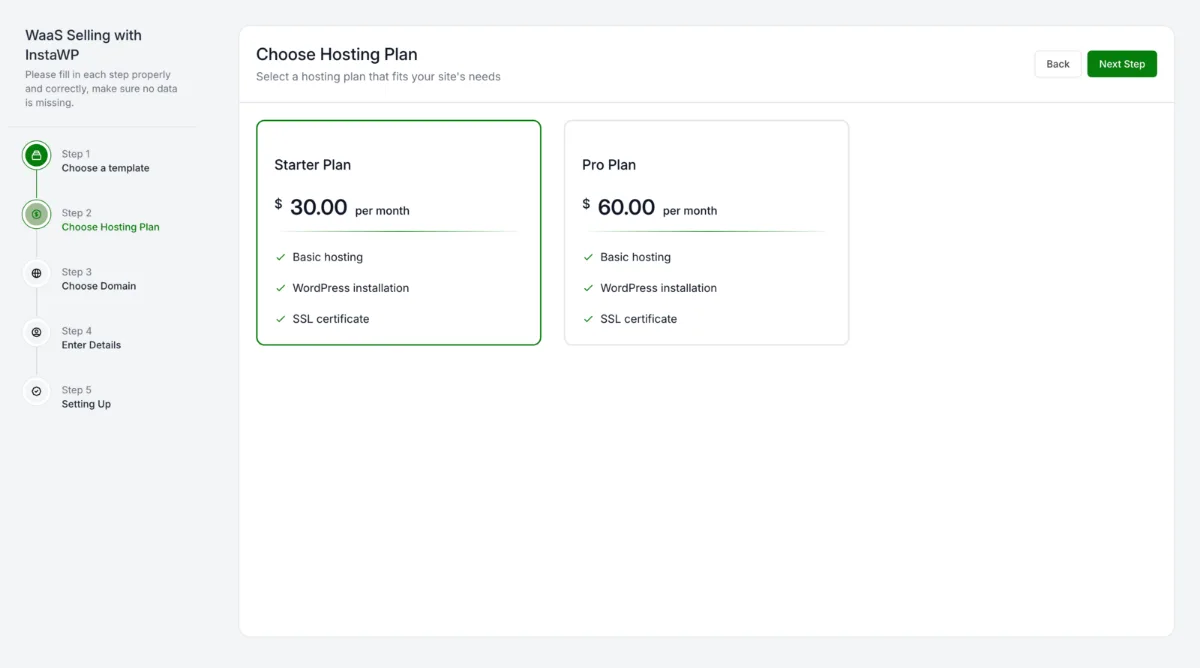
Payouts from the native checkout go to your bank through Stripe Connect, which you set up once under Sell > Payouts. To run checkout on your own store instead, follow how to sell hosting with WooCommerce. Either way, InstaWP’s WaaS lets you sell websites with hosting under your brand.
How do you keep InstaWP invisible to your clients?
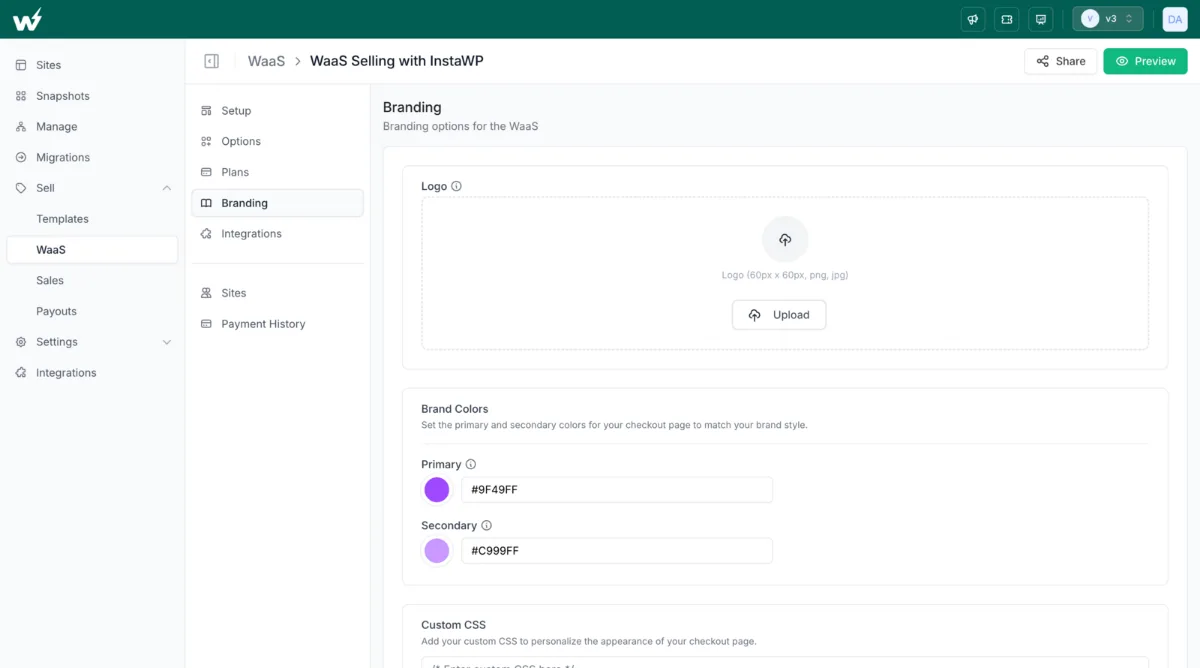
White-label every surface the client touches. On InstaWP that means your logo, colours and CSS on the checkout, your own support link and emails, sites on your own domain, and a client portal on your domain where clients open wp-admin without an InstaWP account.
- Put your logo, brand colours, custom CSS and support link on the checkout, and write the purchase email your client receives.
- With the white-label suffix domain add-on ($5 a month), new client sites get addresses on your domain rather than an InstaWP one.
- Each client’s own domain maps to their site with CNAME records, from your dashboard or from the client’s site page. See custom domains for WaaS sites.
- The client portal runs on your own subdomain: point a CNAME such as clients.youragency.com at it, verify, and HTTPS is set up for you. Clients sign in there and reach wp-admin in one click. See the white-label client portal.
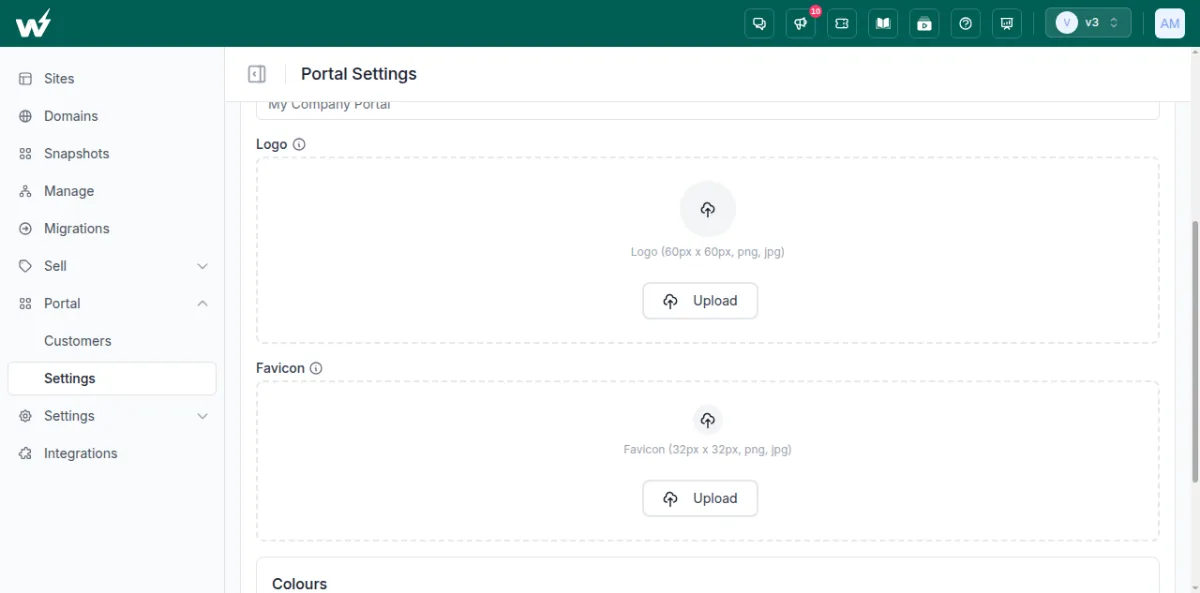
White-labelling here works through your domains and CNAME records rather than branded nameservers. For the full picture of what a client sees and how to price it, read our guide to white-label WordPress hosting.
Who owns the website if a client cancels?
Whoever your agreement says. There is no default, so write it down before the first sale. A common split is that the client owns their content and domain, you own the template design and code, and a client who leaves can either buy out the design for a set fee or take their content only.
On InstaWP the exit is technically simple, which makes the clause easy to honour. Each client site is its own WordPress install, not a Multisite subsite, so it can be exported or moved to another host as a complete site, and InstaWP migrations are free in both directions. Clients who buy through the WaaS checkout can also cancel their plan from their own site page, so your agreement needs to say what happens next.
What contract term should a website and hosting package have?
- Month-to-month is the easiest sale and the easiest exit. Pair it with a setup fee so your build time is covered.
- A twelve-month minimum pays back the build over the first year. State clearly whether it renews monthly or yearly afterwards.
- A setup fee plus month-to-month sits between the two.
Whatever you pick, set a notice period long enough to hand the site over or migrate it, and do not promise an uptime percentage you cannot back with your own monitoring.
What goes in a website and hosting agreement?
- What the monthly fee includes (your package list) and what costs extra
- Term, renewal, notice period and how to cancel
- Who owns the content, the design, the code and the domain
- The exit: export, migration help, any buyout price, and how long you keep data after cancellation
- Payment terms, failed payments and when a site is suspended
- Support hours and response times you commit to
- Data protection terms if you process personal data, such as a data processing agreement for clients covered by EU data protection rules
- Limits of liability and acceptable use
How do you keep clients from cancelling?
Make the monthly fee visibly worth paying. Clients cancel when they cannot see what they are paying for, so show them: a short monthly report, quick turnaround on small edits, and a good reason to pay yearly.
- Charge a setup fee. A client who paid to start is less likely to leave in month two.
- Offer yearly billing at a discount. WaaS plans can be sold monthly or yearly.
- Send a monthly report of updates, backups, uptime and the edits you made. InstaWP’s WordPress site management tools give you the uptime, activity and vulnerability data to report on.
- Include a few edits each month, so the client keeps coming back to you instead of looking elsewhere.
- Let prospects try first. WaaS demo sites can expire after anything from 30 minutes to 48 hours, then upgrade to a paid plan in one click.
- Review plan fit each quarter and move growing sites up a tier before they slow down.
Bundling these into retainers is covered in our guide to WordPress care plans for agencies, and finding the clients in the first place is covered in the WaaS sales funnel for agencies.
How do you sell your first website with hosting on InstaWP?
Build one template site, connect payouts, create a WaaS with your plans and branding, then share the checkout link. A client picks a template and a plan, pays, and gets a live WordPress site in about 10 seconds. You then manage ongoing clients in your branded portal.
Step 1: Build the site you want to sell and save it as a template
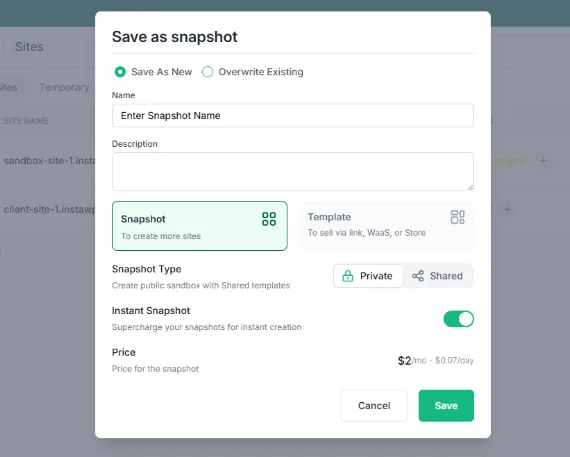
Create a site on InstaWP from scratch, from a snapshot or from the Store, or bring in a design you already built elsewhere with InstaWP Connect. Shape it for one niche (a dental practice, a bakery, a law firm), then save it as a template from the site’s actions menu. You can start from pre-built WordPress templates or your own site snapshots.
Step 2: Connect payouts
Go to Sell > Payouts and finish the Stripe account setup so native checkout payments reach your bank. The payout setup guide walks through each screen.
Step 3: Create the WaaS
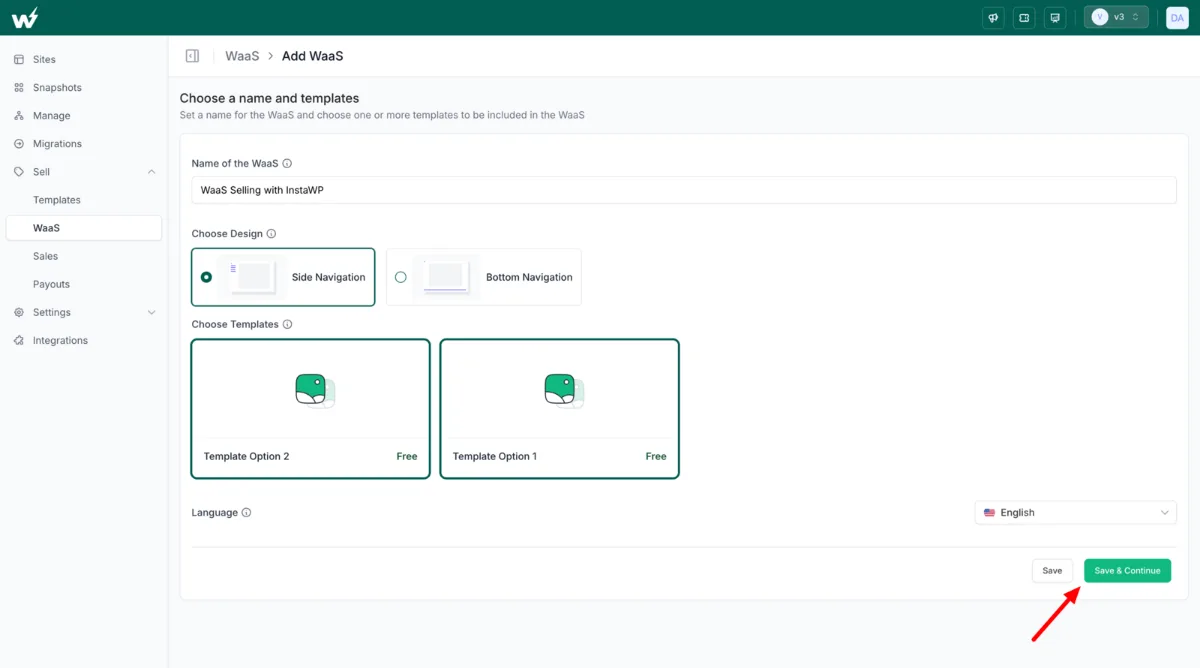
Go to Sell > WaaS and click Add New. Name it, pick side or bottom navigation, choose the templates clients can pick from, and set the language. On the next screen you can switch on demo sites, let clients buy a domain at checkout with your markup on top, set the default currency, and skip steps you do not need.
Step 4: Add the plans you sell
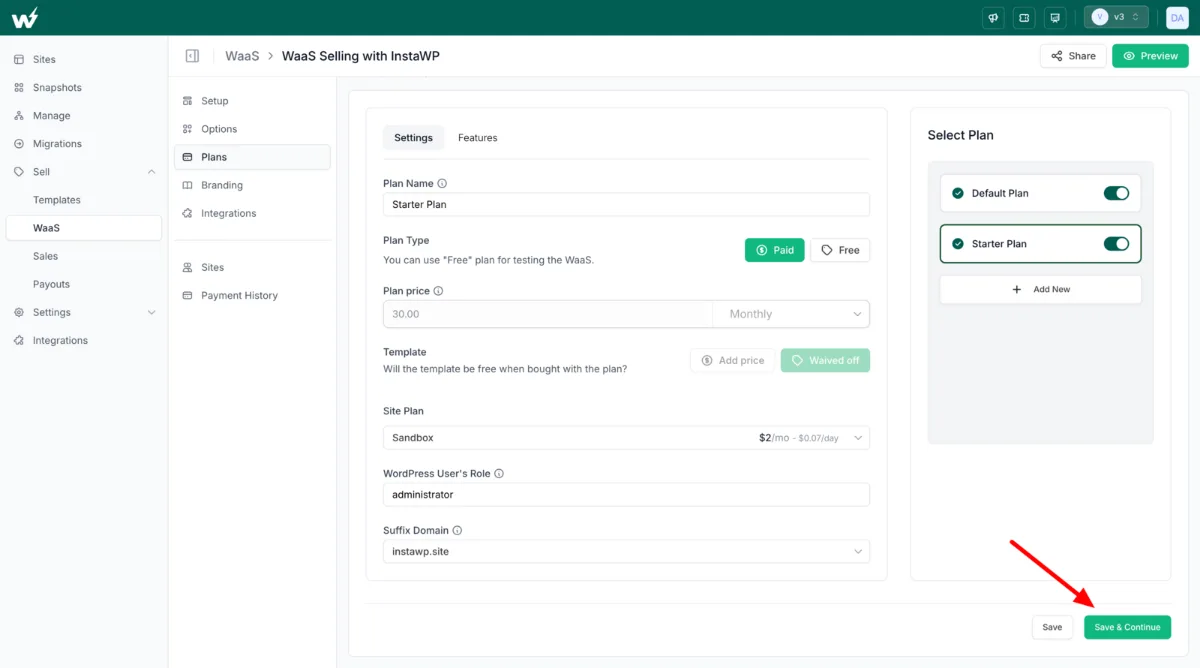
For each plan, set the name, paid or free, a monthly or yearly price, whether the template is priced or waived, the InstaWP site plan underneath it, the WordPress role your client gets, and the suffix domain. List what is included on the Features tab; clients see that list when they compare plans.
Step 5: Brand the checkout
Add your logo, brand colours, custom CSS, support link and the purchase email. This is what makes the checkout look like your product.
Step 6: Preview and share the link
Click Preview and run the whole checkout once yourself. When it looks right, click Share to copy the link, then send it to clients or embed it on your own site.
Step 7: Your client checks out
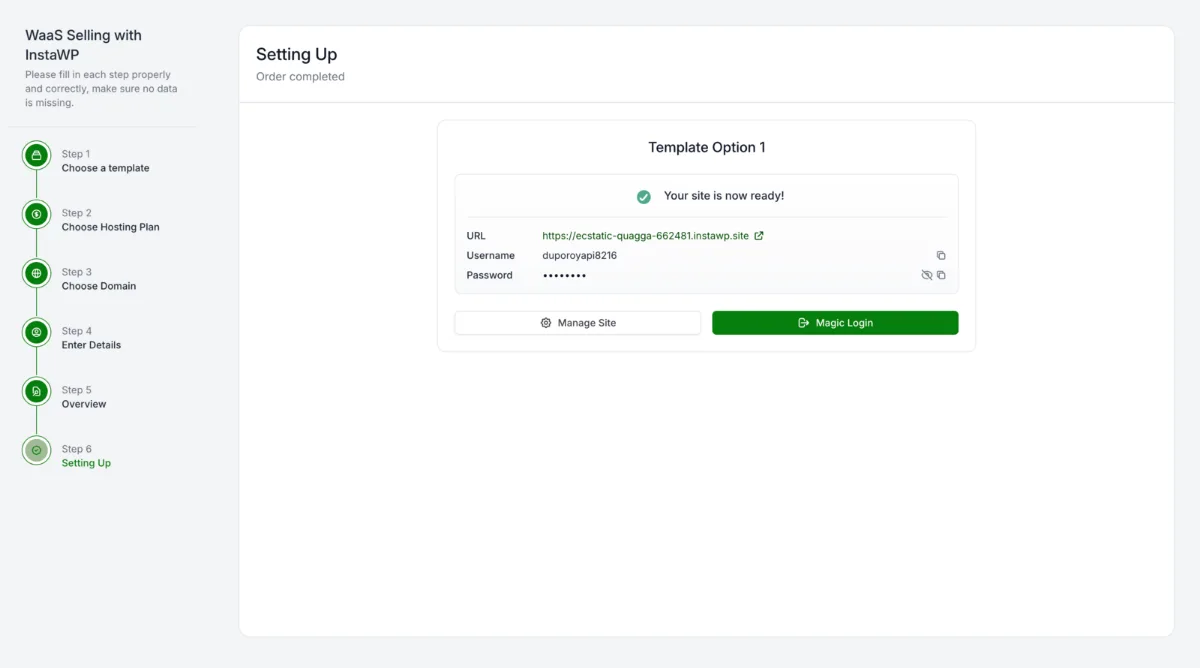
The client picks a template, picks a plan, chooses a domain (buys one, enters their own, or keeps the generated address), enters their name and email plus card details for a paid plan, and checks out. The site is ready with its URL, login details, Magic Login and a Manage Site link.
Step 8: Manage clients in your portal
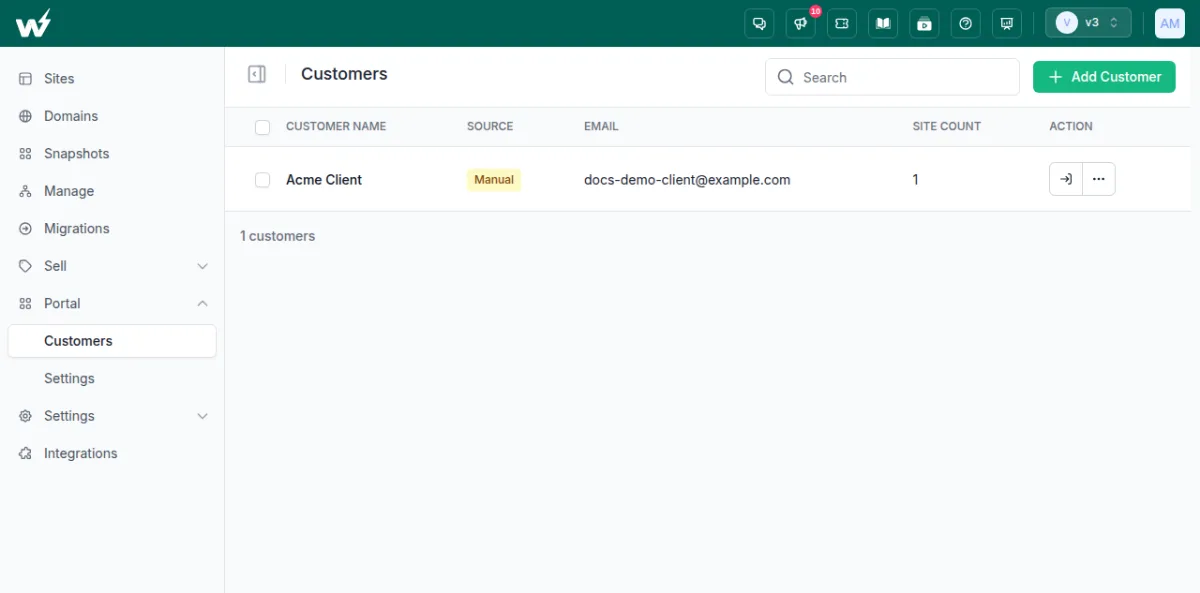
For clients you onboard yourself, go to Portal > Customers, click Add Customer, enter their name and email, and tick the sites they should see. They get a welcome email to set a password. You can log in as any client to see what they see, reset their password, or remove them. The Customer Portal setup guide covers the domain and branding steps.
What is the quickest way to start selling websites with hosting?
Pick one niche, build one template site, and sell it in two or three tiers on a monthly subscription. Put the package contents, the term and the exit terms in writing. Host each client site on its own plan so it can grow, move or leave without touching anyone else. On InstaWP that is per-site hosting from $5 a month, a branded checkout at 5% or 0%, and a client portal on your own domain.
More from the InstaWP team on this topic: how to sell websites faster with WaaS, selling WordPress websites to your clients, how WordPress agencies can sell websites as a service, building a WaaS on a supported host and the benefits of templates in WordPress development.
Frequently asked questions about selling websites with hosting
Who owns a website sold with hosting?
Whoever your agreement says. A common split is that the client owns their content and domain while the agency owns the template design and code until the client buys it out. On InstaWP each client site is a standalone WordPress install, so either outcome is easy to carry out.
Can a client leave and take their website with them?
Yes, if your agreement allows it. Each InstaWP client site is a complete WordPress install, so it can be exported or migrated to another host, and InstaWP migrations are free in both directions. If you own the design, set a buyout fee in the agreement.
How long should a website and hosting contract be?
Month-to-month is the easiest to sell, a 12-month minimum pays back your build cost, and a setup fee plus month-to-month sits in between. Whichever you choose, state the renewal terms, the notice period and how the client cancels.
What are the downsides of website as a service for the client?
The client pays for as long as they keep the site, so over several years a subscription can cost more than a one-off build. They may have less freedom to customise, and they depend on the agency for a clean exit. Clear exit terms and a fair buyout price answer most of this.
What is the difference between WaaS, reseller hosting and white-label hosting?
Reseller hosting sells hosting space only. White-label hosting is any hosting sold under your own brand. Website as a service sells the website, its hosting and its upkeep together as one subscription, and it is usually white-labelled too.
Do I need a reseller account or my own servers to sell websites with hosting?
No. On InstaWP you host each client site on its own plan from $5 a month, sell it through the WaaS checkout, WooCommerce or the API, and InstaWP runs the servers. You set the retail price and keep the difference.