Website as a service (WaaS) is a business model where an agency sells a client a ready-made website, its hosting and its upkeep for one monthly fee instead of a one-off build price. The client’s site stays updated and backed up, and the agency earns recurring revenue from a template it only has to build once.
On WordPress, that usually means one template site cloned for every client, each clone on its own hosting plan, with a branded checkout in front. InstaWP runs that setup on its managed WordPress hosting: each WaaS client site is a separate WordPress install billed per site from $5 a month, and the checkout, plans and client portal carry your brand. This guide covers what a WaaS subscription includes, how it compares with traditional web design and reseller hosting, who owns the site, and the click-by-click setup.
- WaaS turns a website into a subscription. The client pays one monthly fee for the website, hosting, updates and support, so the agency’s revenue repeats every month.
- Your cost floor is the per-site hosting plan. On InstaWP that starts at $5 a month per site, billed daily, so a $19 plan leaves $14 before any checkout fee.
- Checkout choice sets your fee. InstaWP’s native WaaS checkout takes 5% with Stripe fees included; WooCommerce or your own API costs 0%, and there is no platform fee.
- Ownership is a contract decision, so write it down first. Each InstaWP WaaS site is a standalone WordPress install, not a Multisite subsite, so a client who leaves can take a full copy.
- Sell live client sites on Starter or higher. Sandbox sites cannot map a custom domain.
Table of Contents
What is website as a service (WaaS)?
Website as a service (WaaS) is a subscription model for websites: the agency builds, hosts and maintains the site, and the client pays a recurring fee to use it. The client gets a working, managed website without handling hosting, updates or security. The agency turns each build into recurring revenue instead of a one-time invoice.
In WordPress terms, website as a service (sometimes searched as “WordPress as a service”) means one polished template site, cloned for each new client, with hosting, backups, updates and support bundled into the monthly price. A client usually signs up through a checkout page, picks a plan, and gets a live WordPress site minutes later. Finding and converting those clients is its own job, covered in our WaaS sales funnel for agencies.
The core difference from traditional web development is the payment model. A traditional build is a one-off project fee, sometimes followed by a separate maintenance retainer. With WaaS, the subscription is the product, and the site, hosting and care are sold together.
How does website as a service work, step by step?
A WaaS business runs the same loop for every client: build once, sell many times, then keep each site healthy so the subscription renews.
Key components of a successful WaaS (website as a service)
A WaaS offer works when seven pieces fit together.
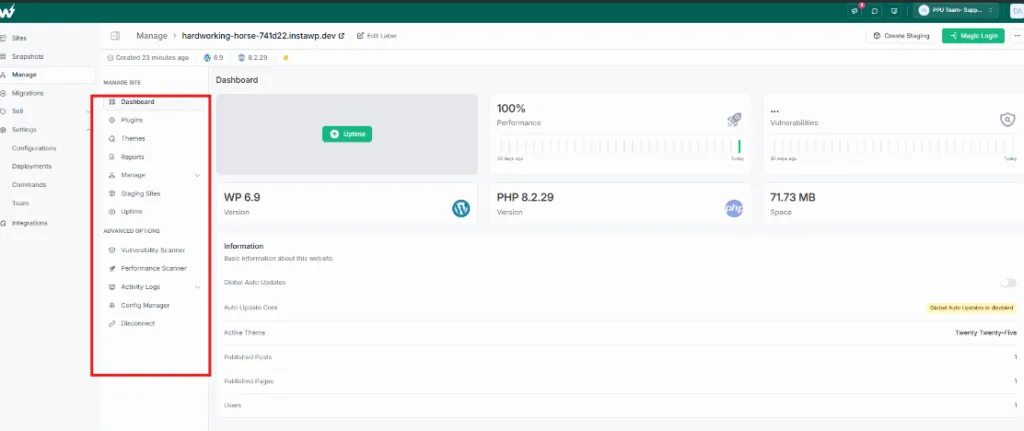
1. Centralized management platform
One dashboard for every client site, covering hosting, updates, backups and monitoring. Without it, each new client adds the same manual work again.
InstaWP’s multi-site management dashboard handles bulk updates, backups and performance checks across client sites from one place.
2. Customizable templates and themes
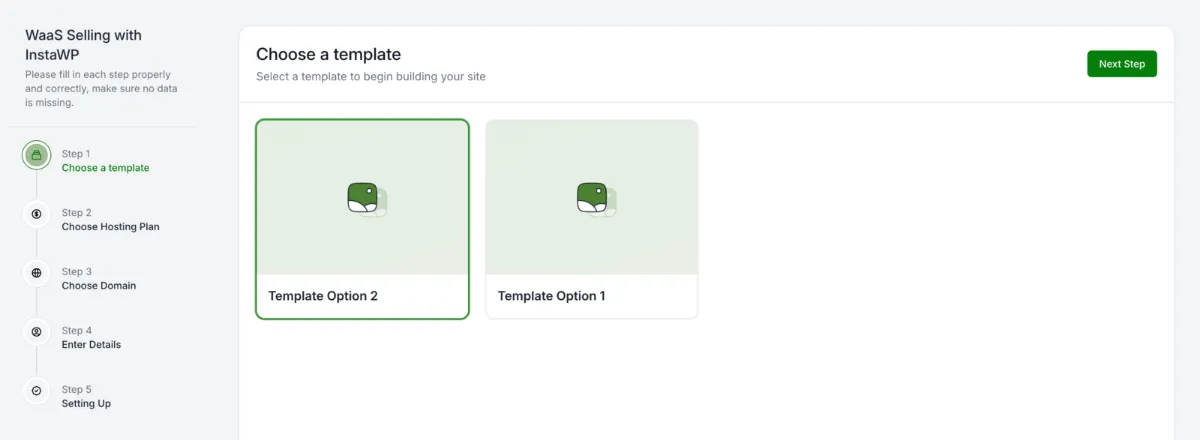
A library of customizable templates and themes is what makes WaaS profitable: you design once, then sell the same structure to many clients in one niche.
InstaWP Snapshots capture a complete WordPress site (themes, plugins, content and settings), so each new client starts from an exact copy of your template. Premium themes and plugins inside a template need a licence that covers multiple sites.
3. Integrated hosting infrastructure
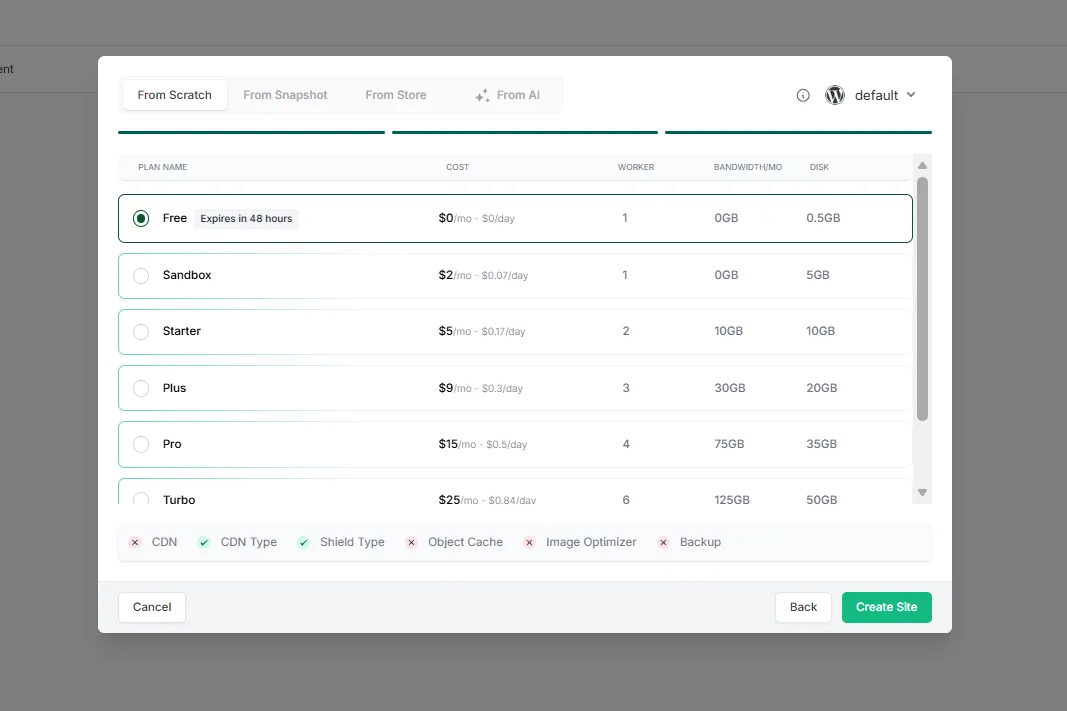
The hosting underneath decides speed, uptime and how many problems reach your inbox. A WaaS platform should run each client site on high-performance WordPress hosting with security and backups built in, so one client’s traffic spike does not slow down the others.
On InstaWP, every WaaS plan you sell sits on an InstaWP production hosting plan with reserved resources for that site and the InstaCDN edge network in front.
4. Automated security and maintenance
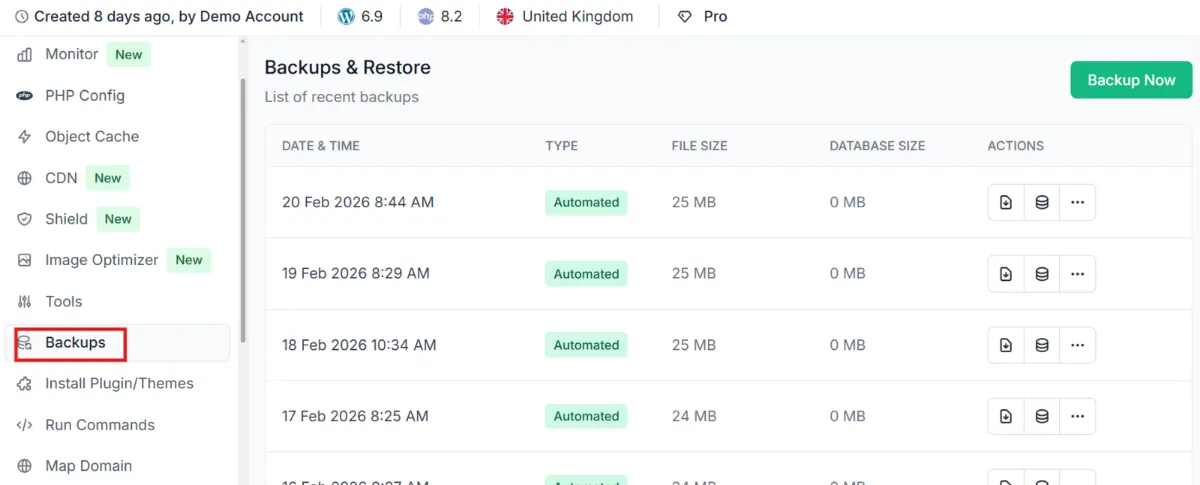
Clients pay a monthly fee partly so they never think about updates, malware or SSL. Your stack needs automatic SSL, a firewall, vulnerability checks and daily backups.
InstaWP’s InstaShield firewall blocks attacks at the edge, and the vulnerability scanner flags outdated plugins and known security issues. Which of these each client site gets depends on the hosting plan you attach to its WaaS plan (see the table below).
5. Client dashboard and reporting
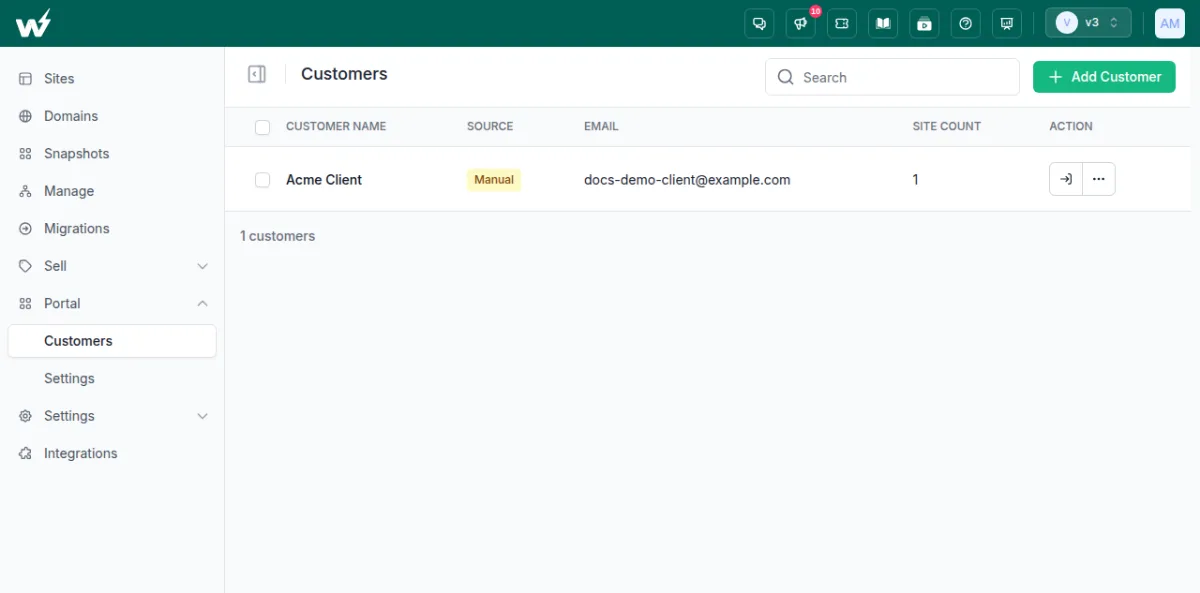
Clients want somewhere to log in that looks like your business, not your host. A client portal also cuts support requests, because clients can reach their own site without asking you for a password.
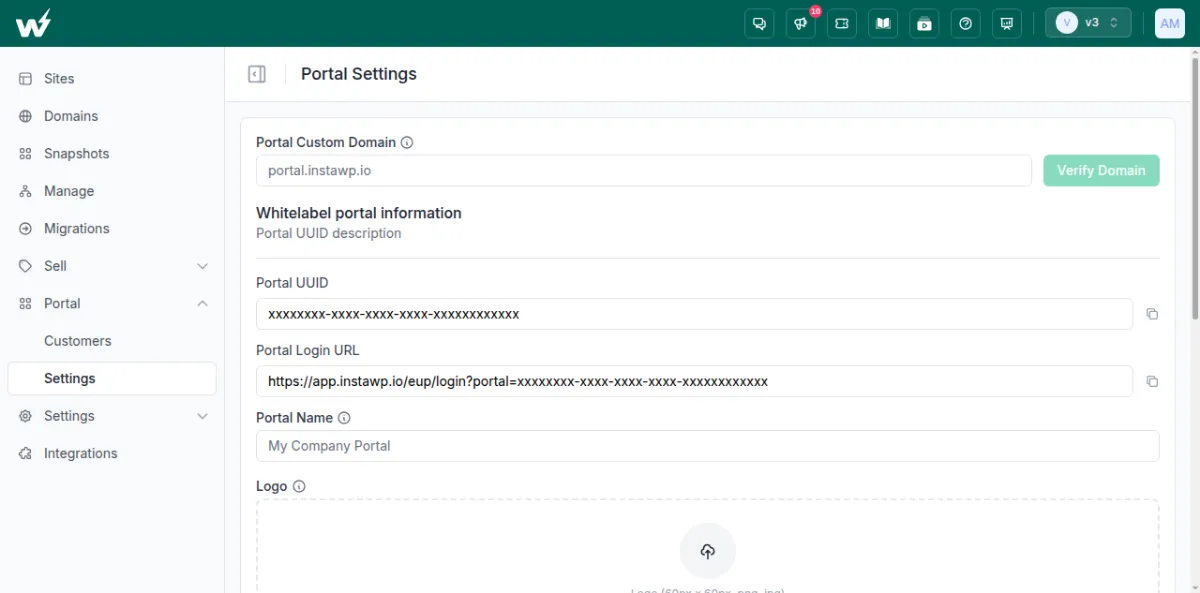
InstaWP’s white-label client portal runs on your own domain with your logo, favicon and colours. Each client sees only the sites you assign them and opens wp-admin in one click, without an InstaWP account.
6. Subscription billing system
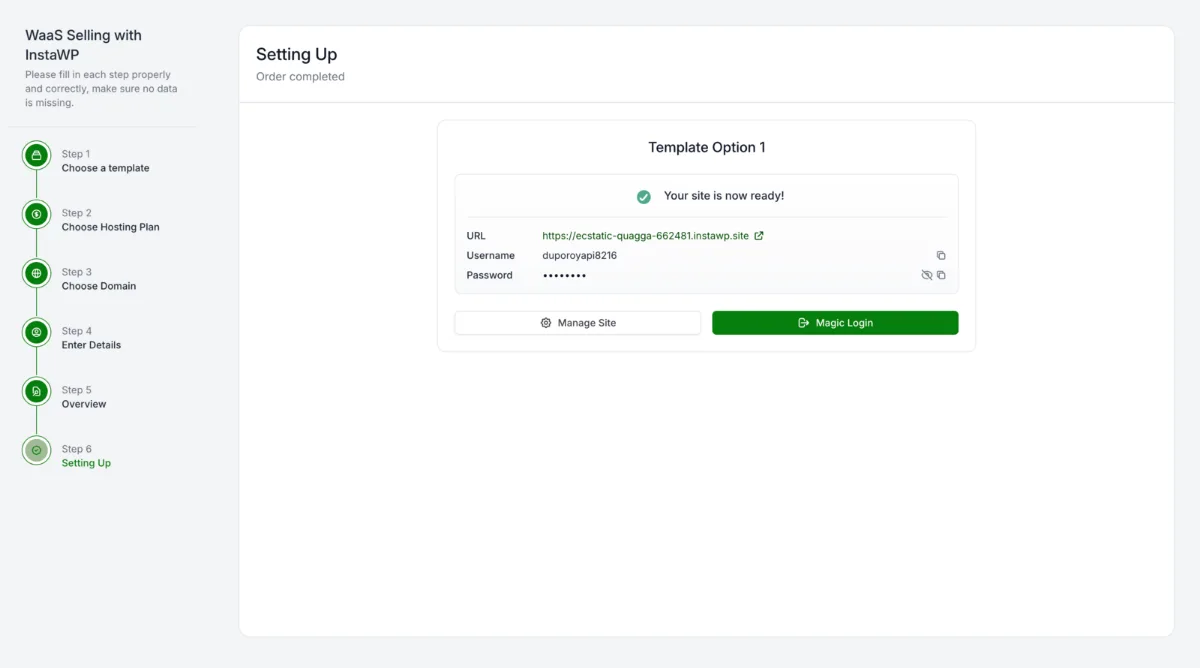
Recurring billing has to run without you. InstaWP gives you three options: a native checkout it hosts for you (5% per sale, Stripe fees included), your own WooCommerce store, or your own app over the API (both 0%). See how to sell hosting with WooCommerce for the store route. Paid sites are provisioned when the payment completes.
7. White-label solutions
To sell WaaS under your own brand, every surface the client sees has to carry it. InstaWP supports a white-label suffix domain (for example, client.youragency.com) as a $5-a-month add-on, plus your branding on the checkout and the portal, so clients never see InstaWP.
How is WaaS different from traditional web design, reseller hosting and white-label hosting?
WaaS sells the website, its hosting and its upkeep as one subscription. Traditional web design sells the build once. Reseller hosting sells only server space, and white-label hosting is any hosting sold under your own brand, which a WaaS offer usually is as well.
For a deeper look at the first two columns, read website as a service vs traditional web development. For the hosting-only models, see our guides on how to resell hosting and white-label WordPress hosting. If you are weighing a single Multisite network instead, read WordPress Multisite vs WaaS.
What does a WaaS subscription include?
A WaaS subscription should include the website, hosting, SSL, backups, security, software updates, uptime monitoring and a defined amount of support or edits each month. Write the list on your pricing page so the client knows exactly what renews every month.
- The website, built from your template and branded for the client
- Hosting, with the server region stated
- SSL, issued and renewed automatically
- Backups: how often and how long they are kept
- Security: a firewall plus vulnerability and malware checks
- WordPress core, plugin and theme updates
- Uptime monitoring, and what you do when the site goes down
- Support: response time and how many edits a month are included
- The domain: who registers it and who pays the renewal
The hosting half of that list comes with the InstaWP site plan you attach to each WaaS plan. This is what each plan covers, from the InstaWP pricing page on 7 October 2026:
The support and edits half is yours to define. For more on the hosting side, see InstaWP backups and the WordPress uptime monitor.
Who owns the website in a WaaS model?
Whoever your WaaS agreement says. There is no legal default, so the agency decides before the first sale. A common split is that the client owns their content and domain, the agency owns the template design and code, and a client who leaves can either buy out the design for a set fee or take their content only.
On InstaWP the exit is technically simple, which makes that clause easy to honour. Each WaaS client site is its own WordPress install, not a Multisite subsite, so it can be exported or moved to another host as a complete site, and InstaWP migrations are free in both directions.
What contract term should a WaaS agreement have?
- Month-to-month: the easiest sale and the easiest exit. Pair it with a setup fee so your build time is paid.
- Twelve-month minimum: pays back the build in year one. State whether it renews monthly or yearly afterwards.
- Setup fee plus month-to-month: sits between the two, and cuts early cancellations.
Whatever you choose, set a notice period long enough to hand the site over, and never promise an uptime percentage you cannot back with your own monitoring. The full agreement checklist (term, exit, data protection, liability) is in our guide on how to sell websites with hosting.
What are the benefits of WaaS for agencies, and the downsides for clients?
For agencies, WaaS turns one-off projects into predictable monthly revenue, cuts delivery time with reusable templates, and keeps clients coming back. For clients, the trade-off is paying for as long as they keep the site, with less freedom to customise than a fully bespoke build.
Recurring revenue. Subscription fees arrive every month, so twenty clients on a $49 plan is $980 a month before costs, and it repeats.
Time and resource efficiency. Updates, backups and fixes run across every client site from one place, which frees your team for sales and new templates.
Scalability. Adding a client means cloning a template, not starting a project. Overhead grows far more slowly than the client list.
A design agency with 50 WaaS clients on InstaWP can run updates, backups and monitoring for all of them from the managed sites dashboard, instead of logging in to 50 wp-admins.
Client retention. A client who pays monthly and gets regular updates and edits has a reason to stay. A project relationship ends at delivery.
The client-side downsides. Over three or more years a subscription can cost a client more than a one-off build. They depend on you for changes, and they need clear exit terms to feel safe. Agencies that publish fair buyout terms answer most of this objection up front. For a fuller list of who WaaS suits and who it does not, read is the WaaS model right for your agency.
How do agencies sell websites with hosting?
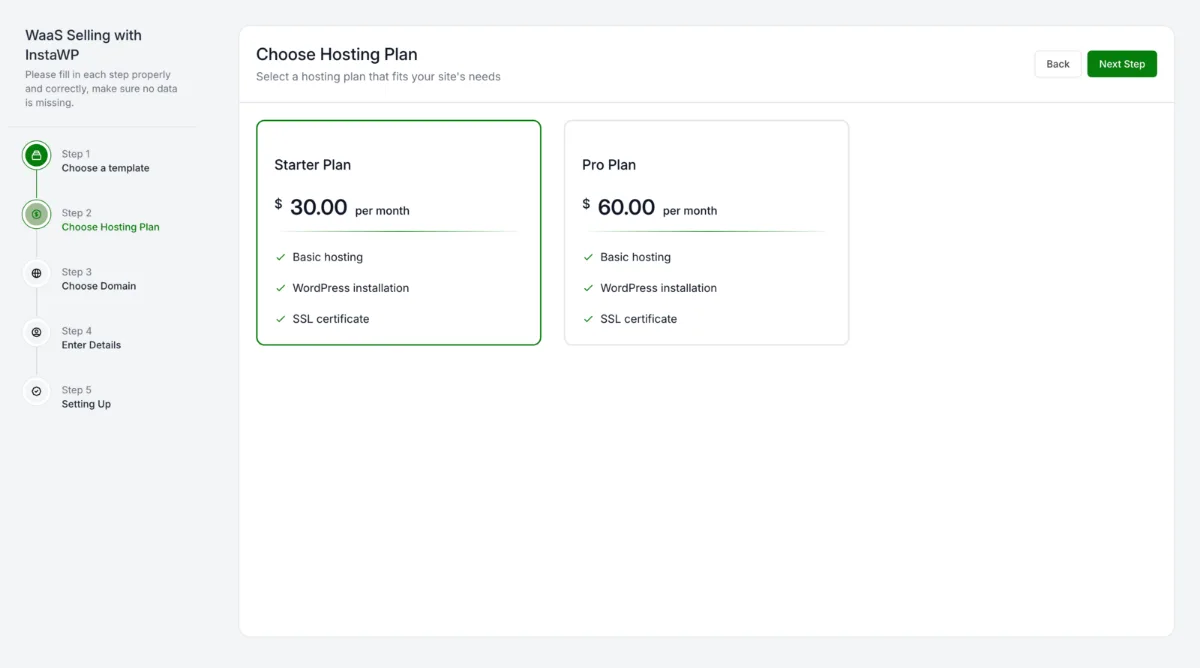
The easiest way to sell websites with hosting, or to start a website as a service (WaaS) business, is to build it on InstaWP. You build one template site, save it as a snapshot and sell it in plans. When a client pays, InstaWP creates their own copy of the template on the hosting plan you chose, and you keep the difference between your price and the per-site hosting cost.
Because the WaaS platform sits on top of InstaWP’s managed WordPress hosting, the template, the checkout, the hosting and the client portal all live in one dashboard. InstaWP WaaS gives you:
- Snapshots as templates: one finished site, cloned for every new client.
- Three ways to take payment: the native WaaS checkout, your own WooCommerce store, or your own app over the API. There is no platform fee on any of them.
- Automatic provisioning: a paid site is live in about 10 seconds, and the client gets a one-click Magic Login link.
- Demo sites: prospects can try a template on a temporary site (30 minutes to 48 hours) before they buy.
- White label throughout: your logo and colours on the checkout, client sites on your own suffix domain ($5-a-month add-on), and a branded client portal on your domain. See white-label WordPress hosting.
- Hosting per site: each client site is a separate WordPress install with SSL, the InstaShield firewall, InstaCDN and backups, at the level of the plan you pick, from $5 a month on Starter to $45 on Elite.
What are the three ways to sell WaaS on InstaWP?
InstaWP offers Native WaaS, WooCommerce WaaS and API WaaS. All three use the same provisioning engine and the same snapshots; they differ only in where the client pays and what InstaWP charges per sale.
On WooCommerce and the API, your own payment gateway still charges its usual fees. On every route, you pay InstaWP only the hosting plan of each client site, billed by the day.
1. Native WaaS: sell from InstaWP’s branded checkout
Native WaaS is the no-code route. InstaWP hosts the checkout, takes the payment through your Stripe account and provisions the site, while the client sees only your brand.
- Build your template site and save it with Save Template/Snapshot from the site actions menu.
- Go to Sell > Payouts and connect Stripe so payments reach your bank (payout setup guide).
- Go to Sell > WaaS, click Add WaaS, pick the templates clients can choose from, and create your plans, each backed by an InstaWP site plan.
- Upload your logo and brand colours under Branding, and switch on demo sites if you want prospects to try before they buy.
- Share the checkout link. A paid site is live in about 10 seconds, and the client receives a Magic Login link.
The Create WaaS guide covers every option, and the click-by-click setup below walks through each screen with screenshots. Watch the full Native WaaS workflow:
2. WooCommerce WaaS: sell hosting from your own store
WooCommerce WaaS turns any WooCommerce product into a hosted site. The client buys in your store, the paid order provisions the site on InstaWP, and the client finds it waiting in their My Account page. InstaWP takes 0% of the sale.
- Build the sites you want to sell and save each one as a snapshot.
- On your WooCommerce store (it can run on InstaWP too), install WooCommerce, WooCommerce Subscriptions for recurring billing, and the InstaWP Integration plugin.
- Create an InstaWP API token and paste it into InstaWP > Settings in your store.
- Create each hosting plan as a subscription product that maps a snapshot to an InstaWP plan.
- Place a test order as a customer and confirm the site appears under My Account before you go live.
The InstaWP Integration plugin guide covers every setting, and our step-by-step guide on how to sell hosting with WooCommerce covers store setup, pricing and free trial sites. Watch the WooCommerce WaaS workflow:
3. API WaaS: provision sites from your own app
API WaaS is for teams that already have their own signup and billing. Your app takes the payment and calls the InstaWP API to create the site, and webhooks tell your app when a site goes live or is deleted. InstaWP takes 0% of the sale.
- Create an API token in your InstaWP account.
- When a client pays, call the create-site endpoint with your template’s slug (Create a site via API).
- If the response says the site is still in progress, check the task status endpoint until it is ready, then send the client their login.
- Under Settings > Webhooks, add a webhook for the site.create and site.delete events so your app stays in sync (webhooks guide).
- Bill the client in your own system. InstaWP charges only the hosting plan of each site.
Every endpoint, parameter and response is in the InstaWP API reference.
How much does an agency keep per WaaS site?
Your cost per client site is its InstaWP hosting plan (compare plans on managed WordPress hosting, priced per site) plus the checkout fee if you use Native WaaS. Here is the margin on three example tiers sold through the native checkout. The retail prices are examples, not a market rate:
Sell the same tiers through WooCommerce WaaS or API WaaS and the checkout column drops to $0 in InstaWP fees, less your own gateway’s charges.
Which InstaWP tools does a WaaS business use?
InstaWP covers the WaaS stack in one dashboard: templates, provisioning, hosting, security, billing and a white-label portal.
How do you set up website as a service on InstaWP?
Build one template site, save it as a snapshot, add your white-label suffix domain, create the WaaS with plans and branding, connect payments, then share the checkout link. These steps use Native WaaS; for WooCommerce WaaS or API WaaS, swap Step 5 for the route above.
Step 1: Create your template site
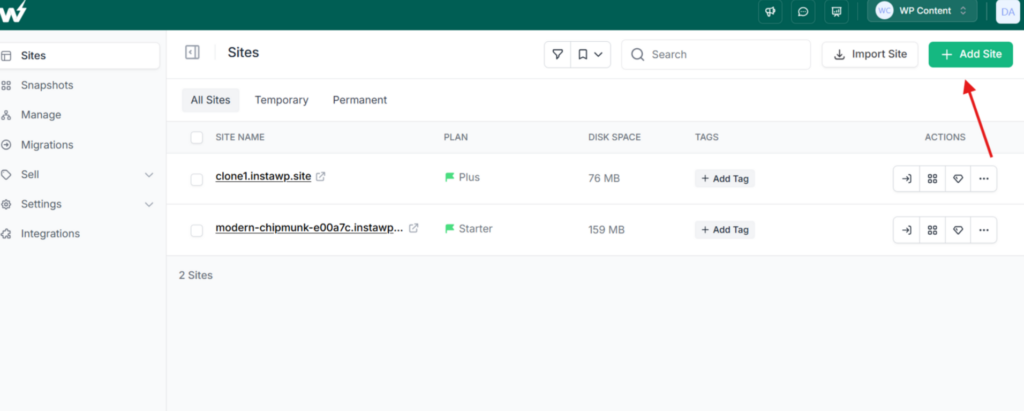
Log in to your InstaWP dashboard and click Add Site. Build from scratch or import an existing site, then install your theme and plugins and build the pages your niche needs (home, about, services, contact, booking) with polished placeholder content. Test the whole site before you save it.
Step 2: Save the site as a Snapshot
On the Sites list, open the three-dot actions menu next to the site and choose Save Template/Snapshot.
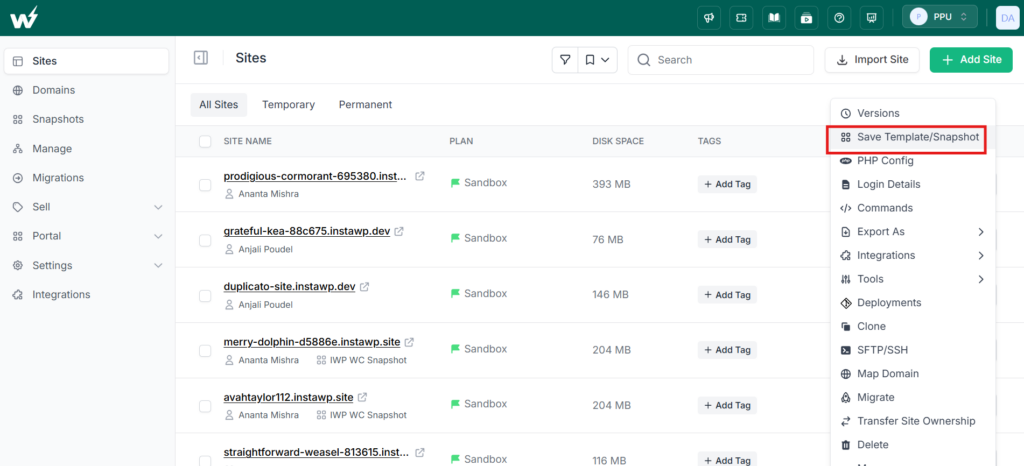
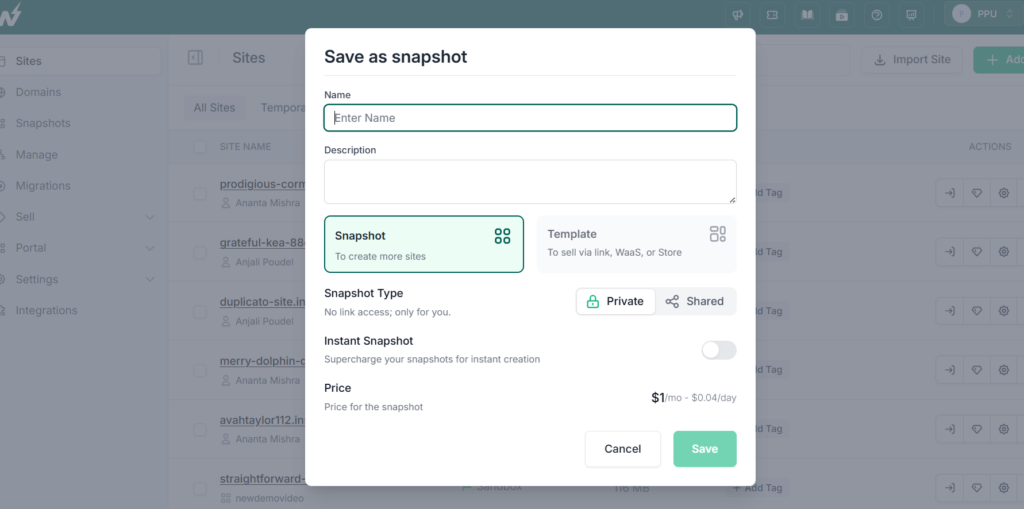
Give it a descriptive name (for example, “Restaurant Template v1”) and a description. This snapshot is the master copy InstaWP clones for every client who subscribes, so the more complete it is, the less per-client work you do. Snapshots cost $1 a month each.
Step 3: Configure your branded suffix domain
Click your team name in the top-right corner, open the settings icon, scroll to White Label and switch on Enable White Label.
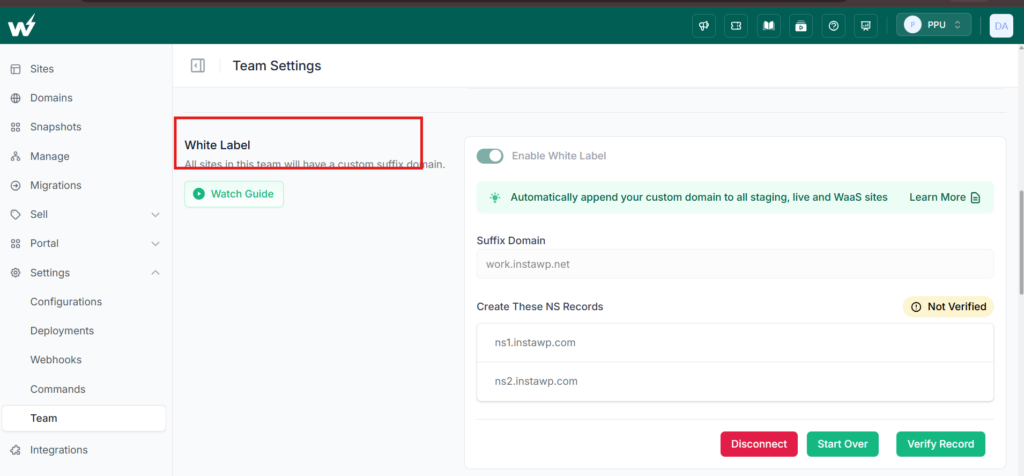
Enter your suffix domain (for example, sites.youragency.com) and click Add. InstaWP then shows two NS records; add them for that domain at your DNS provider, and click Verify Record. Once verified, client sites carry your domain in their URL. The suffix domain is a $5-a-month add-on, and the suffix domain setup guide covers Cloudflare.
Must Watch:
Step 4: Create your WaaS, plans and branding
Go to Sell > WaaS and click Add WaaS. Name it, choose side or bottom navigation, pick the snapshot templates clients can choose from, and set the default language.
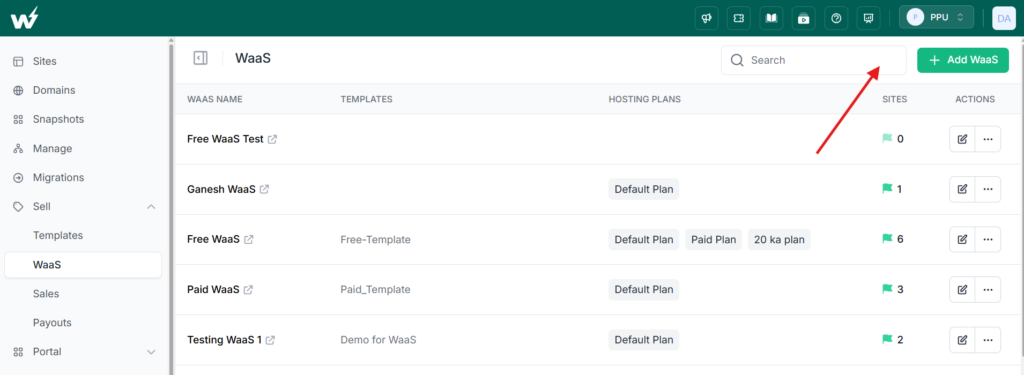
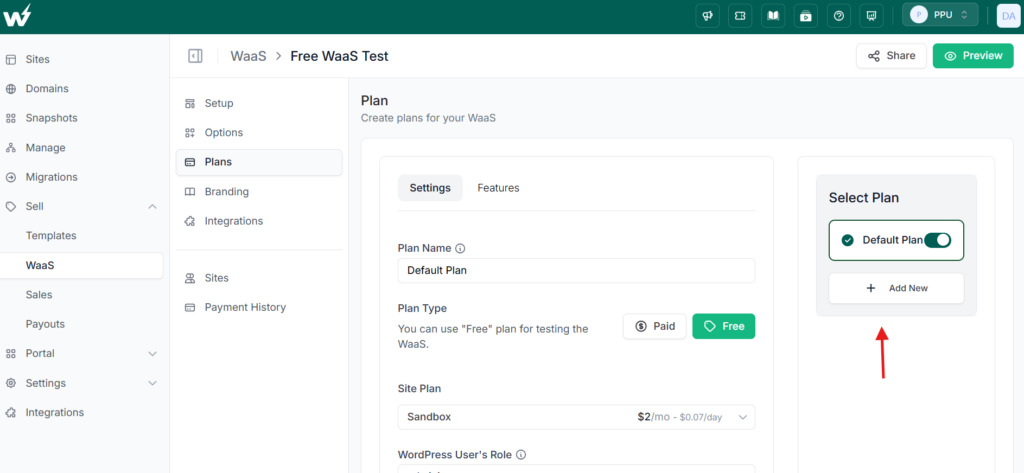
Under Plans, create each tier you sell: the plan name, paid or free, a monthly or yearly price, the InstaWP site plan underneath it, the WordPress role the client gets, and the suffix domain. For live client sites, choose Starter or higher, because Sandbox sites cannot map a custom domain.
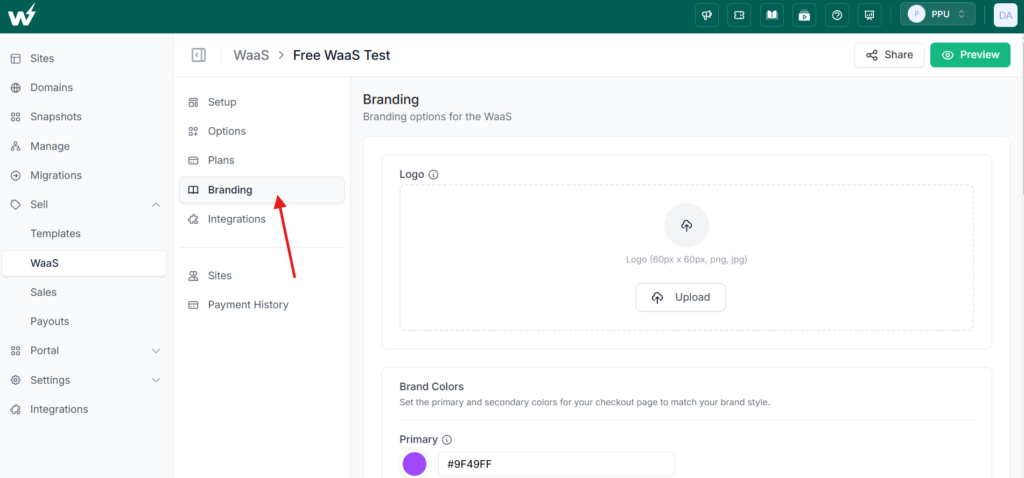
Under Branding, upload your logo, set your brand colours, add custom CSS and a support link, and write the confirmation email new subscribers receive.
Step 5: Connect payments
For the native checkout, go to Sell > Payouts and finish the Stripe account setup so payments reach your bank (5% per sale, Stripe fees included). To use your own store instead, follow how to sell hosting with WooCommerce, or connect your own app over the API; both cost 0% in InstaWP fees. Either way, a paid site is created only after a successful payment, and the client gets a Magic Login link for immediate wp-admin access.
Step 6: Choose the protection each client site gets
Security and performance follow the InstaWP site plan behind each WaaS plan, so pick it on purpose. Plus and above add daily backups, the Advanced firewall, bot and DDoS protection, the vulnerability scanner, managed updates and uptime monitoring; Pro adds built-in staging. Manage the whole fleet from the managed sites dashboard. These ongoing services are what clients pay for each month.
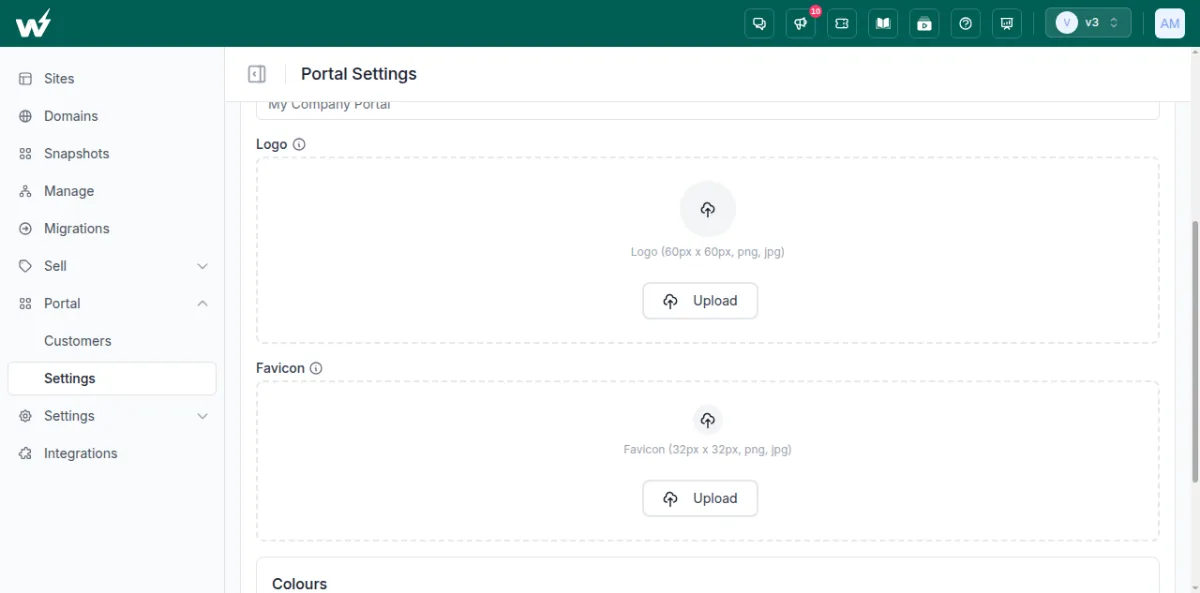
Step 7: Set up the branded client portal. Go to Portal > Settings, enter the portal domain (for example, clients.youragency.com) and point a CNAME to the address shown, then upload your logo and favicon and set your colours. Clients log in there to see the sites you assign them and open wp-admin in one click. The Customer Portal setup guide has every screen.
Is website as a service right for your agency?
Website as a service fits agencies that serve many similar small-business clients and want revenue that repeats every month. It fits less well when every client needs a fully custom build they own outright. If it fits, start with one niche and one template, write your ownership and exit terms down, and price each tier above the per-site hosting cost.
Running WaaS on InstaWP gives you managed WordPress hosting billed per site, templates and snapshots, InstaShield and the vulnerability scanner, InstaCDN, and a branded checkout and client portal, so the service looks like your own product. The seven steps above take you from the first snapshot to a working white-label WaaS. For the business side, read how agencies run a WaaS business.
Website as a service FAQs
What is website as a service (WaaS)?
Website as a service (WaaS) is a business model where an agency sells a client a ready-made website, its hosting and its upkeep for one monthly fee instead of a one-off build price. On InstaWP, each WaaS client site is its own WordPress install, created from your template when the client pays.
Who owns the website, the content and the domain in a WaaS subscription?
Whoever the WaaS agreement says, because there is no default. A common split is that the client owns their content and domain, while the agency owns the template design and code until the client buys it out. Put it in writing before the first sale.
What happens to the website if a client cancels a WaaS subscription?
That depends on your exit terms: typically the client either pays a buyout fee to keep the full site, or takes their content and domain only. On InstaWP each client site is a standalone WordPress install, so it can be exported or migrated to another host, and InstaWP migrations are free in both directions.
What contract term should a WaaS agreement have?
Month-to-month is the easiest to sell, a 12-month minimum pays back your build cost in the first year, and a setup fee plus month-to-month sits in between. State the renewal terms, the notice period and how the client cancels, whichever you choose.
What are the disadvantages of website as a service for the client?
The client pays for as long as they keep the site, so over several years a subscription can cost more than a one-off build. They usually have less freedom to customise and depend on the agency for changes and a clean exit. Clear buyout terms answer most of this.
What is the difference between WaaS, reseller hosting and white-label hosting?
Reseller hosting sells server space only, and the client builds their own site. White-label hosting is any hosting sold under your own brand. Website as a service sells the website, its hosting and its upkeep together as one subscription, and is usually white-labelled too.
How much does website as a service cost per month?
The agency sets the price. Most sell two or three tiers, priced to cover the hosting cost per site, support time and a margin. On InstaWP the hosting cost starts at $5 a month per site, and the native checkout takes 5% per sale with Stripe fees included, or 0% through WooCommerce or the API.
How do WaaS businesses reduce churn?
Make the monthly fee visibly worth it: send a short monthly report of updates, backups and uptime, include a few edits each month, charge a setup fee, and offer a yearly plan at a discount. Demo sites that let prospects try a template first also bring in clients who already know what they are buying.
Is website as a service the same as WordPress Multisite?
No. WordPress Multisite runs many subsites on one WordPress install, so they share plugins and resources. A WaaS platform such as InstaWP gives each client a separate WordPress install, which can be upgraded, moved or cancelled without touching any other client.
What should a WaaS client agreement include?
What the monthly fee includes, the term and notice period, who owns the content, design, code and domain, the exit and buyout terms, payment and suspension rules, support response times, data protection terms, and limits of liability. Have a lawyer review it before use.


