WordPress 7.2 is the third and final major WordPress release of 2026, scheduled for December 8, 2026. It ships a new minimal default theme called Ipsum, a Secrets API that stores credentials encrypted, emoji reactions and a canvas layout for Notes, text shadow controls, an On This Day section on the dashboard and random content redirects at /random/.
Last tested: 30 October 2026, on WordPress 7.2 Beta 3 in an InstaWP sandbox (PHP 8.2).
Key takeaways
- Release date: WordPress 7.2 is due December 8, 2026. Beta 3 arrived early, on October 28, alongside the 7.1.4 security release.
- Ipsum replaces year names: the default theme that was planned as Twenty Twenty-Seven ships as Ipsum, a blank-canvas blog theme. Beta 3 bundles Ipsum 1.0 with 11 templates and 57 patterns.
- Secrets API: plugins get
wp_set_secret()andwp_get_secret(). In InstaWP’s test the stored value never appeared in plain text inwp_options. - Editors notice Notes and styling first: reactions on Notes, text shadow, a Customized filter in Global Styles and form controls in Styles.
- Developers get six core abilities: Beta 3 registers six, up from the three that shipped with the Abilities API in WordPress 6.9.
- Two promised blocks are not in Beta 3 yet: Description List and Table of Contents are on the roadmap but not registered in the build InstaWP tested.
| Question | Answer (as of Beta 3, 30 October 2026) |
|---|---|
| What is it? | The third major WordPress release of 2026 and the last one of the year. |
| Release date | December 8, 2026, at 15:00 UTC (official schedule). |
| Current build | 7.2-beta3, released October 28, 2026. RC1 is planned for November 17. |
| Default theme | Ipsum 1.0, a minimal blank-canvas blog theme. Twenty Twenty-Five stays bundled. |
| Biggest developer change | The Secrets API, encrypted credential storage built on libsodium. |
| Biggest editor change | Notes with emoji reactions on the canvas, plus text shadow and form styling in Global Styles. |
| PHP and MySQL minimums | PHP 7.4 and MySQL 5.5.5, unchanged from WordPress 7.1.4. |
| Release lead | Matt Mullenweg. |
| Not in Beta 3 | Description List block, Table of Contents block, sudo mode, React 19, real-time collaboration. |
| Safe to use in production? | No. Betas are for test sites, staging copies and local installs only. |
If you are catching up, the earlier releases this year have their own guides: WordPress 7.0 features covers the AI Client, Connectors and the modern admin, and what is new in WordPress 7.1 covers responsive styles, Tabs, Playlist and in-browser image processing. WordPress 7.2 builds directly on both.
When is WordPress 7.2 released?
WordPress 7.2 is scheduled for release on December 8, 2026, at 15:00 UTC. That date comes from the official WordPress 7.2 development cycle page and the 7.2 release party schedule, and it is repeated in the WordPress 7.1.4 announcement.
The beta cycle has already moved once. Beta 3 was planned for November 3, but it shipped on October 28 together with the WordPress 7.1.4 security release, so it carries the same security fixes. The schedule page now lists the two remaining beta dates as Beta 4 and Beta 5.
| Date (2026) | Milestone | What happens |
|---|---|---|
| ~August | Alpha | Trunk opens for 7.2 development. |
| October 20 | Beta 1 | Feature work lands. Dev notes and the About page begin. |
| October 27 | Beta 2 | Abilities API, DataViews and admin asset loading work continues. |
| October 28 | Beta 3 | Released early, alongside the 7.1.4 security release. |
| November 3 | Beta 4 | Planned. Bug fixing and dev notes continue. |
| November 10 | Beta 5 | Planned. Last beta before the release candidate. |
| November 17 | Release Candidate 1 | Field Guide published, hard string freeze, 7.2 branch created. |
| November 24 | Release Candidate 2 | About page images updated, release post drafted. |
| December 1 | Release Candidate 3 | Final release candidate. |
| December 7 | Dry run | 24-hour code freeze. |
| December 8 | Final release | WordPress 7.2 ships at 15:00 UTC. |
Read the table from the bottom up if you plan client work around it. The release candidate on November 17 is the first build where features are frozen, so that is the earliest point to run a full compatibility pass on a client site.
One note on dates: the Help Test WordPress 7.2 post mentions December 9, while the schedule page and the release party post both say December 8. InstaWP uses December 8 and will update this page if the schedule changes.
Who is on the WordPress 7.2 release squad?
Matt Mullenweg leads the WordPress 7.2 release, with David Baumwald coordinating. The full squad was announced on September 9, 2026:
| Role | People |
|---|---|
| Release Lead | Matt Mullenweg |
| Release Coordination | David Baumwald |
| Tech Leads | George Mamadashvili, Peter Wilson |
| Default Theme Design Lead | Henrique Iamarino |
| Default Theme Dev Leads | Maggie Cabrera, Carolina Nymark |
| Default Theme Lead Mentor | Juanfra Aldasoro |
| Triage Leads | Jb Audras, Eshaan Dabasiya |
| Test Leads | Md Noruzzaman, Jina Parekh, Erick Wambua |
Like 6.7 through 7.1, the 7.2 cycle uses a smaller squad that leans on each Make team for its own area. The default theme team also has an explicit mentorship role this year, aimed at bringing new contributors into theme work.
What is new in WordPress 7.2?
WordPress 7.2 adds a new default theme, a Secrets API for developers, richer Notes, more design tools and a set of admin changes. The table maps each headline change to its status in the Beta 3 build InstaWP tested and to who will notice it first.
| Feature | Status in Beta 3 | Who notices first |
|---|---|---|
| Ipsum default theme | Bundled, version 1.0 | Site builders, bloggers, theme developers |
| Notes reactions and canvas layout | Working | Editorial teams and agencies with client reviewers |
| Text shadow controls | Working, None, Light and Strong presets | Designers |
| Global Styles: Customized filter and form controls | Working | Site builders |
| Responsive gallery settings | Partly verified (see below) | Designers |
| Dynamic galleries and Order by | Working | Content editors |
| On This Day | Working, inside the Activity widget | Long-running blogs |
| SVG admin icons | Working | Everyone in wp-admin |
| Secrets API | Working, CLI command not yet available | Plugin developers |
| Random content redirects | Working at /random/ | Bloggers and developers |
| Six core abilities | Registered | AI and automation builders |
| Description List and Table of Contents blocks | Not registered | Planned |
What is Ipsum, the WordPress 7.2 default theme?
Ipsum is the new default theme bundled with WordPress 7.2: an intentionally minimal block theme for blogs that starts as a blank canvas. It is named after lorem ipsum, the placeholder text that fills a page until real content arrives. The Ipsum announcement describes a quiet page with dotted underlines, a handful of typesets and style variations, where every color combination passes WCAG AA.
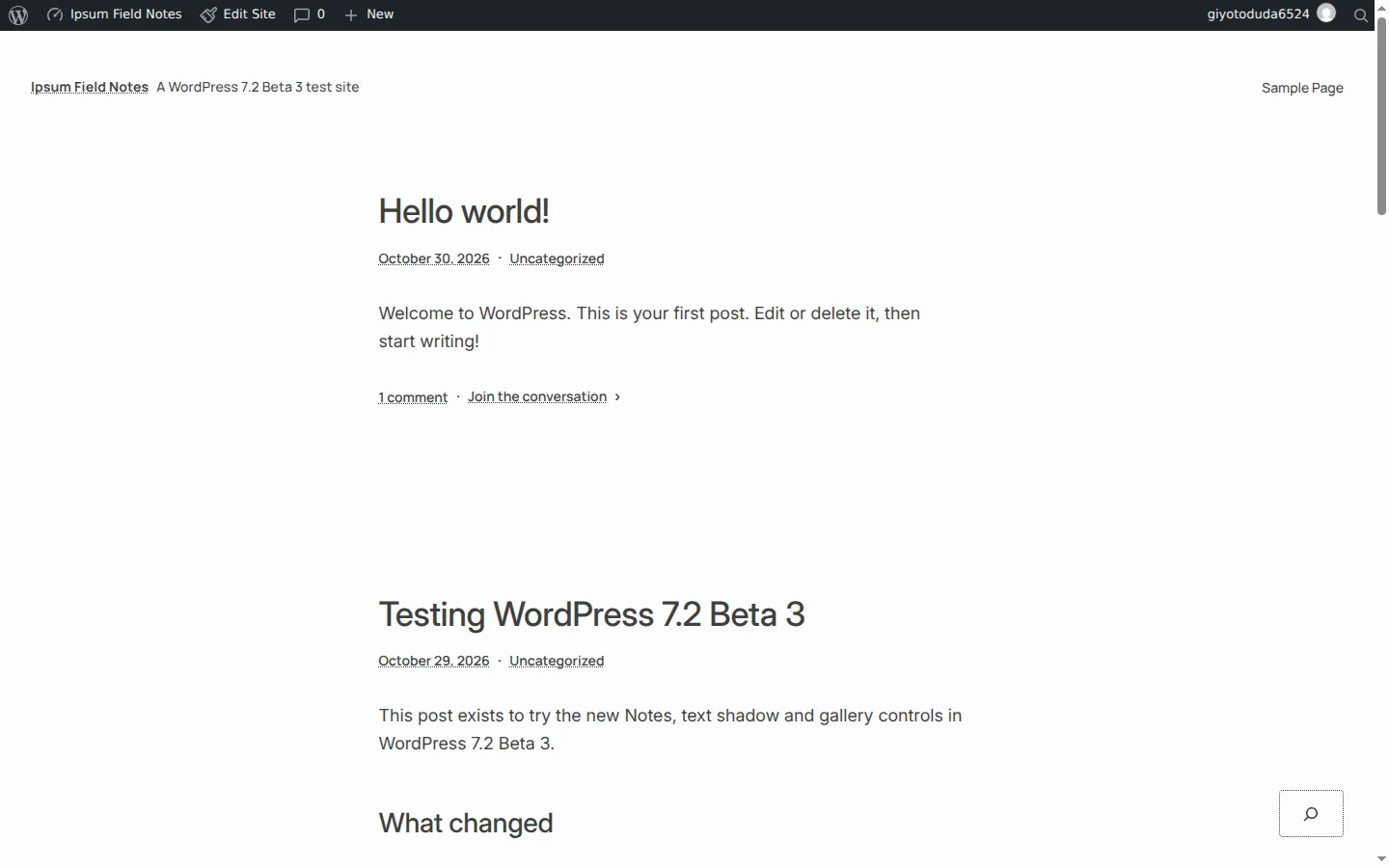
The name matters more than the design. The default theme work started in April 2026 as “Twenty Twenty-Seven”, and an earlier, more expressive design called Mētis was built for it.
After a review with Matt Mullenweg, the team switched to a simpler blank-canvas design and dropped year-based naming: future default themes get their own names and change when the design calls for it, not when the calendar does. Mētis remains a separate theme and does not ship with 7.2.
Here is what InstaWP found inside Ipsum 1.0 as bundled with Beta 3:
| Part | What Beta 3 contains |
|---|---|
| Requirements | WordPress 7.2 and PHP 7.4 (from the theme header) |
| Templates | 11, including sidebar variants of index, archive, single and page, plus 404 and search |
| Patterns | 57 PHP pattern files |
| Color variations | 7, named for times of day: Blue Hour, Sunrise, Morning, High Noon, Golden Hour, Evening and After Hours |
| Typography variations | 5: Archivo, Archivo Condensed, Besley, JetBrains Mono and STIX Two Text |
| Font families | 7: Manrope, Inter, Archivo, Besley, STIX Two Text, JetBrains Mono and Archivo Condensed |
| Block style variations | 4, including Display, Quote Mark and Quote Mark on Color for paragraphs |
| Size on disk | 3.6 MB |
Ipsum does not replace the older default themes in the download. The Beta 3 package still includes Twenty Twenty-Five, Twenty Twenty-Four and Twenty Twenty-Three, so updating an existing site does not switch its theme.
If you build client sites on block themes, the block theme vs classic theme comparison and the guide to styles in the Site Editor explain how Ipsum’s style variations behave.
Ipsum is still in development review.
The announcement is explicit that the current build “reflects the design work” and that formal development review comes next. Expect templates and patterns to change before December 8, and do not build a production child theme on Ipsum 1.0 from a beta.
How do Notes change in WordPress 7.2?
Notes, the block-level comments that arrived in WordPress 6.9, become a conversation in the margin in WordPress 7.2. Notes now sit on the editor canvas next to the block they belong to, the block settings sidebar can stay open at the same time, and every note takes emoji reactions.
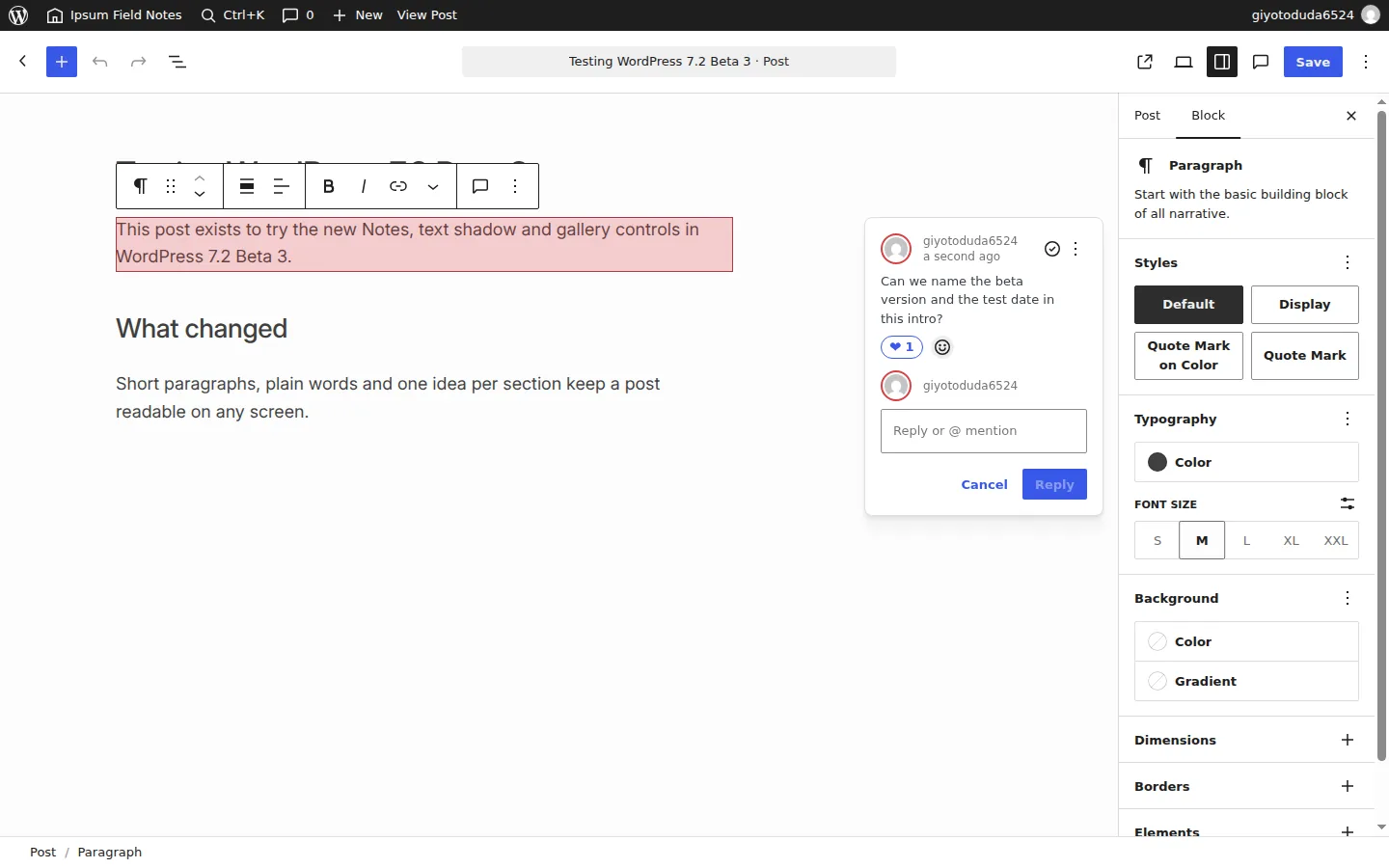
In InstaWP’s Beta 3 test, the first note came from the block Options menu (“Add note”, shortcut Ctrl+Alt+M). Once the paragraph had a note, a Notes button appeared in the block toolbar showing “1 note”, and a Notes icon appeared in the editor header. The reaction picker offered five reactions: Heart, Celebration, Smile, Eyes and Rocket.
The WordPress 7.2 Beta 1 announcement also lists a minimized Notes mode that collapses threads to reduce clutter, and the roadmap names suggestion mode, where a reviewer proposes an edit that the author accepts or rejects, as the centerpiece of this cycle. InstaWP did not find suggestion mode in Beta 3, so treat it as planned rather than shipped.
For agencies, this is the part of 7.2 worth trying with a client. Give the client a login on a WordPress staging site, ask them to leave notes on the draft, and react to close the loop, without a separate feedback tool.
What design tools are new in WordPress 7.2?
WordPress 7.2 adds text shadow controls, a Customized filter and form controls in Global Styles, inherited values in the block inspector, and more responsive settings for galleries. Most of these finish work that started in WordPress 7.1.
Text shadow
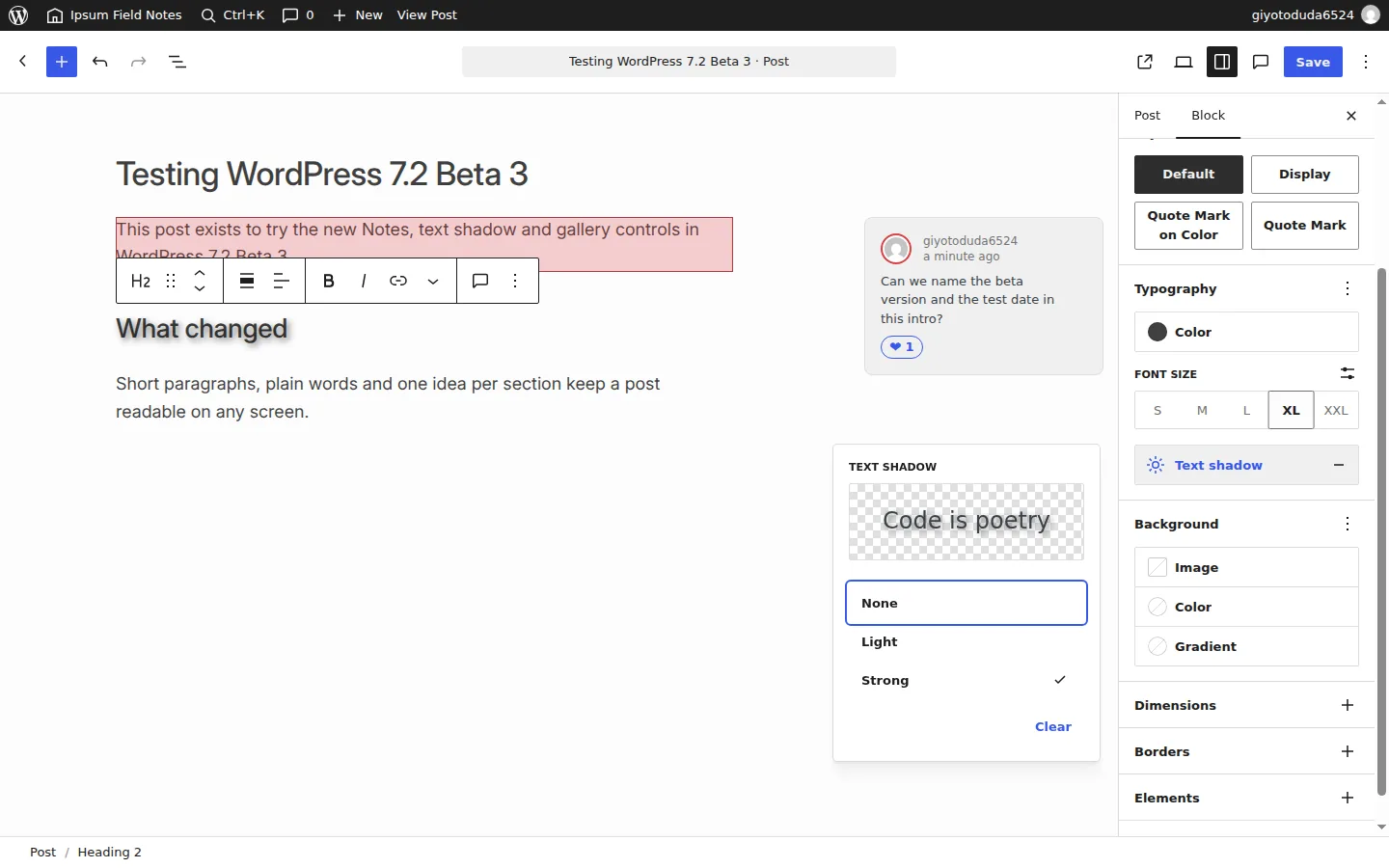
Text shadow is now a Typography tool in the block inspector and in Global Styles. In WordPress 7.1, textShadow existed only as a theme.json property for developers. In Beta 3, adding “Text shadow” from the Typography panel menu opens a picker with a live “Code is poetry” preview and None, Light and Strong presets. Themes can define their own presets in theme.json.
Global Styles: Customized filter and form controls
Global Styles gets two practical additions. A filter on the Blocks and Elements list switches between “All blocks” and “Customized”, so you can see only the blocks whose styles you changed. A new Form Controls group lets you style Form input, Form select and Form button site-wide without writing CSS.
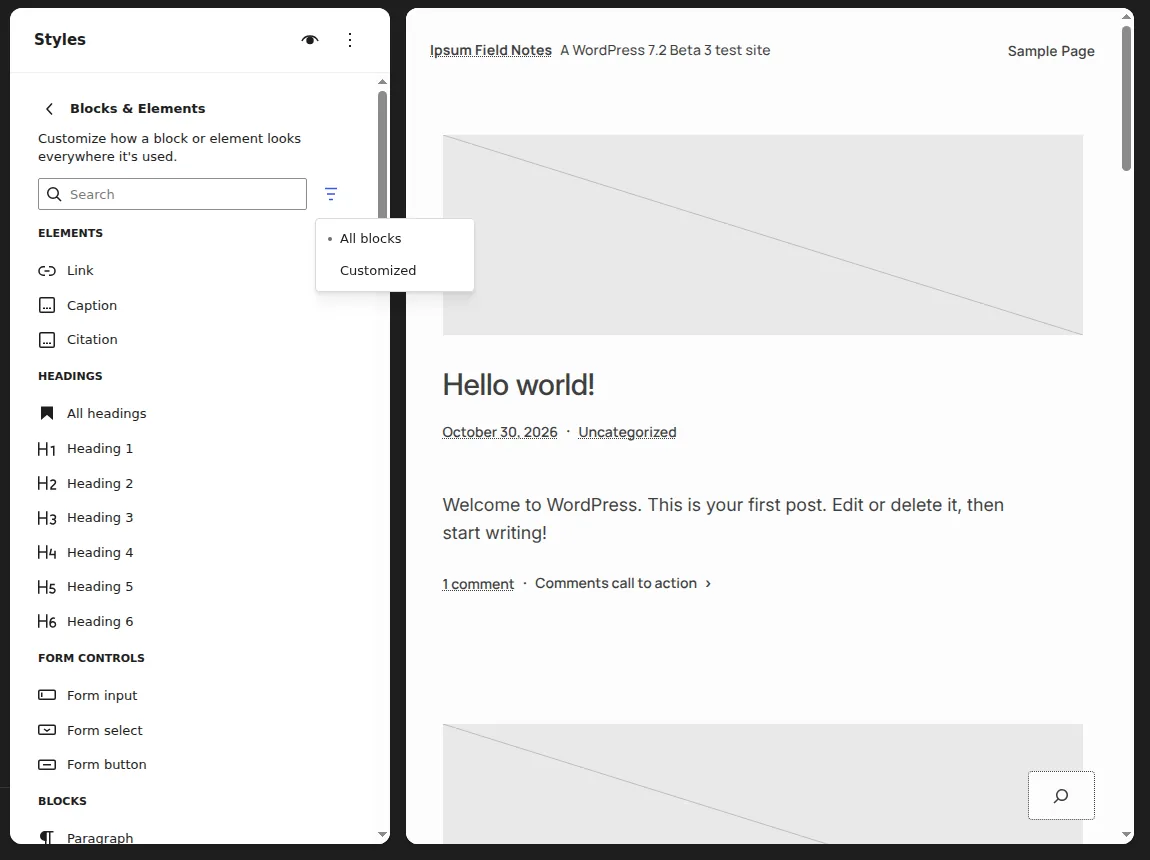
The roadmap says a label element and interactive input states are also planned for form styling. InstaWP saw input, select and button in Beta 3, so check the label element again at RC1.
The block inspector also starts showing inherited Global Styles values, so a paragraph set to red globally shows red in its own settings panel, which makes it clear when you are overriding a site-wide style.
Responsive settings and dynamic galleries
WordPress 7.2 extends the responsive styling introduced in 7.1 to more design tools, with the Gallery block as the headline example: columns, image cropping and aspect ratio are meant to be settable per viewport.
The Gallery block also gets a “Use attached images” source, which builds a gallery from images attached to the current post, and an Order by menu with Custom, Newest to oldest, Oldest to newest, A to Z, Z to A and Random.
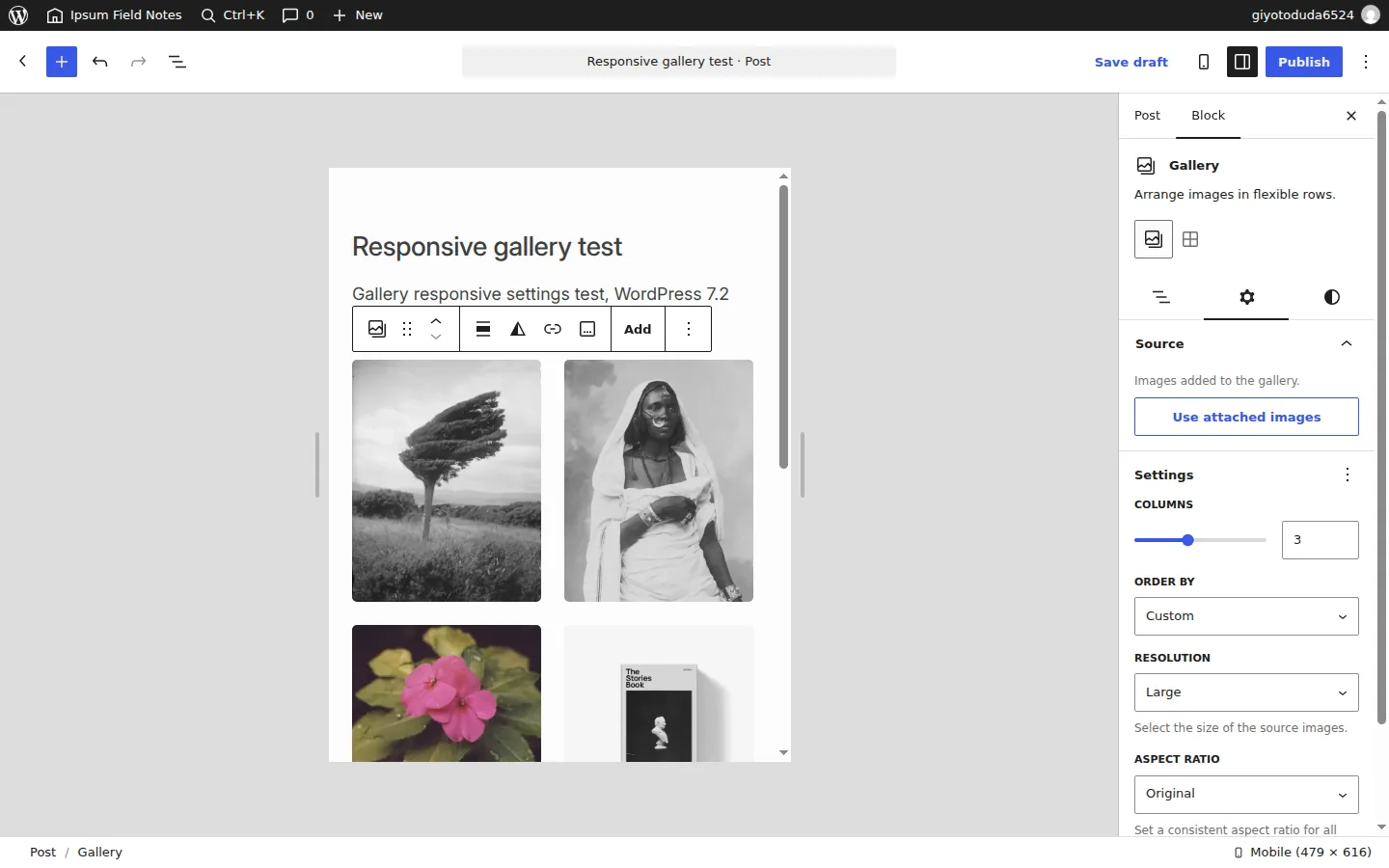
One result did not match the announcement. With the editor switched to Mobile preview, changing Columns in Beta 3 updated the gallery’s single columns value rather than storing a mobile-only value.
InstaWP could not confirm per-viewport gallery columns in this build, so test it again at RC1 before you promise it to a client. The “Use attached images” source and the Order by options worked as described.
The Help Test post also lists a duotone filter that applies to every image in a gallery and site-wide duotone palettes in Global Styles. InstaWP did not test either.
Try WordPress 7.2 on a throwaway site. Spin up an InstaWP sandbox and update it to the beta with one WP-CLI command.
Create a test siteWhat is the On This Day widget in WordPress 7.2?
On This Day resurfaces posts you published on the same date in earlier years, right on the dashboard. It was proposed for WordPress 7.1, left out of that release, and lands in 7.2.
In Beta 3 it is not a separate widget. The code adds a “Published On This Day” section to the existing Activity widget and moves Recent Comments into a widget of its own.
The section only appears when an older post shares today’s date: InstaWP created test posts dated 30 October 2024 and 30 October 2025, and both showed up under the new heading on 30 October 2026.
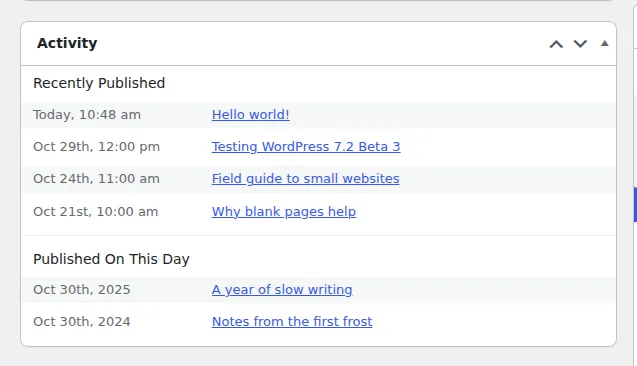
Developers can change how many posts it shows with the wp_dashboard_on_this_day_query_args filter.
What changes in wp-admin in WordPress 7.2?
WordPress 7.2 replaces the Dashicons font in the admin bar and admin menu with SVG icons, refreshes the post settings sidebar with DataForm, and changes how admin scripts load.
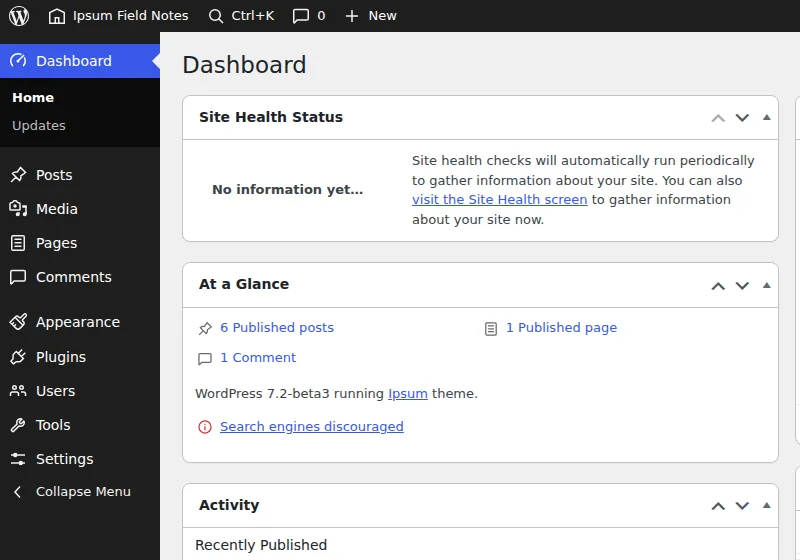
- SVG admin icons. The admin bar and side menu now use icons from the WordPress icon library, so wp-admin matches the newer editor screens. If your plugin adds a menu item with a Dashicon, check how it looks next to the new set.
- DataForm-powered inspector. The post settings panel (status, date, author, template, featured image) is being rebuilt on DataForm. There is a call for testing if you rely on custom fields in that panel.
- Clearer errors with a copy button. Error messages in the editor are being rewritten to say what went wrong, with a button to copy the error for a search or a support ticket.
- Faster admin navigation. WordPress 7.2 stops concatenating admin scripts and styles into large combined files and loads them individually for better browser caching, and a new prefetching step loads the resources for the screen you are likely to open next (Trac #57548).
- A toggle to stop metabox rearranging. Screen Options gets a setting that disables dragging metaboxes, which stops accidental layout changes on mobile.
What is the WordPress 7.2 Secrets API?
The Secrets API is a standard way for plugins to store API keys, tokens and passwords encrypted at rest, instead of saving them as plain text in wp_options. Until 7.2, WordPress had no first-class place for a credential, so every plugin invented its own. In Beta 3 the API lives in wp-includes/secrets.php, encrypts with libsodium (XChaCha20-Poly1305) and supports key rotation.
InstaWP tested it on the Beta 3 sandbox with a dummy key:
// Store a secret. Names take the form 'plugin-slug/secret-name'.
wp_set_secret( 'instawp-demo/api-key', 'sk_test_123' ); // returns true
// Read it back. You get a WP_Secret object, not a string.
$secret = wp_get_secret( 'instawp-demo/api-key' );
var_dump( $secret );     // prints "[secret:instawp-demo/api-key]"
$value = $secret->reveal(); // the plaintext, only when you ask for it
// List what a plugin has stored (no values, just metadata).
wp_list_secrets( 'instawp-demo' ); // name, fingerprint, created, needs_rotation
Three results are worth knowing. First, a database search for the test value found nothing: the secret was stored under an option named _wp_secret_instawp-demo/api-key, encrypted. Second, the returned WP_Secret object masks itself everywhere: printing, logging, JSON encoding and var_dump() all show [secret:name] until code calls reveal(), which keeps keys out of debug logs. Third, Site Health flagged the setup straight away.

Without a dedicated WP_SECRETS_KEY constant, WordPress derives the encryption key from your existing LOGGED_IN_KEY and LOGGED_IN_SALT. That works, but Site Health recommends defining WP_SECRETS_KEY in wp-config.php with a 32-byte, base64-encoded value. A WP_SECRETS_KEY_PREVIOUS constant exists for rotating that key. If you have not edited wp-config.php before, the guide to editing wp-config.php in WordPress covers the safe way to do it.
Two limits to plan around.
Namespacing is not isolation: the Beta 3 docblock says any plugin that can run PHP can read any secret. And the wp secret generate-key command that Site Health suggests did not exist in WP-CLI 2.12.0 on InstaWP’s test site, so generate the key another way until WP-CLI ships it.
The proposal behind this work is Trac #66187. A user interface for secrets is planned for a later release.
What else changes for developers in WordPress 7.2?
Beyond the Secrets API, WordPress 7.2 adds three core abilities, random content redirects, new Interactivity API primitives, server-side registration for DataViews and DataForm, and a database fix for servers running in NO_BACKSLASH_ESCAPES mode.
Six core abilities in the Abilities API
The Abilities API shipped in WordPress 6.9 with three core abilities, and WordPress 7.1.4 still registers only those three. WordPress 7.2 Beta 3 registers six. InstaWP confirmed this by reading the wp_register_ability() calls in both release packages:
| Ability | WordPress 7.1.4 | WordPress 7.2 Beta 3 |
|---|---|---|
core/get-site-info | Yes | Yes |
core/get-user-info | Yes | Yes |
core/get-environment-info | Yes | Yes |
core/settings-get | No | New |
core/users-query | No | New |
core/content-query | No | New |
Read the new rows as read-only access to settings, users and content. An AI agent needs that kind of read access to answer questions about a site before it changes anything. The WordPress MCP Adapter can expose abilities as MCP tools, and the WordPress MCP Adapter review explains how.
The roadmap also says write abilities, an updated MCP Adapter and a WordPress.org listing for it are being built in the AI plugin, with no promise they land in 7.2. To try abilities today, the guide to connecting AI agents to WordPress using MCP walks through it.
Random content redirects
WordPress 7.2 adds a /random/ URL that sends a visitor to a random published post. On the Beta 3 sandbox, a request to /random/ returned an HTTP 302 redirect to a random post with an X-Robots-Tag: noindex, follow header, so search engines do not index the random URL itself. The Help Test post says it also works for archives, such as /random/category/news/, and returns a 404 when nothing matches.
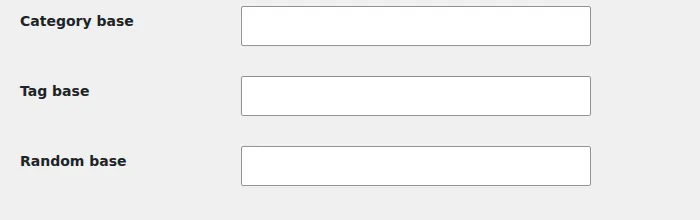
The base is configurable: a new “Random base” field sits under Category base and Tag base on Settings, Permalinks. If a site already uses /random/ as a page slug, check it before you update.
Interactivity API, DataViews and HTML processing
data-wp-htmldirective. The Interactivity API gets a way to render markup from the store inside an interactive region and keep it reactive. The first version only renders values that application code explicitly marks as trusted throughasDangerousHTML().- Router navigation events. Extenders get a supported way to observe client-side navigations and what started them, replacing the deprecated
state.navigation.hasStartedandhasFinishedpair. - DataViews and DataForm on the server. Beta 2 added server-side registration of view and form config, fields and actions, which is the base for plugins registering their own screens in the extensible Site Editor.
- Harder HTML processing. More of core moves to the HTML API instead of regular expressions for parsing markup.
NO_BACKSLASH_ESCAPES is turned off for WordPress connections
WordPress 7.2 adds NO_BACKSLASH_ESCAPES to the SQL modes it switches off when it connects to MySQL, next to modes like STRICT_ALL_TABLES and ANSI. Some hosts enable it, and it makes MySQL treat the backslash as a normal character, which can silently break escaped queries.
InstaWP confirmed the new entry in wpdb‘s incompatible modes list on Beta 3. It only affects the WordPress connection, not the server. If you truly need the mode, the dev note shows how to keep it with the incompatible_sql_modes filter in a db.php drop-in, because a normal plugin loads too late.
Which WordPress 7.2 features are planned but not in Beta 3?
Several items on the Roadmap to 7.2 were not in the Beta 3 build. The roadmap itself says that what it lists “doesn’t necessarily mean each will make it into the final release”, so treat these as possible, not promised.
| Item | What it would do | Status on 30 October 2026 |
|---|---|---|
| Description List block | Native <dl>, <dt> and <dd> blocks for glossaries and spec lists | On the roadmap. Not registered in Beta 3. |
| Table of Contents block | Takes the experimental block stable with server-side rendering | On the roadmap. Not registered in Beta 3. |
| Notes suggestion mode | Suggest edits that the author accepts or rejects | Centerpiece of the Notes roadmap. Not found in Beta 3. |
| Sudo mode | Re-authentication before sensitive admin actions | Initial work only, per the roadmap. |
| Application Passwords hardening | Email notification on a new password, safer default role handling, SameSite cookies | Prioritized task list on the roadmap. |
| React 19 | Full React 19 support in the editor | The roadmap says this is unlikely to land in 7.2. |
| Real-time collaboration | Several people editing one post at once | Deliberately left off the 7.2 roadmap. |
| AI features | Write abilities, an updated MCP Adapter, embeddings | Built in the AI plugin, no guarantee for 7.2. |
What are the WordPress 7.2 requirements?
WordPress 7.2 Beta 3 requires PHP 7.4 or newer and MySQL 5.5.5 or newer, the same minimums as WordPress 7.1.4. InstaWP read both values from wp-includes/version.php in each package. The download did grow, mostly because of Ipsum:
| Measure | WordPress 7.1.4 | WordPress 7.2 Beta 3 |
|---|---|---|
| Minimum PHP | 7.4 | 7.4 |
| Minimum MySQL | 5.5.5 | 5.5.5 |
| Zip download | 37.2 MB | 43.9 MB |
| Files in the package | 3,782 | 4,093 |
| Size unpacked | 117 MB | 143 MB |
| Database version | 61833 | 64486 |
| Bundled themes | Twenty Twenty-Three, Twenty Twenty-Four, Twenty Twenty-Five | The same three plus Ipsum |
The database version change means WordPress runs a database upgrade the first time an administrator visits wp-admin after updating.
That is normal, but it is one more reason to take a backup first and to test on a copy. PHP 7.4 is the floor, not a recommendation: the sandbox in this test ran PHP 8.2, and you can change the PHP version of an InstaWP site to match a client’s production server.
How do you test WordPress 7.2 safely on InstaWP?
Create a temporary InstaWP site, update it to the 7.2 beta with one WP-CLI command, and test there. Never run a beta on a production site. This is the exact process InstaWP used for this article; the sandbox was ready in 29.9 seconds.
Step 1: Create a sandbox site
In the InstaWP dashboard, click New Site, choose From Scratch, pick a PHP version and create the site (how to create a site on InstaWP). A Sandbox site costs $2 per month and is billed daily, and the $25 in free credits you get when you add a card covers it many times over. Mark it as temporary if you only need it for a few days.
Step 2: Open the Web Terminal
Open the site, expand Developer Tools and click Web Terminal. It is a browser-based SSH shell that runs WP-CLI in your site’s web root (Web Terminal docs). You can also send the same command from Run Commands or from your own terminal with InstaCLI.
Step 3: Update to the beta and confirm the version
wp core update --version=7.2-beta3
wp core version
# 7.2-beta3
Replace 7.2-beta3 with the newest build when Beta 4, Beta 5 or a release candidate ships. InstaWP’s guide to updating the WordPress version of a site explains the version card and refresh icon on the dashboard, and how to use WP-CLI covers the commands in more depth. If you prefer a plugin, the WordPress Beta Tester plugin on the “Bleeding edge” channel with “Beta/RC Only” does the same thing from wp-admin.
Step 4: Activate Ipsum and work through the checklist
Run wp theme activate ipsum, then test the features above. To test a real client site instead of a blank one, clone the site or make a staging copy first and update the copy. The general walkthrough on how to clone a WordPress site covers sites hosted elsewhere, and testing WordPress themes has a checklist that fits Ipsum.
Should you update a live site to WordPress 7.2 now?
No. Every WordPress 7.2 beta announcement says the same thing: betas are for testing and development only, not production or mission-critical sites. Wait for the final release on December 8, then update a staging copy first and promote it once the checklist below passes.
If something breaks during the beta, report it in the Alpha/Beta support forum or on WordPress Trac. Bugs reported now can still be fixed before the final release.
A WordPress 7.2 compatibility checklist
- Update a copy of the site, never the original, and confirm
wp core versionshows the beta. - Turn on
WP_DEBUG_LOGand watch for new notices after the database upgrade. - Check any plugin that stores API keys: does it work as before, and does it plan to move to the Secrets API?
- Look at custom admin menu icons next to the new SVG set.
- If the site uses
/random/as a page slug, change the Random base or the page. - If the host enables
NO_BACKSLASH_ESCAPES, test searches and anything that saves quotes or backslashes. - Open the post editor and check custom fields and metaboxes in the rebuilt settings sidebar.
- Test editor plugins with Notes open on the canvas and the settings sidebar open at the same time.
- If you build on block themes, try your patterns inside Ipsum and in its seven color variations.
Run this checklist on a copy, not the live site. Clone the client site on InstaWP and update the clone to the 7.2 beta.
Clone a site to testIs WordPress 7.2 worth waiting for?
Yes, mainly for developers and for teams that review content together. The Secrets API fixes a long-standing gap in how plugins handle credentials, and it worked as described in InstaWP’s test. Notes reactions and the canvas layout make client review possible inside WordPress.
Ipsum is a deliberately modest default theme, and the end of year-based theme names is the bigger long-term change. Two things to watch at RC1: whether the Description List and Table of Contents blocks make it, and whether gallery settings become truly per-viewport.
If you host client sites, plan the update for after December 8 and run it on a copy first. InstaWP’s managed WordPress hosting includes staging on Pro, Turbo and Elite plans, and managed hosting plans start at $5 per month per site, billed daily. For the background on why to stage every core update, read WordPress hosting with staging.
Sources for this post: the WordPress 7.2 schedule page, the Roadmap to 7.2, the Beta 1 and Beta 2 announcements, the Help Test WordPress 7.2 post, and InstaWP’s own Beta 3 test on 30 October 2026. InstaWP will update this page as new betas and release candidates ship.
Frequently asked questions about WordPress 7.2
When is WordPress 7.2 released?
WordPress 7.2 is scheduled for December 8, 2026, at 15:00 UTC. Release Candidate 1 is planned for November 17, 2026. It is the third and final major WordPress release of 2026.
What is new in WordPress 7.2?
WordPress 7.2 adds the Ipsum default theme, a Secrets API for encrypted credential storage, emoji reactions and a canvas layout for Notes, text shadow controls, a Customized filter and form controls in Global Styles, an On This Day section on the dashboard, random content redirects, SVG admin icons and three new core abilities.
What is the WordPress 7.2 default theme?
The default theme is Ipsum, a minimal blank-canvas blog theme named after lorem ipsum placeholder text. It was planned as Twenty Twenty-Seven, but WordPress is moving away from year-based theme names. Beta 3 bundles Ipsum 1.0 with 11 templates, 57 patterns and 7 color variations.
What PHP version does WordPress 7.2 need?
WordPress 7.2 Beta 3 requires PHP 7.4 or newer and MySQL 5.5.5 or newer, the same minimums as WordPress 7.1.4. A newer PHP version such as 8.2 or 8.3 is a better choice for performance and security.
What is the Secrets API in WordPress 7.2?
The Secrets API lets plugins store API keys and tokens encrypted with libsodium instead of in plain text. Plugins call wp_set_secret() to store a value and wp_get_secret() to read it, which returns a masked WP_Secret object until reveal() is called. Site Health recommends defining a WP_SECRETS_KEY constant in wp-config.php.
Is WordPress 7.2 safe to install on a live site?
Not yet. The 7.2 betas are for testing only. Test on a sandbox, a staging site or a clone, and update production after the final release on December 8, 2026, once your plugins and theme pass a compatibility check.
How do I test the WordPress 7.2 beta?
Create a test site, then run wp core update –version=7.2-beta3 with WP-CLI, or install the WordPress Beta Tester plugin and choose the Bleeding edge channel with Beta/RC Only. On InstaWP you can do this from the Web Terminal on a $2 Sandbox site.
Does WordPress 7.2 include a Table of Contents block?
It is planned but not confirmed. The Roadmap to 7.2 lists a stable Table of Contents block and a new Description List block, but neither was registered in the Beta 3 build InstaWP tested on 30 October 2026.