Royal MCP is a free WordPress plugin from Royal Plugins that turns a WordPress site into an MCP server, so Claude, ChatGPT, Cursor and other AI clients can read and change it. It is safe by default and broad, with 270 tools and a working 72-hour undo, but it cannot run PHP, query the database, edit files or install plugins.
InstaWP tested Royal MCP twice on live WordPress sites. In September 2026, InstaWP’s engineering team ran version 1.5.4 through the same 83-call test, Elementor build and Gutenberg build used on InstaMCP and 19 other WordPress MCP plugins. On 29 October 2026, InstaWP installed the newest release, 1.5.13, on a fresh site, listed every tool, made a change and undid it. This review covers what Royal MCP does, what changed between those two versions, its real strengths and limits, pricing, and when InstaMCP is the better choice.
- Royal MCP runs on your own site. The MCP endpoint is
/wp-json/royal-mcp/v1/mcp, there is no relay server and no account, and the plugin is off until an administrator switches it on. - Its undo works. On 29 October 2026 a Royal MCP 1.5.13 undo token restored an edited post in one call, and a second use of the same token was refused.
- It fixed most of what InstaWP found in 1.5.4. By 1.5.13 it had added read-only and drafts-only access levels, read-only and destructive labels on all 270 tools, key rotation and a hashed API key.
- It is not a developer tool. Royal MCP 1.5.13 has no PHP, SQL or file tools, cannot install, update or activate plugins and themes, and can only read Site Editor templates and Global Styles.
- InstaMCP is the alternative for developers and agencies on InstaWP. It adds code, database and file tools (off by default), plugin and theme installs, Site Editor writes, skills and site memory, with staging and backups next to it. It has no undo of its own and runs only on InstaWP.
Table of Contents
How InstaWP tested Royal MCP. Two hands-on tests, about five weeks apart.
Test 1, September 2026. Royal MCP 1.5.4 on a dev site running WordPress 7.1.2. InstaWP ran reads, writes, its safety switches, login checks, a 14-element Elementor page and a 15-block Gutenberg page, and compared every result with InstaMCP 1.11.3.
Test 2, 29 October 2026. Royal MCP 1.5.13 on a fresh temporary site (WordPress 7.1.3, PHP 8.2) created with the InstaWP CLI. InstaWP listed its tools, made and undid a change, and captured its admin screens. InstaMCP 1.11.6 ran on the same site for a same-day tool count.
All test content used a zz-apitest prefix and was removed afterwards. Royal MCP updates often, so every version detail below is dated.
What is Royal MCP?

Royal MCP is a Model Context Protocol (MCP) server packaged as a WordPress plugin. MCP is the open standard AI clients use to discover and call tools on another system. Royal MCP exposes WordPress content, media, menus, SEO fields, comments and the settings of about 20 popular plugins as MCP tools, so an AI assistant can make changes on the site instead of telling you how to make them.
It is made by Royal Plugins (royalplugins.com) and listed on WordPress.org under the slug royal-mcp. Royal MCP is not related to Royal Elementor Addons, which is a separate plugin from a different developer, WP Royal. The two names get mixed up in search.
| Fact | Royal MCP, as of 29 October 2026 | Source |
|---|---|---|
| Developer | Royal Plugins (royalplugins.com) | WordPress.org listing |
| Current version | 1.5.13, updated 29 October 2026 | WordPress.org |
| Active installs | 10,000+ | WordPress.org |
| On WordPress.org since | 14 January 2026 | WordPress.org |
| Rating | 100 out of 100 from 7 reviews | WordPress.org |
| Requirements | WordPress 5.8+, PHP 7.4+, tested up to 7.1.4 | WordPress.org |
| Where the MCP server runs | On your site, at /wp-json/royal-mcp/v1/mcp | InstaWP test, 29 Oct 2026 |
| Tools on a bare site | 270 (readme: 113 WordPress core plus 157 plugin integrations) | InstaWP tools/list call, readme |
| Sign-in | OAuth 2.0 with PKCE and dynamic client registration, or an API key | Readme, InstaWP test |
| Undo | 72 hours on the free plugin, 7 days on Pro | royalplugins.com |
| Price | Free; Pro $79 per site per year at founding-member pricing, $149 regular | royalplugins.com |
Read the version row with the date beside it. Royal MCP went from 1.5.4 to 1.5.13 in about five weeks, and the changelog lists 112 entries across those nine releases. That pace fixed most of the problems InstaWP found in September, and it also means any review, this one included, goes stale quickly.
How does Royal MCP work?
Royal MCP answers MCP requests on a REST route inside WordPress, signs each caller in as a real WordPress user, and then runs every tool through a stack of switches before anything changes. Nothing leaves the site except the replies your AI client receives. Royal Plugins says the plugin makes no outbound calls, no telemetry and no license check.
Two sign-in methods are supported. Chat apps such as Claude and ChatGPT use OAuth 2.0 with PKCE and dynamic client registration (RFC 7591), as the MCP authorization spec recommends, and an administrator can require approval before a new client connects. Clients that cannot do OAuth send an API key as a Bearer token. In 1.5.13 InstaWP found the key stored only as a SHA-256 hash, with the plain-text field empty, and bound to the WordPress user who created it. A missing key, a wrong key and a key placed in the URL all got HTTP 401.
Royal MCP also registers its tools with the WordPress Abilities API, so other MCP servers on the same site, such as the WordPress MCP Adapter or Elementor’s own MCP server, can call them. Since 1.5.11 those calls follow the same access levels and get logged, and Royal MCP keeps its own sign-in addresses so it no longer collides with another plugin’s OAuth routes.
How do you install and connect Royal MCP?
Install the free plugin from WordPress.org, switch it on, pick an access level, then add the site’s MCP URL to your AI client and sign in with OAuth. Here are the steps for Royal MCP 1.5.13:
Step 1: Install the plugin
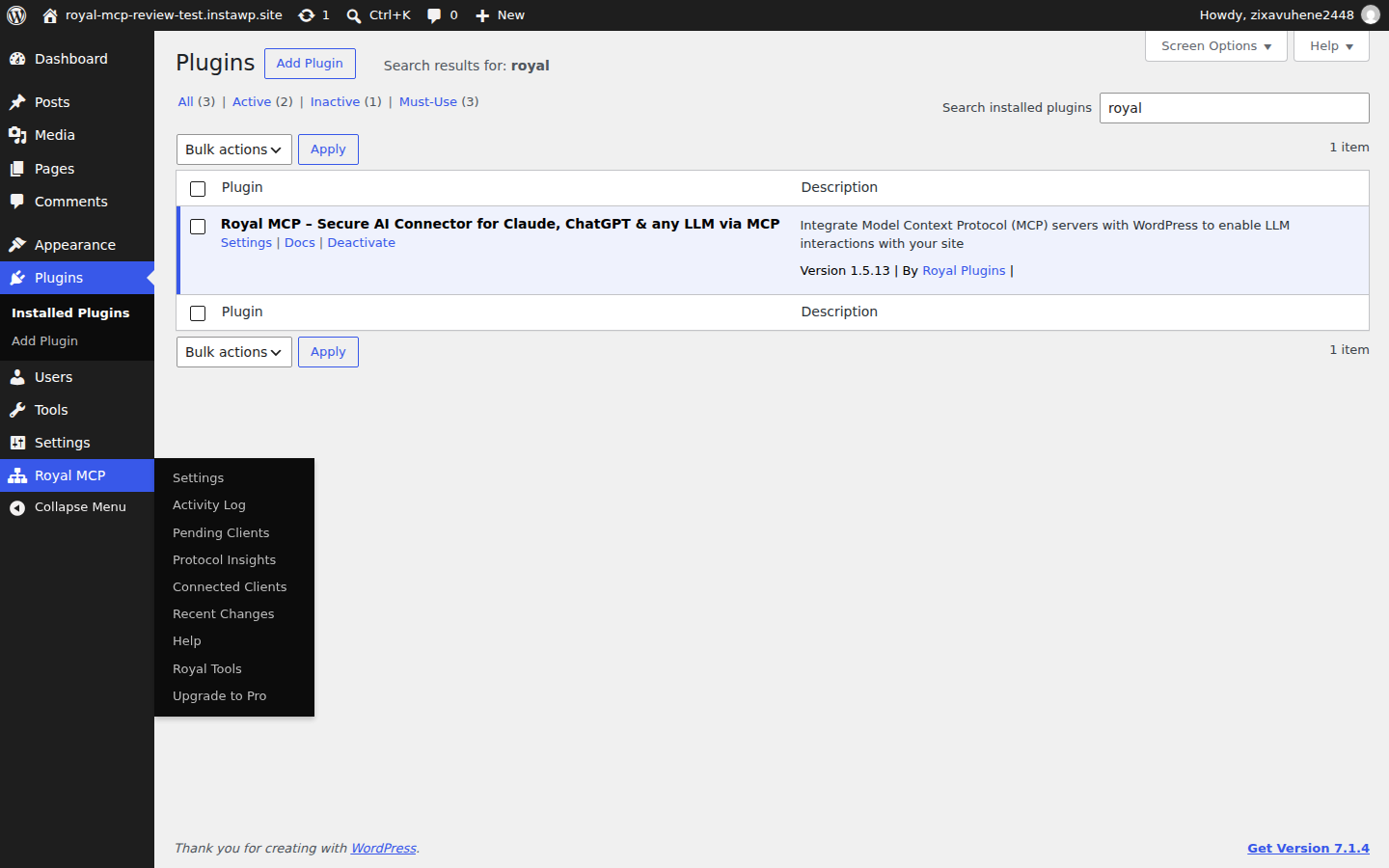
In wp-admin go to Plugins, Add New, search for Royal MCP, then install and activate it. A Royal MCP menu appears with Settings, Activity Log, Connected Clients and Recent Changes screens.
Step 2: Switch it on
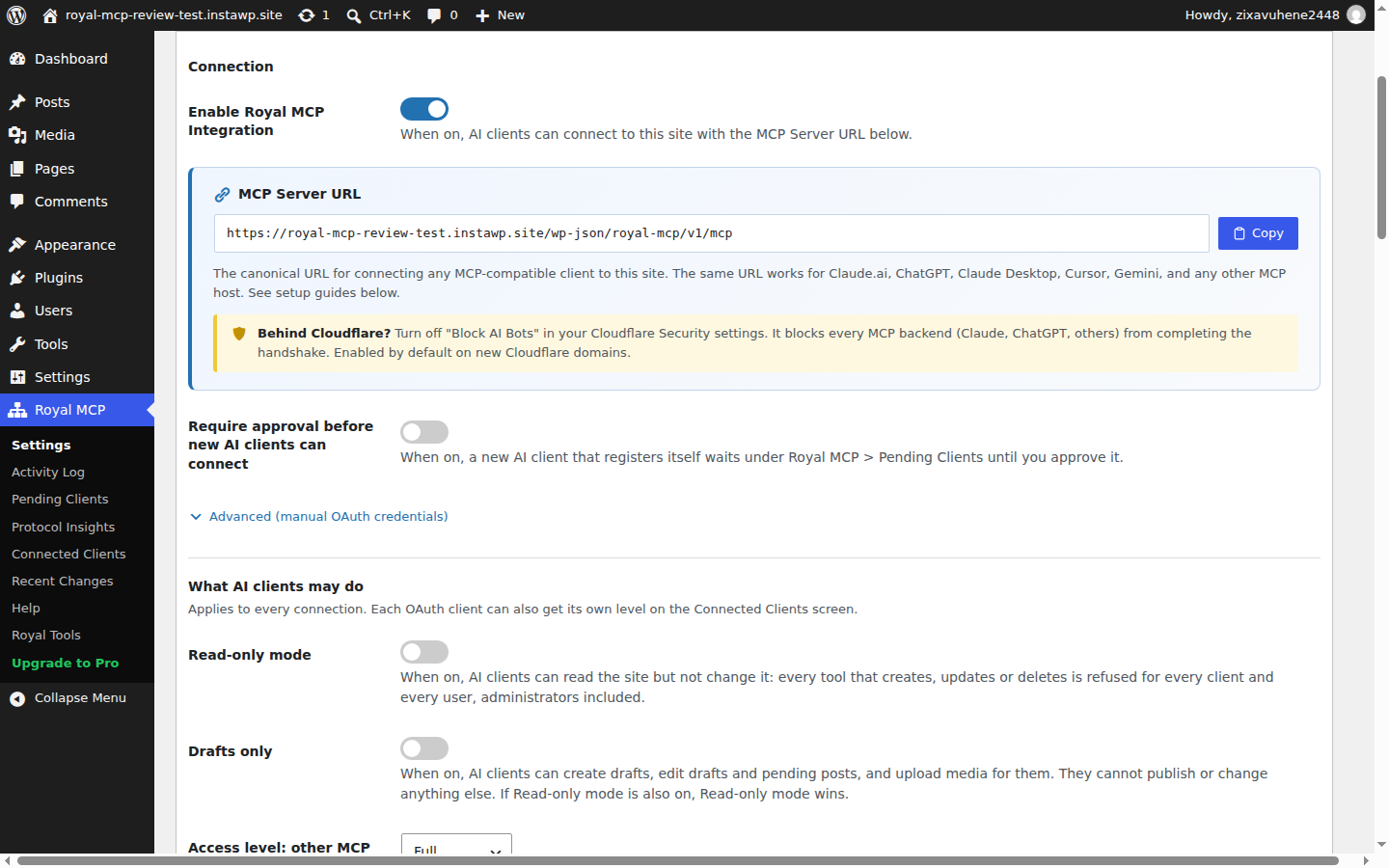
Open Royal MCP, Settings, and turn on Enable Royal MCP Integration. Royal MCP stays off after install, so nothing is reachable until you do this. The MCP Server URL below the switch is the address every AI client connects to.
Step 3: Set what AI clients may do
Under What AI clients may do, choose Read-only mode or Drafts only for a cautious start, and leave Who can connect AI clients on Administrators only unless editors need it.
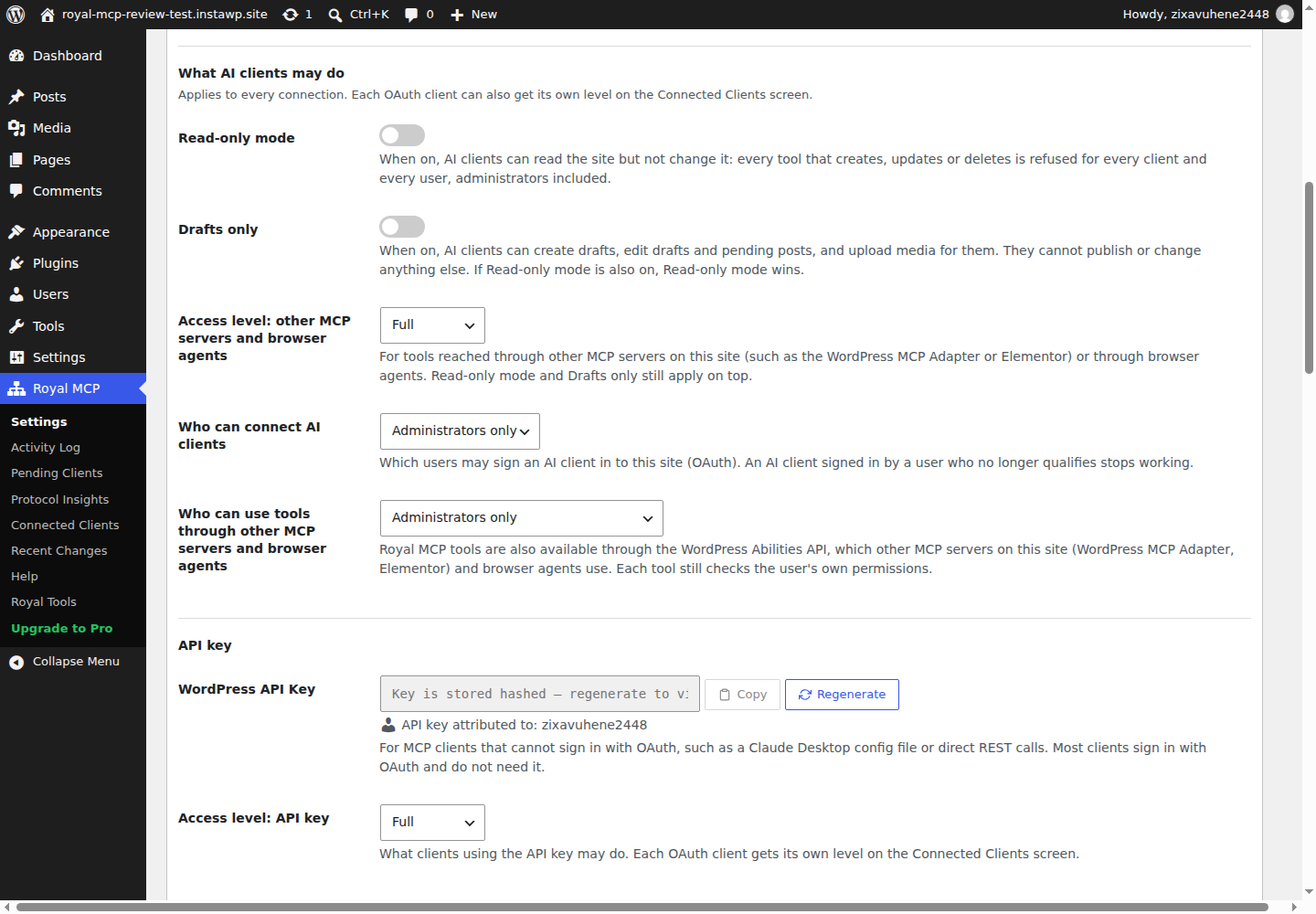
Step 4: Connect your AI client
Copy the ready-made command from the Connect a coding agent box, for example claude mcp add --transport http royal-mcp https://your-site.com/wp-json/royal-mcp/v1/mcp for Claude Code, or add the same URL as a custom connector in Claude or ChatGPT. Approve the OAuth screen in your browser.
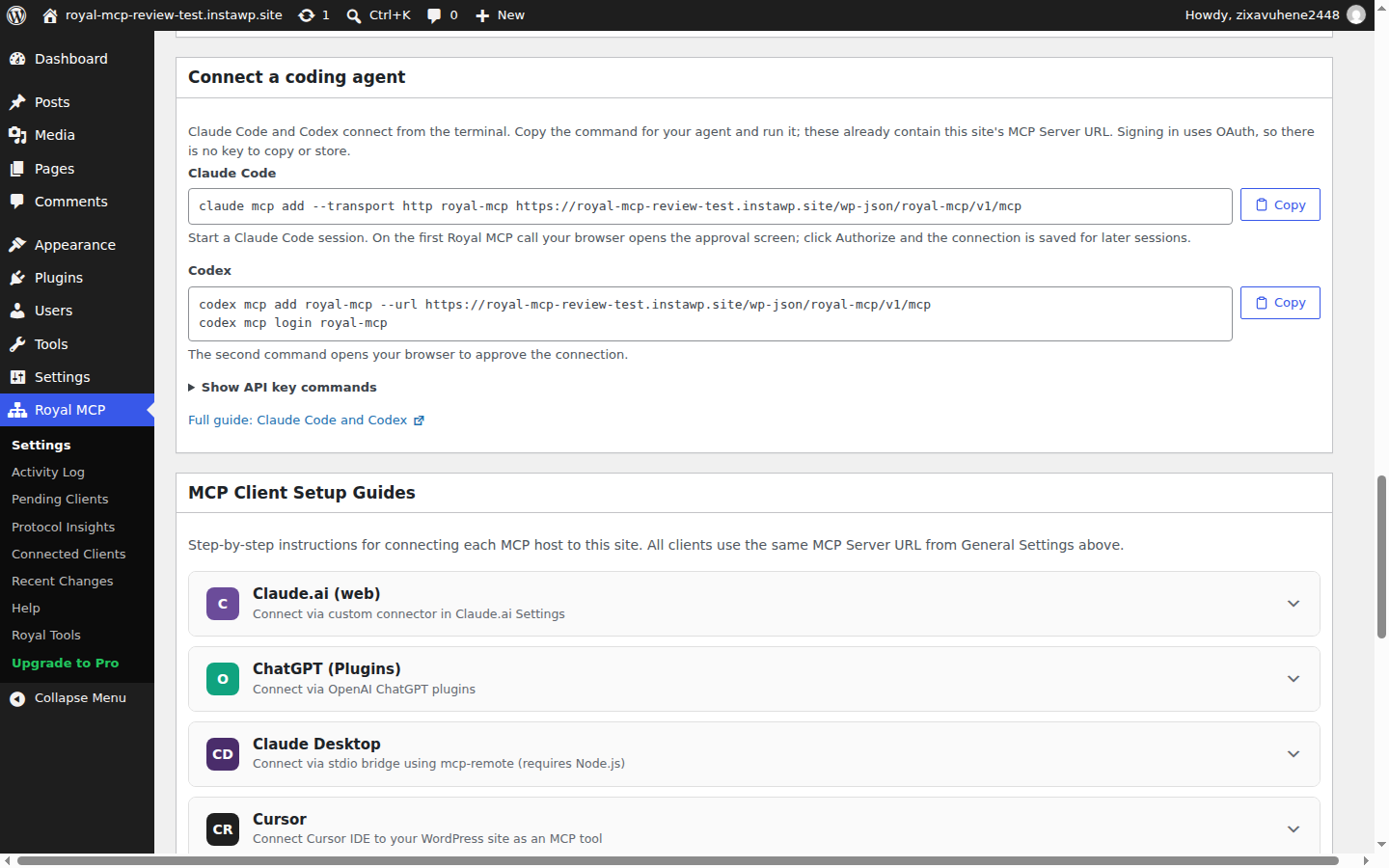
Step 5: Check the first change
Ask the AI to make one small edit to a draft, then open Royal MCP, Recent Changes and confirm the change is listed with an undo option. Open the change to see what undo would restore.
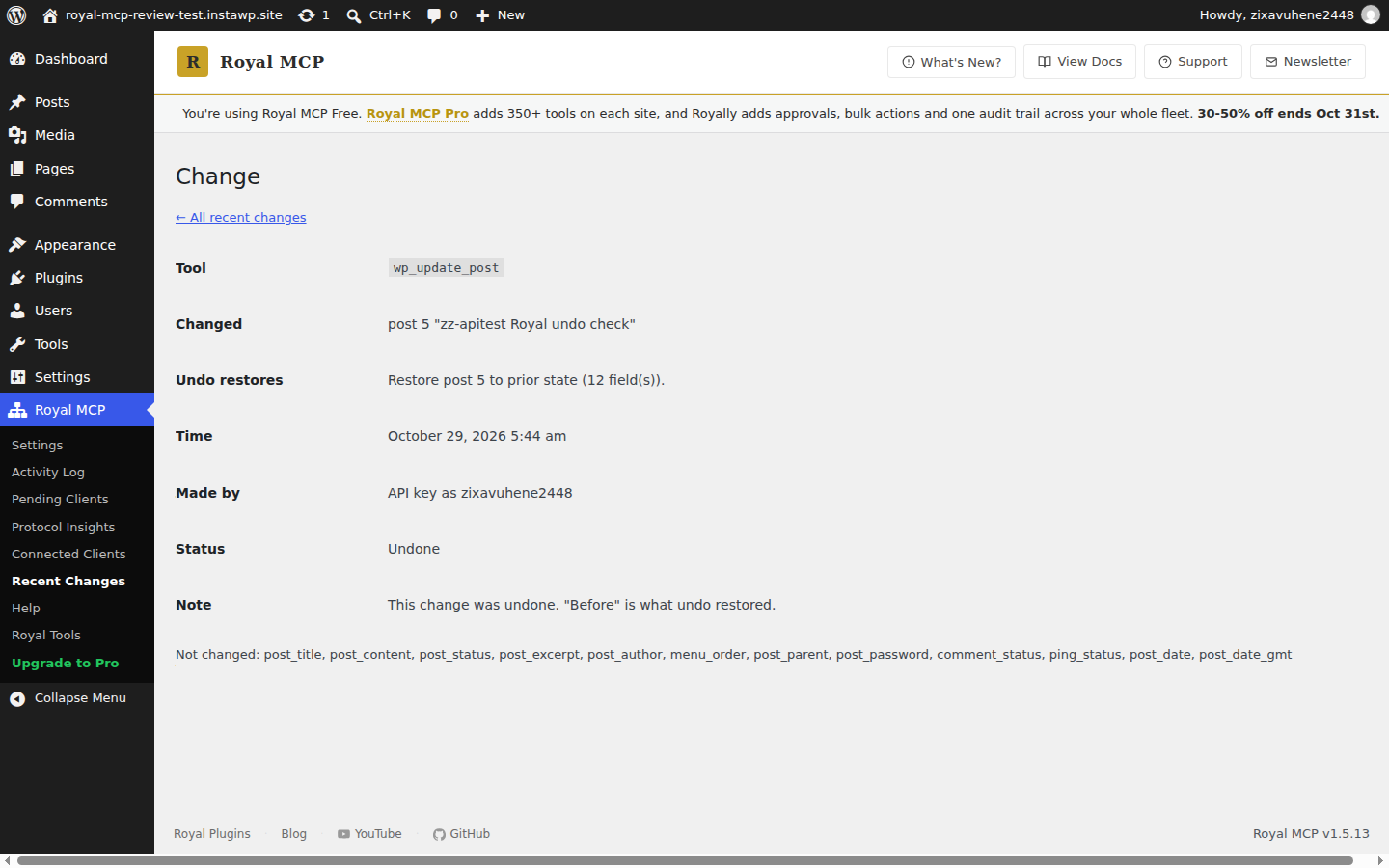
Clients that cannot sign in with OAuth, such as a Claude Desktop config file or a script, use the API key instead. Since 1.5.11 it goes in an Authorization: Bearer header; the older X-Royal-MCP-API-Key header is deprecated. The key is shown once when you create it, and wp royal-mcp rotate-api-key replaces it from WP-CLI. For the client side, InstaWP’s guides to connecting Claude to WordPress and connecting Cursor to WordPress cover where the URL goes.
What did InstaWP’s hands-on test of Royal MCP find?
Royal MCP did what it claims on content work in both tests. In September 2026, version 1.5.4 passed 75 of 83 API calls, and all 8 failures were intended: 4 safety switches that are off by default and 4 calls to plugins that were not installed. Its Elementor and Gutenberg pages came out identical to InstaMCP’s.
Test 1: Royal MCP 1.5.4, September 2026
| Test | Result on InstaWP’s test site |
|---|---|
| Install and activate | Worked in one call, driven through InstaMCP |
| Tools listed | 209: 82 WordPress core, 1 undo, 126 for other plugins |
| API run on test data | 83 calls, 75 passed; the 8 failures were 4 default-off switches and 4 missing plugins |
| Posts, pages, meta, terms, media, comments, menus, revisions | All worked |
| Undo | Brought a trashed post back as a draft; a second use of the same token was refused |
| Secrets in plugin settings | Shown as REDACTED; Royal MCP did not return its own API key |
| Option writes (switched on for the test) | Allowed options changed and were restored; siteurl and users_can_register were always refused |
| Custom CSS (switched on for the test) | Changed and restored exactly |
| Elementor page (14 elements) | 4 calls: import the tree as a template, create a page, apply the template, set the page template. Pixel-identical to InstaMCP’s page at desktop and mobile |
| Gutenberg page (15 blocks) | 1 call; stored blocks valid and byte-identical to the input; rendered the same as InstaMCP’s page |
| Site Editor | No tools for templates, template parts, Global Styles or navigation |
| No key or wrong key | HTTP 401 both times |
Two details from the Elementor build are worth knowing. Royal MCP gave every imported element a fresh ID, which avoids ID clashes when the same template lands on several pages, and it wrote 3 meta keys where InstaMCP wrote 5. Neither changed how the page looked. InstaWP’s Elementor MCP write-up explains which Elementor meta keys matter and why a page can look fine and still be fragile.
Test 2: Royal MCP 1.5.13, 29 October 2026
| Check | Result on a fresh WordPress 7.1.3 site |
|---|---|
| Tools listed | 270, of which 105 are WordPress core tools and 29 are WooCommerce tools, even though WooCommerce was not installed |
| Size of the tool list | 281,035 bytes of JSON in one tools/list reply (InstaMCP 1.11.6: 43 tools, 34,083 bytes) |
| Read-only and destructive labels | All 270 tools carry MCP annotations: 162 marked read-only, 107 marked destructive |
| API key storage | SHA-256 hash only; the plain-text key field was empty; key bound to the admin user who created it |
| No key, wrong key, key in the URL | HTTP 401 all three times |
| Create, edit, undo | Created a test post, edited it, then one undo call restored all 12 post fields; the original text was back |
| Reusing the undo token | Refused: “Undo token not found, expired, or already consumed.” |
| Undoing an older change | Refused, because the post had been edited since: “Cannot undo: post 5 was edited after it was created.” |
| Rate-limit headers | None seen in responses (the readme documents 60 requests a minute per IP for API-key clients) |
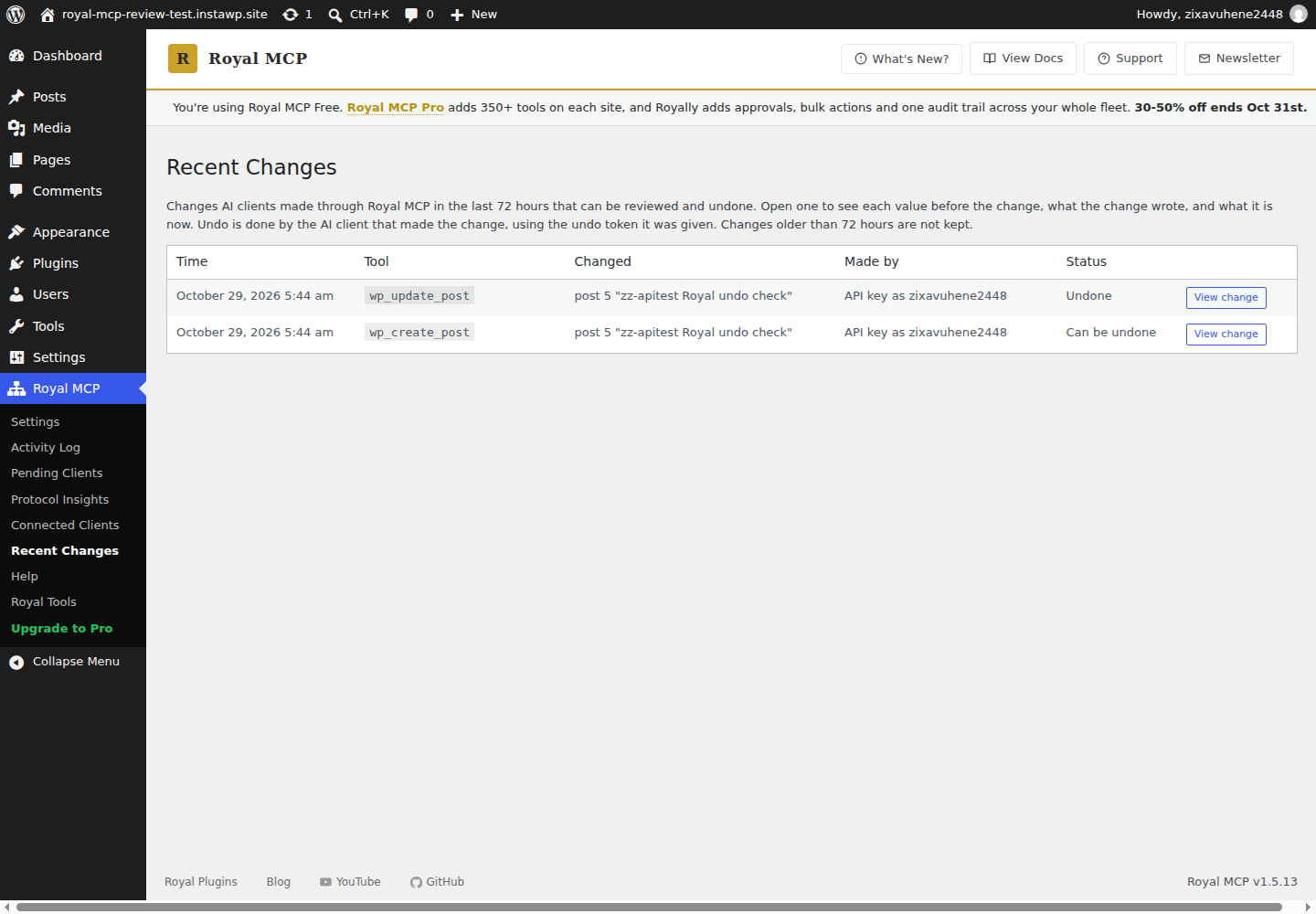
The undo refusal is the detail to notice. Royal MCP does not blindly roll a post back over later edits: it checks whether the item changed again since the snapshot and refuses if it did. That protects a human’s edits from an AI’s undo, which is exactly the clash that hurts on a shared site.
// The undo call InstaWP sent to Royal MCP 1.5.13.
// The argument is "token". "undo_token", the name the write reply uses, fails with "token is required."
{
  "jsonrpc": "2.0", "id": 9,
  "method": "tools/call",
  "params": {
    "name": "mcp_undo_last_operation",
    "arguments": { "token": "f8c5e2f0..." }
  }
}
// Reply: {"undone": true, "op": "wp_update_post", "restored": [12 fields]}
What changed in Royal MCP between 1.5.4 and 1.5.13?
Royal MCP fixed five of the eight gaps InstaWP found in September 2026 within nine releases and partly fixed a sixth. The two still open are small: there is still no tool to delete a whole menu, and no rate-limit headers appear in responses. Here is each gap, matched to the release that addressed it in the changelog:
| Gap found in 1.5.4 (Sept 2026) | Status in 1.5.13 (29 Oct 2026) | Release |
|---|---|---|
| The API key had one level: full access as the site’s first administrator | Fixed. Full, Read-only or Drafts only per OAuth client and for the API key; the key acts as the user who created it | 1.5.9 |
| No tool marked read-only or destructive | Fixed. InstaWP counted annotations on all 270 tools | 1.5.7 |
| API key stored in plain text and never rotated | Fixed. WP-CLI rotation in 1.5.7; InstaWP found only a hash stored in 1.5.13 | 1.5.7, 1.5.13 |
| Site-wide sign-in addresses clashed with other MCP plugins | Fixed. Clients sign in at Royal MCP’s own address, with a self-check that names any clash | 1.5.12 |
| WooCommerce errors said “no permission” when WooCommerce was missing | Fixed. The tools now say the plugin is not active | 1.5.12 |
| Tools for missing plugins filled the tool list | Partly. They are flagged as inactive, but all 29 WooCommerce tools were still listed on a site without WooCommerce | 1.5.7 |
| No tool to delete a menu | Still open. Menu items can be deleted; whole menus cannot | n/a |
| No rate-limit headers on responses | Still none seen on 29 October 2026 | n/a |
The table says as much about the team as about the plugin. The access levels, labels and key handling that matter most for safety all shipped within weeks of the September test. The flip side is churn: a plugin that changes this much per release is one to update, re-test and pin on client sites rather than leave on auto-update.
What are Royal MCP’s strengths?
Royal MCP’s strengths are reversibility, safe defaults and breadth across popular plugins. For a content team that wants AI help on a live site without giving it the keys to the server, it is one of the more careful WordPress MCP plugins InstaWP has tested.
- Undo that respects later edits. Every tracked write returns a one-use token valid for 72 hours, and Royal MCP refuses an undo if the item changed again since. Pro extends the window to 7 days and adds batch undo.
- Safe defaults. The plugin is off after install, only administrators can connect AI clients by default, and writes to WordPress options and theme appearance each need their own switch. The site address, secret keys and license keys can never be written.
- Access levels per connection. Since 1.5.9 each OAuth client and the API key can be Full, Read-only or Drafts only, and site-wide Read-only and Drafts only switches sit on top.
- Secrets stay hidden. In 1.5.4, plugin settings came back with secrets shown as REDACTED and Royal MCP did not return its own API key. 1.5.13 extends redaction to keys, tokens and passwords that other plugins store.
- Ready-made plugin tools. WooCommerce (29 tools), Elementor (14), Divi (9), Wordfence (8), Complianz (7), TablePress (6), Yoast SEO (5) and more, so an AI can update a product or swap text across Elementor widgets without writing raw meta.
- Labelled tools. Every tool says whether it reads or changes the site, so MCP clients can ask before destructive calls, as the MCP tool annotation spec intends.
- No middle server. Unlike a hosted relay such as WPVibe, nothing passes through a third party, and Royal MCP works on almost any host.
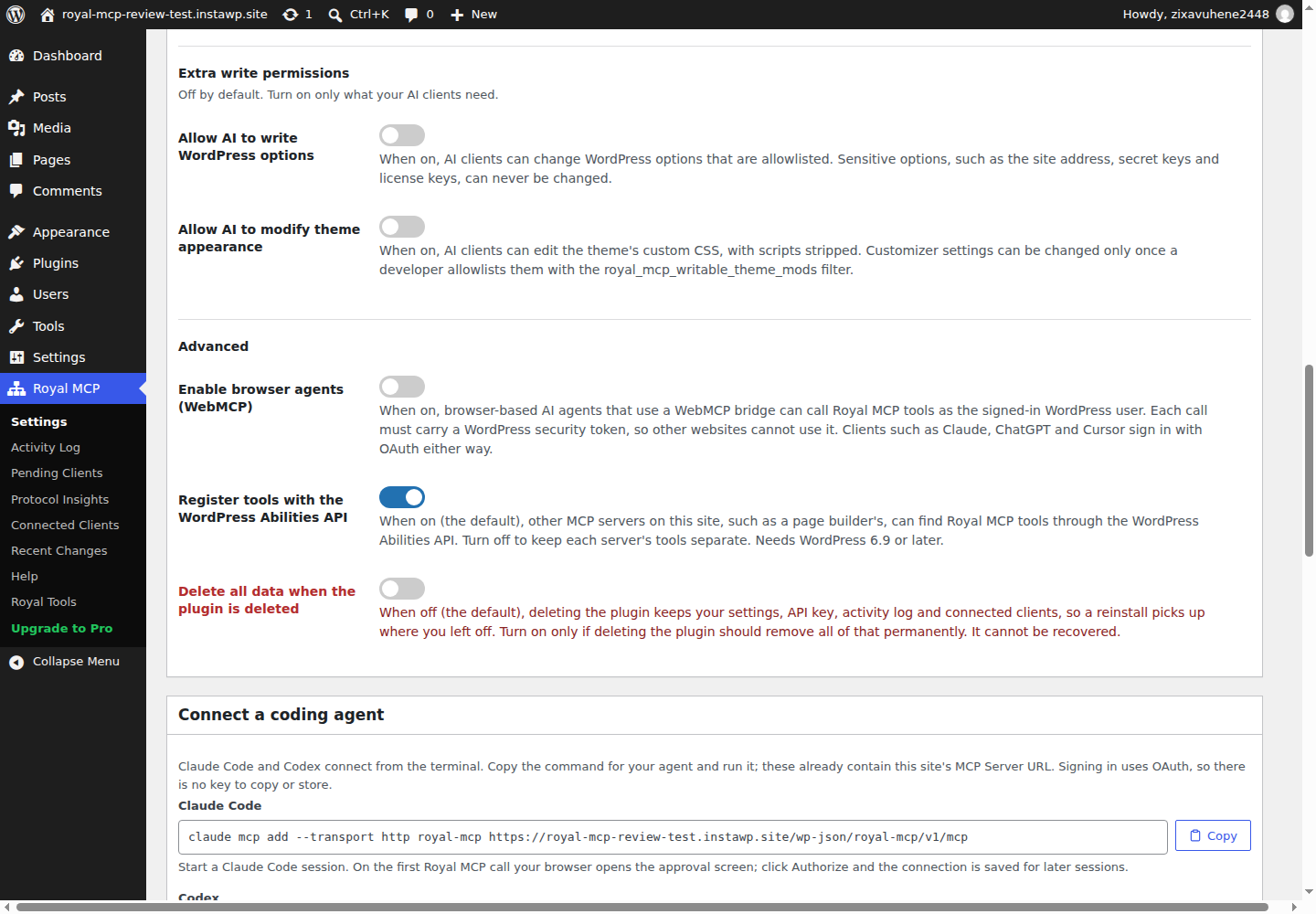
The labels matter more than they look. The MCP tools specification lets a server mark each tool with hints such as readOnlyHint and destructiveHint, and clients use them to decide when to ask you first. A server with no hints leaves the client guessing, which is the failure mode OWASP calls excessive agency.
What are Royal MCP’s weaknesses and limits?
Royal MCP’s limits are about what it can reach. Royal MCP 1.5.13 cannot run code, query the database, edit files, install plugins or change the Site Editor, so a developer will hit a wall the first time a job needs any of those. Here is the honest list from InstaWP’s two tests:
- No developer tools. There is no PHP, SQL, WP-CLI or file tool. Even its Code Snippets integration, by its own description, never creates, edits, activates or runs code. A fatal error in a theme file or a slow query has to be fixed some other way.
- No plugin or theme lifecycle. Royal MCP lists installed plugins and themes, but has no tool to install, activate, update, deactivate or delete them, and none for WordPress core updates.
- Read-only Site Editor. 1.5.13 can list and read block templates and Global Styles and can create synced patterns, but cannot write templates, template parts or Global Styles. On a block theme, the header, footer and site styles stay out of reach.
- A heavy tool list. A plain
tools/listreturned 270 tools and 281 KB of JSON on InstaWP’s test site, including 29 WooCommerce tools on a site with no WooCommerce. Royal MCP offers a compact profile (anX-MCP-Profile: compactheader) that swaps the list for three routing tools, but a client has to ask for it. - New Elementor layouts take more steps. In September, building a fresh Elementor page took 4 calls through the template system, against 2 for InstaMCP. Royal MCP’s own readme now points the AI at Elementor’s own MCP server for designing new layouts and keeps its tools for editing pages you already have.
- One site at a time. Each site has its own key and settings, and Royal MCP does not bridge between sites, even on multisite. Running one change across a fleet, with approvals and one audit trail, is the job of Royally, Royal Plugins’ separate paid cloud product.
- Fast release pace. Nine releases in about five weeks brought real fixes, but also a deprecated auth header and changed defaults. Pin and re-test it on client sites.
How much does Royal MCP cost?
Royal MCP is free on WordPress.org, and Royal MCP Pro costs $79 per site per year at founding-member pricing or $149 per year at the regular price, according to Royal Plugins’ Royal MCP page on 29 October 2026. The free plugin is not a trial: it has no usage cap and includes the access levels and 72-hour undo.
| What you get | Royal MCP (free) | Royal MCP Pro |
|---|---|---|
| Price | Free | $79 per site per year (founding member), $149 regular |
| Tools | 250+ per the vendor; InstaWP counted 270 | 350+ per the vendor’s admin banner |
| Undo window | 72 hours, one token per change | 7 days, plus batch undo from a dashboard widget |
| Access levels and Drafts only | Included | Included |
| Audit history | Activity Log, kept until you clear it | 90-day retention by default |
| Tool profiles per client | Not included | Per-tool endpoint profiles that limit what each client sees |
| Many sites at once | Not included | Royally, a separate cloud layer for approvals, bulk actions and one audit trail across sites |
Notice that the per-site price adds up for agencies. Ten client sites on Pro is $790 a year at the founding rate before any fleet tooling. Royally’s pricing was not checked for this review. Pro details are on the Royal MCP Pro page.
Is Royal MCP safe to use on a live site?
Yes, with sensible settings, Royal MCP is one of the safer WordPress MCP plugins InstaWP has tested. It is off by default, signs callers in as real WordPress users, keeps settings and theme writes behind their own switches, hashes its API key and lets you undo most changes for 72 hours. Its risk is the one every MCP server shares: an AI acting as an administrator can still do a lot of damage inside the permissions you give it.
Three settings make the biggest difference. Give each AI client its own WordPress user rather than the main admin account. Set the access level to Drafts only for content work, so nothing the AI writes goes live without a human. And keep the extra write switches off unless a task needs them. InstaWP’s guide to whether WordPress MCP is safe covers the wider risk classes, and running agents on a staging copy first is covered in using MCP for WordPress in production.
What is the best Royal MCP alternative?
For developers and agencies whose sites are, or could be, hosted on InstaWP, the best Royal MCP alternative is InstaMCP. It does the jobs Royal MCP 1.5.13 cannot (running PHP, querying the database, editing files, installing plugins and themes, and changing Site Editor templates), keeps those tools off until an administrator turns them on, and sits next to InstaWP’s staging, sandboxes and backups. If your sites must stay on another host, Royal MCP is a strong choice, and the other options are listed at the end of this section.
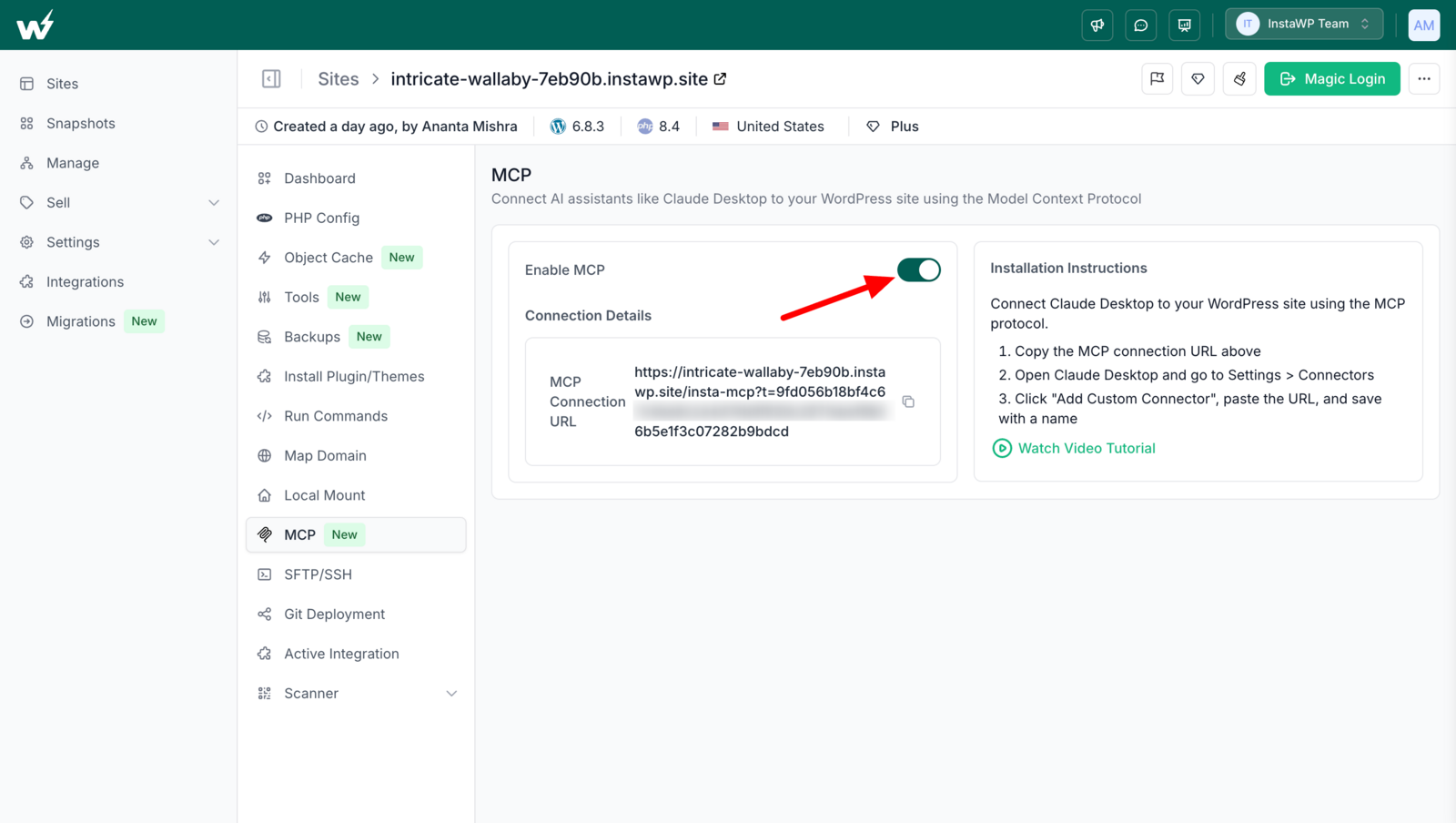
InstaMCP is the WordPress MCP server built into every site hosted on InstaWP. An administrator switches it on from the site’s MCP tab in the InstaWP dashboard and pastes one connection URL into Claude, ChatGPT, Cursor or another MCP client. On 29 October 2026, InstaMCP 1.11.6 listed 43 typed tools covering content, media, terms, meta, plugins, themes, files, PHP, SQL, skills and site memory, with the PHP, SQL and file tools off until an administrator enables them.
Royal MCP vs InstaMCP: how do they compare?
Royal MCP is a free, careful content-and-plugins assistant you can add to almost any WordPress site; InstaMCP is a developer-grade server that ships with every InstaWP site. Royal MCP wins on undo, review screens and plugin integrations; InstaMCP wins on code, database, files, plugin installs, the Site Editor and the platform around it. Here is the comparison, using Royal MCP 1.5.13 and InstaMCP 1.11.6 as measured on 29 October 2026, plus the September 2026 builds:
| What to compare | Royal MCP 1.5.13 | InstaMCP 1.11.6 on InstaWP |
|---|---|---|
| Where the server runs | On the site, as a WordPress plugin | On the site, built into every InstaWP site |
| Which sites it works on | Almost any WordPress 5.8+ site | Only sites hosted on InstaWP |
| Tools on a bare site | 270 (281 KB tool list) | 43 (34 KB tool list) |
| Read-only and destructive labels | Yes, on all 270 tools | Yes, on all 43 tools |
| PHP, SQL and file tools | None | execute_php, db_query and site_files, each off until an admin switches it on |
| Install, update and activate plugins and themes | No; it lists them only | Yes; InstaWP installed, activated and deactivated a plugin in 3 calls |
| Site Editor templates, template parts, Global Styles | Read only | Read and write (tested September 2026) |
| Skills and site memory | Not in the server | 15 built-in skills, plus memory tools that persist per site |
| Plugin-specific tools | WooCommerce, Elementor, Divi, ACF, Yoast and more | None; general content, meta, term and media tools |
| Undo | 72-hour one-use tokens (7 days on Pro) | None in the server; InstaWP backups and restore on the platform |
| Review screens | Recent Changes and an Activity Log | No log of tool calls |
| Access control | Full, Read-only or Drafts only per connection | Per-user tokens mapped from the WordPress role to read, write, delete and admin scopes |
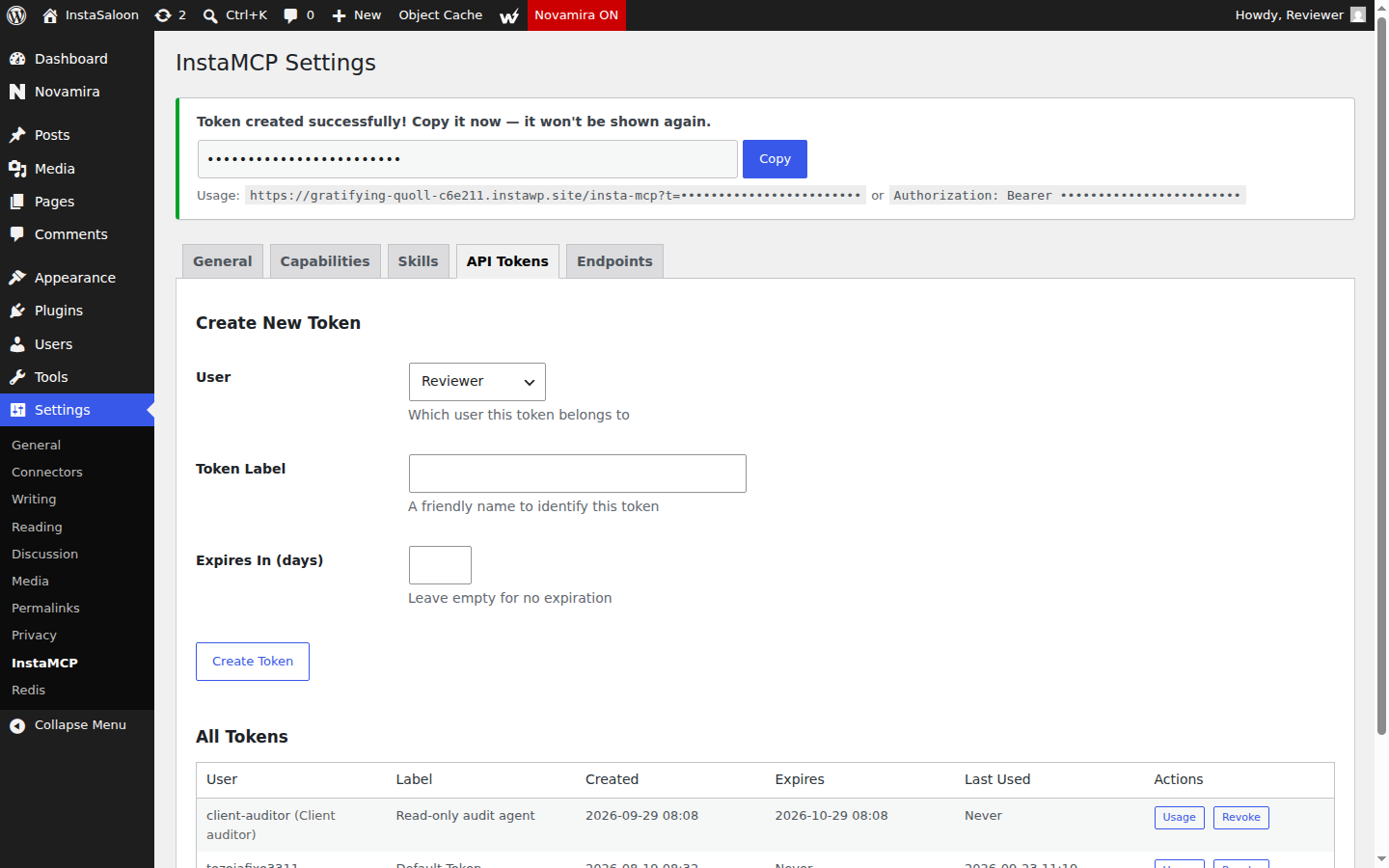
| Token in the URL | Refused (HTTP 401) | Accepted as ?t=, so treat the connection URL like a password |
| Elementor page (Sept 2026) | 4 calls through a template import | 2 calls, writing the page data directly |
| Gutenberg page (Sept 2026) | 1 call, byte-identical | 1 call, with a markup check first |
| Staging, sandboxes and backups | Not part of Royal MCP | Part of the InstaWP platform |
| Price | Free; Pro $79 to $149 per site per year | Included with InstaWP sites |
Split the table by who wins. The rows where Royal MCP wins (undo, review screens, plugin tools, refusing URL tokens) are about protecting a site from the AI. The rows where InstaMCP wins (code, database, files, plugin installs, the Site Editor) are about what the AI can actually get done, and InstaWP puts the protection one level up, in staging copies and backups rather than in the server. Which half matters more depends on who is driving the agent.
Fix the problems Royal MCP cannot reach
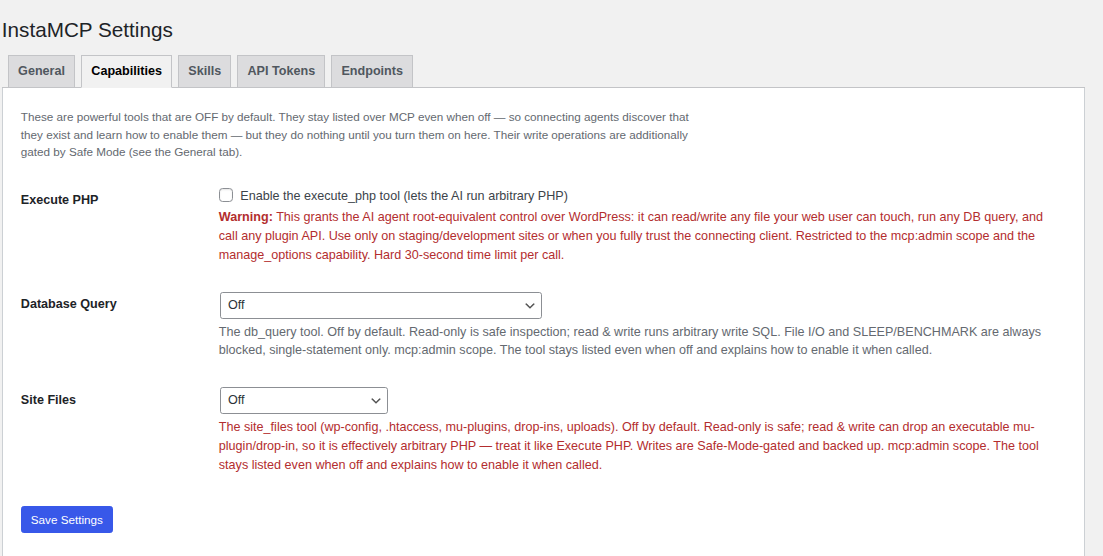
InstaMCP includes the developer tools Royal MCP leaves out by design: execute_php runs PHP with the full WordPress environment, db_query runs SQL in read-only or read-write mode, and site_files, plugin_files and theme_files read and edit files. That is what an agent needs to fix a fatal error in functions.php, find the slow query behind a timeout, or patch a plugin template.
All three power tools ship off. On InstaWP’s test site on 29 October 2026, InstaMCP 1.11.6 answered the first execute_php call with “Forbidden: execute_php is disabled on this site” and the first db_query call with “Forbidden: db_query is OFF on this site”, and named the setting an admin would change. When they are on, every PHP file write is syntax-checked before it reaches disk, and a guard around execute_php reverts boot-critical files (functions.php, active plugins, mu-plugins, drop-ins, wp-config) within the same request if a change breaks them.
Install and update plugins and themes from the agent
InstaMCP’s plugin_operations and theme_operations tools install from WordPress.org, a URL or a ZIP, then activate, deactivate, update or delete. On 29 October 2026 InstaWP installed, activated and deactivated a WordPress.org plugin on the test site in three calls. Royal MCP 1.5.13 has no tool for any of those steps, so an agent working through it has to hand the job back to a human.
Change the Site Editor, not only the posts
On block themes, the header, footer, templates and Global Styles live in the Site Editor. In InstaWP’s September 2026 test, InstaMCP built and changed templates, template parts and Global Styles; Royal MCP could not, and 1.5.13 still only reads them. One caveat from the same test: a template part InstaMCP created was not linked to the active theme, so check new template parts in the editor. InstaWP’s best WordPress MCP plugins test has the full Site Editor results for every plugin.
Give the agent skills and a memory of the site
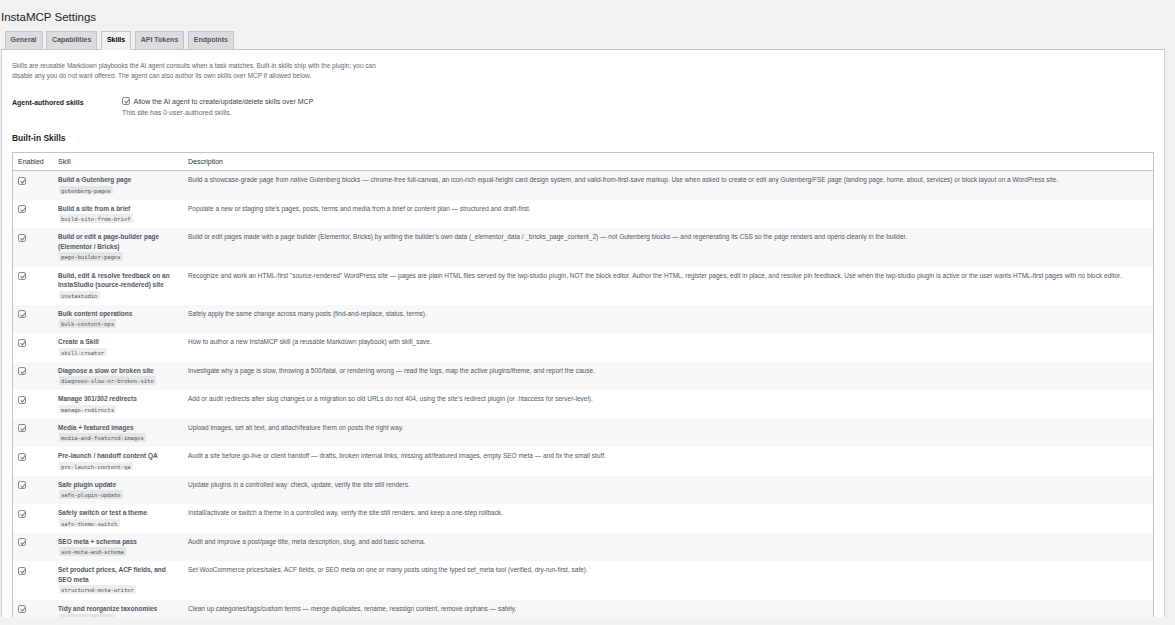
InstaMCP ships 15 built-in skills, step-by-step playbooks such as building a Gutenberg page, that an agent reads before it starts, and its memory_save and memory_get tools keep notes on the site between sessions, so the next agent knows which plugin handles forms or which page not to touch. Royal Plugins publishes Claude skills for Divi, WooCommerce and Elementor on its own website, but Royal MCP has no memory tool.
Scope each agent by WordPress role
InstaMCP issues tokens per WordPress user and maps the role behind each token to four permission scopes: read, write, delete and admin. An Editor’s token can read, write and delete content but cannot reach the admin-only tools; a Contributor or Subscriber token can only read. Royal MCP now offers access levels too, so the two differ in model rather than in coverage: InstaMCP scopes follow the WordPress user, while Royal MCP sets a level per connection.
Put the undo layer in the platform
InstaMCP has no undo tokens. InstaWP’s answer is the platform around it: create a sandbox site for an agent to experiment on, or a staging copy of a live site with its own MCP endpoint, then push the result. If something still goes wrong, site backups and restore sit in the same dashboard, and they cover plugin updates and wp-admin edits as well as AI changes. InstaWP explains which copy to use when in WordPress staging vs sandbox sites.
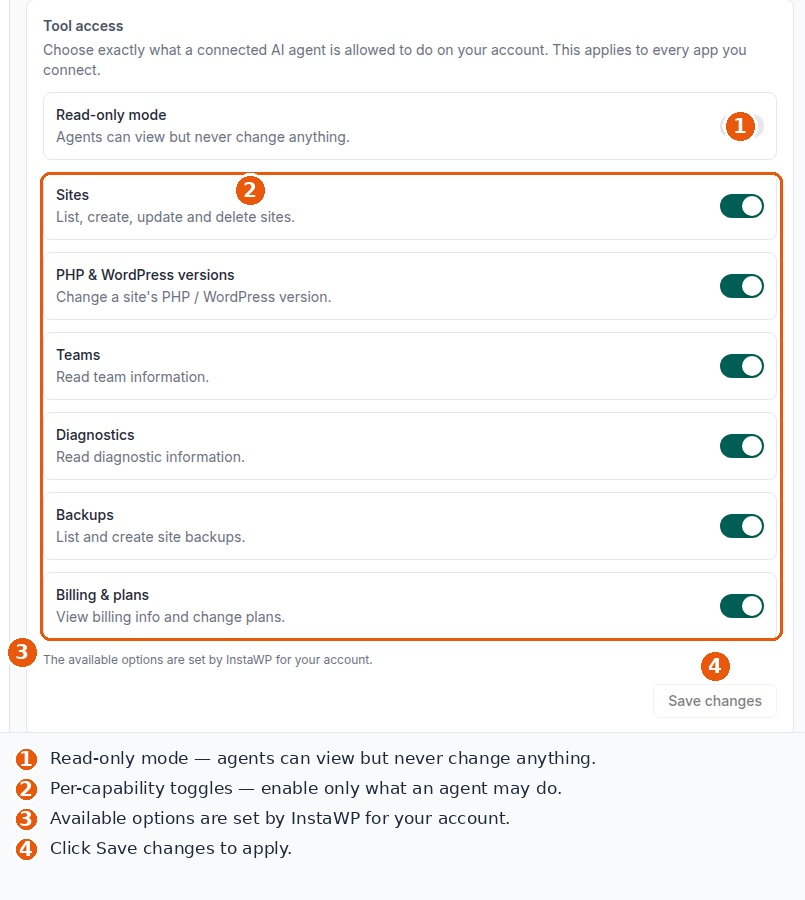
For agencies, InstaWP’s Account MCP adds one connection to the whole InstaWP account, switched on under Profile, MCP, with a read-only mode and a switch per capability. It manages sites, PHP and WordPress versions, backups and plans. Royal Plugins covers account-wide work with Royally, a separate paid product. The two layers are explained in Account MCP vs Site MCP and set up in the docs on connecting AI assistants to your account MCP.
What InstaMCP does not do
InstaMCP has real gaps, and they belong in any fair comparison. It runs only on sites hosted on InstaWP and is not a WordPress.org plugin. It has no undo tokens, no Recent Changes screen or log of tool calls, no site-wide Drafts only switch and no rate limiting. It has no ready-made WooCommerce, Divi or Yoast tools; an agent works through general content, meta and term tools instead. It accepts its token in the connection URL, which Royal MCP refuses. InstaWP’s Elementor skill needs execute_php switched on to regenerate page CSS. And it does not update WordPress core.
To switch it on, open the site in the InstaWP dashboard, go to the MCP tab, turn on Enable MCP and paste the connection URL into Claude, ChatGPT or Cursor. The steps are in InstaWP’s docs on connecting AI assistants to your WordPress site using MCP, and the client side is covered in connecting AI agents to WordPress using MCP.
What are the other Royal MCP alternatives?
If the site has to stay on its current host, these are the alternatives InstaWP tested hands-on in September and October 2026. Each runs on almost any WordPress host:
| Alternative | Best for | Watch out for |
|---|---|---|
| Novamira | Developers who want raw PHP, WP-CLI and file access on a staging site | Administrator-only access and no read-only mode |
| WPVibe | ChatGPT and Claude users who want signed in-chat approvals | Every call goes through WPVibe’s cloud relay; 100 calls a day free |
| Easy MCP AI (Themeisle) | Labelled tools, per-token limits and an audit log | No code, SQL or file-edit tools |
| WordPress MCP Adapter | The official, standards-first path over the Abilities API | Only 3 read-only abilities on a bare install |
For a ranked list with InstaMCP first, see InstaWP’s Novamira alternatives roundup. Store owners should read the hands-on WooCommerce MCP test, and for servers you run outside WordPress, see the WordPress MCP servers comparison.
Who should use Royal MCP, and who should use InstaMCP?
Use Royal MCP if your sites stay on their current host, the AI mostly edits content, products and SEO fields, and you want undo and a review screen for every change. Use InstaMCP on InstaWP if the agent needs to fix code, query the database, install plugins or change the Site Editor, or if you want staging and backups next to the agent.
Where your sites are hosted decides most of this. InstaWP’s managed WordPress hosting includes InstaMCP, staging and backups on every hosted site, and plans are on the InstaWP pricing page. If you are comparing hosts with this in mind, start with WordPress hosting with MCP and WordPress hosting with staging.
Is Royal MCP worth it in 2026?
Yes, for site owners and content teams on any host. Royal MCP is free, careful by default, quick to improve, and its 72-hour undo worked exactly as advertised in InstaWP’s test. It is worth less for developers, because Royal MCP 1.5.13 cannot run code, touch the database or files, install plugins or change the Site Editor, and those are the jobs that usually break a site.
Royal MCP is the reversible, safe-by-default option for everyday content work on any WordPress host, with 270 tools, access levels per connection and an undo that refuses to overwrite later edits. It is not a developer tool: no PHP, SQL, files, plugin installs or Site Editor writes. If your sites are on InstaWP, or could be, InstaMCP covers that developer half with power tools off by default, role-scoped tokens, skills and site memory, and staging and backups in the same place.
Before either server touches a client site, run it the way InstaWP ran Royal MCP for this review: on a throwaway copy, signed in as its own WordPress user. The InstaWP CLI and a temporary sandbox make that a one-minute job.
Royal MCP review: frequently asked questions
What is Royal MCP?
Royal MCP is a free WordPress plugin from Royal Plugins that turns a WordPress site into an MCP server, so AI clients such as Claude, ChatGPT and Cursor can read and change the site. Version 1.5.13 listed 270 tools on InstaWP’s test site on 29 October 2026, including tools for WooCommerce, Elementor, Divi and Yoast SEO.
Is Royal MCP free?
Yes. The WordPress.org plugin is free with no usage cap and includes access levels and a 72-hour undo. Royal MCP Pro costs $79 per site per year at founding-member pricing or $149 regular, and adds a 7-day undo, batch undo, 90-day audit retention and per-client tool profiles, as of 29 October 2026.
Is Royal MCP safe?
Royal MCP is one of the safer WordPress MCP plugins InstaWP has tested. It is off after install, signs callers in as WordPress users, stores its API key as a hash, keeps option and theme writes behind switches that are off by default, and offers Read-only and Drafts only access levels. An AI with Full access can still change a lot, so give it its own user and a limited level.
Can Royal MCP undo AI changes?
Yes. Every tracked write returns a one-use undo token valid for 72 hours, or 7 days on Pro. In InstaWP’s test on 29 October 2026 one undo call restored an edited post, reusing the token was refused, and Royal MCP refused to undo a change when the post had been edited again since.
Can Royal MCP run PHP or install plugins?
No. Royal MCP 1.5.13 has no PHP, SQL, WP-CLI or file tools, and it can list plugins and themes but not install, activate, update or delete them. InstaMCP on InstaWP has those tools, with PHP, SQL and file access switched off until an administrator turns them on.
Does Royal MCP work with Elementor and WooCommerce?
Yes. Royal MCP 1.5.13 has 14 Elementor tools and 29 WooCommerce tools that load when those plugins are active. In InstaWP’s September 2026 test it built an Elementor page pixel-identical to InstaMCP’s, in 4 calls through a template import.
Is Royal MCP the same as Royal Elementor Addons?
No. Royal MCP is made by Royal Plugins (royalplugins.com). Royal Elementor Addons is a different plugin from a different developer, WP Royal. The names are similar, but the products and companies are separate.
What is the best Royal MCP alternative?
For developers and agencies on InstaWP, the best Royal MCP alternative is InstaMCP, the MCP server built into every InstaWP site. It adds PHP, database and file tools (off by default), plugin and theme installs, Site Editor writes, skills and site memory, with staging and backups next to it. It runs only on InstaWP. On other hosts, Novamira, WPVibe, Easy MCP AI and the WordPress MCP Adapter are the main options.
What is the difference between Royal MCP and InstaMCP?
Royal MCP is a free plugin for almost any WordPress host, focused on safe content and plugin edits with undo, review screens and access levels per connection. InstaMCP is built into InstaWP sites and focused on developer work: PHP, SQL, files, plugin and theme installs and the Site Editor, scoped by WordPress role, with InstaWP backups instead of undo tokens.