WPVibe is a free WordPress plugin from SeedProd that connects Claude, ChatGPT, Cursor and other AI assistants to a self-hosted WordPress site through WPVibe’s own hosted MCP relay. It works on almost any host and asks before risky changes, but every tool call passes through WPVibe’s cloud, and the free plan stops at 100 tool calls a day.
InstaWP installed WPVibe 1.20.4 on a fresh WordPress 7.1.3 site on 14 October 2026, walked its setup screens, and read the code it ships, all 78 PHP files. That is on top of a hands-on test InstaWP’s engineering team ran in September 2026, when WPVibe built the same Elementor page as InstaMCP and 19 other WordPress MCP plugins. This review covers what WPVibe does, how its relay and approvals actually work, pricing, the risks worth knowing before you connect a client site, and the alternatives.
- WPVibe is a cloud-relayed MCP server. The free plugin runs on your site, but your AI client talks to
mcp.wpvibe.ai, a service on Cloudflare Workers, which forwards each call to WordPress. You need a WPVibe account. - Free means 100 tool calls a day, per account. Paid plans run from $99 a year (500 calls a day) to $899 a year (10,000 calls a day), checked on 14 October 2026. The allowance is shared across every site you connect.
- Risky actions wait for a signed approval. In 1.20.4 the approval is an Ed25519 signature minted by WPVibe’s servers, valid for at most 5 minutes and tied to one site, one connection and one operation. Your site only holds the public key.
- Not everything asks. WPVibe’s own docs say categories, tags, menu items and most media are deleted for good with no approval page, and a per-site “Dangerously bypass approvals” switch turns every prompt off.
- It saved Elementor pages more completely than InstaMCP in InstaWP’s September 2026 test: 9 meta keys and the stylesheet built at save time. If your sites already run on InstaWP, InstaMCP is the option with no relay and no daily call cap.
Table of Contents
What is WPVibe?
WPVibe is a Model Context Protocol (MCP) server for WordPress, built by SeedProd LLC, the company behind the SeedProd page builder. MCP is the open standard that lets an AI client such as Claude or ChatGPT discover and call tools on another system. WPVibe packages WordPress operations (content, media, themes, plugins, WP-CLI style commands and the WordPress Abilities API) as MCP tools, so an assistant can change a site through conversation instead of handing you instructions.
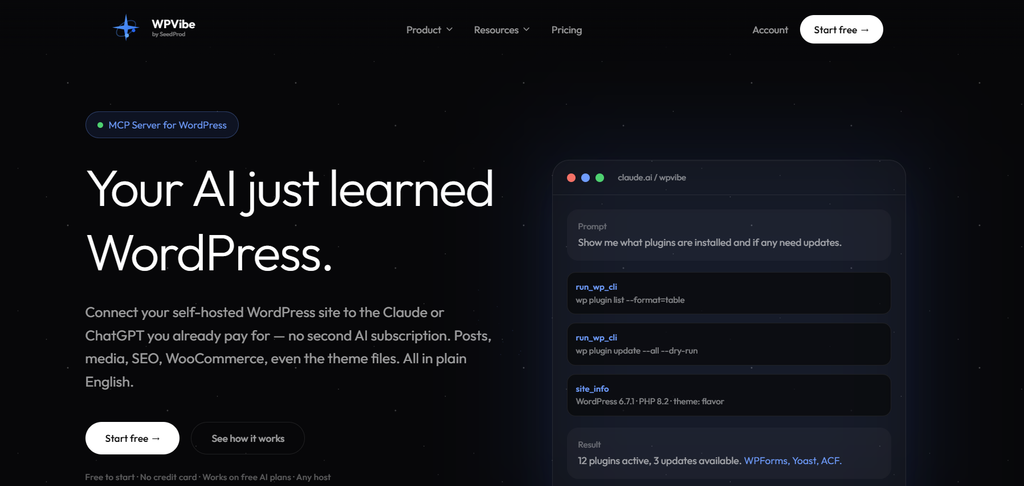
WPVibe has two parts. The free plugin, listed on WordPress.org under the slug vibe-ai, adds REST routes to your site. The MCP server itself is a hosted service at mcp.wpvibe.ai that you sign in to with a WPVibe account. That split is the single most important fact about the product, and most of this review follows from it.
| Fact | WPVibe, as of 14 October 2026 | Source |
|---|---|---|
| Developer | SeedProd LLC. Not the same company as “WPVibes”, which makes Elementor add-ons. | WordPress.org listing |
| Current version | 1.20.4, released 13 October 2026 | WordPress.org |
| Active installs | 70,000+ (40,000+ on 29 September 2026, 50,000+ on 6 October 2026) | WordPress.org, InstaWP snapshots |
| Listed on WordPress.org | 20 April 2026 | WordPress.org |
| Rating | 100 out of 100 from 119 reviews | WordPress.org |
| Requirements | WordPress 6.0+, PHP 7.4+, tested up to 7.1.3 | WordPress.org |
| Where the MCP server runs | WPVibe’s cloud (Cloudflare Workers at mcp.wpvibe.ai) | WPVibe security page |
| Price | Free, 100 tool calls a day; paid plans $99 to $899 a year | WPVibe pricing page |
| AI clients | ChatGPT, Claude (web, desktop, Claude Code), Cursor, Windsurf, OpenCode and other MCP clients | WordPress.org listing |
Read the install column as a speed signal. WordPress.org showed WPVibe going from 40,000+ to 70,000+ active installs in about two weeks, and the readme changelog alone lists 20 releases from 1.16.1 to 1.20.4. That pace is good news for features and bad news for any review that stays still, which is why every claim below carries a version and a date.
How does WPVibe work?
WPVibe works as a relay. Your AI client calls WPVibe’s hosted MCP server, the server checks your WPVibe account, applies your plan’s daily limit and its safety gates, and then sends an HTTPS request to the WPVibe plugin on your WordPress site, which runs the operation as the WordPress user you authorized and sends the result back the same way.
Authentication uses a WordPress Application Password. When you approve the connection in wp-admin, WordPress creates one for WPVibe, and WPVibe stores it encrypted with AES-GCM on its own servers, according to its security and data page. You never type your normal WordPress password into the chat, and you can revoke the Application Password from your user profile at any time.
Does WPVibe send your site data to its servers?
Yes, in transit. WPVibe is a relay, so the inputs and outputs of each tool call, which can include post content, media, settings or admin data, pass through WPVibe’s service on the way between your AI client and your site. WPVibe says it does not use that content to train its own models and does not keep it as a content archive.
WPVibe’s two public descriptions of this do not read the same way, which is worth knowing if you have to answer a client’s data question:
| Where WPVibe says it | Exact wording | What it means for you |
|---|---|---|
| WordPress.org readme FAQ | “Is my WordPress data sent to third-party servers? No. … The only external connection is between your AI client and the WPVibe MCP server, which proxies authenticated requests to your WordPress site.” | Read “proxies” as the important word: the proxy is a third-party server. |
| wpvibe.ai security page (updated 24 August 2026) | “We do not claim that site content never leaves your host.” and “Tool inputs and outputs may include WordPress content, media, settings, or admin data when you ask for that work.” | The accurate version. Content passes through WPVibe while a request runs. |
| Same security page | Usage and reliability logs keep the “tool name, site URL, action detail … status, error type, duration, plan, MCP client name/version, session id.” | Metadata about each call is stored on WPVibe’s side. |
Treat that table as a disclosure question. WPVibe publishes a Data Processing Addendum and names its sub-processors (Cloudflare, DigitalOcean for an egress forwarder, Stripe and others), which is more than many plugins do. But if a client contract says site data may not pass through an unlisted processor, the security page, not the readme, is the one to show them. InstaWP’s guide to whether WordPress MCP is safe covers the same question for every connection model.
How do you install and connect WPVibe?
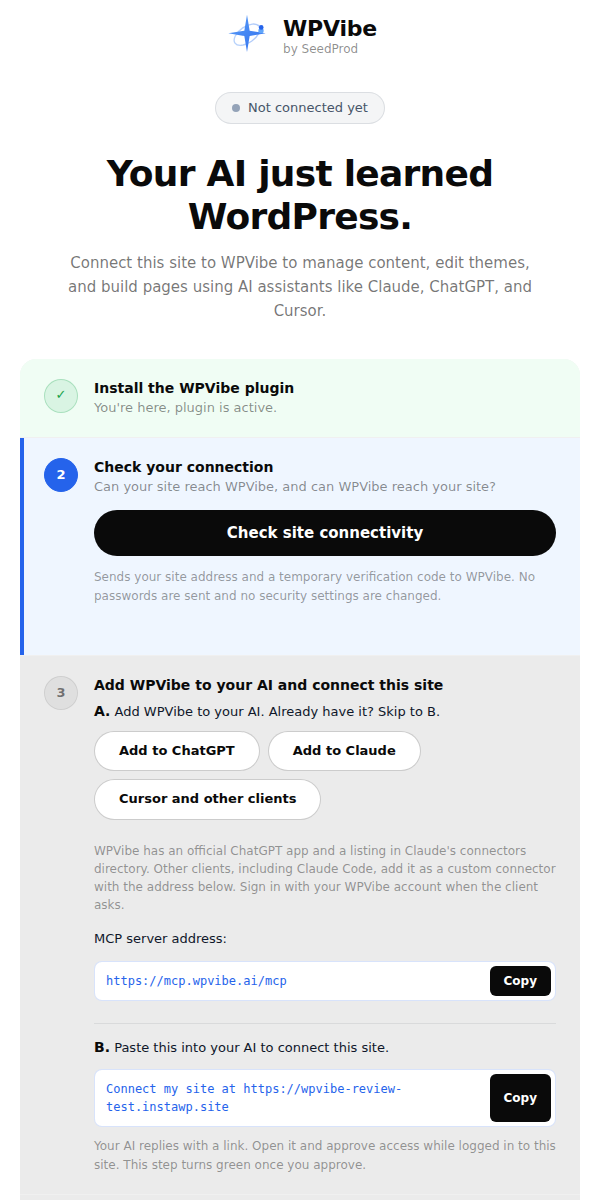
Install the free WPVibe plugin from WordPress.org, add WPVibe to your AI client as a connector, sign in with a WPVibe account, then ask the AI to connect your site and approve the Application Password screen in wp-admin. WPVibe’s setup page walks through four steps, and the whole flow takes a few minutes on a public site.
- Install the plugin. In wp-admin go to Plugins, Add New, search for WPVibe, then install and activate it. A WPVibe menu appears with an Approval Log submenu.
- Check the connection. Click Check site connectivity on the WPVibe page. It sends your site address and a temporary verification code to WPVibe to confirm each side can reach the other.
- Add WPVibe to your AI client. Use the Add to ChatGPT or Add to Claude button, or add https://mcp.wpvibe.ai/mcp as a custom connector in Claude Code, Cursor or another MCP client. Sign in with a WPVibe account when the client asks.
- Connect your site. Paste the prompt WPVibe shows you, for example “Connect my site at https://example.com”, into your AI client. It replies with an authorization link.
- Approve in wp-admin. Open the link while logged in to the site as an administrator and approve the Application Password WordPress offers. WPVibe stores it encrypted on its servers.
- Confirm it works. Ask your AI to read the site with the site_info tool and report the site name and address. The setup step turns green when it does.
Firewalls are the other common snag. WPVibe’s requests come from Cloudflare’s network or from one static IP, and its firewall guide now asks anyone who followed an older page to delete a rule that trusted the X-WPVibe request header, since anyone can send that header. If you added such an exception for WPVibe, remove it and use the scoped IP rule the guide describes.
What can WPVibe do?
WPVibe can manage posts, pages, media, categories and custom fields, edit theme files in a draft copy, run an allowlisted set of WP-CLI style commands, build pages in the major page builders, call plugin abilities through the WordPress Abilities API, and update plugins, themes and WordPress core across every connected site. Its public tools reference groups the tools like this:
| Tool group | Main tools | What it is for |
|---|---|---|
| Site connection | connect_site, list_sites, site_info, remove_site | Connect sites to your WPVibe account and check usage |
| Content and media | rest_api, upload_media, request_upload, search_images | Any WordPress REST route, image uploads, Unsplash search |
| Plugins and abilities | discover_abilities, get_ability_info, run_ability, code_snippet | Run Abilities API operations; write WPCode snippets that stay switched off until you enable them |
| Themes and files | create_draft_theme, edit_file, read_file, publish_draft_theme | Edit a cloned draft theme with a private preview, then publish with a backup |
| Fleet | show_fleet_dashboard, start_fleet_job | Plugin, theme and core updates across sites, checked before and after each one |
| Inspection | run_wp_cli, get_page_html, audit_page, load_skill | WP-CLI style commands through PHP, rendered HTML, PageSpeed audits, task skills |
| Approvals | show_approval_panel, check_approval_status | Show an approval in the chat and check whether you approved it |
Two design choices stand out. First, WP-CLI commands are emulated in PHP against an allowlist, so they work on shared hosting with no shell, and there is no open shell or arbitrary eval. Second, theme work happens in a cloned draft theme with its own preview URL, and publishing keeps a backup of the old theme files. Both are sensible defaults for people who do not have a staging site. For WooCommerce, WPVibe can review a store and bulk-edit products, prices and stock; InstaWP tested that job across several servers in its WooCommerce MCP comparison.
How well does WPVibe handle Elementor?
Well. In InstaWP’s September 2026 test, on a dev site running WordPress 7.1.2 and Elementor 4.3.2, WPVibe saved the 14-element test page the native way: it wrote 9 Elementor meta keys and generated the page stylesheet at save time, closer to what the Elementor editor does than most of the 21 plugins tested. InstaMCP 1.11.3 wrote the raw _elementor_data with 5 meta keys and left Elementor to build the stylesheet on the first page view. The full write-up of why that difference matters is in InstaWP’s Elementor MCP test.
WPVibe 1.20.4 also lists Bricks, Breakdance, Beaver Builder and Divi as builders it writes through each builder’s own save pipeline, with built-in skills for Gutenberg, Kadence, GeneratePress and SeedProd. InstaWP has not tested those builders with WPVibe.
How much does WPVibe cost?
The WPVibe plugin is free, and the WPVibe service is free for 100 tool calls a day. Paid plans raise the daily allowance: Pro is $99 a year for 500 calls a day, Power $299 for 2,000, Agency $599 for 5,000 and Scale $899 for 10,000, with monthly billing at $19, $49, $99 and $149. Prices are from WPVibe’s pricing page on 14 October 2026.
| Plan | Tool calls a day | Annual price | Monthly price | Cost per 1,000 calls at full use |
|---|---|---|---|---|
| Free | 100 | $0 | $0 | n/a |
| Pro | 500 | $99 ($8.25 a month) | $19 | about $0.54 |
| Power | 2,000 | $299 ($24.92 a month) | $49 | about $0.41 |
| Agency | 5,000, plus client invites and per-client reporting | $599 ($49.92 a month) | $99 | about $0.33 |
| Scale | 10,000 | $899 ($74.92 a month) | $149 | about $0.25 |
The last column is InstaWP’s arithmetic, the annual price divided by the full yearly allowance, so it is a floor: almost nobody uses every call every day. The rules that decide how fast you burn the allowance matter more than the price:
- The limit is per WPVibe account, not per site. Ten client sites share one daily allowance.
- It is a rolling 24-hour window. Older calls drop off as time passes, so there is no midnight reset.
- Failed actions do not count, and neither do connecting a site, listing sites, or loading and saving skills.
- New accounts get a bonus allowance for 7 days to absorb setup.
- One free account per person. WPVibe treats extra free accounts as getting around the limit.
A single page build can take dozens of calls, because an agent reads, writes, checks and retries. A WordPress.org reviewer who manages a restaurant site put it plainly on 9 October 2026: “The free plan’s usage limit can slow down larger projects.” Budget for Pro if you plan to build with it, and for Agency or Scale if several people or scheduled agents share one account.
How does WPVibe keep an AI agent in check?
WPVibe holds hard-to-undo operations until you approve them on an approval page or an in-chat panel that shows a dry-run preview, and it records approved operations in an append-only Approval Log in wp-admin. Everyday edits run straight away, and a short list of operations is refused whatever you approve.
What sits in each bucket matters more than the fact that approvals exist. This is WPVibe’s own list from its safety documentation, checked on 14 October 2026:
What does a “signed approval” mean in WPVibe 1.20.4?
It means the go-ahead for a gated operation is a cryptographic signature that only WPVibe’s servers can produce. InstaWP read the class that checks it, WPVibe_Op_Proof_V2: the plugin holds a single Ed25519 public key, and before an approval-gated route runs it verifies a signature over the site address, a hash of the connection’s Application Password, the operation id, the route and a hash of the request. A signature older than 300 seconds, or one made for another site, connection or operation, is refused.
// Worker-only signing secrets; this installation stores public verification material only.
const MAX_TTL = 300;  // an approval is valid for 5 minutes at most
// the signed message binds the approval to one site, one credential, one operation
// $credential = hash( 'sha256', the Application Password WordPress just authenticated )
$message = implode( "\n", array( 'wpvibe-op-proof-v2', $m[1], static::audience(), $credential,
                                $op_id, (string) $route, hash( 'sha256', (string) $subject ), $exp ) );
$valid = sodium_crypto_sign_verify_detached( $signature, $message, $public_key );
That is a careful design: a leaked approval cannot be replayed against another site or another action, and it expires fast. The trade-off is that the authority to approve lives on WPVibe’s side. If the relay is down, or your WPVibe account cannot sign in, gated operations cannot run, and the plugin has no local fallback for them.
What does “Dangerously bypass approvals” do?
It turns off every approval prompt on one site. With it on, deletes, raw SQL, WP-CLI writes, REST writes, plugin abilities and fleet jobs run as soon as the AI asks, and only enabling white label mode still asks. It needs plugin 1.20.0 or newer, is off by default, and only a logged-in administrator can switch it on from wp-admin; WPVibe’s own tools cannot.
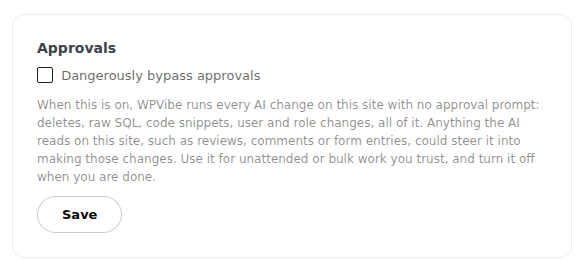
The warning on that screen is the most important sentence in WPVibe’s admin: “Anything the AI reads on this site, such as reviews, comments or form entries, could steer it into making those changes.” That is prompt injection, the top risk on the OWASP list for LLM applications, described by the vendor itself. WPVibe’s bypass documentation recommends it for staging sites, backed-up sites and big batch jobs, and against it on stores with open reviews, busy comment sections, public forms and client sites.
Is WPVibe safe to use on a live WordPress site?
WPVibe is reasonably safe for content work on a live site with its defaults left on, because it runs as the WordPress user you authorize, gates irreversible operations behind signed approvals and keeps an Approval Log. It is not risk-free, and three gaps deserve a deliberate decision before you connect a client site.
- Your site traffic passes through a third party. Tool inputs and outputs travel through WPVibe’s relay, and WPVibe stores the Application Password and per-call metadata. It is a data-processing question you should be able to answer for every client.
- Some destructive actions never ask. Categories, tags, menu items and media on most sites are deleted for good with no approval page, and a plugin ability its plugin does not mark destructive runs immediately whatever it does. WPVibe’s own advice is to ask the AI to list what it will delete and wait for your go-ahead.
- One checkbox removes the brakes. With “Dangerously bypass approvals” on, a review or comment on the site can steer the agent into deletes or SQL. Keep it off on any site where strangers can post content.
None of these is unusual for WordPress MCP plugins. InstaWP found worse in its test of 21 WordPress MCP plugins, where data leaving the site and public-by-default endpoints were one of five recurring security themes. The practical answer is the same for every server: give the agent its own WordPress user, connect it to a copy of the site first, and keep a restorable backup.
What does WPVibe do well?
WPVibe does setup, page builders and approvals better than most WordPress MCP plugins InstaWP has tested. The strengths that held up in testing and in the 1.20.4 code:
- Fast setup from a browser. ChatGPT and Claude users can add it from each app’s own directory, with no URL to paste and no local install.
- Native page-builder saves. 9 Elementor meta keys and the stylesheet at save time in InstaWP’s September test, with Bricks, Breakdance, Beaver Builder and Divi listed in 1.20.4.
- Approvals that cannot be replayed. Ed25519 signatures bound to one site, connection and operation, valid for 5 minutes.
- An Approval Log in wp-admin that records each gated operation, the preview you saw and the result.
- Works on shared hosting. WP-CLI style commands run through PHP against an allowlist, with no SSH.
- Fleet updates. Plugin, theme and WordPress core updates across every connected site, checked before and after each update.
- Unlimited sites on every plan, and white label mode free on every plan.
What are WPVibe’s limitations?
WPVibe’s limitations all come from the same place: the product is a hosted service, not a server that lives on your site. You need its account, its servers, its allowance and its approvals, and what you get in return is convenience.
It needs a WPVibe account and its cloud
There is no self-hosted mode. Every tool call needs WPVibe’s relay to be up, your WPVibe sign-in to work and your plan to have calls left. When you hit the cap, WPVibe blocks further counted calls until the rolling window frees some up.
The daily allowance is shared across every site
Unlimited sites on one account sounds generous until a busy day on one client site eats the allowance for the other nine. Agencies running scheduled agents should price the Agency or Scale plan, not Pro.
Not every destructive action asks first
Approval gates cover permanent deletes of posts, users and plugins, SQL writes and search-and-replace. They do not cover taxonomy terms, menu items or most media, and they defer to each plugin’s own labelling for abilities. Trash protects posts and comments, not everything else.
Local sites, firewalls and bot protection get in the way
The relay must reach your site over the public internet. Local sites need a tunnel, and security layers that challenge Cloudflare-origin traffic can block WPVibe until you add a scoped exception. On a client’s host, that may mean a support ticket before the first call works.
Your AI app adds its own permission layer
ChatGPT, Claude and other clients ask their own permission questions before calling a tool, separately from WPVibe’s approvals. Long unattended runs need both layers set, which WPVibe documents per client.
What is the best WPVibe alternative?
For agencies whose sites are, or could be, hosted on InstaWP, the best WPVibe alternative is InstaMCP, the MCP server built into every InstaWP site. It answers the three WPVibe trade-offs directly: there is no third-party relay, no daily tool-call allowance, and access is scoped by WordPress role rather than by approval prompts. If your sites must stay on another host, look at the other plugins in the list below.
| What to compare | WPVibe 1.20.4 | InstaMCP on InstaWP |
|---|---|---|
| Where the MCP server runs | WPVibe’s cloud relay at mcp.wpvibe.ai | An endpoint on the InstaWP site itself |
| Which sites it works on | Almost any self-hosted WordPress site reachable from the internet | Only sites hosted on InstaWP |
| Account needed | A WPVibe account | Your InstaWP account; the site’s connection URL carries its token |
| Usage limits | 100 tool calls a day free, up to 10,000 on Scale ($899 a year) | No daily tool-call allowance; part of InstaWP hosting |
| How access is scoped | Runs as the WordPress user you authorize | Token maps the WordPress role to read, write, delete and admin scopes; a Subscriber token can only read |
| Raw PHP, SQL and file access | No arbitrary eval; allowlisted WP-CLI style commands; SQL writes need approval | execute_php, db_query and site_files are off until an admin switches each one on |
| Approvals for risky actions | Signed in-chat approvals with a dry-run preview | No approval prompts; risky tools stay off by default, and Safe Mode blocks a set of destructive operations |
| Record of risky actions | Append-only Approval Log in wp-admin | No audit log of tool calls |
| Elementor pages (InstaWP test, Sept 2026) | 9 meta keys, stylesheet built at save time | 5 meta keys, stylesheet built on first view |
| Theme and plugin file edits | Draft theme with a private preview and a backup on publish | Every PHP write syntax-checked before it reaches disk; execute_php reverts boot-critical files it breaks |
| WordPress core updates | Yes, across connected sites | No; InstaMCP manages plugins and themes, not core |
| Staging and backups | Not part of WPVibe | InstaWP staging sites with their own MCP endpoint, plus site backups |
| Many sites, one connection | One WPVibe account lists all connected sites | Account MCP: one connection to the whole InstaWP account, with a read-only mode |
Read the table in two halves. The first six rows are about where trust sits: WPVibe asks you to trust its relay and its approval prompts, while InstaMCP keeps the traffic on the site and makes the dangerous tools opt-in. The last rows are where each product reaches further. WPVibe updates WordPress core and saves Elementor pages more completely; InstaMCP sits inside a host that also gives you the staging copy and the backup to roll back to.
Keep the connection on the site
InstaMCP is switched on per site from the site’s MCP tab in the InstaWP dashboard and gives you one connection URL to paste into Claude, ChatGPT, Cursor or another client. Requests go straight to the site, so there is no extra processor to explain to a client.
The setup is in InstaWP’s docs on connecting AI assistants to your WordPress site using MCP, and InstaWP’s guide to the InstaMCP WordPress MCP server lists all 43 tools. Treat the connection URL like a password: it carries the site’s token.
Give each agent only the access it needs
InstaMCP maps the WordPress role behind each token to four scopes: read, write, delete and admin. An Editor’s token can read, write and delete content but cannot reach the 11 admin-only tools; a Contributor or Subscriber token can only read.
In InstaWP’s own test on 29 September 2026, a Subscriber token listed posts and was refused the moment it tried to create one. That is how you run a reporting or audit agent that cannot change anything, without trusting it to click Decline.
Keep raw PHP, SQL and files off until you need them
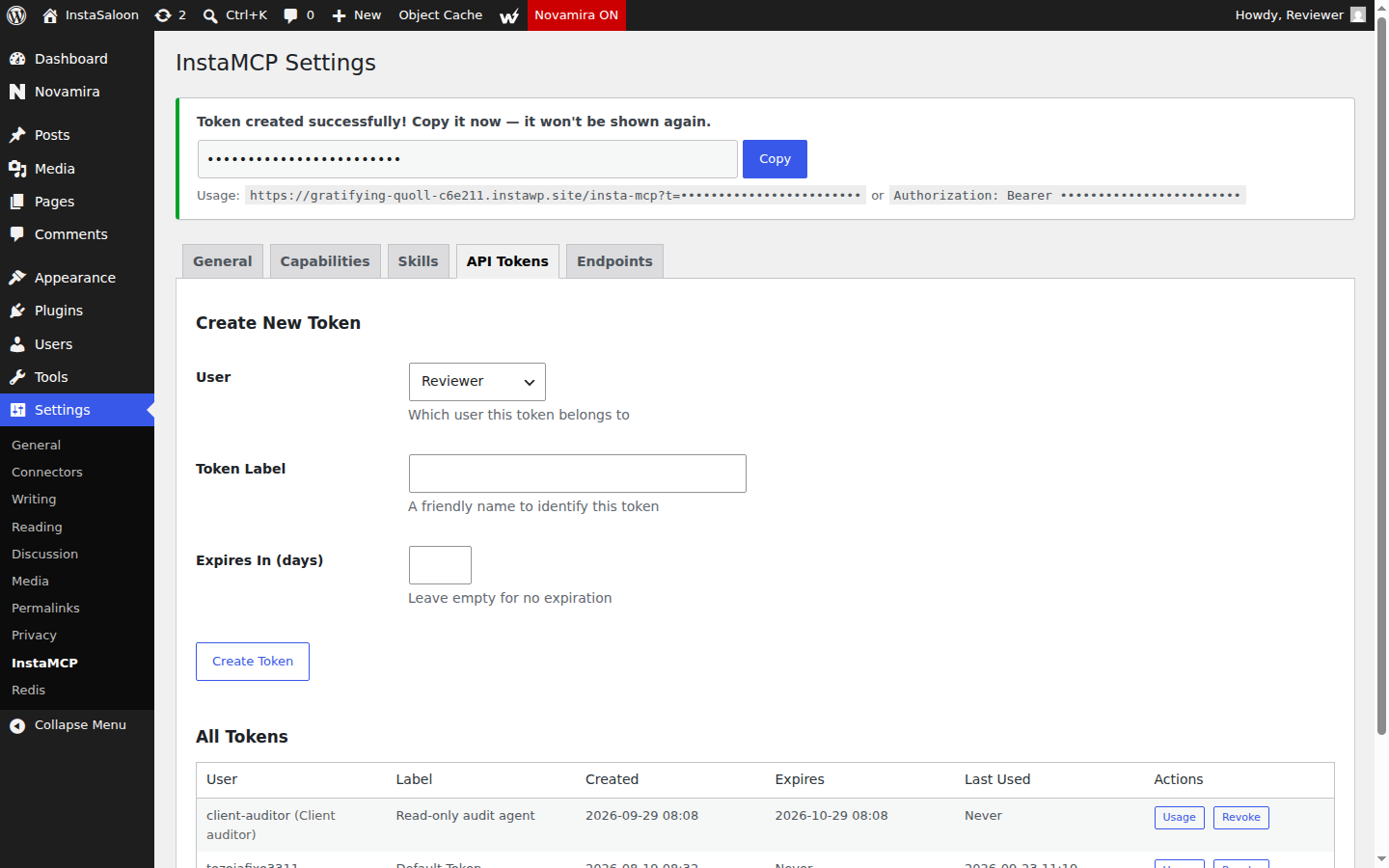
execute_php, db_query and site_files ship switched off on every InstaWP site, and a site administrator enables each one separately. When they are on, every PHP file write is syntax-checked before it reaches disk, and a guard around execute_php reverts boot-critical files (functions.php, active plugins, mu-plugins, wp-config) within the same request if a change breaks them. Safe Mode, when you turn it on, blocks a defined set of destructive operations and file writes.
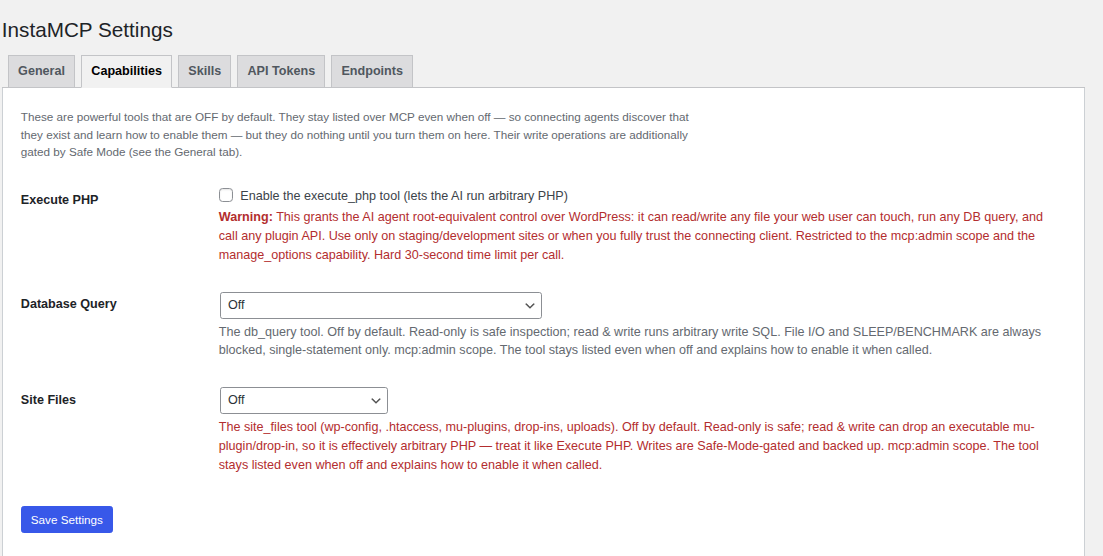
Point the agent at staging, not production
The bigger difference is the platform around the server. On InstaWP you can create a sandbox site for an agent to experiment on, or a staging copy of a live site that has its own MCP endpoint, then push the result. InstaWP explains when to use which in WordPress staging vs sandbox sites.
And if something still goes wrong, site backups and restore live in the same dashboard. That is the undo layer InstaMCP itself does not have.
Reach every client site with one connection
WPVibe’s answer to many sites is one WPVibe account. InstaWP’s is Account MCP: one connection to your whole InstaWP account, switched on under Profile, MCP, off by default, with a read-only mode and a toggle per capability. It manages sites, PHP and WordPress versions, backups and plans, and with the opt-in “act inside sites” capability it reaches each site’s InstaMCP underneath.
The difference between the two layers is explained in Account MCP vs Site MCP and set up in the docs on connecting AI assistants to your account MCP.
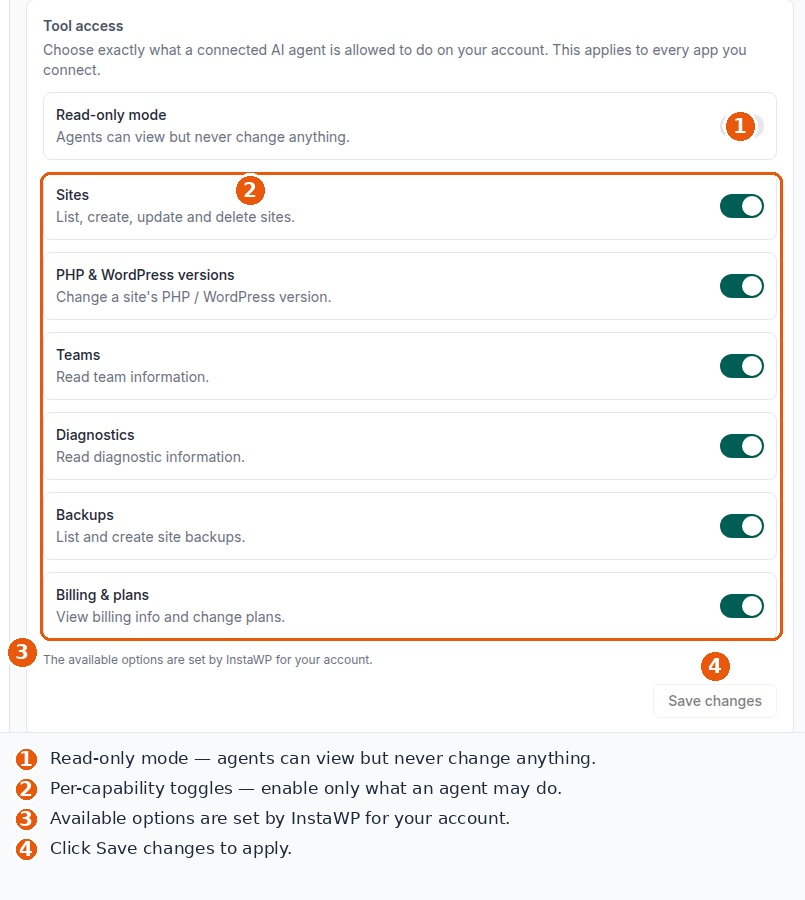
What InstaMCP does not do
An honest list, so the comparison holds up. InstaMCP runs only on sites hosted on InstaWP and is not a WordPress.org plugin. It has no in-chat approval prompts, no audit log of tool calls, no undo, no rate limiting and no per-tool switches.
It writes Elementor data rather than saving through Elementor, and InstaWP’s Elementor skill needs execute_php switched on to regenerate the page CSS. It does not update WordPress core. InstaWP’s answer to most of these is the platform: staging, backups and scoped tokens rather than prompts.
What are the other WPVibe alternatives?
If the site has to stay on its current host, these are the alternatives InstaWP tested hands-on in September 2026. Each runs on your own site with no hosted relay:
| Alternative | Best for | Watch out for |
|---|---|---|
| Novamira | Developers who want raw PHP, WP-CLI and file access on a staging site | Administrator-only, no read-only mode |
| Easy MCP AI (Themeisle) | Guardrails: every tool labelled, per-token limits, an audit log | No code, SQL or file-edit tools |
| Royal MCP | Breadth plus a 72-hour undo token on every write | One shared site-wide API key |
| WordPress MCP Adapter | The official, standards-first path over the Abilities API | Only 3 read-only abilities on a bare install |
The full field, with every result, is in InstaWP’s best WordPress MCP plugins test. For servers you run outside WordPress, such as npm or GitHub projects, see the WordPress MCP servers comparison, and for hosts that bundle MCP, the roundup of WordPress hosting with MCP.
Who should use WPVibe, and who should not?
Use WPVibe if your sites live on a host you cannot or will not leave, you work mostly from ChatGPT or Claude in the browser, and you want approval prompts rather than permission settings. Choose InstaMCP on InstaWP if site data must not pass through a third party, agents run on a schedule, or you want staging and backups next to the agent.
Hosting on InstaWP is the deciding factor, and it is a real decision rather than a toggle. InstaWP’s managed WordPress hosting includes InstaMCP, staging and backups on every hosted site; plans are on the InstaWP pricing page. If you are moving sites anyway, the comparison of WordPress hosting with staging is a good place to start.
Is WPVibe worth it in 2026?
Yes, for site owners and freelancers whose sites stay on their current host and who want an AI assistant with brakes. WPVibe is quick to set up, signs its approvals properly, saves page-builder layouts more completely than most rivals, and the free plan is enough to judge it. It is worth less for agencies that run agents all day or cannot route client data through a third party.
WPVibe is a polished, fast-moving hosted relay for WordPress MCP, with signed approvals and strong page-builder saves. Its costs are structural: every call passes through WPVibe’s cloud, the free plan stops at 100 calls a day, and some deletes never ask. If your sites are on InstaWP, or could be, InstaMCP gives your agent the same WordPress reach with no relay, role-scoped tokens, power tools off by default and staging and backups in the same place.
Whichever server you choose, test it the way InstaWP tested WPVibe: on a copy of the site, with its own WordPress user, before it touches production. The InstaWP guide to connecting AI agents to WordPress using MCP covers the client side, including Claude and ChatGPT.
WPVibe review: frequently asked questions
What is WPVibe?
WPVibe is a WordPress MCP server from SeedProd that lets AI assistants such as Claude, ChatGPT and Cursor manage a self-hosted WordPress site. The free plugin (WordPress.org slug vibe-ai) runs on your site, and the MCP server itself runs in WPVibe’s cloud at mcp.wpvibe.ai, so you need a WPVibe account.
Is WPVibe free?
Partly. The plugin is free and the WPVibe service has a free plan with every tool and 100 tool calls a day per account. Paid plans raise the daily allowance: Pro 500 calls for $99 a year, Power 2,000 for $299, Agency 5,000 for $599 and Scale 10,000 for $899, as of 14 October 2026.
Is WPVibe safe?
WPVibe is reasonably safe with its defaults on: it runs as the WordPress user you authorize, holds permanent deletes, SQL writes and role changes for a signed approval, and logs approved operations in wp-admin. Know three limits: traffic passes through its cloud relay, some deletes such as categories, tags and media do not ask, and the Dangerously bypass approvals setting removes every prompt.
Does WPVibe send my site data to its servers?
Yes, while a request runs. WPVibe’s security page says tool inputs and outputs may include WordPress content, media, settings or admin data and that it does not claim site content never leaves your host. It stores your Application Password encrypted plus per-call metadata, and says it does not train models on your content.
Who makes WPVibe?
WPVibe is made by SeedProd LLC, the company behind the SeedProd page builder. It is a different product from WPVibes, a separate company that makes Elementor add-on plugins.
Does WPVibe work with Elementor?
Yes. In InstaWP’s September 2026 test WPVibe saved an Elementor page the native way, writing 9 meta keys and building the stylesheet at save time. Version 1.20.4 also lists Bricks, Breakdance, Beaver Builder and Divi as builders it saves through their own pipelines.
Can WPVibe connect to a local WordPress site?
Not directly. WPVibe’s server runs in the cloud, so it can only reach a site on the public internet. Its documentation has you expose a local site with a Cloudflare Tunnel and connect the public address, which changes each time the tunnel restarts. A cloud sandbox such as an InstaWP site avoids the tunnel.
What is the best WPVibe alternative?
For sites hosted on InstaWP, the best WPVibe alternative is InstaMCP, the MCP server built into every InstaWP site: no cloud relay, no daily call allowance and tokens scoped by WordPress role. It runs only on InstaWP. For sites on other hosts, Novamira, Easy MCP AI, Royal MCP and the official WordPress MCP Adapter are the main options.
What is the difference between WPVibe and InstaMCP?
WPVibe is a hosted relay you add to almost any WordPress site, with signed approval prompts, an Approval Log and a daily call allowance. InstaMCP is an endpoint on each InstaWP-hosted site, with no relay, read, write, delete and admin scopes mapped from WordPress roles, and PHP, SQL and file tools off by default.