Yes, MCP WordPress integration can be safe and secure, as long as you limit what the AI agent is allowed to do. MCP is only the connection. With InstaMCP by InstaWP, an agent gets 43 fixed, typed tools, the token’s scopes follow its WordPress role, PHP, SQL and file tools are off by default, and Safe Mode blocks deletes and plugin changes.
InstaWP checked every control in this post on a throwaway sandbox on 12 October 2026 and quotes the responses the agent actually got back. Each section follows the same three steps: the risk, how InstaMCP handles it, and what you should set. Where InstaMCP has no control for a risk, the section says so.
Key takeaways
- Permissions determine risk. InstaWP’s WordPress MCP server, InstaMCP, exposes a fixed list of 43 tools.
- Scopes follow the WordPress role. Editor tokens can access 32 tools. Restricted operations return a scope error.
- Dashboard tokens have Administrator access. Issue a lower-role token for content agents and contractors.
- Safe Mode blocks 11 tools. Content creation and editing still work. Power tools have separate switches.
- Code, SQL and file tools start disabled. The boot guard restores the previous file if a PHP edit causes a syntax error.
Table of Contents
| Question | Answer for InstaMCP 1.11.4 |
|---|---|
| Is MCP itself the risk? | No. MCP is the connection. The risk is the tools behind it and the permissions the agent borrows. |
| How many tools can an agent call? | 43 fixed, typed tools: 19 read, 11 write, 2 delete, 11 admin. |
| Whose permissions does the agent use? | Those of the WordPress user the token belongs to. Scopes follow that user’s role. |
| Who owns the dashboard-issued token? | The site’s Administrator, so it reaches all 43 tools. |
| What is off on a new install? | execute_php, db_query and site_files. Safe Mode is also off until you tick it. |
| What does Safe Mode block? | Deletes, plugin and theme operations, code-file writes, set_meta and media_upload: 11 tools. Content edits still work. |
| How are tokens stored? | As a SHA-256 hash only. Each can carry an expiry date, shows when it was last used, and can be revoked on its own. |
| Fastest way to cut off an agent? | Revoke its token. In InstaWP’s test the next call was refused with Invalid token. |
| What can no MCP server stop? | A model being persuaded by instructions hidden in content it reads. |
| Last tested | 12 October 2026 on InstaMCP 1.11.4, WordPress 7.1.3 and PHP 8.2. |
Is MCP WordPress integration safe?
It is as safe as the tools behind it and the permissions it borrows. The Model Context Protocol is a doorway: it lets an AI client such as Claude, ChatGPT or Cursor call tools that a server exposes. The protocol does not decide what those tools do or whose account they act as. The server does, which is why the MCP project’s own security best practices are written for the people who build servers.
For a WordPress site, three questions decide whether a connection is safe, and InstaMCP gives a specific answer to each:
- What tools sit behind the connection? A general REST bridge exposes whatever the REST API exposes. InstaMCP exposes a fixed, published list of 43 tools.
- Whose permissions does the agent borrow? InstaMCP runs every call as the WordPress user the token belongs to, with scopes taken from that user’s role.
- What happens when the agent gets something wrong? InstaMCP keeps the riskiest tools off, offers Safe Mode, rolls back broken PHP files and reads important writes back.
MCP adds to ordinary WordPress security rather than replacing it: an agent connected to a site with weak passwords or an outdated plugin inherits those problems. If you are still deciding whether to connect an agent at all, start with how to make a WordPress site AI-agent ready.
What can an AI agent actually do to your WordPress site?
Whatever its credential allows, which on most WordPress MCP setups is far more than the job needs. Many servers authenticate with a WordPress application password. An application password carries every capability of the user it belongs to and cannot be narrowed to a few routes, so an agent connected with an administrator’s application password can do anything that administrator can do through the REST API. InstaWP found the same pattern across the plugins in its roundup of WordPress MCP plugins.
InstaMCP replaces that with a fixed, published list of 43 typed tools. An agent asked to edit a page calls the page tool. There is no general-purpose route to the filesystem in the default set, and each tool declares the scope it needs:
| Scope needed | Tools | Examples |
|---|---|---|
mcp:read | 19 | get_content, list_content, plugin_info, discover_blocks, validate_blocks |
mcp:write | 11 | create_content, update_content, patch_content, set_meta, media_attach, memory_save |
mcp:delete | 2 | delete_content, delete_term |
mcp:admin | 11 | plugin_operations, theme_operations, plugin_files, theme_files, media_upload, site_logs, skill_save, skill_delete, execute_php, db_query, site_files |
Read that table from the bottom. The 11 admin tools are the ones that touch plugins, themes, code, the database and the server. Three of them, execute_php, db_query and site_files, are off on every new install, even for an administrator. The other 8 work for any token that holds the admin scope, which is why choosing the token’s user matters more than anything else in this post.
Every call passes the same checkpoints in the same order, and InstaWP saw four of them refuse a call during testing:
How did InstaWP test these controls?
On a temporary InstaWP sandbox created for this post, never a customer site and never instawp.com. You can spin up the same kind of throwaway site from a terminal with InstaCLI. The setup:
- InstaMCP 1.11.4, installed from the release build, on WordPress 7.1.3 and PHP 8.2.
- Two WordPress users: the site administrator, and a new user
ai-content-agentwith the Editor role. - Four InstaMCP tokens: one for the administrator, one for the Editor that expires on 31 October 2026, one created already expired, and one revoked after it had been used.
- Every call made as JSON-RPC to the site’s
/insta-mcpendpoint with anAuthorization: Bearerheader, which is how an MCP client makes it.
One boundary, stated plainly: this tested InstaMCP’s own endpoint. It did not test other WordPress MCP plugins on the same site, and it does not measure how well a model resists manipulation, because no server can.
| Test | What the agent got back |
|---|---|
Editor token calls plugin_operations to install a plugin | Refused: requires the 'mcp:admin' scope. You have: mcp:delete, mcp:write, mcp:read |
Editor token calls execute_php | Refused with the same scope error |
Admin token calls execute_php, db_query, site_files on a fresh install | All three refused: execute_php is disabled on this site, db_query is OFF, site_files is OFF |
Safe Mode on: delete_content, plugin_operations, set_meta | All three refused: Operation blocked: Safe mode is enabled |
Safe Mode on: update_content renames a draft | Allowed. The title changed. |
db_query in read-only mode: an UPDATE, an INTO OUTFILE and a SLEEP | All three refused before reaching the database |
execute_php writes a mu-plugin with a syntax error | The boot guard reverted the file. The home page kept returning HTTP 200. |
plugin_files write with DISALLOW_FILE_EDIT set | Refused once PHP had picked up the new constant (see the OPcache note below) |
| Expired, revoked and made-up tokens | Token expired, Invalid token, Invalid token |
set_meta writes one field | A before and after diff with verified: true |
Read that table as a set of refusals with one deliberate exception. The only write that went through under Safe Mode was a content edit, which is exactly what Safe Mode is designed to allow.
How do you limit what the agent can touch?
Give the agent its own WordPress user at the lowest role the job needs, and issue the InstaMCP token to that user. InstaMCP takes a token’s scopes from the role of the user it belongs to and then runs the request as that user, so the role you pick is the ceiling on what the agent can do.
| WordPress role | Scopes | Tools it can call | What it cannot do |
|---|---|---|---|
| Administrator | admin, delete, write, read | 43 | Nothing is withheld by scope. The power tools still need their own switch. |
| Editor | delete, write, read | 32 | Install, update or edit plugins and themes, upload media, read logs, run PHP or SQL, write site files, author skills |
| Author | write, read | 30 | All of the above, plus delete posts or terms |
| Contributor or Subscriber | read | 19 | Any write at all |
The Editor row is the one most agencies want for a content agent. It can draft, edit, tag and delete posts, and it cannot touch the plugins or the code. If the agent should not delete either, use an Author token or turn on Safe Mode. The WordPress roles and capabilities reference explains what each role means outside MCP.
One detail surprised InstaWP in testing. The Editor token’s tools/list returned all 43 tools, not 32. InstaMCP lists every tool to every client and enforces the scope when a tool is called, and the refusal names exactly what was missing:
// tools/list with the Editor token: 43 tools listed
// tools/call plugin_operations { "action": "install", "plugin": "hello-dolly" }
{
  "isError": true,
  "text": "Insufficient permissions: This tool requires the 'mcp:admin' scope. You have: mcp:delete, mcp:write, mcp:read"
}
So do not judge a token by the tool list your AI client shows you. Judge it by the role of the user it belongs to.
Which WordPress user does the dashboard’s MCP token belong to?
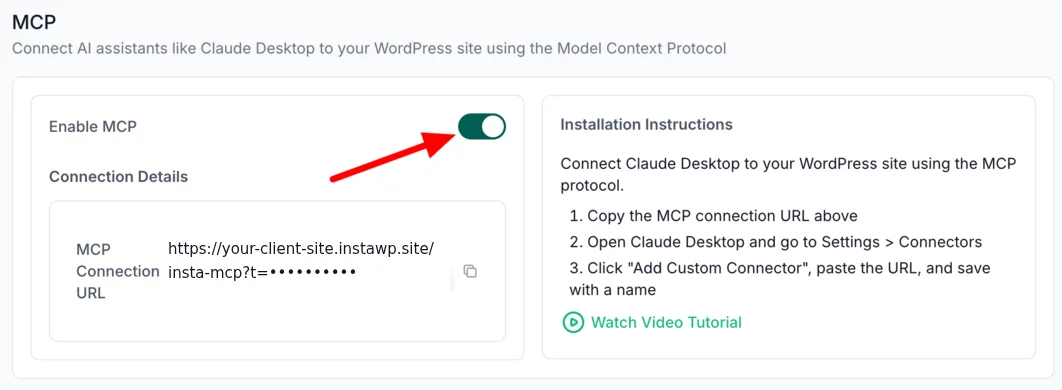
An administrator. When you switch MCP on for a site in the InstaWP dashboard, InstaWP generates the token and InstaMCP assigns it to the site’s first Administrator, so the connection URL you copy reaches all 43 tools. That is the right default for the site owner’s own agent. It is the wrong token to hand a contractor or a content bot. The InstaWP MCP documentation walks through switching MCP on.
One scope note, so nobody over-reads this section. What is verified here is the role-to-scope mapping, plus explicit WordPress capability checks such as edit_post, manage_options and update_plugins on the tools that need them. Do not assume every WordPress capability check runs on every tool. Choose the role as if the scope is the only limit.
What stops an agent from deleting things or changing plugins?
Safe Mode. It is a single checkbox under Settings, then InstaMCP, then General. It is off on a new install, and when it is on, 11 tools refuse to run. The agent gets a clear error instead of a silent failure, so it can tell you what it could not do.
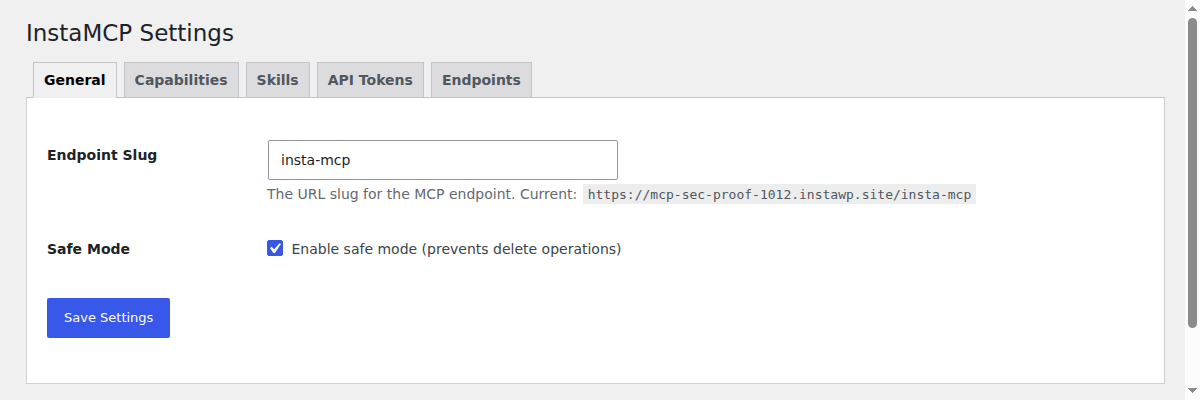
| Group | Tools | With Safe Mode on |
|---|---|---|
| Deletes | delete_content, delete_term, memory_delete, skill_delete | Blocked |
| Plugin and theme changes | plugin_operations and theme_operations: install, activate, update, delete | Blocked |
| Code and config file writes | plugin_files, theme_files, site_files | Blocked |
| Meta and media | set_meta, media_upload | Blocked |
| Content edits | create_content, update_content, patch_content, term edits | Still allowed |
| Power tools | execute_php, db_query | Not covered. Use their own switches. |
Read the last two rows carefully. Safe Mode is not a read-only mode: an agent can still create and rewrite posts and pages with it on, which is usually what you want from a content agent. And it does not switch off execute_php or db_query. Each of those has its own setting, covered in the next section. Here is what the agent saw with Safe Mode on:
// delete_content { "content_id": 5 }
"Operation blocked: Safe mode is enabled. Deleting content is not allowed."
// plugin_operations { "action": "install", "plugin": "hello-dolly" }
"Operation blocked: Safe mode is enabled. Plugin operations is not allowed."
// set_meta { "post_id": 5, "fields": [ ... ] }
"Operation blocked: Safe mode is enabled. Writing post meta is not allowed."
// update_content { "content_id": 5, "title": "..." }
"title": "Agent test post (edited under Safe Mode)"   // allowed
Can an AI agent run PHP or SQL on my WordPress site?
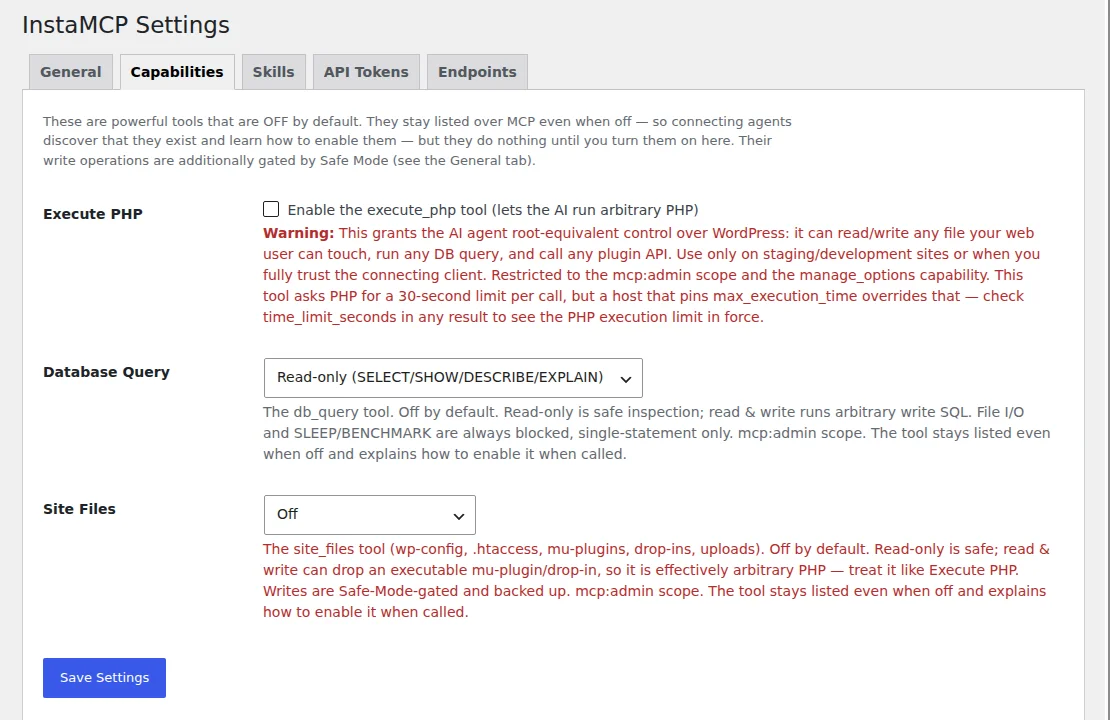
Only if an administrator switches it on, separately, after enabling MCP. Arbitrary PHP or SQL is root-equivalent on a WordPress site, so InstaMCP ships execute_php, db_query and site_files off, and turning MCP on does not turn them on. Each has its own control on the Capabilities tab.
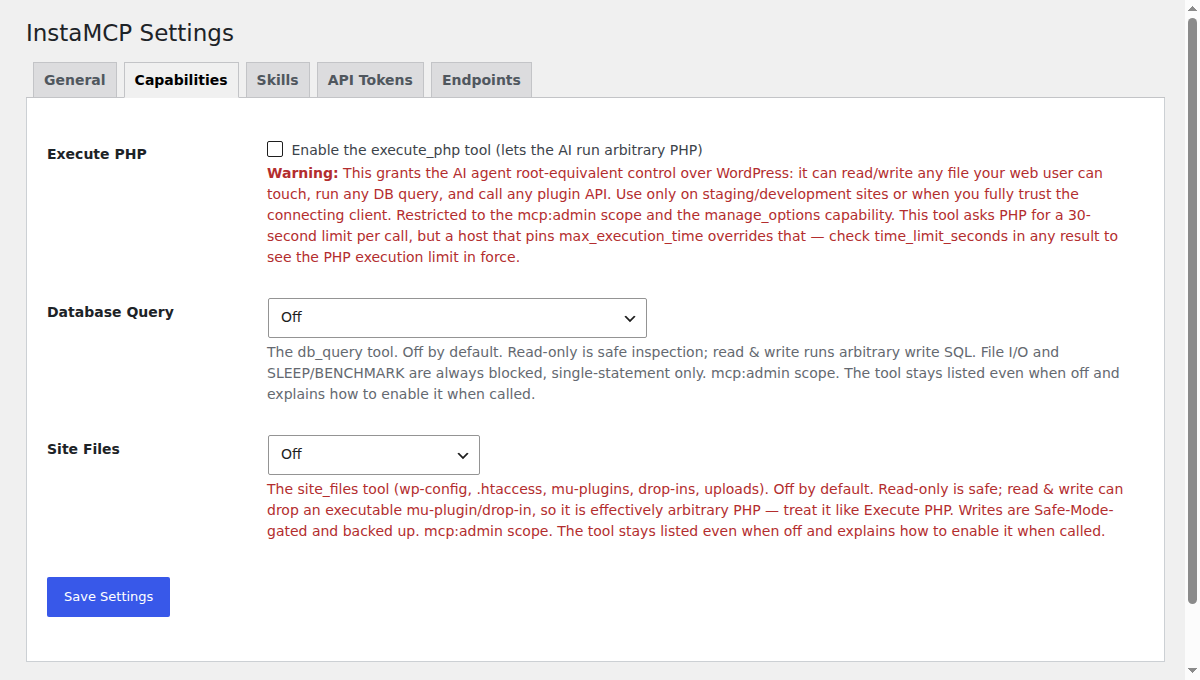
// execute_php
"Forbidden: execute_php is disabled on this site. A site admin must enable it ..."
// db_query
"Forbidden: db_query is OFF on this site. A site admin can enable it ..."
// site_files
"Forbidden: site_files is OFF on this site. A site admin can enable it ..."
| Tool | Default | Modes | Guardrails that always apply |
|---|---|---|---|
execute_php | Off | On or off | Needs the mcp:admin scope and the manage_options capability. A boot guard rolls back a change that leaves a PHP file with a syntax error. Every result reports the time limit actually in force (time_limit_seconds). |
db_query | Off | Off, read-only, read and write | File I/O, SLEEP, BENCHMARK and stacked statements are always refused. Since 1.11.2 statements are parsed rather than pattern-matched, and anything ambiguous is refused. A bare SELECT gets a LIMIT. |
site_files | Off | Off, read-only, read and write | Allowlisted paths only: wp-config.php, .htaccess, mu-plugins, drop-ins and uploads. The file is backed up before a write, and the write fails if the backup cannot be made. wp-config.php secrets are redacted on read. |
Read the guardrails column as the part you cannot switch off. InstaWP switched db_query to read-only and tried three things a manipulated agent might try. All three were refused before they reached the database:
// UPDATE wp_options SET option_value = 'x' WHERE ...
"Forbidden: db_query is in READ-ONLY mode, only SELECT/SHOW/DESCRIBE/EXPLAIN are allowed."
// SELECT ... INTO OUTFILE '/tmp/x.txt'
"Forbidden: File read/write SQL (LOAD DATA / LOAD XML / INTO OUTFILE / DUMPFILE) is not allowed."
// SELECT SLEEP(5)
"Forbidden: Disallowed function (LOAD_FILE / SLEEP / BENCHMARK)."
One thing InstaMCP deliberately does not promise is a fixed time cap on execute_php. It asks PHP for a limit, a host can override that, and so each result reports the limit that actually applied rather than a number the tool cannot guarantee.
db_query read-only unless the task needs writes, and switch them off again when the task is done.What happens if the agent’s change breaks the site?
InstaMCP limits how far a bad write can spread, and InstaWP gives you a copy of the site to make it on. The plugin-level controls are narrow and specific. The platform-level one, working on a copy, is the strongest control in this post.
Does InstaMCP undo a change that breaks PHP?
For one failure class, yes. When execute_php leaves functions.php, a plugin, a mu-plugin, a drop-in or wp-config.php with a PHP syntax error, the boot guard restores the previous file before the call returns. InstaWP tested it by having execute_php write a deliberately broken mu-plugin. The response reported the revert, the file was gone afterwards, and the home page kept returning HTTP 200:
// execute_php: file_put_contents( WPMU_PLUGIN_DIR . '/agent-broken-test.php', '<?php function agent_test( {' )
"boot_guard": {
  "reverted": [
    {
      "path": "wp-content/mu-plugins/agent-broken-test.php",
      "error": "syntax error, unexpected token "{", expecting variable"
    }
  ],
  "unrecoverable": []
}
// GET / afterwards: HTTP 200
That matters because a syntax error in a file WordPress loads on every request takes the whole site down, including the MCP endpoint you would use to fix it. The boot guard does not undo a change that is valid PHP and simply wrong.
What else limits the damage?
- Writes to code files are atomic since 1.11.4, so a failed write cannot leave half a PHP file behind.
- Backups are made before writes to plugin, theme and site files, and they are stored outside the web root (a 1.10.4 security fix), so a backup cannot be downloaded from a URL.
plugin_files,theme_filesandsite_filesrespectDISALLOW_FILE_EDITandDISALLOW_FILE_MODS. The wp-config.php hardening constants agencies already set to lock the dashboard file editor lock the agent out too.
plugin_files writes made straight after the constant was added still succeeded. A later call was refused with File editing is disabled via DISALLOW_FILE_EDIT constant. The cause was PHP’s OPcache: on that host it rechecks changed files every 60 seconds (opcache.revalidate_freq), so web requests briefly kept running the old wp-config.php. Make one test call before you rely on the constant.Where should an AI agent do its work first?
On a copy. Run the agent on an instant sandbox or a staging copy of the client site, review what it did, then push to live. A mistake on staging costs nothing, and the live site never sees a change you have not looked at. InstaWP builds this into its managed WordPress hosting: WordPress staging sites are created straight from the live site, and changes go back with pull and push staging.
If you are choosing between the two, staging versus sandbox sites explains when each fits, and the staging environment docs cover the setup. For a quick experiment, clone the site instead. And before any agent session on a live site, check you can find a recent backup and know how to restore the site.
Can you trust what the agent says it did?
Trust the checked writes, not the claimed ones. Across WordPress MCP plugins, a common 2026 failure is a tool that reports success when the write did not land: InstaWP documented four of them in its Elementor MCP tests. InstaMCP narrows that gap in four places:
set_metareads every value back and returns a before and after diff with averifiedflag, plus adry_runoption to preview. Since 1.11.4 it returns an error if any field fails.validate_blockschecks Gutenberg markup before it is saved.- Failed tool calls are flagged as errors to the client (1.10.4), so the agent does not read a failure as a success.
- Plugin and theme installs and updates report failure instead of “updated successfully” (1.11.4).
{
  "post_id": 5,
  "dry_run": false,
  "results": [
    {
      "key": "agent_reviewed",
      "before": "",
      "requested": "yes",
      "after": "yes",
      "changed": true,
      "verified": true
    }
  ],
  "summary": { "n_written": 1, "n_unchanged": 0, "n_failed": 0 }
}
This turns a claimed write into a checked write. It does not make the agent’s judgement correct: a verified write of the wrong value is still the wrong value, so review on staging is still the control for that.
How is the MCP connection itself secured?
With a per-user token that is stored hashed, can expire, and can be revoked on its own. InstaMCP generates each token from 32 random bytes (64 hex characters) and stores only its SHA-256 hash, so a copy of the database does not contain a usable token. Each token belongs to one WordPress user, and you can issue several per user, one for each person or tool.
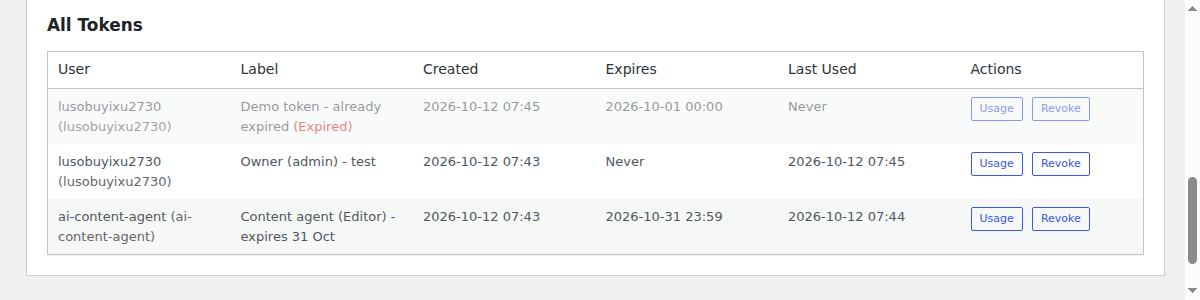
InstaWP checked what an agent gets with a bad token. An expired token, a revoked token and a made-up one were all refused before any tool ran:
// token created with an expiry of 1 October 2026
{ "error": "Unauthorized", "message": "Token expired" }
// token used once, then revoked in wp-admin
{ "error": "Unauthorized", "message": "Invalid token" }
// 64 zeros
{ "error": "Unauthorized", "message": "Invalid token" }
Is the MCP connection URL a secret?
Yes. The URL the dashboard gives you has the shape https://your-site.instawp.site/insta-mcp?t=YOUR_TOKEN, and the token in it is the credential. Do not paste it into tickets, docs or Slack. Where your MCP client supports it, send the token as an Authorization: Bearer header instead of in the URL, so it stays out of server logs and browser history. InstaMCP accepts both.
What about connecting an agent to your whole InstaWP account?
That is the InstaWP Account MCP, and it has its own controls. A site token reaches one WordPress site. The Account MCP reaches the account that manages your sites, so it is built on a different model:
- It signs in with OAuth 2.1, so there is no secret string to paste.
- You choose read-only or read-write on the consent screen, and that scope is baked into the token.
- Shell and credential tools sit in toolsets that are off by default.
- Write and destructive tools need an explicit
confirm: true, checked on the server. - MCP can be switched off per account.
For fleet-level work, connect it read-only first. Account MCP versus site MCP explains which to use when, and the Account MCP docs cover the connection. The InstaWP Academy walkthrough below shows it end to end. To see how other hosts handle account-level MCP, compare the best WordPress hosting with MCP.
For a single site, the Academy video Claude AI can now manage your entire WordPress site shows the site MCP side, and the guide to connecting AI agents to WordPress using MCP covers each client.
Can prompt injection make the agent misbehave?
Yes, and no MCP server can prevent it. Text the agent reads, such as a post, a comment, a form entry or a page from the web, can contain instructions, and a model can follow them. OWASP lists prompt injection as the first risk for LLM applications. The defence is limiting what a persuaded agent can do, which is everything above: a lower-role token, Safe Mode, and the power tools off.
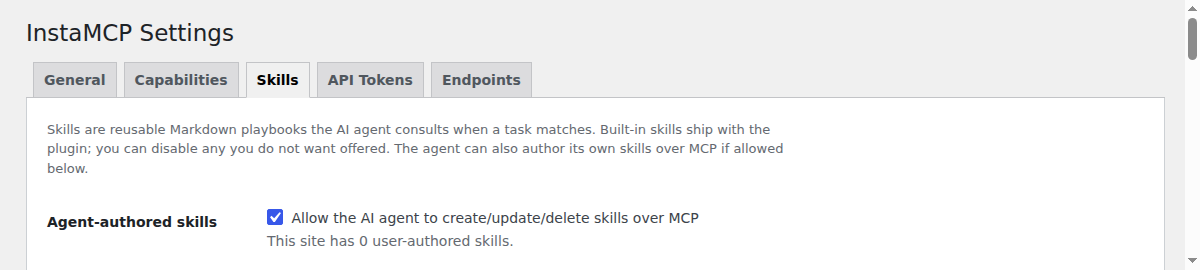
There is one InstaMCP-specific place to close. Skills are Markdown playbooks the agent loads when a task matches, and by default the agent can write its own. That makes skills a place where an injected instruction could persist into later sessions. Writing a skill needs the mcp:admin scope, so an Editor token cannot. For admin tokens, untick Agent-authored skills on the Skills tab, and skill_save and skill_delete disappear from the tool list.
What does InstaMCP not protect you from?
Four things to know before you connect a client site:
- A persuaded agent. The controls cap the damage. They do not stop a model being talked into using the tools it does have.
- A wrong but valid change. Verified writes prove the write landed, not that it was a good idea.
- Other MCP routes on the same site. These controls apply to InstaMCP’s own endpoint. If the site also runs the WordPress MCP Adapter plugin, requests through it authenticate with WordPress’s own methods, such as application passwords, so do not assume InstaMCP’s token scopes or Safe Mode apply there. Unless you need both, run one MCP route per site. InstaWP’s WordPress MCP Adapter review covers that route.
- An Administrator token in the wrong hands. It reaches all 43 tools, and only the power-tool switches stand between it and PHP, SQL and site files. Keep admin tokens for yourself.
How do you set up WordPress MCP safely for a client site?
Use the lowest role, the shortest-lived token and a copy of the site. In order:
Step 1: Enable MCP per site
Enable InstaMCP for each site from the InstaWP dashboard (Sites, then the site, then Extensions, then MCP), never as a blanket default across every site. The switch installs InstaMCP and gives you a connection URL with a token in it. Treat that URL like a password.
Step 2: Create an agent user
Create a dedicated WordPress user for the agent at the lowest role the job needs: Editor for content, Author if it should not delete. In wp-admin that is Users, then Add User. A separate user also makes it obvious in the post history which changes the agent made. On a store, InstaWP’s WooCommerce MCP test shows which role each server needs for products and orders.
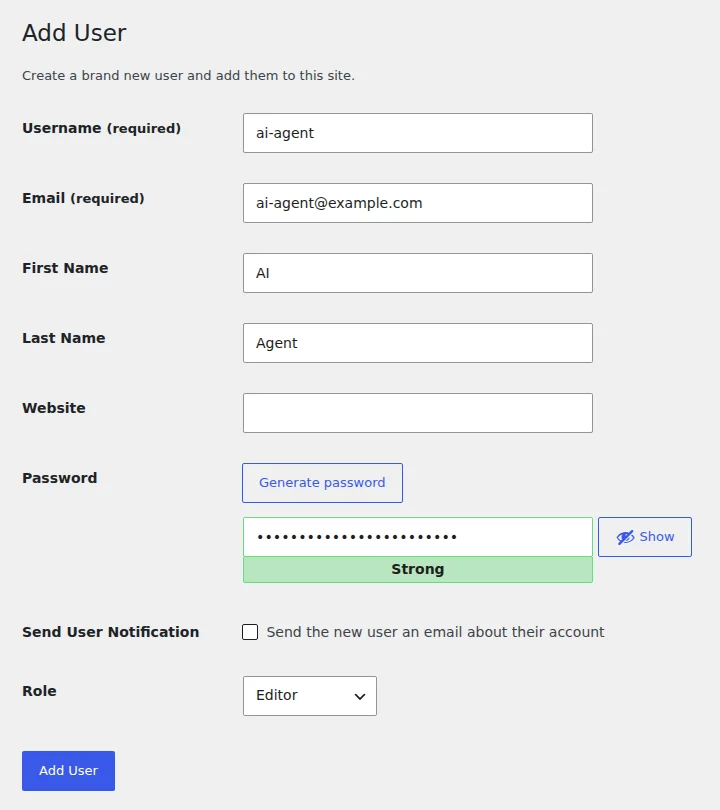
ai-agent user with the Editor role. Captured 12 October 2026 on a temporary InstaWP sandbox, InstaMCP 1.11.4.Step 3: Issue a named token with an expiry
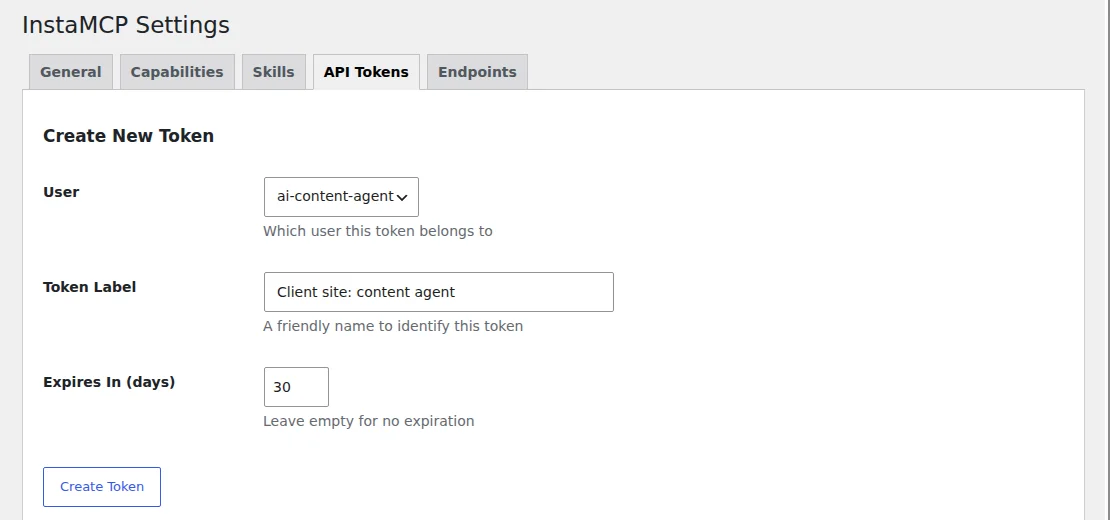
Under Settings, then InstaMCP, then API Tokens, issue a token to that user with a label and an expiry, and revoke it when the engagement ends. The label tells you which client or job a token belongs to, and the expiry closes it even if nobody remembers to.
Step 4: Turn on Safe Mode
Tick Safe Mode on the General tab for content-only work. The Safe Mode section above shows the setting and the calls it refused on InstaWP’s sandbox.
Step 5: Leave the power tools off
Leave execute_php, db_query and site_files off, or use their read-only modes. They sit on the Capabilities tab. If the agent needs to inspect the database, Read-only allows SELECT, SHOW, DESCRIBE and EXPLAIN and nothing else.
Step 6: Set DISALLOW_FILE_EDIT
Add DISALLOW_FILE_EDIT to wp-config.php, then make one test call to confirm it applies:
define( 'DISALLOW_FILE_EDIT', true );On InstaWP’s sandbox the first writes after adding it still went through until PHP’s file cache refreshed, which is why the test call matters.
Step 7: Work on staging
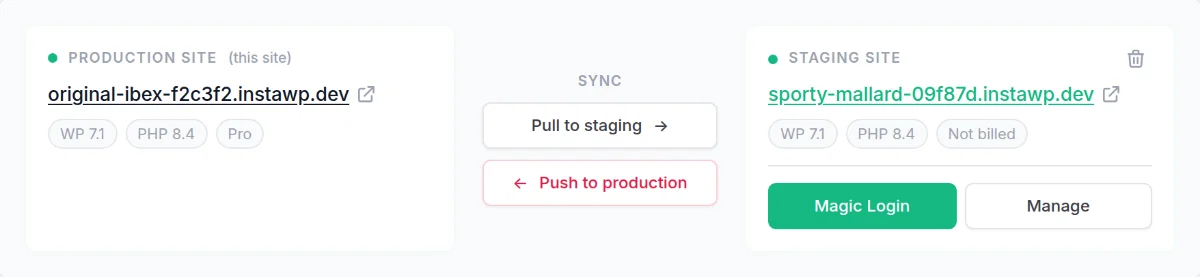
Run agent sessions on a staging copy, review the result, then push to live. On InstaWP’s Pro plan and above, the built-in staging site has its own URL and its own MCP connection, so the agent never touches production. Push to production replaces the live site with the staging copy, so review first.
Step 8: Start the Account MCP read-only
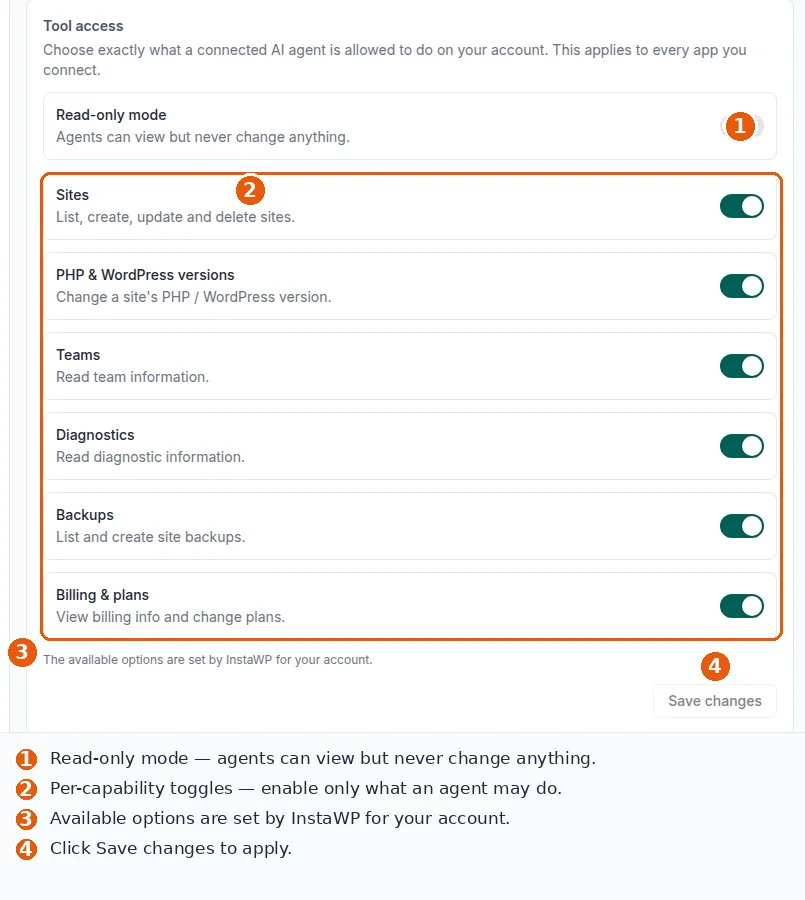
For account-level access, connect the Account MCP with read-only scope first. Switch on Read-only mode under Tool access, and when the agent does need to act, turn on only the capabilities that job requires.
Connect an agent with InstaMCP when
site_logs, from an admin token you hold yourself.Do not connect one yet when
execute_php on a live site with no staging copy.The verdict
MCP WordPress integration is safe when the connection is narrower than the account behind it. InstaMCP makes it narrower in ways you can count: 43 fixed tools, scopes taken from the token’s WordPress role, power tools off until you switch them on, Safe Mode for deletes and plugin changes, a boot guard for broken PHP, and tokens that are hashed, expire and revoke. It cannot stop a model being persuaded, and Safe Mode is not a read-only mode. Give the agent its own lower-role token, do the work on staging, and the worst case becomes a staging site you throw away.
To check any of this yourself, create a sandbox, switch MCP on, issue an Editor token and ask your agent to install a plugin. The refusal should name the mcp:admin scope the token is missing. Compare the result with InstaMCP versus the WordPress MCP Adapter, see the other AI features in InstaWP, and when you are ready to host the client site itself, compare the managed hosting plans.
Related guides on WordPress MCP and AI agents
- How to rank in ChatGPT and AI Overviews: crawler access, quotable passages and an InstaMCP audit for a WordPress blog.
- What is GitHub MCP: what GitHub’s MCP server does, and what it cannot do for a WordPress site.
- WooCommerce MCP servers compared: 10 servers, 5 tested on a live store, including prices and orders.
- Best SEO MCP servers: Search Console and keyword data an agent can act on, tested on a live WordPress site.
- Best WordPress hosting with MCP: 11 hosts compared on account-level and site-level MCP.
- Best WordPress MCP plugins: 21 plugins tested on one live site.
Is WordPress MCP safe? Frequently asked questions
Is MCP safe for WordPress?
It is safe when the MCP server limits what the agent can do. The risk comes from the tools behind the connection and the permissions the agent borrows, not from the protocol. InstaMCP limits both: 43 fixed tools, scopes taken from the WordPress role of the token user, PHP, SQL and file tools off by default, and an optional Safe Mode.
Can an AI agent delete my WordPress site?
Not with InstaMCP’s default tools. No default tool deletes a site, and the tools that delete posts or terms need the mcp:delete scope, which Author, Contributor and Subscriber tokens do not have. Safe Mode blocks those deletes for every token. The power tools that could do wider damage, execute_php, db_query and site_files, stay off until an administrator enables them.
Does InstaMCP use application passwords?
No. InstaMCP authenticates with its own tokens. Each token belongs to one WordPress user, takes its scopes from that user’s role, is stored only as a SHA-256 hash, can carry an expiry date and can be revoked on its own. A WordPress application password carries every capability of its user and cannot be narrowed.
Can I make an MCP connection read-only?
Yes. For a single site, issue the InstaMCP token to a Contributor or Subscriber user, which limits it to the 19 read tools. For your whole InstaWP account, choose read-only on the Account MCP consent screen. Safe Mode on its own is not read-only, because content can still be created and edited with it on.
What happens if my MCP URL leaks?
Revoke the token in wp-admin under Settings, InstaMCP, API Tokens, and issue a new one. In InstaWP’s test a revoked token was refused on the very next call. The URL contains the token, so treat it like a password and, where your client supports it, send the token in an Authorization header instead.
Is InstaMCP safer than the official WordPress MCP Adapter?
They work differently, so compare the mechanisms. The WordPress MCP Adapter exposes abilities registered through the WordPress Abilities API and typically authenticates with an application password. InstaMCP exposes a fixed list of 43 typed tools behind tokens whose scopes follow a WordPress role, with the power tools off by default.
Does Safe Mode make InstaMCP read-only?
No. Safe Mode blocks 11 tools: deletes, plugin and theme operations, plugin, theme and site file writes, set_meta and media_upload. Creating and editing posts, pages and terms still works, and execute_php and db_query are controlled by their own switches, not by Safe Mode.