AI for WordPress is no longer a future concept. It is happening right now. Agencies and developers are actively looking for ways to connect large language models like Claude and ChatGPT directly to WordPress sites, automate repetitive tasks, and build smarter workflows without writing custom code from scratch.
The technology making this possible is the WordPress MCP server, powered by the Model Context Protocol (MCP). But here is where it gets interesting: there are two very different ways to bring a WordPress MCP server into your workflow, and choosing the wrong one for your use case will cost you time, money, and unnecessary complexity.
In this blog, we compare the official WordPress MCP Adapter and InstaWP’s WordPress MCP Server across the criteria that matter most to agencies and WordPress developers. By the end, you will know exactly which WordPress MCP server belongs in your stack.
Table of Contents
What Is a WordPress MCP Server?
A WordPress MCP server is a backend service that connects AI agents to a WordPress site using the Model Context Protocol. MCP is an open standard, originally developed by Anthropic, that gives AI tools a structured and secure way to interact with external systems.
In practical terms, a WordPress MCP server means you can instruct an AI agent like Claude to “create a new draft post,” “list all active plugins,” or “show pending comments” and it will execute those actions directly on your WordPress site. No wp-admin. No manual clicking. No custom API wrappers.
There are currently two main implementations of a WordPress MCP server:
The official WordPress MCP Adapter is part of WordPress’s native AI initiative. It is built on the Abilities API introduced in WordPress 6.9 and is designed for plugin developers who want deep, native AI integration with full control over what gets exposed.
InstaWP’s WordPress MCP Server is a managed, agency-first implementation built on the WordPress REST API. It is available as an open-source Node.js package and as a fully managed, one-click solution inside the InstaWP hosting dashboard.
Both are legitimate WordPress MCP server implementations. But they are built for very different users, and picking the right one depends entirely on your workflow.
WordPress MCP Server Comparison: InstaWP MCP vs WordPress MCP
Agencies and developers evaluating a WordPress MCP server for AI development need to look beyond feature lists. What matters is how each tool performs on real criteria: how fast you can get started, how well it scales, who on your team can use it, and what it costs you to maintain over time.
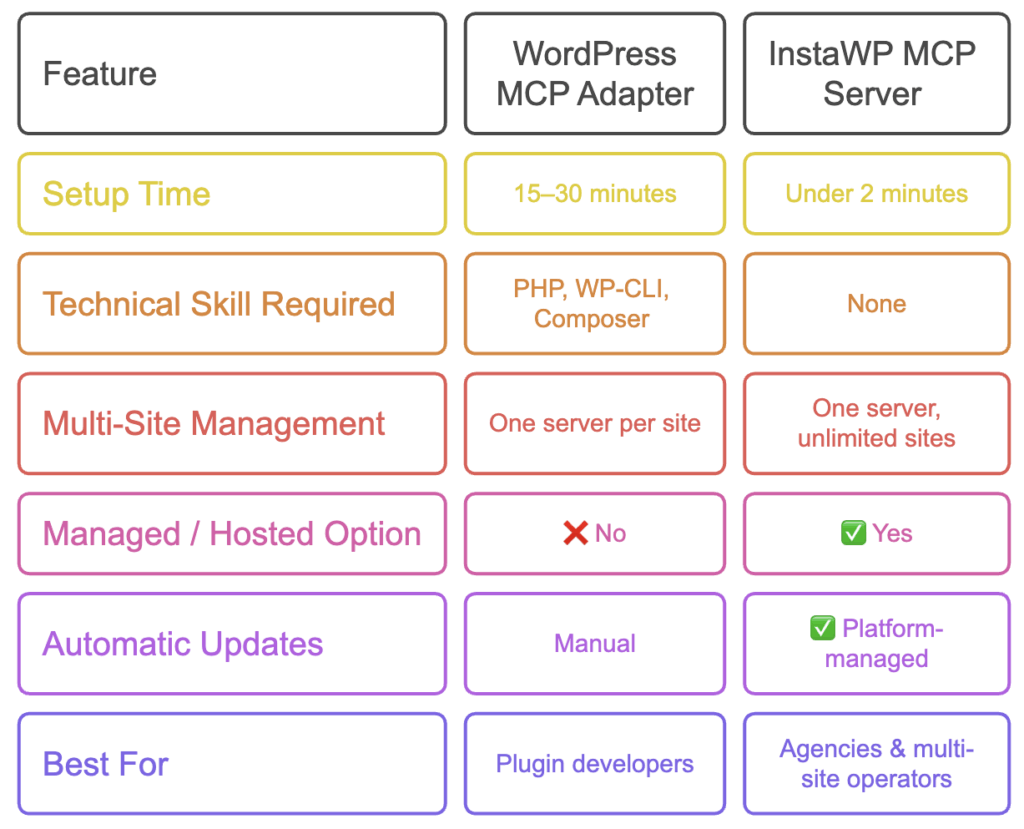
Here is the full comparison.
1. Ease of Setup
Setting up a WordPress MCP server is the first real test of any AI for WordPress tool. If the setup process demands hours of developer time, most agencies will never get past it. For teams managing multiple client sites under deadline pressure, a complicated setup is not just inconvenient; it is a blocker.
How fast you can go from zero to a working AI connection directly determines how quickly your agency starts seeing value.
The official WordPress MCP server gives developers precise control over their AI for WordPress setup.
Getting started requires installing WP-CLI, setting up Composer, registering WordPress Abilities with the correct metadata flags, configuring JSON files inside your AI client, and generating application passwords manually.
It is a developer-grade setup process that rewards technical expertise with deep customization.
InstaWP removes every technical barrier from the setup process.
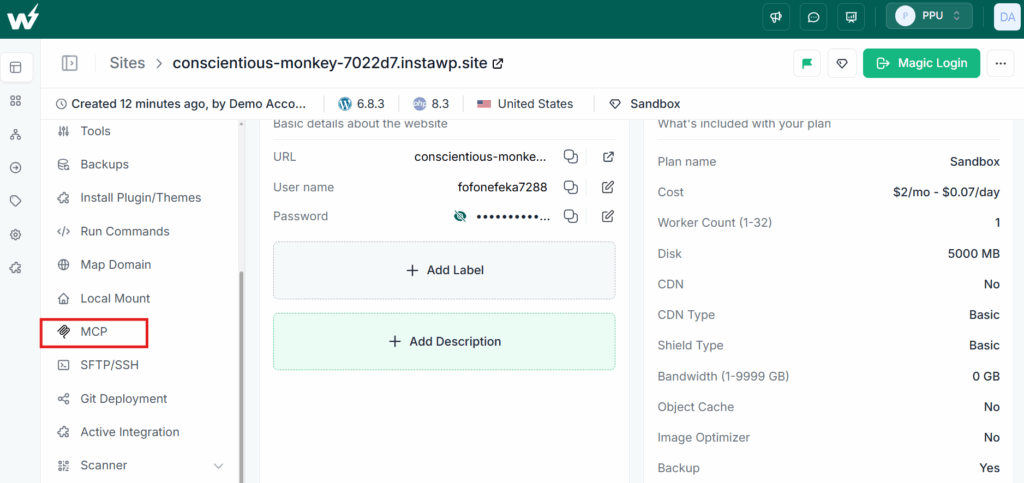
Log into your InstaWP dashboard, navigate to your site’s detail page, and click Enable MCP.
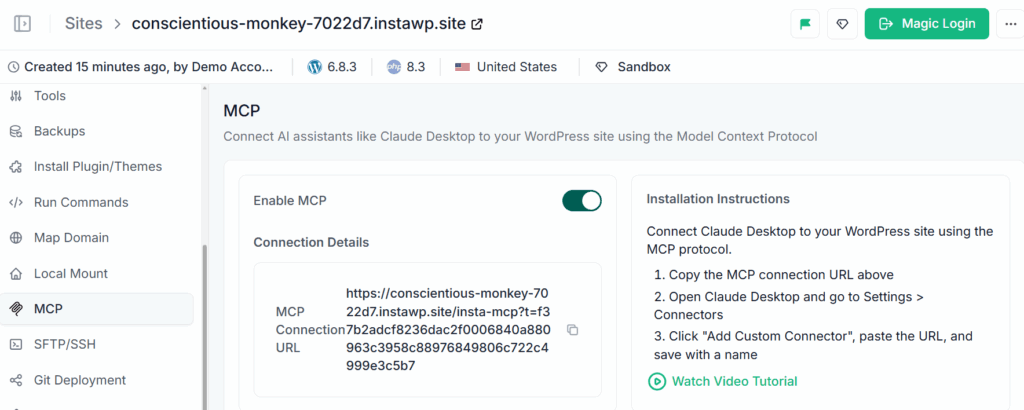
The WordPress MCP plugin is installed automatically, a secure token is generated, and your unique MCP URL is ready to copy. From there, you paste the URL into your AI client of choice and you are live. There is no terminal, no configuration file, and no manual credential setup involved.
| WordPress MCP Adapter | InstaWP MCP Server | |
|---|---|---|
| Setup method | WP-CLI, Composer, JSON config | One-click dashboard toggle |
| Time to connect | 15 to 30 minutes | Under 2 minutes |
| Technical knowledge needed | PHP, WP-CLI, Composer | None |
Verdict: For agencies and WordPress developers who want AI for WordPress running today without a lengthy setup, InstaWP wins by a significant margin. The official adapter is a valid developer workflow, but it is not accessible to non-technical team members or agencies working on tight timelines.
2. Multi-Site Management
For agencies, WordPress AI development is never about one site. It is about managing an entire portfolio of client sites efficiently.
The way a WordPress MCP server handles multiple sites determines whether it becomes a genuine productivity tool or just another thing to configure separately for every client. The difference between managing one site and managing fifty should be a process question, not a technical one.
The official WordPress MCP server is scoped to a single WordPress installation per server instance. For developers working on a single site or building a plugin, this is perfectly adequate. Each site gets its own dedicated MCP server with full control over what abilities are exposed.
InstaWP was built specifically for agencies managing multiple WordPress sites. One InstaWP MCP server instance connects to unlimited sites.
You enable MCP for each client site from the dashboard, copy each unique MCP URL, and add them as separate connectors in your AI client.
You can switch between client sites inside a single AI conversation without any reconfiguration. When a client offboards, you disable MCP with one click and there are nothing left to clean up.
| WordPress MCP Adapter | InstaWP MCP Server | |
|---|---|---|
| Sites per server | One | Unlimited |
| Adding a new client site | Separate full setup | Copy and paste a URL |
| Removing a client site | Manual cleanup required | One-click disable |
Verdict: If you manage more than one WordPress site, the official adapter’s per-site model creates overhead that compounds as your agency grows. InstaWP’s multi-site architecture is purpose-built for agency scale.
3. Technical Skill Required
Not everyone on your agency team is a developer. When AI for WordPress tools require PHP expertise and command-line knowledge to operate, they stay locked inside a single person’s workflow. A WordPress MCP server that your content team, project managers, and account managers can all use independently is worth far more than one that only your most technical hire can touch.
The official WordPress MCP Adapter is a developer tool designed to be extended by developers. Getting full value from it requires working knowledge of PHP, WP-CLI, and Composer.
Building custom MCP servers for plugins requires understanding the Abilities API, permission callbacks, and REST namespaces. For a solo developer or a technical WordPress agency, this is a reasonable ask.
InstaWP’s managed WordPress MCP server requires zero technical knowledge to operate. A project manager, a content strategist, or a junior account manager can enable MCP on a client site, connect it to Claude or ChatGPT, and start issuing commands without ever opening a terminal.
InstaWP also offers a self-hosted Node.js version for developers who prefer direct control, which requires only basic familiarity with a terminal and JSON files.
| WordPress MCP Adapter | InstaWP MCP Server | |
|---|---|---|
| Minimum skill level | PHP developer | None (managed) |
| Who can operate it | Developers only | Entire agency team |
| Self-hosted option | Yes | Yes |
Verdict: InstaWP democratizes AI for WordPress across your entire team, not just your most technical developers. For agencies, this is a meaningful operational advantage.
4. Maintenance and Updates
A WordPress MCP server that requires constant upkeep quietly drains your agency’s time and margins. Token rotations, plugin updates, server monitoring and credential management all add up, especially across a growing client base.
The ongoing cost of maintaining your own AI for WordPress infrastructure is rarely factored into the initial setup decision, but it is often what determines whether a tool gets used long term.
The official WordPress MCP Adapter follows the standard WordPress plugin update cycle. Updates are applied manually through the admin dashboard or WP-CLI. Token rotation, credential management, and server uptime are the responsibility of the developer or agency running it.
For self-hosted configurations, infrastructure maintenance falls entirely on your team.
With InstaWP’s managed WordPress MCP server, there is nothing to maintain on your end. Plugin updates are applied automatically. Token expiration is managed through the dashboard with a built-in date picker. Security patches are handled at the platform level. InstaWP monitors the infrastructure so your team does not have to.
| WordPress MCP Adapter | InstaWP MCP Server | |
|---|---|---|
| Plugin updates | Manual | Automatic |
| Token rotation | Manual | Dashboard-managed |
| Infrastructure uptime | Your responsibility | InstaWP-managed |
Verdict: For agencies managing multiple client sites, ongoing maintenance compounds fast. InstaWP eliminates this overhead entirely, keeping your team focused on client work rather than server administration.
5. Customization and Depth
Not every WordPress AI development project has the same requirements. Some agencies need standard operations like publishing posts and managing plugins.
Others are building complex plugin-level workflows that require custom AI behavior and precise control over what the AI can access. Understanding where each WordPress MCP server draws the line on customization helps you choose the right tool for the right job.
This is where the official WordPress MCP Adapter earns its position as the developer’s choice for AI for WordPress. It supports deeply customized MCP servers scoped to individual plugins, with typed input and output schemas, granular per-ability permission controls, and support for both STDIO and HTTP transport methods.
Plugin developers can ship AI-ready functionality as part of their plugin, with full control over what is exposed to AI agents and what stays private.
InstaWP’s WordPress MCP server focuses on coverage over customization. It ships with prebuilt tools for the most common WordPress operations: posts, pages, media, users, comments, categories, and plugin management.
Custom Abilities and plugin-level MCP servers are not supported. What the AI can do is determined by the WordPress REST API surface area.
| WordPress MCP Adapter | InstaWP MCP Server | |
|---|---|---|
| Custom ability support | Full (Abilities API) | Not supported |
| Plugin-level MCP servers | Yes | No |
| Prebuilt WordPress tools | Partial | Full (REST API) |
Verdict: If you are building a custom WordPress plugin that needs custom AI behavior, the official adapter is the right tool. For agencies running standard WordPress operations at scale, InstaWP’s prebuilt toolset covers everything you need without requiring any custom development.
6. Security
Before giving any AI agent access to a WordPress site, especially a client’s live production environment, security has to be evaluated carefully. A WordPress MCP server that lacks proper authentication controls, token management, or user role restrictions creates real risk.
Knowing how each implementation handles permissions and access is not optional. It is the baseline question every agency should answer before connecting AI to WordPress.
The official WordPress MCP Adapter enforces security at the individual ability level. Each ability has its own permission callback tied to WordPress user capabilities.
A read-only ability can be safely exposed to a limited user role, while destructive or sensitive operations stay locked behind admin-level callbacks. This granular, per-ability model gives developers precise control over what an AI agent can and cannot do.
InstaWP’s WordPress MCP server ties security to the WordPress user role associated with the application password. The AI agent can perform any action that user role permits via the REST API. The managed dashboard adds token expiration controls and role-based permission settings, which is sufficient for the vast majority of agency use cases.
For sensitive client environments, InstaWP also recommends testing all workflows in its built-in staging environments before deploying to production.
| WordPress MCP Adapter | InstaWP MCP Server | |
|---|---|---|
| Permission model | Per-ability callbacks | WordPress user roles |
| Token expiration | Manual | Dashboard-managed |
| Staging environment support | Separate setup required | Built-in |
Verdict: Both are secure when configured correctly. The official adapter offers more granular control for plugin developers. InstaWP offers simpler, dashboard-managed security that is practical and sufficient for agency workflows, especially when combined with dedicated MCP users and staging environments.
How to Enable the InstaWP WordPress MCP Server
Now that you have seen how InstaWP’s WordPress MCP server stacks up, the natural next question is: how do I actually get started? The comparison above already hints at the answer. InstaWP won four out of six comparisons precisely because it is the simplest, most accessible WordPress MCP server for agencies. And the setup process reflects exactly that.
Here is how to connect your first WordPress site to an AI agent using InstaWP.
Step 1: Enable MCP in Your Dashboard
Log into your InstaWP dashboard and open the detail page of the site you want to connect. Find the MCP option in the left-hand navigation menu and click “Enable MCP.”
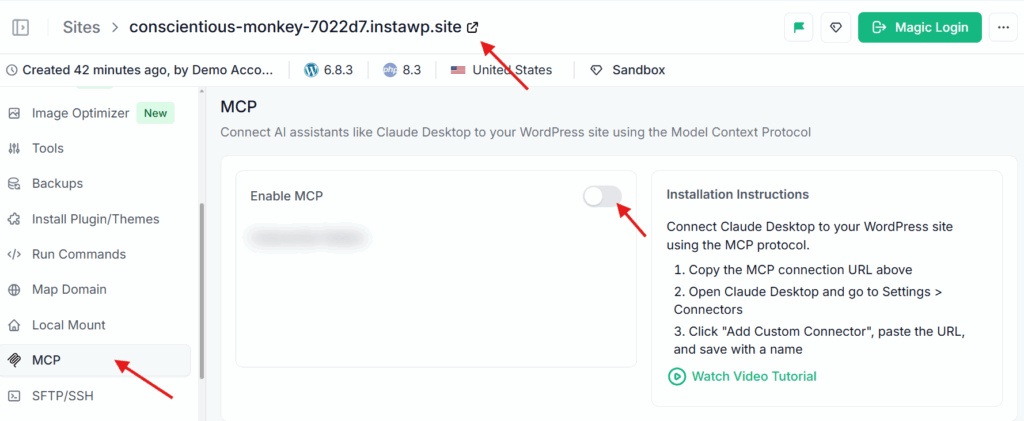
InstaWP automatically installs the WordPress MCP plugin on your site and generates a secure authentication token.
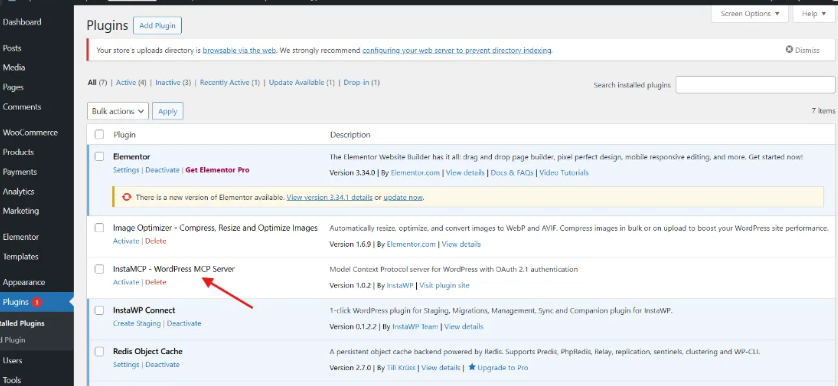
There is no manual plugin installation, no application password to create, and no configuration file to edit.
Step 2: Copy Your MCP URL
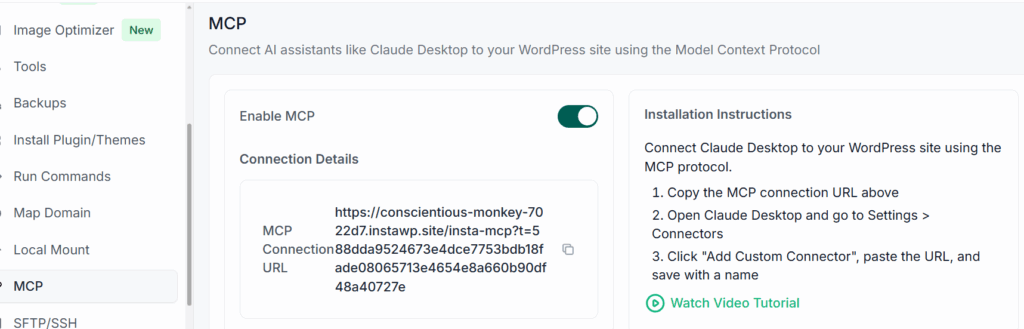
Once MCP is enabled, your dashboard shows a unique MCP URL with your authentication token already embedded in it. Click to copy.
Step 3: Connect to Your AI Client
For Claude Desktop:
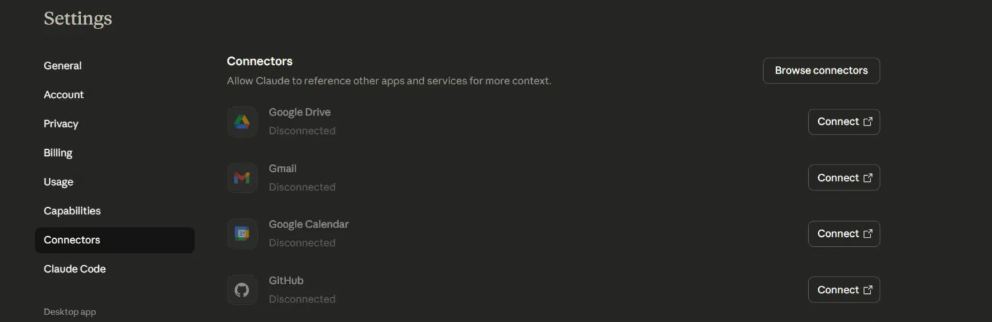
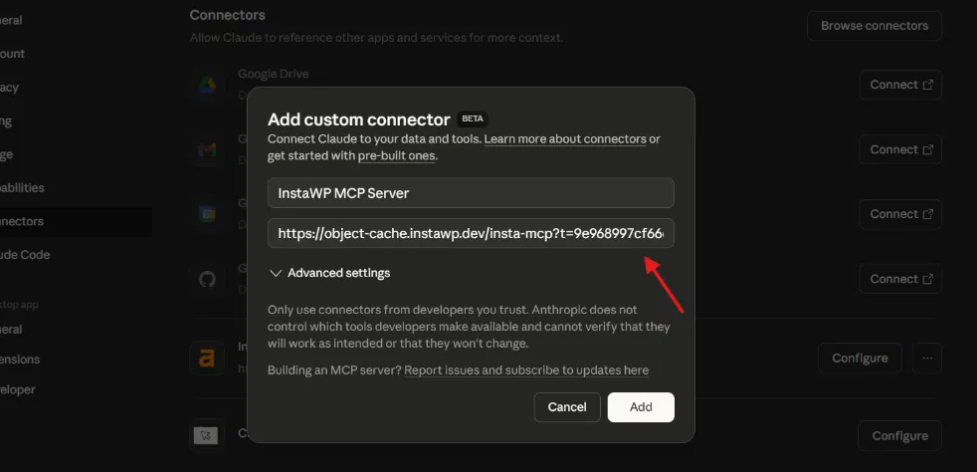
Go to Settings, then Connectors, then Add Custom Connector.
Paste your MCP URL, give the site a recognizable name such as “Acme Corp Site,” and click Add.
Click Configure to see all available WordPress MCP tools.
Must Read: Connect Claude with WordPress
For ChatGPT: Go to Settings, then Apps and Connectors.
Paste your MCP URL and give it a name.
When prompted for authentication, select “No authentication” since the token is already embedded in the URL. Check the confirmation box and click Create.
Must Read: Connect ChatGPT to WordPress: 3 Methods Compared
Step 4: Start Managing WordPress with AI
Your AI client is now connected to your WordPress site. Try prompts like “List all published posts on this site,” “Show me all pending comments,” or “Create a new draft post about AI trends in 2025.” The AI calls the appropriate WordPress MCP tools and executes each request directly on your site.
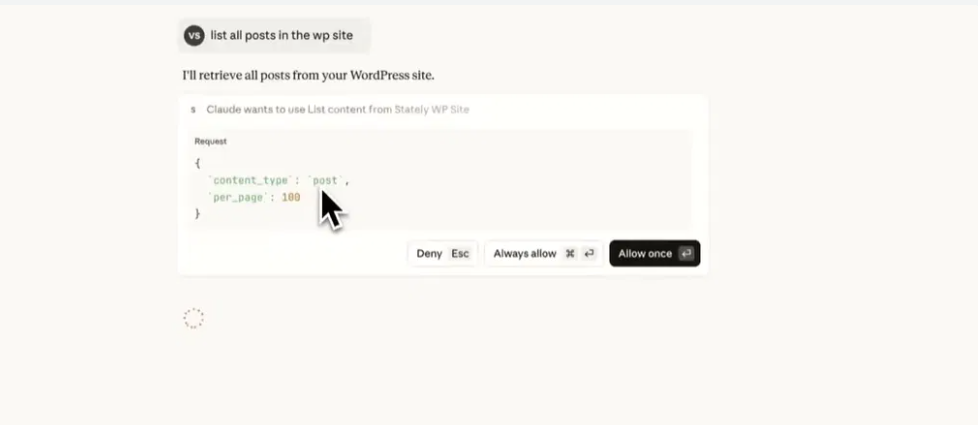
Once you have done this once, adding every additional client site follows the exact same process: enable MCP from the dashboard, copy the URL, add a new connector. Your entire agency can be running AI-powered WordPress workflows within the hour.
See it in action:
Conclusion
The official WordPress MCP Adapter is a strong foundation for plugin developers who need deep, customized AI for WordPress integration. But for agencies and WordPress developers managing multiple client sites, InstaWP’s WordPress MCP server is the faster, simpler, and more scalable choice.
It requires no technical setup, maintains itself automatically, and puts AI-powered site management in the hands of your entire team. If your goal is to start using AI for WordPress today without building infrastructure from scratch, InstaWP is where to start.
Enable MCP on your InstaWP site and connect your first WordPress site to AI in under two minutes. Get started here.
Frequently Asked Questions
Q: What is a WordPress MCP server?
A WordPress MCP server is a backend service that connects AI agents like Claude or ChatGPT to a WordPress site using the Model Context Protocol. It translates natural language instructions into authenticated WordPress API calls, allowing AI tools to read, create, update, and manage WordPress content and settings without manual intervention.
Q: Do I need WordPress 6.9 to use a WordPress MCP server?
Only if you are using the official WordPress MCP Adapter, which depends on the Abilities API introduced in WordPress 6.9. InstaWP’s WordPress MCP server works with any WordPress installation that supports the REST API, which has been available since WordPress 4.7. This makes InstaWP the more compatible option for agencies managing sites across different WordPress versions.
Q: Can one WordPress MCP server manage multiple client sites?
Yes, but only with InstaWP’s WordPress MCP server. InstaWP is designed for multi-site management: one server, unlimited sites. The official WordPress MCP Adapter is scoped to a single WordPress installation per server instance, which means a separate configuration is required for every client site.
Q: Is a WordPress MCP server safe to use on live production sites?
Yes, when configured correctly. Best practices include using dedicated application passwords rather than main admin credentials, assigning limited user roles for MCP access, and testing all new AI workflows in a staging environment before deploying to production. InstaWP’s managed platform adds built-in token expiration and role-based permission controls to make this easier to manage at scale.
Q: What AI tools are compatible with a WordPress MCP server?
Both the official adapter and InstaWP’s server are compatible with any MCP-supported AI client. This currently includes Claude Desktop, Claude Code, ChatGPT, Cursor, and VS Code. As MCP adoption grows across the AI industry, compatibility will continue to expand.
Q: Do I need coding knowledge to use InstaWP’s WordPress MCP server?
No. InstaWP’s managed WordPress MCP server requires zero coding knowledge. The entire setup is handled through the InstaWP dashboard UI. For teams that prefer a self-hosted setup, InstaWP also offers an open-source Node.js package that requires only basic familiarity with a terminal and JSON configuration files.
Q: Can I use both WordPress MCP server implementations together?
Yes. For larger agencies, using both tools together can be a powerful combination. The official WordPress MCP Adapter handles custom, plugin-level AI integrations on individual sites. InstaWP’s WordPress MCP server handles fleet management and everyday operations across all client sites. Both can run as separate connectors inside Claude Desktop or any other compatible AI client.