Agencies and developers need a WordPress sales model that turns the first conversation into a working demo, a scoped build, and a steady retainer without wasted motion. The model in this guide is practical and fast.
It runs in five stages that you can repeat across clients. Attract with a live demo that looks real. Qualify with a guided trial that shows fit. Pitch with proof that is measured. Close with a plan for weekly releases. Expand with a WordPress care plan that shows visible results.
Table of Contents
What is a WordPress Sales Model?
A WordPress sales model is a five-stage process that starts with a safe demo, moves to a small scope, ships weekly, and locks in care with visible results, all tracked through a clear sales report that highlights progress and outcomes..
It aligns qualification, delivery, and pricing so your team moves fast without rework. The goal is a repeatable pattern you can use across niches with predictable margins and proof of value—supported by data-driven sales reports—on every check-in.
The Five-stage WordPress Sales Model for Agencies
A WordPress sales model for agencies that closes faster follows five clear stages. Each stage has a single goal, a short set of actions, and a clean handoff. The same flow works across niches because it leans on templates, staging, scanners, and steady releases.
Step 1: Attract With a Live Demo That Creates Momentum
This is the first real proof of your WordPress sales model. Buyers are not judging your pitch. They are judging how quickly you turn intent into a working experience. A WordPress live demo website reduces risk, compresses discovery, and gives you control of scope before numbers enter the room.
- Speed to first value: A WordPress demo site that loads fast and shows a real conversion path tells the buyer you can deliver next week, not next quarter. It moves the conversation from ideas to outcomes.
- Risk transfer: When the WordPress demo already has a staging site, backups, and a clear release path, the perceived risk shifts away from the buyer. They can say yes without fearing a rebuild.
- Scope clarity: Clickable pages expose real requirements. You get precise acceptance criteria instead of vague requests. Fewer surprises later.
- Authority and trust: Running a demo while you talk signals operational maturity. You are not asking for trust. You are demonstrating it.
- Shorter cycle: WordPress demos that feel relevant cut a week or more from the sales cycle. The decision maker can react to what they see, not to a deck.
This is the foundation of a successful WordPress sales model because every later stage depends on the credibility you earn here.
How to Set up This Stage with InstaWP
InstaWP, the all-in-one cloud for the WordPress platform, provides agencies and developers with a fully integrated WordPress development where everything, from building WordPress to managing it, is offered under one roof.
If you want a successful WordPress sales model, start here. You will spin a live WordPress demo website in minutes, guide the trial safely, and set a clean path to staging without extra tools.
As you build a live WordPress demo website with InstaWP, you do not have to install local servers, wire databases, hunt for a staging plugin, or pass credentials on chat. You create, brand, share, scan, and hand off from the same dashboard.
Here is how you can complete the first stage of setting up a successful WordPress sales model, using InstaWP.
Click Create site and choose one of four sources: From Snapshot, From Template Store, From Scratch, or From AI.
Must Read: Create Site | InstaWP Docs
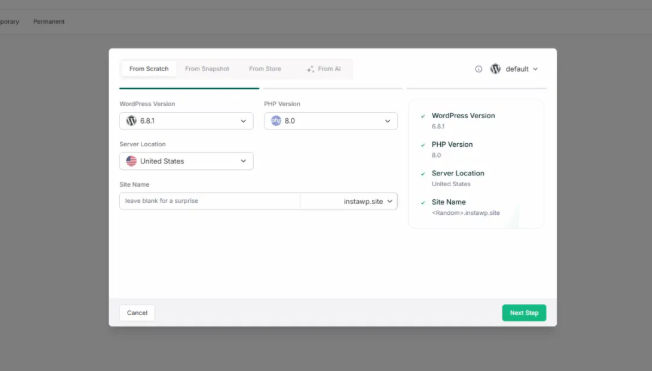
For client facing trials, select the Sandbox plan so the demo is isolated and set to auto expire. Internal mockups can live on the Free tier.
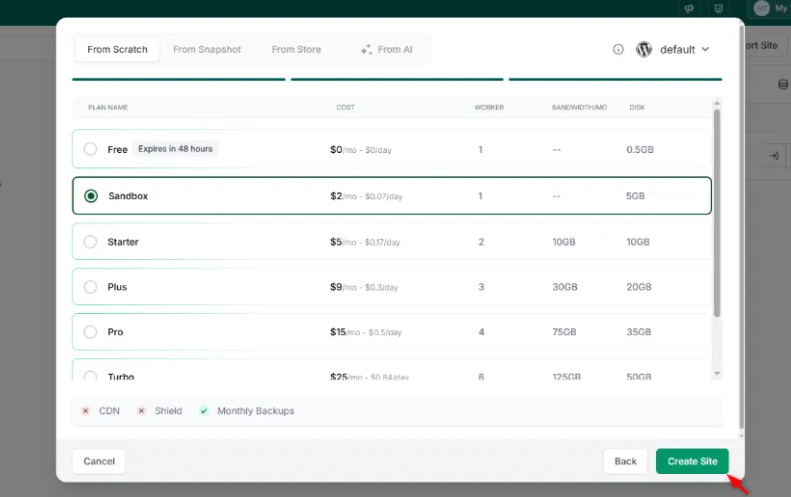
As you do, the WordPress demo site will be live in no time.
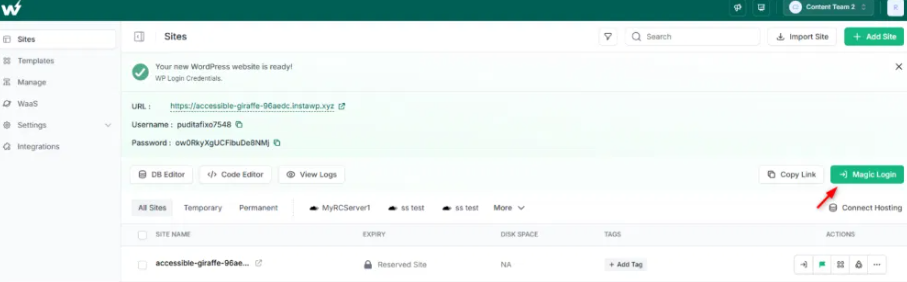
Use the Magic Login to access the WP Admin of the demo site and customize it accordingly. Keep the welcome page visible with a short checklist that shows where to change a hero, update a button, and preview on mobile.
The WordPress demo for WordPress sales model is ready. Now, it’s time to set the foundation and do the basic customization. At first, save your demo site website as Snapshot.
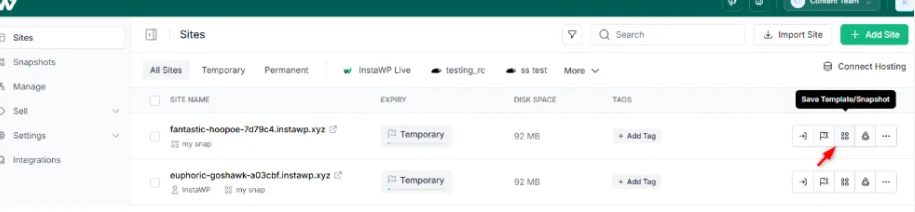
Choose Shared Snapshot option.
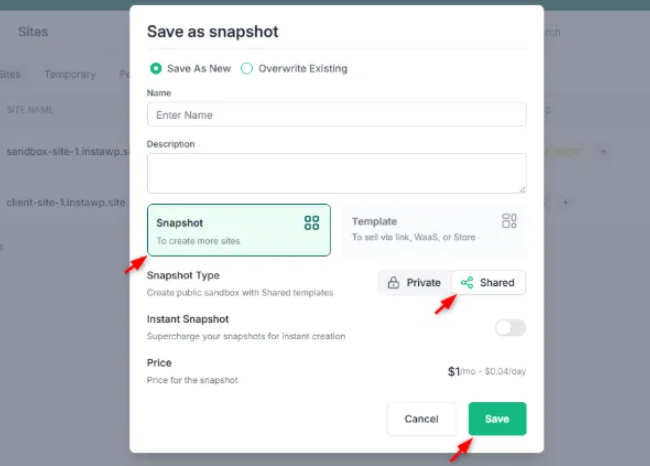
As you click on ‘Save’, the demo website is saved as Snapshot on InstaWP and your demo site link will look like this: https://app.instawp.com/launch?t=your-snapshot
And, it will be visible in ‘Snapshot’ tab in your InstaWP dashboard.
Click on the snapshot you want to use as a demo for your WordPress sales model to customize it.
Go to the set-up section of this snapshot and start customizing it.
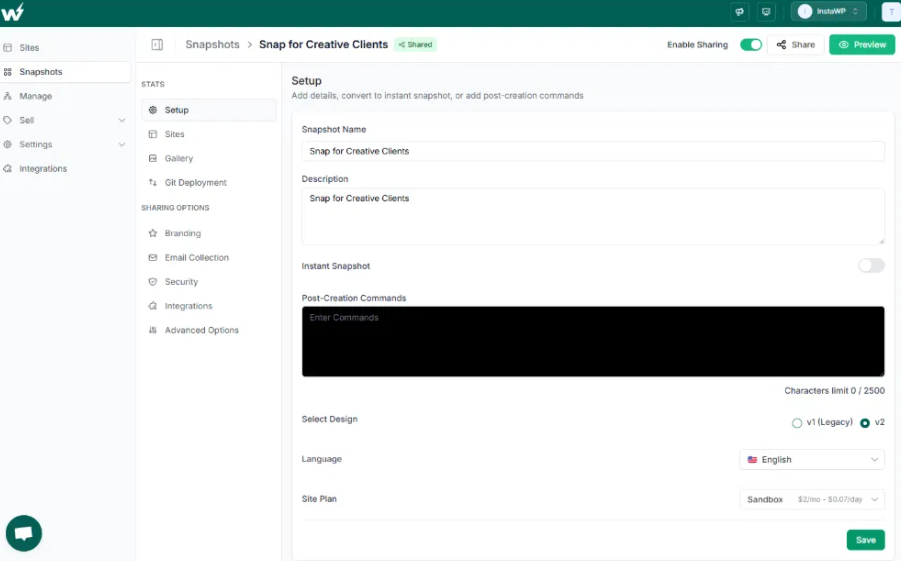
You need to update:
- Site Title, Tagline, Language, and Timezone.
- Brand logo, colors, and custom CSS
- Product images and email templates
Read our guide on InstaDemos to learn more about live demo website customization for WordPress agencies.
At last, the live demo website will look like this.
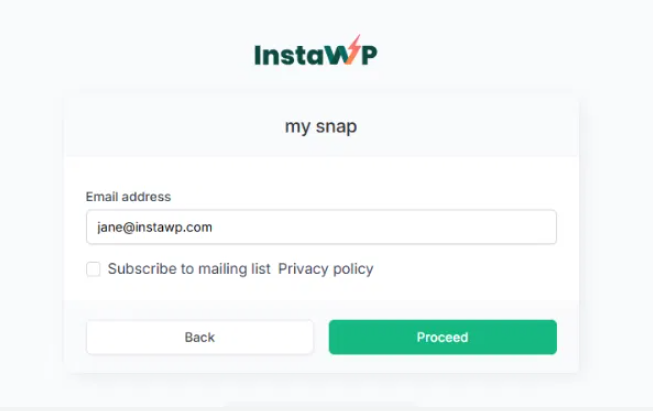
Your prospects only need to enter their email address to preview a demo and it sets a strong foundation for your WordPress sales model.
Step 2: Qualify Prospects with a Guided Trial
Once the live demo is ready, the next stage in building a WordPress Sales Model is qualification. This stage makes sure your time and resources go toward prospects who are serious, aligned with your services, and ready to move forward. Without qualification, demos risk becoming “free consulting sessions” instead of deal closers.
- Saves time: Not every lead is worth the full cycle. Early qualification filters out window shoppers.
- Sets expectations: A guided trial shows prospects the boundaries of what’s included. That helps prevent scope creep later.
- Shows authority: When you run the trial with structure, specific actions, proof of performance, and a next step, you control the process and build trust.
- Speeds up decisions: Prospects can see their outcomes in action rather than imagining them from a proposal.
Here is how WordPress agencies, using InstaWP, can handle this stage of WordPress sales model.
- Provide prospects with a Magic Login link so they can enter instantly—no need to share or manage credentials.
- Add a welcome note on the dashboard or a pinned page that explains the demo’s purpose and timeline.
- Place a lightweight feedback form inside the demo to capture three key outcomes prospects want. Examples: “Generate leads,” “Sell digital products,” “Streamline bookings.” This ensures your pitch ties directly to outcomes, not just features.
- Run a Performance Scan on the demo and share the metrics (First Contentful Paint, Largest Contentful Paint).
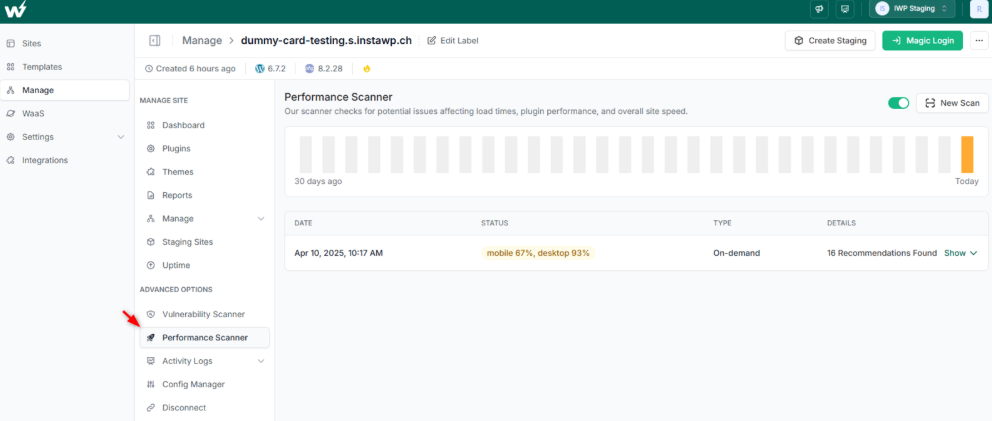
- Run a Vulnerability Scan to baseline security. Even in qualification, showing these numbers positions you as proactive and transparent.
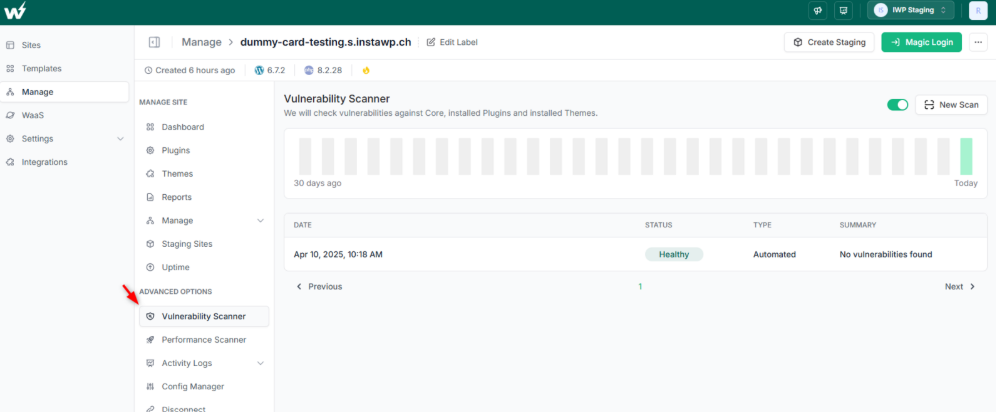
Before the trial ends, set a staging review date. Let the prospect know the demo will expire automatically if no review is scheduled. This creates urgency and keeps the pipeline moving.
Qualification is where your WordPress sales model starts separating buyers from browsers. With InstaWP, you don’t just hand over a WordPress demo website, you give a structured, guided trial that proves value, captures business outcomes, and sets a timeline for moving into staging. This keeps your sales cycle predictable and short, while building credibility with prospects.
Step 3: Pitch with Proof
By the time you reach this stage of a WordPress sales model, the prospect has already seen and interacted with your demo. Now the job is to move beyond “looks good” and provide measurable proof that earns trust.
This is where your authority as an agency or developer shines; by showing evidence, not just promises.
Pitching with proof matters because it:
- Builds credibility: Numbers and baselines make you the expert, not just a vendor.
- Clarifies scope: Concrete performance or security findings define what you’ll fix first.
- Reduces risk for the buyer: Evidence reassures prospects that their investment will solve real issues.
- Shortens negotiation: With proof in hand, the conversation shifts from “Can you deliver?” to “When can you start?”
When you’re at this stage of creating WordPress sales model for your agency, keep note o few aspects.
Instead of sending a report after the meeting, walk the client through the findings during your call. Highlight one performance number (e.g., Largest Contentful Paint at 4.3s) and one security note (e.g., outdated contact form plugin). State how you will improve them in the first week.
Outline the first 7-day plan. Improve key performance metric by 20–30%.Patch or replace one vulnerable plugin. Deliver one small feature update on staging.
User of InstaWP can perfect this stage of WordPress sales model with least possible hassles. Here is why:
- One-click Staging: Spin up a WordPress staging site from the demo so the client sees where changes will be tested first.
- Performance Scanner: Generate a baseline that anchors your first week of improvements.
- Vulnerability Scanner: Show immediate security insights, building trust that you will protect their site.
- SitePush / Two-Way Sync: Explain how new features or fixes will move from staging to production safely.
This step makes your WordPress sales model tangible. Instead of vague promises, you provide numbers, baselines, and an actionable path forward; something agencies and developers can repeat across clients with confidence.
Step 4: Close with Weekly Delivery
At this stage of your WordPress sales model, you’ve already won attention with a demo and built trust with proof. Now you need to turn interest into a signed agreement and a rhythm of delivery that keeps clients confident.
The close isn’t about discounts or pressure; it’s about showing a process that feels safe, predictable, and fast.
Weekly delivery wins deals because of:
- Predictability: Clients know when to expect updates. Weekly drops reduce anxiety and show consistent progress.
- Lower risk: Shipping in small increments makes rollback easy if something breaks.
- Momentum: A seven-day delivery cycle keeps stakeholders engaged and makes renewals natural.
- Trust: Frequent visible results are better than long periods of silence followed by a “big reveal.”
Here is how you can cloas weekly delivery wisely:
- Explain that each week includes one small release, tested on staging, pushed to production, and reviewed with the client.
- Define the first two weeks. Week 1: Improve performance baseline (e.g., cut Largest Contentful Paint by 20%). Week 2: Patch vulnerabilities and add one agreed feature.
- Share screenshots or short reports at the end of each week.
- After four weeks of consistent weekly drops, review results and agree on a longer retainer or care plan.
Those who’re using InstaWP can simplify this stage using features such as:
- Two-Way Sync: Move changes between staging and production in small, reversible chunks. This reduces risk and shows clients you have safety nets.
- Automated Backups: Protect every release with daily or weekly restore points. If something goes wrong, roll back in seconds.
- Activity Logs: Give clients a visible record of what was changed and when, supporting accountability.
- Uptime Monitoring: Show that releases aren’t just features—they’re stable improvements.
By the end of closing, the client isn’t just saying “yes.” They are agreeing to a clear weekly rhythm, a safe delivery pipeline, and a plan tier that matches their needs. You’ve removed uncertainty, offered evidence-based confidence, and locked in a process that sets up long-term retention.
Step 5: Expand with Visible Care
Closing the deal is not the end of your WordPress sales model; it is the start of long-term revenue. The expansion stage is where agencies and developers move from project delivery into predictable, recurring value. This is the point where you transform one-off builds into lasting partnerships.
- Recurring revenue: WordPress Care plans, updates, and monitoring build a steady income stream.
- Proof of ongoing value: Reports and metrics keep clients confident that their investment is paying off.
- Trust and retention: Clients stay longer when they see security, uptime, and performance managed without them asking.
- Upsell potential: Once trust is earned, it’s easier to add new features, templates, or even entire WaaS solutions.
InstaWP adds natural value in multiple ways at this stage of building WordPress care plan.
- Uptime Monitoring: Provides minute-level checks (on Pro plans and above) that you can turn into client-facing proof.
- Auto Update Scheduler: Keeps plugins and themes current without manual intervention, lowering risk.
- Shield Protection: Edge-based security that stops bad traffic before it touches WordPress.
- Maintenance Reports: Present clients with a digest of uptime, updates, and patches through a WordPress maintenance report, making invisible work visible.
Expansion secures the long-term payoff of your WordPress sales model. Instead of ending at delivery, you extend into visibility, proof, and recurring trust. Clients see results they can measure, you create predictable revenue, and your agency stops chasing one-off projects to survive.
Benefits of Using InstaWP for WordPress Sales Models
For agencies and developers, speed and trust decide deals. InstaWP eliminates the messy, fragmented workflows of traditional WordPress development; no local servers, no fragile staging plugins, no manual migrations.
Instead, you get an end-to-end platform where demos, staging, production, and care plans all live in one system. This directly supports a WordPress sales model that is faster to run, easier to repeat, and more profitable over time.
Pricing Patterns That Fit the Model
Different clients require different pricing. Pairing the right model with the right delivery rhythm is key to scaling.
| Model | When to Use | Sales Cycle | Delivery Rhythm | Risk Level | Target Margin | Where InstaWP Adds Value |
| Fixed Discovery | Complex or unclear projects | 2–3 weeks | Single report | Medium | 20–25% | Launch quick prototypes with Snapshots to test assumptions |
| Productized Build | Sites with predictable scope | 1–2 weeks | Weekly drops | Low | 30–40% | Templates + one-click staging for repeatable builds |
| Website as a Service | Recurring builds in a specific niche | Ongoing | Subscription | Low | 40–50% | Shared Snapshots, InstaDemos, pay-as-you-go WordPress |
| Care Plans | Post-launch recurring work | Monthly | Reports/updates | Very Low | 50%+ | Uptime monitoring, auto updates, Shield protection |
| Performance SLAs | High-traffic or enterprise-grade sites | Ongoing | Scheduled scans | Low | 45%+ | Performance scanner, Turbo/Elite hosting, maintenance reports |
Agencies can align pricing with actual risk and delivery rhythm; while InstaWP ensures each model is backed by consistent infrastructure.
Live Demo System You Can Reuse
A demo should never be a one-off effort. With InstaWP, agencies build a demo library they can reuse across clients.
Step by step:
- Create site → From Snapshot, Store, or AI.
- Set auto expiry so no trial lingers past its usefulness.
- Share access via Magic Login for frictionless entry.
- Add a welcome checklist: change a hero, update a button, preview on mobile.
3-minute demo scorecard:
- Loads in under 3 seconds
- Editing feels intuitive
- Mobile view works without adjustment
This approach ensures every demo feels polished, purposeful, and measurable.
From Demo to Staging to Production
Clients feel reassured when they see a safe path from concept to live site.
- One-click staging: Promote the demo into staging instantly.
- SitePush: Move changes from staging to production with control.
- Two-way sync: Push small updates back and forth without risk.
The result: smoother approvals, faster launches, and fewer production mishaps.
Proof During the Sales Call
Instead of telling prospects what you can do, show them.
- Run a Performance Scan live and share one actionable metric.
- Run a Vulnerability Scan to highlight any risks.
- Summarize in three lines: “Load time is 4.3s, we’ll cut this under 3s in week one. One outdated plugin patched in staging. First release in 7 days.”
This proof-driven approach makes your pitch tangible and reduces objections.
Security and Trust That Sells Itself
Security and reliability are often deal-breakers for clients. InstaWP bakes both into the hosting layer:
- Shield protection: Blocks malicious traffic before it touches WordPress. Available on Plus, Pro, Turbo, and Elite.
- Uptime monitoring: Minute-level checks reassure clients their site is always online.
- Maintenance reports: Turn invisible behind-the-scenes work into visible proof of value.
These are the tools that help agencies not just deliver sites, but keep them safe, fast, and trustworthy over time.
Conclusion
Building a successful WordPress sales model is less about selling harder and more about selling smarter. Agencies and developers who standardize their process, from fast demos to weekly delivery, and from proof-driven pitches to recurring care, close deals faster and retain them longer.
With InstaWP, you get the platform that supports each stage: instant sandboxes for demos, one-click staging for safe reviews, scanners for proof, two-way sync for safe delivery, and advanced site management for long-term care. Every plan, from Sandbox to Pro to Elite, gives you a foundation that keeps sales predictable and scalable.
If you want shorter cycles, higher margins, and recurring revenue, it’s time to align your agency’s sales model with the right system.
? Ready to put this WordPress sales model into practice?
Sign up for InstaWP today and build your first live demo in under a minute. Show clients real proof, move from demo to staging without rework, and unlock care plans that generate steady revenue.
Get started with InstaWP and close your next project faster.
Frequently Asked Questions
1. What is a WordPress sales model?
A WordPress sales model is a structured approach agencies and developers use to turn leads into clients. It combines fast demos, clear qualification, proof-driven pitches, weekly delivery, and recurring care plans into a repeatable framework.
2. Why do agencies need a WordPress sales model?
Agencies often lose time creating custom proposals and one-off builds. A sales model standardizes the process, shortens cycles, and provides a roadmap for recurring revenue. This ensures predictable margins and smoother client relationships.
3. How do live demos help in WordPress sales model?
Live demos reduce risk for prospects and build confidence in your delivery. By letting clients click through a real site in minutes, you shift the conversation from “Can you deliver?” to “When can we start?”
4. What pricing strategies work best with a WordPress sales model?
Fixed discovery for complex projects, productized builds for predictable sites, WaaS (Website as a Service) for recurring revenue, care plans for post-launch support, and performance SLAs for high-traffic clients. Each aligns with different client needs and margins.
5. Can smaller agencies or freelancers use a WordPress sales model?
Yes. Even a solo developer benefits from structuring sales. The model ensures less time wasted on low-quality leads, more focus on delivery, and easier upselling into care plans.
6. How does staging improve the sales process?
Staging provides a safe environment where changes are tested before going live. For clients, it’s proof of professionalism and a reassurance that production sites won’t break during updates.
7. What role does security play in the sales model?
Security isn’t just technical; it’s a sales driver. Demonstrating uptime monitoring, automated updates, and edge protection builds trust and gives clients a reason to commit to long-term care plans.
8. How do care plans fit into the wordpress sales model?
Care plans are the expansion stage. They keep revenue recurring with services like updates, monitoring, and reports. Clients see ongoing value, and agencies secure predictable income beyond the initial project.
9. Can a wordpress sales model work across industries?
Yes. Whether you’re building sites for local businesses, eCommerce stores, or SaaS products, the framework adapts. The demo → staging → delivery → care sequence is universal.
10. How does pay-as-you-go WordPress help agencies?
Pay-as-you-go WordPress hosting allows agencies to scale costs with demand. You can run multiple demos during a sales push without locking into expensive plans, and only upgrade to higher tiers once deals close.