Here is what is new for everyone hosting WordPress on InstaWP: an account-level MCP is available on every InstaWP account. Connect your account to Claude, Cursor, or any AI assistant that speaks the Model Context Protocol, and you can manage every site you own by describing what you want, from creating sites and taking snapshots to running backups and fixing issues.
This is a real shift in how you run WordPress hosting. Until now, every action meant opening the dashboard and clicking through a flow. With the account MCP, you stay in the same AI assistant you already use for code and content, and your hosting comes along for the ride. Below is what is launching, what changes for your day to day, and how it builds on the AI power InstaWP already ships.
Key takeaway
- InstaWP ships an account-level MCP on every account: one connection that lets your AI manage all your sites. Switch it on in Account Settings, then the MCP tab.
- You can create sites, take snapshots, run backups, apply fixes, set PHP, and check plans by prompt, without opening the dashboard.
- Connection is one-click OAuth with no API keys. You approve it, choose what it can touch, and risky actions confirm first.
- It joins InstaMCP, the per-site MCP that connects every major AI client, to form a full hosting plus content suite.
What we are launching: the account-level MCP
The account-level MCP is a secure connection that gives an AI assistant control of your InstaWP account and all the sites in it. Connect once, and your AI can list your sites, create new ones, take snapshots, run backups, apply maintenance fixes, change PHP settings, and report on plans and billing. It acts on your account on your behalf, from a chat window.
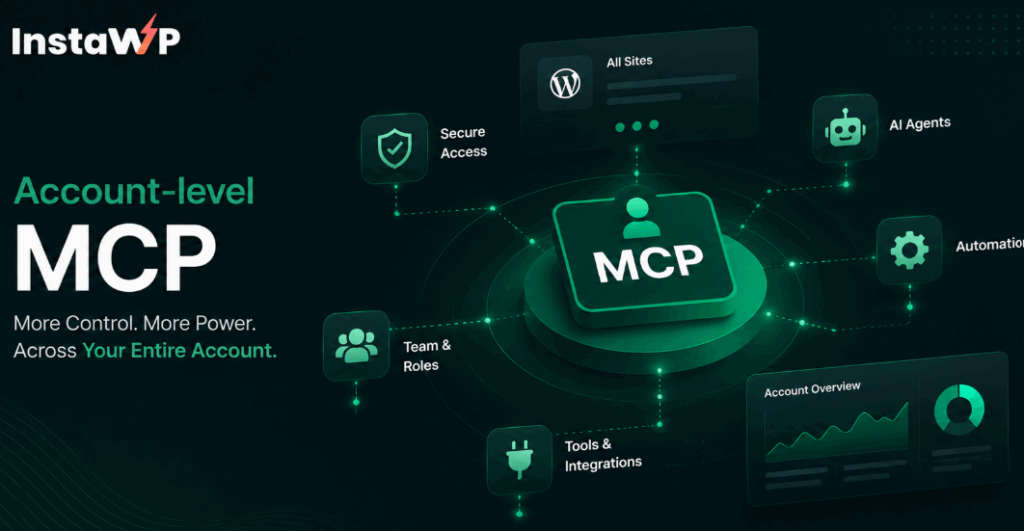
This is account-wide, not site by site. One connection covers everything you host on InstaWP managed WordPress hosting. Ask for any site by name and the AI knows where to act. The dashboard stays exactly where it is, so the MCP is an additional, faster way in rather than a replacement.
In short: MCP, the Model Context Protocol, is an open standard that lets AI assistants securely connect to real apps and take actions inside them. Anthropic introduced it, and tools like Claude, Cursor, and VS Code support it. The account MCP uses it to put your whole hosting account inside your AI.
What changes for you
The account MCP removes the dashboard from routine hosting work. Instead of navigating menus, you describe the outcome and your AI carries it out across your account.
The result is fewer context switches, faster operations, and a single place to both build a site and run it. Here is the before and after, side by side.
| Task | Before Dashboard Workflow | Now With Account MCP |
|---|---|---|
|
Spin Up a Test Site
|
Open dashboard
→
Pick options
→
Copy login
|
✦
“Create a sandbox called acme-test.”
|
|
Take a Snapshot
|
Find site
→
Open snapshots
→
Create & name
|
✦
“Snapshot acme-test before I install this plugin.”
|
|
Fix Permalinks & Permissions
|
Locate site
→
Open tools
→
Run fixes
|
✦
“Flush permalinks and fix permissions on acme-test.”
|
|
Check Plan & Billing
|
Open account
→
Find site
→
Check billing
|
✦
“What plan is acme-test on, and my billing status?”
|
|
Change PHP Version
|
Open settings
→
Find PHP
→
Change & save
|
✦
“Bump acme-test to PHP 8.3.”
|
The difference is not only speed. It is staying in flow. The biggest win shows up in the work you skip today because it is mildly annoying, like snapshotting before every risky change. When that is one sentence, you actually do it every time.
What it means by role
- Solo developers and freelancers: spin up a sandbox in the middle of a task without leaving your editor, and keep a clean restore point before every experiment.
- Agencies: run operations across many client sites by prompt, so the minutes saved on each routine job compound across every account you manage for clients.
- Everyone else: the dashboard is still there for deep work. The MCP just gives you a faster lane for the things you do over and over.
Why this is a big deal for WordPress hosting
Developers increasingly live inside AI assistants. The editor and the chat window are becoming the same place, and the tools that win are the ones that meet developers there. WordPress tooling has been click-heavy and dashboard-bound for two decades. An account-level MCP for every InstaWP account changes that pattern at the hosting layer.
Major developer platforms including Cloudflare, Vercel, Stripe, and GitHub have shipped MCP servers so their users can run them straight from an AI assistant. WordPress hosting has not had this until now. By bringing it to every account, InstaWP puts agentic operations in the hands of the whole WordPress community, not a select few.
What you can do on day one
Once your account is connected, you manage it by typing what you want. The default toolset is safe by default, so read-only and routine actions work right away. These prompts map directly to InstaWP actions.
These map to features you already know, including site creation, snapshots, backups and restores, site maintenance tools, and PHP configuration. The MCP simply lets your AI trigger them for you. The documented capability groups are sites, PHP and WordPress versions, backups, billing and plans, teams (read-only) and diagnostics.
Powerful actions stay opt-in
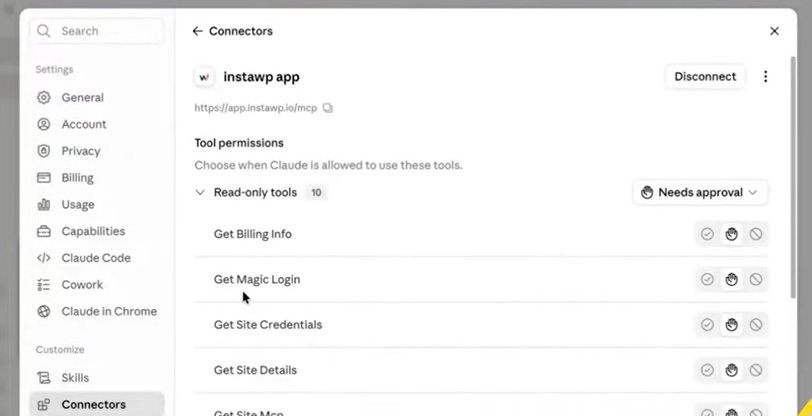
Three groups of sensitive tools ship switched off: credentials and secrets (site logins, magic-login links, SFTP details), shell and WP-CLI, and act inside sites, which lets the account MCP reach directly into your WordPress installs. You turn each on deliberately, so the AI never reaches for them on its own. Enabling the MCP is one gate and enabling these is a separate one, and the first never opens the second.
Built on the AI power InstaWP already ships
The account MCP does not arrive from nowhere. InstaWP already leads on agentic WordPress at the site level through InstaMCP, the per-site MCP that connects an individual WordPress site to your AI so you can edit posts, pages, media, and plugins by prompt.
That foundation is already strong, and the account MCP builds on it:
- One toggle, no server setup. Every InstaWP site on Sandbox plans and above is MCP-ready with a single switch. There is nothing to host or maintain.
- Every major AI client supported. Account MCP connects Cursor, VS Code, VS Code Insiders, GitHub Copilot, Claude Code, Claude.ai, Claude Desktop, ChatGPT, Codex, Gemini, Antigravity, Windsurf, Cline, Roo, Zed and Continue, with one-click installers for several of them.
- Deep control when you want it. Three power tools go further. execute_php runs PHP inside WordPress behind four security layers: admin opt-in, an mcp:admin token scope, the manage_options capability, and a 30-second limit, with broken files rolled back automatically. db_query and site_files each offer Off, read-only and read-write modes. All three are disabled by default.
- Native to WordPress. InstaMCP tools are registered through the WordPress Abilities API, introduced in 6.9 and expanded in WordPress 7.0 and 7.1, so they plug into WordPress the way the platform intends.
Read the full setup in the guide to connect AI assistants to your WordPress site with InstaMCP. The account MCP adds the hosting layer on top, so together they cover the whole picture: one manages the content inside a site, the other manages the account and every site in it.
Account MCP vs per-site MCP
It helps to know which surface does what, because they are designed to work together rather than overlap.
mcp:read to mcp:admin
execute_php, db_query, site_files
With both connected, a single AI assistant can provision a site, snapshot it, and then switch to editing its content, all in one conversation. For agencies, that full lifecycle is the basis of a business: build client demos by prompt, manage them at scale, and resell hosting under your own brand with the InstaWP WaaS platform.
Turn AI-fast hosting into recurring revenue
Your clients are already paying for hosting. The InstaWP Agency Program lets you host, manage, and resell WordPress under your own brand, with margins you set.
See the Agency ProgramHow to connect your account
The account MCP stays off until you switch it on, so nothing is exposed to any AI until you decide. Setup takes about a minute.
Watch the video tutorial to set-up the Account MCP on InstaWP.
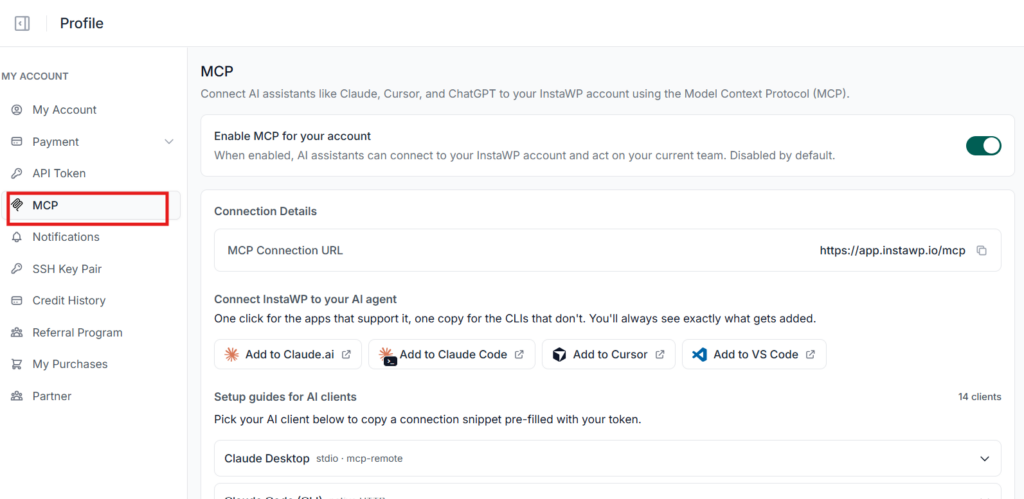
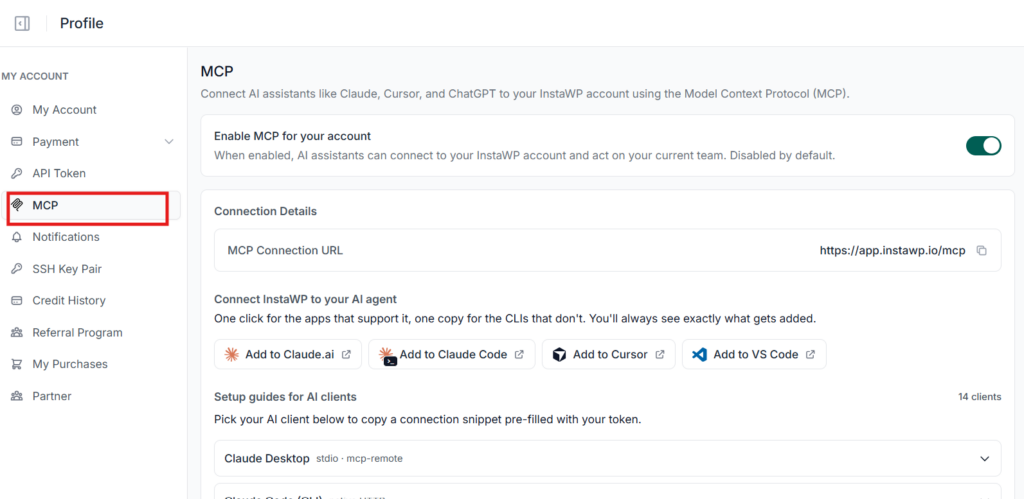
1. Turn it on. Open the MCP tab in your InstaWP account and switch on Enable MCP for your account. It is disabled by default, and once enabled it acts on your current team.
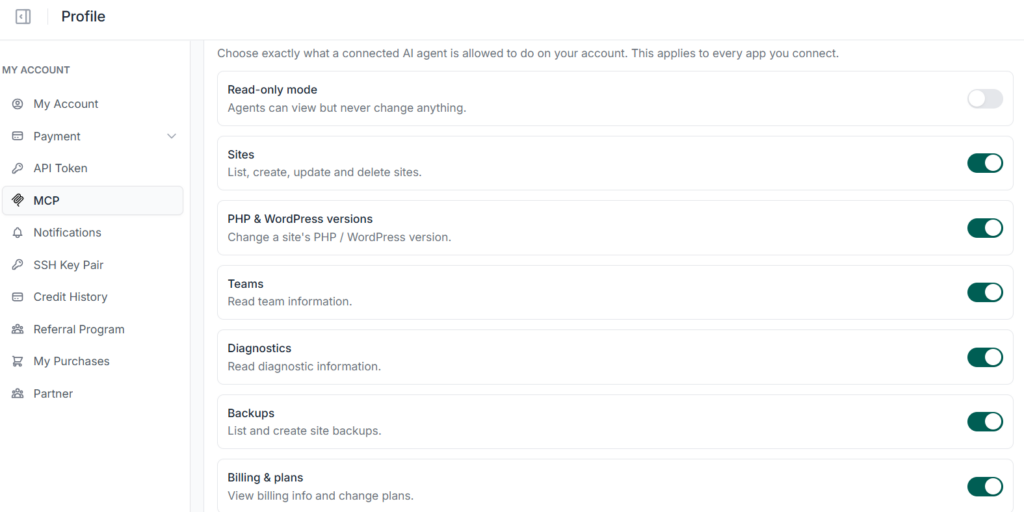
2. Choose exactly what it may do. Every capability is its own toggle: Sites, PHP & WordPress versions, Teams, Diagnostics, Backups, and Billing & plans. Above them sits a Read-only mode switch, which lets agents view everything and change nothing. That is the safest way to start, and your choices apply to every app you connect.
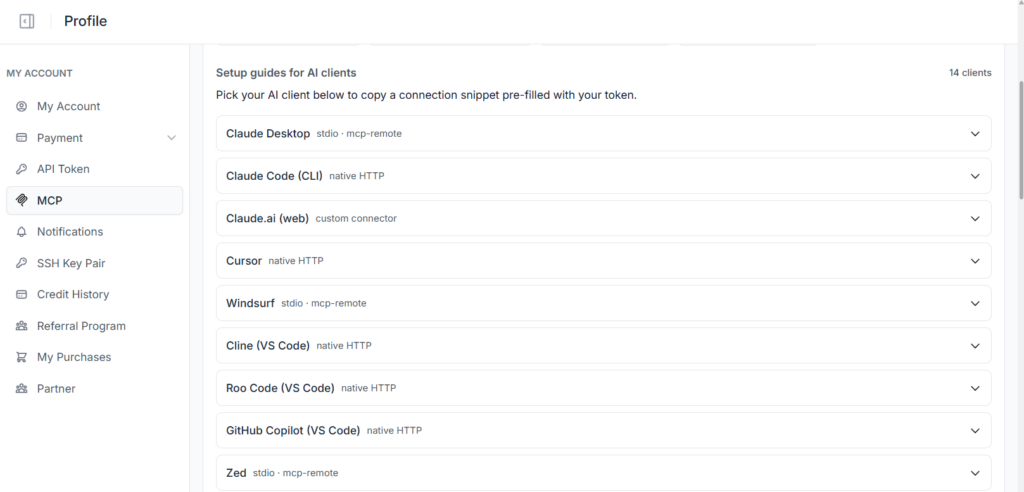
3. Add InstaWP to your AI client. It is one click for the apps that support it, with Add to Claude.ai, Add to Claude Code, Add to Cursor and Add to VS Code buttons built in. For the CLIs that do not, copy the MCP connection URL instead, or pick your client from the setup guides to copy a snippet pre-filled with your token.
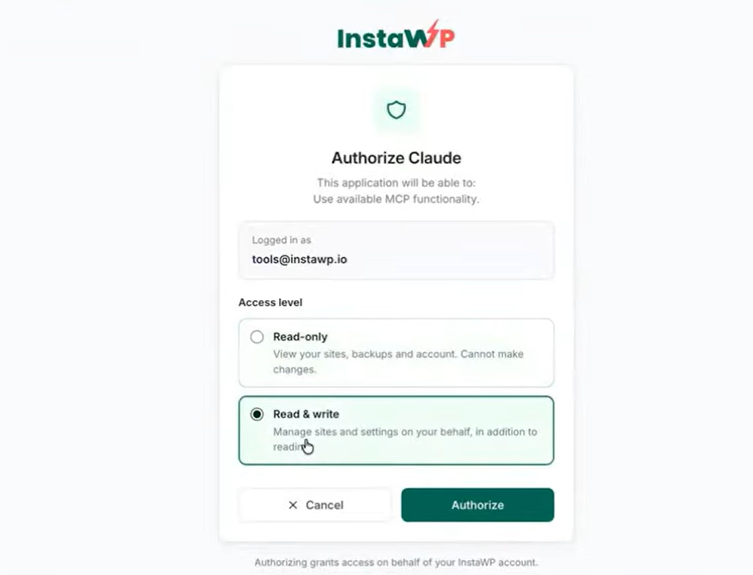
4. Authenticate and pick your access level. InstaWP asks you to approve the connection and to grant either read-only or read-write access. Because it is OAuth, there is no API key to paste or store anywhere.
5. Finish the connection inside your AI client. The connector arrives switched off, so turn it on wherever your client keeps its integrations. In Claude that is Settings → Connectors, where the InstaWP app will be waiting.
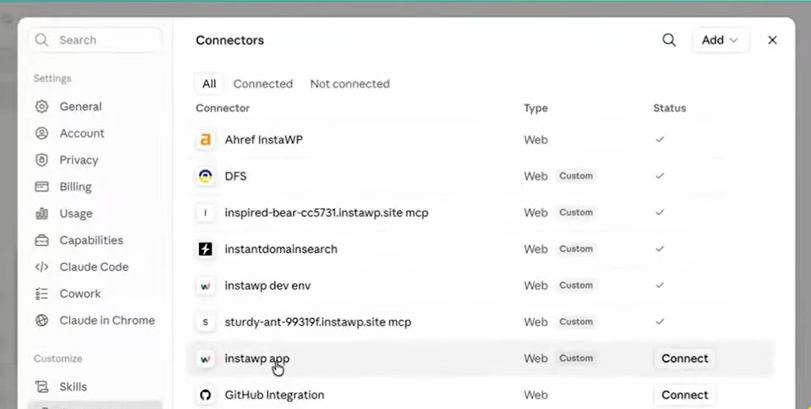
6. Switch off anything sensitive. Scroll to the bottom of the capability list and turn off whatever you do not want reachable. With act inside sites off, the connection cannot enter your WordPress installs, run shell commands, or open site credentials and SSH keys.
InstaWP ships setup guides for 14 AI clients, so whichever one you use it is either a button or a pre-filled snippet, and you always see exactly what gets added before it is added.
That is gate one, the account-level gating, and it covers every app you connect. Gate two sits inside each WordPress site, where InstaMCP’s own capabilities are switched off by default and every action runs through a typed tool: ask it to update a post and it updates a post, nothing else. Step-by-step instructions for each client live in the account MCP documentation.
Security and control
Giving an AI access to your whole account only makes sense if you stay in charge. The account MCP is permissioned by design. You approve the connection, you decide what it can touch, and the riskiest actions always ask before they run.
One-click OAuth
Approve on a branded InstaWP consent screen. No API keys to copy or store.
You hold the switch
An account-level toggle, per-capability switches for each tool group, and a connected apps list to revoke any client. Access is scoped to your current team.
Safe by default
Read-only and routine tools are on. There is an account-wide read-only mode, and destructive actions require explicit confirmation.
Standards-based
Built on OAuth 2.1 with scoped, audited access. Powerful tools stay off unless you enable them.
Put simply, the connection is powerful but on a leash. You approve it, you choose what it can reach, and risky actions confirm first. That is the same security-first thinking behind InstaWP hosting security, applied to AI access.
What is next
The account MCP is the first step toward fully agentic WordPress hosting, where describing the outcome is the whole job. The toolset will grow over time, and the security model will keep pace, so you gain capability without giving up control.
Ready to connect? Open Account Settings → MCP, switch the account MCP on, and follow the setup for your AI client in the account MCP documentation.
Your hosting, now inside your AI
An account-level MCP for every InstaWP account collapses the distance between deciding to do something and it being done. Instead of hunting through a dashboard, you describe the outcome and your AI carries it out across your sites, safely and on your terms. It is managed WordPress hosting built for the way developers and agencies already work.
InstaWP already lets you build, host, manage, and sell WordPress sites from one platform. The account MCP adds an AI layer on top of all of it. Create a free account today and connect your AI in a couple of minutes.
FAQs
What is the InstaWP account MCP?
It is an account-level connection that lets an AI assistant manage your InstaWP account and every site in it. You can create, snapshot, back up, and fix sites, set PHP, and check plans by prompt, rather than clicking through the dashboard.
Is every InstaWP account getting it?
Yes. The account MCP is available on InstaWP accounts, and it stays off until you switch it on. Open Account Settings, then the MCP tab, to enable it and get your connection URL.
What is MCP?
MCP, or Model Context Protocol, is an open standard that lets AI assistants securely connect to real apps and take actions inside them. Anthropic introduced it, and many AI tools now support it. The account MCP uses MCP to manage your hosting account.
Which AI tools work with it?
Any MCP-capable client, including Claude on desktop and web, Cursor, and VS Code, with more tools adding MCP support over time. You add the connection once in your chosen tool and approve it.
Build your first site in seconds
Create a real WordPress site on InstaWP, then manage your whole account by talking to the AI assistant you already use.
Create Your First Site