The WordPress development world is splitting into two camps right now. One side is walking away, migrating to Astro, shipping React sites to Vercel, and declaring WordPress dead. The other side is doing something far more interesting: using AI agents to make WordPress unreasonably fast to build on.
This post is about the second camp. Specifically, it’s about a workflow we tested end-to-end, designing a custom WordPress block theme, developing it, and deploying it to a live site,in under an hour. No designer. No front-end developer. No page builder. Just a series of AI agents handing work to each other, with a human steering the direction.
We’re calling it the agentic workflow for WordPress. And based on what we’re seeing in the developer community, it’s going to define how WordPress sites get built from here on.
Table of Contents
The Conversation That’s Already Happening
A few weeks ago, a Reddit post titled “Bye bye WordPress” hit 367 upvotes on r/ClaudeCode. The poster had converted two client sites to Astro and React using Claude Code, deployed them to Vercel for free, and declared they’d never touch WordPress again.
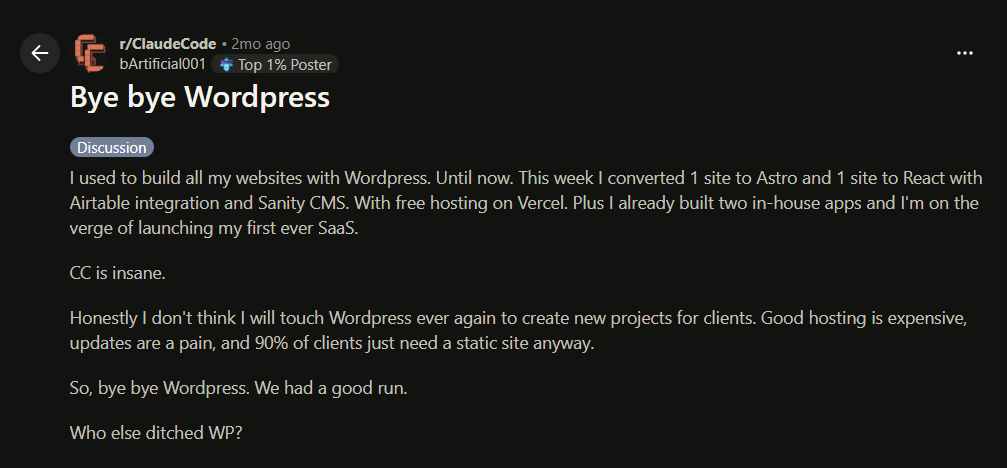
The comments blew up 236 of them. Migration stories, counter-arguments, and heated debates about the future of WordPress.
But buried in that thread were the voices that didn’t make the headlines. A developer named yamebe described how his agency was using Claude Code to “supercharge” their WordPress workflow, theme scaffolding, security scans, deployment pipelines, ACF setups, custom post types.
Another redditor, bigtakeoff, gave Claude Code SSH access to his WordPress server and was managing everything through natural language.
A German developer was building themes from scratch with Claude Code, stripping out unused code and writing lean custom functions. His metaphor: “I use the WP chassis and inside runs my own motor.”
These developers aren’t leaving WordPress. They’re rebuilding the workflow around it.
The most upvoted comment in the thread was a warning to the “bye bye” crowd: “Keep in mind that with a custom solution you’re responsible for maintaining the code going forward.”
That’s the tension. Static sites are fast to build but expensive to maintain. WordPress is slow to build but cheap to maintain. The agentic workflow eliminates the first problem without creating the second one.
What Is an Agentic Workflow, Exactly?
In traditional WordPress development, a human does every step. Design in Figma. Translate the design to code manually. Upload to WordPress. Test. Fix. Repeat. Each step involves a different tool, a different mental model, and often a different person.
An agentic workflow is different. Multiple WordPress AI agents handle different parts of the process, passing structured context to each other like a relay team handing off a baton. The human doesn’t disappear. The human becomes the creative director: setting the vision, making decisions, and course-correcting when something goes wrong.
The key difference from “just using AI” is the handoff. When one agent finishes its work, it doesn’t dump a file for you to figure out. It packages its output in a format the next agent can consume natively. Design intent, component structure, spacing tokens, color systems; all of it transfers without a human translating between tools.
This is what the Model Context Protocol (MCP) makes possible. MCP is an open standard that lets AI tools connect directly to external platforms.
When your WordPress site has MCP enabled, AI agents don’t just generate files, they read your site’s content, understand its structure, and write directly to it. The AI becomes a participant in your WordPress environment, not a separate tool you copy-paste from.
The Workflow: From Concept to Live Theme in Under an Hour
Here’s the exact process we followed, step by step. This isn’t theoretical; we ran this on a live InstaWP site and documented every step, including the parts that broke.
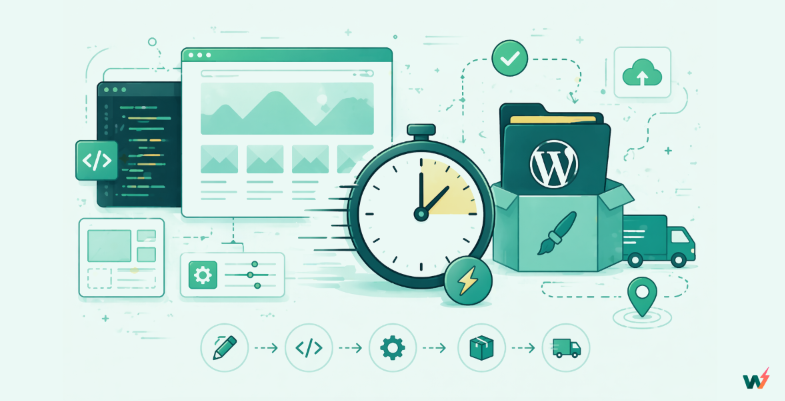
Step 1: Set Up the Infrastructure (5 Minutes)
Before any AI touches anything, you need a WordPress site with MCP enabled.
We created a site on InstaWP, enabled MCP, and copied the MCP URL. That URL is what connects every AI agent in the pipeline to the live WordPress site.
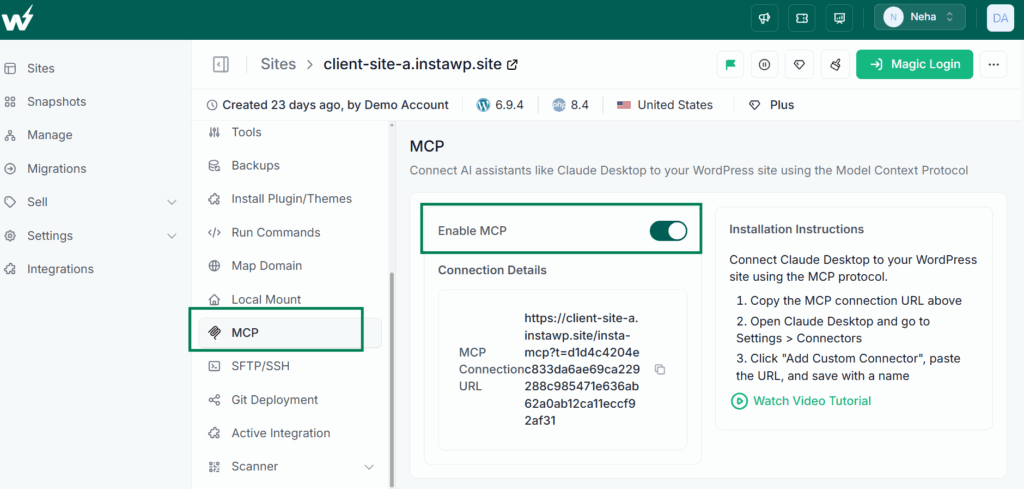
Why this matters: without WordPress MCP, every AI-generated output exists in isolation. You design something in one tool, export it, import it somewhere else, debug the import. MCP eliminates that entire class of friction. The agents talk to your site directly.
Need to understand the process of connecting Claude Desktop with WordPress? Well, we have a video tutorial.
Step 2: Design the Theme in Claude Design (15 Minutes)
Claude Design is Anthropic’s new visual design tool, launched in April 2026. It’s powered by Claude Opus 4.7 and works as a two-pane interface; chat on the left, a live canvas on the right.
We opened Claude Design and described the theme concept:
“I’m building a minimal creative agency theme. Serif headings using Playfair Display with italic accents. Body text in DM Sans. Accent color: electric blue, #1553F0 for light mode, #4D7FFF for dark. Generous whitespace, 120px section padding. Include a dark mode toggle.”
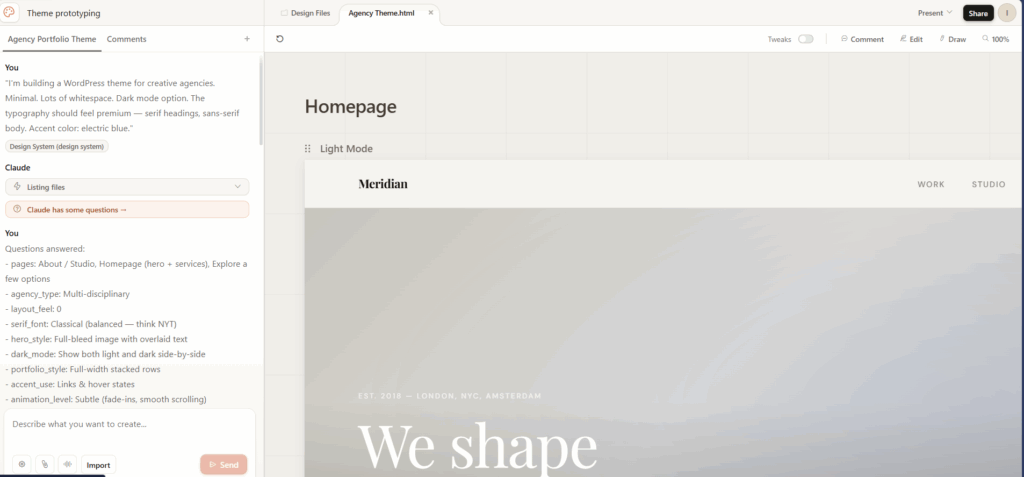
Claude Design generated a full design system and applied it to the first page. From there, we designed multiple page types in the same conversation:
- Homepage: full-bleed hero with serif headline overlay, 3-column services grid, 4 stacked project rows with hover effects, and a contact CTA
- About / Studio: large editorial statement, 2-column story section, numbered approach grid, 4-member team roster
- Blog archive and single post layouts
- 404 page
Every page inherited the same design system automatically. Same typography scale, same spacing tokens, same accent color logic across light and dark modes.
The critical detail: because Claude Design was connected to our WordPress site through MCP, we weren’t designing with placeholder content. The AI could reference the actual site structure, giving us a prototype that reflected reality — not a polished fiction.
Refinements happened inline. Click on a heading, adjust spacing with a slider, leave an inline comment asking Claude to change how service cards stack on mobile. The design conversation never left one tool.
Step 3: Hand Off to Claude Code (2 Minutes)
This is the step that makes the agentic workflow fundamentally different from “AI-assisted design.”
Inside Claude Design, we clicked Export → Hand off to Claude Code.
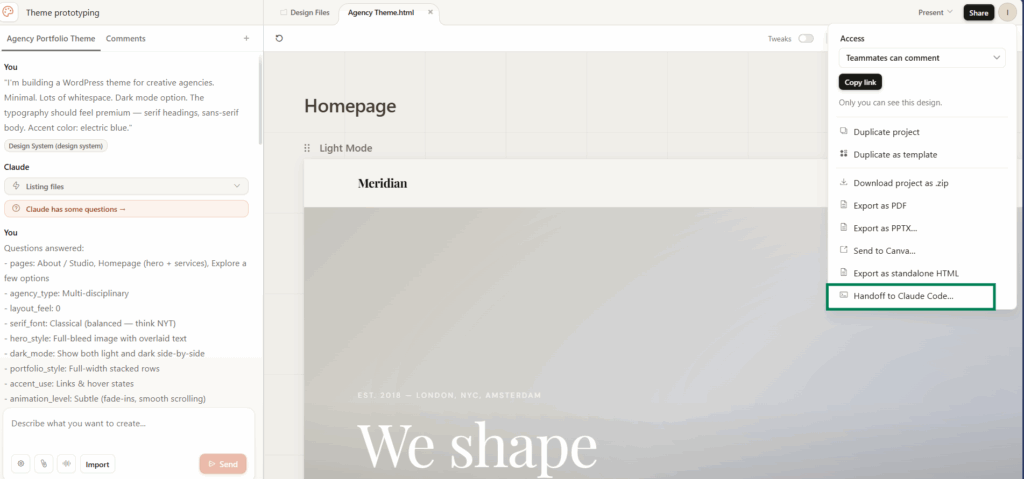
Claude Design didn’t export a screenshot or an HTML file. It packaged a handoff bundle; a machine-readable spec containing the component structure, design tokens (every font, color, and spacing value), layout hierarchy, and all the design decisions from the conversation.
Claude Code received the bundle and understood the intent. It wasn’t reverse-engineering pixels. It had structured metadata about every design decision; what the hero section should look like, how the grid spacing works, what the dark mode toggle should do.
This is what Anthropic means when they talk about the “closed loop” from design to code. The handoff isn’t a lossy conversion. It’s a structured transfer of creative intent.
Step 4: Build the WordPress Block Theme (10 Minutes)
In Claude Code, we gave one instruction:
“Convert this into a WordPress block theme. Use theme.json for the design system — Playfair Display headings, DM Sans body, electric blue accent colors, spacing tokens. Create block patterns for each section. Include the dark mode toggle. Make it installable as a .zip on WordPress.”
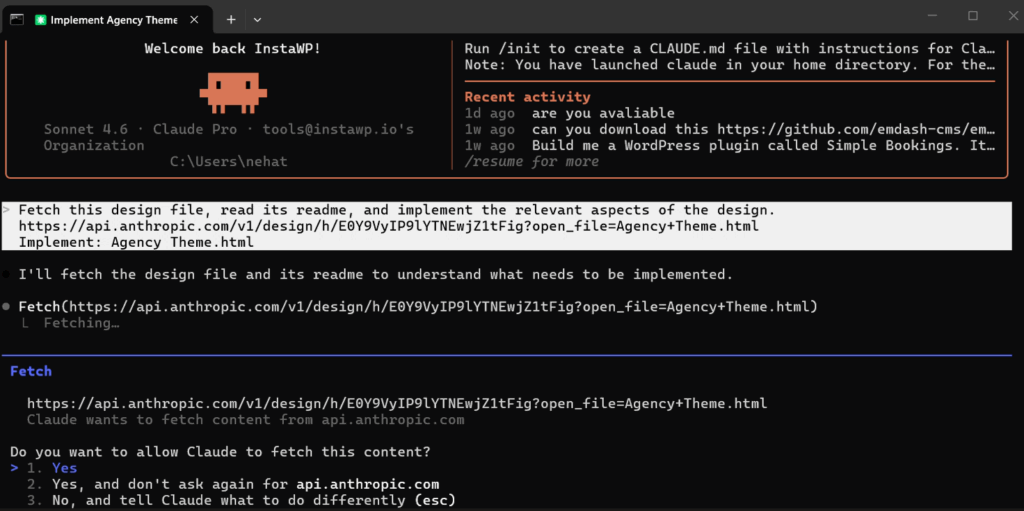
Claude Code worked for about 10 minutes. Here’s what it generated:
- theme.json — complete design system with fluid typography (11px to 88px display sizes), color palette for both light and dark modes, spacing scale (20/40/48/56/80/120/160px), and layout configuration (1280px content / 1440px wide)
- Block patterns — hero.php, services.php, work-section.php, about-statement.php, story.php, approach.php, team.php
- Template parts — header (sticky nav + dark mode toggle) and footer (3-column layout)
- Templates — front-page, services, work, page, index (blog), 404
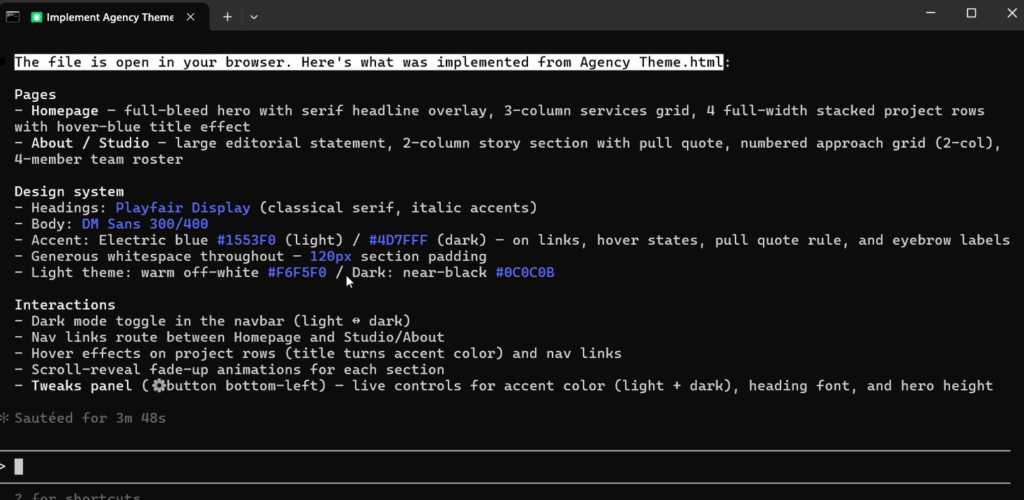
Then, using MCP, Claude Code installed the theme directly on our InstaWP site and activated it. No FTP. No zip upload. No WordPress admin clicking. The agent talked to the site and made it happen.
Step 5: The Reality Check (15 Minutes)
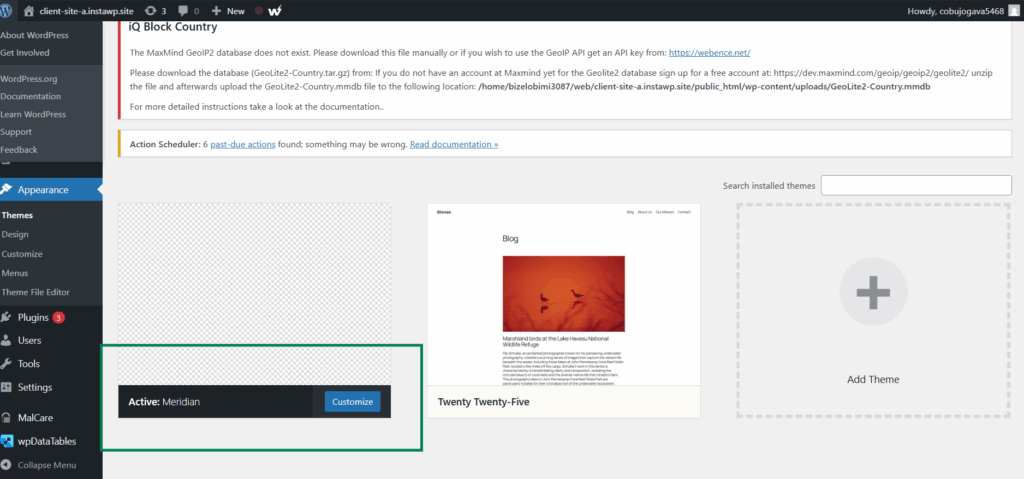
Here’s where honesty matters more than hype. The theme installed. The WordPress dashboard showed “Meridian” as the active theme. All metadata was correct; block patterns listed, templates registered, design system visible in theme.json.
Step 6: Template and Productize (5 Minutes)
Once the theme was working correctly on the live site, we moved to the productization step. On InstaWP, this means saving the site as a template; the complete package of theme files, demo content, plugin configurations, and site settings. Anyone can deploy this template as a fully configured WordPress site in one click.
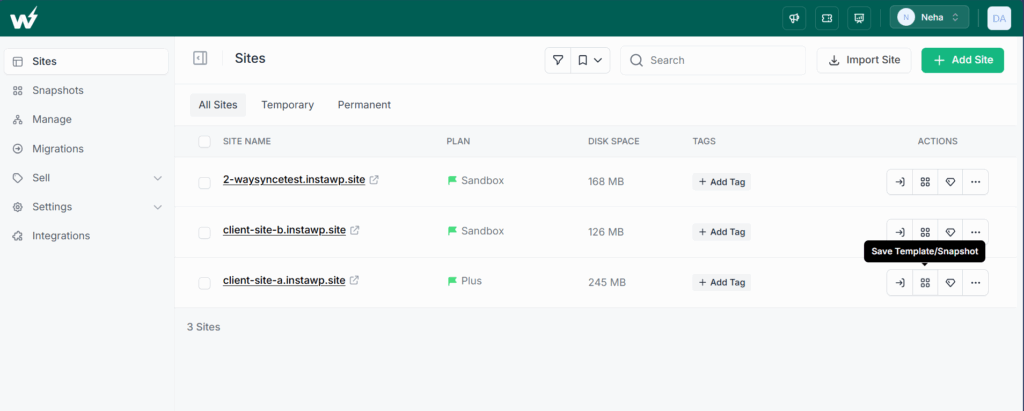
For agencies, this is where the business model shifts. You’re not selling a one-time theme build. You’re selling a hosted product through WaaS (Website as a Service); the client gets a live, fully configured site and you get recurring hosting revenue. Build once, sell repeatedly.
Why This Workflow Is Different From “Just Using AI”
The WordPress community has been using AI for individual tasks for a while now. Developers use Claude or ChatGPT to write functions, debug errors, generate boilerplate. That’s useful but incremental ; you’re still doing the same workflow, just faster at certain steps.
The agentic workflow is structurally different. It’s not about making one step faster. It’s about collapsing the entire pipeline:
Traditional pipeline: Client brief → Designer creates mockups (1–2 weeks) → Developer builds theme (2–3 weeks) → QA and revisions (1 week) → Deployment → Maintenance
Agentic pipeline: Describe the concept → AI designs it → AI builds it → AI deploys it → You review and refine → Template it → Sell it
The human role changes from executor to director. You’re not writing CSS; you’re deciding what the CSS should achieve. You’re not debugging PHP; you’re telling an agent what the expected behavior should be and letting it find the fix.
The MCP Layer Is What Makes It Scale
Here’s the part that matters for anyone thinking about adopting this workflow at scale.
Every success story in the Reddit threads; the agencies using Claude Code for theme scaffolding, the solo developers managing sites through natural language; shares a common limitation.
As we noted in our analysis of the “Bye bye WordPress” conversation: every success story is bespoke. “Developer manually connects Claude Code to a server. Developer writes custom prompts. Developer manages the workflow.”
There’s no productized, repeatable process. No way for the thousands of agencies building WordPress sites to adopt this approach without deep technical knowledge.
That’s the infrastructure gap. And it’s the gap that native MCP support closes. When MCP is a one-toggle feature on your WordPress platform, not a custom integration you build yourself, the agentic workflow becomes accessible to any agency, not just the ones with developers comfortable with SSH and API keys.
Enable MCP. Connect your AI tools. Start building. That’s the entire setup.
What This Means for WordPress Agencies
The agencies that adopt this workflow earliest get a compounding advantage:
Speed becomes a feature, not a cost. When you can prototype a theme in 15 minutes and have a working version in an hour, you can show clients working designs in the first meeting, not after two weeks of back-and-forth. That changes the sales dynamic entirely.
Iteration becomes cheap. Client doesn’t like the direction? Design three alternatives in Claude Design before the call ends. The cost of exploration drops to near zero, which means you converge on the right design faster.
The deliverable changes. Instead of selling a one-time theme build, you’re selling a hosted, maintained product. Build the theme. Template it. Offer it as a managed WordPress site with hosting, CDN, backups, and security included. Recurring revenue instead of project fees.
The talent bottleneck loosens. You don’t need a designer and a developer for every project. One person with good taste and clear thinking can direct the agentic workflow and produce agency-quality output. That changes hiring, that changes margins, and that changes how many projects you can run simultaneously.
The Developers Who’ll Own the Next Decade
The “bye bye WordPress” narrative makes for a good Reddit post. It’s satisfying, it’s clean, and it’s partly true for a specific slice of the market, static brochure sites that never needed a CMS in the first place.
But the moment a site needs e-commerce, content scheduling, role-based editing, multi-language support, or any kind of dynamic functionality, the “just vibe-code it” approach falls apart.
WordPress’s ecosystem, 60,000+ plugins, a content management interface millions of people already know, a security and maintenance infrastructure maintained by a global community, doesn’t get replicated in a weekend with Claude Code.
The developers who’ll own the next decade aren’t the ones abandoning WordPress. They’re the ones rewiring how it gets built. Using AI agents to eliminate the tedious parts — the theme scaffolding, the boilerplate, the repetitive pattern building, while keeping the ecosystem benefits that make WordPress the right choice for 40% of the web.
The agentic workflow isn’t about replacing WordPress developers. It’s about giving them leverage they’ve never had before.
And it starts with one toggle: enable MCP.
Want to try this workflow yourself? Create a site on InstaWP, enable MCP, and connect it to Claude Design. The entire setup takes under 5 minutes.


