If you sell hosting or care plans as an agency, a pricing table is not enough anymore. Clients want to feel real speed, see real tools, and understand how you will keep their sites safe. That is where a focused WordPress demo site outperforms any sales page.
Instead of talking about performance, you hand prospects a live demo WordPress website that already runs on your stack. They log into a curated WordPress demo admin, click around, and see the difference.
Table of Contents
What is a Hosting WordPress Demo Site?
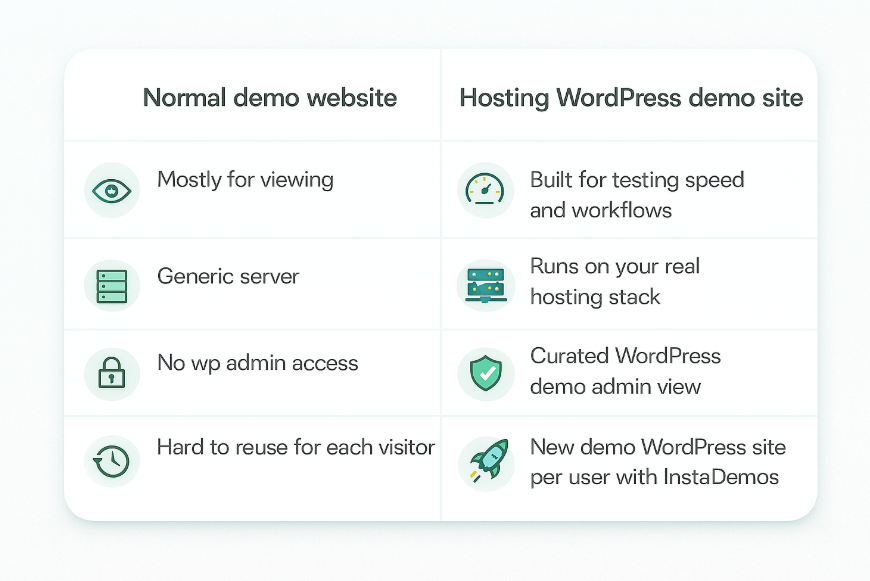
A hosting WordPress demo site is a live WordPress install that runs on the same type of stack you offer to clients. The goal is simple: instead of promising “fast, secure hosting,” you let people feel it on a real demo WordPress website. They can browse the front end, open the WordPress demo admin, and see how backups, staging, and tools actually work.
A normal demo website might just show a design. A hosting demo shows the full experience: speed, stability, and management.
If you want the full foundations of what a WordPress demo site is, start with our guide on how to build a live WordPress demo website. For a higher-level system view, see how to build a WordPress demo site system for your plugin, theme, or hosting offer.
Must Read: How to Create a Demo Website in WordPress
How to Create Hosting WordPress Demo Site
To build hosting demos that convert, you need one “golden” WordPress demo site that shows your stack at its best. InstaDemos by InstaWP is the best option agencies have to build a WordPress demo site for hosting companies.
Here, agencies can create a polished master demo WordPress website once, save it as a reusable snapshot, and let InstaDemos spin up a fresh, isolated demo WordPress site for every prospect.
Each visitor lands on a fast, branded environment that runs on the same stack you sell, with curated WordPress demo admin access, built-in expiry, and a clear path to “move my real site here.”
Must Read: InstaDemos (for Plugin/Theme Companies
Let’s learn how to create a hosting demo using InstaDemos.
Step 1: Spin up a permanent hosting demo site in the right region
- Log in to your InstaWP dashboard and click Create Site.
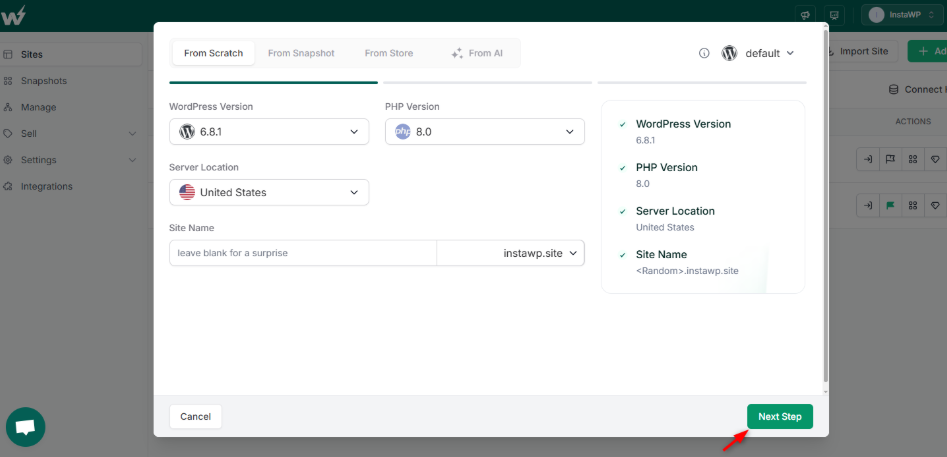
- Choose the server location closest to the customers you usually serve, so your demo WordPress website feels snappy from the first click.
- Pick the same PHP version, WordPress version, and base stack you use for paying clients.
- Give it a clear name like
Agency Hosting – Master Demo. - Use Magic Login to jump straight into the WordPress demo admin.
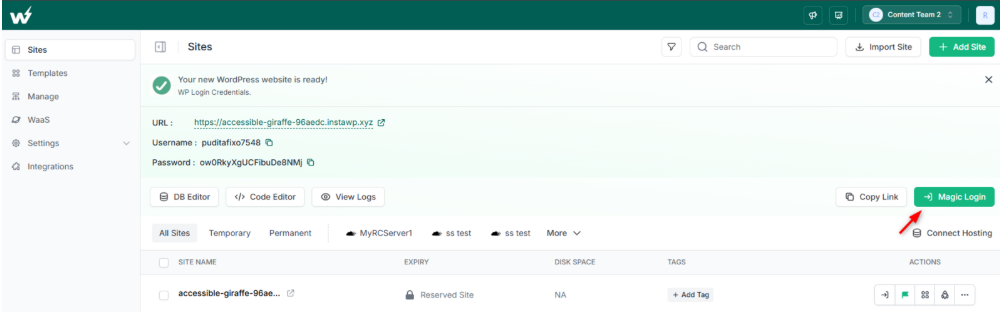
This is the “forever” demo WordPress site you’ll keep updating as your hosting offer evolves.
Step 2: Make the front end look like real client sites
Don’t leave this demo site empty. Build out a few realistic examples that match your typical projects:
- A WooCommerce store with products, cart, and checkout
- A service business site with forms and landing pages
- A content-heavy blog or magazine
Your goal is simple: when a prospect browses this WordPress demo website, they should think, “this feels like my site, just faster and better managed.”
Step 3: Configure the hosting experience inside wp-admin
Next, shape the WordPress demo admin so it showcases your hosting value, not just WordPress itself:
- Activate any performance plugins or tooling you provide
- Expose backup, restore, and staging options in a simple way
- Add a custom dashboard widget or welcome page explaining:
- What stack this WordPress demo is running on
- What they should click first (e.g., “Open staging”, “Test backup restore”)
- Hide noisy menus that don’t matter for the demo
The idea: a client logs into the demo WordPress site and immediately sees “this is easier than what I have today.”
Step 4: Save it as a Shared Snapshot
Once the site feels like a proper hosting showcase, freeze it as a reusable blueprint:
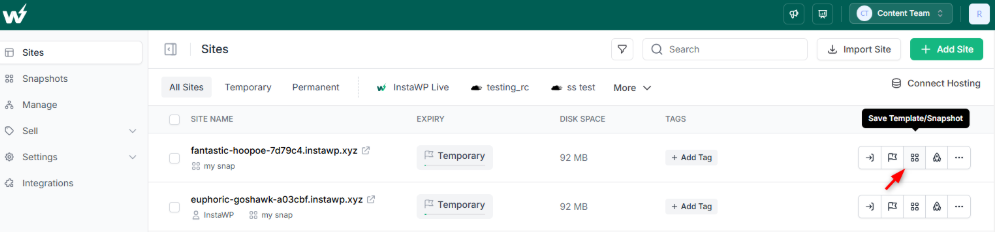
- From the site card in InstaWP, click Save Template / Snapshot.
- Name it clearly (for example
Agency Hosting – Demo Snapshot) and write a short description that will also make sense on your public demo page. - Mark it as Shared so you can use it for public demos.
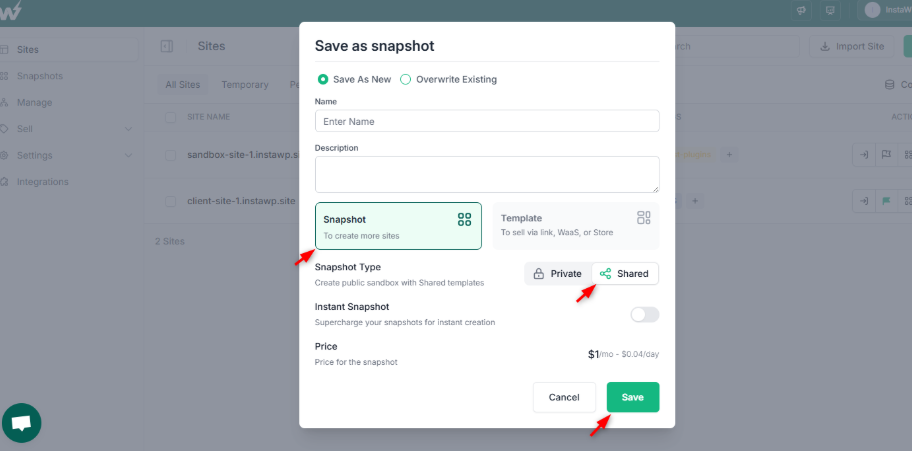
- Optionally mark it as an Instant Snapshot so new demo WordPress sites launch faster from a warm pool.
This Snapshot is what InstaDemos will duplicate every time someone starts a hosting WordPress demo site.
Step 5: Tune Snapshot settings for brand, control, and conversions
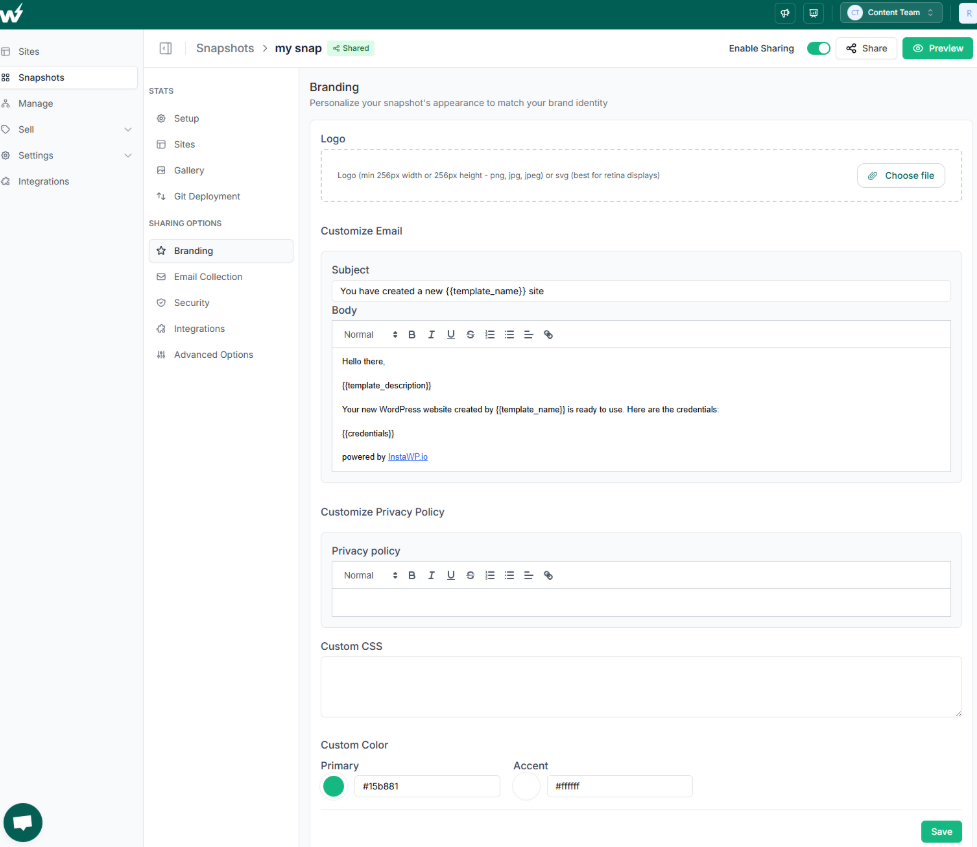
From the Snapshots area, edit this Shared Snapshot and configure.
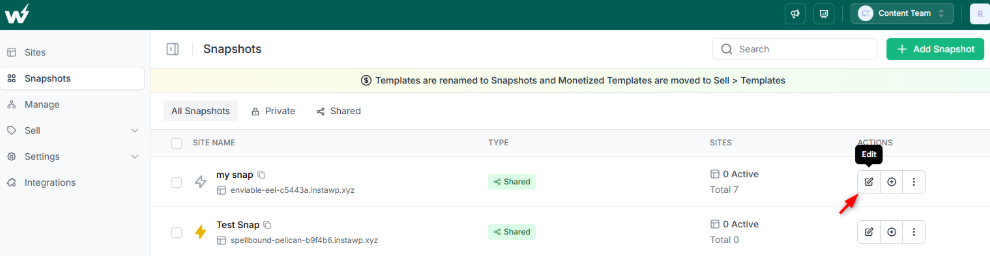
- Setup – Clean name and description so the demo landing page feels professional.
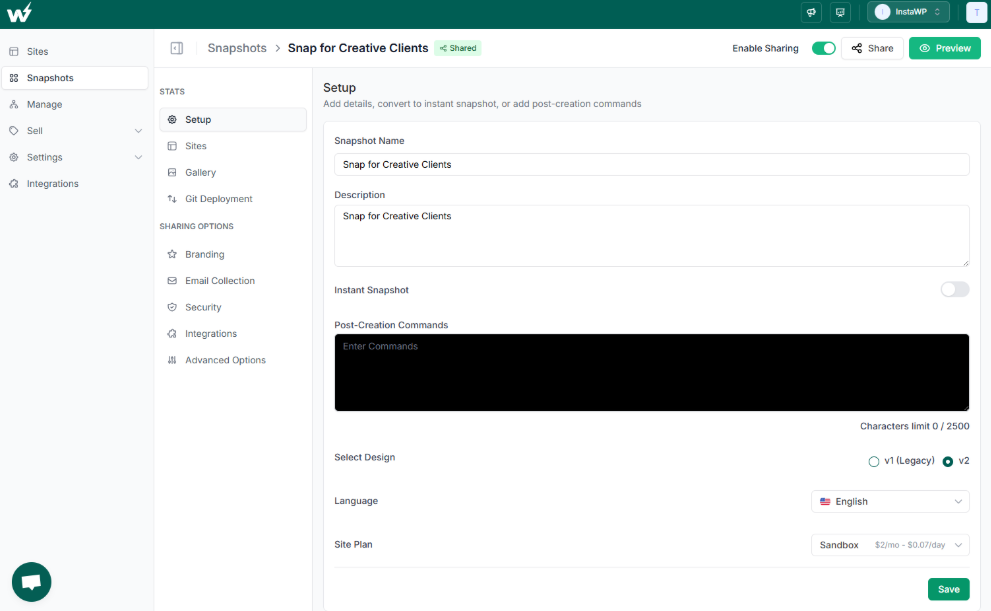
- Branding – Logo, brand colors, privacy link, and email template so the demo WordPress website feels like your agency, not a generic tool.
- Gallery – A couple of screenshots that show the front end and the WordPress demo admin.
- Advanced options:
- Site Lifetime so demo sites auto-expire after a sensible period
- Allow extending lifetime if you want serious prospects to keep exploring
- Enable site cloning if you want clients or your own team to turn a demo into a project
- Auto login to wp-admin to skip credential screens
- Redirect URL so users land on the most important page (front end or a curated wp-admin screen) after login
These options are where InstaDemos beats traditional “demo site on my own server” setups. You control how long each demo site lives, what people see first, and how tightly the whole experience is branded.
Step 6: Hand the blueprint to InstaDemos
With a polished Snapshot in place, your job shifts from “how do I create a demo website” to “where do I want this demo offered?”
- InstaDemos takes your Snapshot and creates a new WordPress demo site every time someone clicks your hosting demo link.
- Each demo WordPress site is isolated, auto-deleted on schedule, and opened with Magic Login in the view you chose.
- You simply drop “Start hosting demo” buttons into pricing pages, landing pages, or email campaigns and let the system handle provisioning.
When Should Agencies Offer a Hosting WordPress Demo Site?
You don’t need a hosting WordPress demo site for every lead. You need it when trust is the main blocker. A good hosting demo site works best in a few clear situations:
1. When you’re replacing slow, shared hosting
If prospects complain about downtime, timeouts, or “the site feels heavy,” send them to a demo WordPress website that already runs on your stack. Let them click through pages, test the cart, and see how fast things feel before moving their real site.
2. When hosting is bundled into your care plans
Many agencies sell “we host and maintain it for you” retainers. A focused WordPress demo site helps non-technical clients see what that really means: automatic backups, staging, updates, and monitoring available from a clean WordPress demo admin instead of vague bullet points on a proposal.
3. When you’re pitching WaaS or productized sites
If you offer website-as-a-service packages (niche templates + hosting), a live demo WordPress site for each package is far more convincing than a PDF. With InstaDemos, each prospect can spin up their own demo WordPress site from the exact blueprint you’ll use in production.
4. When clients are nervous about migration
Some buyers are happy with their current host simply because it “works well enough.” A hosting WordPress demo gives you a gentle way to show them what they’re missing. Run performance scans, show staging, and walk them through the demo WordPress website on a call.
Learn how one WordPress host used InstaDemos to almost double conversions overnight.
Turn demo WordPress sites into real hosting clients
A good hosting WordPress demo site is not just a playground. It should quietly move people from “this feels nice” to “let us move our real site here.”
Map the full journey, not just the launch
Think of your hosting WordPress demo as the middle of a funnel:
- Traffic lands on your pricing or “Why host with us” page
- They click “Start hosting demo” and explore a live demo WordPress website
- They decide whether the stack feels better than their current host
- They book a call or start a plan and move their site
Your job is to design each step so there is always an obvious “next action” after the demo.
Use the demo site as your live sales asset
When you talk to prospects, use the same demo WordPress site they already explored:
- Share the link on calls and walk through the WordPress demo admin together
- Run a quick performance or uptime check directly on the demo WordPress website
- Show how staging, backups, or update flows work in real time
This is much more convincing than slide decks. You are selling with the exact stack they will get after migration.
Give clear “upgrade from demo” paths
Inside every hosting WordPress demo site, add at least one friction free way to move forward:
- A button in wp admin: “Move my site to this hosting” that links to your migration intake or checkout
- A short “Next step” block on the front end that explains how to:
- pick a plan
- schedule migration
- or self migrate from the demo WordPress site using your preferred tools
If you are using IWP Demo Helper or IWP Migration Helper, mention that in your copy so clients feel the move will be guided or automated, not a manual project.
Decide what “success” looks like for each demo
Not every WordPress demo site needs to convert directly to a sale. For some segments, a good outcome is:
- A booked strategy call
- A request for a performance audit of their current site
- A commitment to move one pilot project to your stack
Define this per offer, then align your CTAs inside the demo WordPress website with that goal.
You can even run small experiments using different Snapshots or InstaDemos flows, similar to the approach you describe in our WordPress demo site system guide. One flow might optimise for “book a call,” another for “start a plan,” and your analytics will tell you which hosting demo journey converts best.
Conclusion: Turn hosting demos into a quiet sales engine
A good pricing table can start a conversation. A great hosting WordPress demo site can close it. When you give prospects a live demo WordPress website that runs on your real stack, you remove guesswork. They feel the speed, see the tools, and understand how you will protect and manage their site.
The pattern is simple. Build one solid hosting WordPress demo site in InstaWP, snapshot it, and let InstaDemos create a fresh demo WordPress site for every visitor. Each demo site is isolated, branded, time-boxed, and opened into a curated WordPress demo admin that highlights your strengths.
FAQs
1. What is a hosting WordPress demo site for agencies?
A hosting WordPress demo site is a live WordPress install that runs on the same kind of stack you sell to clients. Instead of showing specs, you send people to a real demo WordPress website where they can browse the front end and, if needed, open a limited WordPress demo admin. It is built to answer one question: “What will my site feel like if I host it with this agency?”
2. How do I create a demo website for my hosting offer without touching my live server?
The easiest way to create a hosting demo site is to start in InstaWP rather than on your own server. You spin up a fresh WordPress demo site, configure PHP, caching, SSL, and tools to match your plans, then add realistic sample content. Once the demo WordPress site looks right, you save it as a Shared Snapshot and connect it to InstaDemos, instead of bolting it onto production hosting.
3. Can every visitor get their own demo WordPress site automatically?
Yes. InstaDemos is built to create a new demo WordPress site for each visitor or campaign. It starts from your master Snapshot and clones a fresh WordPress demo website in the background, then uses Magic Login to drop the visitor into the front end or a curated WordPress demo admin view. No shared logins, no fighting over one messy demo site.
4. How safe is it to give clients WordPress demo admin access?
Giving full admin access on a public demo site is risky if you host it yourself. With InstaWP and InstaDemos, you keep it safe by designing a controlled master WordPress demo site, limiting roles and menus, and setting a clear site lifetime. Each demo WordPress website is isolated, created from a clean Snapshot, and automatically expires, so real client sites and servers stay protected while prospects still see a real WordPress demo admin.
5. How do I move a client from a WordPress demo site to a real hosted site?
You have two main patterns. For higher touch projects, you can use the IWP Demo Helper so the client clicks a Migrate button inside the demo WordPress site, and your team receives a structured request. For more automated funnels, you can use IWP Migration Helper and InstaWP Connect so a new live site pulls everything from the original WordPress demo website with a guided flow. In both cases, the demo is not a dead end. It is the first step of the migration.
6. Do I need my own demo infrastructure to run WordPress demos with InstaDemos?
No. InstaWP hosts the WordPress demo site for you. You still choose region, PHP version, and stack so the demo WordPress site matches your real hosting, but InstaWP and InstaDemos handle provisioning, expiry, and cleanup. Your production servers stay focused on paying clients while your demo system runs on purpose-built infrastructure.
7. What is the difference between a hosting demo and a normal WordPress demo site?
A normal WordPress demo site is often about a plugin, theme, or layout. A hosting demo focuses on the environment around WordPress. It highlights performance, backups, staging, security, and management workflows. In practice, that means your hosting demo WordPress website is tuned to answer “Is this stack faster and safer than what I use now?” rather than just “Does this design look nice?”