Most teams overspend on wordpress website management for the same three reasons: bloated tool stacks, fixed hosting plans, and endless manual tasks. You buy a dedicated staging server, tack on a premium backup plugin, add another service for uptime alerts, and suddenly you’re juggling four subscriptions just to keep a single site updated.
Scale that to ten or twenty installs, and the monthly invoice looks like a small car payment. The real kicker? You’re still logging into each dashboard by hand, running updates one at a time, and hoping nothing breaks in the process.
We believe developers deserve a leaner, smarter workflow, one that cuts the clutter, keeps costs predictable, and frees you to ship code instead of maintaining infrastructure.
Table of Contents
What Makes Basic Site Management Costly if You’re Not Doing It the Right Way
Managing WordPress sites shouldn’t feel like managing a data center. Yet many developers and agencies unintentionally burn through their budgets on tasks that should be simple, all because they’re relying on fragmented tools and manual workflows.
Here are the common cost drivers that creep up silently:
1. Staging Servers That Sit Idle
You spin up a VPS just for WP staging or testing, but most of the time it’s idle; yet you’re still paying for it. Multiply that across projects, and you’re sinking money into unused resources.
2. Premium Plugins for Simple Tasks
You buy separate plugins for backups, security scans, performance checks, role control, and config edits. Individually, they seem affordable, but together they can cost more than your hosting.
3. Time = Cost
Manual logins, one-by-one updates, restoring from errors; all that time adds up. Whether it’s your time or your team’s, hours spent on low-level maintenance are time stolen from high-impact work like development or client strategy.
4. Hidden Support and Recovery Costs
When something breaks, you scramble to fix it. If you don’t have centralized monitoring or a recent backup handy, you end up spending on emergency developer hours, premium recovery tools, or third-party support.
5. Tool Stack Bloat
Most teams stitch together a site management stack that includes:
- Uptime monitoring tool
- WordPress backup plugin
- Staging server
- WordPress management SaaS
- Security scanner
- Performance tester
None of these tools is deeply integrated, which means overlap, configuration conflicts, and monthly subscriptions that pile up fast.
The truth? These costs aren’t just financial; they drain your time, your attention, and your ability to scale.
How to Manage Multiple WordPress Sites Without Paying a Dime
Most folks start with a free “site management” plugin and assume they can run everything from one place. In reality, those tools usually live inside each site. Once you have more than a handful, you end up context-switching, logging into sites one by one, and juggling updates, backups, and alerts individually. No true centralized dashboard, no clean reporting, and a lot of wasted time.
The easiest way to manage multiple WordPress sites from a single dashboard without paying a single penny is to use InstaWP.
With InstaWP’s free plan, you enjoy basic WordPress site management in all its glory. Despite being free, this plan lets you manage multiple WordPress sites from a single dashboard; no installations, and no switching between admin panels.
It’s a truly unified and modern approach to WordPress site management, designed for developers, freelancers, and agencies.
Here’s what you get for free, and why it matters:
1. Manage WordPress Site Access Instantly with Magic Login
Forget lost passwords and client login requests. InstaWP’s Magic Login feature allows you to access any connected WordPress site with a single click. No credentials required. You can go from your management dashboard to the WordPress admin area in seconds, securely and without friction.

For developers juggling multiple client projects, this alone removes hours of wasted time spent logging in and out of different sites.
2. Run Manual Plugin and Theme Updates Across All Sites
Still updating themes and plugins manually, one site at a time? InstaWP simplifies this. You can manage WordPress sites from one dashboard and apply updates in bulk, or individually, without ever opening wp-admin.
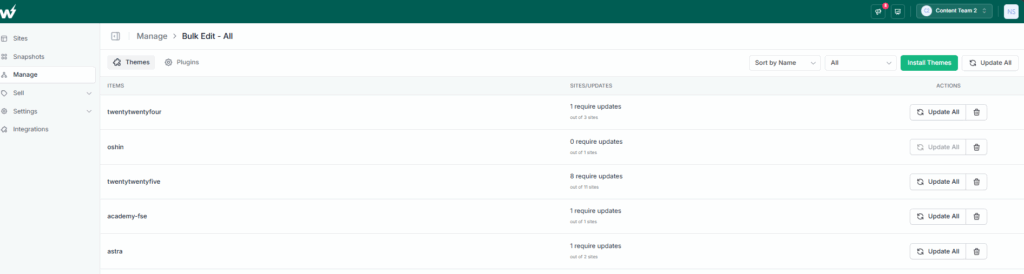
This makes your update workflow faster, cleaner, and safer. Unlike other website management tools, InstaWP doesn’t lock this feature behind a paid plan; it’s part of the free tier.
3. Edit WordPress Databases Without Additional Tools
Need to update user meta values, change URLs after a migration, or clean up junk post types? InstaWP gives you access to a built-in Database Editor, so you can directly modify any WordPress database table without needing phpMyAdmin or cPanel.
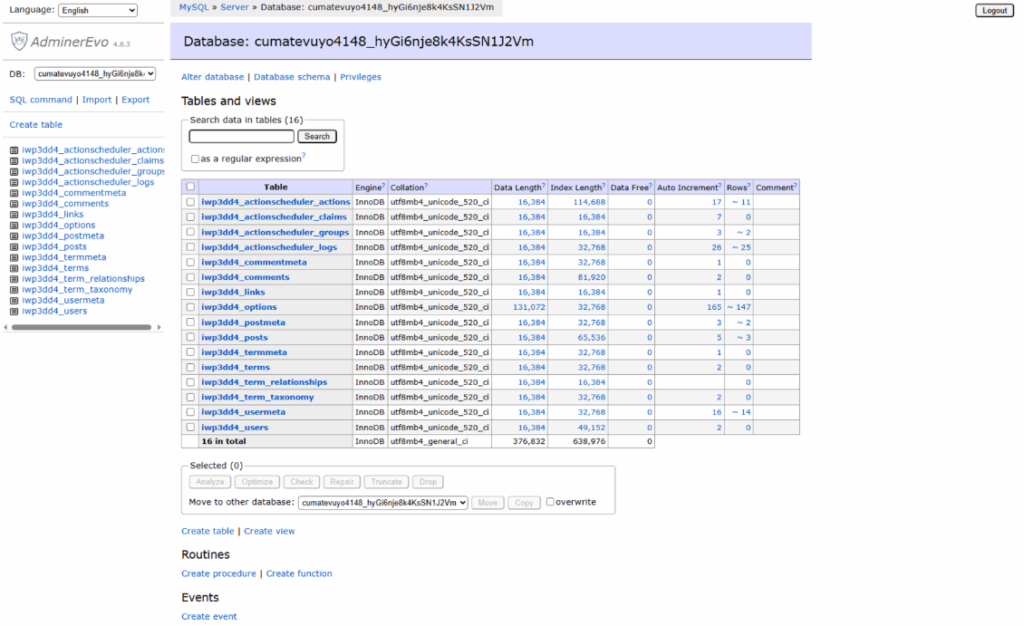
This is critical for advanced users who want to make precise backend changes, especially during migrations, debugging, or performance cleanup.
4. Unified User Management Across All Sites
User permissions scattered across dashboards? With InstaWP, you can manage users across multiple sites from one place. Add new editors, remove inactive accounts, or modify contributor roles quickly, without opening each WordPress install manually.
If you’ve been wondering how to manage WordPress sites with multiple team members or clients, InstaWP gives you the centralized control you need.
5. Built-In Cache Purging to Reflect Real-Time Changes
Theme updates or plugin installs not showing up right away? InstaWP includes 1-click cache purge controls for each site; no need for an extra WordPress caching plugin. You get full control over the site’s cache, ensuring that updates are reflected immediately.
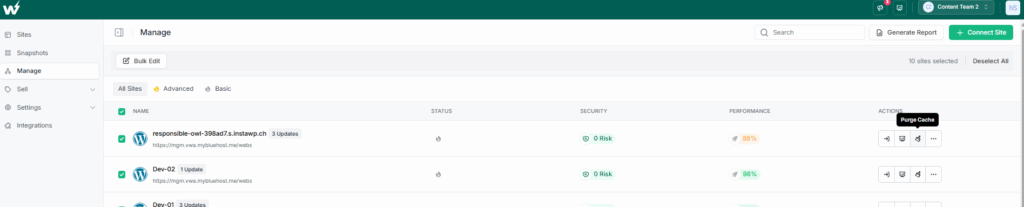
This is especially useful when managing design changes or troubleshooting visual issues across different sites.
6. Free Staging Environment with 500 MB Limit
Testing a plugin, editing a theme, or preparing content for a client? With InstaWP, you can create a staging site for every project, even on the free plan. This staging site mirrors the live setup, allowing you to test everything safely before pushing changes.
You don’t need to pay for a separate staging server or use developer-only workflows. It’s built-in, seamless, and fast.
7. Uptime Monitoring Every 60 Minutes from Global Locations
Downtime affects reputation, SEO, and user trust. InstaWP provides real-time uptime monitoring, checking your site every hour from five global locations. You’ll know instantly if any of your WordPress sites become unreachable, and you can act fast.
This feature replaces paid services like UptimeRobot or Pingdom, making InstaWP the smartest way to manage WordPress sites for free.
8. One-Time Vulnerability Scan
Even on the free plan, you can run a one-time vulnerability scan for each connected site. InstaWP checks your plugins, themes, and core files for known issues so you can patch them proactively. It’s a quick win for securing client sites without paying for a separate malware scanner.
In addition, you also get:
Basic Performance Pulse – A lightweight speed snapshot shows whether TTFB or render time is drifting, so you can address issues early.
Zero Hosting Lock-In – Your sites can live anywhere. InstaWP sits on top as a control layer, so you keep your preferred hosts and still manage multiple WordPress sites from one dashboard.
With these tools in place, you get the best way to manage multiple WordPress sites when budget is tight: central visibility, faster maintenance, and no surprise invoices. InstaWP’s free plan is not a trial or a crippled version. It’s a fully capable WordPress site management platform that helps you reduce cost, save time, and eliminate operational headaches.
Whether you’re managing 3 sites or 30, InstaWP gives you an unfair advantage, and it doesn’t cost a dime to get started.
How to Manage WordPress Sites With InstaWP
After understanding what you’ll get with the Free tier of InstaWP, we’re sure you must be excited to learn to use it for basic site management. Here is a quick guide on that:
Go to your InstaWP Dashboard.
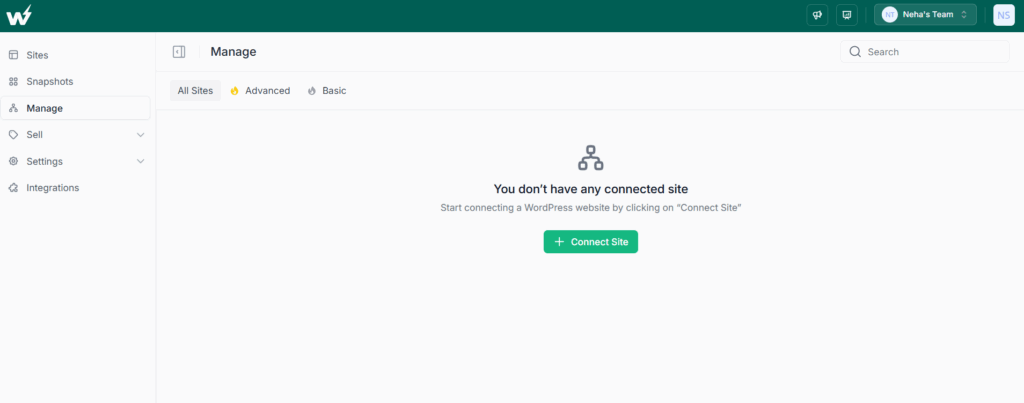
Click on Manage > Connect Site.
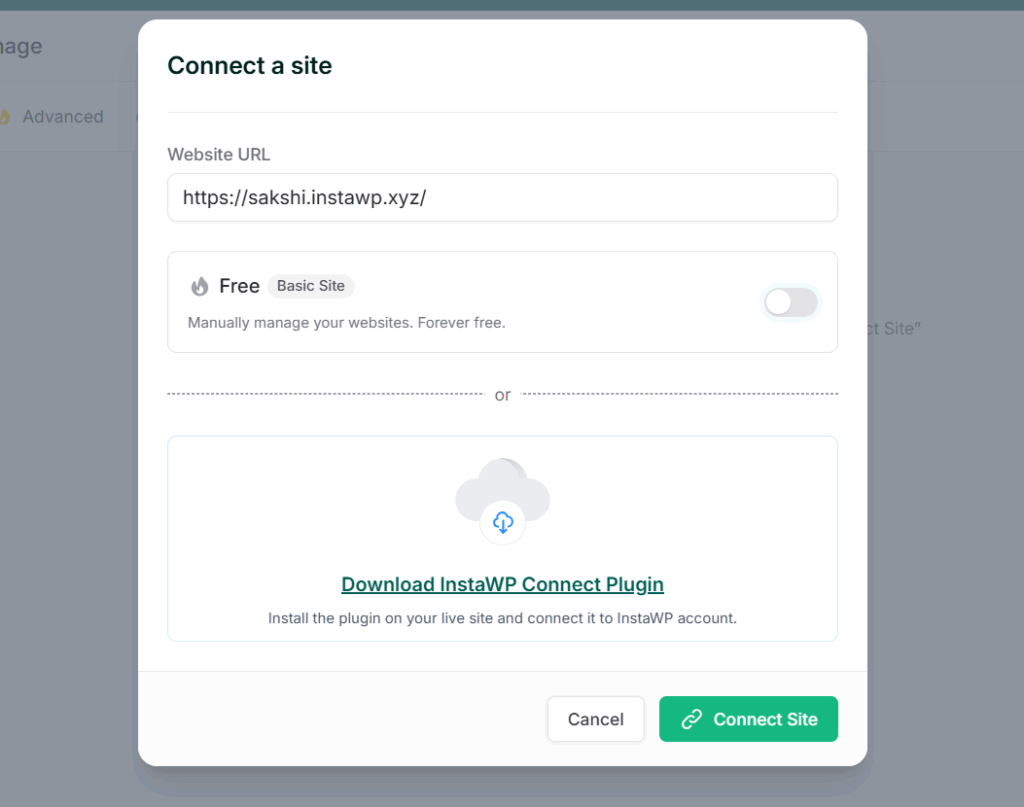
Enter the URL of the site you want to manage and click on Connect Site. This will auto-install InstaWP’s staging plugin remotely on your site.
Approve the connection request.
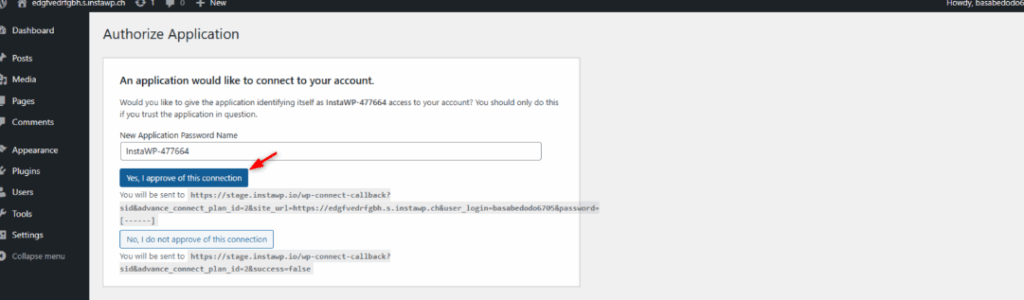
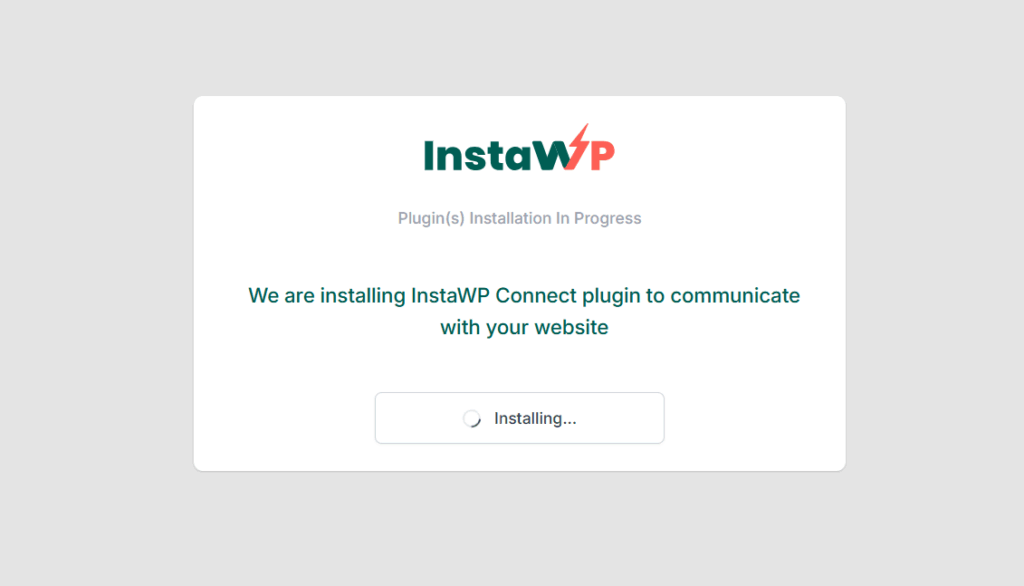
It will take a while to install the InstaWP Connect plugin on the site you want to connect. The beauty of this site management is that it doesn’t matter where your site is hosted. You can connect to any site.
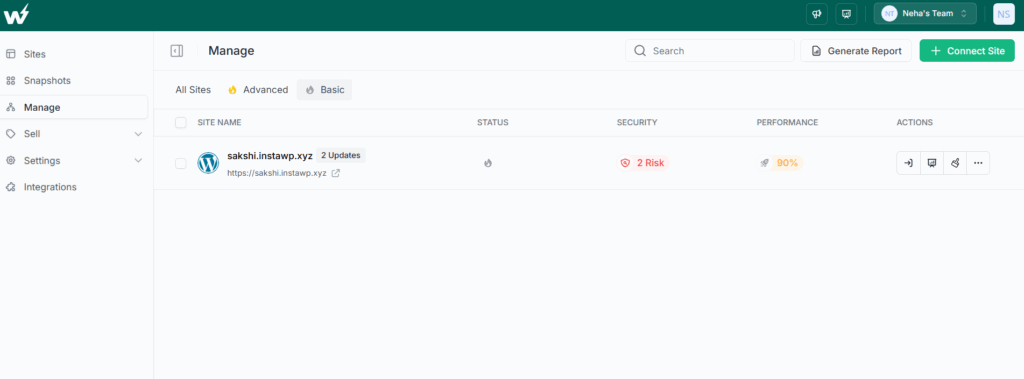
Once the installation is complete, you will be able to see this site under the ‘Basic’ tab.
Create a staging site for your managed site in a single click.
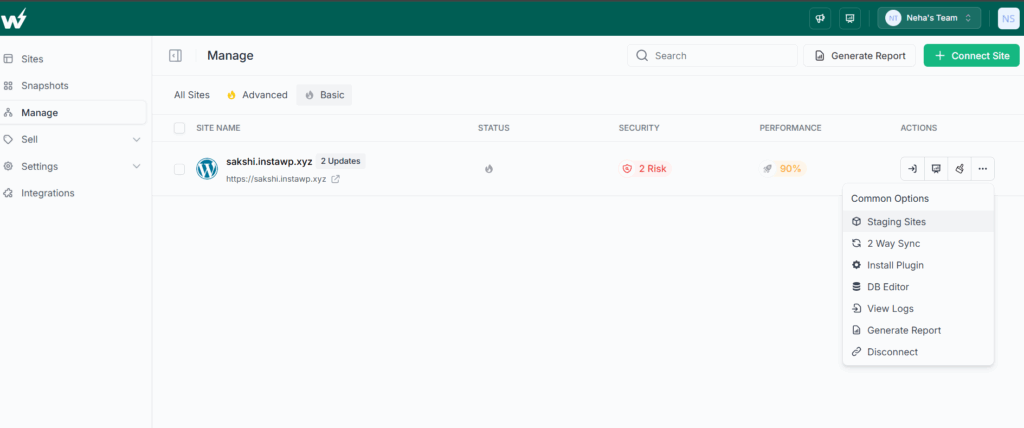
Go to the site’s dashboard to get access to more site management features.
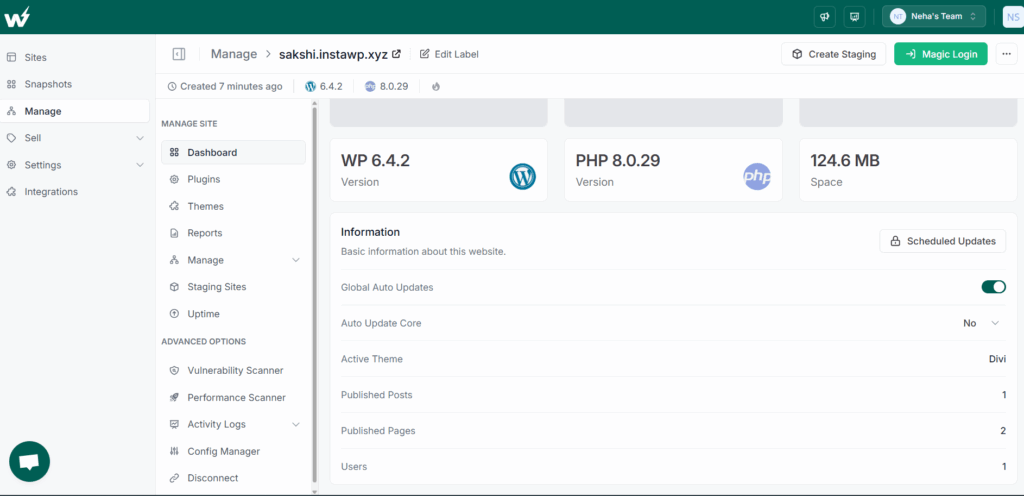
For instance:
- Enable the auto updates for WordPress Core, plugins, and themes
- Run vulnerability scan
- Do uptime monitoring and so on.
Where the Free Plan Stops and Growth Starts
InstaWP’s free tier covers everyday upkeep, but larger portfolios eventually outgrow basic tooling. When you manage multiple WordPress sites that generate revenue, think WooCommerce stores, membership portals, or high-traffic news blogs, you’ll want automated safeguards that the free plan does not include.
For example, you won’t get round-the-clock uptime alerts, daily performance reports, or scheduled vulnerability scans. Bulk editing is limited to updates, so mass activating or deactivating plugins across thirty installs still takes manual effort. And while the free tier flags security issues at first connect, it doesn’t re-scan daily to catch new CVEs.
That’s the signal to level up. InstaWP’s advanced management unlocks:
- One-click uptime monitoring on more locations
- Daily performance and security scans
- Generate WordPress maintenance PDF reports
- Full bulk actions, all priced at just two dollars per site per month on our pay-as-you-go model.
You add power only where it delivers value: high-risk, high-visibility sites stay protected, while low-traffic blogs remain on the free dashboard. This selective upgrade path keeps costs predictable and proves again why InstaWP is the best way to manage multiple WordPress sites from one dashboard.
The Smart Path to Multi-Site WordPress Management
You don’t need a stack of paid tools to keep a portfolio healthy. InstaWP shows that wordpress website management can start at zero dollars yet still give you bulk updates, magic logins, and basic security checks; all in one clean interface. If you only maintain a handful of projects, that free dashboard is already the best way to manage multiple WordPress sites without draining your budget.
Ready to test it yourself? Create a free InstaWP account, connect your first sites, and experience how effortless managing multiple sites can be. Once you see the time savings, you’ll wonder why you ever did it any other way.
FAQs
Q1. Is InstaWP’s free plan really enough to manage multiple WordPress sites?
Yes. The free tier lets you connect up to three installs, run bulk plugin and theme updates, use Magic Login, and view an initial vulnerability scan. For many freelancers, this covers day-to-day WordPress website management without any cost.
Q2. Can I mix free and paid sites in the same dashboard?
Absolutely. InstaWP follows a usage-based model, so you can keep smaller blogs on the free tier and upgrade only the high-traffic or revenue-generating projects. This hybrid setup is the best way to manage multiple WordPress sites while keeping budgets predictable.
Q3. What extra features do I get when I upgrade to advanced management?
Upgrading unlocks daily security and performance scans, uptime monitoring, white-label PDF reports, and full bulk actions across every connected site. At $2 per site per month, it’s a low-cost way to raise the bar on wordpress manage multiple sites workflows.
Q4. Do I have to move my hosting to InstaWP?
No. You can manage multiple WordPress sites from one dashboard, even if those sites remain on your current host. InstaWP acts as a control layer, not a mandatory migration.
Q5. How secure is the Magic Login feature?
Magic Login uses a token-based handshake that expires quickly. No passwords are stored by InstaWP, and each login request is encrypted end-to-end, giving you both convenience and strong security for multi-site work.