Website as a service (WaaS) and traditional web development are two ways to sell the same website. With WaaS, the client pays a monthly fee for a site the agency builds from a template, hosts, updates and supports. With traditional web development, the client pays once for a custom build, and the project ends at handover.
The model you pick decides how your agency gets paid: one invoice per project, or income that renews every month. This guide compares the two on price, delivery, ownership and three-year revenue, using the real per-site costs of running WaaS on InstaWP, where the templates, the branded checkout and each client’s managed WordPress hosting sit in one dashboard.
- Know your margin per client. A $99-a-month WaaS plan on InstaWP’s $15 Pro hosting leaves the agency $79.05 a month after the 5% checkout fee, or $84 if you sell through WooCommerce or the API.
- Recurring revenue is slow to build. Adding 10 clients a year, WaaS at $99 a month overtakes a $3,000-per-build business on yearly income in year 4, or in year 3 if you also charge a $499 setup fee.
- Clients do the same math. At $99 a month, a client’s WaaS spend passes a $3,000 one-off build in month 31, so spell out what renews: hosting, backups, updates and support.
- Pick by niche, not by preference. WaaS fits niches with repeatable sites (dentists, gyms, trades). Keep custom builds for integrations such as MLS feeds, web apps and enterprise sign-off.
- Write the exit terms before the first sale. Each InstaWP WaaS site is a standalone WordPress install, not a Multisite subsite, so a client who leaves can take a full copy.
- Put live client sites on Starter ($5) or higher. Sandbox ($2) sites cannot map a custom domain, so keep them for demos and templates.
Table of Contents
What is website as a service (WaaS)?
Website as a Service (WaaS) is a subscription model for websites: the agency designs, hosts and maintains a live site, and the client pays a recurring monthly or yearly fee to use it. The website, its hosting and its upkeep are sold together as one product, much like SaaS is sold for software.
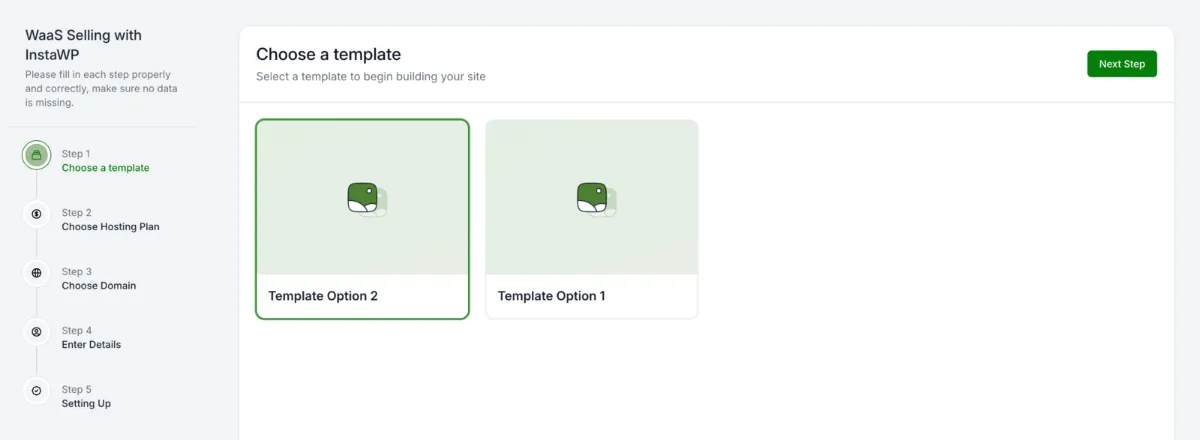
In practice, a WaaS agency does not start each site from a blank page. It builds a few finished template sites for one niche, then clones a template for every new client and adjusts the branding and content. On WordPress, that clone usually comes from a saved snapshots, and the client signs up through a checkout page, picks a plan and pays. Agencies can even use AI to build website-as-a-service workflows that deploy entire sites in minutes. For the WordPress-specific setup, see our explainer on WaaS in WordPress.
Watch how a WaaS offer runs end to end on InstaWP:
What does a WaaS subscription include?
A WaaS subscription covers everything the client would otherwise buy and manage separately. Listing it on your pricing page tells the client exactly what renews each month:
- Subscription pricing: monthly or yearly, sometimes with a one-time setup fee.
- A ready-made site: built from pre-designed templates and snapshots for fast deployment, then branded for the client.
- Hosting, SSL and backups: included in the fee, so the client never deals with a host.
- Maintenance and support: core, plugin and theme updates, security monitoring and a set number of edits a month.
- Room to scale: the same template serves the next client in that niche, so the agency can grow without starting new projects.
This model is gaining traction because it matches how small businesses want to buy: quickly, at a predictable monthly cost, without managing a website themselves. See the InstaWP WaaS creation guide for the full technical walkthrough.
What is traditional web development?
Traditional web development is a one-time, custom website project. The agency scopes the requirements, designs and builds the site, launches it, trains the client and hands it over for a project fee, often paid in milestones. Hosting and maintenance are either left to the client or sold separately as a retainer.
It is the more flexible model. The agency can choose any stack, build any integration and design every page from scratch, which is why larger companies and complex projects still buy this way. The trade-off is a longer timeline, a higher upfront price for the client, and revenue that stops when the project does.
What are the characteristics of traditional web development?
- One-time project fees, sometimes split into deposits and milestones.
- Custom design and development shaped by the client’s brief.
- Full control over the tech stack, plugins and integrations.
- Client ownership of the site once the final invoice is paid.
- Variable timelines, from a few weeks to several months, depending on scope.
What are the differences between website as a service and traditional web development?
The core difference is what the client buys. WaaS sells a working website as an ongoing subscription that includes hosting and upkeep, while traditional web development sells a finished custom site once. That one choice changes how the agency earns, how fast it delivers, who maintains the site and which clients it suits.
The six sections below break each difference down, with a table you can scan and a note on what it means for an agency deciding between the two.
1. Business model: productized vs project-based
WaaS is a productized service: the same offer, at a set price, sold again and again. Traditional development is project-based: every engagement is scoped, quoted and delivered on its own terms. The difference shows up most in how revenue behaves after the site launches.
For an agency, WaaS income grows with the client count, because each subscription keeps paying after the work is done. A project business has to win the same revenue again every year. Many agencies keep both, which is why the agency decision guide below treats them as two tiers rather than rivals.
2. Development approach: templated vs custom
WaaS trades design freedom for speed. The agency standardises on a theme, a plugin set and a few layouts per niche, so new sites launch fast and behave the same way in maintenance. Traditional builds start from the client’s brief, so the stack and design can be anything.
The template becomes the product, so the time you would spend on one custom build goes into a template you sell many times. On InstaWP, a template is a saved snapshot of a complete WordPress site, and each new client site is created from it automatically when the client pays. See the WordPress WaaS build guide for how agencies structure their first templates.
3. Maintenance and support: always-on vs optional
In WaaS, maintenance is the reason the subscription renews. Hosting, security, backups and updates are the agency’s job for as long as the client pays. In a traditional project, they are only the agency’s job if the client signs a separate maintenance contract.
This is why WaaS only scales when maintenance runs across all client sites at once. On InstaWP, the hosting plan behind each site supplies the backups, firewall and monitoring, and the managed WordPress sites dashboard runs bulk updates and scans across the whole fleet. If you sell traditional builds, a WordPress care plans offer is the closest equivalent to WaaS recurring revenue.
4. Client experience: turnkey vs collaborative
WaaS clients make a few choices (a template, a plan, their content) and get a working site quickly. Traditional clients are involved in every stage, from discovery to sign-off, which suits clients with strong opinions and complex needs but takes far more of their time.
Because WaaS clients make so few decisions, the buying journey can be self-serve. On InstaWP, the client picks a template and a plan on your branded checkout, pays, and gets a one-click Magic Login link to their new site, then manages it later from your white-label client portal. A prospect can also try a template on a self-expiring demo site before paying.
5. Ideal client profile: small business vs enterprise
WaaS works best for clients who want a professional site at a predictable monthly cost and have no technical staff. Traditional development fits clients who need custom functionality, integrations with their own systems, or a design process their stakeholders sign off on.
Expect clients to raise the 3-year row, and answer it before they do. A $99 subscription costs more than a $3,000 build from month 31 onward, but the build price excludes the hosting, updates, backups and support that the subscription includes. The cost-and-pricing detail is in our guide to website as a service pricing.
6. Revenue potential: long-term value vs big one-offs
Website-as-a-service builds monthly recurring revenue that compounds, while traditional projects pay more per client but only once. Using the same example prices as above:
A single year flatters traditional development. The picture changes once the WaaS clients from year one are still paying in year two, which is what the next section works out.
Which model earns more over three years?
Traditional development earns more in the first two to three years; WaaS earns more after that, and the gap keeps widening. With 10 new clients a year, a $99-a-month WaaS offer on InstaWP passes a $3,000-per-build business on yearly income in year 4, or in year 3 if each client also pays a $499 setup fee.
These figures use InstaWP’s real costs on 5 November 2026: the Pro hosting plan at $15 a month per client site and the native checkout fee of 5% (Stripe fees included). That leaves the agency $79.05 of every $99 payment, or $84 on WooCommerce or API sales, where InstaWP takes 0%. The model assumes 10 new clients at the start of each year and that every WaaS client stays.
The table leaves out labour, and that favours WaaS: a $3,000 build takes weeks of work, while a WaaS client site is cloned from a template you already built. The table also stops at the start of a year: by the end of year 3 the WaaS agency already has $2,371.50 a month coming in before it signs anyone new. Upsells such as SEO, content or a bigger hosting tier are also easier to sell to a client who already pays you monthly.
Churn works the other way. Every client who cancels removes their share of the recurring line, so retention, reporting and a few included edits a month matter as much as the price.
Which should you offer as an agency: WaaS or traditional development?
You do not have to pick one. Offer WaaS where clients need a standard site quickly and cheaply, and keep traditional development for projects that need custom features, integrations or a bespoke design. Most agencies that run both use WaaS as the entry tier and custom builds as the premium tier.
This table matches common client requests to the model that fits, and why:
When does WaaS make the most sense?
WaaS is the right choice when your agency targets a specific niche, wants recurring income, or needs to serve more clients without growing the team at the same rate.
If you focus on one industry (dentists, fitness coaches, real estate brokers), you can create 5 to 10 strong templates and launch many client sites from them. Onboarding gets faster, support questions repeat, and every new client adds to a base that pays monthly. Finding those clients is its own job, covered in our WaaS sales funnel guide, and how agencies run a WaaS business covers the operations side.
When is traditional development the better call?
Choose a custom build when the site is the product rather than a utility: complex integrations, custom post types and logic, enterprise security reviews, or a brand that cannot look like a template. Those clients pay for the bespoke work, and a WaaS template would cost you more in workarounds than it saves.
What are the downsides of WaaS for agencies and clients?
WaaS has real trade-offs on both sides. Agencies take on ongoing support and the risk of churn, and revenue builds slowly. Clients pay for as long as they keep the site, get less design freedom, and depend on the agency for changes and a clean exit.
Ownership is the objection that loses the most deals, so settle it in writing before the first sale. A common split is that the client owns their content and domain, the agency owns the template design until it is bought out, and either side can end the plan with a set notice period. On InstaWP the exit is technically simple: each WaaS client site is its own WordPress install, so it can be exported or moved to another host as a complete site, and InstaWP’s free migrations run in both directions.
For contract terms, month-to-month plus a setup fee is the easiest sale, while a 12-month minimum pays back your template work in year one. The full agreement checklist is in our guide on how to sell websites with hosting, and is the WaaS model right for your agency walks through who WaaS suits and who it does not.
How do you move from traditional projects to WaaS?
Start from the work you already do. Find the site types you build again and again, turn the best of them into templates, attach hosting and support tiers, and sell them as subscriptions alongside your custom projects. For most agencies the move is worth it as a second line of revenue rather than a full switch.
The hybrid model lets you serve every tier: high-end custom development for large clients, and WaaS for small businesses that would never pay for a custom build. These six steps take you from a project portfolio to a first WaaS offer:
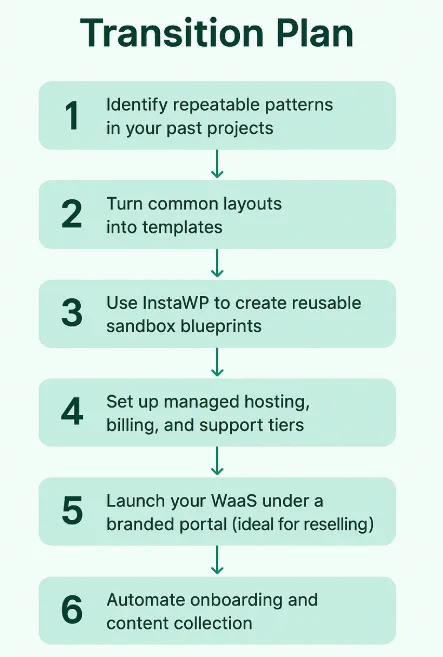
In InstaWP terms, step 3 means saving each template as a snapshot, step 4 means attaching an InstaWP hosting plan and your price to each WaaS plan, and step 5 means your branded checkout and client portal. If you are coming from a WordPress Multisite setup, read WordPress Multisite vs WaaS and our roundup of WP Ultimo alternatives first, because each WaaS client on InstaWP gets a separate install rather than a subsite.
Must Read: What is The Cost of Setting up a Website as a Service in WordPress
How does InstaWP WaaS compare with building your own WaaS stack?
A do-it-yourself WaaS stack usually means WordPress Multisite or a WaaS plugin, your own servers or a reseller account, and a separate checkout, billing and client portal that you build and maintain. InstaWP WaaS bundles all of that on top of managed WordPress hosting, so you only set prices and build templates.
The comparison is from the InstaWP WaaS feature page, checked on 5 November 2026. If you already run a cPanel or WHMCS reseller account, our guides on how to resell hosting and white-label WordPress hosting explain where hosting-only reselling fits next to WaaS.
How do you launch a WaaS business on InstaWP?
Build a template site, save it as a snapshot, create a WaaS with plans and prices, add your branding, connect payments, and share the checkout link. InstaWP is a managed WordPress hosting provider, so every client site you sell runs on its own InstaWP hosting plan, and the checkout, provisioning and client portal sit in the same dashboard.
InstaWP WaaS gives you three ways to take payment. All three use the same templates and the same provisioning; they differ in where the client pays and what InstaWP charges per sale:
On WooCommerce and the API, your own payment gateway still charges its usual fees, and our guide on how to sell hosting with WooCommerce covers the store route. The steps below use Native WaaS.
Step 1: Build your template site, with AI or by hand
In your InstaWP dashboard, click Add Site and build the site exactly as you want clients to receive it: theme, plugins, sample pages and placeholder content for one niche. Test every page before you save it, because each client starts from this copy.
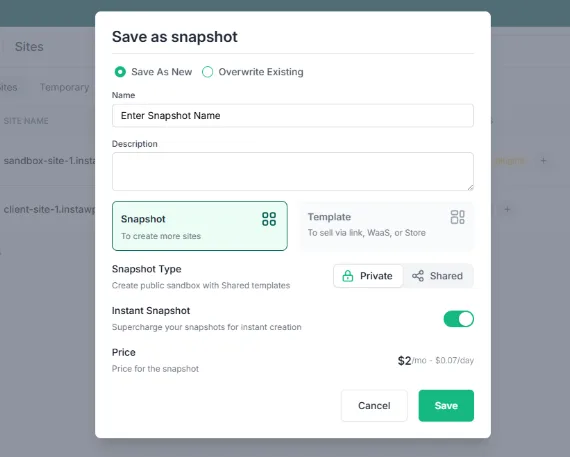
Step 2: Save it as a snapshot
Open the site actions menu, choose Save Template/Snapshot, and give it a descriptive name such as “Dental Template v1”. InstaWP clones this snapshot for every client who buys it, including its plugins, settings and content.
Step 3: Create your WaaS and choose the templates
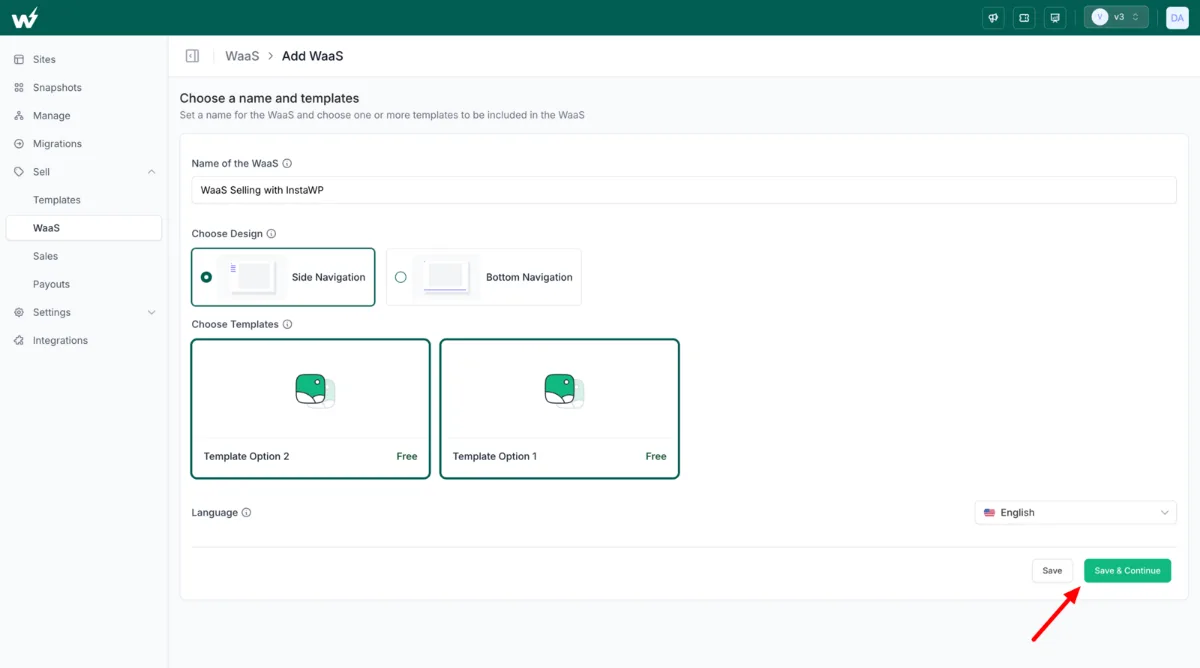
Go to Sell > WaaS and click Add WaaS. Name it, pick side or bottom navigation for the checkout, select the snapshots clients can choose from, and set the default language.
Step 4: Set your plans and prices
For each plan you sell, set the client-facing price (monthly or yearly), decide whether to charge or waive a template fee, and choose the InstaWP hosting plan underneath it. Your margin is the difference between the two. Use Sandbox or free plans only for testing, because Sandbox sites cannot map a custom domain.
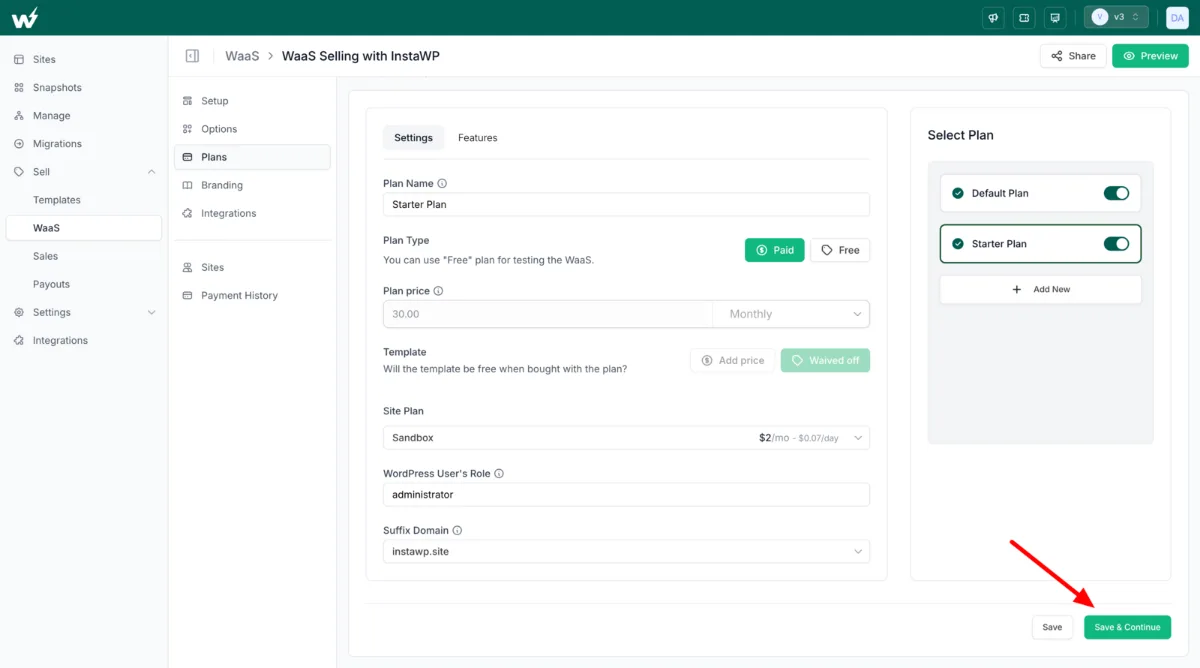
Step 5: Add your branding, domain and client portal
Under Branding, upload your logo, set your brand colours, add custom CSS and write the confirmation email new subscribers receive. Then add a white-label suffix domain (for example, sites.youragency.com, a $5-a-month add-on) so client sites carry your domain, and set up the client portal on your own domain. Our guide to custom domains for WaaS client sites covers mapping each client’s own domain.
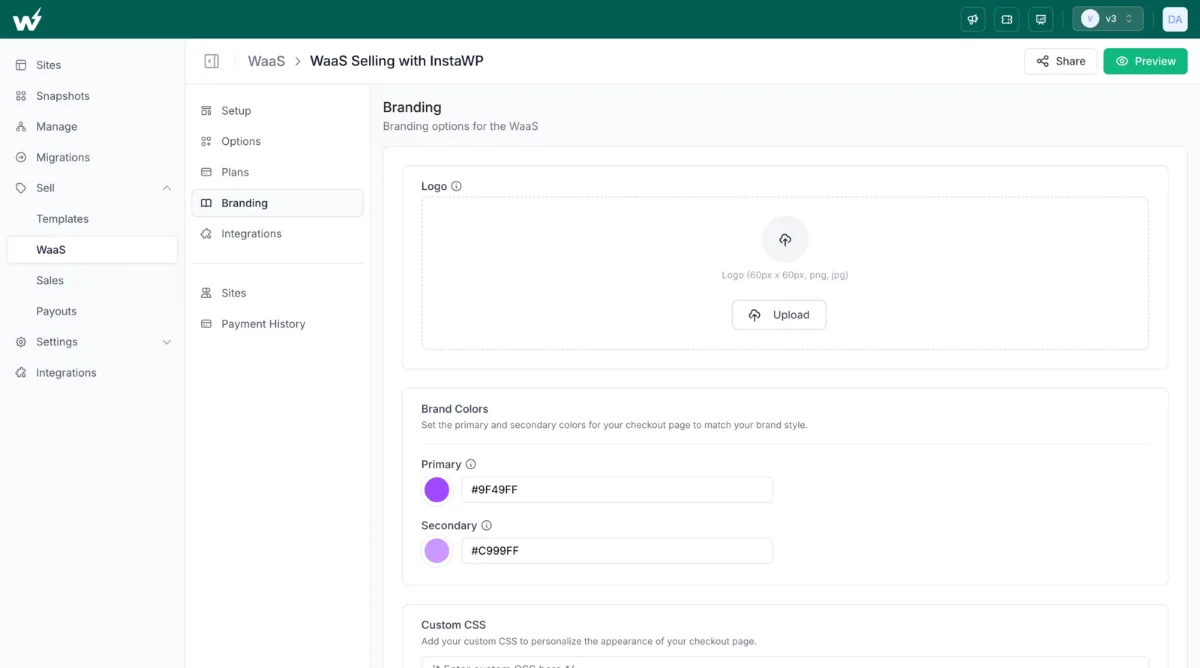
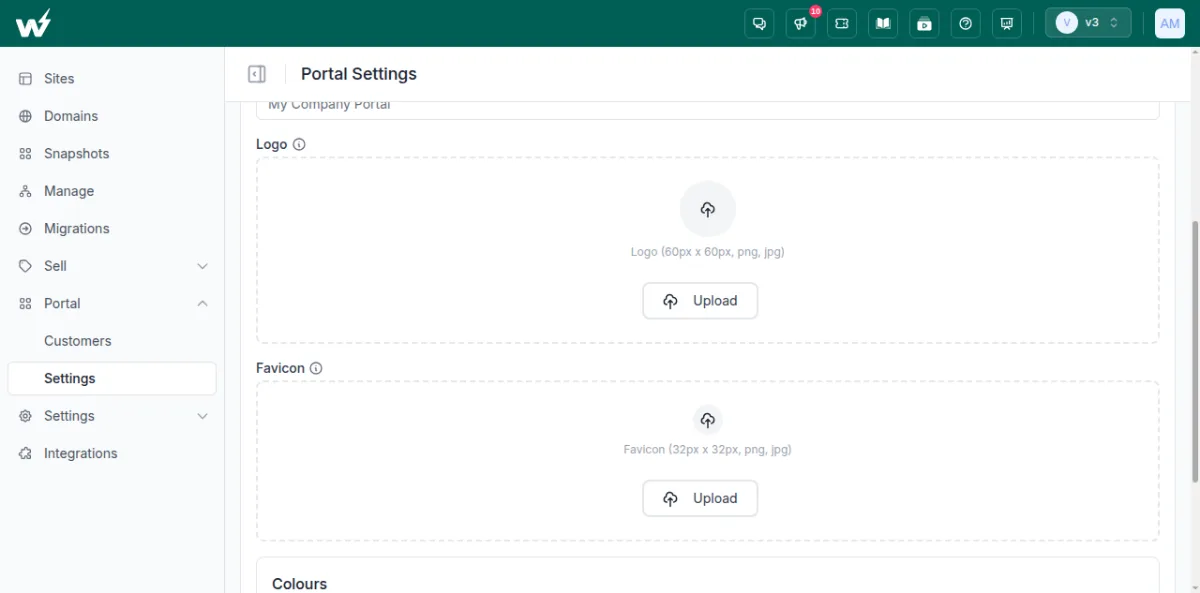
Step 6: Connect payments and share your checkout link
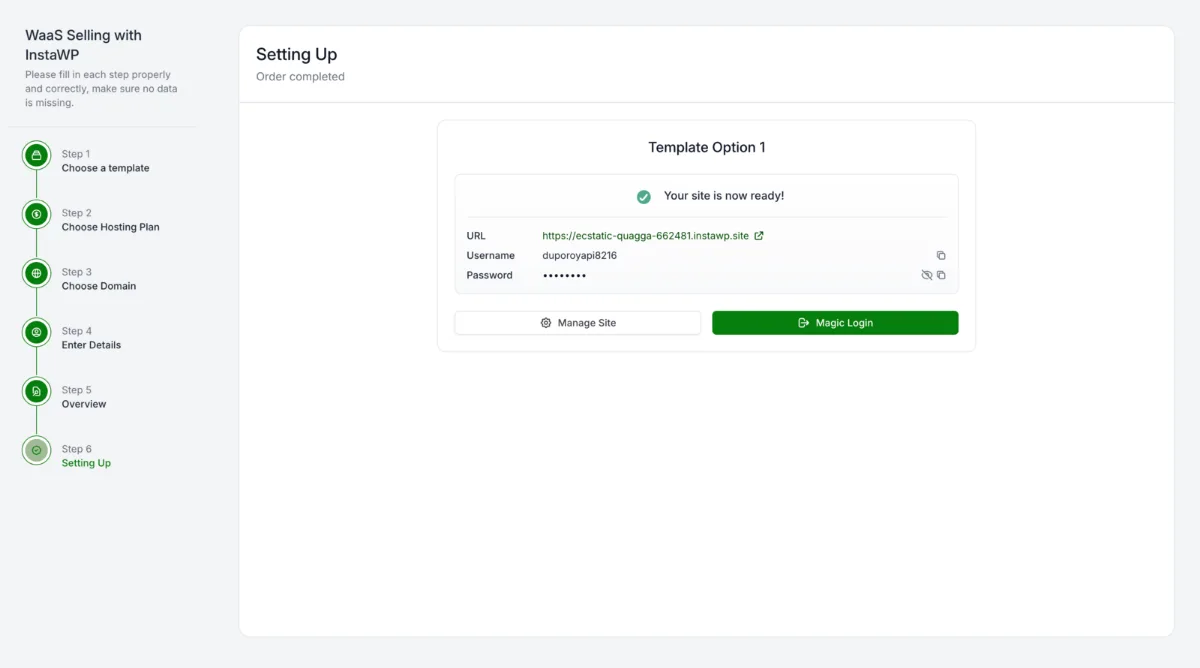
Go to Sell > Payouts and finish the Stripe setup (payout setup guide), then click Share to copy your checkout link. A client picks a template, chooses a plan and pays. The site is created from your snapshot within seconds, and the client receives a Magic Login link that opens their new WordPress dashboard with no password.
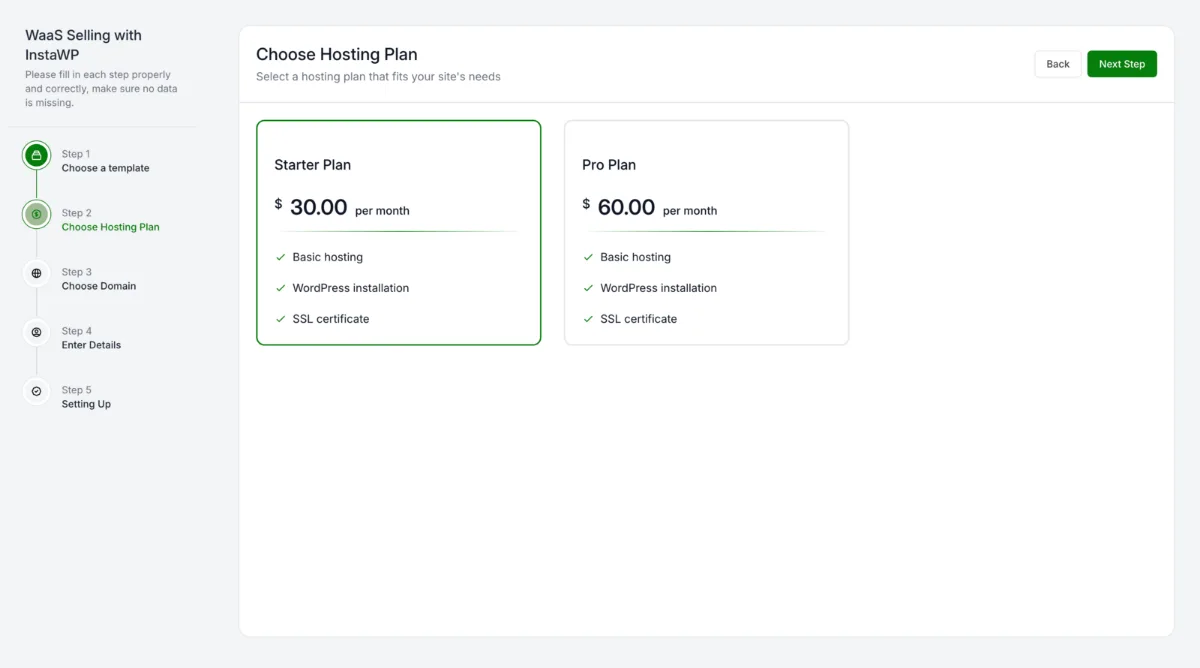
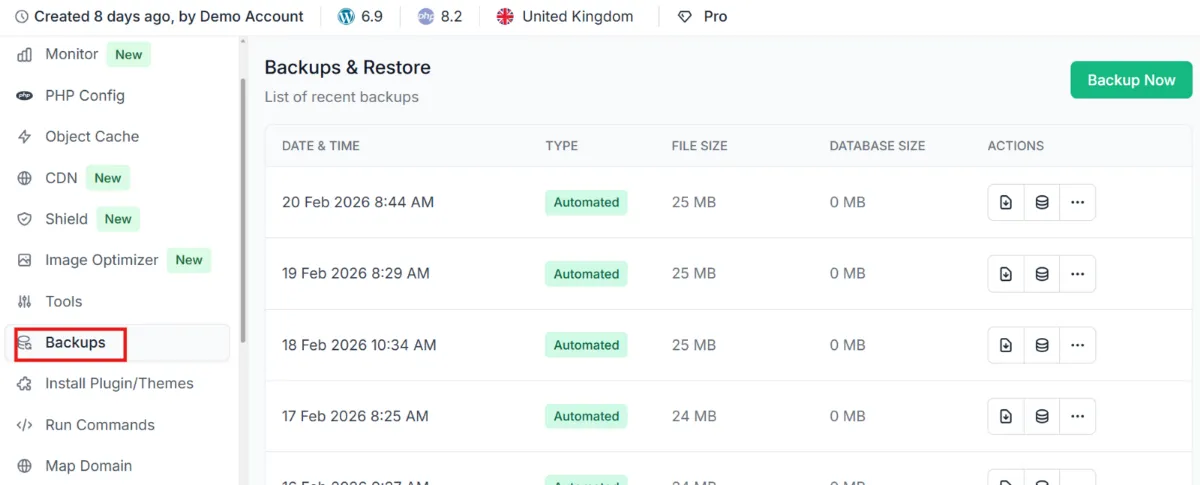
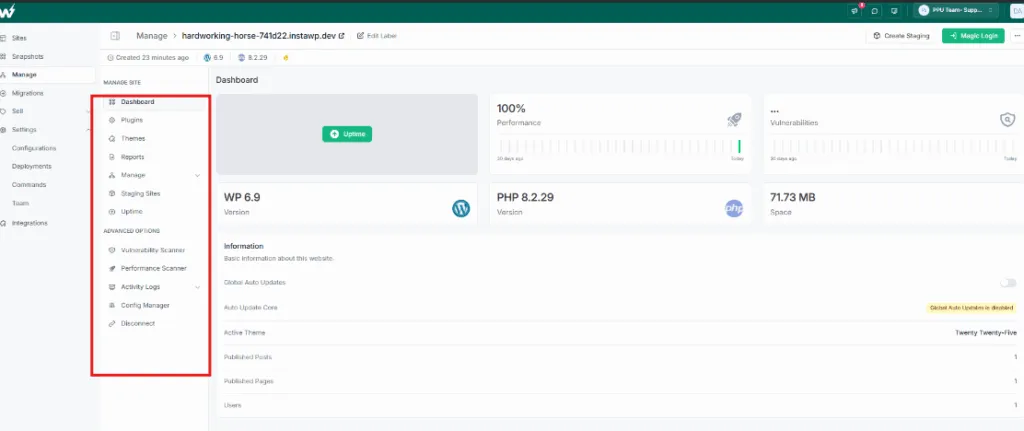
Beyond the WaaS setup itself, InstaWP gives you ongoing management tools across all client sites: bulk plugin and theme updates, uptime monitoring, the vulnerability scanner, InstaShield and InstaCDN, all from one managed WordPress sites dashboard.
Can you host WaaS client sites on InstaWP’s managed WordPress hosting?
Yes. Every site sold through InstaWP WaaS runs on InstaWP’s own managed WordPress hosting, and each client site is an isolated WordPress install with its own resources, billed to you per site by the day. The plan you attach to a WaaS plan decides which security, backup and performance features that client gets.
Pick the hosting plan by what the client’s site does, then price your WaaS plan above it:
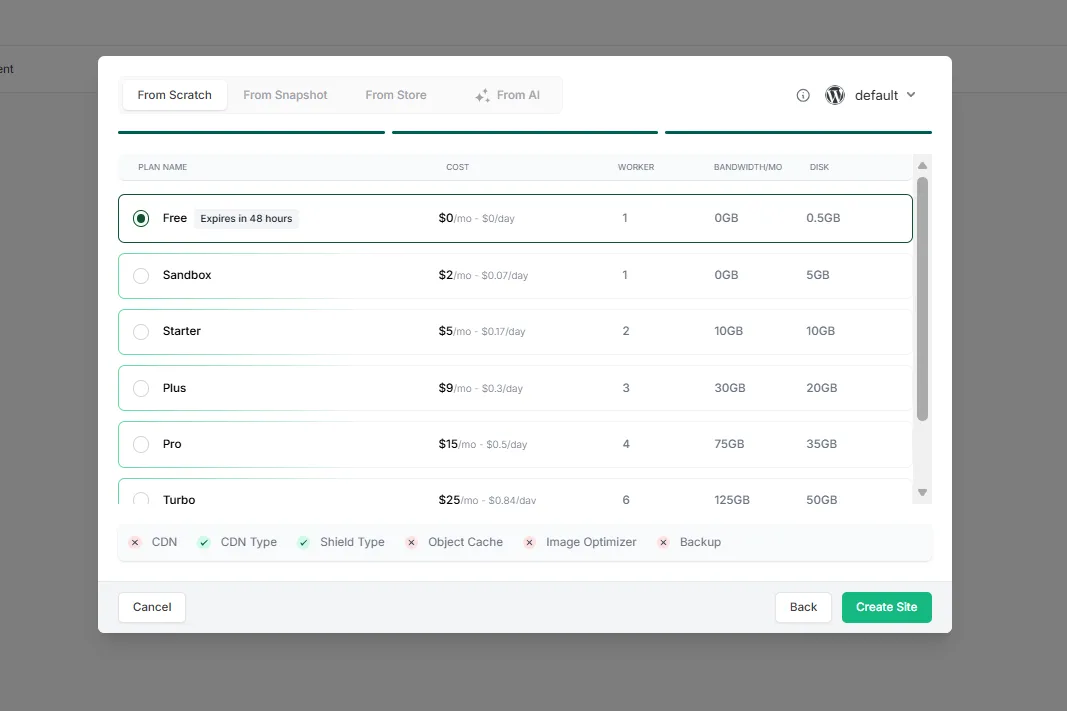
Every plan includes free SSL, SSH, WP-CLI, Git and SFTP, PHP 7.4 to 8.5, AI tools with an in-site MCP server, free migrations and human support. Higher plans add the protection clients are paying you for:
Source: the InstaWP pricing page, checked on 5 November 2026. For the details, see the WordPress backup tool, the WordPress uptime monitor and how InstaShield blocks attacks before they reach WordPress.
Speed is part of what clients pay for. In InstaWP’s August 2026 WordPress hosting benchmark, the new-generation servers scored 9.8 out of 10 on WP Benchmark, a free plugin InstaWP did not write, against 7.3 for the previous generation on the same site and settings. New accounts get $25 in credits, a 14-day money-back guarantee, and no annual contract.
WaaS or traditional web development: which should you choose?
Choose website as a service if you serve many similar small businesses and want income that renews every month; expect it to overtake project fees in year 3 or 4, not year 1. Choose traditional web development for clients who need custom features, integrations or a unique design, and are ready to pay for them upfront. Choose both if you want a self-serve entry tier and a premium custom tier.
- Want scalable, recurring income? Start a WaaS offer with snapshot-based templates and per-site hosting.
- Want high-ticket clients and creative freedom? Keep selling traditional custom builds.
- Want both? Split your service tiers and qualify each lead into the right one.
Either way, how clearly you package, price and deliver is what drives agency growth. On InstaWP you can build and clone WordPress sites with snapshots, resell WordPress hosting as fully hosted WaaS plans under your own brand, and manage every client site from one dashboard. For the full go-to-market playbook, read how to sell websites with hosting.
Website as a service vs traditional web development FAQs
What does Website as a Service include?
A WaaS subscription usually includes a website built from the agency’s template, managed WordPress hosting, SSL, backups, security monitoring, core and plugin updates, and a set amount of support or edits each month, all for one monthly or yearly fee.
What is the main difference between WaaS and traditional web development?
WaaS sells a working website as a subscription that includes hosting and upkeep, so the client pays every month. Traditional web development sells a custom site once for a project fee, and hosting and maintenance are separate.
Is WaaS profitable for agencies?
Yes, once the client base grows. At $99 a month on InstaWP’s $15 Pro hosting plan, an agency keeps $79.05 per client each month after the 5% checkout fee. With 10 new clients a year, that overtakes a $3,000-per-build business on yearly income in year 4, or year 3 with a $499 setup fee.
Can I use WordPress for a WaaS model?
Yes. WordPress is the most common base for WaaS. On InstaWP you save a finished WordPress site as a snapshot, attach it to WaaS plans with your prices, and each client who pays gets their own WordPress install created from it.
Who owns the website in a WaaS model?
Whoever the WaaS agreement says, because there is no default. A common split is that the client owns their content and domain and the agency owns the template design until it is bought out. On InstaWP each client site is a standalone WordPress install, so it can be exported or moved if the client leaves.
Can clients customize WaaS sites?
Usually within limits: content, branding, colours and a choice of layouts. Deep changes to the design, stack or functionality are what traditional custom development is for, so many agencies offer a premium tier or a custom build for those clients.
Do I need coding skills to offer WaaS?
No. On InstaWP you can build a template with a page builder or generate one with InstaWP Studio, save it as a snapshot, and set up plans, branding and the checkout from the dashboard. Coding helps only if you sell through the API.
What are the risks of WaaS?
Churn, a growing support load and slow early revenue for the agency; lock-in worries and a higher long-term cost for the client. Reduce them with standardized templates, fleet-wide updates and monitoring, a setup fee, monthly reports and clear exit terms.
Can I combine WaaS and traditional development?
Yes, and many agencies do. Use WaaS as the entry tier for small businesses and niche markets where speed and recurring revenue matter, and keep traditional custom builds for larger clients with complex requirements.
What is the best tool to get started with WaaS on WordPress?
Look for standalone sites per client, a branded checkout, a white-label portal and hosting in one place. InstaWP covers all four: snapshots as templates, Native, WooCommerce or API checkout, a client portal on your domain, and managed hosting from $5 a month per site.
How much should I charge for WaaS?
Price each plan above your cost per site plus your support time. On InstaWP the hosting cost is $5 to $45 a month per site, plus 5% on the native checkout. For example, a $49 plan on the $9 Plus plan leaves $37.55 a month, and a $99 plan on the $15 Pro plan leaves $79.05.
Can I host my WaaS client sites on InstaWP?
Yes. Every WaaS client site on InstaWP runs on InstaWP’s managed WordPress hosting as its own install, billed per site by the day. Live client sites need Starter ($5 a month) or higher, and Plus and above add daily backups, the Advanced firewall and uptime monitoring.
Is WaaS just for beginners?
No. WaaS suits any agency that wants predictable recurring income, from solo freelancers to larger teams serving hundreds of clients. The deciding factor is whether your clients need repeatable sites, not how experienced you are.


