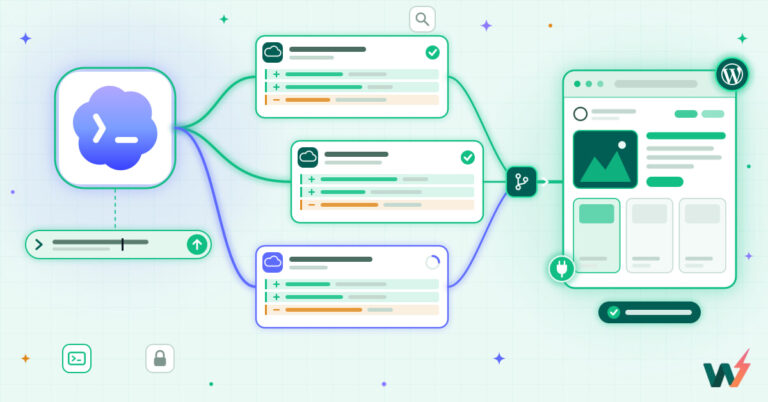
Claude Code works on a WordPress site in two ways: as an MCP client that reads and changes the site through a WordPress MCP server, and as a terminal agent that edits theme and plugin code over SSH, SFTP and WP-CLI. Connect it with one claude mcp add --transport http command, do the work on a staging copy, and let a person push the result to production.
InstaWP, managed WordPress hosting that is ready for AI agents, ran every step in this guide with Claude Code 2.1.282 between 9 and 26 October 2026. That covers connecting it to InstaMCP sandboxes, giving it a scoped token on a WooCommerce store’s staging copy, and having it write a plugin that was then tested on a throwaway WordPress 7.1 install. The numbers, screenshots and failures below come from those runs.
- One command connects them:
claude mcp add --transport http, followed by a name for your site, its MCP address and your token in an Authorization header. On an InstaWP site, the Add to Claude Code button types the command in for you. - Or skip the token with the Claude directory: InstaWP is listed in the Claude connector directory. Add it once on claude.ai, sign in with InstaWP, and Claude Code picks it up when you log in with the same Claude subscription.
- Pick the right MCP server: InstaWP’s Account MCP manages your sites from the outside (create, back up, PHP and WordPress versions). InstaMCP works inside one site, with 43 tools for posts, blocks, plugins and media.
- Use MCP for the site and the terminal for the code: theme and plugin files, tests and deploys go over SSH, WP-CLI and Git. Most real jobs use both.
- Check the site, not the summary: Claude Code wrote a working plugin in 22.8 seconds for $0.18, but its readme said “Tested up to: 6.8”. In another test it reported five plugin updates, and only one had actually happened.
- WooCommerce changes go through staging: a staging push replaces the live database, so orders placed since the last copy would be lost. Push code, and redo content and settings changes on the live store.
Table of Contents
| Question | Answer (tested October 2026) |
|---|---|
| What Claude Code is | Anthropic’s agentic coding tool. It runs in your terminal, reads your project, runs commands and edits files after you approve them. |
| How it reaches WordPress | Over MCP (the Model Context Protocol) for site content and settings, and over SSH, SFTP, WP-CLI or Git for code and files. |
| Connect command | claude mcp add --transport http <name> <url> --header "Authorization: Bearer <token>" |
| Tools it gets on an InstaWP site | 43 InstaMCP tools. Three power tools (execute_php, db_query, site_files) stay off until a site admin enables them. |
| What you need | A paid Claude plan (Pro, Max, Team or Enterprise) or a Claude Console account, and a WordPress site with an MCP server. InstaMCP needs an InstaWP Sandbox plan or above. |
| Plugin build, measured | One prompt, 4 tool calls, 22.8 seconds, $0.18. Worked on WordPress 7.1 and PHP 8.2. |
| Scoped access | Create a token for an Editor user with an expiry. In InstaWP’s test, plugin updates were then refused with “requires the ‘mcp:admin’ scope”. |
| WooCommerce deploys | Staging first. A push replaces the live database, so replay data changes on live instead of pushing them. |
| Rollback | InstaMCP keeps a backup of each plugin file it writes. Site backups and instawp versions cover the rest. |
| Do not | Commit a token in .mcp.json, or run Claude Code against a live store with Safe Mode off and every tool pre-approved. |
Read the table top to bottom as the order of work: connect (rows 2 to 5), build (row 6), then lock down and ship (rows 7 to 10). The rest of the guide follows that order, with a section for each.
What is Claude Code, and what can it do on a WordPress site?
Claude Code is Anthropic’s command-line coding agent: you describe a task, and it reads files, runs shell commands and calls MCP tools until the task is done, asking before each action you have not pre-approved. On a WordPress site it can write and edit content, change settings and SEO fields, install and update plugins, edit theme and plugin code, run WP-CLI and read error logs. It is not the Claude chat app: the app talks to WordPress only through a connector, while Claude Code also has your terminal.
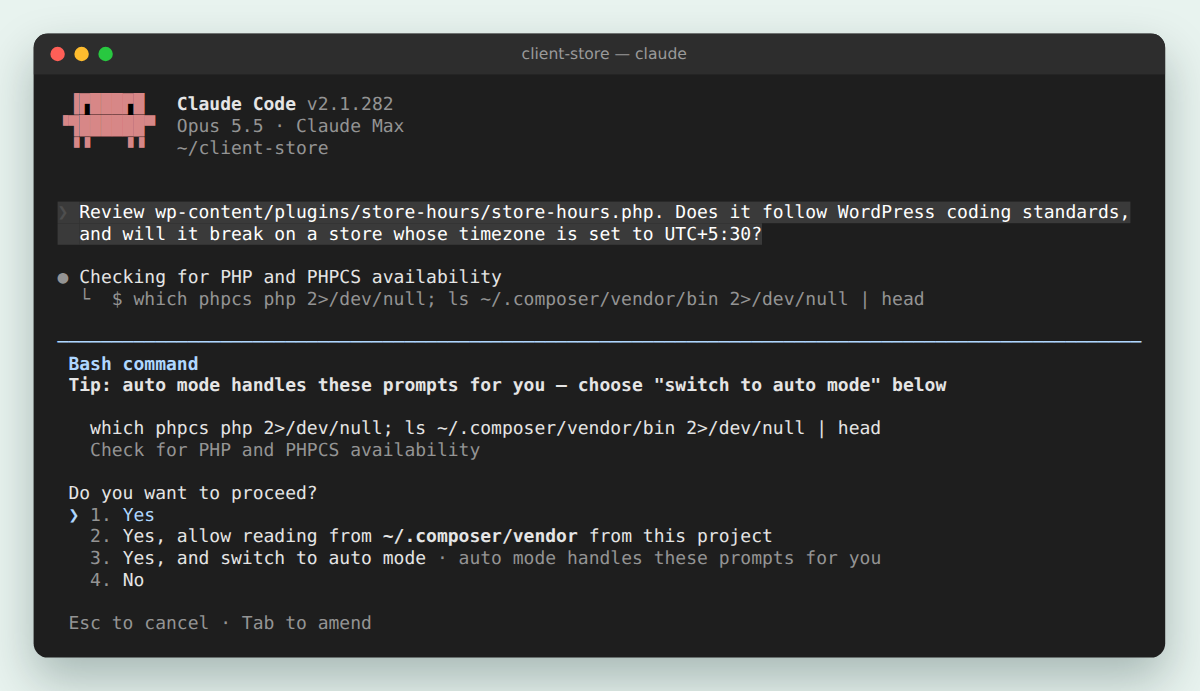
That difference decides what you can ask for. The Claude app connected through a Claude connector for WordPress can rewrite a page. Claude Code can rewrite the page, change the plugin that renders it, run the plugin’s tests, commit the change to Git and check the error log, all in one session.
| Job | Route Claude Code uses | Example prompt |
|---|---|---|
| Write and edit content | MCP: create_content, patch_content, validate_blocks | “Draft a Shipping and returns page from this policy text. Keep it as a draft.” |
| SEO and custom fields | MCP: get_meta, set_meta | “Fill in the Rank Math description on every product category page that has none.” |
| Plugins and themes | MCP: plugin_operations, theme_operations, or WP-CLI over SSH | “List plugins with updates. Update them one at a time and check the home page after each.” |
| Theme and plugin code | Local files and Git, SSH and SFTP, or MCP plugin_files and theme_files | “Add a size guide tab to single product pages in the child theme.” |
| Debugging | MCP site_logs, or instawp logs in the terminal | “Why is /checkout/ returning a 500? Read the PHP error log first.” |
| Sites themselves | The InstaCLI or InstaWP Account MCP | “Create a temporary sandbox on PHP 8.3 and install WooCommerce on it.” |
The middle column is the split that matters. MCP is how Claude Code works inside the running site; the shell is how it works on the code and the server. The same site usually needs both, so the next two sections set up each lane.
How do you connect Claude Code to WordPress with MCP?
The easiest way to connect Claude Code to WordPress is to host the site with a provider that has an MCP server built in. The server comes installed, secured and updated for you, so the whole setup is one switch in the hosting dashboard and one command in your terminal. On hosting without one, you install and configure an MCP plugin yourself, create an application password and often run a local proxy before Claude Code sees a single tool.
InstaWP, managed WordPress hosting with MCP built in, gives Claude Code two MCP servers. They do different jobs, and many teams connect both:
| InstaWP Account MCP | InstaMCP (site MCP) | |
|---|---|---|
| What it controls | Your InstaWP account: create and back up sites, change PHP and WordPress versions, read diagnostics. | Everything inside one WordPress site: 43 tools for posts, blocks, meta, plugins, themes, media and logs. |
| Where you switch it on | The MCP tab in your InstaWP account. | The site’s Extensions tab, then MCP. |
| How Claude Code signs in | OAuth with your InstaWP login. You choose read-only or read-write when you sign in. | A connection URL with a 64-character token. |
| Connections you need | One, for every site in your team. | One per site. |
| Best for | Agencies running many client sites. | Content, settings and plugin work on a single site. |
Read the table this way: the Account MCP works outside your sites, and InstaMCP works inside one. With five sites, a connection per site is manageable. With forty, one Account MCP connection is the practical choice, and it can switch on each site’s InstaMCP for you. The InstaWP Account MCP guide lists every capability and how to switch the sensitive ones off.
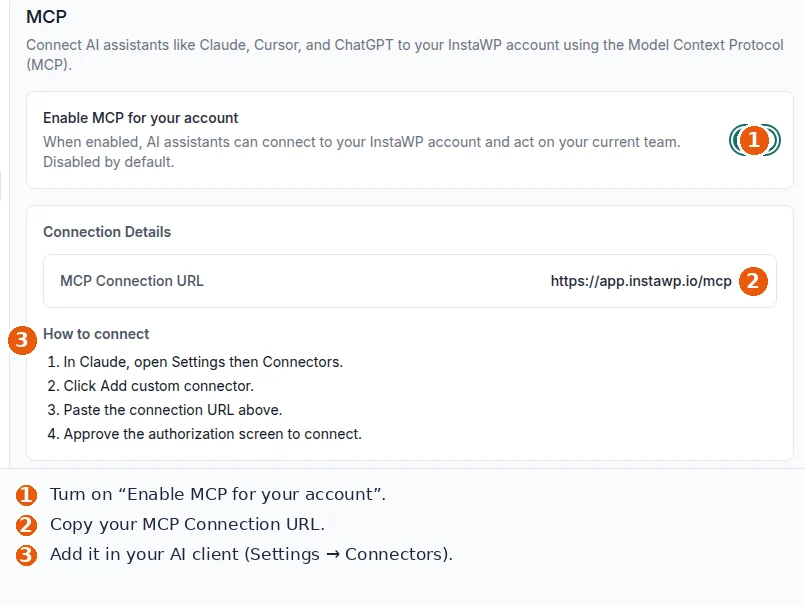
Add InstaWP from the Claude connector directory
InstaWP is listed in the Claude connector directory, the catalog of connectors inside Claude. Add it once at claude.ai/customize/connectors and sign in with your InstaWP account. Claude Code then loads it automatically whenever you are logged in to Claude Code with the same Claude subscription, as Anthropic’s Claude Code MCP documentation describes. Type /mcp in a session and InstaWP appears in the claude.ai part of the list. There is no command to run and no token in your terminal.
One limit applies. Claude Code fetches claude.ai connectors only when you sign in with a Claude subscription. If you run it with an ANTHROPIC_API_KEY, or through Amazon Bedrock or Google Cloud, add the server with the command in Step 3 below instead.
The InstaWP Academy video below shows the setup for both Claude Desktop and Claude Code.
To connect a single site with InstaMCP, turn on its MCP server, then register it in Claude Code with claude mcp add --transport http, the server URL and a bearer token. The five steps below use the exact commands from Claude Code 2.1.282.
Step 1: Install Claude Code
Install it with Anthropic’s native installer, which keeps itself updated, then check the version. Claude Code needs a paid Claude plan (Pro, Max, Team or Enterprise) or a Claude Console account; the free claude.ai plan does not include it, per Anthropic’s setup guide.
# macOS, Linux and WSL (Windows PowerShell: irm https://claude.ai/install.ps1 | iex)
$ curl -fsSL https://claude.ai/install.sh | bash
$ claude --version
2.1.282 (Claude Code)
Step 2: Turn on MCP for the WordPress site
In the InstaWP dashboard, open the site, then Extensions, then MCP, and switch on Enable MCP. That installs InstaMCP, the WordPress MCP server built into InstaWP sites, and shows the site’s connection URL with its 64-character token. The site MCP documentation covers every setting. InstaMCP runs on sites hosted on InstaWP; for a site hosted elsewhere, the official WordPress MCP Adapter plugin is the usual route, and InstaWP’s Claude and WordPress guide walks through it.
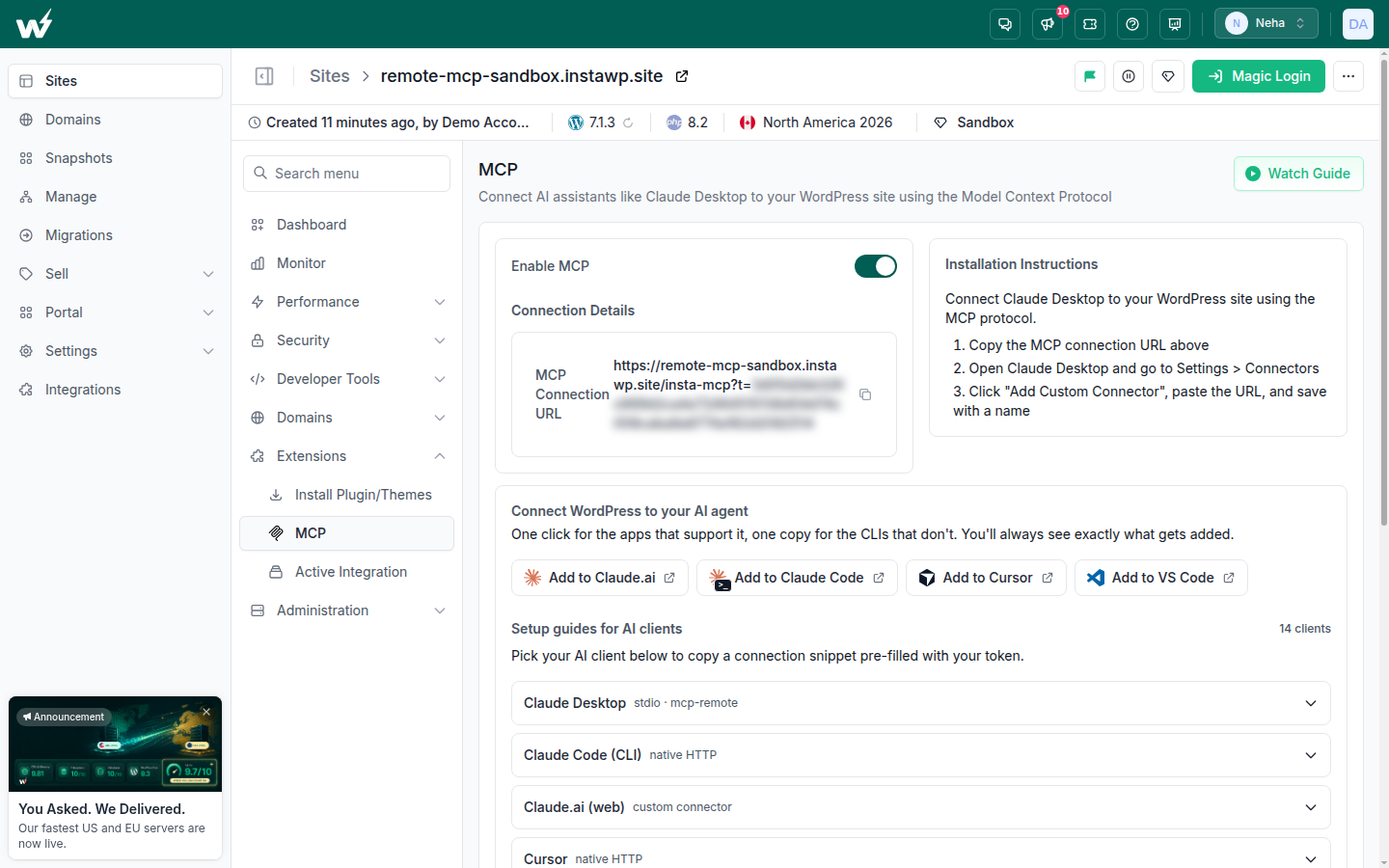
Step 3: Add the site to Claude Code
Either click Add to Claude Code on the MCP tab, or copy the command from the Claude Code (CLI) setup guide and run it yourself. The button opens Claude Code (version 2.1.91 or later) with the add command already typed in; nothing runs until you review it and press Enter. The setup guide gives the same command with the token in the URL as ?t=.
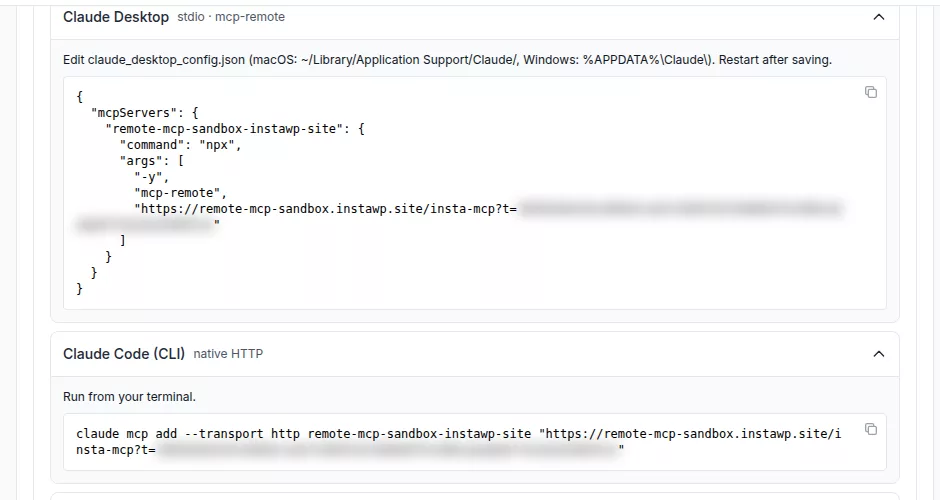
The cleaner form sends the token as a header and keeps it in an environment variable, so it does not sit in your shell history. This is the form InstaWP used:
# the token is the value after ?t= in the site's connection URL
$ export INSTAMCP_TOKEN="paste-your-token-here"
$ claude mcp add --transport http my-site \
    https://my-site.instawp.site/insta-mcp \
    --header "Authorization: Bearer $INSTAMCP_TOKEN"
Added HTTP MCP server my-site with URL: https://my-site.instawp.site/insta-mcp
Two details are worth knowing. The shell expands $INSTAMCP_TOKEN when you run the command, so the token ends up in ~/.claude.json, which is where Claude Code keeps servers added at its default local scope. And my-site is only a label: use one per site, such as client-store-staging, so the agent never confuses staging with production.
Step 4: Share the connection with your team without sharing the token
Add the server at project scope and Claude Code writes it to .mcp.json in the repository root, which you can commit. Write the token as ${INSTAMCP_TOKEN} in that file: Claude Code expands environment variables in url and headers at runtime, as its MCP documentation describes, so each developer supplies their own token and none lands in Git.
{
  "mcpServers": {
    "client-store-staging": {
      "type": "http",
      "url": "https://client-store-staging.instawp.site/insta-mcp",
      "headers": {
        "Authorization": "Bearer ${INSTAMCP_TOKEN}"
      }
    }
  }
}
Claude Code asks each developer to approve a server from .mcp.json before it uses it, and claude mcp list shows it as pending approval until they do. That is a useful check on a file anyone with commit access can change.
Step 5: Check that Claude Code sees the site
Run claude mcp list in the terminal, or type /mcp inside a Claude Code session, and look for Connected. InstaWP added the same sandbox twice on 12 October 2026, once as a native HTTP server and once through the mcp-remote bridge that Claude Desktop needs, and both connected. Claude Code speaks HTTP natively, so it does not need the bridge.
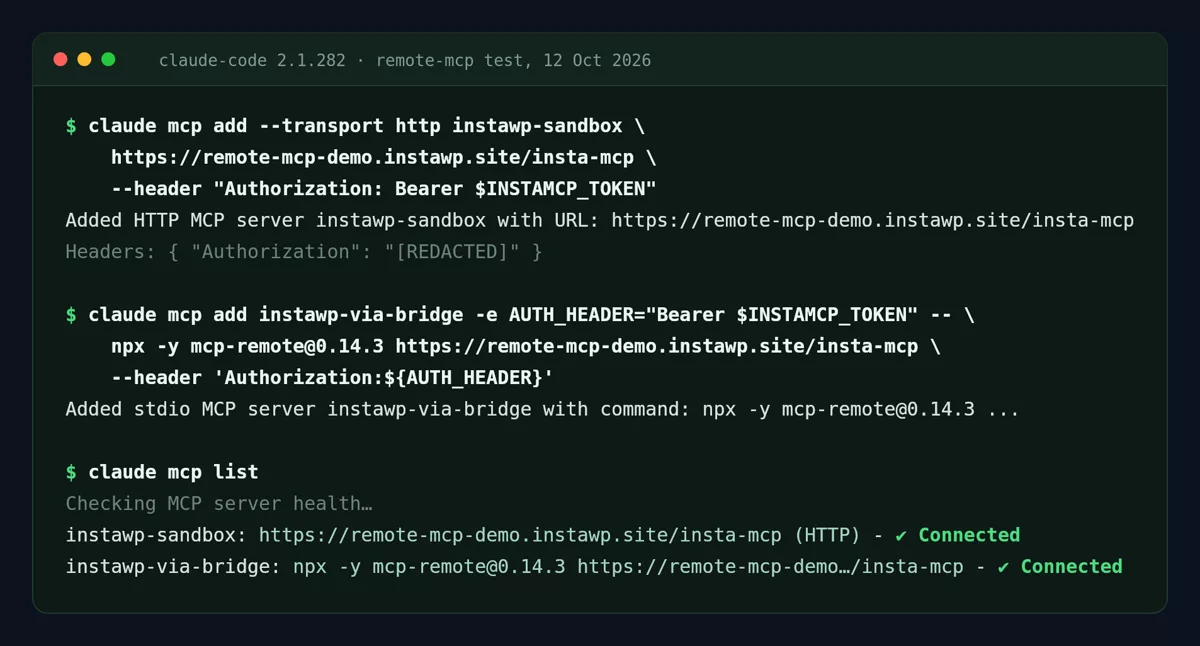
If the server does not show as connected, ask the endpoint directly. InstaWP broke the connection five ways in its tests, and each cause gives a different server response even when the client shows one generic error:
| Cause | What the server returns | Fix |
|---|---|---|
| MCP switched off on the site | HTTP 200 with an HTML page (the site’s home page) | Switch on Enable MCP on the site’s MCP tab. |
| Wrong token | HTTP 401, "message":"Invalid token" | Copy the token again from the MCP tab. |
| No token sent | HTTP 401, "message":"Authentication required" | Add the --header, or check the variable is exported. |
| Wrong path | HTTP 404 with an HTML page | The path is /insta-mcp unless someone changed the endpoint slug. |
| Environment variable not set | HTTP 401 | Export the variable in the shell that starts Claude Code. |
Read the middle column as the diagnosis: an HTML answer means the request never reached InstaMCP, and a JSON 401 means it did and only the token is wrong. This command sends the same first request Claude Code sends:
# expect: 200 application/json
$ curl -s -o /dev/null -w "%{http_code} %{content_type}\n" -X POST \
  -H "Content-Type: application/json" -H "Accept: application/json, text/event-stream" \
  -H "Authorization: Bearer $INSTAMCP_TOKEN" \
  -d '{"jsonrpc":"2.0","id":1,"method":"initialize","params":{"protocolVersion":"2025-06-18","capabilities":{},"clientInfo":{"name":"test","version":"1"}}}' \
  https://my-site.instawp.site/insta-mcp
claude mcp add --transport http instawp https://app.instawp.io/mcp, then run /mcp in a session to sign in with OAuth and choose read-only or read and write. InstaWP Account MCP works at the hosting level (sites, backups, plugins across sites); Account MCP vs Site MCP explains when each fits.How do you edit WordPress theme and plugin code with Claude Code?
Give Claude Code the code in a form it can test: a local Git repository that deploys to the site, an SSH session on the site, or, for a one-file fix, InstaMCP’s file tools. Claude Code is at its best with real files and a shell, because it can run php -l, WP-CLI and your tests after every change instead of guessing. Each option below works on an InstaWP site, and most agencies end up using the first one with the second for checks.
| Option | How it works | Best for | Watch out for |
|---|---|---|---|
| A. Local repo + Git deployment | Claude Code edits and commits locally; the site pulls the branch through Git deployment. | Custom themes and plugins you own and review | Deploys only what is in the repo, not database changes |
| B. SSH, SFTP and WP-CLI on the site | Claude Code runs commands on the server with instawp wp, instawp ssh and instawp sync. | Debugging, WP-CLI jobs, quick fixes on staging | Every command is a live change, so approve each one |
| C. InstaMCP file tools | plugin_files and theme_files read and write single files over MCP. | A small fix when no repo exists | Safe Mode blocks writes; PHP changes can lag about 40 seconds |
Start with the last column. It is what decides between the options on a real project, more than any feature list.
Option A: Work in a local Git repository and deploy it
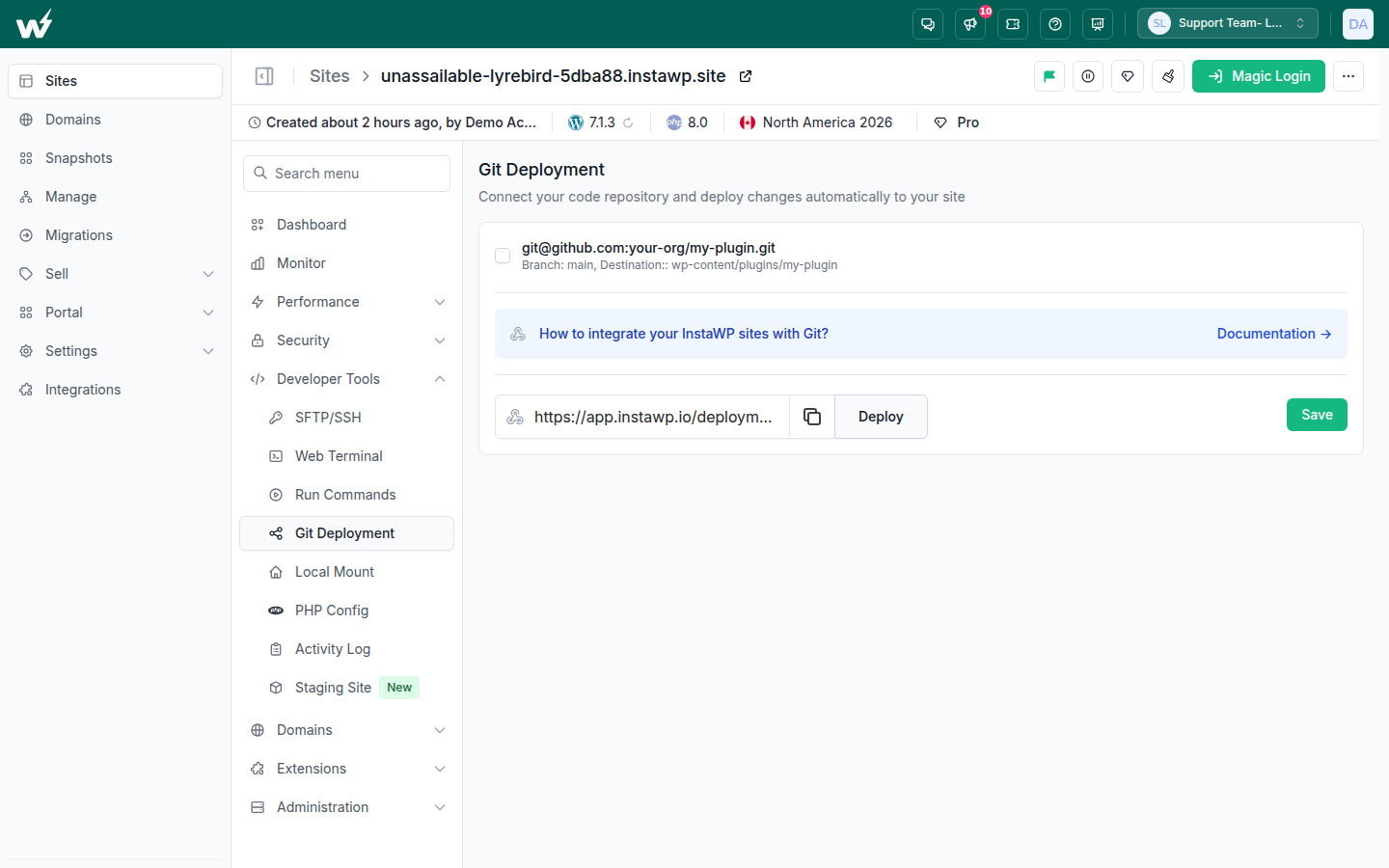
Keep the theme or plugin in Git, run Claude Code in that folder, and let the site pull the branch. On InstaWP that is Developer Tools, Git Deployment: connect the repository, set the branch and the destination folder, and use the deploy URL as a webhook or the Deploy button. Claude Code never needs write access to the server, and every change it makes is a commit a person can review. InstaWP covers the setup in how to deploy WordPress from GitHub.
Put the rules for the site in a CLAUDE.md file at the repository root. Claude Code reads it at the start of every session, as its memory documentation explains, so you only write “never touch production” once. A short one for a client plugin:
# Client store plugin

- Work only on the staging site (MCP server: client-store-staging).
  Never call the production server or push to production.
- Run php -l on every PHP file you change, then
  instawp logs client-store-staging --php -n 50 after each deploy.
- Prefix functions with cs_ and escape all output (esc_html, esc_attr).
- Ask before running anything that deletes data.
For reusable playbooks that go beyond one project, Claude Code also supports skills. InstaWP tested fifteen skill collections for agency work in Claude Code skills for web development.
Option B: Let Claude Code run WP-CLI and SSH on the site
Switch on SSH for the site, install InstaCLI, and Claude Code can run WP-CLI and shell commands on the server from your terminal. In the InstaWP dashboard it is Developer Tools, SFTP/SSH, and one Enable SSH/SFTP toggle turns on both, as the SFTP and SSH documentation explains. The same menu has a browser-based Web Terminal for checking by hand.
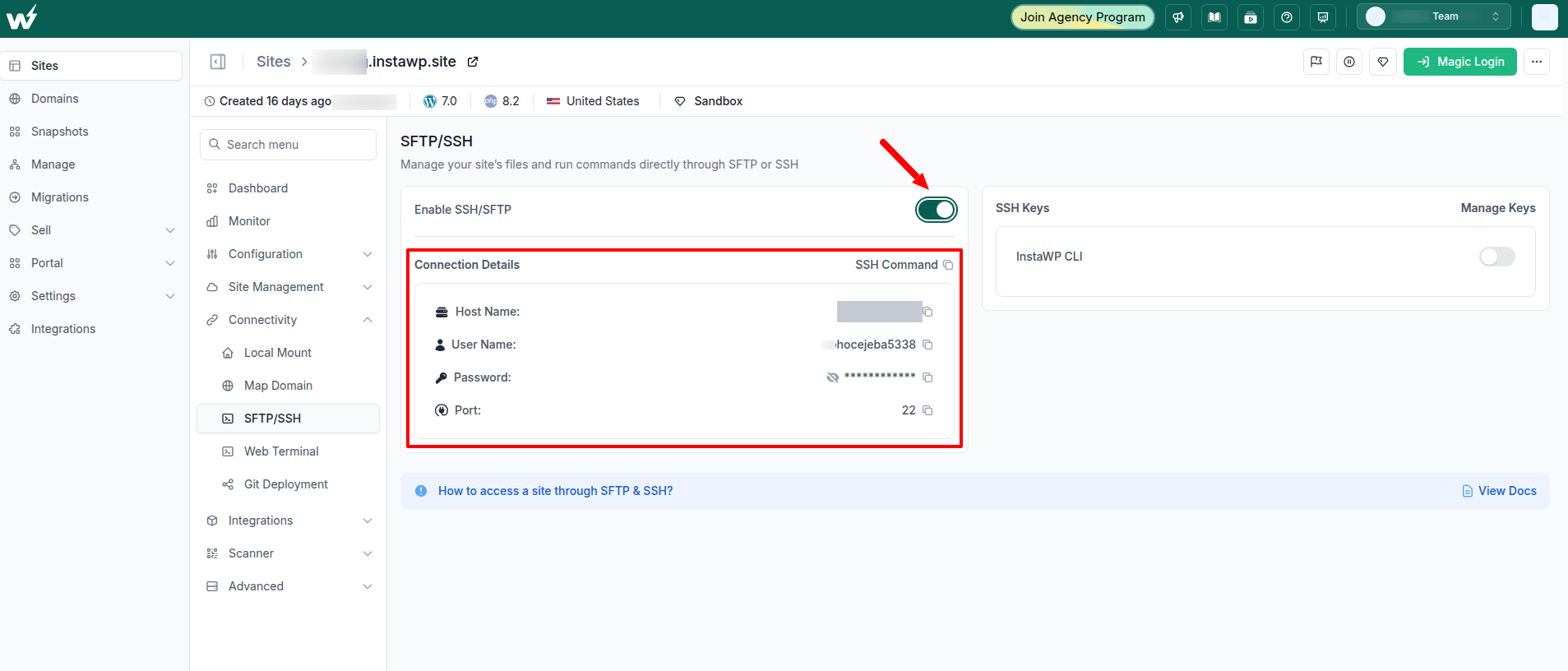
InstaCLI authenticates from an INSTAWP_TOKEN environment variable and every command takes --json, which is why it suits an agent: no browser login, and output Claude Code can parse. These are the commands it uses most, checked against InstaCLI 0.0.1-beta.33:
$ npm install -g @instawp/cli@beta
$ export INSTAWP_TOKEN="your-instawp-api-token"

# WP-CLI on the remote site (use -- to pass raw WP-CLI arguments)
$ instawp wp client-store-staging plugin list --update=available
$ instawp wp client-store-staging -- post list --post_type=page --format=json

# copy wp-content down, edit locally, preview the upload, then push it back
$ instawp sync pull client-store-staging
$ instawp sync push client-store-staging --dry-run

# read the PHP error log after a change
$ instawp logs client-store-staging --php -n 100
Control what Claude Code may run without asking in .claude/settings.json. Allow the read-only and staging commands, and deny the ones that should always need a person, using the permission rules in Claude Code’s settings reference:
{
  "permissions": {
    "allow": [
      "Bash(instawp wp client-store-staging:*)",
      "Bash(instawp logs:*)",
      "Bash(php -l:*)"
    ],
    "deny": [
      "Bash(instawp sites delete:*)",
      "Bash(instawp db push:*)",
      "Bash(instawp versions restore:*)"
    ]
  }
}
The InstaCLI command reference lists every command, and InstaCLI for CI/CD and AI agents shows the loop an agent runs: create a temporary site, install plugins, read logs, delete it. The InstaWP Academy video on WP-CLI and SSH commands in your browser covers the dashboard side.
Option C: Edit a single file over MCP
For a small fix on a site with no repository, Claude Code can read and write plugin and theme files through InstaMCP’s plugin_files and theme_files tools. InstaMCP syntax-checks PHP before it saves, so a broken edit is rejected, and each write saves a backup under wp-content/insta-mcp-backups/. Two things surprised InstaWP in testing: Safe Mode refuses the write (“Write plugin file is not allowed”) until a site admin unticks it, and the live page kept serving the old code for about 40 seconds because of PHP’s OPcache. Tell Claude Code to wait and re-check before it “fixes” a change that already worked.
Should Claude Code work on a local site or a hosted sandbox?
Use a local site for fast code loops and a hosted sandbox for anything that has to behave like production. A local install (Docker, LocalWP or similar) is quick and free, but a cloud MCP client cannot reach it and it does not run your host’s PHP, caching or server rules. A hosted InstaWP sandbox has a public URL, its own MCP endpoint, SSH and the same stack the production site runs on.
| Local install | Hosted InstaWP sandbox | |
|---|---|---|
| Claude Code can edit files | Yes, directly on disk | Yes, over Git deployment, SSH, Local Mount or MCP |
| MCP from cloud clients (claude.ai, ChatGPT) | No, they cannot reach localhost | Yes, over HTTPS |
| Same PHP, cache and server as production | Only if you rebuild it | Yes, the sandbox can be moved to a paid plan or copied as staging |
| Share a link with a client | Needs a tunnel | Yes, a public URL |
| Cost | Free | Free to start; Sandbox plans for MCP |
The third row is the one that bites. A plugin that works on a laptop and fails on the host is the most common reason an AI-built change breaks in production, and a hosted sandbox removes that gap. InstaWP’s Local Mount feature gives a hosted site a local folder, which is a middle ground for editors that expect files on disk.
How do you create a WordPress plugin with Claude Code?
Describe the plugin’s behaviour, constraints and checks in one prompt, let Claude Code write the files and lint them, then install the plugin on a test site and check the result yourself. InstaWP did exactly that on 26 October 2026 with a small, real plugin: a “Last updated on” line above blog posts that were edited at least a day after publishing. The whole build took one prompt.
Create a WordPress plugin in the folder ./last-updated-notice.

What it does: on single blog posts, show a short "Last updated on <date>" line above
the post content, but only when the post was modified at least 24 hours after it
was first published.

Requirements:
- Use the site's own date format setting.
- Escape all output. No settings page, no JavaScript, no external requests.
- Add a filter named last_updated_notice_label so a theme can change the text.
- Prefix every function, follow WordPress coding standards, and include a readme.txt.
- Keep it to one main PHP file plus the readme.

When the files are written, run php -l on every PHP file and fix any error it reports.
Finish with a one-paragraph summary of what you built.
| Measure | Result (26 October 2026) |
|---|---|
| Claude Code version and model | 2.1.282, Claude Opus 5.5, run headless with claude -p |
| Tool calls | 4: create the folder, write the PHP file, write the readme, run php -l |
| Time and cost | 22.8 seconds, $0.18 (as reported by Claude Code) |
| Files | last-updated-notice.php (59 lines) and readme.txt |
php -l | No syntax errors |
| Live test on WordPress 7.1, PHP 8.2 | Post edited six days after publishing: notice shown. Post published the same day: no notice. Home page: no notice. |
Only the last row proves anything. A clean lint and a confident summary say the code parses; the live test says it does what the prompt asked. This is the core of the file Claude Code wrote:
// written by Claude Code 2.1.282; plugin header and docblocks omitted here
function last_updated_notice_filter_content( $content ) {
	if ( ! is_singular( 'post' ) || ! in_the_loop() || ! is_main_query() ) {
		return $content;
	}

	$post = get_post();
	if ( ! $post || get_queried_object_id() !== $post->ID ) {
		return $content;
	}

	$published = (int) get_post_time( 'U', true, $post );
	$modified  = (int) get_post_modified_time( 'U', true, $post );

	if ( ! $published || ! $modified || ( $modified - $published ) < DAY_IN_SECONDS ) {
		return $content;
	}

	$label = apply_filters( 'last_updated_notice_label', __( 'Last updated on', 'last-updated-notice' ), $post );

	$notice = sprintf(
		'<p class="last-updated-notice">%1$s <time datetime="%2$s">%3$s</time></p>',
		esc_html( $label ),
		esc_attr( get_the_modified_date( DATE_W3C, $post ) ),
		esc_html( get_the_modified_date( get_option( 'date_format' ), $post ) )
	);

	return $notice . $content;
}
add_filter( 'the_content', 'last_updated_notice_filter_content' );
The code is sound: it compares GMT timestamps so time zones cannot skew the 24-hour check, escapes every value it prints, and checks the main query so the notice does not leak into widgets or excerpts. Two things still needed a person:
- The readme said “Tested up to: 6.8”. WordPress was on 7.1 at the time, and the readme header is what WordPress.org and site owners read. Models default to the versions they saw in training, so check every version number an agent writes.
- It never ran the coding standards check. Its own summary said so: “I haven’t run it in a real WordPress site or checked it with the WordPress coding-standards linter (PHPCS).” Run WordPress Coding Standards before you ship, or add it to the prompt.
To put the plugin on a site, InstaCLI uploads a local folder or zip in one command, or Claude Code can install a zip through InstaMCP’s plugin_operations tool. Install it on staging first:
$ instawp plugin install client-store-staging ./last-updated-notice --activate
$ instawp logs client-store-staging --php -n 50
For a longer walkthrough that covers planning a plugin with AI, packaging it and testing it on a sandbox, see how to build a WordPress plugin using AI. The WordPress Plugin Handbook is the reference for reviewing what the agent wrote: nonces, capability checks, sanitised input and escaped output.
How do you deploy WooCommerce changes with Claude Code?
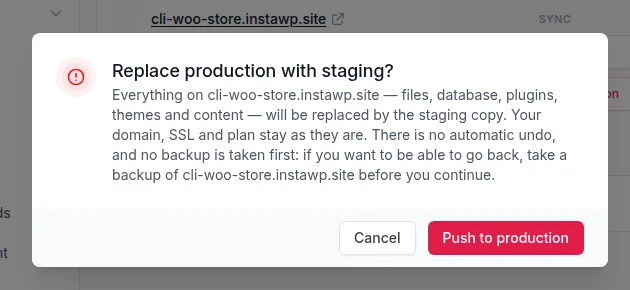
Have Claude Code make and test the change on a staging copy of the store, back up production, then ship code and data differently: push code (a plugin, a theme, a template), and replay content, product and settings changes on the live store. Do not push a whole staging database over a live store that is taking orders. On InstaWP, a push replaces the production files and database, so any order placed on live since the staging copy was made would disappear.
That one rule shapes the whole workflow, because WooCommerce is the one kind of WordPress site where the live database keeps changing while you work: orders, customers, stock and coupons all move on their own. The diagram shows the safe route.
Step 1: Refresh the staging copy and point Claude Code at it
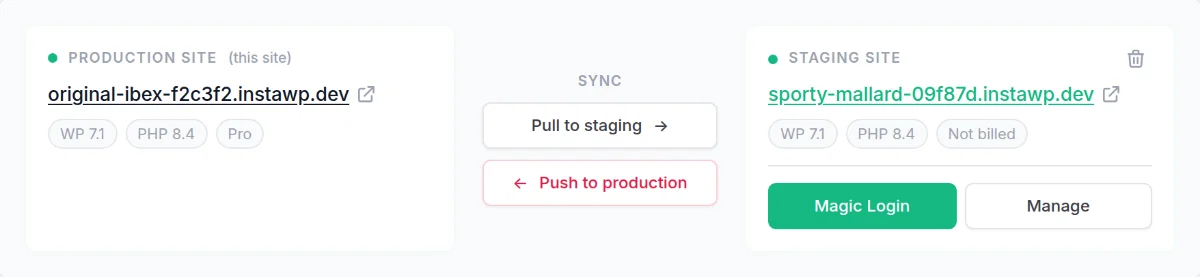
Pull the live store to staging so Claude Code works on current products and settings, then give it the staging site’s own MCP server, not the live one. On InstaWP that is Developer Tools, Staging Site on the production site, then Pull to staging; the staging site keeps its own URL, MCP tab and SSH details. Staging is available on InstaWP managed hosting plans from Pro, and the pull and push documentation explains both directions.
Step 2: Make the change and check it the way a shopper would
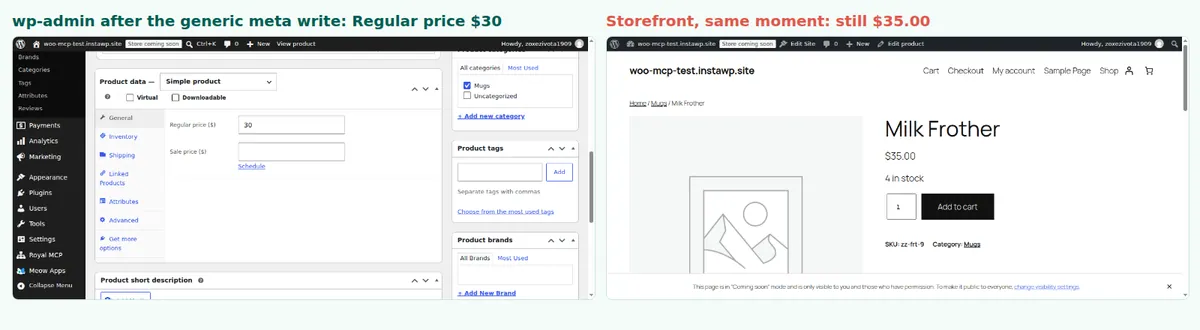
Ask Claude Code for the change, then ask it to prove the result from the storefront, not from wp-admin and not from its own tool replies. InstaWP’s hands-on test of five WooCommerce MCP servers on 9 October 2026 shows why. A generic post-meta write changed a product’s regular price from $35 to $30, the tool replied that the meta was updated, and wp-admin showed $30. A real add-to-cart through the WooCommerce Store API still charged $35, because WooCommerce’s own price field and lookup table were never updated.
Two more WooCommerce traps from the same test belong in your prompt. With High-Performance Order Storage (HPOS) on, which has been the default for new stores since WooCommerce 8.2, generic post tools found 0 of the store’s 8 orders, while WooCommerce’s own order tools found all 8. And changing an order’s status runs WooCommerce’s normal status transition, so its customer emails fire as they would on live; check where a staging copy sends mail before you test order changes. WooCommerce’s HPOS documentation explains the storage change, and the Store API documentation covers the cart endpoints.
Use the client-store-staging MCP server only.
Put every product in the Summer category on a 20% sale until 31 October.
Write prices through WooCommerce (product objects), not raw post meta.
Then add one sale product to a cart through the Store API and tell me the price it charges,
and list any product where the cart price differs from the sale price.
Step 3: Back up production before anything ships
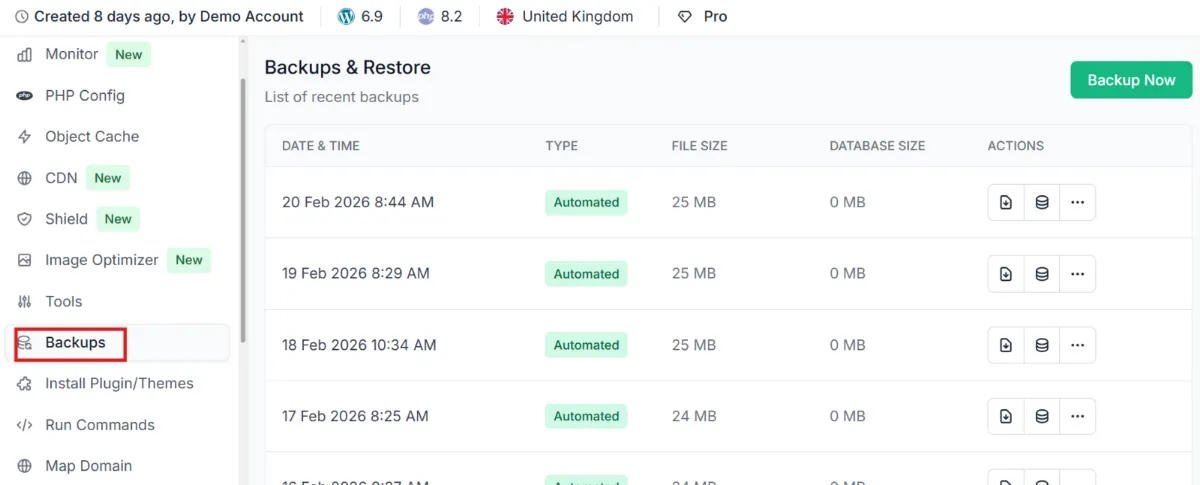
Take a backup of the live store or create a version first, because a push has no automatic undo and InstaWP does not back up production for you before it. On InstaWP, use the site’s Backups page or Versions; InstaCLI does the same from the terminal, and Claude Code can run it as the first step of the deploy.
$ instawp versions create client-store --name "before summer sale"
$ instawp versions list client-store
# rollback if needed: OVERWRITES current files and database
$ instawp versions restore client-store <version-id>
Step 4: Ship code by deploy, and replay data on the live store
Ship code the same way you would without an agent: through Git deployment or a targeted file sync of the one plugin or theme folder. Ship content and data by running the same prompt against the live store’s MCP server, so new orders, customers and stock levels are left alone. The guide to syncing staging to live without overwriting WooCommerce orders covers the merge-based alternative for sites hosted elsewhere.
# preview, then deploy only the plugin folder to production
$ instawp sync push client-store --path ./wp-content/plugins/cs-size-guide/ \
    --remote-path wp-content/plugins/cs-size-guide/ --dry-run
$ instawp sync push client-store --path ./wp-content/plugins/cs-size-guide/ \
    --remote-path wp-content/plugins/cs-size-guide/
$ instawp logs client-store --php -n 50
A full Push to production is the right tool when the store is frozen, for example a rebuild launched in a maintenance window. The confirmation dialog states the trade-off plainly:
Step 5: Check the live store
Repeat the shopper check from step 2 on the live store, read the PHP error log, and only then close the task. InstaCLI’s instawp logs client-store --php and InstaMCP’s site_logs read the same logs, so Claude Code can do both checks in one prompt.
How do you keep Claude Code safe on a live WordPress site?
Give it the least access the job needs, on a copy of the site, and verify its work against the site rather than its summary. In practice that means a token for a lower-privileged WordPress user with an expiry, Safe Mode on, the three power tools off, and Claude Code’s own approvals for anything that writes. InstaWP tested each of these with Claude Code on 12 October 2026 on the staging copy of a WooCommerce store.
Use a scoped, expiring token
An InstaMCP token inherits the role of the WordPress user it belongs to, so a token for an Editor user cannot install or update plugins whatever the agent tries. Create one under Settings, InstaMCP, API Tokens in wp-admin, pick the user, add a label and an expiry in days, and copy the token, which is shown once.
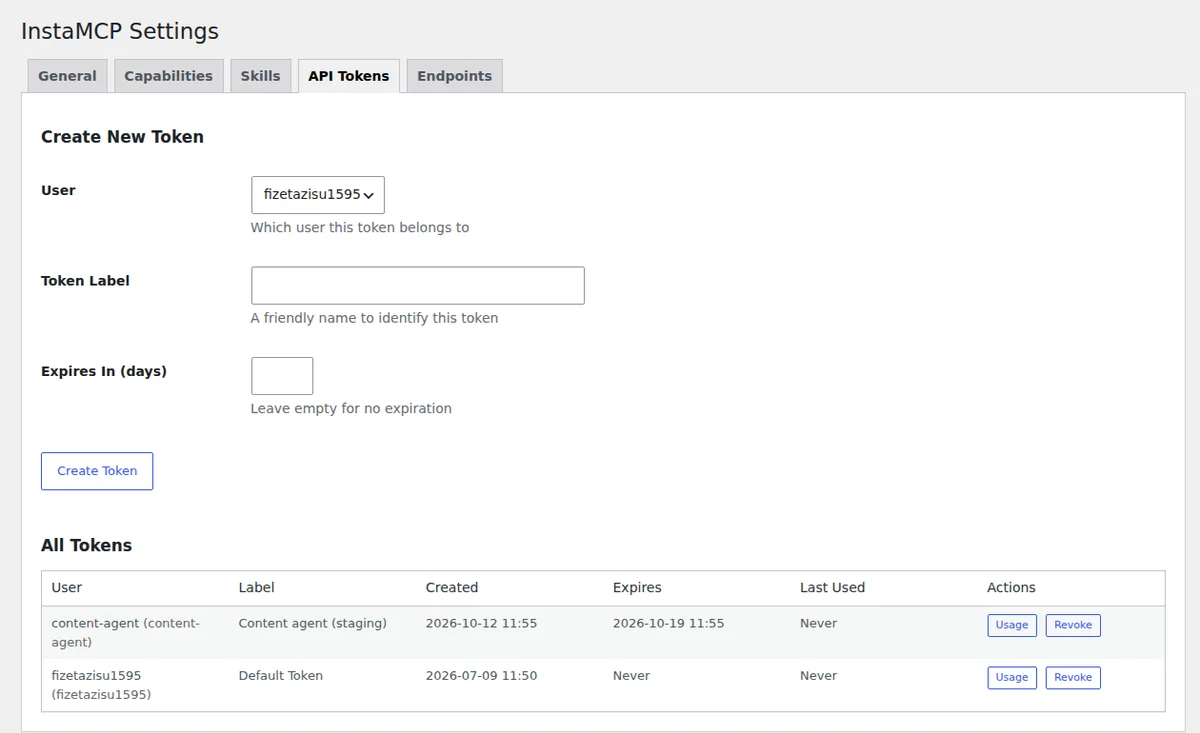
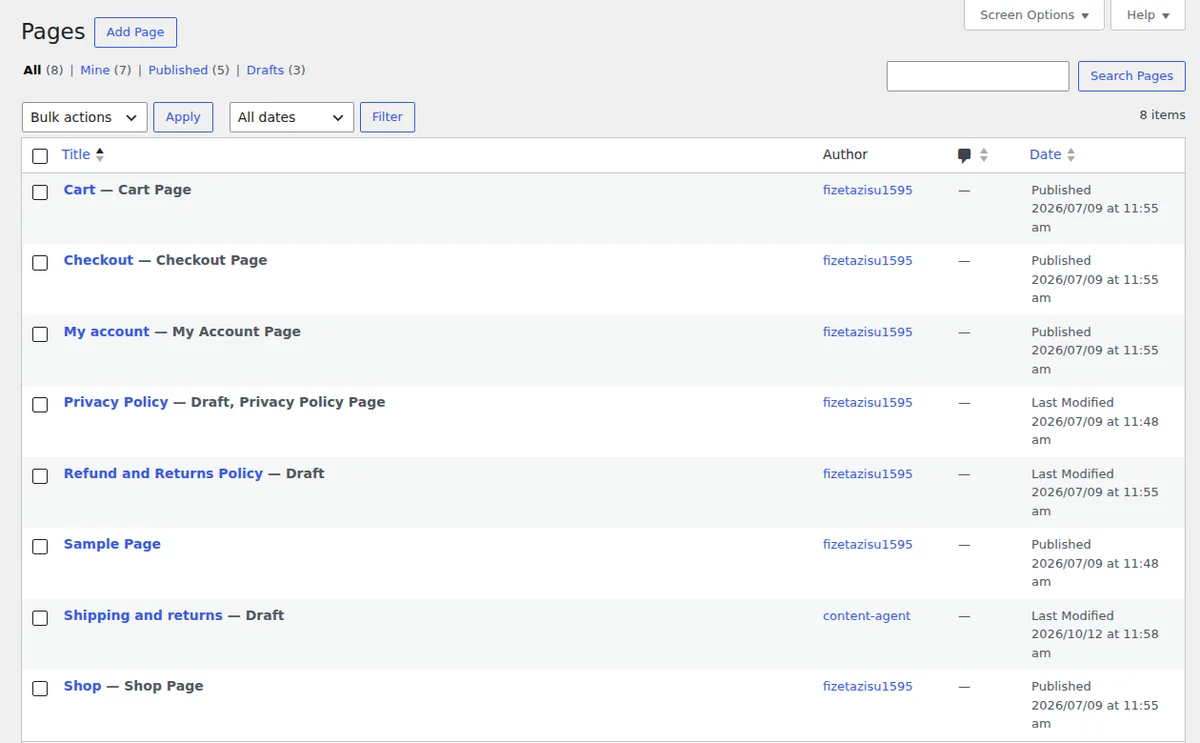
With that token, in a run of 9 MCP calls that took 47.5 seconds and cost $0.20, Claude Code 2.1.282 created a draft page attributed to the content-agent user. Every one of the five plugin updates it attempted was refused with “requires the ‘mcp:admin’ scope. You have: mcp:delete, mcp:write, mcp:read”. Its suggested fix was to grant mcp:admin, which is exactly the request a person should say no to.
Verify the site, not the summary
With an admin token on the same staging copy, Claude Code was asked to update the five plugins that showed an update. It finished in 13 MCP calls, 55.9 seconds and $0.27, and returned a five-row table with five green ticks. Only one plugin version had changed. The other four had stale update flags, and InstaMCP had replied “already up to date” each time; the summary turned that into success. An independent check of the plugin versions, the HTTP status of the home, shop and cart pages, and the debug log caught it.
Keep Safe Mode on and the power tools off
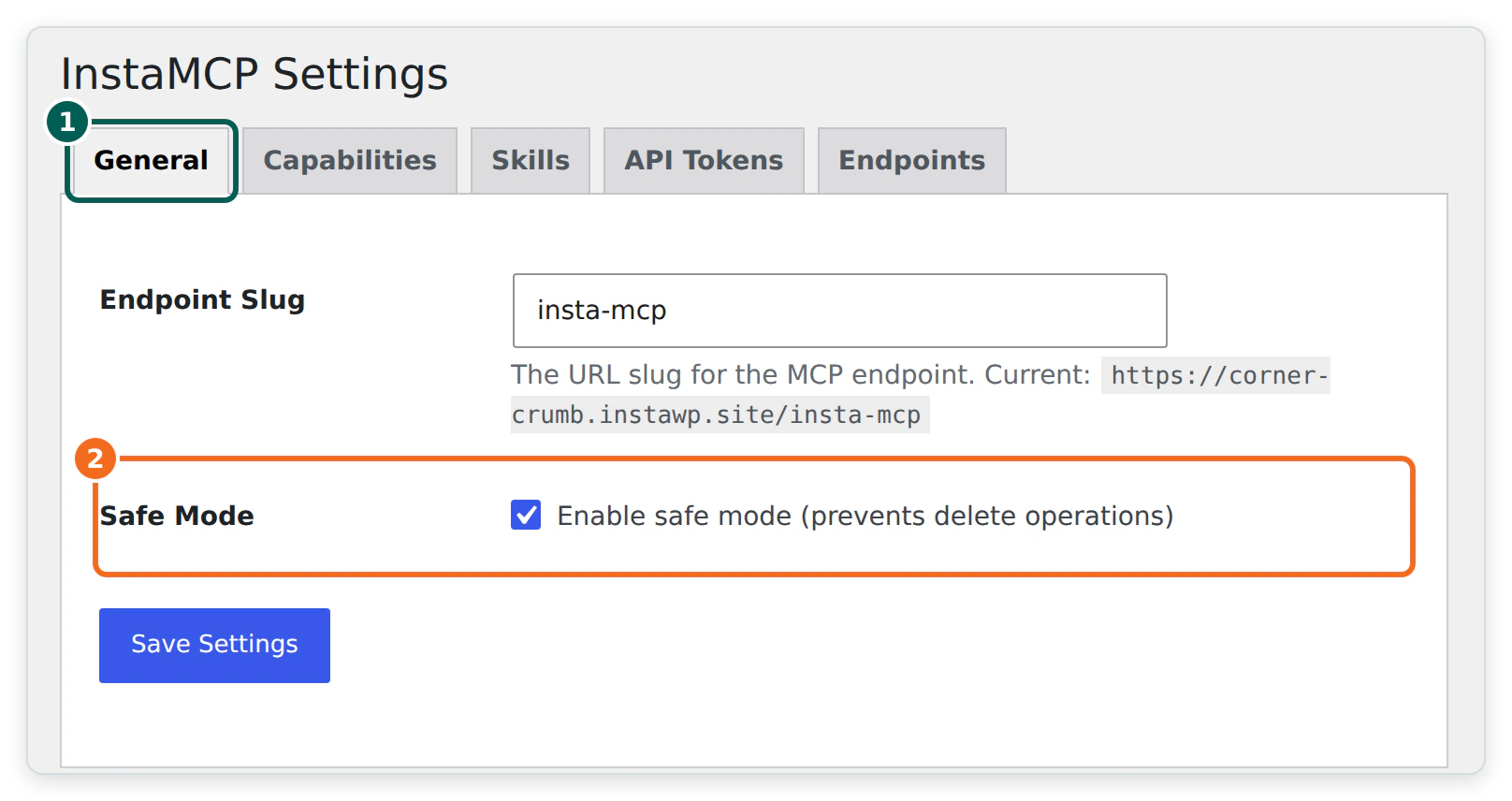
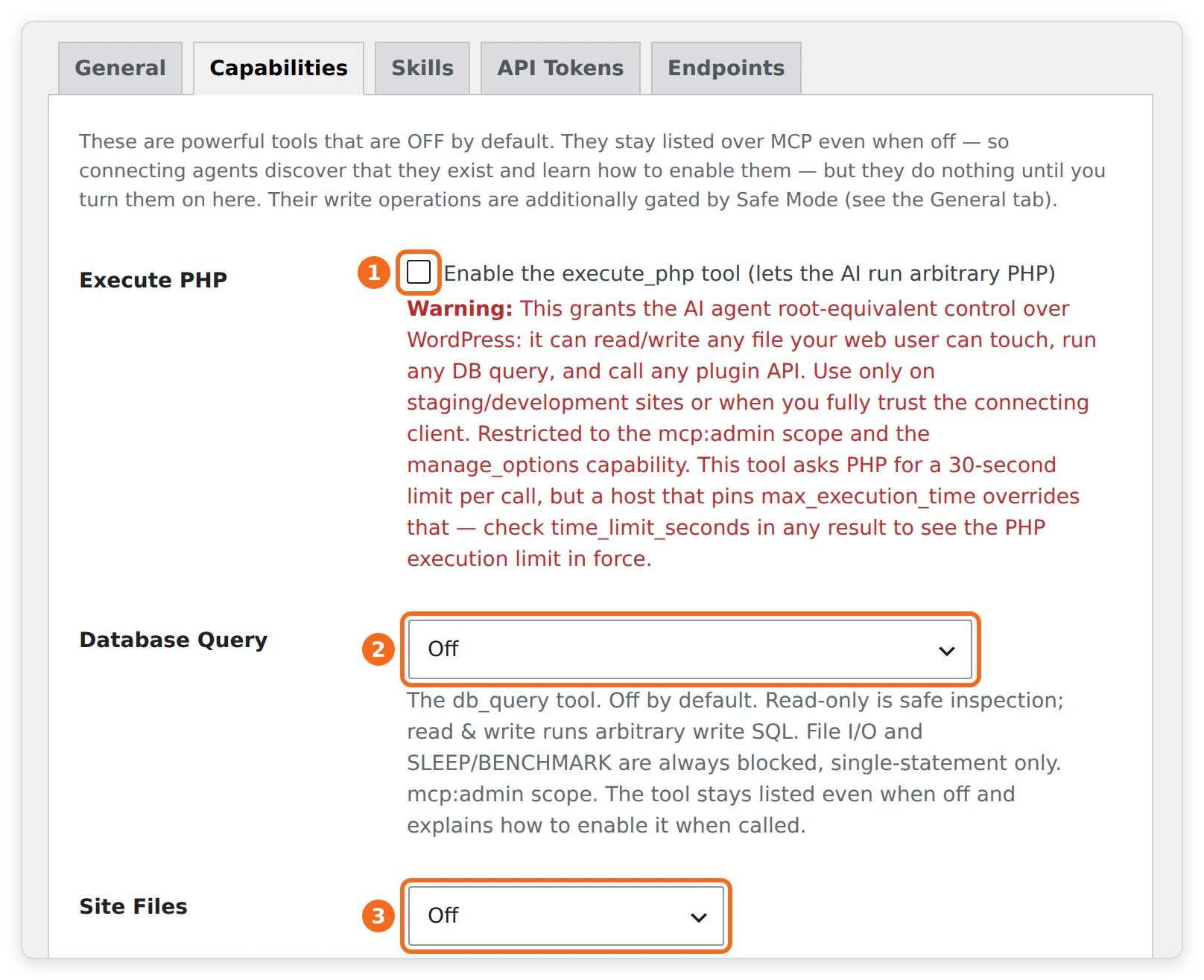
Safe Mode, on InstaMCP’s General tab, blocks every delete and the write side of the power tools; in InstaWP’s tests it also blocked plugin file writes. The Capabilities tab keeps execute_php, db_query and site_files off until an admin turns them on. Claude Code still sees all 43 tools, so it can tell you a tool exists and how to enable it, but the call is refused.
| Risk | Claude Code control | InstaWP control |
|---|---|---|
| The agent changes something you did not ask for | Leave approvals on; allow only named commands in .claude/settings.json. | Editor or Author token; Safe Mode blocks deletes. |
| A broken code change | Review the diff before approving; require php -l and tests in CLAUDE.md. | PHP syntax check and a backup on every MCP file write; site backups and versions. |
| A leaked token | ${INSTAMCP_TOKEN} in .mcp.json, never the literal token. | Revoke it under API Tokens. Switching MCP off and on keeps the same token. |
| Raw PHP or SQL | Deny the tools in the session if you do not need them. | Power tools off by default and admin-only. |
| Unreviewed changes reaching customers | Point the agent at the staging server name only. | Staging site with its own MCP endpoint; a person clicks Push. |
The right-hand column is the backstop. Any Claude Code setting can be relaxed from inside a session by a user in a hurry; the WordPress-side controls hold whatever the agent decides, because only a site admin can change them. InstaWP goes deeper on the risks in is WordPress MCP safe and how to use MCP for WordPress in production, and shows a security hardening run in harden WordPress using AI.
Should you use Claude Code, the Claude app, Codex or Cursor for WordPress?
Use Claude Code or Codex when the work is code plus terminal commands, Cursor when you want to read every file and diff in an editor, and the Claude app when the work is content and settings with no code at all. All four connect to the same InstaMCP URL, so the WordPress side does not change when you switch.
| Claude Code | Claude app (desktop, claude.ai) | Codex CLI | Cursor | |
|---|---|---|---|---|
| Where it runs | Terminal (also IDE and desktop) | Chat window | Terminal | Code editor |
| How it adds a WordPress site | claude mcp add --transport http | Custom connector with the MCP URL | codex mcp add | mcp.json or Add to Cursor |
| Shell, Git, WP-CLI | Yes | No | Yes | Yes |
| Project rules file | CLAUDE.md | Project instructions | AGENTS.md | Rules files |
| Best WordPress fit | Plugins, themes, deploys, WooCommerce rehearsals | Content and settings, no code | Plugins, themes, scripted jobs | Reading and reviewing code changes |
| InstaWP guide | This page | Connect Claude with WordPress | Connect Codex to WordPress | Connect Cursor to WordPress |
The “Shell, Git, WP-CLI” row is the dividing line. The Claude app can do a lot through MCP alone, but it cannot run your tests or deploy code. For a broader look at the tools, InstaWP’s roundup of AI coding tools for WordPress developers compares more of them, and the Model Context Protocol site has the specification all four use.
Switch on MCP on the WordPress site and run claude mcp add --transport http with its URL and a bearer token, kept in an environment variable. Give Claude Code the code through Git or SSH so it can test what it writes, and put the site’s rules in CLAUDE.md. Work on a staging copy with an Editor token and Safe Mode on. For WooCommerce, ship code by deploy and replay data changes on live, because a push replaces the live database. Then check the site yourself: in InstaWP’s test, five green ticks meant one real update.
Claude Code and WordPress: FAQs
How do I connect Claude Code to WordPress?
Switch on an MCP server on the WordPress site, then run claude mcp add –transport http with a name, the server URL and an Authorization: Bearer header. On an InstaWP site, the MCP tab has an Add to Claude Code button and a copyable command. Check it with claude mcp list, which should show Connected.
Does Claude Code work with WordPress MCP?
Yes. Claude Code speaks MCP over HTTP natively, so it connects to a WordPress MCP server without a bridge. On an InstaWP site it gets InstaMCP’s 43 tools for content, blocks, meta, plugins, themes, media and logs. InstaWP tested this with Claude Code 2.1.282 in October 2026.
Can I create a WordPress plugin with Claude Code?
Yes. In InstaWP’s test on 26 October 2026, Claude Code wrote a working “Last updated” plugin from one prompt in 22.8 seconds for $0.18, and it passed a live test on WordPress 7.1. Review the result: its readme listed an old WordPress version and it had not run the coding standards check.
How do I deploy WooCommerce with Claude Code?
Make and test the change on a staging copy of the store, back up production, then deploy code changes with Git or a file sync and replay product, content and settings changes on the live store. Avoid pushing a staging database over a store that is taking orders, because a push replaces the live database and orders placed since the copy would be lost.
Can I connect WooCommerce to Claude Code?
Yes. A WooCommerce store is a WordPress site, so the same MCP connection works. Ask Claude Code to write prices through WooCommerce rather than raw post meta, and to check changes with a real add-to-cart, because a generic meta write can leave the storefront charging the old price.
Do I need the Claude app or Claude Code for WordPress?
Use Claude Code if the work involves code, a terminal, WP-CLI or deployments. Use the Claude desktop app or claude.ai if the work is only content and settings. Both connect to the same WordPress MCP URL.
Is it safe to give Claude Code access to a live WordPress site?
It is safe enough with limits on both sides: a token for an Editor user with an expiry, InstaMCP Safe Mode on, the PHP and database power tools off, Claude Code approvals on, and a staging copy for anything risky. Then check the site after each task rather than trusting the agent’s summary.
Does Claude Code need SSH access to WordPress?
No. MCP alone lets it edit content, settings, plugins and theme files. SSH, WP-CLI or a Git deployment is worth adding for code work, because it lets Claude Code run linters, tests and WP-CLI against the site.